CSS background image opacity without fading the text
Opacity on a box fades its text with the photo. We rendered 9 ways to fade only the background image and measured how readable the text stays. Part of the image API.
By Sahadat Husain10 min readEngineering

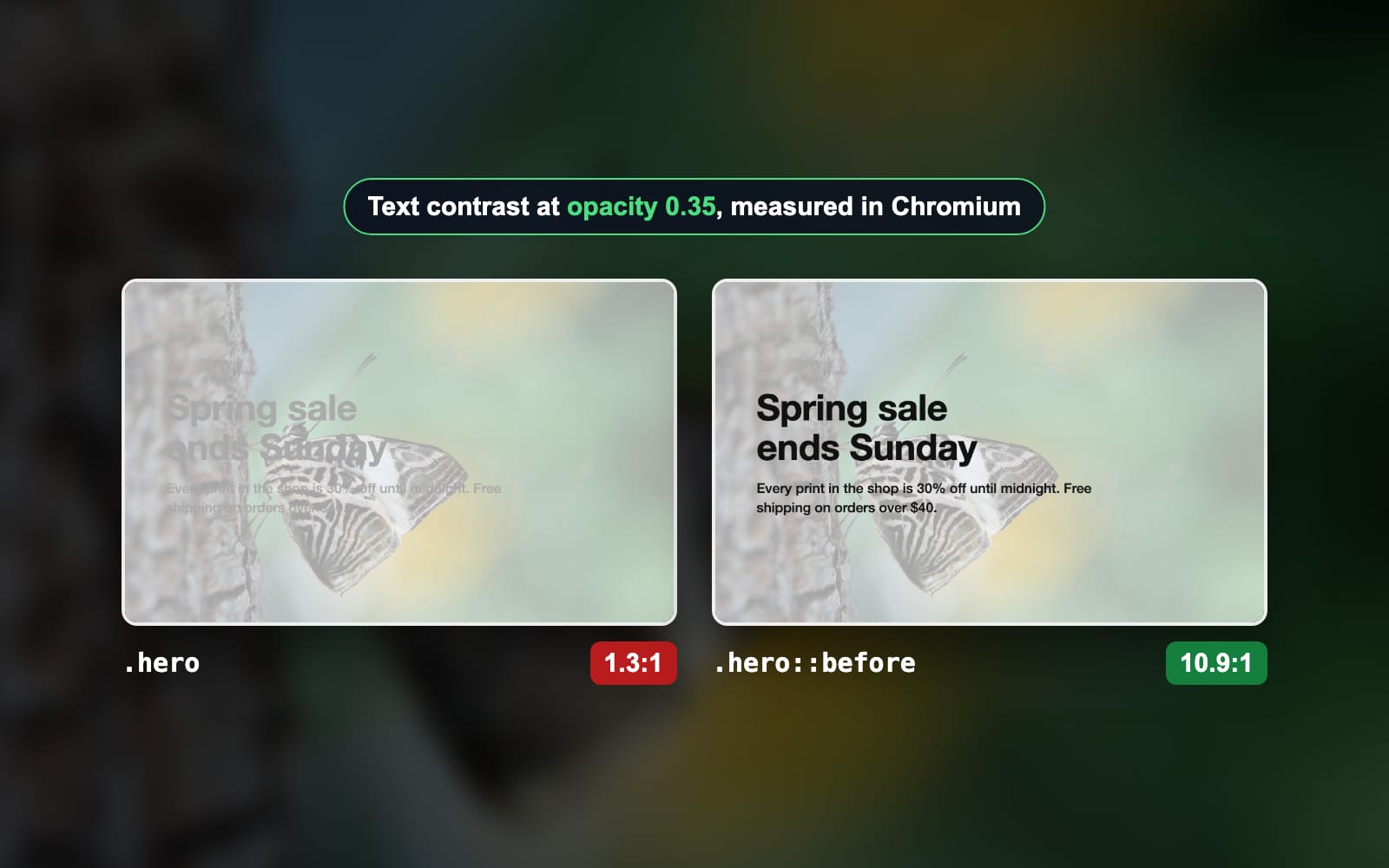
CSS has no background-opacity property. To fade only the background image, put the image on its own layer and fade that layer: a ::before pseudo-element with opacity, or a semi-transparent gradient laid over the image. Setting opacity on the box itself fades the text with it. We rendered both on one photo in Chromium. Opacity on the box left the text at 1.3:1 contrast. The ::before layer kept it at 10.9:1.
Why does opacity fade the text too?
The opacity property fades an element and everything inside it as one picture. MDN’s opacity reference says the value applies to the element as a whole, including its contents. So the heading, the paragraph and any button fade by the same amount as the photo. A child cannot opt out: opacity: 1 on the heading only means 100% of an already faded parent.

WCAG asks for 4.5:1 between body text and what sits behind it, and 3:1 for large text, in WCAG 2.2, Contrast (Minimum). With opacity on the box, not one letter pixel in our test reached 4.5:1. The worst tenth of the letters sat at 1.1:1, which is close to no contrast at all.
How to set background image opacity without affecting text
Move the image off the box and onto a ::before pseudo-element. The pseudo-element is a layer of its own, so its opacity touches nothing else. Three steps, each rendered in Chromium:
Put the photo on ::before
Give the box
position: relative. Give::beforean emptycontent,position: absoluteandinset: 0, so the layer covers the box exactly. Move thebackgroundfrom the box to the layer.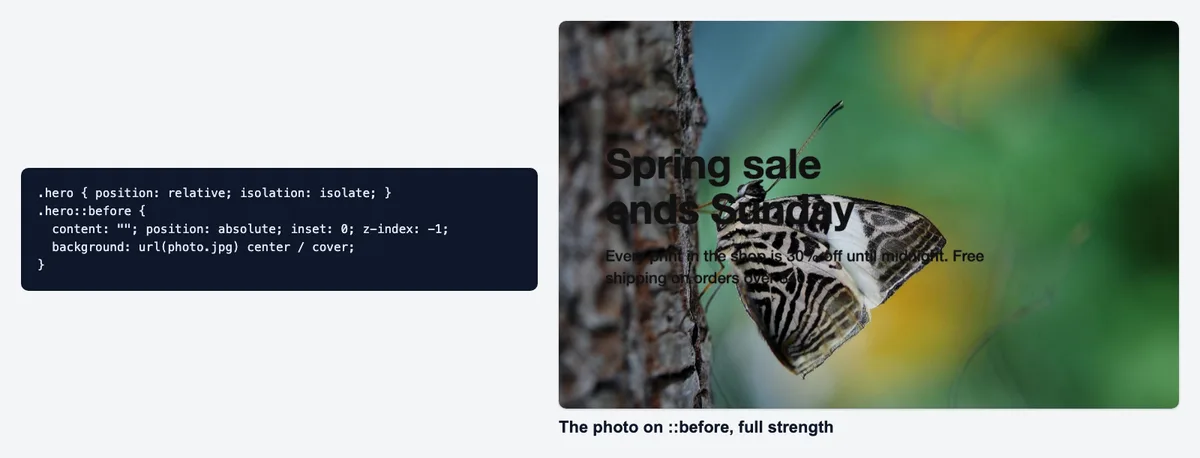
The photo now lives on ::before, still at full strength. Add opacity: 0.35 to ::before
The photo fades. But a positioned layer paints above text that is not positioned, so the faded photo now sits on top of the letters. Our test measured 8.2:1 here, down from 10.9:1.
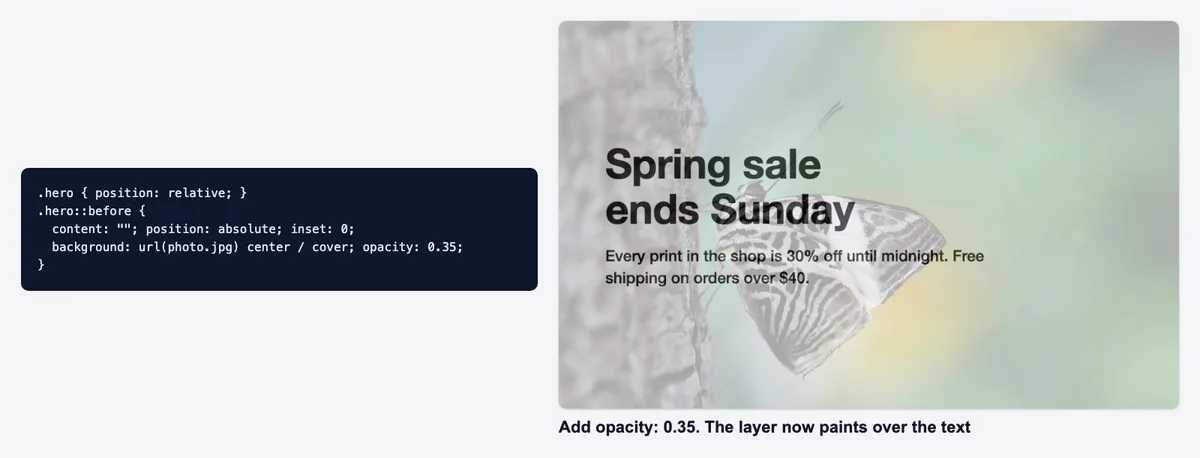
Without a z-index, the faded photo paints over the words. Send the layer behind the text
Add
z-index: -1to::beforeandisolation: isolateto the box. isolation starts a new stacking context, so the layer stays behind the text but inside the box, not behind the page.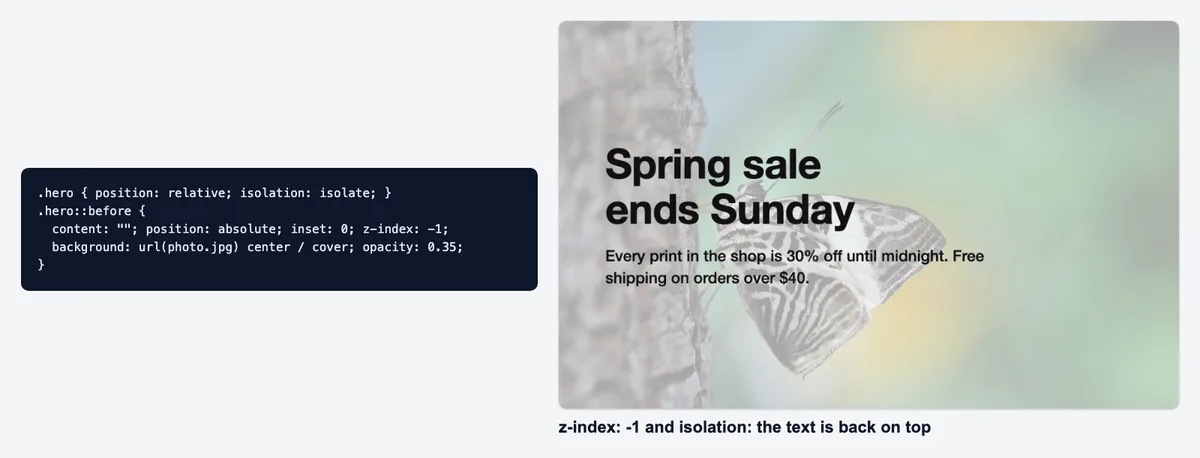
The finished layer: the photo behind, the words on top at 10.9:1.
.hero {
  position: relative;
  isolation: isolate;
}
.hero::before {
  content: "";
  position: absolute;
  inset: 0;
  z-index: -1;
  background: url(photo.jpg) center / cover;
  opacity: 0.35;
}The same fix with a real <img> layer
A CMS often hands you an <img>, not a CSS background. Put it first in the box, pin it to every edge and give it the opacity. The text keeps full strength. Our test page scored 10.9:1, the same as ::before at 10.9:1.
<div class="hero">
  <img class="bg" src="photo.jpg" alt="">
  <h2>Spring sale</h2>
</div>

.hero {
  position: relative;
  isolation: isolate;
}
.hero .bg {
  position: absolute;
  inset: 0;
  z-index: -1;
  width: 100%;
  height: 100%;
  object-fit: cover;
  opacity: 0.35;
}Background overlay CSS: a gradient over the image
The shortest fix is a second background. A linear-gradient() with the same color at both ends is a flat, semi-transparent sheet. List it before the photo and the browser paints it on top. The text stays outside both layers.
.hero {
  background:
    linear-gradient(rgb(255 255 255 / 0.65), rgb(255 255 255 / 0.65)),
    url(photo.jpg) center / cover;
}A white veil at 0.65 over the photo gives the same pixels as the photo at opacity 0.35 on a white page. Our renders agreed: 10.9:1 for the gradient, 10.9:1 for ::before. The gradient needs no extra element and no stacking rules. It cannot fade toward a page color it does not know, though, so match the veil to the page behind.
For white text, darken instead: a black veil at 0.65 with color: #fff. That page scored 16.5:1, the highest of the 9, because our photo is mostly mid-tones and white letters on a darkened photo have more room to stand out.
Does background-blend-mode make a background transparent?
Not exactly, but it can look the same. background-blend-mode mixes an element’s background layers. With a semi-transparent white color under the photo and lighten, every dark pixel is lifted toward the white.
.hero {
  background: url(photo.jpg) center / cover, rgb(255 255 255 / 0.65);
  background-blend-mode: lighten;
}On our photo the blend scored 10.9:1, level with the gradient. Lighten keeps every pixel already brighter than the veil as it is, so a photo with bright highlights keeps them. Pick the gradient when you want an even fade, and the blend when you want the bright parts to stay.
Should you pre-fade the image file instead?
You can bake the fade into the file: lighten the photo in an editor, save it and use it as a plain background. The text then needs no CSS trick at all, and our pre-faded page scored 10.8:1. The file also gets smaller, because a faded photo holds less detail to encode.
| Format | Photo | Pre-faded copy | Smaller by |
|---|---|---|---|
| JPEG | 152.1 KB | 69.7 KB | 54% |
| WEBP | 132.4 KB | 45.0 KB | 66% |
| AVIF | 74.5 KB | 35.8 KB | 52% |
The pre-faded file: the smallest download, 69.7 KB as a JPEG, and it works in any email client or old browser. But the fade is fixed. A hover state, a dark mode or a second page that wants the full photo needs a second file.
The CSS fade: one file for every use, and the strength is one number you can change. The cost is the full photo, 152.1 KB as a JPEG. Either way, compress the file: the WebP converter cut our photo to 132.4 KB, and a plain JPG compressor run keeps the format.
Which method keeps text readable? Contrast measured
Median contrast of the text, higher reads better
- No fade2.7:1
- opacity on the box1.3:1
- ::before, no z-index8.2:1
- ::before with opacity10.9:1
- Separate <img> layer10.9:1
- White gradient overlay10.9:1
- background-blend-mode10.9:1
- Pre-faded image file10.8:1
- Dark overlay, white text16.5:1
- WCAG minimum4.5:1
| Method | Median | Worst tenth | Letter pixels at 4.5:1 |
|---|---|---|---|
| No fade | 2.7:1 | 1.1:1 | 31% |
| opacity on the box | 1.3:1 | 1.1:1 | 0% |
| ::before, no z-index | 8.2:1 | 7.4:1 | 100% |
| ::before with opacity | 10.9:1 | 8.5:1 | 100% |
| Separate <img> layer | 10.9:1 | 8.5:1 | 100% |
| White gradient overlay | 10.9:1 | 8.5:1 | 100% |
| background-blend-mode | 10.9:1 | 8.5:1 | 100% |
| Pre-faded image file | 10.8:1 | 8.4:1 | 100% |
| Dark overlay, white text | 16.5:1 | 11.7:1 | 100% |
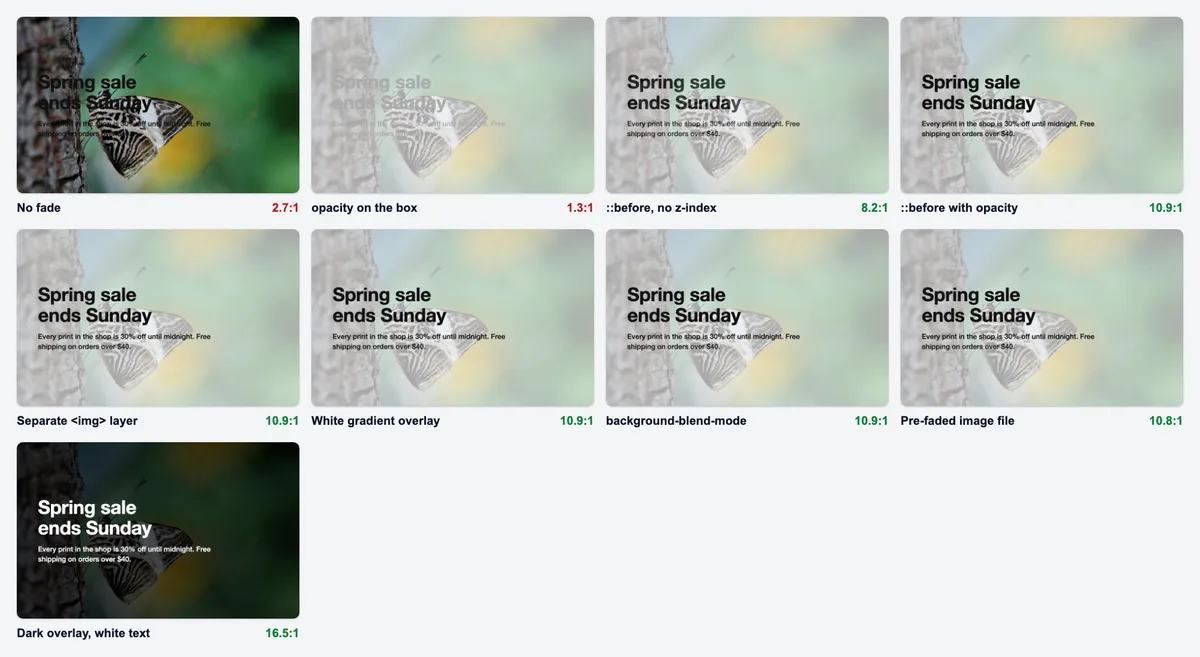
Two results stand out. The unfaded photo scored 2.7:1: only 31% of the letter pixels reached 4.5:1, so a busy photo needs some fade or veil before text goes on top. And the three CSS fades and the pre-faded file landed within 0.1 of each other. Pick between them for the reasons above, not for contrast.
How we tested
- The photo: blinkimg-compressed-image-11.jpg, a striped butterfly on bark, 1920 × 1213, from Blinkimg’s own photo library. Each page served the engine’s Auto JPEG of it.
- The pages: one 960 × 600 box, a 64 px heading and a 24 px paragraph in #111, white for the dark overlay. Every method at 35% photo strength.
- The renders: Playwright’s Chromium 149.0.7827.55 at 1x, on 2026-10-29. Each page twice: with the text, and with the text transparent.
- The score: the WCAG 2.2 contrast ratio at every fully inked letter pixel, text render against background render. The median, the worst tenth and the share at 4.5:1 or more.
- The bytes: the photo and a pre-faded copy (made with sharp, the same sum CSS opacity paints on white) through Blinkimg’s engine, version 10, at Auto.
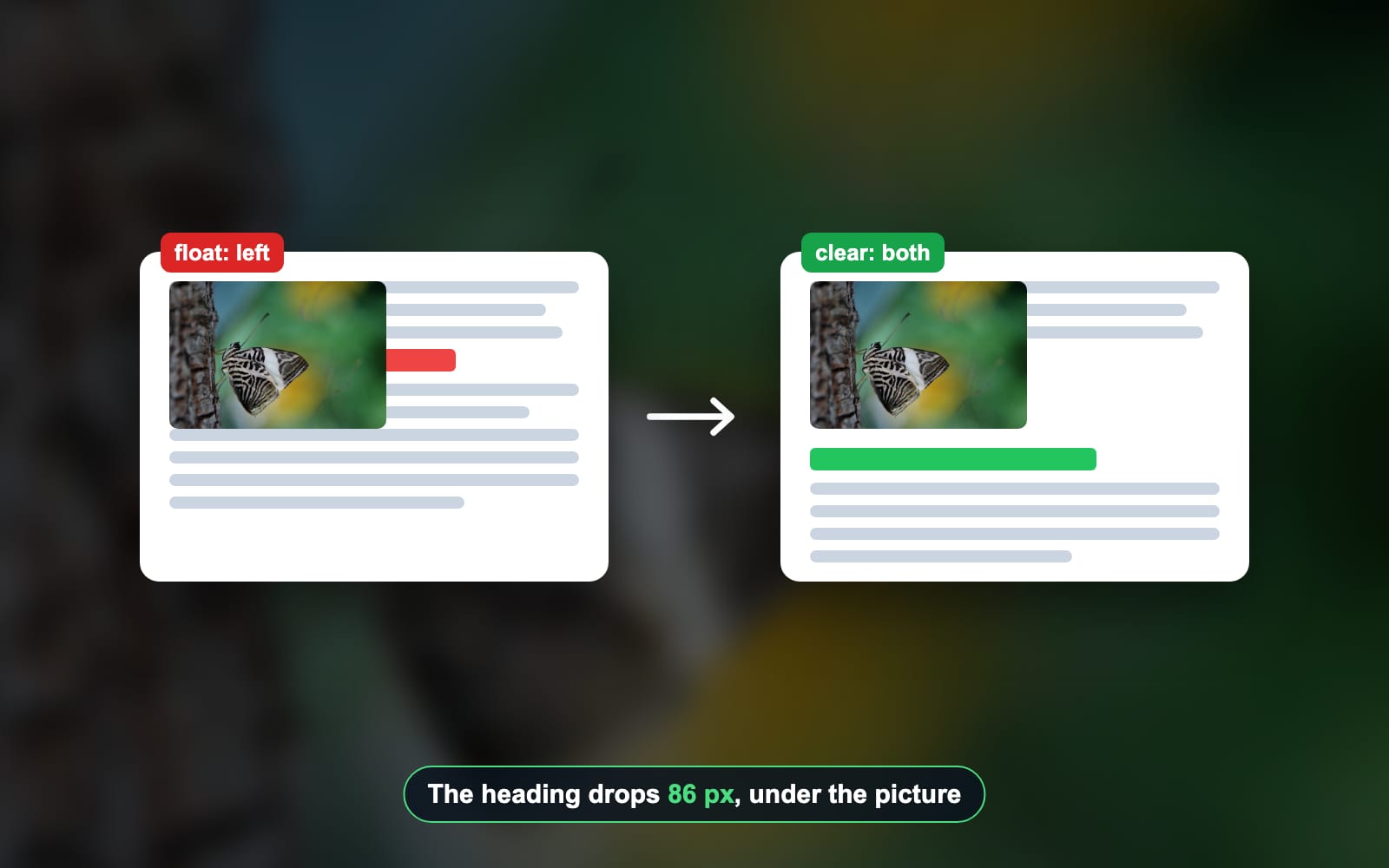
Next, make the photo itself light. The image optimization guide covers the sizes, formats and lazy loading a background photo needs. Text beside a photo, not on it? See how to stop text wrapping around an image.
Read the full guide: Image optimization for the web: formats, sizes and lazy loading.
Questions
- How do I change the opacity of a background image in CSS?
- Put the image on a ::before pseudo-element and set opacity on that layer. Give the box position relative and isolation isolate, and the layer z-index -1. In our Chromium test this kept the text at 10.9:1 contrast, while opacity on the box itself dropped it to 1.3:1.
- Is there a background-opacity property in CSS?
- No. CSS has no property that fades only a background image. The opacity property fades the whole element, text included. To fade the image alone, move it to a ::before layer, lay a semi-transparent gradient over it, or use a pre-faded image file instead of the original photo.
- Why does opacity affect child elements?
- Opacity fades an element and its contents as one finished picture. The browser paints the element and its children together, then fades the result. A child with opacity 1 still sits inside the faded group, so it cannot be brighter than its parent. Only a separate layer escapes the fade.
- How do I add an overlay to a background image in CSS?
- List a linear-gradient before the image in the background property, with the same semi-transparent color at both ends. The browser paints the gradient on top of the photo. Use white for dark text and black for white text. In our test a black veil at 0.65 gave white text 16.5:1 contrast.
- What is the difference between opacity and rgba?
- Opacity fades a whole element and everything inside it. An rgba or rgb color with an alpha value makes only that one color transparent. So a background color with alpha leaves the text solid, while opacity on the same box fades the text too. Gradients built from rgba colors work as overlays.
- Why is my ::before background covering the text?
- An absolutely positioned ::before paints above content that is not positioned. Without a z-index, the faded photo lands on top of the letters. Add z-index -1 to the pseudo-element and isolation isolate to the parent. In our test the missing z-index cut contrast from 10.9:1 to 8.2:1.
- What contrast ratio does text on a background image need?
- WCAG 2.2 asks for at least 4.5:1 between body text and its background, and 3:1 for large text. On a photo the background changes from pixel to pixel, so check the darkest and brightest parts behind the words. Our unfaded test photo passed on only 31% of the letter pixels.
- Does background-blend-mode fade a background image?
- It can look like a fade. Pair the image with a semi-transparent white background color and set background-blend-mode to lighten. Dark pixels lift toward white and bright ones stay. In our test the blend scored 10.9:1 text contrast, the same as a white gradient overlay on the same photo.
- Is a pre-faded image better than CSS opacity?
- A pre-faded file is smaller and needs no CSS trick. Our faded copy compressed to 69.7 KB as a JPEG, against 152.1 KB for the full photo. But the fade is fixed, so a hover state or a dark mode needs another file. CSS keeps one file and an adjustable fade.
- Does a CSS overlay slow down the page?
- The overlay itself adds no download: a gradient is drawn by the browser, not fetched. The photo underneath is the real weight, so compress it and serve WebP or AVIF where you can. We did not measure paint time or GPU memory for each method, so we make no speed claim.