How to hyperlink an image in HTML, tested in Chromium
Making an image a link takes 3 lines of HTML. Here is the code, what a screen reader gets from it, and the fixes we measured. Part of the image compressor.
By Sahadat Husain12 min readEngineering

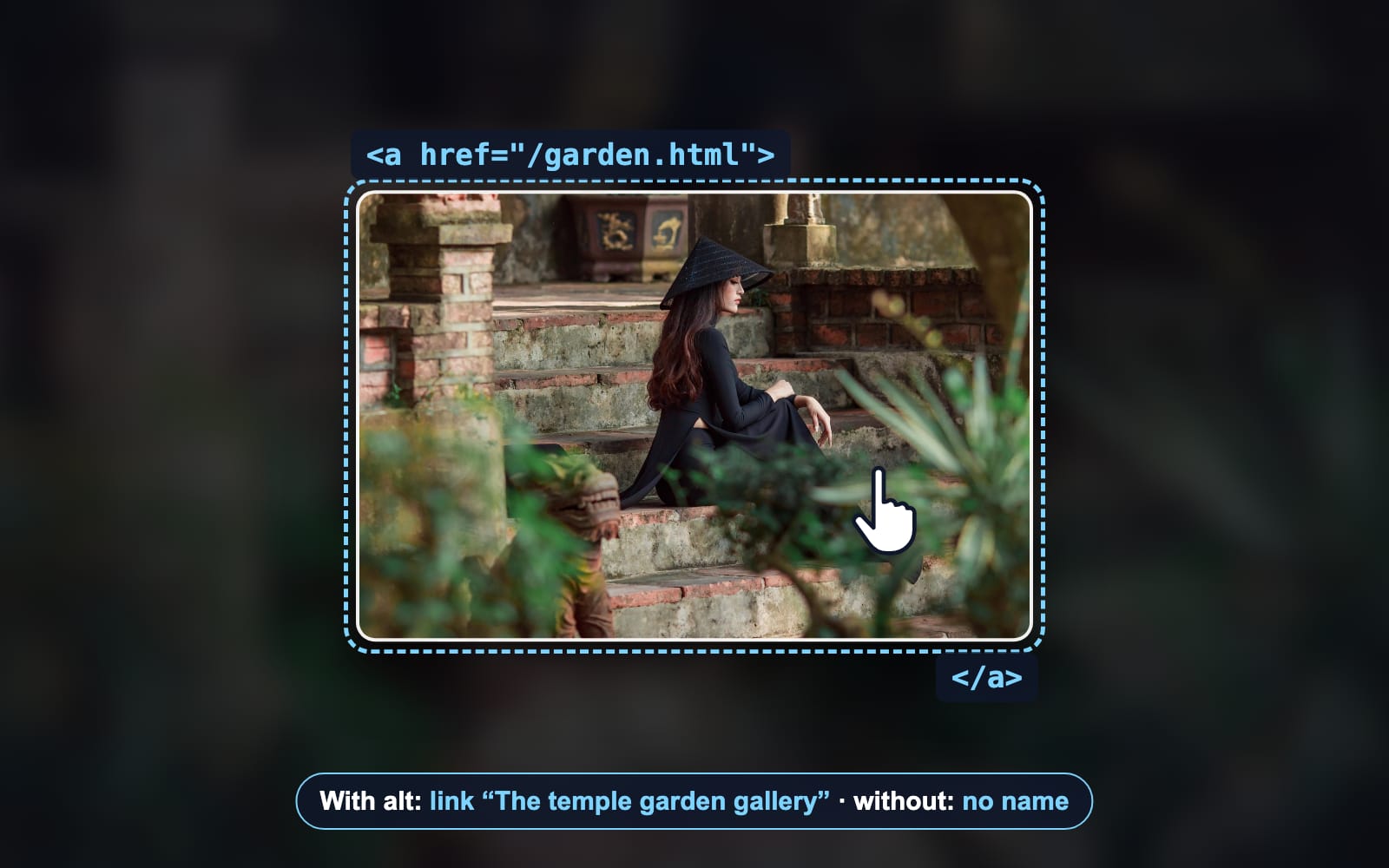
To hyperlink an image in HTML, put the <img> tag inside an <a> tag and set the link’s href. Then give the image an alt that says where the link goes. That alt is the link’s only name. Without it, Chromium gave our image link no name at all.
<a href="https://example.com/garden.html">
  <img src="steps.jpg" alt="The temple garden gallery" width="300" height="200">
</a>Every guide prints those 3 lines. We rendered them, and 9 other patterns, in Chromium and read what the browser hands a screen reader. Some common versions fail in ways a sighted tester never sees.
The image link HTML code, step by step
Add the image
Write the
<img>with itssrc, awidthand aheight. The 2 sizes let the page reserve the space before the file arrives. MDN’s img reference lists every attribute.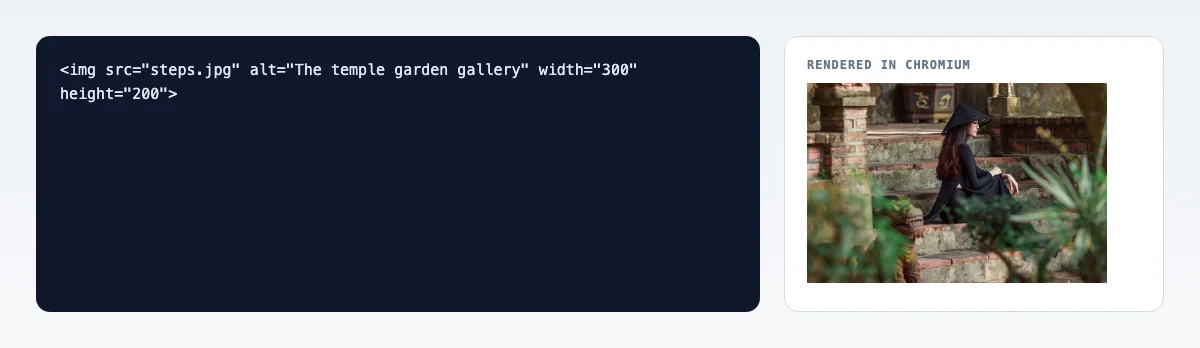
Real render: the image alone, before it is a link. Wrap it in an <a> with an href
Put
<a href="…">before the image and</a>after it. Thehrefis the address the click opens: a full URL, or a path on your own site. The HTML standard lets an<a>hold an image, text or both.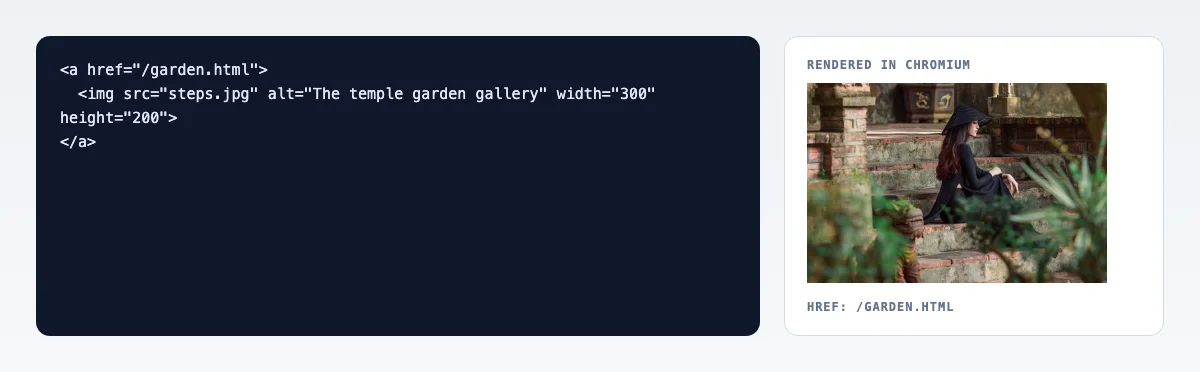
Real render: the same photo, now a link to /garden.html. Write the alt as the link’s destination
The alt now does a new job: it names the link. Describe where the click goes, not what the photo shows. The W3C’s guide to functional images says the same. Chromium named our link “The temple garden gallery”.
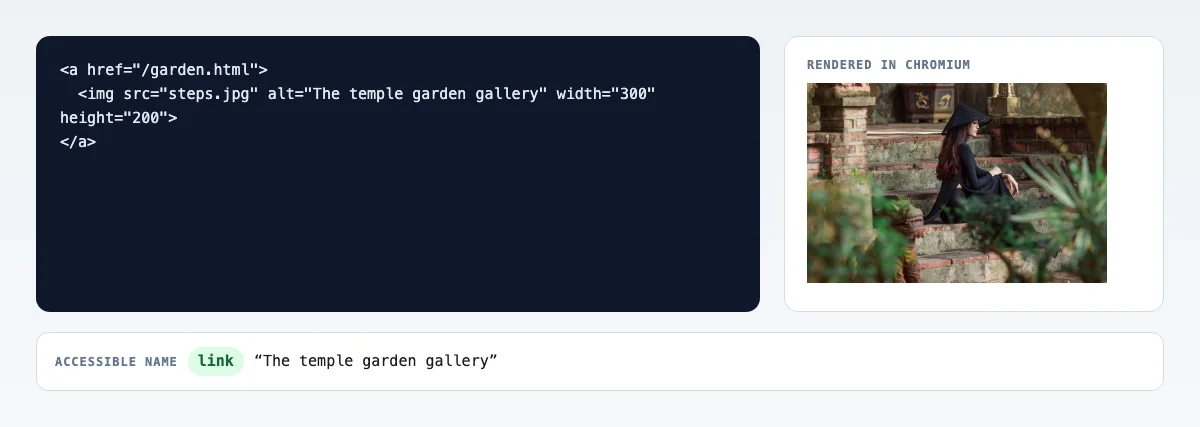
Real render: the name Chromium computed, read from its accessibility tree.
What alt text should an image link have?
An image link needs alt text that names the destination, unless text inside the same link already does. We built 6 versions of the same link and read the name Chromium computed for each.
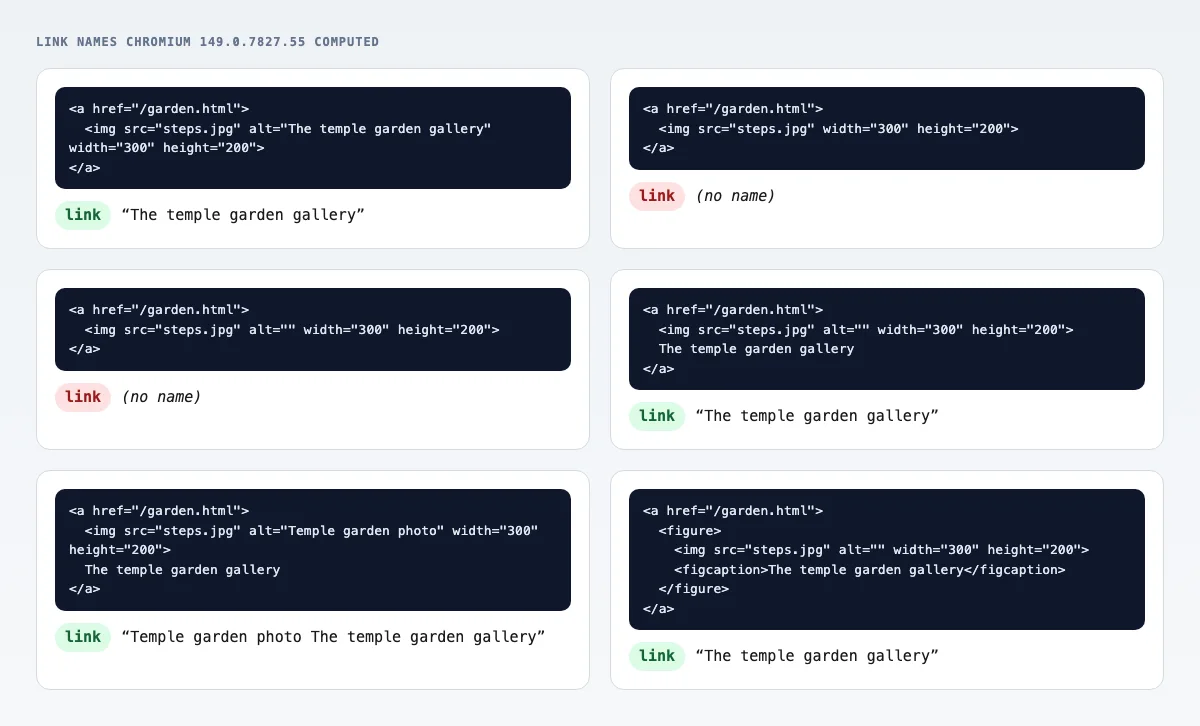
| Inside the <a> | Name Chromium gave the link | Verdict |
|---|---|---|
| <img alt="The temple garden gallery"> | The temple garden gallery | Right |
| <img> with no alt | (none) | Broken |
| <img alt=""> | (none) | Broken |
| <img alt=""> plus the text | The temple garden gallery | Right |
| <img alt="Temple garden photo"> plus the text | Temple garden photo The temple garden gallery | Read twice |
| <figure> with <img alt=""> and <figcaption> | The temple garden gallery | Right |
With no alt, Chromium still listed an image inside the link, but gave neither of them a name. What a screen reader then says varies: some read the file name, some only say “link”. Either way, the user cannot tell where it goes.
This is WCAG’s technique H30: the link text, or the alt of an image that is the only content, describes the link’s purpose.
Why is the clickable area of my image link wrong?
Because an <a> is inline by default. Around our 300 × 200 image, Chromium reported the link's own box as 300 × 18 pixels: one line of text tall, at the image's foot. The image still clicks, but anything that draws the link's box draws it there.
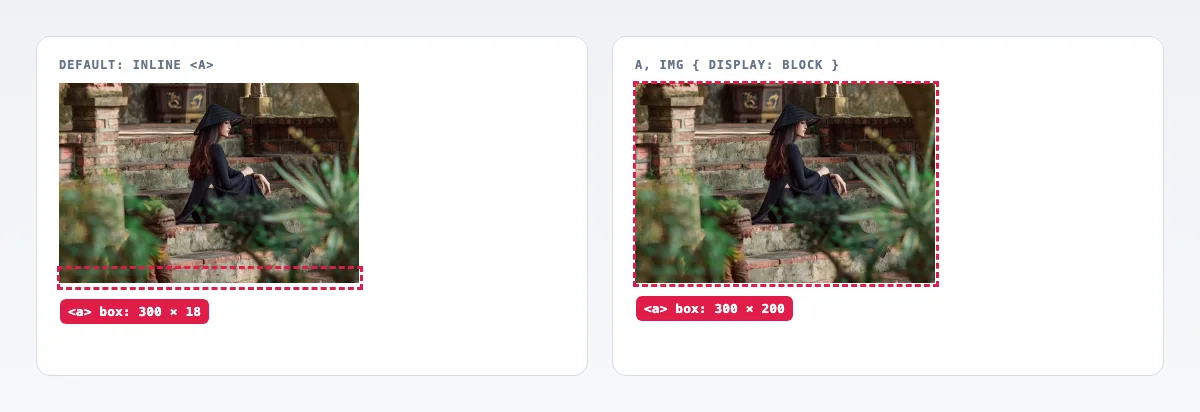
The inline image also sits on the text baseline. That left a 6-pixel strip under the photo, and a click in that strip still followed the link. Set both to block and the box, the image and the click area become one rectangle.
a.image-link { display: block; width: max-content; }
a.image-link img { display: block; }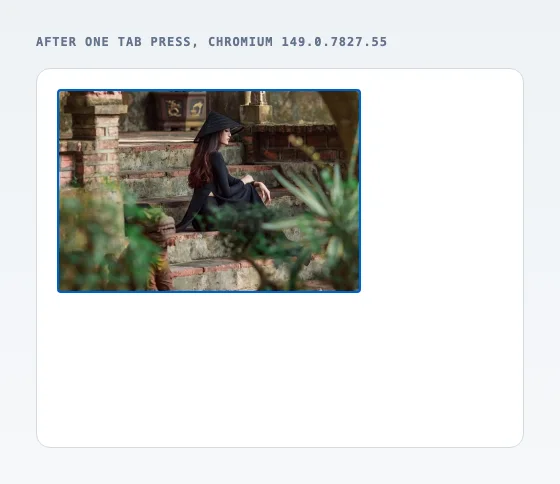
Keyboard users see the link through that ring. Chromium drew it with outline-style "auto" on :focus-visible. If your CSS removes outlines, give the link a visible ring of your own.
How do I open an image link in a new tab?
Add target="_blank" to the <a>. You no longer need rel="noopener" for safety in a current browser: MDN says _blank now implies it. We checked each rel in Chromium.
| rel on the link | New tab can reach your page (window.opener) | Referer sent |
|---|---|---|
| (none) | No | Yes |
| noopener | No | Yes |
| noreferrer | No | No |
| opener | Yes | Yes |
So noopener changed nothing on its own, and still protects older browsers. noreferrer also hides which page sent the click. The HTML standard defines both. Say in the alt that the link opens a new tab, so nobody is surprised.
<a href="https://example.com/garden.html" target="_blank" rel="noopener">
  <img src="steps.jpg" alt="The temple garden gallery (opens in a new tab)" width="300" height="200">
</a>Can a figure or caption be a link?
Yes. An <a> may hold a whole <figure>, because its content model is transparent, as MDN puts it. Give the image an empty alt, and the caption names the link: Chromium read “The temple garden gallery”.
<a href="/garden.html">
  <figure>
    <img src="steps.jpg" alt="" width="300" height="200">
    <figcaption>The temple garden gallery</figcaption>
  </figure>
</a>The other way round, a figure holding a linked image and a plain caption, works too. Then the image’s alt names the link and the caption stays text.
How do I link different parts of one image?
Use an image map: usemap on the image and an <area> for each clickable region. Each area needs its own alt. The W3C’s image map guide asks for one per area, and Chromium turned ours into 2 named links: “The stairs” and “The garden”.
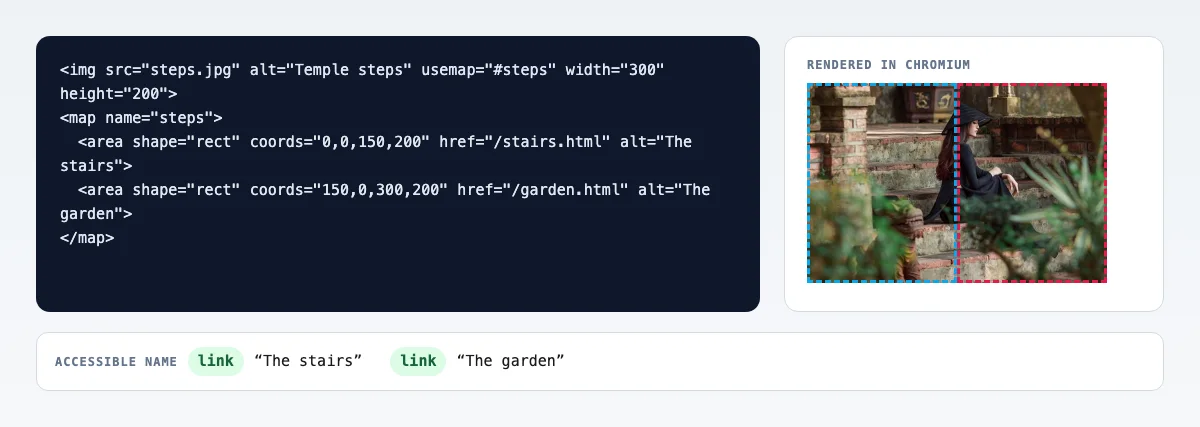
The cost: area coordinates are in image pixels, so they drift when CSS scales the photo. For a responsive page, 2 separate linked images, or links laid over the photo with CSS, scale with it.
How do I link a CSS background image?
Make the <a> itself the box and put the image in its background. A background image has no alt, so the link needs a name another way. Ours, empty, had no name and was still a Tab stop.
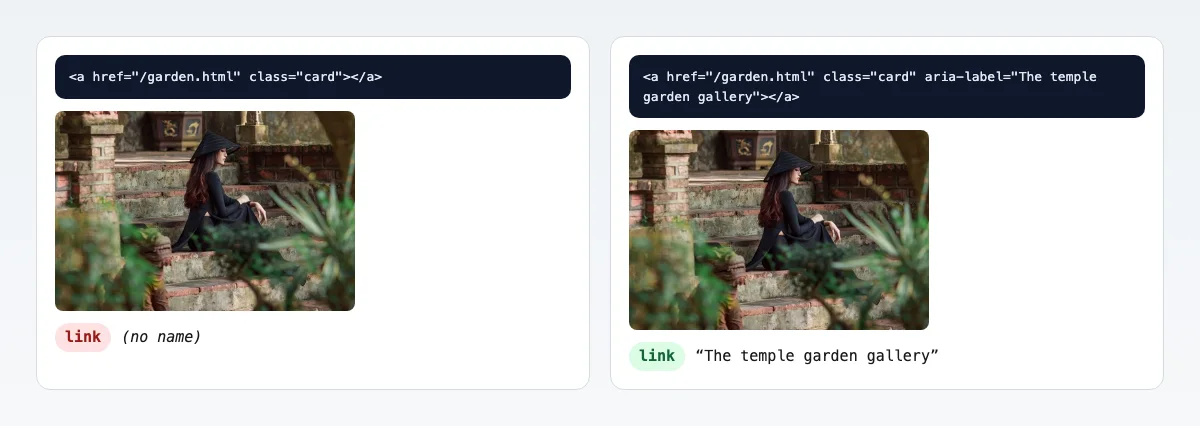
<a href="/garden.html" class="card" aria-label="The temple garden gallery"></a>

.card { display: block; width: 300px; height: 200px;
background: url(steps.jpg) center / cover; }Use a background only for decoration. A photo that carries meaning belongs in an <img>, where it has an alt, loads lazily and can be picked by srcset.
Image links in Markdown, WordPress, Wix, Webflow, React and email
- Markdown: nest the image inside the link,
[](/garden.html). The alt goes in the inner brackets, as the CommonMark spec defines images. - WordPress: select the Image block and click Link in its toolbar. Paste a URL, or pick Link images to image file or Link images to attachment page, as WordPress’s Image block guide names them. The alt field is in the block settings.
- Wix: select the image, click the Link icon, choose where the link goes and click Done, the steps Wix’s help page gives for any element. Wix writes the
<a>for you; set the image’s alt text in its settings. - Webflow: drag a Link Block from the Add panel and drop the image inside it, or wrap an image you already placed. Then pick the destination in the Element settings panel, as Webflow’s Link block guide describes.
- React and Next.js: the same nesting in JSX,
<a href="/garden"><img src="steps.jpg" alt="The temple garden gallery" /></a>. In Next.js, put the<Image>inside the Link component, which renders an<a>. The alt rule does not change: the image’s alt is still the link’s name. - Email: the same
<a><img></a>, with a full https URL for both, the width and height as attributes, and alt text. Many mail apps block images until the reader allows them, so the alt is what they see first. We did not test mail clients.
Common image link mistakes, and the fix for each
- No alt, or an empty alt, on a linked image. The link has no name, so a screen reader announces nothing useful. Write alt text that names where the link goes.
- An alt that repeats the text beside it. The name is read twice. Give the image
alt=""when the same link already holds text. - A link that stays inline. Its box is a thin line under the picture and a gap below it still clicks. Set
display: blockon the link and the image. - A new tab without rel. The page you link to still learns where the visitor came from. Add
rel="noreferrer"when that matters. - An empty link over a CSS background. It is a Tab stop with no name. Put text in the link, or an
aria-labelon it. - An image map on a responsive page. The area coordinates are image pixels and drift when CSS scales the photo. Use separate linked images instead.
Make the linked image light
A linked thumbnail is often a full photo shown small. Our 1920 × 1280 example weighed 514.3 KB. Shown at 300 CSS pixels, it needs 600 pixels for a sharp phone screen. At that width, Blinkimg's engine made it 34.1 KB as JPEG and 17.9 KB as AVIF.
The image inside the link
- Original JPG514.3 KB
- Compressed, full size217.3 KB
- 600 px JPG34.1 KB
- 600 px AVIF17.9 KB
Sizes, formats and lazy loading for every image on a page are in our guide to image optimization. For a site that makes these files on upload, the image API does the same work from code.
How we tested
- The pages: 10 test pages, each one pattern as printed in this post, served from a local server and rendered in Chromium 149.0.7827.55 through Playwright 1.61.1 on 2026-10-28.
- The names: Playwright’s ARIA snapshot of each page, which reads the name Chromium computes for each link and image.
- The box: getBoundingClientRect on the link and the image, and elementFromPoint 2 pixels under the image.
- New tabs: a click on 4 target="_blank" links, then window.opener in the new tab and the Referer header our server received.
- The photo: a 1920 × 1280 JPG from Blinkimg’s photo library, through Blinkimg’s engine version 10 at Auto quality.
- WordPress and Markdown: from WordPress’s guide and the CommonMark spec, not run by us.
Next step
Write the alt as the destination, set the link to block, and shrink the image inside it. Drop the photo on the image compressor before you link it. Need the address of a picture already online? Here is how to copy an image URL.
Read the full guide: Image optimization for the web: formats, sizes and lazy loading.
Questions
- How do I make an image a link in HTML?
- Put the img tag inside an a tag: <a href="page.html"><img src="photo.jpg" alt="Where the link goes"></a>. The href sets the address the click opens. The alt names the link for screen readers, so describe the destination rather than the picture. Add width and height so the page reserves space.
- What alt text should a linked image have?
- The alt of a linked image should name where the link goes, such as "Temple garden gallery", not describe the photo. When text inside the same link already names the destination, use alt="" so the name is not read twice. In our Chromium test, a repeated alt was read twice.
- What happens if a linked image has no alt?
- The link has no accessible name. In our Chromium test, a link holding an image with no alt, or with alt="", was named nothing at all. A screen reader may then read the file name or just say "link", and the user cannot tell where the link goes.
- How do I make an image link open in a new tab?
- Add target="_blank" to the a tag. Current browsers treat it as rel="noopener", so the new tab cannot reach your page; our Chromium test confirmed it. Add rel="noreferrer" if you also want to hide the sending page. Mention the new tab in the alt text.
- Why is there a gap under my linked image?
- An image is inline by default and sits on the text baseline, which leaves room for letter descenders. In our Chromium test the gap was 6 pixels, and it was still part of the link. Set the image to display: block, and the link too, and the gap is gone.
- How do I remove the border around a linked image?
- Chromium drew no border around a linked image in any of our 10 test pages. If you see one, a stylesheet or theme on your site adds it, and img { border: 0 } in your CSS removes it. Some email templates still put border="0" on the image for older mail apps.
- Can I link different parts of one image?
- Yes, with an image map: usemap on the img and one area element per region, each with its own href and alt. Chromium turned our 2 areas into 2 named links. Area coordinates do not scale with CSS, so separate images suit a responsive layout better.
- How do I hyperlink an image in Markdown?
- Nest the image syntax inside the link syntax: [](https://example.com). The inner part is the image, with its alt text in the square brackets. The outer brackets and parentheses make it a link. Most Markdown renderers, including CommonMark ones, turn it into an a tag around an img.