
Image converter
without the guesswork
An image converter changes a picture’s file format and keeps the picture. Pick a conversion and it opens ready for it: 16 paths across JPG, PNG, WebP, AVIF and HEIC, each with its size result measured, not promised.
Drop images or browse
JPEG · PNG · WEBP · AVIF · HEIC · up to 50 at once · max 30 MB each
Advanced settings
Auto tunes each image.
A hard cap for the number your form demands.
A floor for forms that refuse small files.
Empty side keeps the ratio. Never enlarges.

Decided by subject, with receipts
Which format should you convert to?
Most converter sites list formats and leave you to guess. These rules cover the common cases, and the chart is those rules run through the engine that will process your files.
Auto quality throughout
One image converter, every format, measured on real files
| Subject | Source | JPG | PNG | WebP | AVIF |
|---|---|---|---|---|---|
| Our reference photo | 576.8 KB JPEG | JPG273.9 KB | PNGgrows | WebP218.9 KB | AVIF123.9 KB |
| Screenshot of our pricing page | 1121.1 KB PNG | JPG193.2 KB | PNG213.1 KB | WebP109.6 KB | AVIF72.3 KB |
| Flat-colour art | 7.4 KB PNG | JPG2.9 KB | PNG1.6 KB | WebP1.3 KB | AVIF0.8 KB |
Every row is the file our engine wrote from that source at Auto quality.
- Pattern 1
AVIF is smallest in every row
Our reference photo, a screenshot of our pricing page and flat art: it wins each time. - Pattern 2
On flat art, JPG is the largest file
2.9 KB against 1.6 KB as PNG. Pick the format by the picture, not by habit.
Every byte count is the size of the actual file our engine produced from the named source, the same bytes you would download, not an estimate. The reference photo is one of our own photographs, an iguana on a branch, and the camera photo is a real one too. Drop your own file into the tool above to rerun any of them. How we measure names the sources and the settings.
Compatibility
The real reason people convert at all
Nearly every conversion on this page exists because some program refuses some format. When something will not open, the fix is one conversion toward the older format.

- JPG / PNG
- The safe destination. Thirty years of software opens them.
- WebP
- Fine in browsers, still stumbles in Office, older Photoshop and many email clients. The top reason people convert out of a format.
- AVIF
- Renders almost everywhere on the web, thinner in editors. Serve it with a fallback.
- HEIC
- The outlier. iPhones shoot it and almost no Windows software opens it. Hence the most-needed conversion family here.

One pass
Convert and hit a size limit in one pass
The signature move the two-tool sites can’t match: set Max file size in Advanced settings and the conversion lands under it in the same pass. The engine binary-searches quality to the best fit, never overshoots, and ships presets at 50/100/200 KB and 1 MB.
“Convert this PNG to JPG under 100 KB for the portal” stops being convert-here-then-compress-there. It works for every output format on this page, and the compress JPG and PNG pages run the same caps when the format already suits.
The four conversion gotchas
Answered before they bite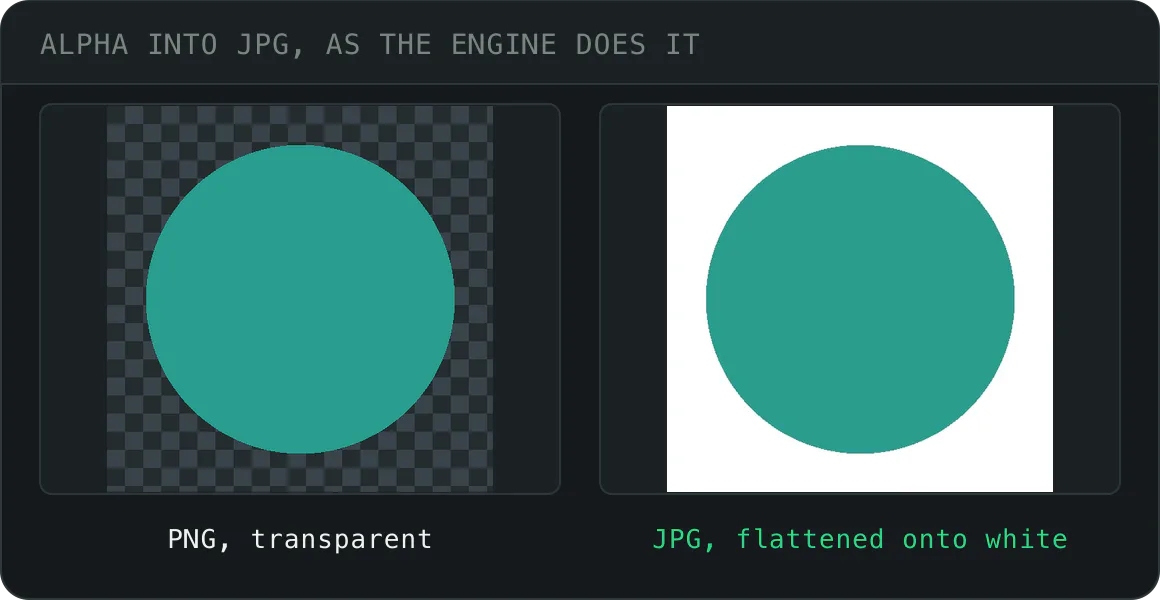
Transparency into JPG
JPEG has no alpha, so transparent pixels flatten onto white, matching every mainstream editor. Keep it by exiting to WebP or AVIF instead.
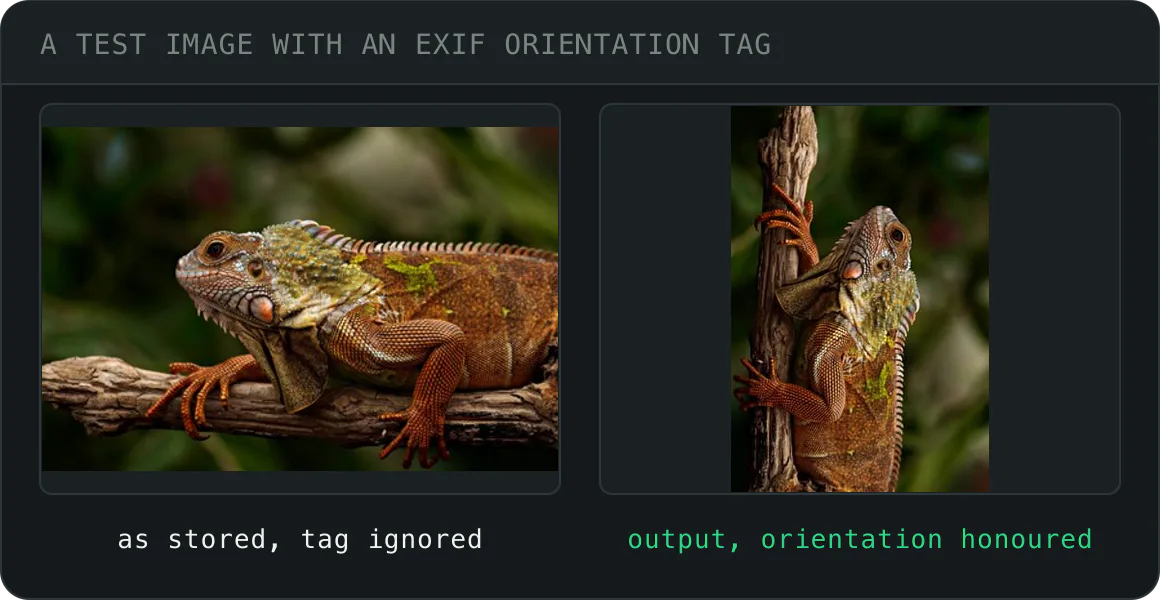
Sideways photos
Phone cameras store rotation as EXIF metadata. We honour it before encoding, so the output faces the way the photo was taken.
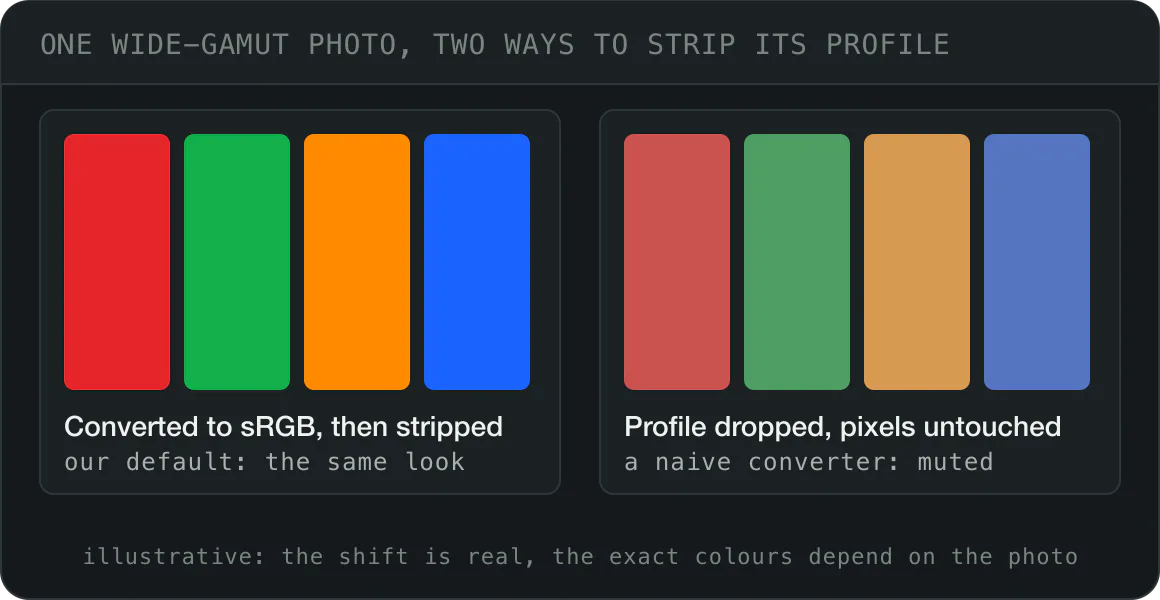
Washed-out colour
Tools that drop a Display-P3 profile without converting the pixels mute the photo. We convert JPG, PNG, WebP and AVIF sources to real sRGB before the strip, so the look survives.
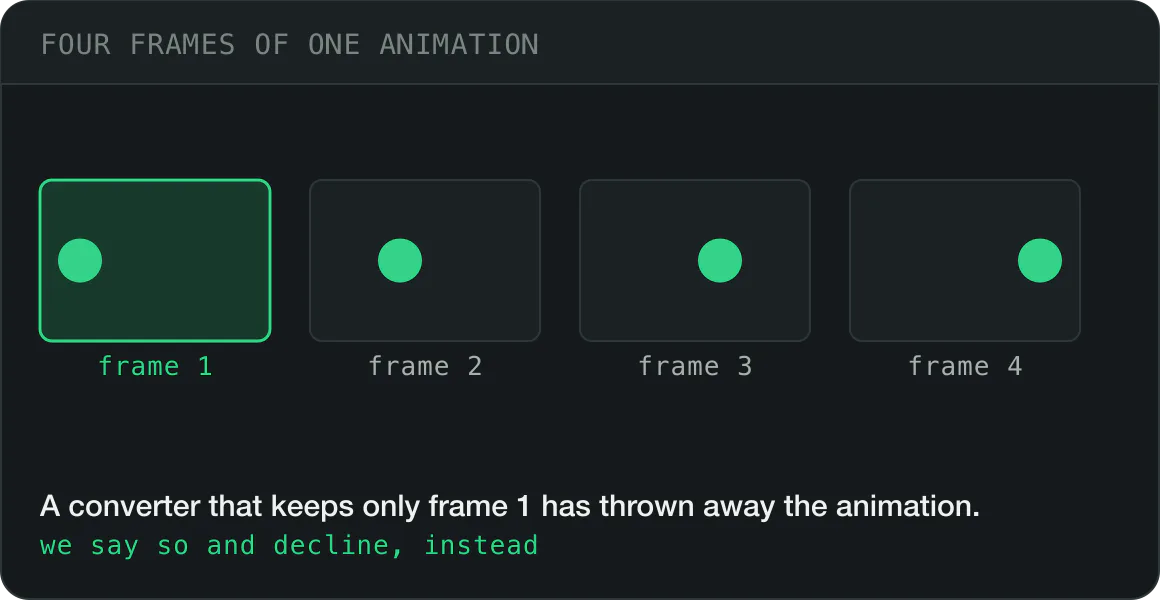
Animated files
We decline with a clear message rather than silently flattening to frame one. An animation that quietly loses its animation is a data-loss bug.


Scope
What we deliberately
don’t convert
- Camera RAW (CR2, NEF, ARW…) deserves a real developer, not a web converter's defaults: Lightroom, darktable, or your camera vendor's tool. Export to JPEG there, then optimise here.
- PSD, AI, SVG are layered and vector sources; rasterising them is a design decision, not a conversion. Export a PNG at the size you need, then convert that.
- Video-adjacent formats (GIF animations): animation is video's job in 2026. We convert stills honestly instead of flattening your animation to one frame.
Five formats, every direction, done properly, instead of a 500-format list where each pair gets a template. The 16 pairs and 5 hubs below are each their own page with their own measured numbers.
 Original · 9.8 MB
 AVIF · 97.1 KB
Six things a conversion changes
Why convert images at all?
Because the file, not the picture, is what a page loads, a phone downloads and a program has to open.
- 01Page weight
72.3 KBfrom 1.1 MB PNG
Pages load faster
Images are usually the heaviest thing on a page. A screenshot of our pricing page went 1.1 MB PNG → 72.3 KB AVIF; our reference photo 577 KB JPG → 124 KB. Fewer bytes, earlier paint.
- 02Ranking
LCPusually an image
Core Web Vitals move
Google measures Largest Contentful Paint, and on most pages the largest element is an image. A smaller hero paints sooner, and that is the number Google ranks with.
- 03Mobile data
10×2 MB vs 200 KB
Phones on mobile data
A visitor on 4G waits for every byte and pays for it. A 2 MB photo and a 200 KB one look the same on a phone screen. Only one of them keeps the reader.
- 04Cost
Onceevery load after is cheaper
Bandwidth and storage bills
Every byte served costs money at the host or the CDN, and every original kept costs space. Converting once cuts both for as long as the image is online.
- 05Compatibility
HEICApple-only, in practice
The picture opens at all
HEIC does not open outside Apple devices. AVIF does not open in old browsers. WebP shows as a broken image in Outlook on Windows. Converting is how a picture reaches the person on the other end.
- 06Alpha
124 KBfrom 4.1 MB PNG
Transparency at a sane size
PNG carries transparency losslessly and pays for it in bytes: 4.1 MB for our reference photo saved as PNG. WebP and AVIF carry an alpha channel too, and made it 219 KB and 124 KB.
Every conversion in one place
16 format pairs plus a converter hub for each format. Every card is its own page, and we measure every result.
JPG
7 pages- JPG converter
Everything in and out of JPG, the format every app, inbox and print shop opens, on one page.
- +90%JPG to PNG
Freeze the current pixels. Lossless from here, and the right move before editing or archiving.
- −32%JPG to WebP
The safe upgrade. Around a third smaller at matching quality, and readable essentially everywhere.
- Pick−58%JPG to AVIF
Roughly half the bytes of WebP on most photos. Slower to encode, worth it at scale.
- Image to JPG
HEIC, PNG, WebP or AVIF in, a .jpg out. Drop up to 10 files, cap the size if a form demands it, and download one ZIP.
- JPEG to JPG
A .jpeg file is already a JPG. Rename it and you are done, or drop it here for a smaller file, a stripped file or 50 at once.
- JFIF to JPG
A .jfif file is a JPEG that Windows named oddly. Rename it and it opens everywhere; drop it here when a portal, a size cap or a batch needs the bytes changed.
PNG
4 pages- PNG converter
Convert to PNG when pixels must not change, or out of it when size matters.
- −47%PNG to JPG
For photographic PNGs that never needed transparency. We flatten any alpha onto a solid background.
- Pick−64%PNG to WebP
Keeps the alpha channel and still cuts real weight. The least disruptive way off PNG.
- −78%PNG to AVIF
Transparency survives and size collapses. Check thin type and 1px strokes in the preview first.
WebP
4 pages- WebP converter
The safe modern default: smaller than JPG, supported almost everywhere.
- +47%WebP to JPG
The universal handoff. Anything that opens an image opens this: print, email, old software.
- +179%WebP to PNG
Keeps transparency for editors and pipelines that won't read WebP. Bigger file; quality 100 adds no further loss.
- Pick−38%WebP to AVIF
One more step down the size curve for pages already on modern formats. Keep WebP as the fallback.
AVIF
4 pages- AVIF converter
The smallest files we can make, and about 95% of browsers open them. Every path in and out of AVIF.
- Pick+138%AVIF to JPG
When something rejects the upload, this is the format it wants. Photos only, no transparency.
- +352%AVIF to PNG
Keeps alpha and gives every editor something to open. Expect a large file. That's the trade.
- +62%AVIF to WebP
Broader support, still modern compression. The middle path when AVIF is one step too far.
HEIC
5 pages- HEIC converter
Turn iPhone HEIC photos into JPG, PNG, WebP or AVIF, so every app and browser can open them.
- Pick+82%HEIC to JPG
The default answer. Email it, print it, upload it anywhere. Orientation carries over.
- +245%HEIC to PNG
For screenshots and graphics saved as HEIC, or anything headed into a design tool untouched.
- +24%HEIC to WebP
Phone photos headed for a website. Similar size to the original, and universally displayable.
- −24%HEIC to AVIF
Both are HEIF-family codecs, so quality holds up while the file lands smaller than the original.
- Image to PDF
Drop up to 50 images, 10 of them HEIC, WebP or AVIF. They come back as one combined PDF, each page compressed first.
- JPG to PDF under 200 KB
One PDF at or under 200 KB, the budget split across the pages, never over. For scholarship and admission uploads of two to four pages.
- JPG to PDF under 300 KB
One PDF at or under 300 KB, the budget split across the pages, never over. For NTA certificates, the UPSC photo ID and the e-Visa passport page.
- JPG to PDF under 500 KB
One PDF at or under 500 KB, the budget split across the pages, never over. For visa document sets and packets of five to ten pages.
By size
A page per cap, from 10 KB to 10 MB, each arriving with the number already set. The result lands at or under it, never over.
Size targets
17 pages- Compress to 10 KB
A hard 10 KB cap, never over. Built for PAN signatures with a 10 KB cap, and forms where 10 KB is the floor, not the ceiling.
- Compress to 20 KB
A hard 20 KB cap, never over. Built for signatures and thumbnail uploads.
- Compress to 30 KB
A hard 30 KB cap, never over. Built for Kerala PSC profile photos and signatures, and every form that says "photo 30 KB".
- Compress to 50 KB
A hard 50 KB cap, never over. Built for passport photos, visa forms and exam portals.
- Compress to 60 KB
A hard 60 KB cap, never over. Built for the UTI PAN signature scan, and passport photos above the UK 50 KB floor.
- Compress to 80 KB
A hard 80 KB cap, never over. Built for the CAT photo and signature, both capped at 80 KB, and files clearing a 100 KB rule with room.
- Compress to 100 KB
A hard 100 KB cap, never over. Built for job applications, ID cards and email attachments.
- Compress to 150 KB
A hard 150 KB cap, never over. Built for Google Ads image banners, the ERAS residency photo and portal uploads.
- Compress to 200 KB
A hard 200 KB cap, never over. Built for marketplace listings, CVs and web uploads.
- Compress to 300 KB
A hard 300 KB cap, never over. Built for NEET certificate scans, UPSC uploads, CV scans and the e-Visa passport page.
- Compress to 500 KB
A hard 500 KB cap, never over. Built for web pages, portfolios and generous portals.
- Compress to 1 MB
A hard 1 MB cap, never over. Built for email attachments, GitHub avatars, Play Store icons and the e-Visa photo.
- Compress to 2 MB
A hard 2 MB cap, never over. Built for the WordPress 2 MB limit, YouTube thumbnails, profile photos and CEAC documents.
- Compress to 3 MB
A hard 3 MB cap, never over. Built for LinkedIn Page images, the New Zealand visa photo and Australian visa photos.
- Compress to 5 MB
A hard 5 MB cap, never over. Built for photos on X, Google Business Profile photos and Australian visa documents.
- Compress to 8 MB
A hard 8 MB cap, never over. Built for LinkedIn profile photos and cover images, and Discord server avatars.
- Compress to 10 MB
A hard 10 MB cap, never over. Built for the US and UK online passport photo, Discord uploads and profile banners.
Reduce in KB or MB
4 pages- Reduce image size in KB
Type the KB figure your form demands into the open size field, or tap a preset chip, then drop the photo. It comes back at or under that number, never over.
- Reduce image size in MB
Type the megabyte ceiling your upload allows into the open size field, decimals included, then drop the file. Every pixel stays; the bytes land at or under your number.
- Compress image from MB to KB
Your photo weighs megabytes and the form wants kilobytes: that is the job for this MB to KB converter. Type the KB figure into the open size field, or tap a chip, drop the photo, and it comes back at or under the number.
- KB to MB converter
A KB to MB converter divides by 1,000, or by 1,024 the way Windows counts: 2,048 KB is 2.048 MB, or exactly 2 MB. Type any number below and read both, then drop an image to bring it under your limit.
Formats at a glance
If you only remember one row: AVIF for the web, JPG for compatibility, PNG when nothing may change.
- PNG190%
- JPG100%
- WebP68%
- AVIF42%
Indexed to JPG. Typical for photographs at matched quality. Flat art and screenshots behave differently, and PNG does far better there than this suggests.
| Format | Compression | Alpha | Relative size | Best for |
|---|---|---|---|---|
| JPG | Lossy | No | 100% | Photographs |
| PNG | Lossless | Yes | 190% | Graphics, screenshots, transparency |
| WebP | Lossy or lossless | Yes | 68% | Smaller web images |
| AVIF | Lossy or lossless | Yes | 42% | Smallest web images |
| HEIC | Lossy (HEVC) | Yes | 55% | iPhone photos (convert for the web) |
The formats, in plain words
One question each, answered from what we measured. Every format has its own converter hub with every direction in and out.
What is AVIF?
AVIF is the image format built on the AV1 video codec, and the smallest of the five on all three subjects of our format benchmark: 124 KB for our reference photo, 72 KB for a screenshot of our pricing page, under 1 KB for the flat art. It carries transparency, opens in about 95% of browsers, and is the format to convert to for the web.
Every AVIF conversionWhat is WebP?
WebP is Google's web image format from 2010. It compresses lossy or lossless, carries transparency, and opens in about 97% of browsers. On our camera photo it came out at 329 KB against 606 KB as JPG; on our reference photo it won too, 219 KB against 274 KB. The safe modern choice, and the fallback beside AVIF.
Every WebP conversionJPG or JPEG: is there a difference?
None. JPEG is the format, .jpg the three-letter extension from the days when Windows allowed no more, and every program reads both. It is lossy, has no transparency, and opens everywhere: on the web, in email, in print shops and on every phone. Convert to it when the picture has to open anywhere at all.
Every JPG conversionWhen is PNG the right choice?
When nothing may change: screenshots, logos, line art, anything with text, and anything that needs a transparent background kept exactly. PNG is lossless and heavy for photographs. Our reference photo is 4.1 MB as PNG and 124 KB as AVIF at Auto.
Every PNG conversionWhat is HEIC?
HEIC is the container iPhones have saved photos in since 2017, with the picture coded as HEVC video frames. It opens on Apple devices and almost nowhere else: not in most browsers, not on Windows without a codec. Our 343 KB HEIC became a 267 KB JPG for sharing and a 122 KB AVIF for the web.
Every HEIC conversionWhich one should I use?
AVIF for a website, with WebP as the fallback. JPG for email and anything that has to open everywhere. PNG for print, logos and screenshots, where every pixel has to stay. HEIC is for the iPhone that took it: convert it before you share.
Pick by destination
Pick by destination
Which format for where it is going
The destination decides. A format that is perfect on a website can arrive as a broken image in an inbox.
- A website AVIF, WebP fallback A
<picture>with an AVIF source first and a WebP source second serves every browser its smallest file. JPG and PNG still work, at more bytes. - WordPress WebP, or AVIF WordPress has taken WebP uploads since 5.8 and AVIF since 6.5, where the host’s image library can read it. Older sites take JPG and PNG.
- Shopify JPG or PNG Its CDN serves WebP, and AVIF where the browser supports it, from whatever you upload. Give it a clean full-size original, not a pre-shrunk one.
- Email JPG or PNG Outlook on Windows shows WebP and AVIF as broken images, so convert WebP to JPG. JPG and PNG render in every mail client, sized to the column width.
- Social media JPG, high quality Each platform has its own size, and the social media image resizer opens every one. JPG is the one format every network that names its formats accepts, so a high-quality JPG at the platform’s size is the safe upload.
- Print PNG, or JPG at 100 Print shops want pixels, not small files. Keep the original resolution, and never send a web-sized AVIF to a printer.
How it works
Drop, convert, download
No account, and a measured number at every step, never an estimate.
Drop
Up to 10 images at once, straight from your device. Nothing to install.
Convert
Pick the format, and every output shows its real size against the original.
Download
Take results one at a time or as a single ZIP, at the settings you chose.
Questions people actually ask
Short answers first. If one of these is your situation, you will find the matching conversion linked above.
What is the best image format for the web in 2026?
WebP or AVIF: which should I use?
How do I convert an image without losing quality?
Can I convert multiple images at once for free?
Will converting PNG to JPG remove the transparent background?
How do I convert iPhone HEIC photos in bulk?
Which image format has the smallest file size?
Is there a file size limit or a daily conversion limit?
Does converting remove EXIF and GPS data?
Do I need to install software or create an account?
Why does my converted image look rotated or washed out?
Can I convert and compress to a target size in one step?
How do I convert an image to JPG or PNG?
How do I convert an image to WebP?
Should I convert every image on my site to WebP or AVIF?
Does converting PNG to JPG lower the quality?
Which image file types support transparency?
JPG or JPEG: is there a difference?
What is the largest image I can convert?
Can I convert images to a PDF?
Is it safe to upload my photos to an online converter?
Still have a question?
Ask us. A person reads it.
Page updated
Guides
The longer answers, with the same measured numbers, on the blog.
- FormatsWhat is an HEIC file, and how to open one anywhereWhat is an HEIC file?
- FormatsWhat is an AVIF file? Open it, convert it, or keep itWhat is an AVIF file?
- GuidesHow to convert HEIC to JPG on Windows, Mac and iPhone: every free wayHow to convert HEIC to JPG: on any device, drop the photos into a browser converter; on Windows, the Photos app once two codecs are installed; on a Mac, the Finder's Convert Image; on an iPhone, one setting stops the problem at the source.
What people say
Every rating counts in the average, low ones too. We remove only spam, abuse and fakes.
Average rating
5.0
15 ratings, 6 written
- 515
- 40
- 30
- 20
- 10
How did it go?
One tap. No account needed.
Written reviews
Go further with Pro
Drop it in and we’ll pick the conversion that saves the most without breaking anything.
Convert now