WebP quality: which setting to use, measured from 40 to 100
Use WebP quality 75 for photos and 75 to 80 for screenshots, and lossless for text, logos and flat art. To match a JPEG saved at 80, use 85. We saved 6 images at every quality from 40 to 100 to find where extra bytes stop buying detail. Part of the image API.
By Sahadat Husain16 min readEngineering

What WebP quality should I use?
Use quality 75 for photos on a website. It is cwebp’s default, and it is where libwebp’s scale turns steep. Go to 80 or 85 when the WebP replaces a JPEG saved at 80. Use 75 to 80 for screenshots. Save text, logos and flat art as lossless WebP instead.
| The image | Setting | What we measured |
|---|---|---|
| A photo on a web page | Quality 75 | 217.8 KB at 75, 815.8 KB at 100, on a 1916 × 1276 photo |
| A photo that replaces a JPEG at 80 | Quality 85 | WebP 85 scored the same SSIM as JPEG 81 and 77 on our two photos |
| A screenshot | Quality 75 to 80 | 91.6 KB at 75, 66% under the JPEG that scored the same |
| Text, a logo, flat art | Lossless | Text card: 27.0 KB lossless, 28.9 KB at quality 85 |
| Text or a logo, smallest | Near-lossless 60 | Text card: 23.4 KB, 60.4 dB |
What the WebP quality number means
The WebP quality number sets how much fine detail the encoder rounds away. It is not a percentage of the picture kept. A lower number rounds harder, so the file shrinks and the detail blurs into blocks. The dial runs from 0 to 100 in cwebp, 1 to 100 in sharp, and 0 to 1 in a browser’s canvas.
The scale is not even. libwebp’s own code maps quality in two straight lines that meet at 75, and the line above 75 is 3 times steeper. A comment in the code says why: good quality is “around q=75”, as in JPEG.
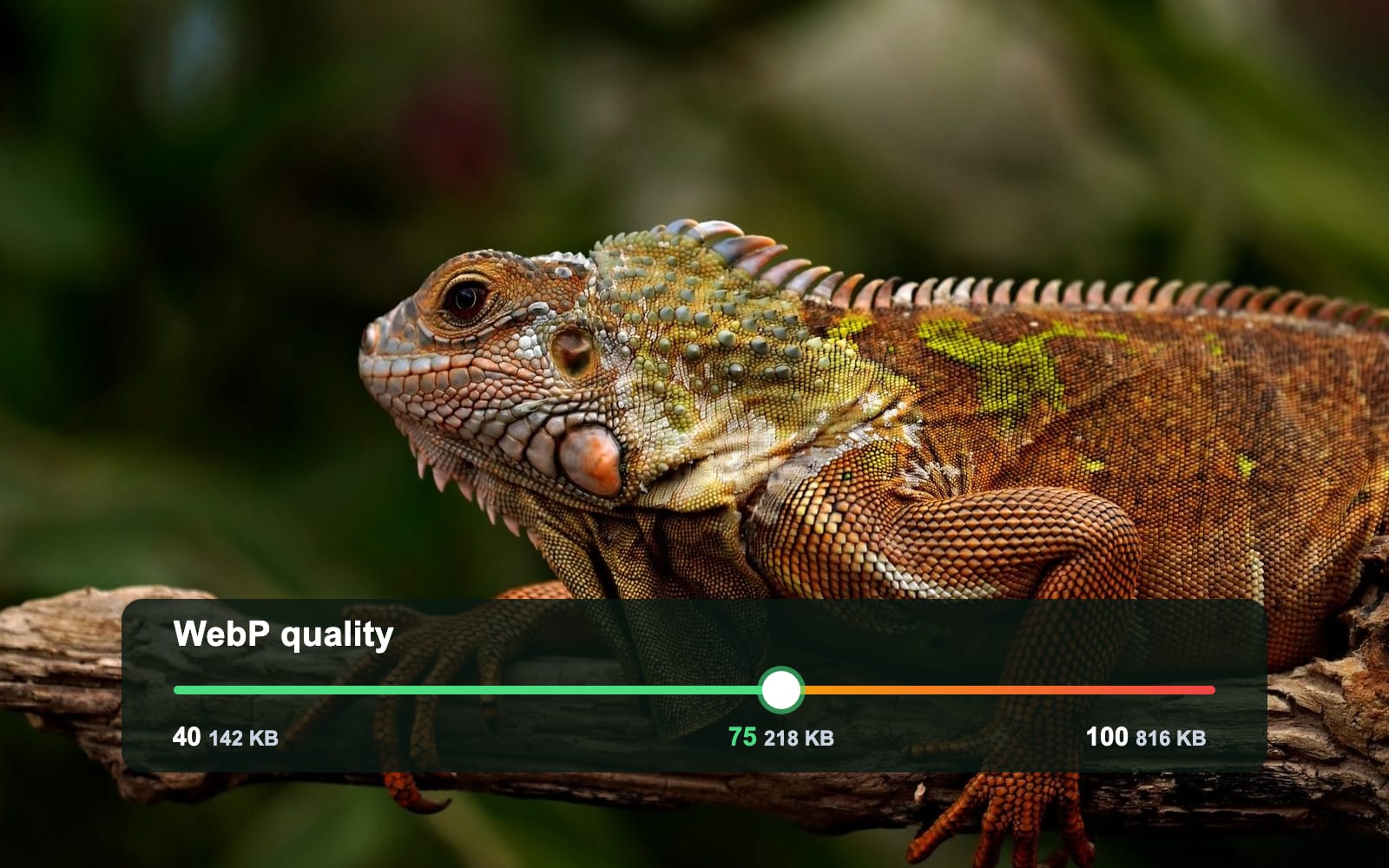
- Quality 40142.4 KB
- Quality 45155.4 KB
- Quality 50165.9 KB
- Quality 55175.6 KB
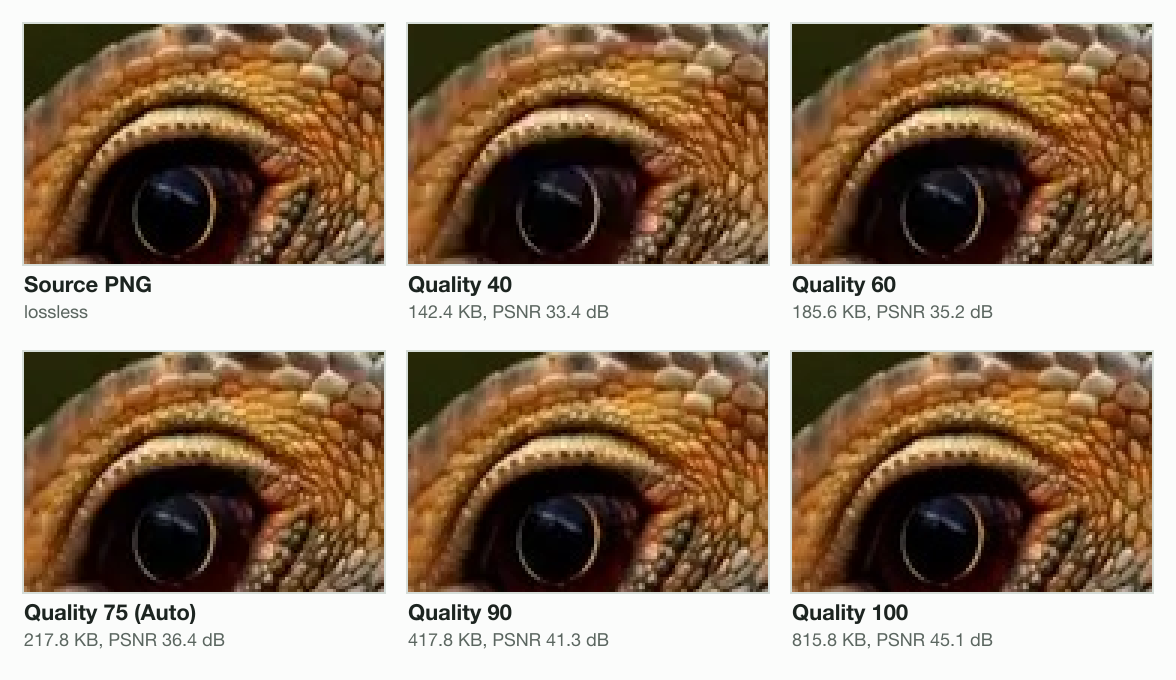
- Quality 60185.6 KB
- Quality 65194.6 KB
- Quality 70207.1 KB
- Quality 75217.8 KB
- Quality 80261.3 KB
- Quality 85322.7 KB
- Quality 90417.8 KB
- Quality 95620.2 KB
- Quality 100815.8 KB
Our photo shows the bend. From quality 60 to 75 it grew 17%, from 185.6 KB to 217.8 KB. From 75 to 90 it grew 92%, to 417.8 KB. Below 75, neighbours can even make the same file: 72 and 73 both gave 211.7 KB.
WebP quality from 40 to 100, measured on 6 images
We saved 6 images at every fifth quality from 40 to 100 with Blinkimg’s engine. Two are photos: our iguana and a boat at sunset with a smooth sky. Then a screenshot, a card of text, a soft-edged logo and flat colour blocks. The table gives each file’s size.
| Quality | Iguana | Sunset | Screenshot | Text card | Logo | Flat art |
|---|---|---|---|---|---|---|
| 40 | 142.4 | 50.8 | 70.1 | 16.9 | 6.9 | 1.2 |
| 50 | 165.9 | 59.9 | 76.2 | 18.7 | 7.4 | 1.2 |
| 60 | 185.6 | 69.2 | 82.0 | 19.7 | 7.7 | 1.2 |
| 70 | 207.1 | 79.4 | 87.3 | 21.2 | 8.1 | 1.3 |
| 75 (Auto, photos) | 217.8 | 85.5 | 91.6 | 22.1 | 8.3 | 1.3 |
| 80 | 261.3 | 106.9 | 103.5 | 25.1 | 9.1 | 1.2 |
| 85 | 322.7 | 138.8 | 119.6 | 28.9 | 10.0 | 1.4 |
| 90 | 417.8 | 198.4 | 145.1 | 34.6 | 11.7 | 1.5 |
| 95 | 620.2 | 297.2 | 205.4 | 43.8 | 14.4 | 1.8 |
| 100 | 815.8 | 496.1 | 296.5 | 51.5 | 18.0 | 1.5 |
| Lossless | 2,041.9 | 2,017.3 | 805.0 | 27.0 | 8.5 | 0.2 |
The photos grew the most past 75. The iguana went from 217.8 KB to 815.8 KB, 3.7 times the bytes. The sunset grew 5.8 times, because its smooth sky costs little at 75 and a lot at 100. The flat art barely moved, and its lossless file was the smallest of all at 0.2 KB.
The best WebP quality for the web
For photos, start at 75. Each step above it is a big one, and each buys less detail per kilobyte than the last. On the iguana, 75 to 80 added 43.5 KB for 1.4 dB. 95 to 100 added 195.6 KB for 1.3 dB: 4.5 times the bytes for less gain.
| Quality | Size | PSNR | SSIM |
|---|---|---|---|
| 60 | 185.6 KB | 35.2 dB | 0.9732 |
| 70 | 207.1 KB | 36 dB | 0.9766 |
| 75 (Auto) | 217.8 KB | 36.4 dB | 0.9778 |
| 80 | 261.3 KB | 37.8 dB | 0.9822 |
| 85 | 322.7 KB | 39.4 dB | 0.9863 |
| 90 | 417.8 KB | 41.3 dB | 0.9898 |
| 95 | 620.2 KB | 43.8 dB | 0.9937 |
| 100 | 815.8 KB | 45.1 dB | 0.9958 |
Page weight adds up. Ten photos like ours weigh 2.2 MB at 75 and 4.2 MB at 90. Use 80 to 85 for a hero image people look at closely. Skip lossy 100: on both photos and the screenshot it made the largest file, and still not an exact one.
WebP quality vs JPEG quality
The two scales do not match. On our photos, a WebP at 80 scored the same as a JPEG at 69 to 72, not 80. To match a JPEG at 80, set WebP to about 85. We scored each file with SSIM, the measure of structure Google’s own study used.
| WebP quality | Iguana: JPEG match | Iguana: WebP smaller | Sunset: JPEG match | Sunset: WebP smaller |
|---|---|---|---|---|
| 50 | 43 | 13% | 41 | 28% |
| 60 | 52 | 13% | 47 | 25% |
| 70 | 60 | 12% | 54 | 23% |
| 75 | 63 | 12% | 58 | 23% |
| 80 | 72 | 10% | 69 | 23% |
| 85 | 81 | 11% | 77 | 19% |
| 90 | 87 | 8% | 88 | 26% |
| 95 | 94 | 5% | 93 | 20% |
| 100 | 96 | 3% | 97 | 14% |
Our result agrees with Jeff Kaufman’s 2014 test, which found WebP 80 close to JPEG 67. Twelve years of libwebp later, the gap is about the same. Malte Ubl’s 2021 table put WebP 82 next to JPEG 80, scored with a different measure, DSSIM. The measure moves the answer: by PSNR, our WebP 80 matched a JPEG at 81 on the iguana.
Is WebP 25% to 34% smaller than JPEG?
Not on our photos. Google says lossy WebP is 25% to 34% smaller at the same SSIM. That figure comes from a study of libwebp 0.1.2 from 2011 against libjpeg 6b from 1998. With today’s encoders, our photos came out 10% to 23% smaller at quality 75 to 85. The screenshot, the text and the logo came out at under half the size of the matching JPEG.
WebP lossless vs lossy
Lossless WebP keeps every pixel; lossy WebP at any quality does not. On text, logos and flat art, lossless was smaller than lossy at 85, because long runs of one colour pack tightly. On photos and screenshots, lossless was several times the size of lossy at 100.
| Image | Lossy 75 | Lossy 100 | Near-lossless 60 | Lossless |
|---|---|---|---|---|
| Iguana photo | 217.8 KB (36.4 dB) | 815.8 KB (45.1 dB) | 1,436.8 KB (49.8 dB) | 2,041.9 KB |
| Sunset photo | 85.5 KB (37.7 dB) | 496.1 KB (43.1 dB) | 1,562.9 KB (50.3 dB) | 2,017.3 KB |
| Screenshot | 91.6 KB (43.2 dB) | 296.5 KB (46.8 dB) | 750.1 KB (56.9 dB) | 805.0 KB |
| Text card | 22.1 KB (42.6 dB) | 51.5 KB (48.5 dB) | 23.4 KB (60.4 dB) | 27.0 KB |
| Logo | 8.3 KB (42.1 dB) | 18.0 KB (45.1 dB) | 7.6 KB (61.9 dB) | 8.5 KB |
| Flat art | 1.3 KB (41.9 dB) | 1.5 KB (42.6 dB) | 0.2 KB (identical) | 0.2 KB |
Is WebP quality 100 lossless?
It depends on the tool. In cwebp, sharp, Pillow and Squoosh, quality 100 is still lossy. Our iguana at 100 was 815.8 KB and scored 45.1 dB, not identical. Its lossless file was 2.0 MB. ImageMagick switches to lossless at 100. So do Chrome and Firefox when a page asks a canvas for quality 1: both files we got back were lossless.
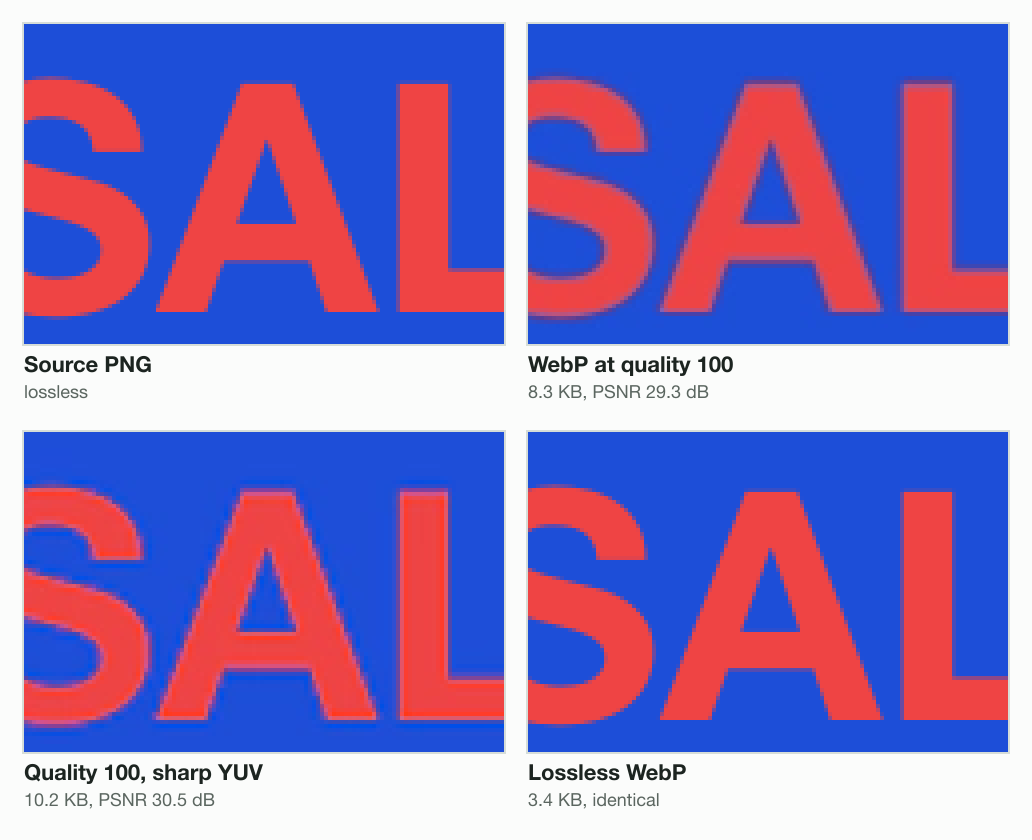
Lossy WebP also halves the colour detail at every quality, a scheme called 4:2:0. Red words on blue show it. At quality 100 they scored only 29.3 dB. Sharp YUV, a slower colour conversion, raised that to 30.5 dB. Lossless WebP was exact, and smaller than both at 3.4 KB.
Near-lossless WebP
Near-lossless WebP nudges pixel values so they compress better, then saves them losslessly. Its level runs from 0 to 100, where 100 changes nothing and 60 is typical. On text and the logo, level 60 was smaller than lossless and scored over 60 dB. On the photos, lossy 100 was smaller, which Google’s cwebp page warns can happen.
What quality do apps and browsers use for WebP?
Most tools start at 75 or 80, so two “default” WebPs of our photo differ by 20% in size. We read each maker’s page on 1 November 2026. A page can also ask the browser for a WebP with canvas.toBlob, and the standard leaves that default to each browser. We measured those ourselves.
| Tool | Default | Quality 100 (or 1) gives |
|---|---|---|
| cwebp (Google) | 75 | Lossy |
| libvips | 75 | Lossy |
| ImageMagick | 75 | Lossless |
| Squoosh | 75 | Lossy |
| sharp (Node.js) | 80 | Lossy |
| Pillow (Python) | 80 | Lossy |
| WordPress | 86 (JPEG: 82) | Lossy |
| Chrome canvas (Chromium 149) | 0.80 | Lossless |
| Firefox canvas (151.0) | 0.92 | Lossless |
| Safari canvas (WebKit 26.5) | No WebP: saves a PNG | A PNG |
| Blinkimg Auto | 75 photos; 82 or lossless for graphics | Lossy |
The defaults come from Google’s cwebp page, the libvips, ImageMagick, sharp and Pillow manuals, Squoosh’s code and WordPress’s image editor code.
WordPress is the odd one. It saves WebP at 86, above its own JPEG default of 82. A 2021 ticket proposed 82 for both. Testers found one portrait needed WebP 90 to match, and the ticket closed as “maybelater” in 2024.
Safari’s canvas cannot write WebP at all. It shows WebP fine, but a canvas asked for image/webp hands back a PNG, as the standard allows. A page that makes WebP in the browser should check blob.type before it uploads.
Blinkimg’s Auto is 75 for a photo and 82 for a graphic. On a graphic that comes in as PNG, it also tries lossless WebP and keeps the smaller file. Our logo and flat art came out lossless, at 8.5 KB and 0.2 KB. On the text card, quality 82 made 26.6 KB, just under its 27.0 KB lossless file, so Auto kept the lossy one.
Other WebP settings that change the file size
Quality is not the only dial. Effort, called -m in cwebp, sets how hard the encoder searches. It changes the size at the same quality, and the time it takes. On our photo at quality 75, effort 0 made a file 63% bigger than the default of 4. Effort 6 saved 4% more for 72% more time.
| Effort | Size | PSNR | Time |
|---|---|---|---|
| 0 | 354.2 KB | 36.5 dB | 67 ms |
| 1 | 249.0 KB | 36.5 dB | 78 ms |
| 2 | 226.2 KB | 36 dB | 94 ms |
| 3 | 217.7 KB | 36.4 dB | 177 ms |
| 4 (default) | 217.8 KB | 36.4 dB | 179 ms |
| 5 | 215.1 KB | 36.3 dB | 194 ms |
| 6 | 209.6 KB | 36.3 dB | 307 ms |
- Sharp YUV (
-sharp_yuv, sharp’ssmartSubsample): cleaner colour edges on text and logos, at a slower encode. Blinkimg turns it on for graphics only. - Alpha quality (
-alpha_q): the quality of the transparency, separate from the colour. It defaults to 100, which keeps the edges of a cut-out exact. - Presets (
-preset photo,text,icon): cwebp’s bundles of settings for one kind of image.
Should I use WebP?
Yes, for images on a web page. At the same SSIM, our WebPs were 10% to 23% smaller than JPEG on photos, and under half the size on the screenshot, text and logo. caniuse counts 97.08% of users with full WebP support.
Keep another format for files you will edit, print or email. A WebP saved again loses a little more each time, and some apps and email clients still refuse it. Our WebP vs PNG post measures those cases. AVIF is smaller again; AVIF vs WebP compares the two on the same photo.
How to set WebP quality
Every encoder takes the number the same way: one option, on the save. The lines below set quality 75 for a photo, and lossless or near-lossless for graphics. Leave quality out and each tool uses its default from the table above.
# cwebp (Google's command-line encoder)
cwebp -q 75 photo.png -o photo.webp
cwebp -lossless logo.png -o logo.webp
cwebp -near_lossless 60 text.png -o text.webp

// sharp (Node.js)
await sharp('photo.png').webp({ quality: 75 }).toFile('photo.webp');
await sharp('logo.png').webp({ lossless: true }).toFile('logo.webp');

# Pillow (Python)
Image.open('photo.png').save('photo.webp', quality=75)

// A browser canvas: 0 to 1, and check the type (Safari returns PNG)
canvas.toBlob((blob) => upload(blob), 'image/webp', 0.75);

# Blinkimg's API
curl -X POST https://api.blinkimg.com/v1/jobs \
  -H "Authorization: Bearer bk_..." \
-d '{ "uploadId": "...", "options": { "format": "webp", "quality": 75 } }'Already have JPEGs saved at 80? Convert them at 85, not 75: on our photos, WebP 85 scored the same SSIM as JPEG 77 to 81. Our JPG to WebP converter prints each file’s size before you download it.
How we tested
- The images: our iguana photo (1916 × 1276), our camera photo of a boat at sunset (1920 × 1076), a 2880 × 1800 screenshot of our pricing page, and three we drew: a text card, a soft-edged logo and flat colour blocks.
- The files: Blinkimg’s engine, version 12, at each quality (sharp 0.35.5, libvips 8.18.7, libwebp 1.6.0). Lossless and near-lossless WebP and every JPEG came from sharp directly. Measured 2026-11-01 on an Apple M1 Pro, 8 cores.
- The scores: PSNR over RGB, and SSIM over brightness with an 11-pixel window. The matching JPEG quality is read off a JPEG saved at every quality from 20 to 100. How we measure has the rest.
- The browsers: Playwright’s Chromium 149.0.7827.55, Firefox 151.0 and WebKit 26.5, a 960 × 640 photo saved at 101 qualities and compared byte for byte with the default.
Read the full guide: Image optimization for the web: formats, sizes and lazy loading.
Questions
- What is a good WebP quality?
- Quality 75 is a good WebP quality for photos on a website, and it is the default in cwebp and libvips. On our 1916 × 1276 photo, 75 made a 217.8 KB file and 90 made 417.8 KB. Use 80 to 85 for hero images, and lossless WebP for text, logos and flat art.
- Is WebP quality 80 good?
- Yes, 80 is a safe setting for photos, and sharp and Pillow use it by default. It is not the same as JPEG 80, though. By SSIM, our WebP at 80 matched a JPEG at 72 on one photo and 69 on another. To match a JPEG saved at 80, use WebP 85.
- Is WebP quality 100 lossless?
- Not in most tools. In cwebp, sharp, Pillow and Squoosh, quality 100 is still lossy: our photo at 100 scored 45.1 dB, not identical. ImageMagick switches to lossless at 100, and Chrome and Firefox do the same when a canvas asks for quality 1. Use the lossless option to be sure.
- What WebP quality equals JPEG quality 80?
- About 85. On our two photos, WebP at 85 scored the same SSIM as a JPEG at 81 and 77. WebP at 80 matched only JPEG 72 and 69, close to Jeff Kaufman's 2014 result of 67. The WebP at 85 was still 11% to 19% smaller than the matching JPEG.
- Should I use lossless or lossy WebP?
- Use lossy WebP for photos and screenshots, and lossless WebP for text, logos and flat art. Lossless kept every pixel of our text card in 27.0 KB, under the lossy file at quality 85. Our photo needed 2.0 MB lossless against 217.8 KB at quality 75.
- How do I convert to WebP without losing quality?
- Save it as lossless WebP, which keeps every pixel. That suits PNG screenshots, logos and graphics. A photo that began as a JPEG grows several times as lossless WebP, so use lossy quality 85 for it instead: on our photos, 85 scored the same SSIM as JPEG 77 to 81 and was smaller.
- Is WebP lower quality than JPEG?
- Not at the same file size. At the same SSIM, our WebPs were 10% to 23% smaller than JPEG on photos, so at an equal size the WebP scores higher. Two catches: WebP's quality numbers run lower than JPEG's, and smooth gradients can band. Check large skies by eye before you settle on a number.
- What are the disadvantages of WebP?
- Lossy WebP stores colour at half resolution, so red text on blue blurred even at quality 100 in our test. WebP holds 8 bits a channel, Safari's canvas cannot write it, and some editors and email clients refuse it. Keep JPG or PNG for files you edit, print or email.
- What quality does Chrome use for WebP?
- 0.80, when a page calls canvas.toBlob or toDataURL for image/webp without a quality. Chromium 149's default file matched the one at 0.80 byte for byte. Firefox 151.0 uses 0.92. At quality 1 both switch to lossless WebP, and Safari's canvas returns a PNG instead.
- Why is my WebP bigger than the JPEG?
- Usually the quality is too high or the file is lossless. Our photo at WebP 100 was 815.8 KB, bigger than a JPEG at 90, and its lossless WebP was 2.0 MB. At the same SSIM, our WebPs were smaller than JPEG at every quality we tried, so lower the number first.
- Does WebP quality affect page speed?
- Yes, through the bytes it adds. Ten photos like ours weigh 2.2 MB at quality 75 and 4.2 MB at 90. On a 10 megabit connection, the extra takes about 1.6 seconds to download. Quality 75 to 80 keeps photos light while the detail still holds up.
- What WebP quality does WordPress use?
- 86. WordPress saves WebP at 86 and JPEG at 82, the defaults in its image editor class. A 2021 ticket to use 82 for both stalled after one tester’s portrait needed WebP 90 to match, and it closed as “maybelater” in 2024. The wp_editor_set_quality filter changes it.