WebP vs PNG: which is better? We measured 5 images
WebP is better than PNG for images on a website. Lossless WebP kept every pixel of our 5 test images in 27% to 88% fewer bytes. PNG is better for files you edit, email or print, and for 16-bit images. Part of the image converter.
By Sahadat Husain17 min readFormats

Is WebP better than PNG?
For a website, yes. A lossless WebP holds the same pixels as a PNG in fewer bytes. On our 5 test images, it was 27% to 88% smaller. Saved lossy at Auto, our photo went from a 994.3 KB PNG at Auto to a 218.9 KB WebP.
PNG still wins in five places: 16-bit images, pictures over 16,383 pixels, email, editing and print, and apps that refuse WebP. A card of text also came out smaller as a PNG at Auto. The table puts each job next to its format.
| The job | Use | Why |
|---|---|---|
| A photo on your website | WebP | 218.9 KB at Auto against 994.3 KB as PNG at Auto |
| A screenshot on your website | WebP | 109.6 KB against 213.1 KB, and closer to the source |
| A logo or icon on your website | Lossless WebP | Every edge pixel kept, 53% under lossless PNG |
| A file you will edit again | PNG | Every editor opens it, and resaving loses nothing |
| A picture inside an email | PNG | Outlook for Windows 2007 to 2019 shows no WebP |
| A 16-bit or HDR master | PNG | WebP stores 8 bits a channel |
| Wider or taller than 16,383 pixels | PNG | WebP cannot store it |
WebP vs PNG: every difference in one table
The two formats differ in more than size. PNG holds more colour depth, bigger pictures and, since June 2025, HDR. WebP adds lossy compression and smaller files. Each row comes from the format’s own standard or from Google’s WebP pages.
| Feature | WebP | PNG |
|---|---|---|
| Compression | Lossy or lossless | Lossless; a smaller file cuts colours to a palette |
| Bits per channel | 8 | 1 to 16 |
| Transparency | 8-bit alpha, lossy or lossless | Up to 16-bit alpha |
| Animation | Yes | Yes, as APNG, in the standard since June 2025 |
| HDR | No | Yes, since the third edition (June 2025) |
| Colour profile | ICC | ICC |
| Largest picture | 16,383 × 16,383 pixels | Over 2 billion pixels a side |
| Browsers | 97.08% of users (caniuse) | Every browser |
| Not in Outlook for Windows 2007 to 2019 | Every client caniemail lists | |
| Standard | RFC 9649, November 2024 (informational) | W3C Recommendation, June 2025 |
WebP vs PNG file size, measured on 5 images
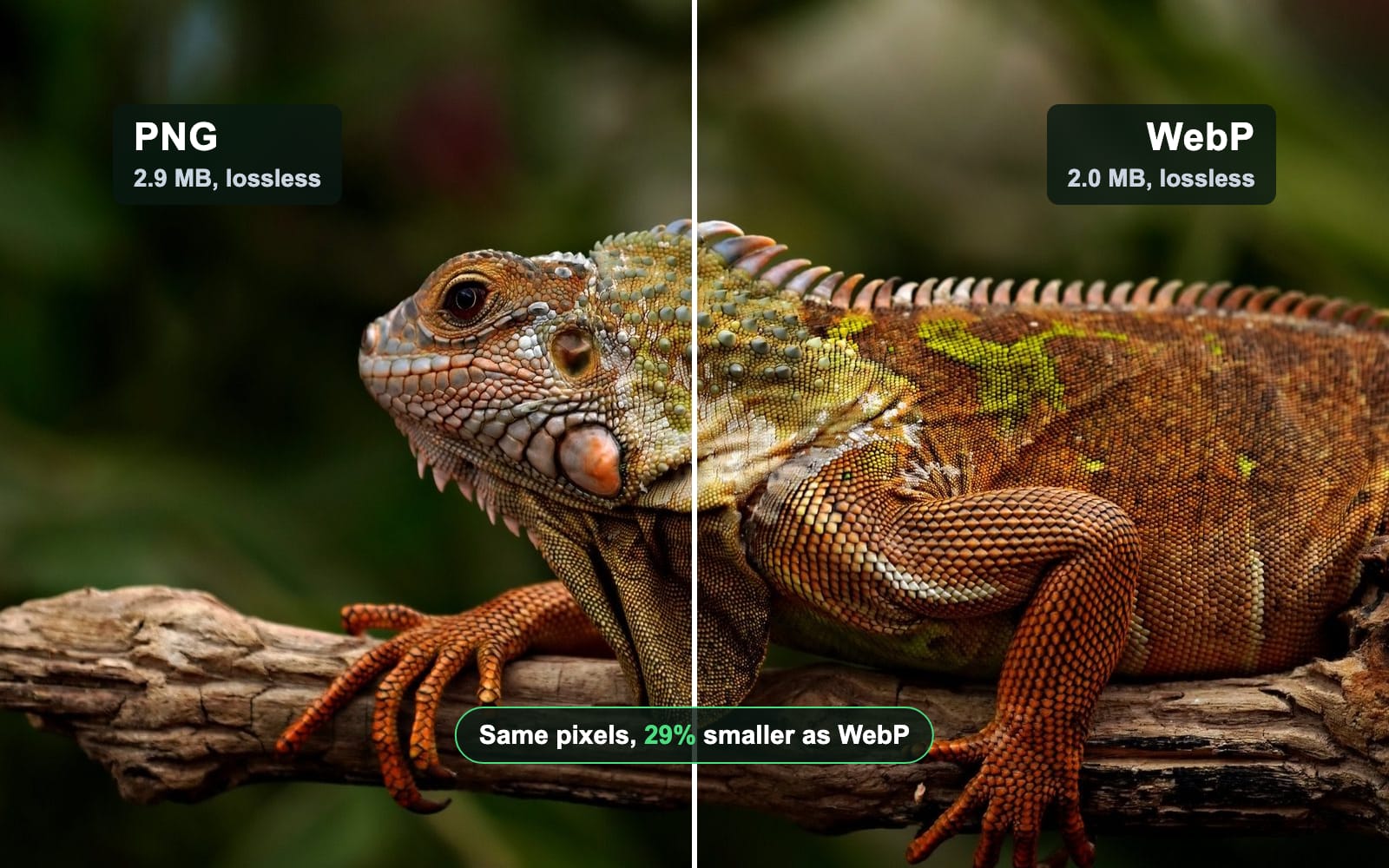
Lossless WebP was smaller than lossless PNG on all 5 images, from 27% on the screenshot to 88% on the flat graphic. Both kinds of file decoded to the source’s exact pixels; we compared every one.
Photo, 1920 × 1280
- PNG, lossless2.9 MB
- WebP, lossless2.0 MB
Screenshot, 2880 × 1800
- PNG, lossless1.1 MB
- WebP, lossless805.0 KB
Text card, 1200 × 630
- PNG, lossless58.7 KB
- WebP, lossless27.0 KB
Logo, 512 × 512
- PNG, lossless18.1 KB
- WebP, lossless8.5 KB
| Image | PNG, lossless | WebP, lossless | PNG at Auto | WebP at Auto |
|---|---|---|---|---|
| Photo, 1920 × 1280 | 2,866.3 KB | 2,045.4 KB | 994.3 KB | 218.9 KB |
| Screenshot, 2880 × 1800 | 1,099.3 KB | 805.0 KB | 213.1 KB | 109.6 KB |
| Text card, 1200 × 630 | 58.7 KB | 27.0 KB | 18.3 KB | 26.6 KB |
| Logo, 512 × 512 | 18.1 KB | 8.5 KB | 4.2 KB | 8.5 KB |
| Flat graphic, 640 × 480 | 1.7 KB | 0.2 KB | 1.6 KB | 0.2 KB |
Google’s own figure is 26% smaller than PNG. The study behind it reports 23% against ZopfliPNG and 42% against libpng (Google, 2017). It used 12,000 web PNGs, first cut to 8 bits a channel. Our photo and screenshot landed near that. The text card, the logo and the flat graphic saved far more, because flat colour is what lossless WebP packs best.
At Auto the answer depends on the picture. WebP halved the screenshot, from 213.1 KB to 109.6 KB. On the card of text the PNG won: 18.3 KB against 26.6 KB. Google’s WebP FAQ warns about exactly this case. A PNG with few colours can grow when it becomes a lossy WebP. On the logo and the flat graphic, our engine’s Auto tried lossless WebP as well and kept it, because it was the smaller file: 8.5 KB and 0.2 KB, with every pixel exact.
Squeezing harder: what maximum effort buys
Lossless WebP has a slow, thorough mode, which cwebp calls -z 9. On the screenshot it cut the lossless WebP from 805.0 KB to 503.7 KB, under half the lossless PNG. On the photo it saved almost nothing: 2,045.4 KB became 2,030.9 KB, after 18.3 seconds instead of 1.2 seconds. PNG’s strongest zlib setting gave the same bytes as our default, because our engine already uses it.
| Image | PNG | WebP, default | WebP, maximum |
|---|---|---|---|
| Screenshot | 1,099.3 KB, 1.1 seconds | 805.0 KB, 1.7 seconds | 503.7 KB, 7.2 seconds |
| Photo | 2.9 MB, 0.9 seconds | 2.0 MB, 1.2 seconds | 2.0 MB, 18.3 seconds |
So run maximum effort once on screenshots, logos and graphics you publish. For photos, use lossy WebP instead.
WebP vs PNG quality: does WebP lose detail?
Lossless WebP loses nothing. All 5 of our lossless WebPs decoded to the exact pixels of the source, as the PNGs did. Lossy WebP does drop detail, the way a JPG does. PSNR measures how far the pixels moved: a higher score is closer to the original.
On the screenshot, WebP at Auto scored 44.4 dB against 42.3 dB for PNG at Auto, at half the size. On the photo it scored 36.5 dB against 37.4 dB. Enlarged twice, the letters below show no difference you can point to.
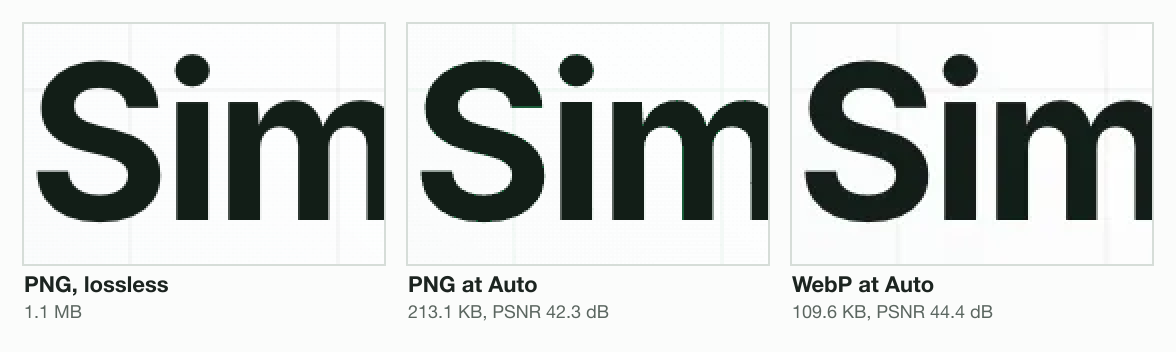
Lossy WebP keeps colour at half the detail of brightness, which Google’s FAQ calls 8-bit 4:2:0. So the edges of coloured text and thin coloured lines soften first. Keep those as lossless WebP or PNG.
WebP vs PNG transparency
Both formats hold full transparency: 256 levels from clear to solid in every pixel, or more in a 16-bit PNG. The difference is what a compressed file keeps. Our soft-edged logo had 247 levels along its rim. PNG at Auto saved bytes by keeping 7, so its edge steps when you enlarge it. Lossless WebP kept all 247.
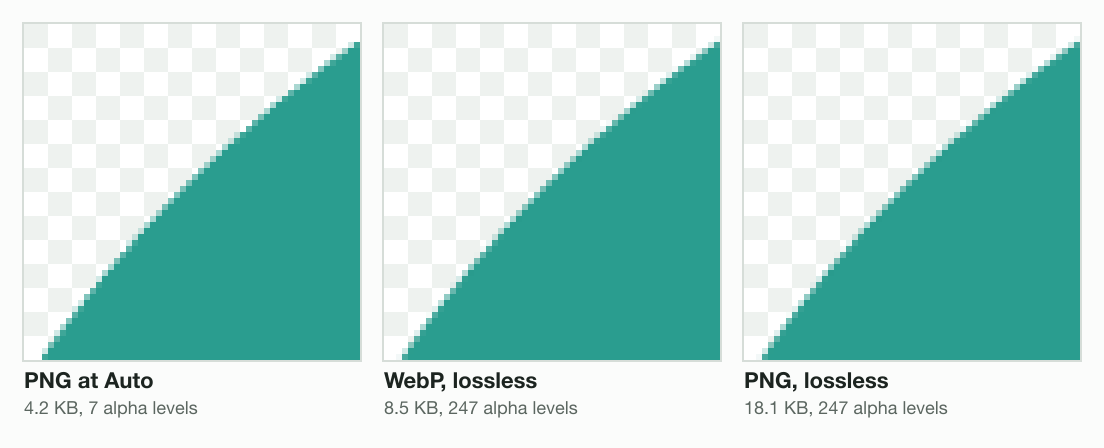
WebP vs PNG for logos
For a logo on your own site, use lossless WebP: every edge pixel kept, in 8.5 KB against 18.1 KB. Lossy WebP gained nothing here, so Blinkimg’s Auto saved the logo as lossless WebP, the same 8.5 KB. PNG at Auto was the smallest, at 4.2 KB, and on white it scored 50.3 dB. Its 7 levels show only where the edge is enlarged.
For a logo you send to someone else, send the PNG. It opens in every app, every email client and every office suite. To shrink one first, the PNG compressor keeps the transparency.
What lossless WebP does under clear pixels
Lossless WebP is not quite lossless by default. It rewrites the colour hidden under fully clear pixels, because that colour costs bytes and no one sees it. We cut a circle out of our photo, 512 × 512, and kept the photo’s colour under the 116,875 clear pixels, as an editor’s export does.
At its defaults, lossless WebP changed the hidden colour of 116,611 of them, in 221.8 KB. With cwebp’s -exact flag on, it kept every one, in 338.0 KB. The PNG kept every one too, in 638.7 KB. On screen all three look the same. The change matters when someone opens the file again and removes the transparency, or uses the image as a game texture.
Is WebP slower to open than PNG?
A little, in Chromium (the engine inside Chrome and Edge) and Firefox, and the smaller file more than makes up for it. We timed each browser engine turning the same picture into pixels, the step before a page can paint it. In Chromium, the lossless WebP of our screenshot took 32.7 ms against 23.5 ms for the lossless PNG.
That 9.2 ms is small next to the download. The lossless PNG is 294.3 KB bigger, which takes about 235 ms more at 10 megabits a second. WebKit, the engine inside Safari, was the other way round: it opened the WebP faster than the PNG.
| File | Chromium 149 | Firefox 151 | WebKit 26.5 |
|---|---|---|---|
| Screenshot, PNG lossless | 23.5 | 29 | 46 |
| Screenshot, WebP lossless | 32.7 | 36 | 38 |
| Screenshot, PNG at Auto | 5.1 | 7 | 49 |
| Screenshot, WebP at Auto | 15.6 | 18 | 23 |
| Photo, PNG lossless | 22.5 | 29 | 35 |
| Photo, WebP lossless | 40.6 | 42 | 42 |
| Photo, PNG at Auto | 6.2 | 9 | 26 |
| Photo, WebP at Auto | 16.9 | 18 | 19 |
One surprise: the PNG at Auto, cut to a 256-colour palette, decoded fastest of all in Chromium and Firefox. A palette PNG is quick to open as well as small, which suits interface graphics.
When PNG is the better choice
PNG is the better file in five cases. Each one comes from a limit of WebP, or of the apps around it.
A 16-bit image
PNG stores up to 16 bits a channel, 65,536 steps from dark to light (W3C PNG Third Edition). WebP stores 8 bits, 256 steps (RFC 9649). We wrote a 16-bit grey ramp with 4,096 steps. As a lossless WebP it came back with 256. Our engine’s PNG at quality 100 kept all 4,096. So save a 16-bit master as a lossless PNG, never as WebP.
An image over 16,383 pixels
WebP stops at 16,383 × 16,383 pixels, the WebP FAQ says. A long full-page screenshot passes that easily. Our engine refused a 16,384-pixel-wide PNG with “exceeds WEBP’s 16383px per-side limit”. PNG allows over 2 billion pixels a side.
A picture inside an email
Outlook for Windows 2007 to 2019 shows no WebP (caniemail, tested 2021). Gmail converts a WebP to JPG, which has no transparency. PNG shows in every client caniemail lists. So a signature logo or a newsletter picture belongs in PNG.
A file you edit or print
Keep the master copy as PNG. A lossy WebP loses a little more each time you edit and save it again. We saved our photo as WebP 10 times in a row at quality 75, the setting our engine picks for a photo. Its score fell from 36.5 dB to 32.9 dB. With a 1-pixel crop before each save, the smallest real edit, it fell to 28.7 dB. The PNG saved 10 times stayed identical.
| Saves | WebP, no change | WebP, 1-pixel crop each time | PNG |
|---|---|---|---|
| 1 | 36.5 dB | 36.4 dB | identical |
| 2 | 35.2 dB | 34.2 dB | identical |
| 5 | 34 dB | 31.1 dB | identical |
| 10 | 32.9 dB | 28.7 dB | identical |
For print, neither format holds CMYK: the PNG standard lists 5 colour types, and none of them is CMYK. Our CMYK to RGB guide covers what a print file needs.
An app that will not open WebP
This is most of why people dislike WebP. A browser saves .webp when you expected a JPG or PNG, and an older editor or an upload form refuses it. The format is fine; the app is older than it. What is a WebP file? covers why images save as WebP.
Which apps open and save WebP?
Most editors open WebP now, and fewer save it. That gap is why a WebP from a browser gets stuck. On our Mac, macOS 15.7.3 turned a WebP into a PNG with its own sips tool, but refused to write a WebP. Every row below comes from the maker’s own help pages.
| App | Opens WebP | Saves WebP |
|---|---|---|
| Windows 11 Photos | With Microsoft’s free WebP Image Extension | No; an editor that does is in testing |
| Word and PowerPoint (Microsoft 365) | Yes, from version 2108 (2021) | No |
| macOS Preview | Yes | No: Export offers HEIC, JPEG, JPEG-2000, OpenEXR, PDF, PNG and TIFF |
| Photoshop | Yes, from 23.2 | Yes: File, then Save a Copy (not Export As) |
| Lightroom Classic | Yes, from 15.2 (February 2026) | No |
| Illustrator | Yes | Yes, from 27.6.1, through Export for Screens |
| GIMP | Yes, from 2.10 | Yes, from 2.10 |
| Affinity Photo 2 | Yes | Yes |
| Figma | Yes | No: PNG, JPG, SVG and PDF only |
| Canva | Yes, still images | Yes |
| WordPress | Yes, from 5.8 | Keeps what you upload |
| Shopify | Yes | Serves WebP or AVIF to browsers that take them |
| Squarespace | Yes, still images | Shows uploads as WebP |
The rows come from each maker’s help pages, among them Apple’s, Adobe’s and Figma’s, read on 1 November 2026. Where an app saves no WebP, keep your PNG there and convert the copy you publish.
Should you convert PNG to WebP?
Yes, for images on your own website, and keep the PNG as your master. Our image converter writes lossy WebP at Auto. That beat the PNG at Auto on the photo, the screenshot and the flat graphic. On the card of text it did not, so check the measured size in the results before you swap a small graphic.
Every current browser shows WebP: caniuse counts 97.08% of users with full support. Safari was last, at version 14, and on a Mac it needs macOS 11 Big Sur. For the rest, a picture element serves WebP with a PNG fallback; our AVIF vs WebP vs JPG post shows the code.
How to convert PNG to lossless WebP
Google’s free command-line encoder, cwebp, makes a lossless WebP in one line. Add -z 9 for the slowest, smallest file, and -exact if the hidden colour under clear pixels must stay. cwebp does not take an animated PNG.
cwebp -lossless logo.png -o logo.webp
cwebp -z 9 -exact screenshot.png -o screenshot.webpShould you convert WebP back to PNG?
Only to open or edit the file in an app that refuses WebP. Converting cannot bring back detail the WebP dropped. Our 218.9 KB WebP of the photo became a 2.4 MB PNG, 11 times bigger, with the same picture inside. The WebP to PNG converter keeps the transparency.
How we tested
- The images: our iguana photo as a 1920 × 1280 PNG, a 2880 × 1800 screenshot of our pricing page, and three we drew: a text card, a soft-edged logo and a flat graphic.
- The files: Blinkimg’s engine, version 12, for PNG and WebP at Auto and lossless PNG; sharp 0.35.5 with libwebp 1.6.0 for lossless WebP. Measured 2026-11-01.
- The score: PSNR against the source, in dB; the logo laid on white first. How we measure has the rest.
- The extra tests: a 16-bit ramp, a 16,384-pixel-wide PNG, 10 resaves at quality 75, a 512 × 512 cut-out, 5 encodes per effort setting and 15 decodes per file in Playwright’s Chromium, Firefox and WebKit, on an Apple M1 Pro, 8 cores.
Read the full guide: Best image format: JPG, PNG, WebP, AVIF, HEIC and GIF explained.
Questions
- Does WebP reduce image quality?
- Lossless WebP does not: it decodes to the exact pixels of the source, the same as PNG. Lossy WebP does drop detail, like a JPG. On our 2880 × 1800 screenshot, WebP at Auto scored 44.4 dB PSNR against 42.3 dB for PNG at Auto, at about half the size.
- Is PNG or WebP better for a website?
- WebP, for almost every image on a page. Lossless WebP kept every pixel of our 5 test images in 27% to 88% fewer bytes than lossless PNG, and caniuse counts 97.08% of users with full WebP support. Keep PNG for images wider or taller than 16,383 pixels, which WebP cannot store.
- Why does no one like WebP?
- Because of the apps around it, not the format. Browsers save .webp files when people expect a JPG or PNG, and older editors and some upload forms refuse them. The pictures themselves are fine. Converting the file to PNG or JPG fixes the app problem in one step, and PNG keeps any transparency.
- Is WebP always smaller than PNG?
- Lossless WebP was smaller on all 5 of our images. Lossy WebP was not: on a card of text, WebP at Auto was 26.6 KB against 18.3 KB for PNG at Auto. Google's WebP FAQ warns that a PNG with few colours can come out larger as a lossy WebP.
- Do all browsers support WebP?
- Every current browser does: Chrome, Edge, Firefox and Safari. caniuse counts 97.08% of users with full support. Safari was the last, at version 14 in 2020, and on a Mac it needs macOS 11 Big Sur or later. Internet Explorer never showed WebP, so a PNG fallback matters only for very old devices.
- Can I use WebP in email?
- Not safely. caniemail lists no WebP support in Outlook for Windows 2007 to 2019, and Gmail converts a WebP to JPG, which drops transparency and animation. Apple Mail shows WebP from version 14. PNG shows in every client caniemail lists, so use PNG for logos and pictures inside an email.
- Is WebP good for printing?
- Neither WebP nor PNG is a print format, because neither holds the CMYK colour a press uses. If a print shop accepts an image file, send the PNG, since more design and print tools open it. Keep a 16-bit PNG as it is: WebP stores only 8 bits a channel and would drop the extra steps.
- Is WebP better for SEO?
- Not by itself. Google's image guide lists BMP, GIF, JPEG, PNG, WebP, SVG and AVIF as formats it indexes, with no preference among them. What WebP gives you is a smaller file: our screenshot went from 213.1 KB as PNG at Auto to 109.6 KB as WebP, and a smaller image loads sooner.
- Are PNG files vector?
- No. PNG and WebP are both raster formats: grids of pixels with a fixed width and height, so they blur when enlarged past their size. SVG is the vector format for logos and icons, and it scales to any size. Export a PNG or WebP from the SVG at the exact size a page shows it.
- Can HTML handle PNG?
- Yes. Every browser shows a PNG in a plain img tag, and the same tag shows WebP in every current browser. To serve WebP with a PNG fallback, wrap both in a picture element: the browser takes the first source it can decode and falls back to the img for the rest.
- Can a PNG be animated like a WebP?
- Yes. Animated PNG, called APNG, became part of the PNG standard in the W3C’s third edition in June 2025, and caniuse counts 97.25% of users with support. In email, neither animation is safe: caniemail lists no APNG support in Outlook for Windows or Gmail’s webmail, and Gmail turns a WebP into a still JPG.
- Does WebP load faster than PNG?
- Usually, because the file is smaller. Decoding is slower in Chromium and Firefox: our lossless WebP screenshot took 32.7 ms in Chromium against 23.5 ms for the PNG. But the PNG was 294.3 KB bigger, about 235 ms more to download at 10 megabits a second.
- Does converting PNG to WebP lose quality?
- Only if the WebP is lossy. A lossless WebP keeps every pixel of the PNG, and on our photo it was 29% smaller. A lossy WebP drops some detail: our image converter's WebP at Auto scored 36.5 dB on the photo, at 218.9 KB against 2.9 MB for the lossless PNG.