WordPress image sizes: what one upload writes to disk
Every default size, what themes and WooCommerce add, which file each block downloads, and how to change or regenerate them. Part of the WordPress image compression plugin.
By Sahadat Husain17 min readGuides

WordPress image sizes are the smaller copies WordPress makes of every photo you upload. A page can then send a file close to the size it shows. On our test site, one 9.8 MB photo became 8 files and 10.6 MB on disk: 6 sizes, a 2560-pixel “-scaled” copy and the original you sent. A theme and WooCommerce raised that to 13 files. Here is what each size is for, which one each block really downloads, and what to change.
Files on disk
- Twenty Twenty + WooCommerce13 · 11.0 MB
- WooCommerce11 · 10.7 MB
- Twenty Twenty10 · 10.9 MB
- Twenty Twenty-Five (default)8 · 10.6 MB
- Elementor8 · 10.6 MB
- 2x sizes turned off6 · 10.3 MB
- A 1200-pixel upload5 · 264.0 KB
What are the default WordPress image sizes?
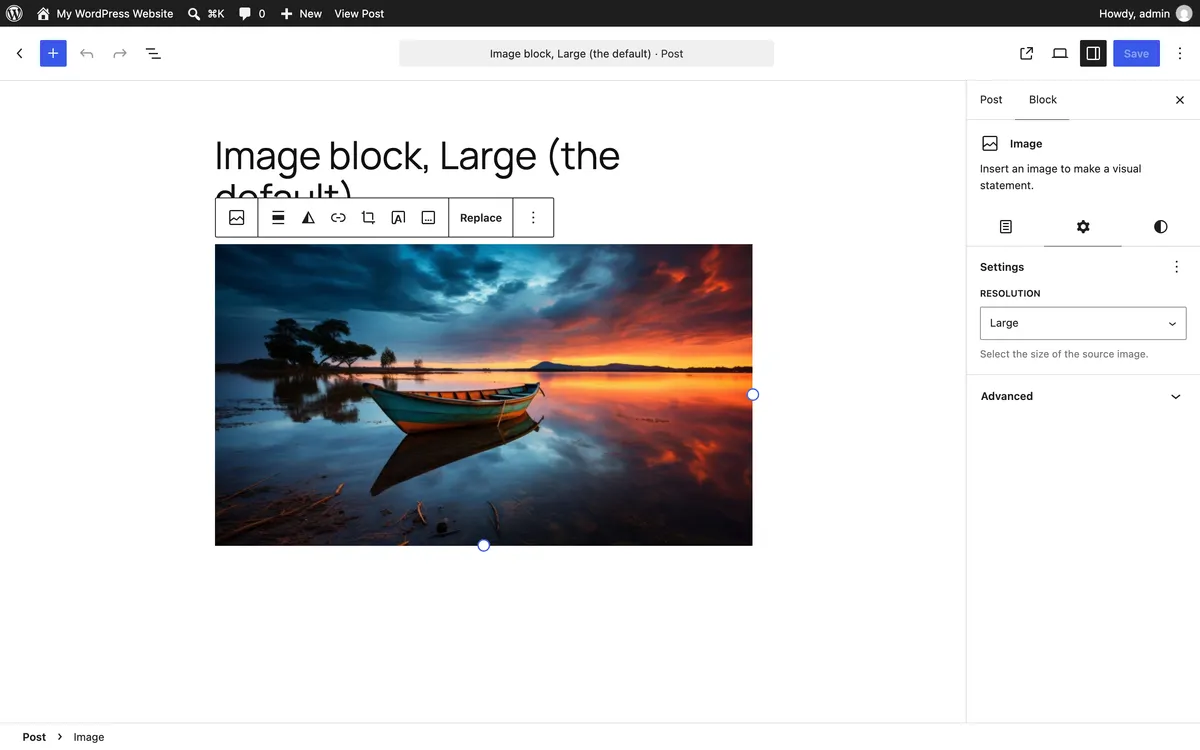
WordPress makes 6 sizes by default: Thumbnail, Medium, Medium large, Large, 1536 × 1536 and 2048 × 2048. The first 4 come from options set in wp-admin/includes/schema.php. WordPress 5.3 added the last 2 in wp-includes/media.php, as 2x copies of Medium large and Large. On top of those sits the full size, and the original you uploaded.
| Size name | Where it is set | Fits inside | Our file | Bytes |
|---|---|---|---|---|
| Thumbnail (thumbnail) | Settings, Media | 150 × 150, cropped | 150 × 150 | 5.9 KB |
| Medium (medium) | Settings, Media | 300 × 300 | 300 × 168 | 10.6 KB |
| Medium large (medium_large) | Code only | 768 wide | 768 × 430 | 45.2 KB |
| Large (large) | Settings, Media | 1024 × 1024 | 1024 × 574 | 71.4 KB |
| 1536 × 1536 (1536x1536) | Code only | 1536 × 1536 | 1536 × 861 | 137.3 KB |
| 2048 × 2048 (2048x2048) | Code only | 2048 × 2048 | 2048 × 1148 | 219.2 KB |
| Full size (-scaled) | big_image_size_threshold | 2560 on the longer side | 2560 × 1435 | 315.7 KB |
| Your original | Kept, never shown | 4964 × 2782 | 4964 × 2782 | 9,804.3 KB |
The 7 copies WordPress made added up to 805.3 KB, 8.2% of the photo we sent. The original itself was 92% of the disk this upload used. So on a site of camera photos, the sizes are not what fills the disk: the originals are. All 8 files sit side by side in wp-content/uploads. The folder is named for the year and month of the upload, ours 2026/11.
WordPress image size names you will see
Code names a size by its slug: thumbnail, medium, medium_large, large, 1536x1536, 2048x2048 and full. The file name carries the real pixels, such as boat-300x168.jpg: Medium fits our photo inside 300 × 300, so its height became 168. The block editor offers only 4 of them by name, Thumbnail, Medium, Large and Full Size, through the image_size_names_choose filter. Medium large and the 2 big sizes exist for srcset, not for you to pick.
What -scaled and the full size mean
Any upload over 2560 pixels on its longer side gets a copy named with -scaled, set by big_image_size_threshold. That copy becomes the full size your pages link to; the original stays on the server beside it, unused by pages. Our 1200-pixel test photo stayed under the limit, so it got no -scaled copy and only 5 files: WordPress never makes a size larger than the upload. What the 2560 limit does to quality, and when to change it, is in our WordPress image quality loss test.
How many files does a theme or WooCommerce add?
Each registered size is one more file per upload. We uploaded the same photo with each theme and plugin active and counted the folder.
| Active | Sizes it adds | Files | On disk | Copies alone |
|---|---|---|---|---|
| Twenty Twenty-Five (WordPress default) | None | 8 | 10.6 MB | 805.3 KB |
| Elementor 4.4.1 | None | 8 | 10.6 MB | 805.3 KB |
| WooCommerce 11.3.1 | woocommerce_thumbnail 300 × 300, woocommerce_single 600 wide, woocommerce_gallery_thumbnail 100 × 100 | 11 | 10.7 MB | 855.5 KB |
| Twenty Twenty 3.3 | post-thumbnail 1200 wide, twentytwenty-fullscreen 1980 wide | 10 | 10.9 MB | 1,105.9 KB |
| Twenty Twenty and WooCommerce | All 5 above | 13 | 11.0 MB | 1,170.3 KB |
Elementor registered no size of its own, so a page builder alone did not add files here. The classic theme added 300.6 KB per photo and WooCommerce 50.3 KB. A site of 1,000 such photos with both would hold 365 MB of extra copies. Those files stay on disk after you switch theme.
Which image size does each block show?
The block picks the size for the src, and the browser picks the file from srcset. Every image gets a srcset of the sizes with the same shape. The list stops at 2048 pixels, the max_srcset_image_width default, unless the image is the full size. We read 8 test posts on a 1280-pixel monitor at 1x, a 1440-pixel Retina laptop at 2x and a 393-pixel iPhone at 3x.
| Block, size | Monitor 1x | Retina 2x | iPhone 3x |
|---|---|---|---|
| Image, Large (the default) | 1024 file, 71.4 KB (645) | 2048 file, 219.2 KB (645) | 1536 file, 137.3 KB (333) |
| Image, Full Size | 1536 file, 137.3 KB (645) | 2560 file, 315.7 KB (645) | 1536 file, 137.3 KB (333) |
| Image, Large at wide width | 1024 file, 71.4 KB (1180) | 2048 file, 219.2 KB (1340) | 1536 file, 137.3 KB (333) |
| Image, Full Size at full width | 1536 file, 137.3 KB (1280) | 2560 file, 315.7 KB (1440) | 1536 file, 137.3 KB (393) |
| Featured image | 1536 file, 137.3 KB (645) | 2560 file, 315.7 KB (645) | 1536 file, 137.3 KB (333) |
| Cover, full width | 1536 file, 137.3 KB (1280) | 2560 file, 315.7 KB (1440) | 1536 file, 137.3 KB (393) |
| Media & Text | 1536 file, 137.3 KB (323) | 2560 file, 315.7 KB (323) | 1536 file, 137.3 KB (333) |
| Gallery, 3 columns | 1024 file, 71.4 KB (202) | 2048 file, 219.2 KB (202) | 1536 file, 137.3 KB (157) |
Four of the 8 files were never downloaded on any screen: Thumbnail, Medium, Medium large and the original. Thumbnail is cropped square, so it never joins the srcset of a wide photo. Medium and Medium large were in every srcset. Each block told the browser the image was 1024 or 2560 pixels wide, so the browser skipped the 2 smaller files.
Galleries and Media & Text download too much
A gallery column on our monitor was 202 pixels wide. Yet the browser downloaded the 1024 file, 71.4 KB. The images said sizes="(max-width: 1024px) 100vw, 1024px", because a Gallery block uses Large unless you change it, as the block’s block.json in WordPress core sets. The 300 file, 10.6 KB, covered the column; that is 6.8 times the bytes for each photo. Media & Text, which uses the full size, sent the 315.7 KB -scaled file to the Retina laptop for 323 pixels. WordPress 6.7’s sizes="auto" lets the browser measure, but only for lazy-loaded images, and these were the first on the page. Choose Medium in a gallery’s Resolution when its columns are narrow.
A wide image needs a bigger size than Large
Large at wide width was drawn 1180 pixels wide on the monitor from a 1024 file, stretched a little. Full Size at full width took the 1536 file there and the 2560 -scaled file on the Retina laptop. Set wide and full-width images to Full Size.
What is the WordPress image size limit?
Two limits, often confused. The upload limit caps the file in megabytes, and PHP sets it. upload_max_filesize defaults to 2M and post_max_size to 8M. A host changes them in php.ini, not in WordPress. The pixel limit is WordPress’s 2560 threshold, which never refuses an upload; it only makes the -scaled copy.
Read your upload limit
Open Media, Add Media File. The line under the drop zone prints the limit. Our Playground site said 2 GB, from upload_max_filesize 2000M. Your host’s number may be far lower. Our 9.8 MB photo would fail at PHP’s 2M default.
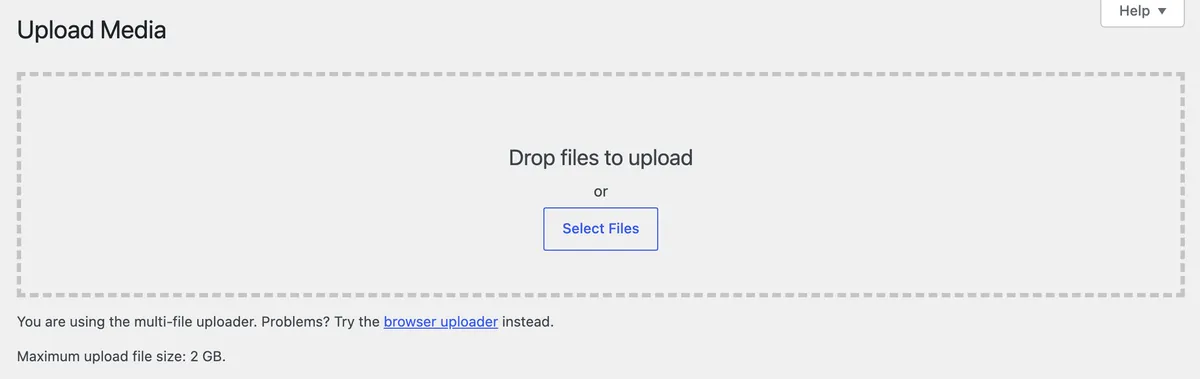
If the limit is too low, ask your host to raise upload_max_filesize and post_max_size. Or edit php.ini where your host allows it. A smaller export is often the better fix. WordPress scales anything over 2560 pixels anyway, so a full-resolution camera file mostly fills the disk.
How to change WordPress image sizes
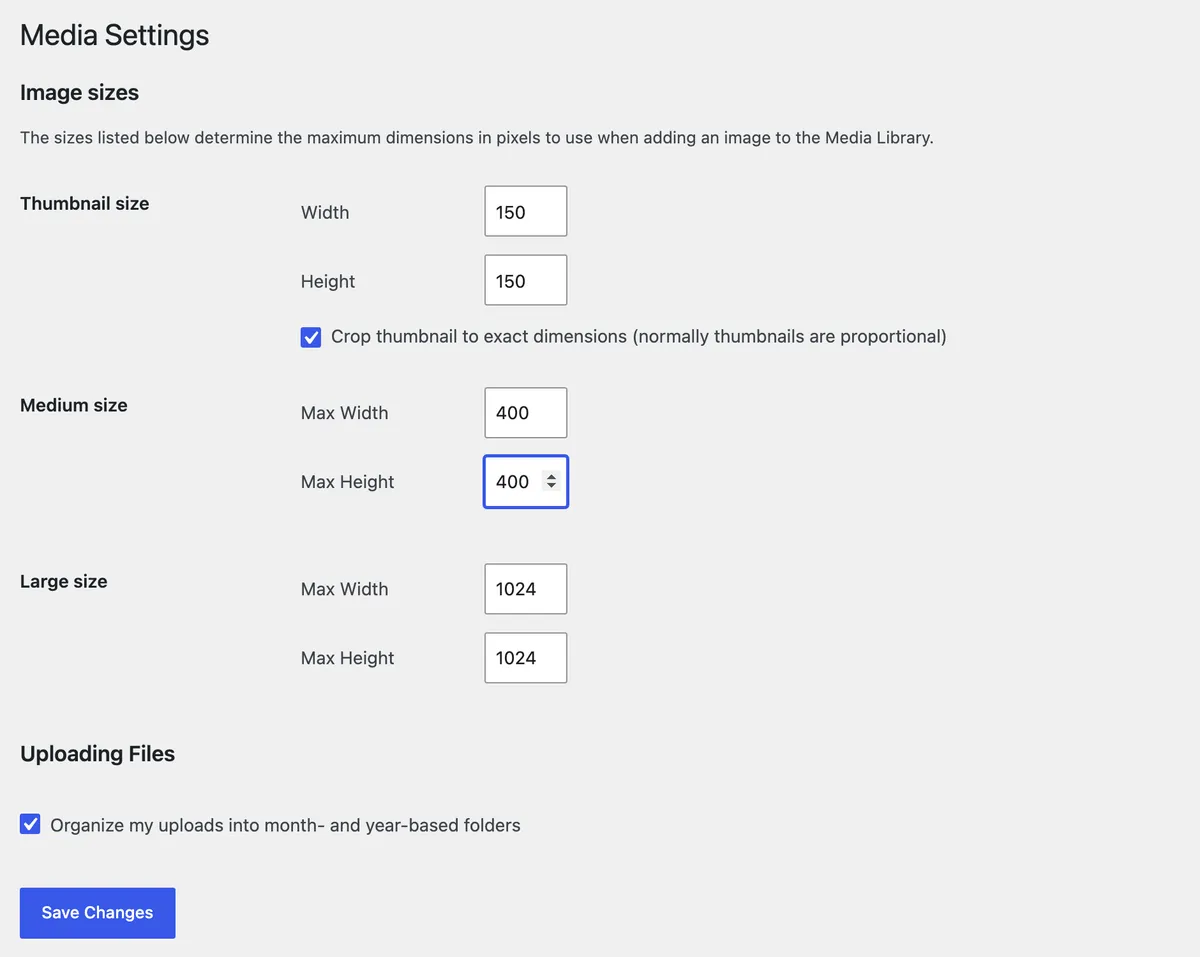
Settings, Media sets the 3 sizes WordPress shows there, and the Media screen’s documentation calls them the maximum dimensions for an image. The change applies to uploads from then on. After we set Medium to 400, a new upload got a 400 × 224 file. Our first boat kept its 300 × 168 one.
Open Settings, Media
The Image sizes section lists Thumbnail, Medium and Large. Thumbnail is cropped to its exact size; Medium and Large keep the photo’s shape and fit inside the box.
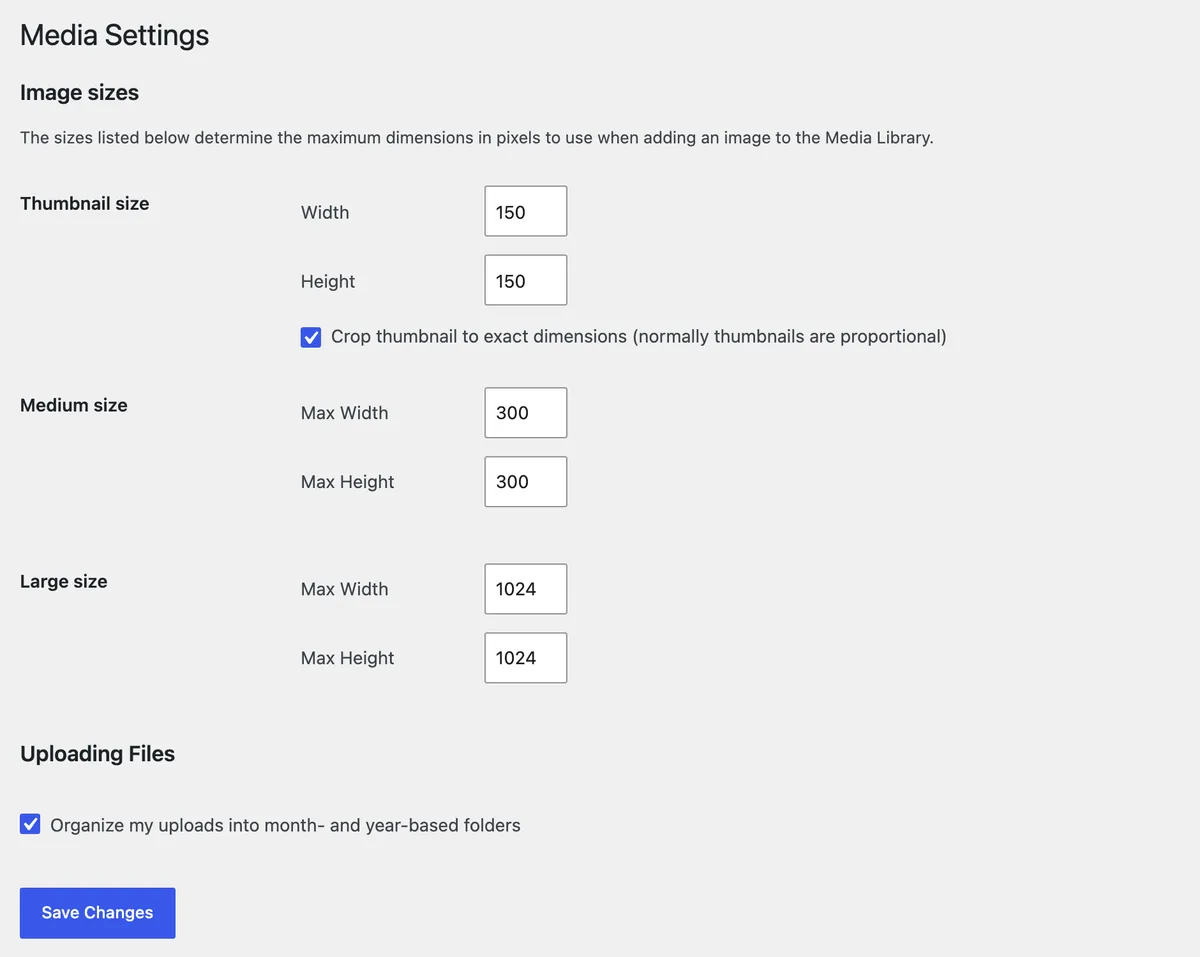
Type the new size and save
We set Medium to 400 by 400 and pressed Save Changes. A size with 0 for both width and height is not made at all, which is how this screen turns one off.
Regenerate thumbnails for older images
Older images keep their old sizes until you regenerate them. We ran Regenerate Thumbnails 3.1.6 on the first boat with its default boxes, then again with Delete thumbnail files for old unregistered sizes ticked.
Open the image in Regenerate Thumbnails
Tools, Regenerate Thumbnails runs on the whole library; we opened its page for our one image. The page lists every registered size, a red cross for each file the image lacks, and the old sizes it still has.
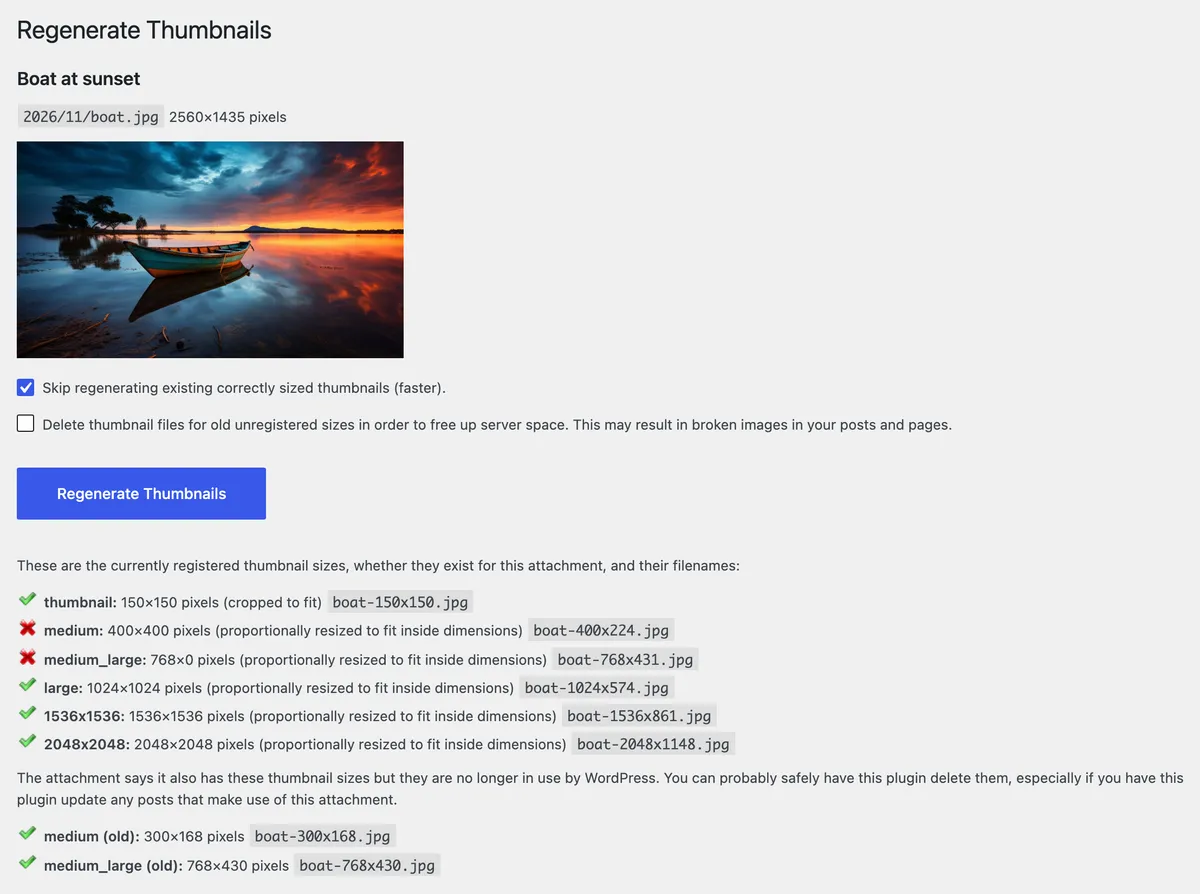
Run it, and read what stayed
With the default boxes, the boat went from 8 to 9 files: the new 400 file joined, and the old 300 file stayed on disk as medium_old_300x168. Posts that still link the old file keep working.
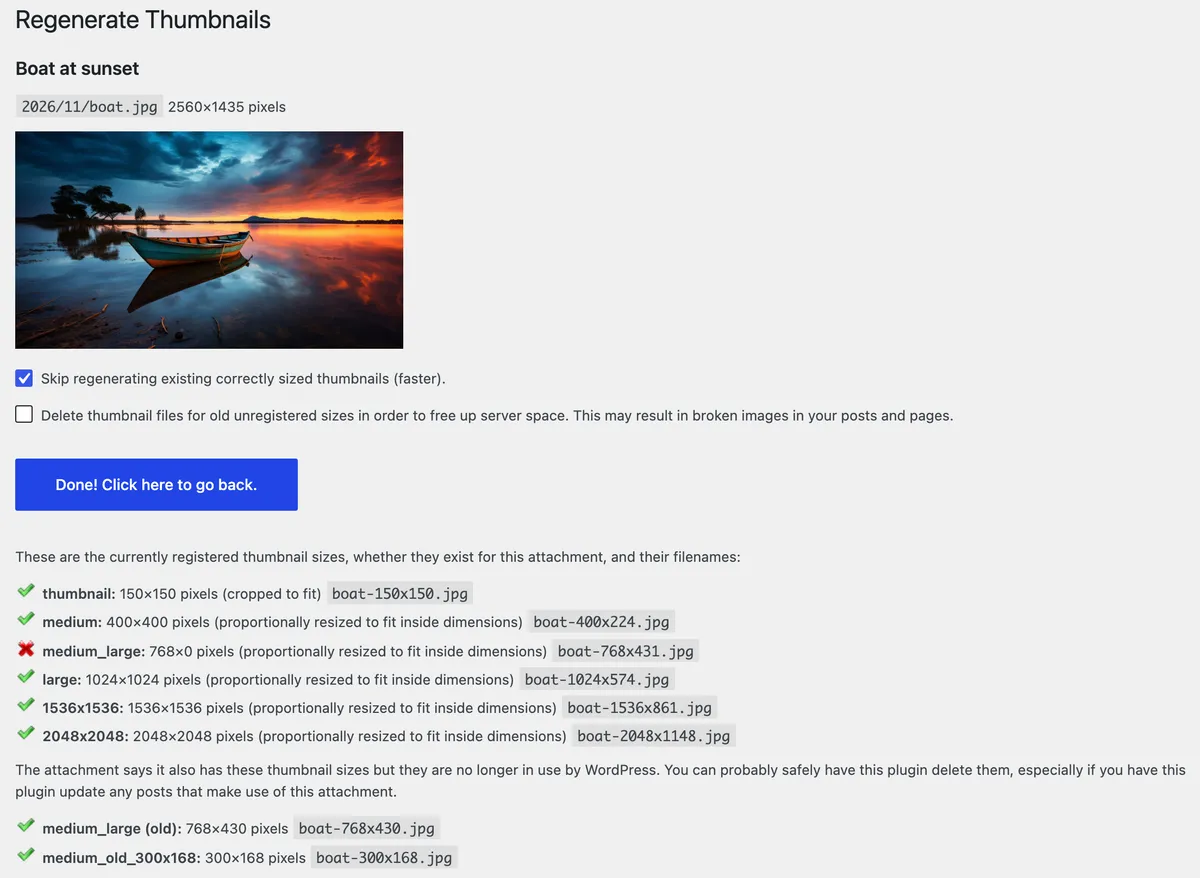
Tick Delete old sizes to free the space
Run it again with Delete thumbnail files for old unregistered sizes ticked. The boat went back to 8 files. Do this only when no post links the old file, or that image breaks.

On the command line, wp media regenerate does the same, and it deletes the old thumbnails unless you add --skip-delete. Either way, clear your page cache and CDN after, so visitors get the new files.
Add a custom size, or turn one off
A theme or plugin adds a size with add_image_size, and the intermediate_image_sizes_advanced filter, in the same WordPress developer reference, removes one from new uploads. Put either in a small plugin or a child theme, then regenerate.
// A 1200 × 630 cropped size for social cards, made for every new upload.
add_action( 'after_setup_theme', function () {
	add_image_size( 'social-card', 1200, 630, true );
} );

// Offer it in the Image block's Resolution list, next to Thumbnail to Full Size.
add_filter( 'image_size_names_choose', function ( $names ) {
	return $names + array( 'social-card' => 'Social card' );
} );

// Stop making the 2 big sizes. Retina screens then get Large instead.
add_filter( 'intermediate_image_sizes_advanced', function ( $sizes ) {
	unset( $sizes['1536x1536'], $sizes['2048x2048'] );
	return $sizes;
} );The last argument of add_image_size decides the crop. With true, WordPress cuts the photo to the exact box from its centre. An array such as array( 'left', 'top' ) moves the cut, and false fits the whole photo inside the box. A cropped size has a new shape, so the browser never picks the social card from a wide photo’s srcset. Medium large has no field in Settings, Media: its width is the medium_large_size_w option, 768 in schema.php, and update_option() changes it.
Crop or scale one image in the Media Library
Settings, Media changes every upload; the Media Library’s Edit Image changes one. Open an image, then Edit Image. WordPress’s Edit Media documentation lists Scale Image, which only scales down, and a crop with an aspect ratio. Thumbnail Settings applies the edit to all image sizes, the thumbnail only, or every size but the thumbnail. Restore Original Image undoes the edits. We did not run the image editor for this post.
What is the best image size for WordPress?
Upload at least twice the width the photo is drawn at, so a 2x screen stays sharp, and let WordPress make the rest. The widths below come from the theme’s own theme.json and the makers’ documentation. We doubled them for 2x screens, and our Retina laptop downloaded files that size.
| Spot | Width | Source | Upload at least |
|---|---|---|---|
| Image in a post (Twenty Twenty-Five) | 645 px | theme.json contentSize | 1290 px wide |
| Featured image (Twenty Twenty-Five) | 645 px | Measured on the monitor | 1290 px wide |
| Wide image (Twenty Twenty-Five) | 1340 px | theme.json wideSize | 2560 px wide (the threshold) |
| Full-width hero or Cover | The screen’s width | Measured | 2560 px wide (the threshold) |
| WooCommerce product image | 600 px | woocommerce_single default | 1200 px wide |
| WooCommerce shop grid | 300 × 300 | woocommerce_thumbnail default, square | A square photo, 600 × 600 |
| Link preview on Facebook | 1200 × 630 | Meta’s sharing documentation | 1200 × 630, cropped |
Your theme may differ, so check its theme.json for contentSize and wideSize, or measure the image in your browser’s inspector. WooCommerce changes its sizes in the Customizer, and its image size documentation says to regenerate thumbnails after. To make a photo that width before uploading, see how to resize an image without losing quality. For a shared link, Meta asks for at least 1200 × 630 pixels, and 600 × 315 at the least for a large preview.
How many KB should a WordPress image be?
WordPress sets no limit in KB; the bytes follow the pixels and the compression. As WordPress saved them, our Large file weighed 71.4 KB and the 2048 file 219.2 KB. A Retina laptop downloads the bigger one, so compressing every size matters more than a KB target.
Why is WordPress resizing my images?
WordPress resizes every upload on purpose. WordPress makes the 6 sizes for srcset, and scales any photo over 2560 pixels to a -scaled copy. Your original stays on disk untouched. A resize becomes a problem in 3 cases.
- The photo looks soft. The block shows a size smaller than its space. Set Resolution to Full Size. If Full Size is soft too, read our WordPress image quality loss test.
- Images break after a regenerate. A post still links an old size that was deleted.
- A big upload fails with an HTTP error. Making sizes takes memory. WordPress asks PHP for 256M while it edits images, unless the server already allows more or locks the limit (WP_MAX_MEMORY_LIMIT in WordPress’s default-constants.php). A host’s cap can still stop the job, and a smaller export avoids it.
Compress every size, and the original, in one go
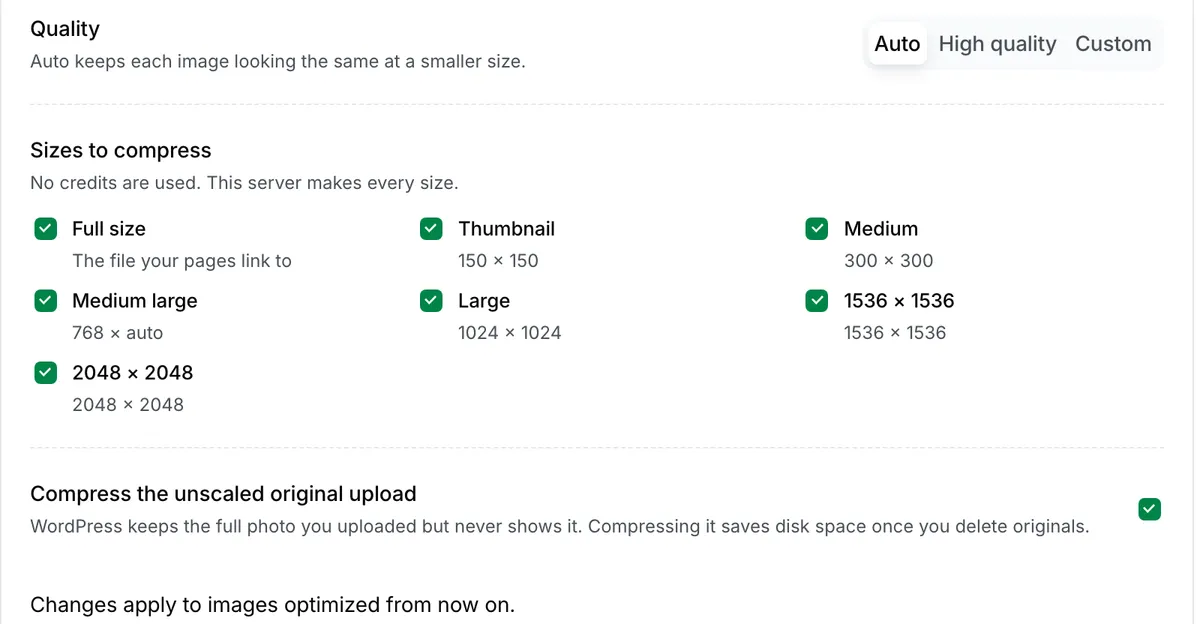
Our WordPress image compression plugin, Blinkimg, treats an image and all its sizes as one. With an account, an image and every size WordPress makes of it cost 1 credit to compress, and thumbnails are free. On This server it uses no credits at all. You choose which sizes to compress, and whether to compress the unscaled original.
Choose the sizes to compress
Open Media, Blinkimg, Settings, Compression. Sizes to compress lists the sizes your site registers; untick any you never show. Compress the unscaled original upload covers the file pages never use.
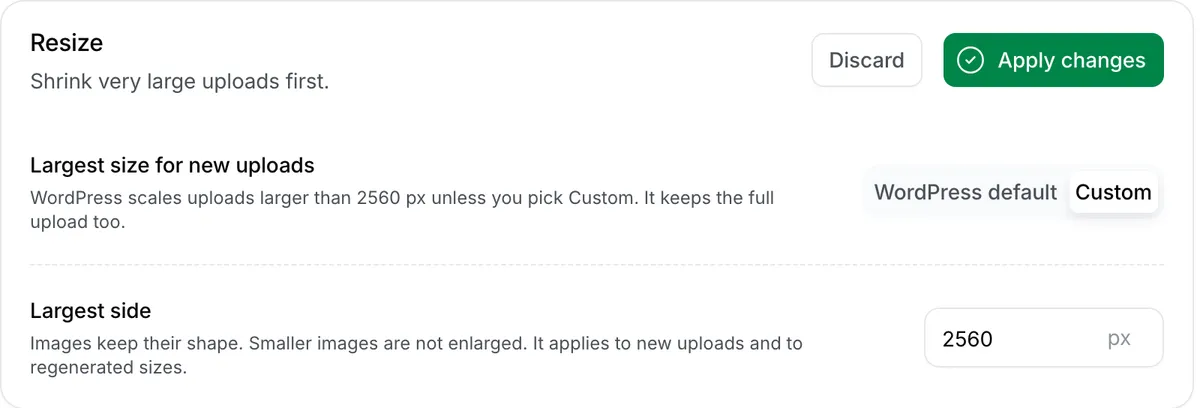
Shrink huge uploads before WordPress makes the sizes
In Settings, Resize, Largest size for new uploads takes Custom and any largest side from 320 to 10,000 pixels. WordPress still keeps the full upload, as the setting says. Compressing that original, then Delete originals, is what frees the disk.
What it did to our boat photo
On This server, Blinkimg Auto made the boat’s page copy a 163.7 KB WebP and added a WebP copy beside each size. Blinkimg also compressed the unscaled original from 9.8 MB to 667.2 KB. The image’s folder went from 8 files and 10.6 MB to 15 files and 1.9 MB.
The backups count too. Blinkimg kept the original and the -scaled file, 10.1 MB, in its private backup folder. The disk gets lighter once you choose Delete originals, which moves the backups to a bin. The bin empties after 7, 15 or 30 days. Leftovers, on the Space tab, finds the originals of images you already deleted. For images no page uses, see how to delete unused images in WordPress.
How we tested
- The site. WordPress 7.1.5 on WordPress Playground, PHP 8.3.36, GD, the Twenty Twenty-Five theme, on 2026-11-20. Each case was a fresh upload of the same photo; WooCommerce 11.3.1, Elementor 4.4.1 and Twenty Twenty 3.3 were active only for their own upload.
- The photo. Our boat photo, 4964 × 2782 and 9.8 MB, and the same photo exported 1200 pixels wide. Files were counted with PHP’s filesize() in the upload’s folder, by its name.
- The blocks. 8 test posts, read with Playwright in Chromium at 1280 pixels (1x), 1440 (2x) and 393 (3x); the file is the image’s currentSrc after scrolling.
- The tools. Regenerate Thumbnails 3.1.6 and Blinkimg 0.2.0 from WordPress.org, Blinkimg on This server at Auto with no account. The defaults were read in WordPress’s source and its developer reference; WooCommerce’s sizes in its source and documentation.
Read the full guide: How to reduce image file size on any device.
Questions
- What are the default image sizes in WordPress?
- WordPress makes 6 sizes of each upload: Thumbnail 150 × 150 cropped, Medium within 300 × 300, Medium large 768 wide, Large within 1024 × 1024, and 1536 × 1536 and 2048 × 2048. Uploads over 2560 pixels also get a -scaled copy, and the original is kept beside it.
- How many files does WordPress create for one image?
- On our test site with Twenty Twenty-Five, one large photo became 8 files: 6 sizes, a -scaled copy and the original. WooCommerce added 3 more, and Twenty Twenty 2. A photo under 1536 pixels makes fewer, because WordPress never makes a size larger than the upload.
- What is medium_large in WordPress?
- Medium large is a size 768 pixels wide that WordPress makes of every large enough upload, for responsive images. It does not appear in Settings, Media or in the block editor’s Resolution list. Browsers pick it from srcset when the space and screen call for a file about that wide.
- Do I need to regenerate thumbnails after changing image sizes?
- Yes, for images uploaded before the change. Settings, Media only affects new uploads. Regenerate Thumbnails or wp media regenerate makes the new sizes. In our test the plugin kept the old file unless Delete thumbnail files for old unregistered sizes was ticked.
- What is the maximum image upload size in WordPress?
- PHP sets it, not WordPress: upload_max_filesize defaults to 2M and post_max_size to 8M, and a host can change them. Media, Add Media File prints your limit. Separately, WordPress scales any photo over 2560 pixels to a -scaled copy, which never blocks an upload.
- What size should images be for a WordPress blog post?
- At least twice the width your theme draws them. Twenty Twenty-Five’s content column is 645 pixels, so upload 1290 or wider; wide and full-width images up to 2560. WordPress makes the smaller sizes and the browser picks one from srcset.