The 5 best WordPress image optimizer plugins, compared
Ratings, free plans, WebP and AVIF, backups, unused image cleanup and real file sizes for Blinkimg, ShortPixel, EWWW, Imagify and Smush, with our pick for your site. Part of the WordPress image compression plugin.
By Sahadat HusainUpdated 13 min readGuides

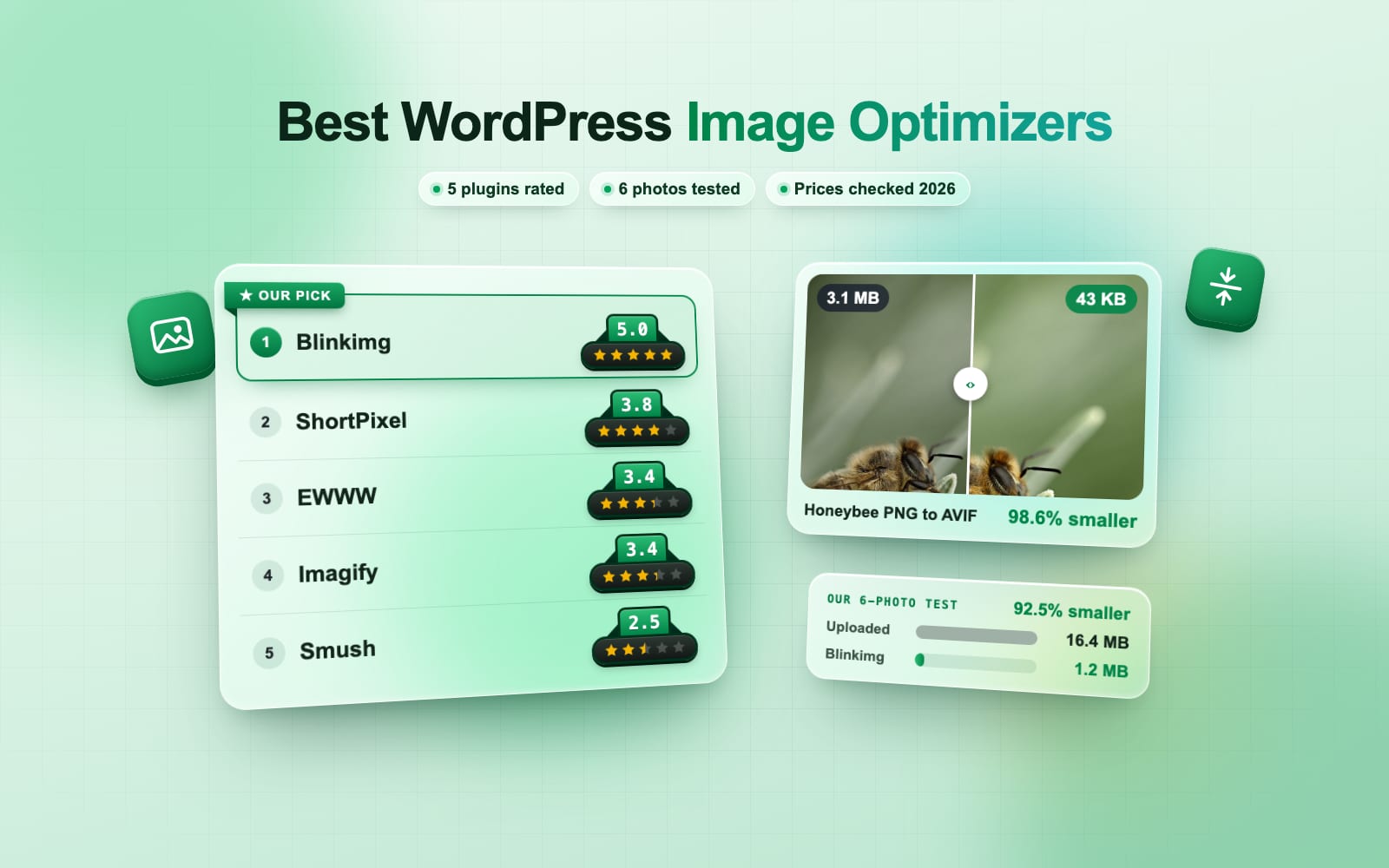
The short answer is Blinkimg. We gave it 6 of our own photos, 16.4 MB in all, on a real WordPress site, and it brought them down to 1.2 MB. Smush’s free plan, on the same photos, left 14.4 MB. Blinkimg also gives you 250 images a month with WebP for free, never charges for thumbnails and keeps every original. On your own server it runs free, with no account at all. ShortPixel, EWWW Image Optimizer, Imagify and Smush each do one thing well, and we cover them all below, so you can pick in a minute.
Which is the best WordPress image optimizer?
Here they are, ranked by our rating. We checked every free plan and price on the makers’ own pages on 14 November 2026.
- Our pick1Our rating: 5.0 out of 5BlinkimgSame quality, smallest files$3.25 a month$39 a yearor $99 once, for life250 images a monthUnlimited on your own serverWebP and AVIF
- 2Our rating: 3.3 out of 5ShortPixelFlat monthly plan$8.33 a month$99.90 a year, or $10.99 monthlyAbout 16 images a monthWebP and AVIF
- 3Our rating: 3.0 out of 5EWWW Image OptimizerAll-local setups$6.67 a month$80 a year, or $8 monthlyUnlimited, needs its toolsWebP only
- 4Our rating: 3.0 out of 5ImagifySmall, web-sized libraries$4.99 a month$59.88 a year, or $5.99 monthly20 MB, 2 MB per imageWebP and AVIF
- 5Our rating: 2.3 out of 5SmushWPMU DEV members$9.99 a month$99.90 the first year: 3 months at $3.33, then $9.99No stated cap, 1X onlyPro only
- Our pick1. BlinkimgOur rating: 5.0 out of 5
- Free
- 250 images a monthUnlimited on your own server
- Formats
- WebP and AVIF
- Paid
- $3.25 a month$39 a yearor $99 once, for life
- 2. ShortPixelOur rating: 3.3 out of 5
- Free
- About 16 images a month
- Formats
- WebP and AVIF
- Paid
- $8.33 a month$99.90 a year, or $10.99 monthly
- 3. EWWW Image OptimizerOur rating: 3.0 out of 5
- Free
- Unlimited, needs its tools
- Formats
- WebP only
- Paid
- $6.67 a month$80 a year, or $8 monthly
- 4. ImagifyOur rating: 3.0 out of 5
- Free
- 20 MB, 2 MB per image
- Formats
- WebP and AVIF
- Paid
- $4.99 a month$59.88 a year, or $5.99 monthly
- 5. SmushOur rating: 2.3 out of 5
- Free
- No stated cap, 1X only
- Formats
- Pro only
- Paid
- $9.99 a month$99.90 the first year: 3 months at $3.33, then $9.99
Our quick picks
Quick picks
- Best overallBlinkimgThe smallest files in our test, with free WebP, AVIF and backups.Get Now
- Best freeBlinkimg on your own serverUnlimited, with no account and no image leaving your site.Get it free
- Best valueBlinkimg Pro$39 a year, or $99 once for life, for 1,500 images a month with WebP.See pricing
Why is Blinkimg our pick?
- Smaller files. On the same photos, Smush’s free plan left about 12 times the bytes Blinkimg did.
- The free plan goes further. 250 full uploads a month with WebP, thumbnails included, against about 16 on ShortPixel’s free plan.
- Nothing to lose. Every original is backed up before a change, and Restore costs nothing.
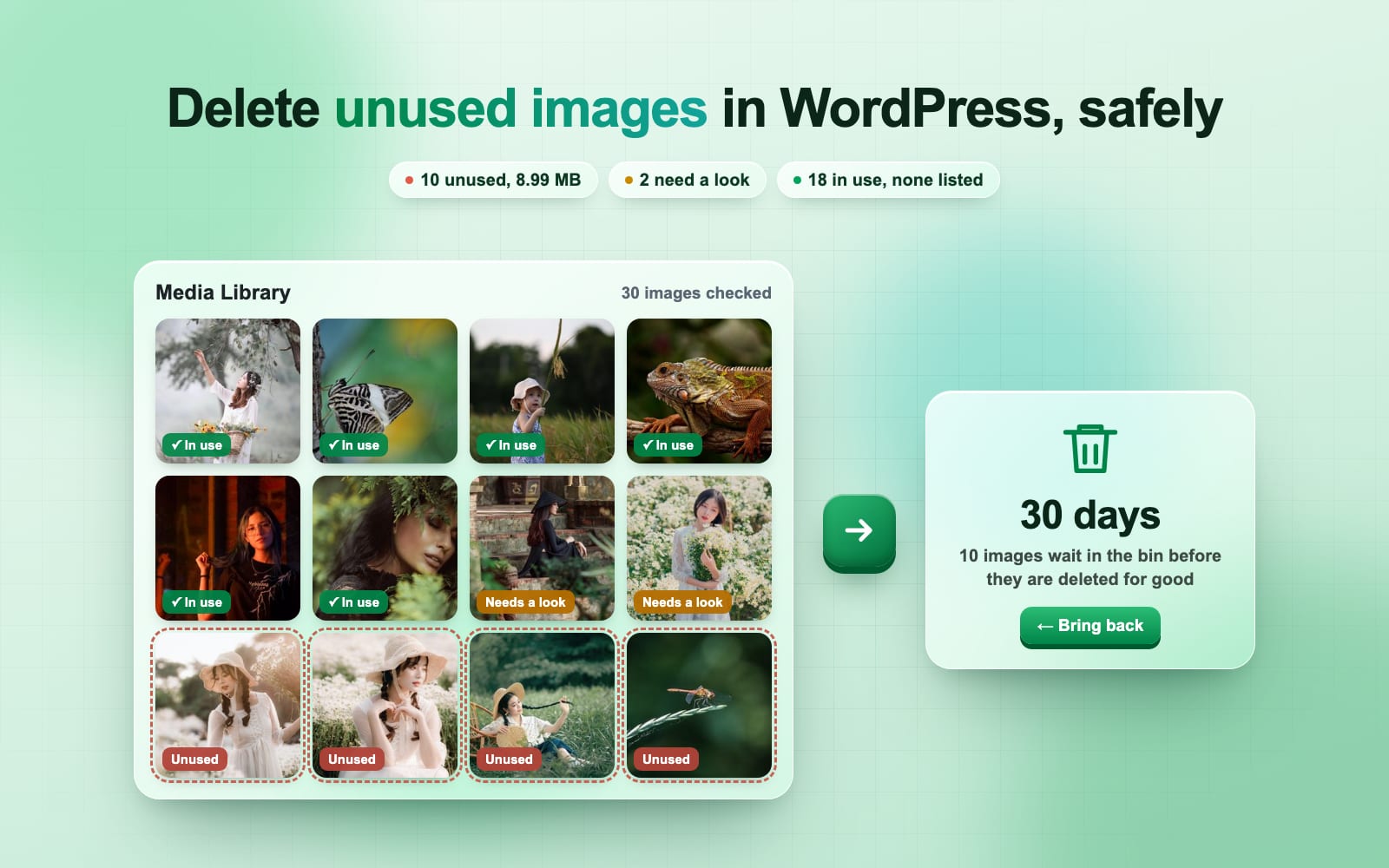
- It cleans out unused images. None of the other four does. On our test site it found all 10 unused images and listed none the site uses.
The 5 best WordPress image optimizers, reviewed
1. Blinkimg: best overall
Same quality, the smallest files in our test, and a free plan that never runs out on your own server.
- Free plan
- 500 credits (250 images with WebP), sizes free; unlimited on your own server
- Free formats
- WebP and AVIF
- Paid, per month
- $3.25 a month$39 a yearor $99 once, for life
Key features
- Two engines: Blinkimg’s cloud or your own server
- WebP and AVIF copies of every size
- A private backup of every original
- Bulk optimize, published pages first
- Unused images, moved to a bin you can undo
Pros
- Smallest files in our 6-photo test
- The only one of the five that finds unused images, and removes them safely
- Thumbnails never cost credits
- Runs free with no account on your own server
- Restore costs nothing, so every change is undoable
- No ads, upsell banners or review requests
Cons
- New: listed on WordPress.org in November 2026
- AVIF on your own server needs a GD or Imagick that writes it
Best for: Almost every site, from a blog on shared hosting to a WooCommerce store
Get NowView pluginWhat you get with Blinkimg
Two engines
Blinkimg’s cloud for the smallest files, or your own server, free and unlimited.
WebP and AVIF
Copies of every size, sent by picture tags or tested server rules.
Every original kept
A private backup, a Compare slider and Restore that costs nothing.
Bulk optimize
Published pages first, with Pause and Resume, even with the tab closed.
WebP only, checked
Keeps one WebP per image, then reads up to 200 pages for any missing image.
Unused images, safely
Finds images no page uses, reads your pages too, and keeps them in a bin 7, 15 or 30 days.
Caches cleared
11 cache plugins, and Cloudflare with an optional token.
Alt text and metadata
Alt text from clean image titles; EXIF, GPS and AI metadata removed.
Works with your stack
WooCommerce, Elementor, block themes, multisite and WP-CLI.
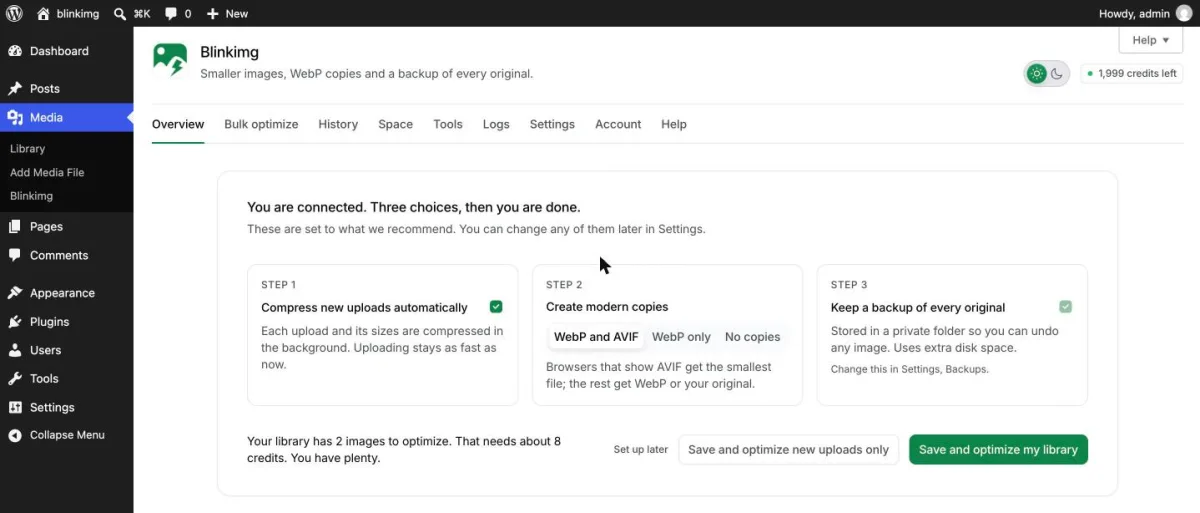
On our test site it ran itself: upload a photo and, about 15 to 30 seconds later, every size had a WebP and an AVIF copy, with the original safe in a private backup. Our guide to converting images to WebP in WordPress walks through every setting.
2. ShortPixel: best for a flat monthly bill
A long-standing cloud optimizer with free formats, but a free plan that runs out fast.
- Free plan
- 100 credits; each thumbnail counts
- Free formats
- WebP and AVIF
- Paid, per month
- $8.33 a month$99.90 a year, or $10.99 monthly
Key features
- Cloud compression: lossy, glossy or lossless
- WebP and AVIF on every plan
- Local backups with one-click restore
- Bulk optimize and WP-CLI
- One-time credit packs
Pros
- WebP and AVIF on every plan
- Free backups and restore
- One-time credits that never expire
Cons
- Each thumbnail costs a credit: 100 credits cover about 16 uploads
- Needs an account, even for the free plan
- Does not work on localhost
- Unlimited costs $99.90 a year, or $10.99 monthly
Best for: Large libraries on a flat monthly bill
View plugin3. EWWW Image Optimizer: best for an all-local setup
Unlimited and local, as long as your host runs its tools.
- Free plan
- Unlimited, on your own server
- Free formats
- WebP only
- Paid, per month
- $6.67 a month$80 a year, or $8 monthly
Key features
- Local compression with bundled tools
- Free WebP conversion
- Lazy load
- Rewrite rules, JavaScript or picture tags
Pros
- No account and no limit in local mode
- Free WebP and lazy load
- 1,000,000+ installs
Cons
- Needs PHP’s exec() and its tools: on our test site it could not compress PNGs
- AVIF needs its paid Easy IO service
- Its setup wizard leaves backups and WebP off
- Its next release will require PHP 8.2
Best for: Developers on a VPS who want everything on their own server
View pluginWe installed EWWW on our test site and it ran, but only partly. It asked us to install jpegtran, and said the server did not meet its requirements for free PNG compression. On a VPS where you control the tools, that is easy to fix. On shared hosting, you may not get that choice.
4. Imagify: best for small, web-sized libraries
Simple settings and free AVIF, on a small free quota.
- Free plan
- 20 MB, 2 MB per image
- Free formats
- WebP and AVIF
- Paid, per month
- $4.99 a month$59.88 a year, or $5.99 monthly
Key features
- Cloud compression
- WebP and AVIF
- Backups on by default
- Background bulk optimize
Pros
- WebP and AVIF are free
- Backups are on by default
- Says it keeps images for 1 hour
Cons
- 20 MB a month is a handful of camera photos
- Skips images over 2 MB on the free plan: 4 of our 6 test photos
- Needs an account
- No lazy load or CDN in the plugin
Best for: Small sites whose images are already web-sized
View plugin5. Smush: best for WPMU DEV members
Free lazy load and light compression; WebP and AVIF are behind Pro.
- Free plan
- No stated cap, 5 MB per image
- Free formats
- Pro only
- Paid, per month
- $9.99 a month$99.90 the first year: 3 months at $3.33, then $9.99
Key features
- Lazy load
- Lossless and lossy compression
- Directory Smush for other folders
- Backup and restore of originals
Pros
- Free lazy load
- 1,000,000+ installs and 6,053 reviews
- No account needed for 1X compression
Cons
- Saved 12.2% on our 6 photos, against 92.5% for Blinkimg
- Skipped all 3 of our PNGs as already optimized
- WebP, AVIF and its CDN are Pro
- Asks you to connect an account, share usage data and answer a survey on deactivation
Best for: Sites already paying for a WPMU DEV membership
View pluginSmush is the one rival we ran from start to finish. To use it without an account, we had to pick “I’m happy with 1X Smush” first. It then saved 12.2% on our photos and left all 3 PNGs as they were.
How did the plugins compare on the same photos?
We set up one WordPress site, turned on one plugin at a time, and uploaded the same 6 photos, 16.4 MB in all. Then we read the real files on disk, not the savings each plugin reports.
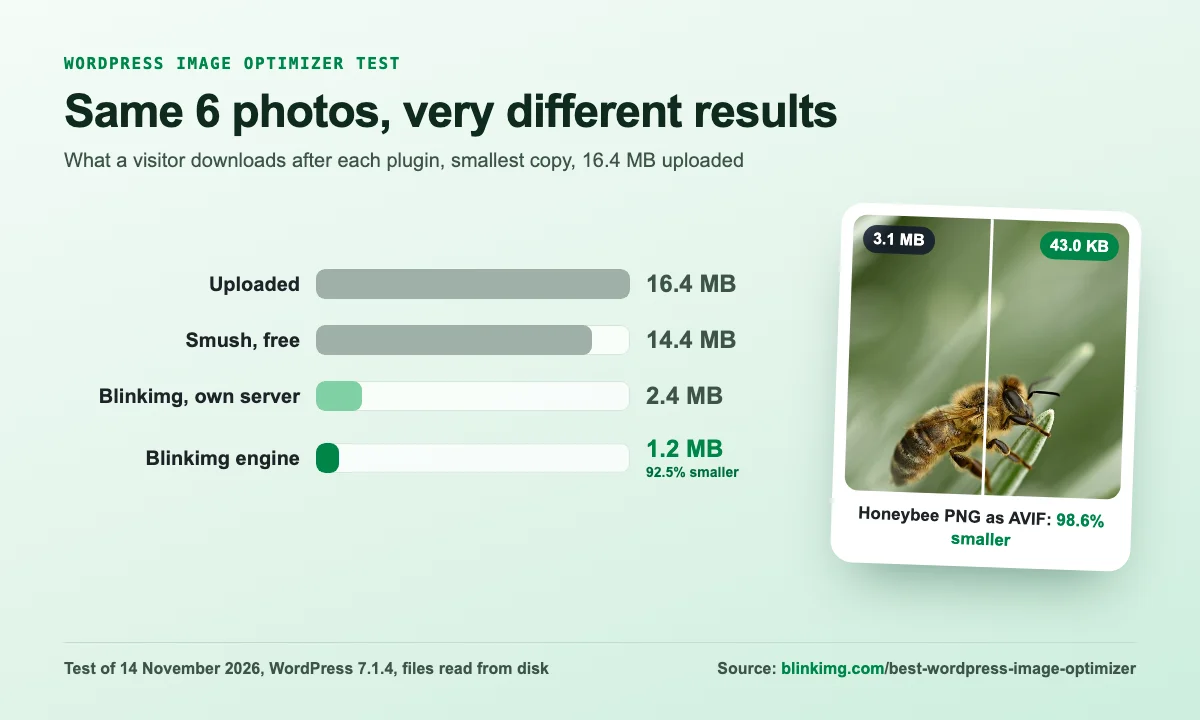
| Photo | Upload | Smush, free | Blinkimg, own server | Blinkimg engine |
|---|---|---|---|---|
| Beach at sunset (PNG) | 4.2 MB | 4.2 MB | 116.1 KB | 100.5 KB |
| Elephant reaching (JPEG) | 1.6 MB | 1.5 MB | 922.6 KB | 448.7 KB |
| Elephant at sunset (JPEG) | 1.1 MB | 1.1 MB | 631.1 KB | 291.5 KB |
| Gold jewellery portrait (PNG) | 3.9 MB | 3.9 MB | 218.6 KB | 112.7 KB |
| Honeybee (PNG) | 3.1 MB | 3.1 MB | 64.6 KB | 43.0 KB |
| Studio portrait (JPEG) | 2.5 MB | 641.3 KB | 434.0 KB | 229.1 KB |
| All 6 | 16.4 MB | 14.4 MB | 2.4 MB | 1.2 MB |
Even keeping each photo’s own format, with no WebP or AVIF, Blinkimg’s engine made the JPEG and PNG files 67.5% smaller. Smush’s free plan skipped all 3 PNGs with the note “Skipped: Image is already optimized”.
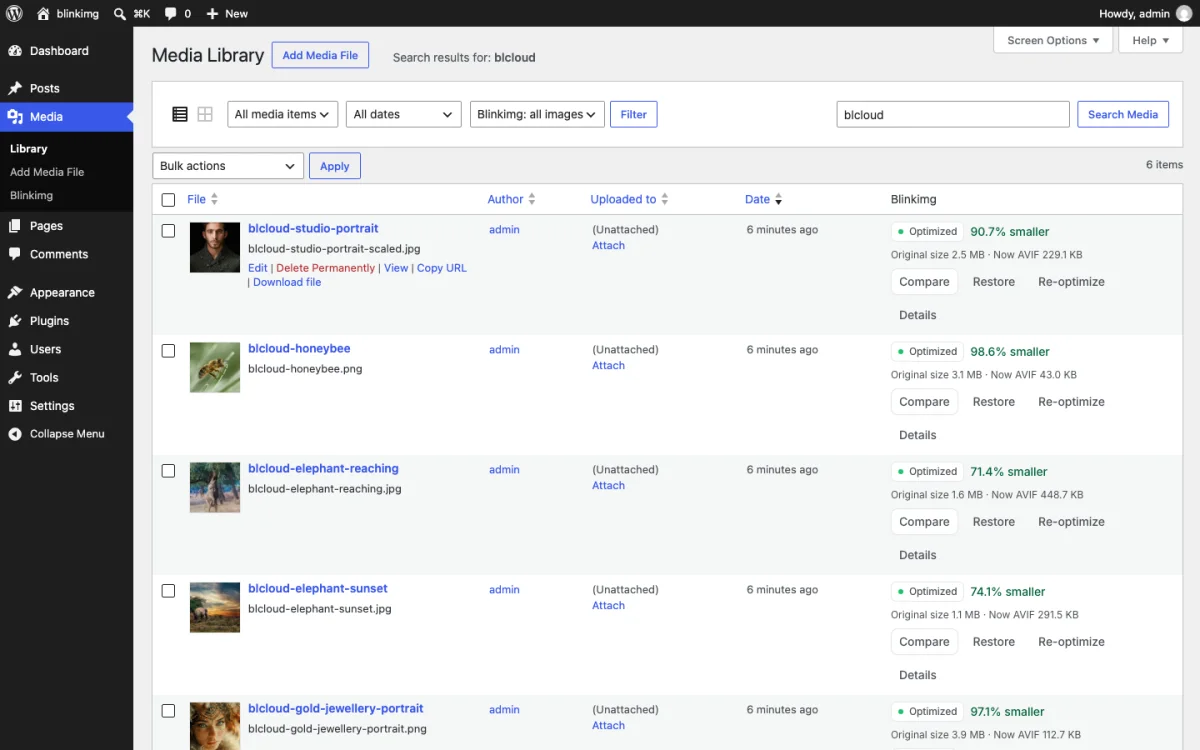
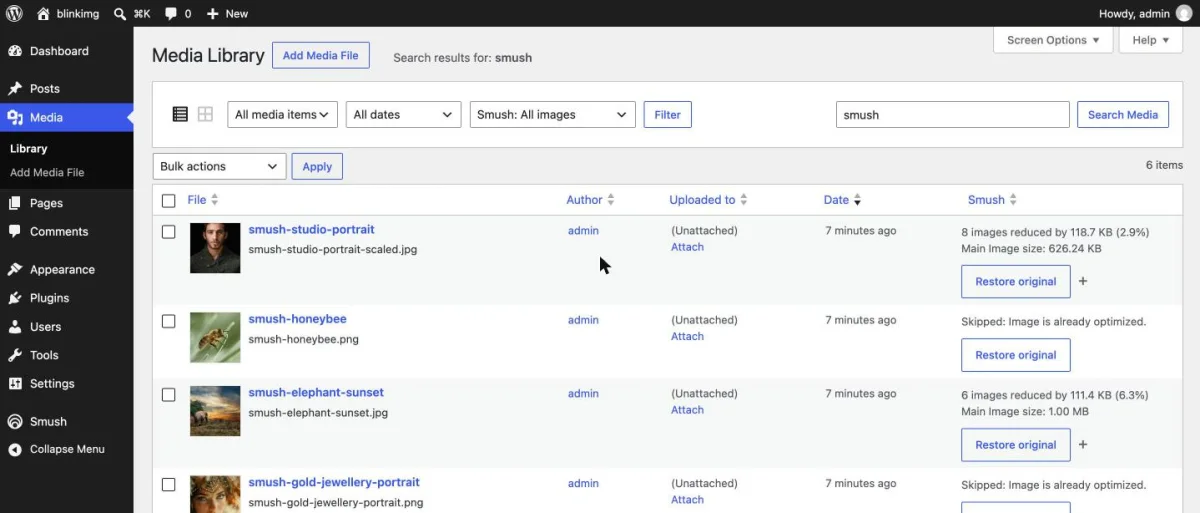
EWWW ran too, but not fully: our test site lacked the tools it needs (more in its review), so we print no EWWW sizes. ShortPixel and Imagify only compress with an account, so we rated them on their published facts.
Want the same result on your own photos? Get Blinkimg free and run Bulk optimize; your first 250 images a month with WebP cost nothing.
How did we rate them?
Each plugin gets 1 to 5 on 6 criteria, and its rating is the average. Where we could not measure a plugin, it says Not tested and the average leaves that row out, so no plugin loses points for a test we did not run.
| Criterion | Blinkimg | ShortPixel | EWWW Image Optimizer | Imagify | Smush |
|---|---|---|---|---|---|
Measured results Our 6-photo test: 5 is the smallest files | 5 | Not tested | Not tested | Not tested | 2 |
Free plan How many full uploads a month cost nothing | 5 | 2 | 5 | 2 | 3 |
WebP and AVIF Both free, sent with a fallback, is a 5 | 5 | 5 | 3 | 4 | 1 |
Backups and restore Every original kept and restorable for free | 5 | 5 | 3 | 5 | 4 |
Setup and privacy Works without an account, no upsell prompts | 5 | 3 | 3 | 3 | 2 |
Price What a growing site pays a year | 5 | 4 | 3 | 3 | 3 |
Unused images Finds images no page uses and removes them with a way back | 5 | 1 | 1 | 1 | 1 |
| Our rating | 5.0 | 3.3 | 3.0 | 3.0 | 2.3 |
Blinkimg scores 5 on every criterion. It is new, though, so it has far fewer WordPress.org reviews than the others. Each review card shows that count next to our rating, so you can weigh it yourself.
What does each plugin cost for a growing site?
Say your site adds 1,000 images a month and you want WebP. Here is the cheapest paid plan that covers it, from each maker’s pricing page. Every plan here allows unlimited sites.
First year
- Blinkimg Pro$39
- Imagify$59.88
- EWWW$80
- ShortPixel$99.90
- Smush Pro$99.90
Each year after
- Blinkimg Pro$39, or $99 once for life
- Imagify$59.88
- EWWW$80
- ShortPixel$99.90
- Smush Pro$119.88
| Plugin | First year | Each year after | Pay once instead |
|---|---|---|---|
| Blinkimg Pro | $39 | $39 | $99 for life |
| ShortPixel Unlimited | $99.90 | $99.90 | $19.99 per 30,000 credits |
| EWWW Standard | $80 | $80 | No |
| Imagify Growth | $59.88 | $59.88 | No |
| Smush Pro (WPMU DEV) | $99.90 | $119.88 | No |
Imagify’s 500 MB plan covers about 5,000 images by its own count, but its quota is in megabytes, so large photos use it up faster. EWWW costs nothing if your host runs its local tools. Blinkimg is the lowest every year, and the only one you can buy once: see the WordPress plugin plans.
What does a free plan really give you?
A free plan is counted in credits, megabytes or images, and the difference is the thumbnails. WordPress makes about 6 files of every upload: our test photos made 6 to 8 each. A plan that charges for each one runs out several times faster. Blinkimg counts an image and all its sizes as one.
- Blinkimg engine250 uploads
- ImagifyAbout 200, under 2 MB each
- ShortPixelAbout 16 uploads
Where do your images go?
A cloud optimizer sends your images to its servers. If that matters to you, here is what each one says it does with them:
| Plugin | Where the work happens | How long they keep your images |
|---|---|---|
| Blinkimg engine | Blinkimg’s servers, over HTTPS | Deleted within 24 hours |
| Blinkimg, own server | Your server | Never leaves your site |
| ShortPixel | ShortPixel’s cloud | Not stated on its listing |
| EWWW | Your server, or its paid cloud | Local: never leaves your site |
| Imagify | Imagify’s servers | 1 hour |
| Smush | Not stated on its listing | Not stated on its listing |
How does each plugin deliver WebP and AVIF?
Making a WebP copy is half the job. The plugin also has to send it to the browsers that can show it, and the original to the rest. Here is how Blinkimg does it with picture tags:
You upload
WordPress saves photo.jpg and its sizes
Copies are made
photo.jpg.webp and photo.jpg.avif
beside every size
The page lists all three
A picture tag: AVIF, WebP, JPEG
The browser picks
The smallest one it can show
| Plugin | How visitors get WebP and AVIF | Free? |
|---|---|---|
| Blinkimg | Picture tags on any server; tested server rules on Apache and LiteSpeed | Yes, both |
| ShortPixel | A front-end option or its CDN | Yes, both |
| EWWW | Rewrite rules, JavaScript or picture tags; AVIF only through its CDN | WebP only |
| Imagify | Its display option; the method is not stated on its listing | Yes, both |
| Smush | Server rules or its CDN | No, Pro |
Our AVIF vs WebP vs JPEG test shows what each format saves on the same pictures.
Which WordPress image optimizer also cleans out unused images?
Only Blinkimg, of the five. Its free Unused images, on the Space tab, finds the images no page, post, setting or theme uses, and reads up to 200 of your pages as visitors see them. On 19 November 2026 we read every rival’s WordPress.org listing, and none mentions a way to find unused images.
| Plugin | Finds unused images | Way back |
|---|---|---|
| Blinkimg | Yes, free, and reads your pages | A bin kept 7, 15 or 30 days |
| ShortPixel | No | n/a |
| EWWW Image Optimizer | No | n/a |
| Imagify | No | n/a |
| Smush | No | n/a |
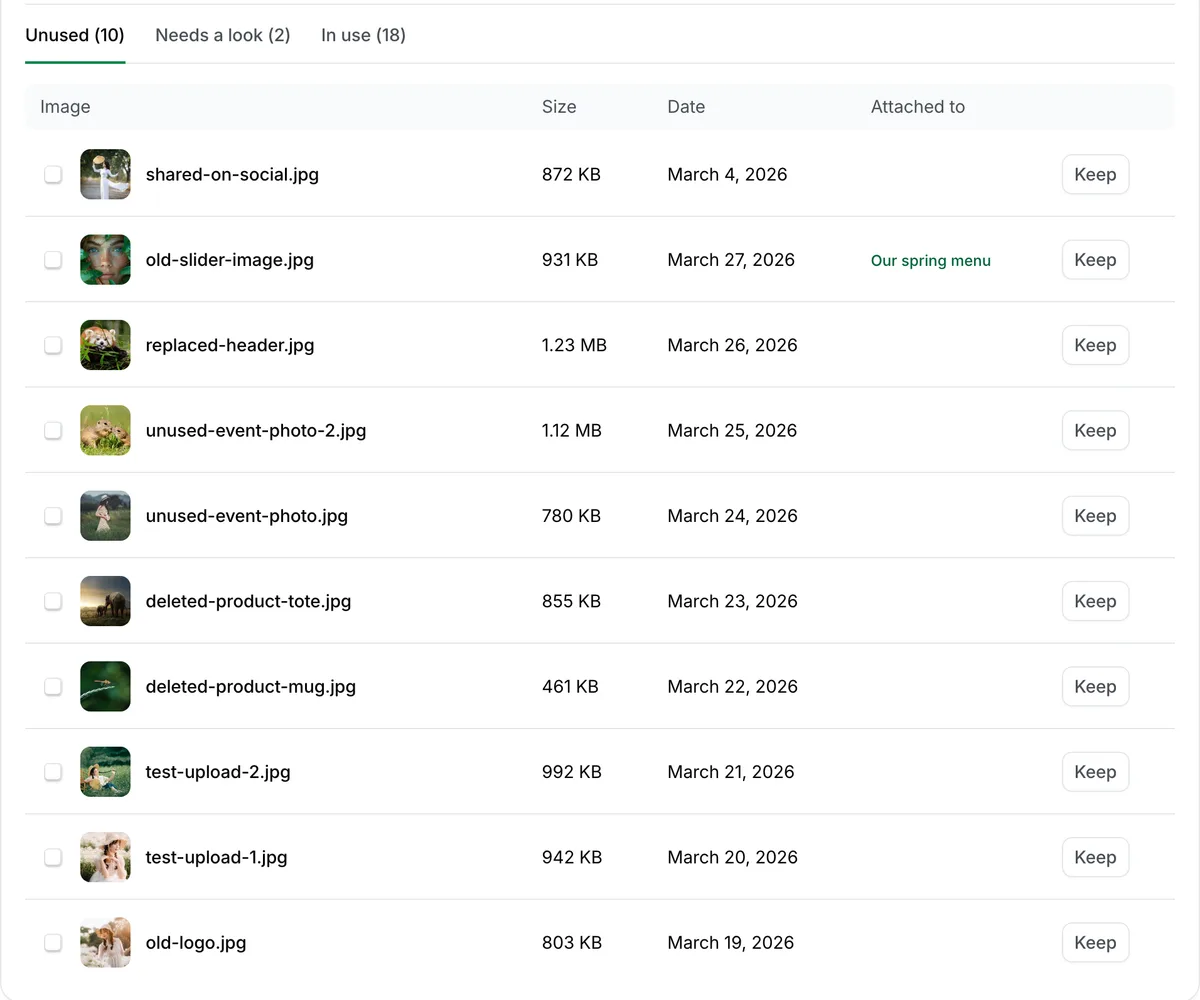
Anything it is not sure of goes to a Needs a look list, never to the bin, and a moved image comes back with one click until the bin empties. Our guide to deleting unused images in WordPress safely shows the whole test, with WordPress’s Unattached filter and Media Cleaner beside it.
How should you set up an image optimizer?
- Keep the automatic quality. Blinkimg’s Auto picks a quality per image; use Compare to check any image you care about.
- Turn on WebP and AVIF. Picture tags send each browser the best copy it can show, and the original to the rest.
- Keep backups on until you have checked your pages.
- Run Bulk optimize once for the images you already have; new uploads are done for you.
- Do not lazy-load the image at the top of the page. It is usually the largest one, and lazy loading delays it.
- Run one optimizer, not two. Two compress each file twice, which can make it worse and waste credits.
Which WordPress image optimizer should you choose?
- Most sites, and shared hosting: Blinkimg. Its engine does the work off your server, and 250 images a month with WebP are free.
- No account, ever: Blinkimg’s engine on your own server, free and unlimited.
- A large library: Blinkimg Pro, $39 a year or $99 once for life, covers 1,500 images a month with WebP.
- Already on WPMU DEV: Smush Pro comes with the membership.
Which other image plugins are worth knowing?
- Optimole serves resized images from its CDN, free up to 2,000 visits a month.
- Converter for Media makes WebP locally for free, but does not compress your JPEG or PNG; AVIF is paid.
- CompressX converts to WebP and AVIF locally, all free.
- Modern Image Formats, from WordPress’s Performance Team, converts new uploads only, with no bulk tool or backups.
- Image Optimizer by Elementor has 1,000,000+ installs but a 1.7 rating, and its free plan is a one-time trial.
How we tested
- The files. 6 of our own photographs, 16.4 MB in all: 3 JPEGs (one 3744 × 5616, which WordPress scales to 2560 pixels) and 3 PNGs of 1280 to 1920 pixels.
- The site. A local WordPress 7.1.4 site on PHP 7.4.30 with Apache and GD, one plugin active at a time, fresh uploads for each.
- The plugins. Blinkimg 0.1.1 with its engine (Auto, WebP and AVIF) and on the site’s own server (Auto, WebP). Smush 4.3.6 free with no account (1X, backups on). EWWW 8.9.2 ran without its tools.
- The sizes. Read from the file system on 14 November 2026, in 1,000-byte units. For each photo, the smallest of the file pages link to and its WebP or AVIF copy.
- The facts. Installs, ratings, free plans and prices from each plugin’s WordPress.org listing and pricing page, read on 14 November 2026. Unused image features from the same listings, read again on 19 November 2026, with Blinkimg 0.2.0 tested on its own site. How we measure covers the rest.
Our verdict
Our verdict
Blinkimg: Same quality, the smallest files in our test, and a free plan that never runs out on your own server.
- The smallest files in our test: about 12 times smaller than Smush’s free plan
- Free and unlimited on your own server, or 250 images a month with WebP on its engine
- $39 a year or $99 once, with every original kept and Restore free
- The only one of the five that cleans out unused images, with a bin you can undo
Read the full guide: How to reduce image file size on any device.
Questions
- What is the best image optimizer for WordPress?
- Blinkimg made the smallest files in our test: 6 photos of 16.4 MB came out at 1.2 MB as WebP and AVIF, against 14.4 MB with Smush’s free plan. It also gives 250 images a month with WebP for free, never charges for thumbnails and backs up every original. We make Blinkimg.
- Is there a free image optimizer for WordPress?
- Yes. Blinkimg runs free and unlimited on your own server with no account, and gives 500 free credits a month for its cloud engine, about 250 images with WebP. EWWW also compresses locally for free. ShortPixel, Imagify and Smush have smaller free plans or keep WebP behind Pro.
- Which is better, ShortPixel or Imagify?
- ShortPixel gives 100 free credits a month, but each thumbnail counts, and Unlimited costs $10.99 a month. Imagify gives 20 MB a month and skips images over 2 MB, and its paid plan starts at $5.99 for 500 MB. Blinkimg’s free plan covers more than either, with thumbnails free.
- Does Smush convert images to WebP for free?
- No. Smush lists WebP and AVIF as Pro features, sold with the WPMU DEV membership. Its free plan compresses JPEG and PNG and adds lazy load. In our test, the free plan with no account made the JPEGs 2.9% to 6.5% smaller and skipped our PNGs. Blinkimg makes WebP and AVIF free.
- Is EWWW Image Optimizer really free?
- Yes, its local mode is free and unlimited, with no account. It needs PHP’s exec() and its bundled tools to run on your server, and WebP is free. AVIF and its Easy IO CDN are paid, from $8 a month. Its setup wizard leaves image backups off, so turn them on yourself.
- Which WordPress image optimizer can delete unused images?
- Blinkimg is the only one of the five we compared. Its free Unused images finds images no page, post, setting or theme uses, reads your pages as visitors see them, and moves the ones you pick to a bin kept 7, 15 or 30 days. ShortPixel, EWWW, Imagify and Smush list no such feature.
- Can I use two image optimization plugins at once?
- Use only one to compress uploads. Two optimizers on the same file compress it twice, which can lower quality and waste credits. Deactivate the old optimizer before the new one runs. Blinkimg’s Logs tab warns when it finds another known image optimizer active on your site.
- Do image optimizer plugins slow down WordPress?
- A local engine, such as EWWW or Blinkimg on your own server, uses your server’s CPU and memory while it works, which can slow a shared host during a bulk run. A cloud engine, such as Blinkimg’s, does the work on its own servers. Visitors never wait for either.
- How can I optimize images in WordPress?
- Install one image optimizer such as Blinkimg, choose WebP and AVIF copies, and run its bulk tool on the images you already have. New uploads are then compressed automatically. Keep backups on so you can restore an original, and check a page in Chrome’s Network panel to confirm the WebP.