How to make an image low quality, or deep fry it: tested
Want a picture that looks bad on purpose, for a meme, a placeholder or a smaller file? Here is what each method does, measured on one real photo. Part of the image compressor.
By Sahadat Husain15 min readGuides

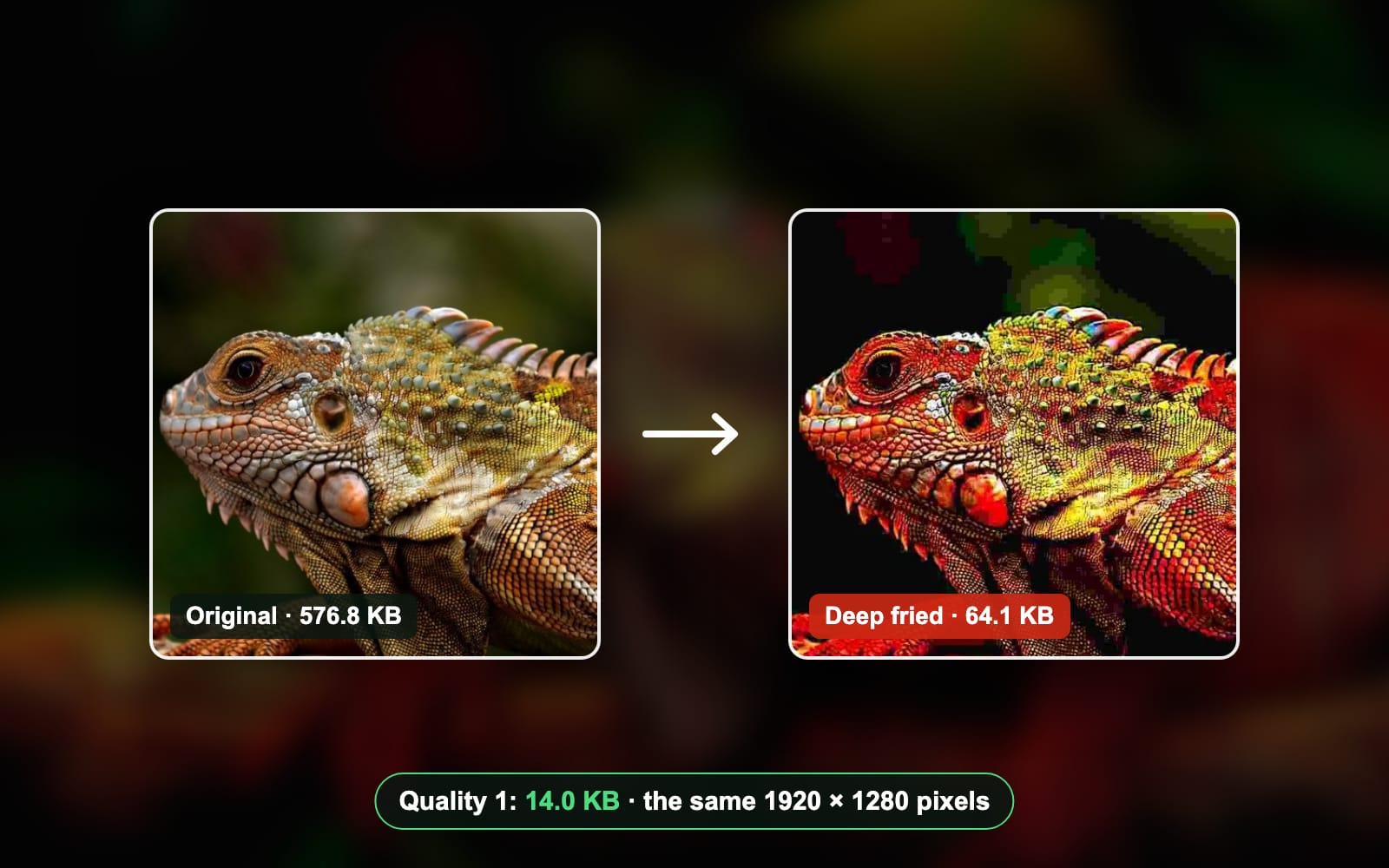
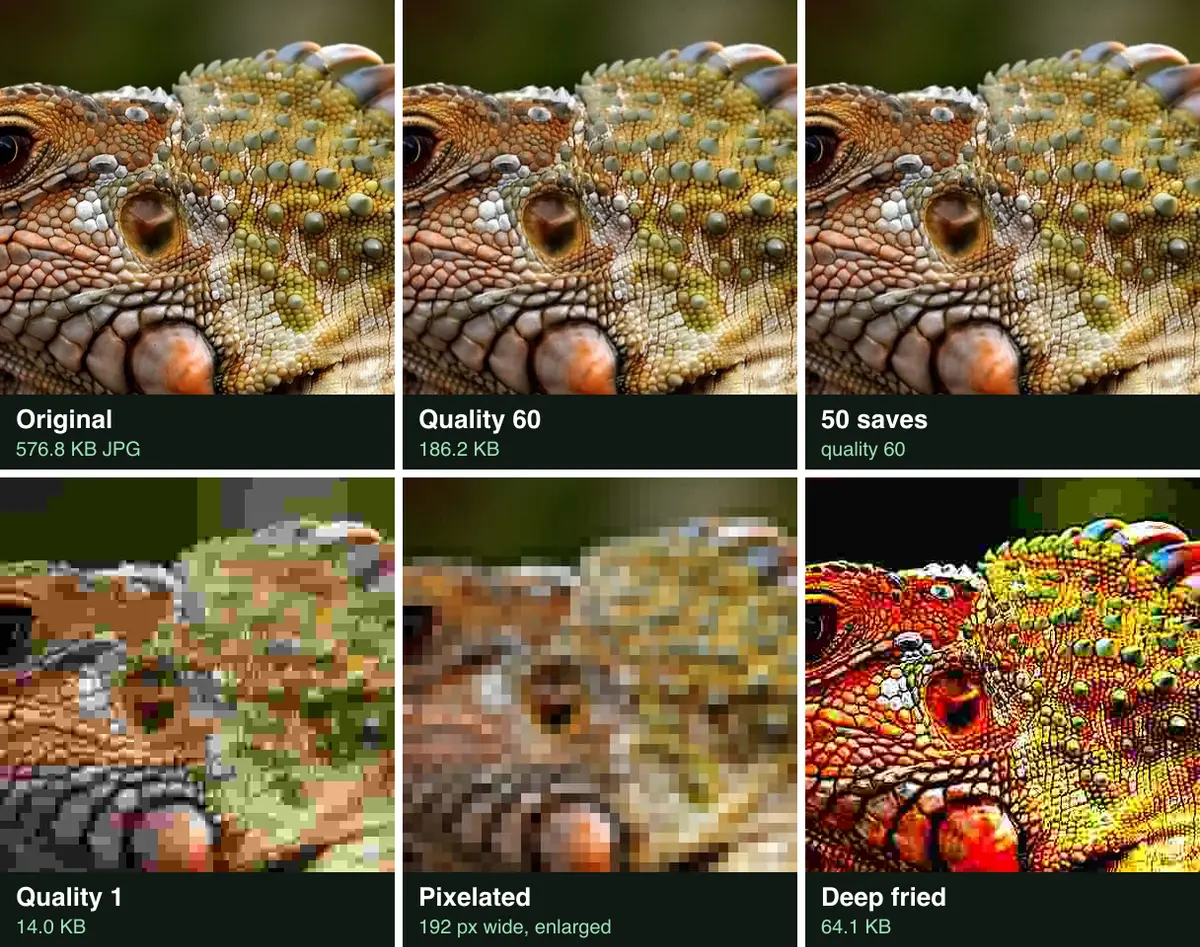
To make an image low quality, save it as a JPG at a quality between 1 and 10. Our576.8 KB photo came out at 44.8 KB at quality 10. At quality 1 it was 14.0 KB, blocky and smeared. For the deep-fried meme look, boost the colour and the sharpening first, then save it at a low quality. Re-saving the same file 50 times did almost nothing.
Why make a low quality image on purpose?
- A joke. A deep-fried meme is meant to look burnt. Know Your Meme’s explainer describes it as an image edited until it is blurry and miscoloured.
- A smaller file. A lower quality setting makes the JPG smaller. At quality 60 our photo was 186.2 KB, 68% under the original, and it still looked fine.
- A placeholder. A rough preview can stand in while the real picture loads, or mark a draft in a mock-up.
- Privacy. A rough copy hides the fine detail of a face, a screen or a document. Use pixelation for that; quality alone kept our iguana easy to recognise.
What does each JPG quality setting look like?
Quality 30 and up still looks like a photo; quality 10 and below falls apart into blocks. The JPEG quality scale runs from 0 (worst) to 100 (best). The libjpeg-turbo usage notes say values below 50 “will produce very small files of low image quality”. We saved our photo at 6 settings with Blinkimg’s engine:
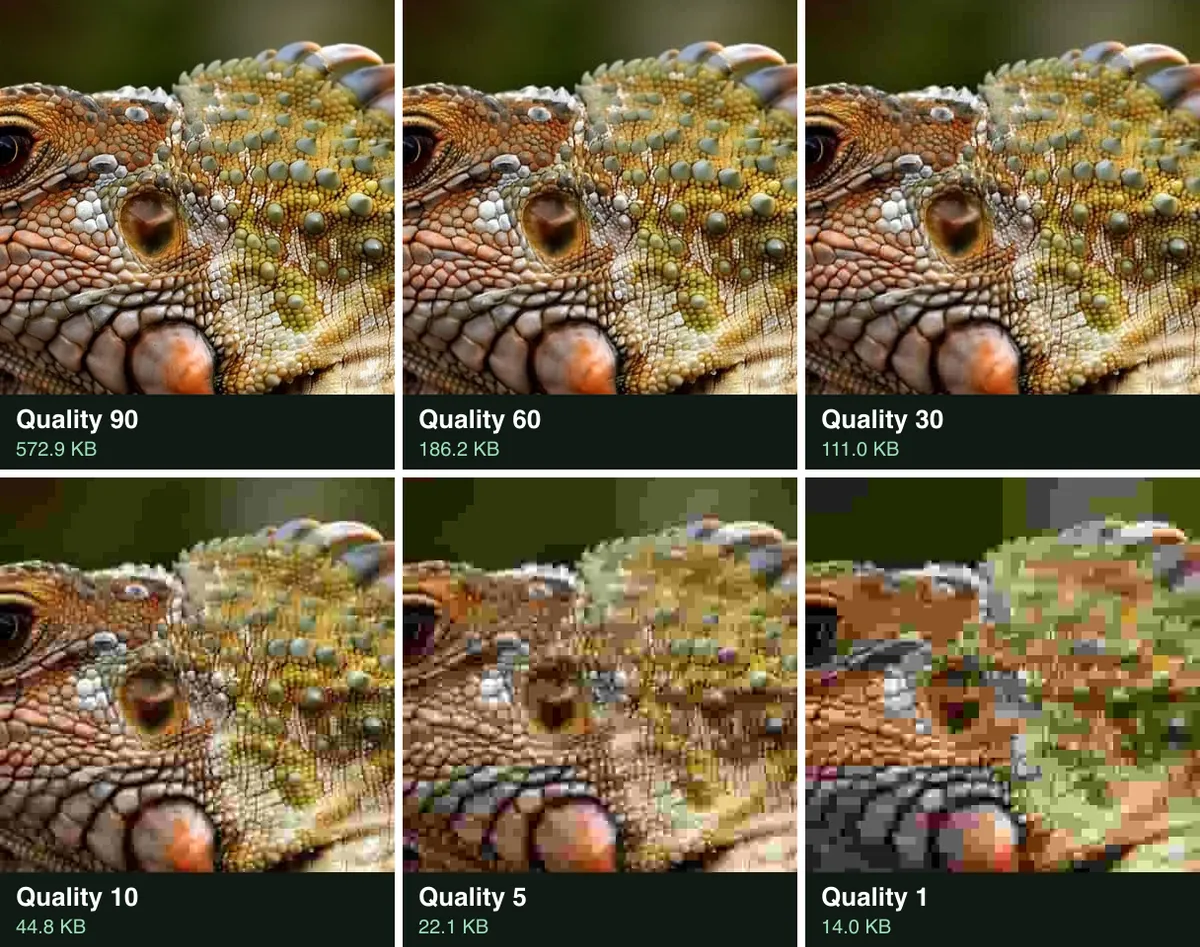
File size by JPG quality
- Original576.8 KB
- Quality 90572.9 KB
- Quality 60186.2 KB
- Quality 30111.0 KB
- Quality 1044.8 KB
- Quality 522.1 KB
- Quality 114.0 KB
| Quality | File size | Smaller than the original | PSNR |
|---|---|---|---|
| 90 | 572.9 KB | 1% | 41.7 dB |
| 60 | 186.2 KB | 68% | 34.3 dB |
| 30 | 111.0 KB | 81% | 31.3 dB |
| 10 | 44.8 KB | 92% | 26.7 dB |
| 5 | 22.1 KB | 96% | 23.6 dB |
| 1 | 14.0 KB | 98% | 21.2 dB |
How to make an image low quality online
Use a page with a quality slider you can drag to the bottom. Here is the run with our iguana on the lower image quality page:
Open the page and find the Quality slider
The page opens Advanced settings with Auto off and the Quality slider at 30. That setting gives a smaller file that still looks right.
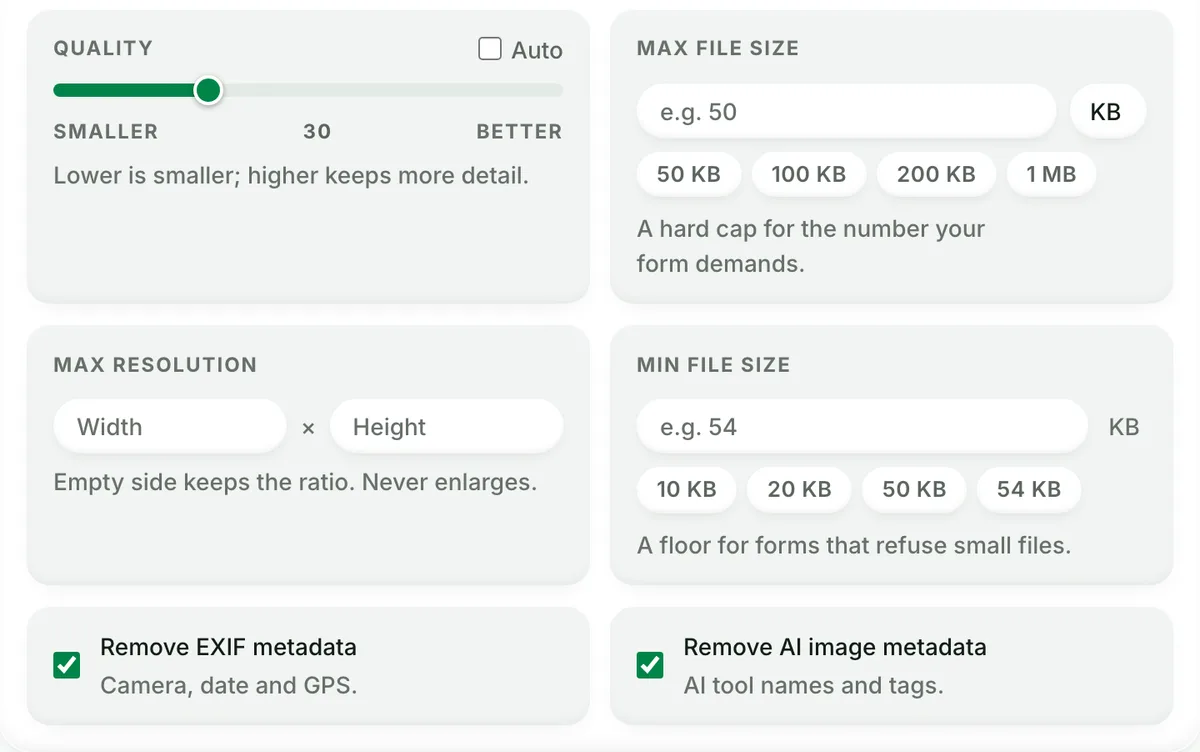
Quality 30 on arrival: smaller, not yet broken. Drag the slider down to 5
For a low quality look, drag the slider to between 1 and 10. We used 5, the point where our crop turned to blocks.
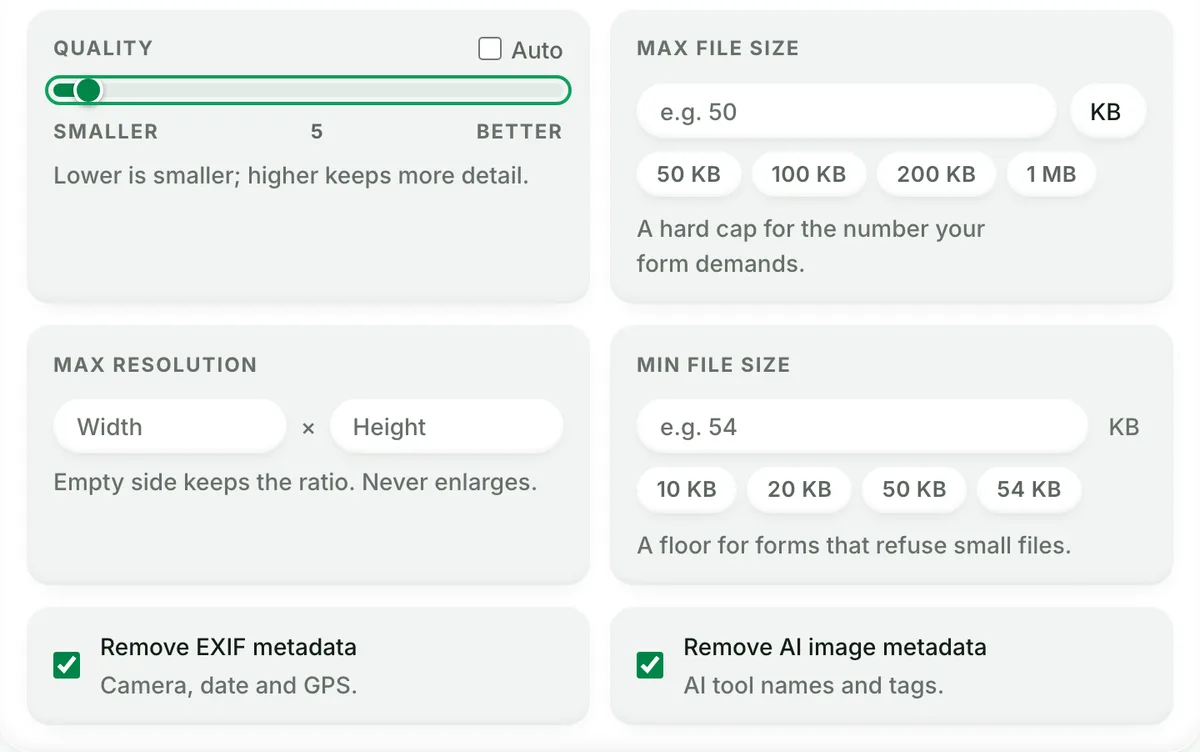
Quality 5: the setting we used for the rough copy. Drop your photo and download it
Drop a JPG, PNG, WebP, AVIF or HEIC, then click Download image. Our photo went from 576.8 KB to 22.1 KB at the same 1920 × 1280 pixels.
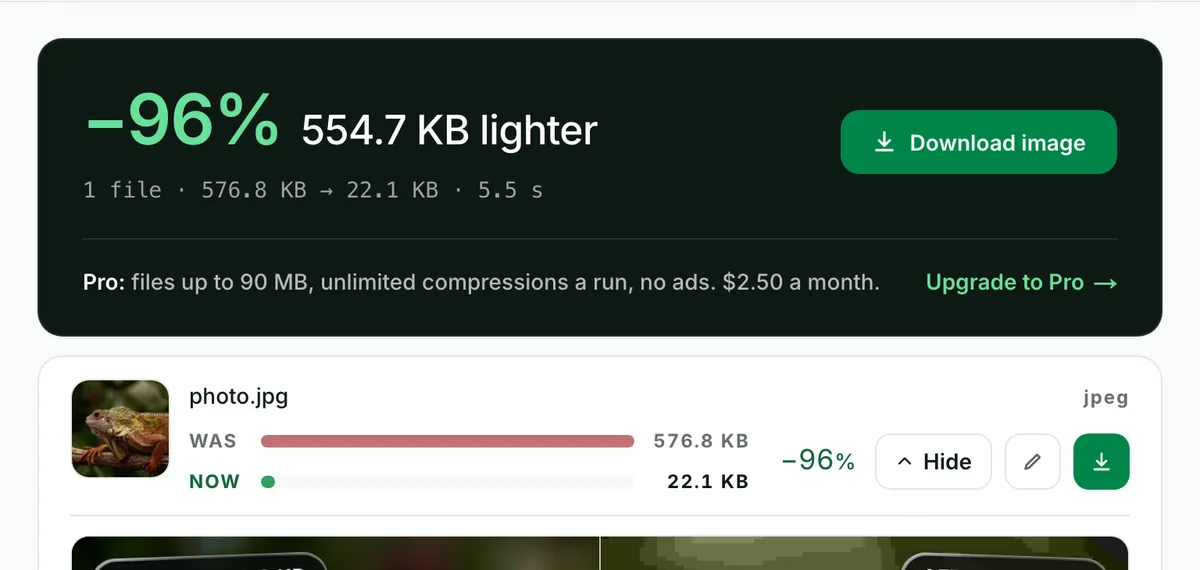
The live page gave the same 22.1 KB our engine test did.
How to deep fry an image
A deep-fried image needs four things in order. Loud colour, hard contrast, heavy sharpening, then a low quality save. Low quality alone gives you grey blocks; the colour and sharpening give you the burn.
Our recipe, step by step
We ran the recipe with sharp, the image library under Blinkimg. Each line is one call:
sharp('photo.png')
  .modulate({ saturation: 3 })        // colour x3
  .linear(1.6, -(128 * 0.6))          // contrast x1.6 around mid grey
  .sharpen({ sigma: 2, m1: 2, m2: 6 }) // hard edges
  .jpeg({ quality: 5 })               // then save at 5, three times over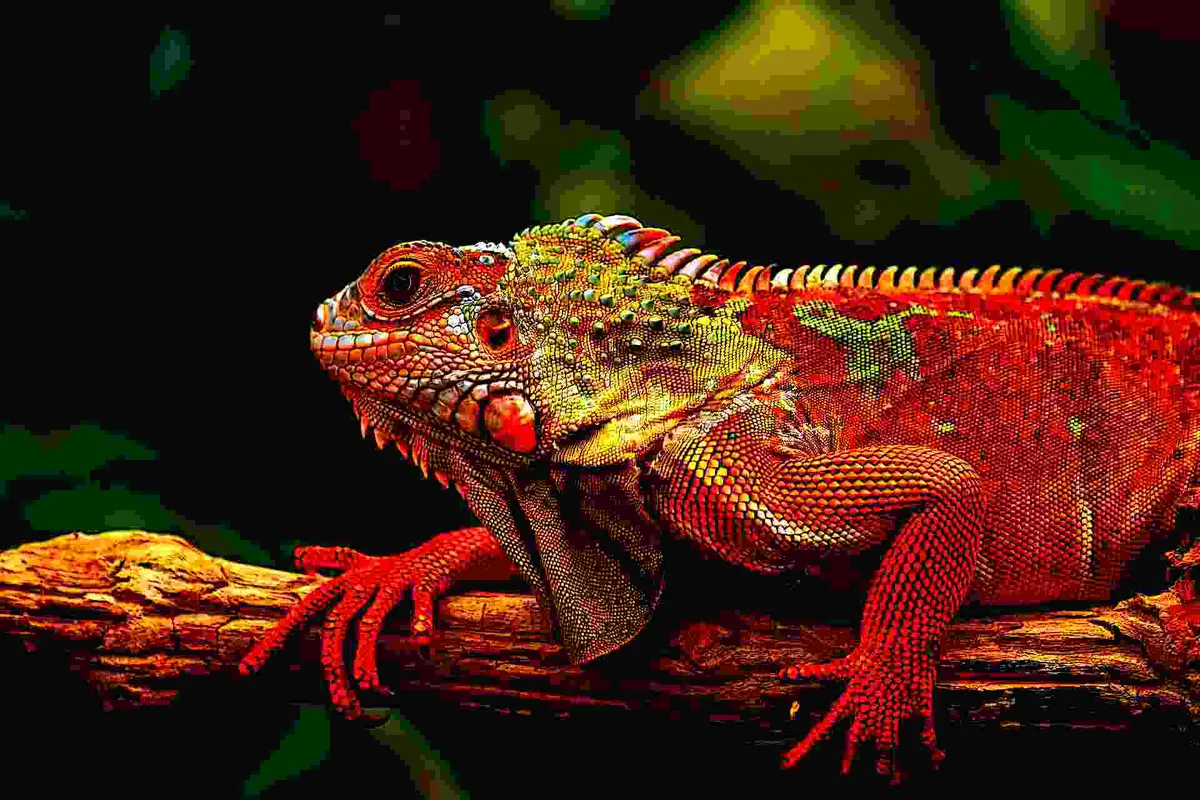
Our deep-fried copy scored 17.6 dB, below even quality 1 at 21.2 dB. It was also bigger, at 64.1 KB, because the sharpened edges are hard to compress. The sharp API page lists each operation if you want to script it.
Mild, crispy or burnt: how hard to fry?
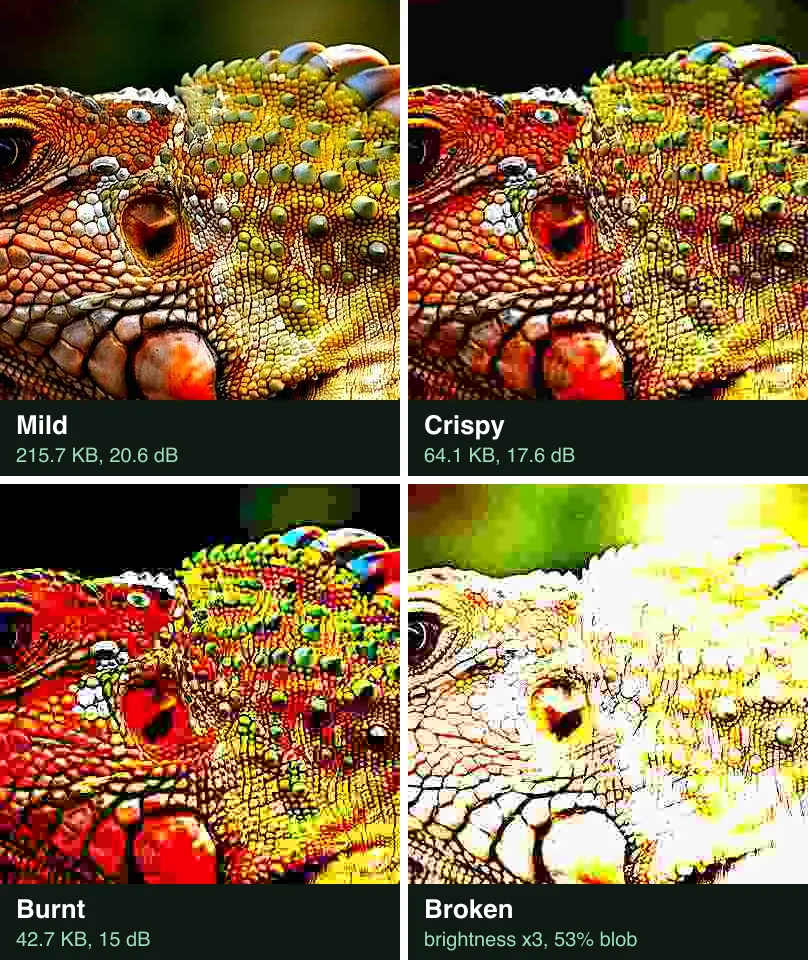
Pick the strength by how much of the photo should survive. We ran three recipes on the same photo:
| Strength | Colour | Contrast | Sharpen | JPG saves | File size | PSNR | Blob |
|---|---|---|---|---|---|---|---|
| Mild | × 1.8 | × 1.3 | sigma 1 | 1 at 30 | 215.7 KB | 20.6 dB | 21.5% |
| Crispy | × 3 | × 1.6 | sigma 2 | 3 at 5 | 64.1 KB | 17.6 dB | 26.8% |
| Burnt | × 5 | × 2.4 | sigma 3 | 5 at 3 | 42.7 KB | 15 dB | 28.8% |
Mild reads as a loud filter, at 215.7 KB. Crispy is the classic meme look. Burnt scored 15 dB and weighed only 42.7 KB, because quality 3 throws so much away.
When does a deep fry turn into a blob?
Stop before brightness × 3. We kept the crispy recipe and raised the brightness step by step. At × 2.5, 42.2% of the head was near black or near white. At × 3 that share hit 53%, and the head turned into a white blob.
| Brightness | File size | PSNR | Blob |
|---|---|---|---|
| × 1 | 64.1 KB | 17.6 dB | 26.8% |
| × 1.25 | 72.9 KB | 17.4 dB | 25.5% |
| × 1.5 | 78.7 KB | 16.3 dB | 25% |
| × 1.75 | 82.7 KB | 14.8 dB | 27.4% |
| × 2 | 85.3 KB | 13.4 dB | 30% |
| × 2.5 | 88.2 KB | 11.1 dB | 42.2% |
| × 3 | 89.0 KB | 9.4 dB | 53% |
How to deep fry an image in Photoshop or GIMP
Use the same four moves: colour, contrast, sharpen, a low quality save. We took each click path from the maker’s own help page. We did not run Photoshop or GIMP for this post.
Photoshop
- Choose Layer > New Adjustment Layer > Hue/Saturation, then drag Saturation to the right (Adobe’s Hue/Saturation page).
- Choose Layer > New Adjustment Layer > Brightness/Contrast. Contrast runs from -50 to +100; drag it high (Adobe’s Brightness/Contrast page).
- Select the photo layer and choose Filter > Sharpen > Smart Sharpen. Raise the Amount (Adobe’s Smart Sharpen page).
- Choose File > Save As, then JPEG. Set the Quality slider, which runs from 0 to 12, near 0 (Adobe’s JPEG page).
GIMP
- Choose Colors > Hue-Saturation. Saturation runs from -100 to 100; push it up (GIMP’s Hue-Saturation page).
- Choose Colors > Brightness-Contrast and raise Contrast (GIMP’s Brightness-Contrast page).
- Choose Filters > Enhance > Sharpen (Unsharp Mask). Amount runs from 0 to 300; set it high (GIMP’s Unsharp Mask page).
- Choose File > Export As and save as a JPG. The JPEG Quality runs from 0 to 100, default 85 (GIMP’s export page). Set it under 10.
Phone deep-fry apps also rank for the search. We did not test any of them, so we cannot vouch for their settings.
How to dress a deep-fried meme
A caption makes the fry read as a joke. The classic style is white capitals in Impact with a black outline, one line on top and one at the bottom. Emoji such as the fire or the crying-laughing face go on top for extra noise.
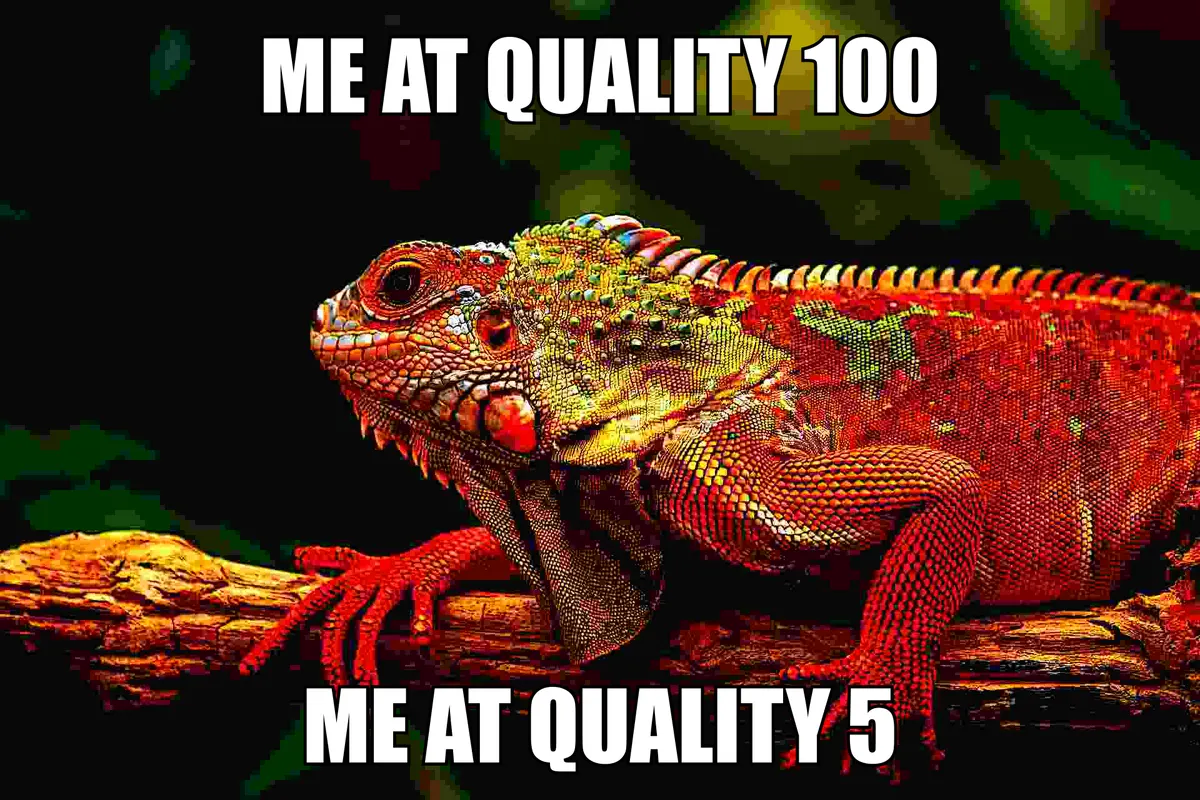
Add the caption after the fry, not before, if you want it readable. Text fried with the photo turns to blocks too. Use your own photo, not a borrowed meme template.
Does saving a JPG over and over lower the quality?
The same setting, 50 times
Barely, when you keep the same setting. We saved our quality-60 JPG 50 more times at 60. The score fell from 34.3 dB to 33.5 dB, and the file went from 186.2 KB to 185.0 KB. All of that change came in the first 10 saves; saves 10 to 50 changed nothing.
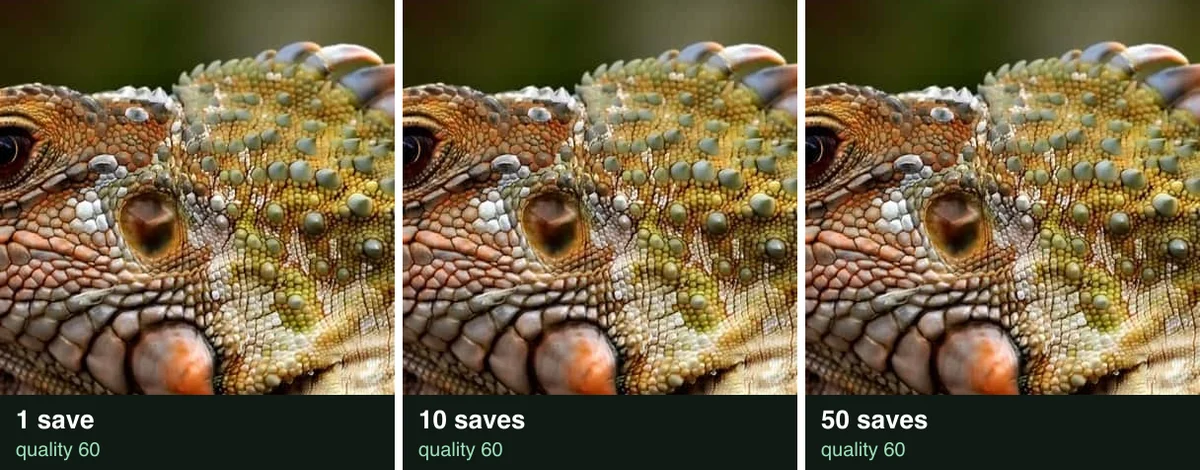
The headline that every re-save degrades a JPG did not hold here. The encoder rounds the same numbers the same way, so the file settles.
Falling quality: 60, 40, 20, 10
Lowering the quality at each save does wear the picture down. We saved at 60, then re-saved that file at 40, 20 and 10. The last copy weighed 36.2 KB and scored 25.1 dB. One direct save at 10 gave 44.8 KB and 26.7 dB, so the stepped copy came out smaller and rougher.
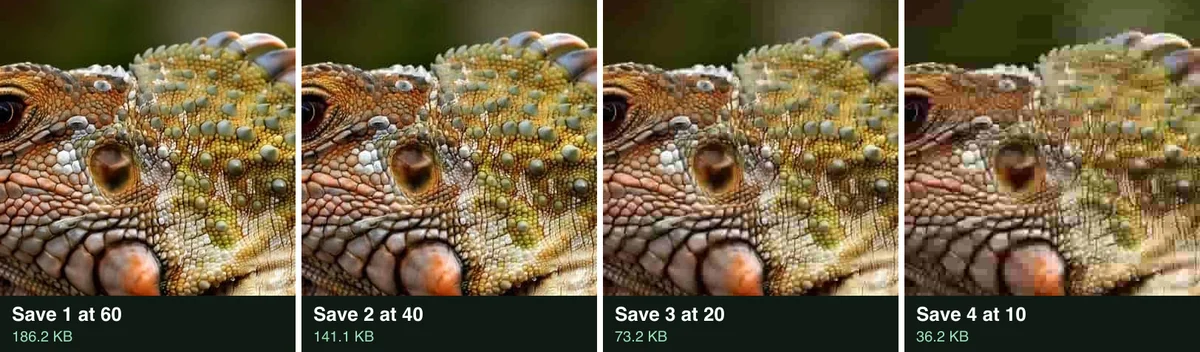
| Save | Quality | File size | PSNR |
|---|---|---|---|
| 1 | 60 | 186.2 KB | 34.3 dB |
| 2 | 40 | 141.1 KB | 31.7 dB |
| 3 | 20 | 73.2 KB | 28.5 dB |
| 4 | 10 | 36.2 KB | 25.1 dB |
How to make an image blurry or grainy
Blur hides detail and makes the file smaller; grain adds detail and makes it bigger. We blurred our photo (Gaussian, sigma 6) and saved it at quality 60: 62.8 KB, 22.4 dB. We added grain (Gaussian noise, sigma 30) and saved it the same way: 408.8 KB, 24.8 dB.
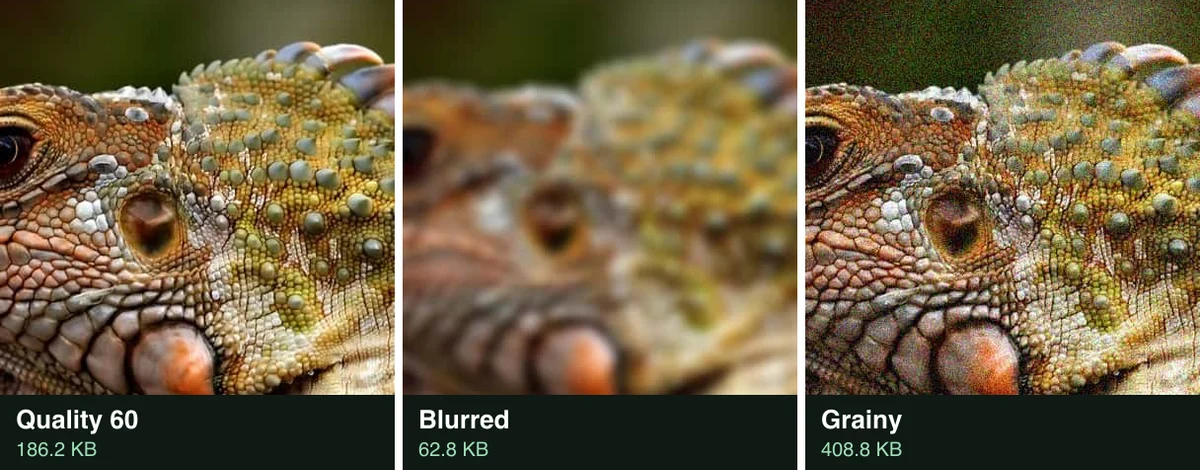
Random grain is the hardest thing a JPEG can store. Our grainy copy weighed over twice the plain 186.2 KB save. For a rough look and a small file, blur; for an old film look, add grain and accept the size.
Low quality or low resolution?
A low resolution image has fewer pixels; a low quality image has the same pixels, stored roughly. We shrank our photo to 192 × 128 and enlarged it back with no smoothing. It looked like coarse squares and scored 22 dB, near quality 5. It weighed 101.8 KB at quality 60, since it still had 1920 × 1280 pixels.
Pick pixelation to hide a face or a number: the detail is gone, not just blurred. Pick a low quality setting for the meme look, which keeps the shapes and adds blocks. The pixelate image tool does the squares in one step.
How we tested
The photo and the tools
- The photo: the owner’s own iguana on a branch, 1920 × 1280, a 576.8 KB JPG. We decoded it once to raw pixels first, so every save started from the same pixels.
- The tools: Blinkimg’s engine (version 10) made every plain JPG save: the ladder, both re-save tests, the pixelated, blurred and grainy copies. sharp 0.35.5 did the shrink, the enlarge, the blur and the deep fries.
- The score: PSNR over the red, green and blue values against the lossless original. Higher is closer to the original.
- The blob: the share of the iguana’s head with a Rec. 601 luma of 20 or less, or 235 or more. We raised the brightness until it passed 50%.
- The meme: the crispy frame with an Impact caption drawn as an SVG layer by sharp. Impact ships with macOS.
The steps and the date
- The steps: captured on the live lower image quality page on 2026-10-26, with the same photo. The page gave 22.1 KB at quality 5, the same as our engine run.
- The app steps: the Photoshop and GIMP click paths come from Adobe’s and GIMP’s help pages, read on 2026-10-26. We did not run either app.
- The crops: one 400 × 400 pixel square of the iguana’s head, cut from each file.
Next step
Drop your photo on the lower image quality page, drag Quality to 5 and download it. For the full burn, boost the colour in an editor first.
Read the full guide: How to reduce image file size on any device.
Questions
- How do I make an image low quality?
- Save the image as a JPG at a quality between 1 and 10. Our 576.8 KB photo came out at 44.8 KB at quality 10. At quality 1 it was 14.0 KB, with visible blocks. Any tool with a quality slider works, including an online page, a photo editor or an export dialog.
- What is a deep-fried meme?
- A deep-fried meme is an image edited until it looks burnt. It has loud colour, hard contrast, heavy sharpening and blocky JPEG compression. The style started on Tumblr around 2015, according to Know Your Meme. The joke is that the picture looks as if it was shared and saved too many times.
- How do I deep fry an image?
- Raise the saturation, raise the contrast, sharpen hard, then save as a JPG at a very low quality. We used saturation times 3, contrast times 1.6, a strong sharpen and quality 5 saved three times. The copy scored 17.6 dB against the original, rougher than a plain quality 1 save.
- What JPG quality looks bad?
- On our test photo, quality 30 and up still looked like a photo. Quality 10 showed clear blocks, and quality 1 broke the picture into large flat squares. The libjpeg-turbo notes warn that values below 50 give low image quality. On a busy photo, the damage shows later.
- Does saving a JPG many times lower its quality?
- Only a little when the setting stays the same. We saved one JPG 50 times at quality 60, and its score fell from 34.3 dB to 33.5 dB. Lowering the quality at each save does wear it down: 60, 40, 20 then 10 ended at 25.1 dB and 36.2 KB.
- Does lowering JPG quality make the file smaller?
- Yes, until the very bottom of the scale. Our 576.8 KB photo was 186.2 KB at quality 60, 111.0 KB at 30 and 44.8 KB at 10. Going from quality 5 to quality 1 saved only 8.1 KB more. The file still stores every pixel of the picture.
- Is low quality the same as low resolution?
- No. Low resolution means fewer pixels; low quality means the same pixels stored roughly. Our photo at quality 1 kept all 1920 by 1280 pixels at 14.0 KB. Shrinking it to 192 pixels wide and enlarging it back made coarse squares instead of compression blocks.
- How do I make a picture blurry or pixelated?
- Shrink the picture to a tenth of its width, then enlarge it back without smoothing. The small copy has too few pixels to hold the detail, so the enlarged one shows squares. A pixelate tool does the same in one step. It is the safer way to hide a face or a number.
- Can a low quality image protect my privacy?
- Only partly. A low quality save keeps the shapes, so our iguana stayed easy to recognise even at quality 1. To hide a face, a plate or text, pixelate or cover that area instead. Also remove the photo’s metadata, which can hold the camera, the date and the place.
- Why is my deep-fried image bigger than a plain low quality one?
- Sharpening adds hard edges and noise, and edges cost the JPEG encoder many bytes. Our deep-fried copy weighed 64.1 KB. The same photo saved at quality 5 without those steps weighed 22.1 KB. The extra bytes are the burnt texture you see.
- How do I deep fry an image in Photoshop?
- Adobe’s help pages give the moves. Add a Hue/Saturation and a Brightness/Contrast adjustment layer and push both up. Run Filter, Sharpen, Smart Sharpen on the photo. Then use File, Save As, JPEG with the Quality slider near 0 on its 0 to 12 scale. We did not run Photoshop ourselves.
- How do I make a picture grainy?
- Add noise to the picture, then save it. We added Gaussian noise with a sigma of 30 and saved it at JPG quality 60. The file grew from 186.2 KB to 408.8 KB, because random grain is hard to compress. Blur does the opposite: our blurred copy weighed 62.8 KB.
- Can I make a PNG low quality?
- A PNG has no quality setting in the same sense, because a normal PNG is lossless. To make a PNG look rough, save it as a low quality JPG. Or reduce its colours to a small palette. Converting to JPG also drops any transparent background, which turns a solid colour.
- How do I make a low quality image placeholder?
- Make a small copy of the picture, a few hundred pixels wide, and save it at a low quality. Show it stretched while the full picture loads. Our full-size photo was still 14.0 KB at quality 1. For a placeholder, fewer pixels matter more than quality.