Pixelate an image: hide a face, a plate or any part
Drop a photo and the editor opens on Regions with Censor pressed. Drag a box over the face, plate or name you want gone and it turns into blocks. Drag again for the next one. Save, and the copy you download comes back compressed, its GPS location stripped. One of the image tools.
Output format
– / –
Drop images or browse
JPEG · PNG · WEBP · AVIF · HEIC · up to 50 at once · max 30 MB each
HEIC
PNG
JPEG
AVIF
WEBP
Advanced settings1 on
SmallerAutoBetter
Auto tunes each image.
A hard cap for the number your form demands.
KB
A floor for forms that refuse small files.
Max resolution
×
Empty side keeps the ratio. Never enlarges.
A real pixelation, before and after
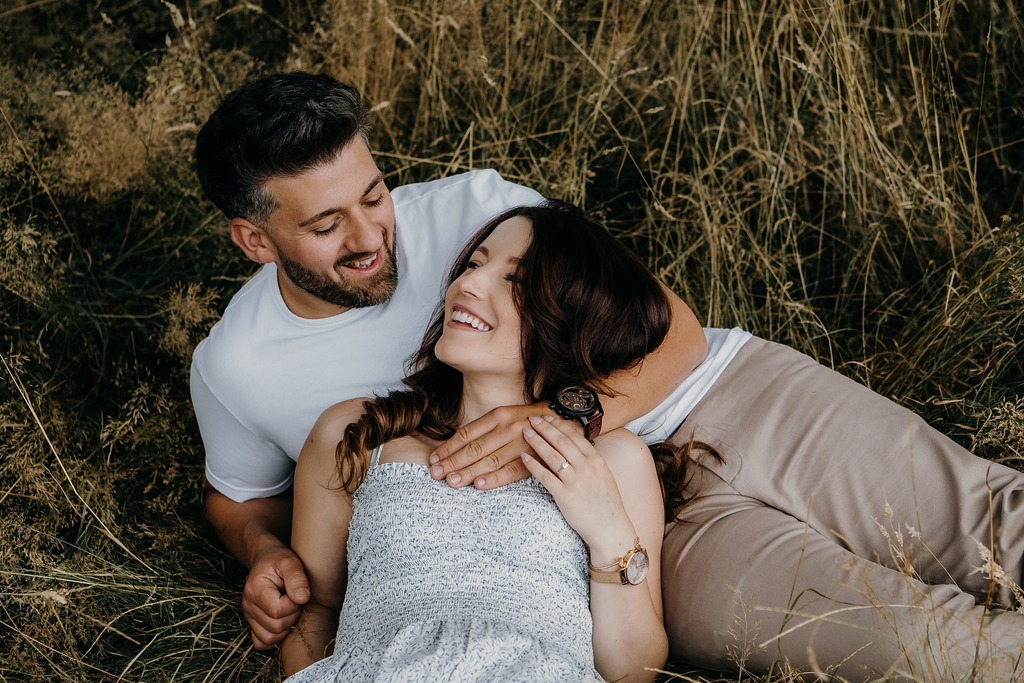
Original · 269.2 KB
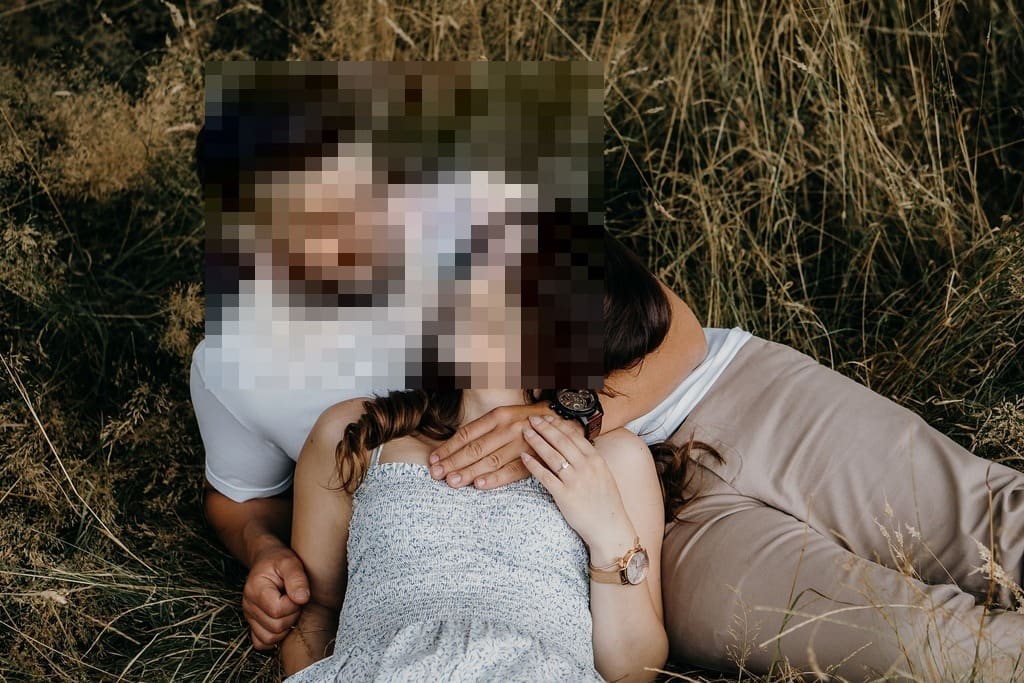
Pixelated, 24 × 24 blocks · 122.9 KB
−54%
One of our photographs, actually pixelated in one box in the editor and saved by our engine; the sizes are the real files'. Drop your own image and do the same.
How it works
Drop, pixelate, save
Three steps, no account. The file leaves smaller than it arrived.
01
Drop
Drop a photo and the editor opens on Regions with Censor pressed.
02
Pixelate
Drag a box over a face, a plate or a name. Drag again for the next one.
03
Save
The pixelated copy comes out compressed, its GPS location stripped.
How do I pixelate part of an image?
Three moves: drop, drag, save. The editor opens on the Regions tab with Censor pressed, so the first drag already makes blocks. Drag a box over the face, the plate or the name you want gone and it turns into a grid of flat colour at once. Drag again for the next area; the panel counts the boxes placed. Drag a box to move it, pull its corner to resize it, and press Delete or its cross to remove it. Undo steps back through every change. When the preview looks right, Save hands back the file compressed, in JPEG, PNG, WebP or AVIF.
How big are the blocks?
Up to 24 blocks each way per box, and never much smaller than 8 pixels of the photo. The block size follows the box you draw: a box 200 pixels wide gets blocks about 8 pixels across, a box 800 pixels wide gets blocks about 33 pixels across. So a small face in a crowd gets fine blocks, and a box over a whole picture gets the chunky, pixel-art look some people mean by pixelate a photo. Want coarser blocks over a small area? Draw the box bigger than the thing it hides. The blocks are drawn at the photo’s full resolution, so what you see zoomed in the preview is what the saved file holds.
Is pixelation safe, or can it be undone?
The file cannot give the detail back: each of the up to 576 blocks in a box keeps one flat colour, and the pixels under it are gone from the saved copy. What stays possible is guessing. Depix, published on GitHub in 2020, rebuilt short pixelated passwords from screenshots by matching the blocks against rendered text. A 2016 study by McPherson, Shokri and Shmatikov, researchers at UT Austin and Cornell Tech, trained neural networks that recognised faces hidden by pixelation far better than chance. Two rules follow. Draw generous boxes, because bigger blocks leave less to match. And never pixelate text that must stay secret, such as a password or an account number: crop it out of the picture instead.
Does pixelating change the file size?
Pixelating one box made our photograph 7% smaller. It shows a laughing couple lying together in dry golden grass. As JPEGs at 92, it exported at 269.2 KB as it came and 250.2 KB with one box pixelated. Quality 92 was the editor’s JPEG step before 5 October 2026. Flat blocks carry no fine detail, and detail is what a JPEG spends its bytes on. The saving grows with the share of the picture you cover and with how busy that part was: a noisy patch turned flat saves more than a clear sky. Our engine then saved the pixelated photo at 122.9 KB, the file in the figure at the top of the page.
What the JPEG measured
File
What changed
Size
Our photograph, exported
Nothing
269.2 KB
Pixelated, exported
One box of blocks
250.2 KB
Pixelated, saved by our engine
One box of blocks
122.9 KB
Source: one of our photographs, a laughing couple lying together in dry golden grass, at 1024 × 683. One box over the faces, rebuilt from 24 × 24 blocks the way the editor draws them. The exports are JPEGs at 92, as the editor saved them before 5 October 2026. The last row is the file our engine made.
Every byte count is the size of an actual file, not an estimate. A row marked exported is the picture as a JPEG at 92, the editor’s save before 5 October 2026. The engine’s row is the file the engine produced from that JPEG. The photograph is one of our own. Drop your own file into the tool above to rerun any of them. How we measure names the sources and the settings.
Where are the blocks drawn, and what reaches your servers?
In your browser, in the second you drag. The drop opens the editor on the photo in your browser tab, and nothing is sent while you work. Save draws the finished picture, blocks included, and that copy goes to our servers over HTTPS for compression. So the version we receive is already pixelated. We keep nothing: it is processed, handed back and wiped automatically, never archived and never used for anything else.
What does the saved file still say about the photo?
None of the 3 things a camera usually writes: the model, the time and the GPS position. A phone photo carries them as EXIF metadata, and a pixelated face in a file that still names the street is not much of a secret. The editor redraws the picture to lay the blocks down, and a redrawn picture keeps none of the camera’s tags, so the saved copy has no model, no time and no GPS. That holds even with Keep EXIF metadata switched on, which then writes only technical tags such as the pixel size. One thing the pixels cannot fix is the file name: rename the download if its name gives something away.
What should I pixelate before I post a photo?
Check 4 things before a photo goes public. Faces of people who did not agree to be posted, children above all. Number plates on cars in street photos and sale listings. House numbers, street signs and a view that places a home. Names, email addresses and order numbers in a screenshot. The first three hide well under generous boxes. The last is where pixelation is weakest, because text is what the published attacks rebuild: crop a screenshot’s secret out, and pixelate only what may be guessed without harm.
When pixelating is the wrong tool
A password or an account number?
Crop it out. Short pixelated text has been rebuilt from screenshots; a missing strip cannot be.
A soft blur behind the subject?
Not here: Censor makes blocks on purpose. A background blur is a different effect.
Draw the eye, hide nothing?
Highlight the part instead: a spotlight keeps your area bright and dims the rest.
Short answers specific to this tool. Try it above and the editor settles the rest.
Q:How do I pixelate part of an image?
Drop the photo and the editor opens on Regions with Censor pressed. Drag a box over the part to hide and it turns into blocks at once. Drag more boxes for more areas, or one across the whole picture to pixelate all of it. Undo takes back the last box, and Save hands back the result compressed.
Q:Can I pixelate a whole photo?
Yes. Drag one box from corner to corner and the whole picture turns into blocks. A box holds at most 24 blocks each way, so the block size follows the box: a big box makes big blocks, and a small box over a face makes fine ones, about 8 pixels at the smallest.
Q:What does a pixelizer do to a photo?
It replaces part of a picture with a grid of flat-colour blocks, so the detail underneath is gone from the saved file. The editor's Censor is a pixelizer: drag a box and it turns into blocks, at most 24 each way and never much smaller than 8 pixels. Drag one box across the whole picture to pixelize all of it.
Q:Is pixelating safer than blurring?
For faces and number plates, yes. A blur softens the detail but can leave the shape readable, while pixelation replaces the box with blocks of flat colour, up to 24 each way. For short text such as a password, crop it out instead: tools such as Depix have rebuilt pixelated text from screenshots.
Q:Do you see the part I pixelate?
No. The blocks are drawn in your browser before anything is sent, so the copy that reaches our servers for compression is already pixelated. We keep nothing: that copy is processed and wiped automatically. It also carries none of the photo's EXIF metadata, GPS location included, so the file does not say where it was taken.
Q:How do I pixelate a face in a photo?
Drag a box a little wider than the face, from the hair to the chin. The blocks follow the box, so a generous box makes coarser blocks that hide more. Pixelate every face that needs it, one box each, then check the preview at full size before you save. A face in a crowd needs its own box.
Q:How do I pixelate a licence plate or a house number?
Draw the box wider than the plate itself. A box 200 pixels wide gets blocks about 8 pixels across, which can leave large characters guessable; a box twice as wide makes blocks twice as big. Cover the whole plate, frame included, and zoom the preview to check that no character still reads before you save.
Q:Can I move or resize a box after drawing it?
Yes. Drag a box to move it and pull its corner handle to resize it; the blocks redraw as you go. Select a box and press Delete, Backspace or its cross to remove it. Undo steps back through every change, so a box in the wrong place costs one tap, not a restart.
Q:Will the blocks stay put if I crop or rotate the image?
Yes. A box is fixed to the picture, not to the screen. Crop, turn, flip or straighten after pixelating and the blocks stay on the face or the plate they cover, because the editor draws them inside the same transform as the photo. The saved file matches the preview exactly.
Q:Can a pixelated picture be unpixelated?
The detail under the blocks is not in the saved file: each block keeps one flat colour. What remains possible is guessing. Depix rebuilt short pixelated text from screenshots, and a 2016 study by McPherson, Shokri and Shmatikov trained neural networks to recognise pixelated faces. Big boxes make guessing harder; for secrets, crop them out.
Q:Does pixelating an image make the file smaller?
Usually a little, because flat blocks cost almost nothing to encode. Before 5 October 2026, our photograph weighed 269.2 KB as the editor's JPEG at 92. With one box pixelated it weighed 250.2 KB, 7% less. The saving grows with the area you pixelate and with how much fine detail that area held before.
Q:Can I pixelate a photo on iPhone or Android?
Yes, in the browser. Open the pixelate tool, tap the drop zone and pick the photo; the editor opens with Censor pressed and a finger drag draws the box. A HEIC photo from an iPhone needs one conversion to JPG first, because the editor does not open HEIC yet; the converter link appears when you drop one.
Q:Is the image pixelator free, with no watermark?
Yes. Pixelating is free with no signup and no watermark, with the same daily allowance as every tool on the site, counted beside the tool. JPG, PNG, WebP and AVIF open in the editor, a PNG with transparency stays a PNG, and the result downloads optimised in the format you pick.