How to post a GIF on Instagram: feed, Stories, DMs
Instagram has no upload button for a .gif file, so you post a GIF as a sticker or as a short video. Here is each route, from Meta’s and GIPHY’s own pages. Part of the social media image resizer.
By Sahadat Husain12 min readSizes

You post a GIF on Instagram in one of two ways. In Stories, Reels and chats, you add a GIF from the built-in GIF search. For the feed, you turn the .gif file into a short MP4 first. Then you post it like any video. Instagram’s feed has no upload path for an animated .gif file. Meta’s developer documentation lists JPEG as the only image format for a post, and MP4 or MOV for video. So a GIF either plays as a sticker or posts as a video. Need the frame at the right shape first? The social media image resizer sizes it for each Instagram slot.
Can you post a GIF on an Instagram post?
Yes, but not as a .gif file. Instagram plays GIFs from its GIF search in Stories, Reels and chats. Your own GIF goes in only as a video. Pick the route by where you want the GIF to show:
| Route | Where it shows | Your own GIF? | What it costs you |
|---|---|---|---|
| GIF sticker | Stories, Reels | No, search only | Sits on top of another photo or video |
| GIF in chats | DMs | No, search only | Phone and tablet apps only |
| GIF in comments | Under a post | No, search only | Meta publishes no help page for it |
| Convert to MP4 | Feed, Reels, Stories | Yes | One extra step before you post |
| GIPHY app share | Feed, Story | Any GIPHY GIF | Needs the GIPHY app on your phone |
| Boomerang | Stories, Reels | Shot in the app | A new loop, not your existing GIF |
How do you add a GIF to an Instagram story?
You add a GIF to a story or a reel with the Stickers button. Meta’s page Using stickers on Instagram gives the route: tap Stickers at the top, then Gif.
Start a story
Start a story and take or pick a photo or video.
Tap Stickers
Tap Stickers at the top of the screen.
Tap Gif
Pick a trending GIF or search for one at the top.
Tap a GIF
Pinch and drag it to size and place it.
Share the story
Share the story.
The same sticker tray opens when you record a reel. For the frame shape behind the sticker, read the Instagram story size guide.
How do you send a GIF in Instagram DMs?
You send a GIF in a chat from the Stickers button in the message bar. These steps come from Meta’s page Send a GIF or sticker in an Instagram chat.
Open a chat
Tap Messages at the bottom, then tap a chat in your inbox.
Tap Stickers
Tap Stickers in the bottom right of the message bar.
Tap GIFs
Tap GIFs in the bottom right, search, then tap a GIF to send it.
Meta’s page says this feature is not on computers. It works in the Android, iPhone, iPad and Instagram Lite apps.
How do you post a GIF in Instagram comments?
You post a GIF comment from the GIF button beside the comment box. Meta publishes no help page for GIF comments that we found. These steps follow Google’s summary of current guides.
Open the comments
Tap the comment icon under a post or reel.
Tap the GIF button
Tap the GIF button next to the comment box.
Pick a GIF
Search, then tap a GIF to post it as your comment.
Comment GIFs come from the same search as stickers. You cannot pick a GIF from your camera roll here.
How do I post a GIF from my camera roll to Instagram?
You post a GIF from your camera roll by converting it to an MP4 first, then posting the MP4. This is the only route that puts your own GIF in the feed.
Two Meta pages give the target. The Help Center’s Reel size and aspect ratios asks for 30 frames per second or more and at least 720 pixels. The shape can run from 1.91:1 to 9:16. Meta’s Graph API media reference adds the file rules: MP4 or MOV, H.264 or HEVC, 3 seconds to 15 minutes, up to 300 MB.
Load the GIF
Open your converter and load the .gif file.
Set MP4, H.264 and 30 frames per second
Loop a short GIF to at least 3 seconds.
Scale the frame to 1080 pixels wide
Pad it to 4:5 for the feed or 9:16 for Reels.
Post the MP4
In Instagram, tap the plus button, pick the MP4 and post it.
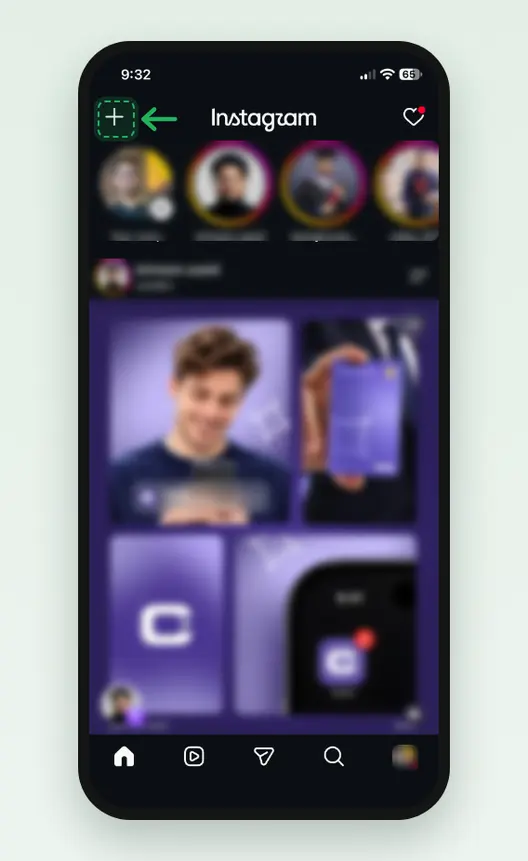
Screenshot: Create, the plus at the top left of Feed, starts the post.
On a computer, ffmpeg does all 3 settings in one command. We list it under How we tested. The posting screens match a photo’s, so the how to post a photo on Instagram steps apply.
What changes when a GIF becomes an Instagram video?
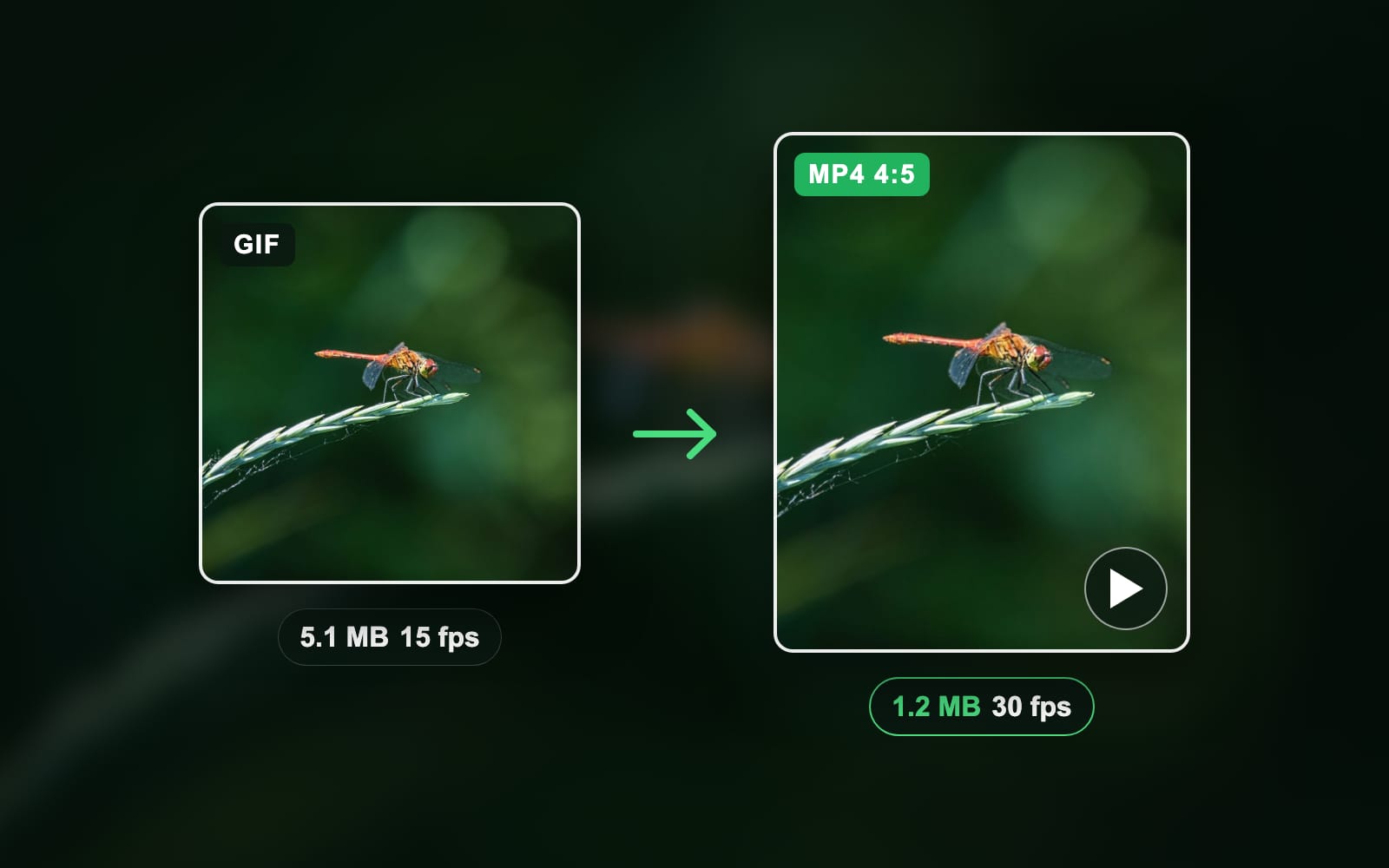
The MP4 is smaller, sharper and smoother than the GIF it came from. Our test conversion shows each change:
Bytes of the same clip
- GIF, 480 × 480, 15 fps5,054 KB
- MP4, 1,080 × 1,350, 30 fps1,209 KB
| Property | Our test GIF | Our MP4 for Instagram | Why it matters |
|---|---|---|---|
| File size | 5,054 KB | 1,209 KB | 4 times smaller |
| Frame | 480 × 480 | 1,080 × 1,350 | Passes the 720-pixel minimum |
| Pixels per frame | 230,400 | 1,458,000 | More than 6 times the detail |
| Frame rate | 15 fps | 30 fps | Meets the Help Center’s minimum |
| Colours | 256 per frame | Full colour | No banding on gradients |
| Length | 3 seconds | 3 seconds | Meets the API’s 3-second minimum |
The motion stays at the GIF’s speed. The converter repeats each GIF frame to fill 30 frames per second.
How do you share a GIF from GIPHY to Instagram?
You share from GIPHY with the share button under a GIF, then the Instagram button. GIPHY’s page How To Post GIFs on Instagram gives the steps.
Tap the share button
In the GIPHY app, tap the share button under a GIF.
Tap the Instagram button
Instagram opens.
Choose Feed or Story
Choose Feed or Story.
GIPHY’s page says the share sends “an .mp4 (15 second looped GIF)” into a post or the story tools. On a computer, GIPHY says to copy the GIF’s link and paste it into Instagram. To keep a GIF from a site first, read how to save a GIF.
How do you upload your own GIF so it shows in Instagram’s GIF search?
You upload it to GIPHY, because Instagram’s GIF sticker searches GIPHY’s library. GIPHY’s page Get Your Stickers and GIFs Into Instagram Stories sets three conditions:
- Make it a sticker. GIPHY asks you to use its Sticker Maker for searchable stickers.
- Expect an @username search. Without an upgraded channel, only Sticker Maker stickers and app uploads show under your @username.
- Wait for review. Every upload passes GIPHY’s moderation first. Each platform can also set its own rating limit.
So your own GIF will not show the minute you upload it. For a GIF only you need to post, converting it to MP4 is faster.
Why doesn’t my GIF work on Instagram?
A GIF fails on Instagram for one of five reasons. Match the symptom to the fix:
| Symptom | Cause | Fix |
|---|---|---|
| Only one frame shows, or the upload fails | The feed takes JPEG photos, not animated .gif files | Convert the GIF to MP4 |
| The converted video looks choppy | The GIF ran at 10 or 15 fps; the Help Center asks for 30 | Export the MP4 at 30 fps |
| The video looks soft | The GIF was under 720 pixels | Scale it to 1080 pixels wide |
| No Gif sticker in the tray | Meta says stickers may be unavailable in Japan and Europe | Update the app; use the MP4 route |
| Your own GIF is not in search | GIPHY has not reviewed it, or it is not a sticker | Use GIPHY’s Sticker Maker and wait |
Should you use a sticker, a video or Boomerang?
Pick the sticker when any GIF from the search will do. It takes 3 taps and shows only in Stories and Reels.
Pick a converted video when the GIF is yours: a product loop, a screen recording, a meme you made. You get the feed and Reels, and the clip stays on your profile. The cost is one conversion step.
Pick Boomerang when you have not made the loop yet. Boomerang shoots a burst in the Instagram camera and plays it forward and back. You get a loop without a file, but it cannot use a GIF you already have.
How we tested
- The file: a 3-second GIF, 480 × 480 at 15 fps, cut from a slow zoom across our own dragonfly photo. Made with ffmpeg 6.0 on 24 October 2026.
- The conversion: ffmpeg to H.264 MP4, yuv420p, 30 frames per second, padded to 4:5 (1,080 × 1,350). The command is below.
- The sizes: 5,054,379 bytes as a GIF and 1,209,257 bytes as the MP4, read from the file system.
- The specs: Meta’s Help Center pages on stickers, chat GIFs and Reel sizes, read in a browser. Meta’s Graph API media reference for the file rules. GIPHY’s two help pages for the share and the sticker search.
- The steps: Stories, chats and GIPHY sharing follow those pages. The comment steps follow Google’s summary of current guides, because Meta publishes no page for them.
ffmpeg -i test.gif -vf "fps=30,scale=1080:1080:flags=lanczos,pad=1080:1350:0:135:black" -c:v libx264 -crf 20 -pix_fmt yuv420p -movflags +faststart test.mp4Next step
Get the frame to 4:5 or 9:16 before you convert. The social media image resizer sizes the still or cover frame for each Instagram slot in your browser.
Read the full guide: Social media image sizes cheat sheet: ratios, safe zones and limits.
Questions
- Can you post a GIF on an Instagram post?
- You can post a GIF on Instagram in Stories, Reels and chats from the built-in GIF search. The feed does not take a .gif file. To put your own GIF in the feed, convert the GIF to an MP4 video first, then post the MP4 like any other video from the plus button.
- Why doesn’t my GIF work on Instagram?
- Instagram’s feed treats image files as photos, and Meta lists JPEG as the only image format for a post. An animated .gif has no animated photo slot, so only one frame shows or the upload fails. Convert the GIF to an MP4 at 30 frames per second and the animation plays.
- How do I post a GIF from my camera roll to Instagram?
- Convert the GIF to an MP4 video at 30 frames per second and at least 720 pixels wide. Loop a short GIF to 3 seconds or more. Save the MP4 to your camera roll, tap the plus button in Instagram, pick the MP4 and post it to your feed, story or reels.
- How do I add a GIF to my Instagram story?
- Start a story with a photo or video, then tap Stickers at the top of the screen. Tap Gif, pick a trending GIF or search for one at the top, and tap the GIF you want. Pinch to resize the GIF, drag it into place, then share the story.
- How do I send a GIF in an Instagram DM?
- Tap Messages at the bottom of the app and open a chat. Tap Stickers in the bottom right of the message bar, then tap GIFs. Search for a GIF and tap it to send it at once. Meta says this works in the phone and tablet apps, not on computers.
- How do you post a GIF in Instagram comments?
- Tap the comment icon under a post or reel, then tap the GIF button beside the comment box. Search for a GIF and tap it to post it as your comment. Comment GIFs come from the same search as stickers, so a GIF from your camera roll cannot go in a comment.
- How do you add your own GIF to an Instagram story?
- Convert your GIF to an MP4 at 9:16, then pick the MP4 in the story camera like any video. The Gif sticker searches GIPHY’s library, not your phone. To make your own GIF searchable as a sticker, upload it through GIPHY’s Sticker Maker and wait for GIPHY’s review.
- Why can’t I send my own GIFs on Instagram?
- Instagram’s GIF search shows only GIFs and stickers from GIPHY’s library, not files on your phone. A GIF you upload to GIPHY must pass moderation first. Without an upgraded channel, only stickers made in GIPHY’s Sticker Maker or apps show under an @username search. Convert your GIF to MP4 instead.
- What frame rate should a GIF video be for Instagram?
- Use 30 frames per second. Instagram’s Help Center asks for Reels at a minimum of 30 frames per second and 720 pixels. Many GIFs run at 10 or 15 frames per second, so set the converter to 30. The converter repeats frames to fill the rate, and the motion keeps its speed.
- How long can a GIF video be on Instagram?
- A GIF converted to video can run from 3 seconds to 15 minutes as a Reel, according to Meta’s Graph API documentation. Most GIFs run only a few seconds, so loop the clip 2 or 3 times to pass the 3-second minimum. The same documentation caps a Reel file at 300 MB.
- Can you post a GIF from GIPHY to your Instagram feed?
- Yes, GIPHY’s help page says its app offers Feed and Story when you tap the Instagram button. Tap the share button under a GIF, tap Instagram, then choose Feed. GIPHY sends a 15-second looped MP4 into a new post. On a computer, copy the GIF’s link instead.
- Is Boomerang the same as a GIF on Instagram?
- Boomerang is not a GIF file. Boomerang is a camera mode inside Instagram that shoots a short burst and plays it forward and backward as a video loop. It suits a new loop you shoot now. For a GIF you already have, convert the GIF to MP4 instead.