Social media image sizes cheat sheet: ratios, safe zones and limits
This social media image sizes cheat sheet lists every placement nine networks size on their own pages, read on 2 October 2026. Each row gives the pixels, the shape, the file limit and the source. The shapes repeat: 1:1 for profile pictures, 4:5 and 3:4 in the feeds, 9:16 for Stories and Reels, 16:9 for YouTube, and strips from 2.7:1 to 5.91:1 for banners. We fitted one photo to every size to show what each keeps. Part of the social media image resizer.
By Sahadat HusainUpdated 27 min readSizes

The social media image sizes cheat sheet, every placement
Here is every placement the nine networks size on their own pages. Where a network states nothing, the table says “Not stated” rather than borrow a number from another site. Two rows come from Meta’s pages for ads: the story, from its Business Help and its ads guide, and the Facebook feed image, from its ads guide. The Instagram and Facebook help pages we reached give no size for an ordinary story or feed photo.
| Network | Placement | Size (px) | Shape | File limit | Source |
|---|---|---|---|---|---|
| Feed photo | 1080 wide, 566 to 1440 tall | 1.91:1 to 3:4 | Not stated | Instagram Help | |
| Reel cover | 420 × 654 | 1:1.55 | Not stated | Instagram Help | |
| Instagram, Facebook | Story (ad spec) | 1080 × 1920 or 1440 × 2560 | 9:16 | 30 MB | Meta Business Help; Meta ads guide |
| Feed image (ad spec) | 1440 × 1800 | 4:5 | 30 MB | Meta ads guide | |
| Page cover | 851 × 315 (at least 400 × 150) | 2.7:1 | Under 100 KB loads fastest | Meta Help | |
| Personal cover | 720 wide or more | Not stated | Not stated | Meta Help | |
| Page profile picture | 320 × 320 | 1:1 | Not stated | Meta Help | |
| X | Header | 1500 × 500 | 3:1 | Not stated | X Help |
| X | Profile photo | 400 × 400 | 1:1 | 2 MB | X Help |
| X | Photo in a post | No pixel size | 2:1 to 3:4 shown in full | 5 MB | X Help |
| Profile banner | 1584 × 396 | 4:1 | Under 8 MB | LinkedIn Help | |
| Profile photo | 400 × 400 to 7680 × 4320 | Not stated | 8 MB | LinkedIn Help | |
| Page cover | 1512 × 256 | 5.91:1 | 3 MB | LinkedIn Help | |
| Page logo | 400 × 400 (at least 268) | 1:1 | 3 MB | LinkedIn Help | |
| Page post image | 1200 × 627 | 1.91:1 | Not stated | LinkedIn Help | |
| YouTube | Video thumbnail | 3840 × 2160 (at least 640 wide) | 16:9 | 2 MB phone, 50 MB computer | YouTube Help |
| YouTube | Shorts thumbnail | 2160 × 3840 (at least 640 tall) | 9:16 | 2 MB phone, 50 MB computer | YouTube Help |
| YouTube | Channel banner | 2560 × 1440 (at least 2048 × 1152) | 16:9 | 6 MB | YouTube Help |
| YouTube | Profile picture | Shown at 98 × 98 | Not stated | 15 MB | YouTube Help |
| TikTok | Profile photo | At least 20 × 20 | Not stated | Not stated | TikTok Help |
| TikTok | Photo post | No pixel size; up to 35 photos | Not stated | Not stated | TikTok Help |
| Standard Pin | 1000 × 1500 | 2:3 | 20 MB desktop, 32 MB app | Pinterest Business Help * | |
| Threads | Post image | 320 to 1440 wide | Up to 10:1 | 8 MB | Threads API |
| Discord | Server banner | 960 × 540 | 16:9 | Not stated | Discord Help |
| Discord | Profile banner (Nitro) | At least 680 × 240 | 2.83:1 | Under 10 MB | Discord Help |
| Discord | Any upload | No pixel size | Not stated | 20 MB free, 1 GB with Nitro | Discord Help |
- Instagram: Feed post, tallest1080 × 1440
- Instagram: Reel cover420 × 654
- Instagram and Facebook: Story1440 × 2560
- Facebook: Feed image1440 × 1800
- Facebook: Page cover851 × 315
- Facebook: Page profile picture320 × 320
- X: Header1500 × 500
- X: Profile photo400 × 400
- LinkedIn: Profile banner1584 × 396
- LinkedIn: Page cover1512 × 256
- LinkedIn: Page post image1200 × 627
- YouTube: Video thumbnail3840 × 2160
- YouTube: Channel banner2560 × 1440
- Pinterest: Standard Pin1000 × 1500
- Threads: Post image1440 × 1800
- Discord: Server banner960 × 540
- Discord: Profile banner (Nitro)680 × 240
Our social media image resizer opens the editor on each of these sizes. The rest of this guide does what a chart cannot: which shape suits which placement, where each app covers your picture, and how large a file each network takes.
Social media aspect ratios: the shapes that cover most placements
Four shapes and a handful of strips cover every placement in the table. A square for profile pictures and logos. 4:5 for a feed post. It sits inside the ranges Instagram, X and Threads state, and it is the shape Meta’s ads guide asks for in the Facebook feed. It is also shorter than Pinterest’s 2:3. Then 9:16 for anything that fills a phone screen, 16:9 for YouTube, and each network’s own strip for its banner or cover.
- 1:1Profile pictures, logos
- 4:5Feed posts
- 3:4Instagram's tallest post
- 2:3Pinterest Pins
- 9:16Stories, Reels, Shorts
- 16:9YouTube, Discord banners
- 1.91:1LinkedIn Page posts
- 2.7:1Facebook Page cover
- 3:1X header
- 4:1LinkedIn banner
- 5.91:1LinkedIn Page cover
How much of a photo each shape keeps
The shape decides what survives of your photo. We cropped our 4964 × 2782 camera photo from the centre to nine of these shapes. The 16:9 crop kept 100% of the frame, because the photo is nearly 16:9 already. The 9:16 crop kept 32%, and the 4:1 strip 45%.
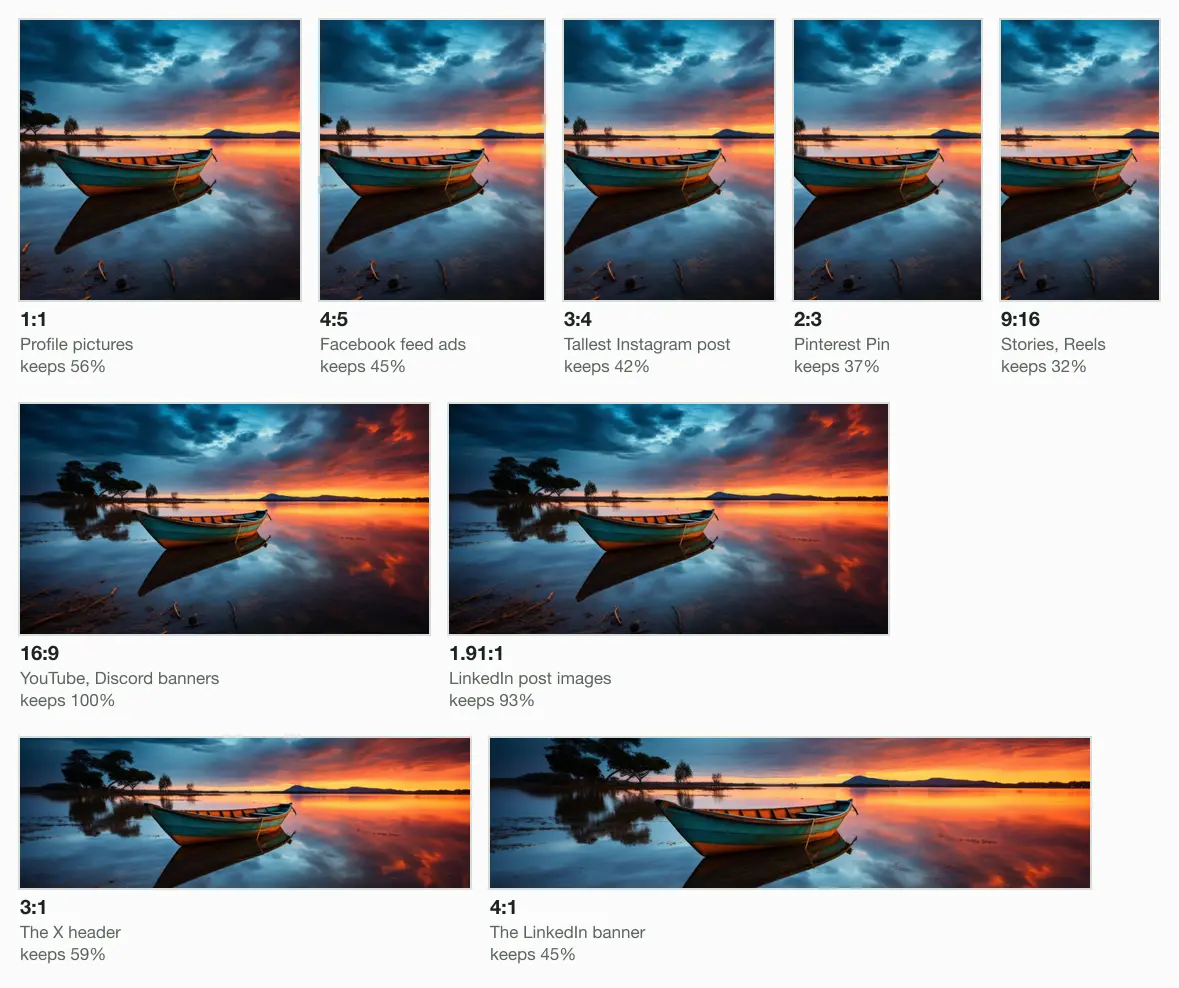
So shoot or design for the tightest shape you will need, and keep the subject in the middle. The middle of the frame survives every crop in the picture above; anything near an edge is lost to one of them.
Which shape for which placement?
Does the picture fill a phone screen?
- Yes
9:16
Stories, Reels and Shorts; text off the top and bottom
- No
Is it a banner or a cover?
- Yes
The network's own strip
3:1 on X, 4:1 on LinkedIn, 2.7:1 on Facebook, 16:9 on YouTube
- No
Is it a profile picture or a logo?
- Yes
1:1
Facebook crops it to a circle
- No
Is it a video thumbnail?
- Yes
16:9
9:16 for a Short
- No
4:5
2:3 on Pinterest, 1.91:1 for a LinkedIn Page post
- Yes
- Yes
- Yes
Instagram: 1.91:1 to 3:4 in the feed, up to 9:16 for Reels
Instagram keeps a feed photo at its own resolution when it is 320 to 1080 pixels wide and between 1.91:1 and 3:4. At 1080 wide that means 566 to 1440 pixels tall, according to Instagram’s help page on photo resolution. A photo outside that range is cropped to fit. So the tallest feed post is 1080 × 1440, and a 4:5 post at 1080 × 1350 sits inside the range.
- Widest, 1.91:11080 × 566
- 4:51080 × 1350
- Tallest, 3:41080 × 1440
- Reel cover420 × 654
- Story, 9:161440 × 2560
Reels take any shape from 1.91:1 to 9:16, at least 720 pixels, says Instagram’s Reels page. Its recommended cover is 420 × 654, a frame Instagram describes as 1:1.55, and the page adds that a cover cannot be changed after upload. Neither page gives a story size or a profile picture size. For a story ad, Meta’s Business Help page, read on 4 October 2026, recommends 1080 × 1920. Its ads guide asks 1440 × 2560, the same 9:16 shape. Both take JPG or PNG up to 30 MB.
Our test photo cropped to 1080 × 1440 came to 104.1 KB as a JPEG at Auto, and the Reel cover to 27.4 KB. The Instagram post size page opens the editor on a 4:5 post with the whole photo kept.
Facebook: an 851 × 315 cover, and 4:5 in the feed
Meta’s help page says a Page cover “loads fastest” as an sRGB JPG of 851 × 315 pixels, under 100 KB. The minimum is 400 × 150. The file is a 2.7:1 strip. Computers show it left-aligned at 16:9, phones at 2.4:1, and on a phone the profile picture overlaps the cover by about 40 pixels. A personal profile’s cover has one rule: at least 720 pixels wide.
- Page cover851 × 315
- Profile picture320 × 320
- Feed image, 4:51440 × 1800
- Story, 9:161440 × 2560
The Page profile picture is 320 × 320, shown at 176 pixels on computers and 196 on phones, cropped to a circle. For a cover or profile picture with a logo or text, Meta says a PNG may give a better result. No Meta help page we reached gives a size for an ordinary feed photo; its ads guide asks 1440 × 1800 at 4:5, at least 600 wide.
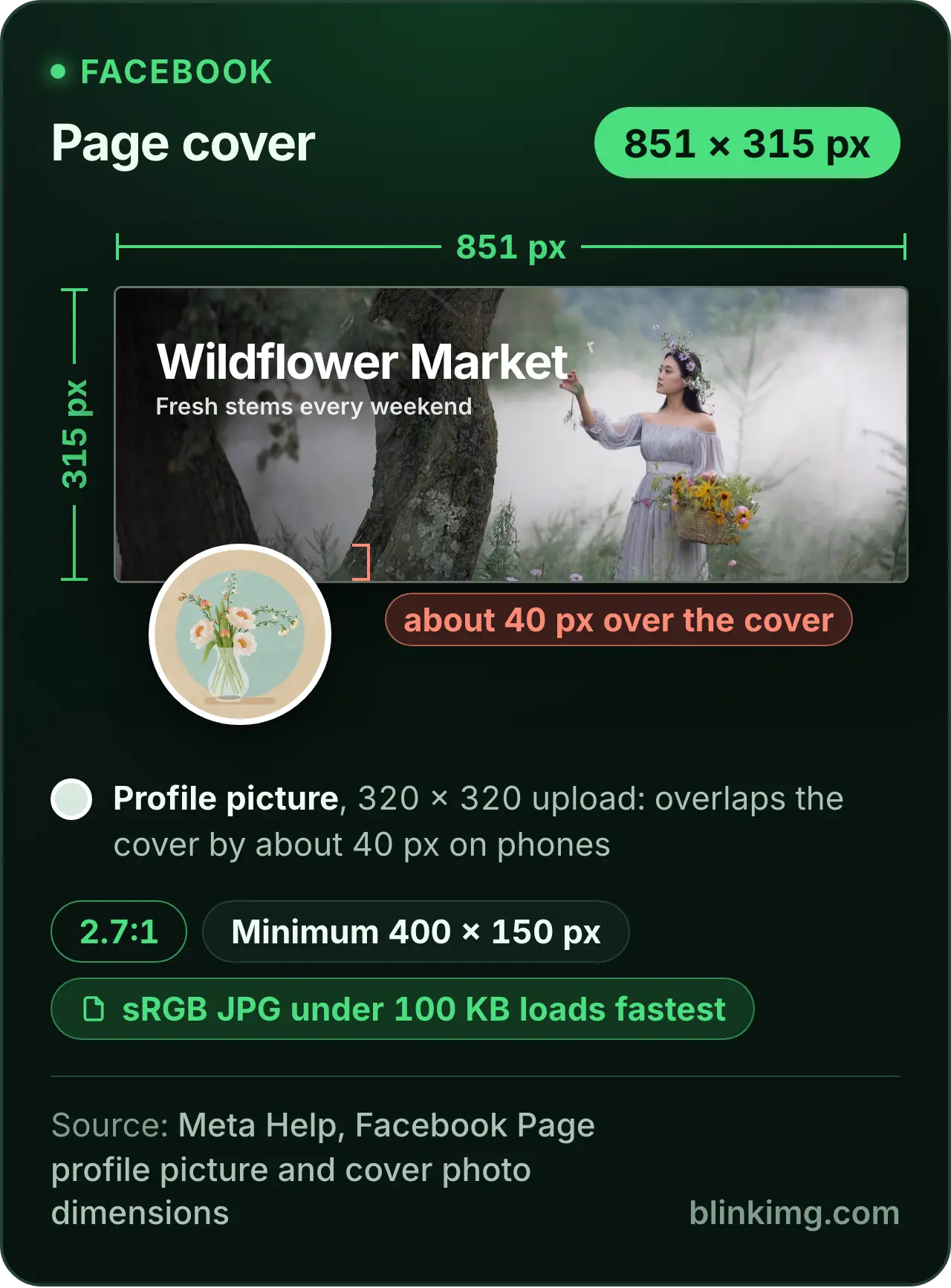
The 100 KB sounds tight, and it is easy to meet. Our cover came to 28.7 KB as a JPEG at Auto, and even the PNG of the same crop, 92.6 KB, stayed under. The Facebook cover photo size page crops a photo to 851 × 315 and shows where each screen cuts it.
X: a 3:1 header, and posts from 2:1 to 3:4
X’s Help Center recommends 1500 × 500 for the header and 400 × 400 for the profile photo. A profile photo may be 2 MB at most, as JPEG, GIF or PNG. The same page warns that a header at those dimensions can lose 60 pixels at the top and bottom, depending on the monitor and the browser. That leaves 1500 × 380 you can count on.
- Header, 3:11500 × 500
- Profile photo400 × 400
For a photo in a post, X gives no pixel size at all. Its posting help says a single photo with a ratio between 2:1 and 3:4 displays in full. Photos can be up to 5 MB, as GIF, JPEG or PNG; BMP and TIFF are refused. X adds that it keeps a photo’s Exif data only while it processes the photo, and never shows it to viewers.
Our header crop came to 64.2 KB and the profile photo to 18.6 KB, far under 2 MB. The Twitter header size page slides a 3:1 frame along your photo so you choose the strip that survives.
LinkedIn: a 4:1 banner, a 5.91:1 Page cover and 1.91:1 posts
LinkedIn recommends 1584 × 396 for a profile’s cover image, JPG or PNG under 8 MB. The profile photo can be anything from 400 × 400 to 7680 × 4320, PNG or JPG, 8 MB at most, and never a GIF.
- Profile banner, 4:11584 × 396
- Page cover1512 × 256
- Page post image1200 × 627
- Page logo400 × 400
A company Page follows its own article. The cover is 1512 × 256, PNG or JPEG, 3 MB at most, with key details kept away from the edges, “especially in the lower-right corner”. The logo is 400 × 400, at least 268, and is shown on light and dark backgrounds. A custom image in a Page post is 1200 × 627 at 1.91:1, and must be more than 200 pixels wide.
Our banner crop came to 57.8 KB and the Page cover to 41.1 KB. If a banner looks soft, LinkedIn’s own advice is to choose an image with a larger file size, so do not squeeze it hard. The LinkedIn banner size page crops to 1584 × 396 and covers the Page cover too.
YouTube: 16:9 thumbnails at 4K, and a banner with a small safe area
YouTube now recommends 3840 × 2160 for a video thumbnail and 2160 × 3840 for a Short. Either must be at least 640 pixels on the long side, as JPG or PNG. The limit is 2 MB from a phone and 50 MB from a computer, per YouTube’s thumbnail help. Podcast playlists take a 1:1 thumbnail instead.
- Thumbnail, 16:93840 × 2160
- Shorts thumbnail2160 × 3840
- Channel banner2560 × 1440
- Smallest thumbnail640 × 360
One rule changes what viewers see. A vertical video with a 16:9 custom thumbnail gets an auto-generated 4:5 thumbnail on the home, explore and subscriptions pages, YouTube says. So give a vertical video a 9:16 thumbnail, the Shorts size. The channel banner is at least 2048 × 1152, 2560 × 1440 is recommended for TV, and the file may be 6 MB. The profile picture is shown at 98 × 98 and may be 15 MB.
Several guides print 1546 × 423 as the banner’s safe area. YouTube’s page never does: it gives 1235 × 338 at the 2048 × 1152 minimum, which works out to about 1544 × 423 at 2560 × 1440. Design to YouTube’s figure, scaled to the size you upload.
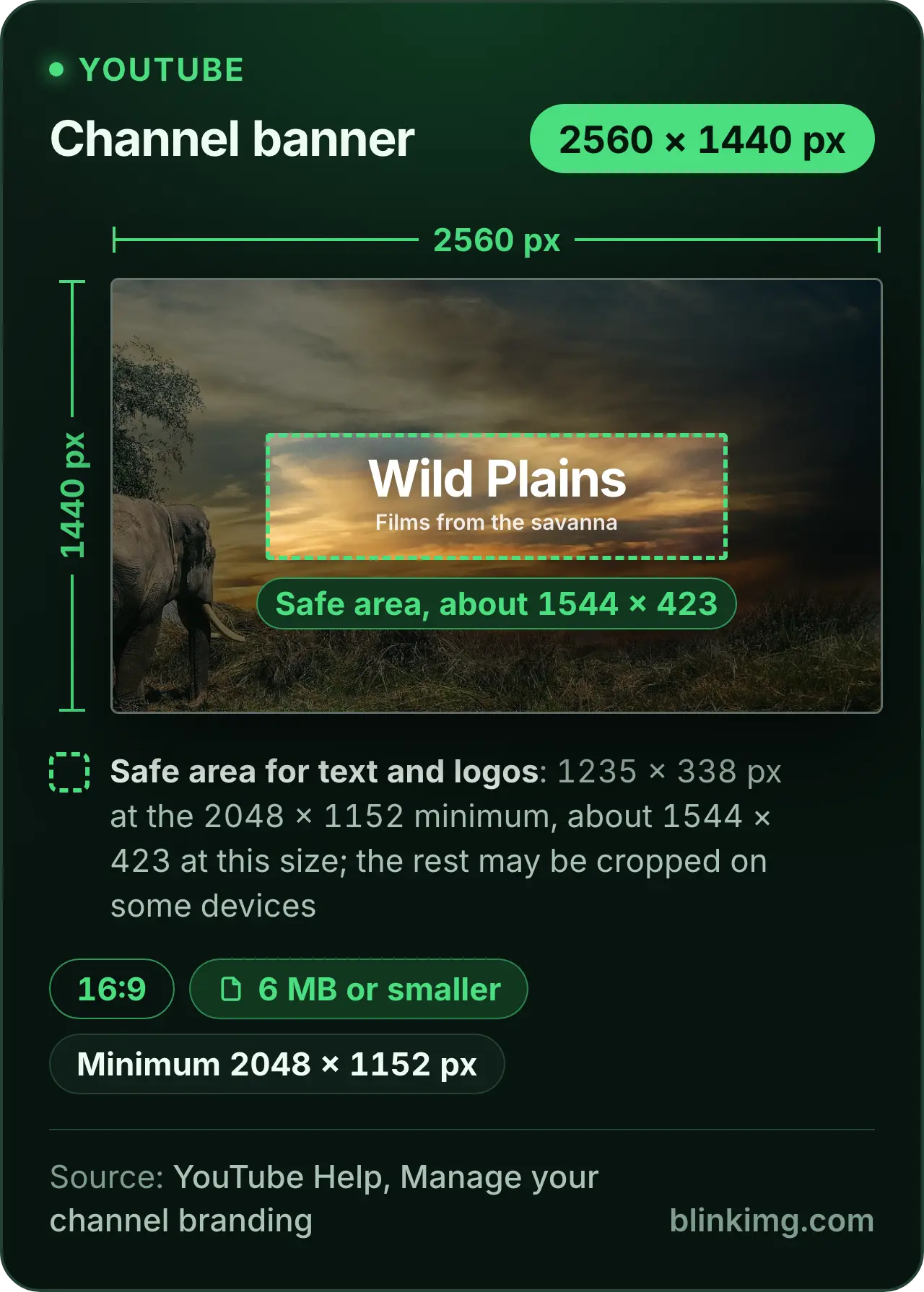
Our 4K thumbnail came to 423.5 KB as JPEG and 2.2 MB as PNG. The PNG is over the phone limit and fine from a computer; the JPEG passes both. The YouTube thumbnail size page opens on a 16:9 frame, and the YouTube banner size page marks the safe area on the crop.
TikTok: one stated size, a 20 × 20 minimum
TikTok’s help states a single image size: a profile photo “must be at least 20x20 pixels to upload”. You crop it in the app, then save. A photo post holds up to 35 photos, which you can crop as you post, and the page gives no pixel size, shape or file limit for them.
- TikTok's minimum20 × 20
- Our preset1080 × 1080
A minimum that small tells you nothing about sharpness, so upload a larger square. The TikTok profile picture size page opens on 1080 × 1080 with the whole photo kept, and says which of its figures are TikTok’s and which are ours.
Pinterest pin size: 2:3, at 1000 × 1500
Pinterest recommends a 2:3 Pin, 1000 × 1500, as a PNG or JPEG. The file may be 20 MB from a computer and 32 MB in the app. A Pin taller than 2:3 “might get cut off in people’s feeds”. A carousel takes 2 to 5 images at 1:1 or 2:3, up to 20 MB each.
- Standard Pin, 2:31000 × 1500
- A 9:16 PinMight get cut off
One caveat on the date. Pinterest’s help site did not load from our network on 2 October 2026. These figures come from the same page as the Wayback Machine captured it on 7 September 2026. Our test Pin came to 100.7 KB as a JPEG at Auto, a sliver of the 20 MB allowed.
Threads image size: 320 to 1440 pixels wide
Threads publishes its image rules for developers rather than in its help pages. Meta’s Threads API overview takes JPEG and PNG up to 8 MB, at any shape up to 10:1. It scales an image narrower than 320 pixels up and one wider than 1440 down, and converts other colour spaces to sRGB. A carousel holds 2 to 20 items.
- Narrowest kept320 wide
- Widest kept, at 4:51440 × 1800
- 10:1, the limit1440 × 144
These are the rules for posting through the API; the app’s help gives no size. Upload at 1440 wide and nothing is scaled down. Our 4:5 image at 1440 × 1800 came to 155.8 KB as a JPEG, against the 8 MB limit.
Discord: 16:9 server banners and a 20 MB upload
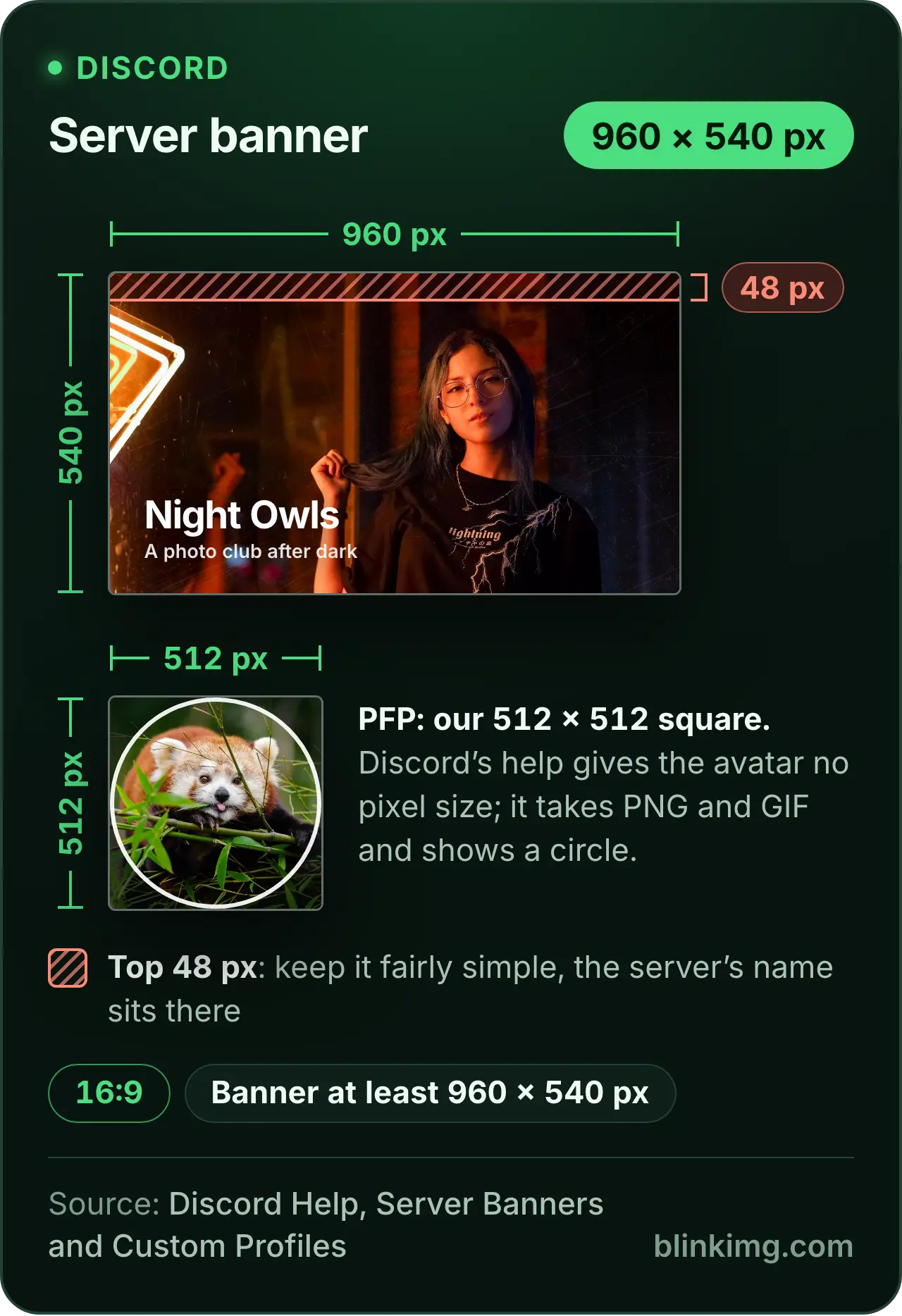
Discord asks for a server banner of at least 960 × 540 at 16:9, and resizes a 1920 × 1080 upload for you. Keep the top 48 pixels simple: the server’s name sits there. A profile banner is a Nitro feature, at least 680 × 240, as PNG, JPG or animated GIF under 10 MB.
- Server banner, 16:9960 × 540
- Profile banner (Nitro)680 × 240
Uploads have their own limit. Since August 2026 a free account can send 20 MB, up from 10 MB; Nitro Basic 50 MB and Nitro up to 1 GB. Discord also says it now checks the size before compression rather than after, on phones as on computers, “so the number you see is the number that counts”.
- Free20 MB
- Nitro Basic50 MB
- Nitro1 GB
Our server banner came to 47.6 KB and the profile banner to 19.5 KB. The Discord banner size page covers both banners and the profile picture.
Social media safe zones: where each app covers your picture
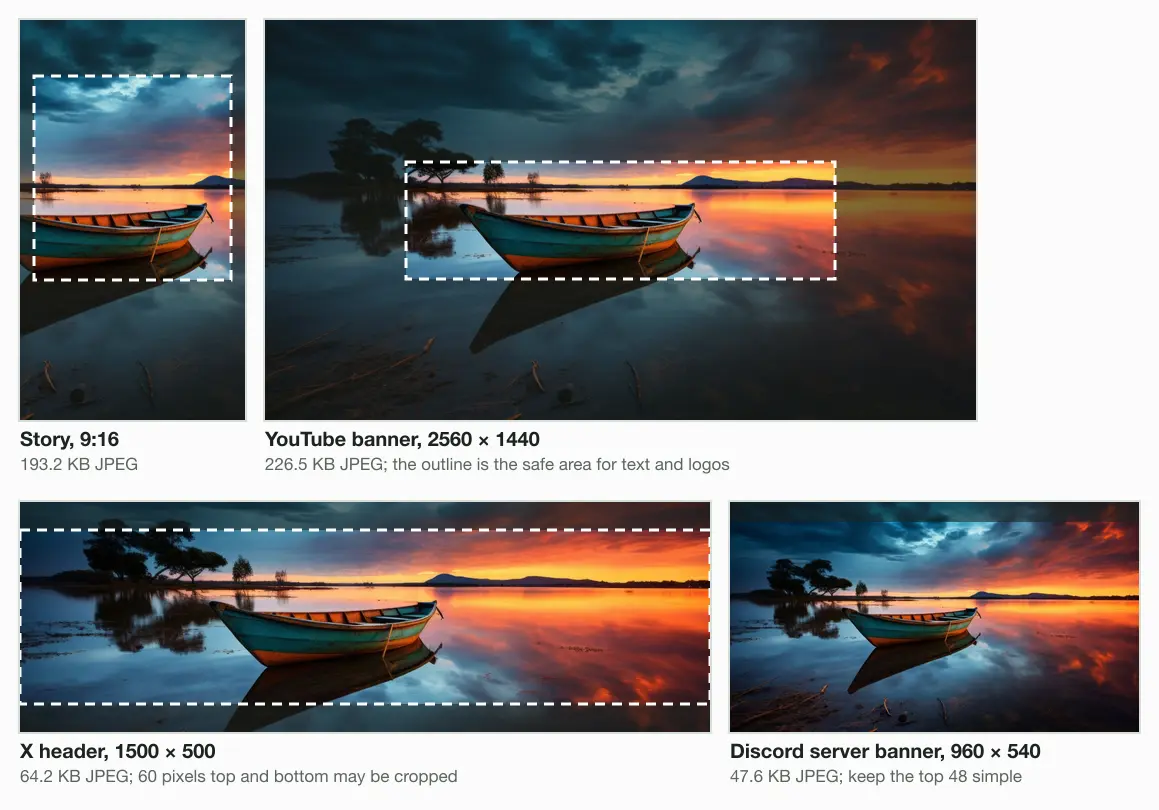
A safe zone is the part of the frame no button, caption or crop will cover. Four networks here state one in numbers, and each states it differently: as a share of the frame, as an area, or as pixels from an edge. Here is each one, worked out on the network’s own size.
- Meta story, 9:1614% top, 35% bottom, 6% sides
- YouTube bannerAbout 1544 × 423, centred
- X header60 pixels top and bottom
- Discord server bannerThe top 48 pixels
- Safe for text and faces
- May be covered or cut
- Stories on Instagram and Facebook: Meta’s ads guide for Stories asks you to leave about 14% of the top, 35% of the bottom and 6% of each side free of text and logos. At 1440 × 2560 that is 358 pixels at the top, 896 at the bottom and 86 at each side, leaving 1268 × 1306. At 1080 × 1920 it is 269, 672 and 65.
- The YouTube banner: 1235 × 338 at the 2048 × 1152 minimum, or about 1544 × 423 at 2560 × 1440. That is 18% of the banner; the rest shows on some screens and not others.
- The X header: 60 pixels may go from the top and the bottom, leaving 1500 × 380.
- The Discord server banner: keep the top 48 pixels simple, under the server’s name.
Where Facebook, LinkedIn and Pinterest cut
Three more networks name the risky part in words. Facebook shows the cover at two shapes and lays the profile picture over it on phones, so the ends and the edge near the picture vary. LinkedIn asks for key details away from the edges of a Page cover, above all the lower-right corner. Pinterest says a Pin taller than 2:3 might be cut off. Here are the four numeric zones on real crops of our photo.
What each network does to your upload
Instagram spells out its rule for a feed photo’s pixels in full, and it is a resize, not a guess. Follow the questions and you know what happens to your file before you post it.
Is the photo between 1.91:1 and 3:4?
- Yes
Is it 320 to 1080 pixels wide?
- Yes
Kept at its own resolution
- No
Is it wider than 1080?
- Yes
Sized down to 1080 wide
- No
Enlarged to 320 wide
- Yes
- Yes
- No
Cropped to fit a supported ratio
Instagram's words
- Threads scales a post image to between 320 and 1440 pixels wide and converts it to sRGB.
- X says a photo is “automatically scaled for display”, and shows a single photo whole when it is between 2:1 and 3:4.
- YouTube swaps a vertical video’s 16:9 thumbnail for an auto-generated 4:5 one on three pages, and crops the banner on some screens.
- Discord resizes a 1920 × 1080 server banner, and checks an upload’s size before compressing it.
- Facebook loads a cover fastest as an sRGB JPG under 100 KB, and suggests PNG for a cover or profile picture with a logo or text.
None of the pages we read says how a network re-encodes a photo after upload, or at what quality. So we make no claim about it, and we did not post to any network to test it. What you control is the file you send: the right shape, the right size, saved once from the original.
Our post on why photos look blurry after you upload them simulates that step.
Upload limits and file types, measured
Every network here that names formats takes JPEG, and all but Instagram’s publishing API take PNG too. The caps run from Meta’s 100 KB advice for a cover to the 1 GB Discord allows with Nitro.
| Network | File types named | Caps |
|---|---|---|
| JPEG through Meta’s publishing API; not stated for the app | 8 MB through Meta’s publishing API; not stated for the app | |
| Meta ads (Stories, Facebook Feed) | JPG or PNG | 30 MB |
| Facebook Page | sRGB JPG; PNG for logos and text | Cover under 100 KB loads fastest |
| X | JPEG, GIF, PNG; not BMP or TIFF | Photos 5 MB, profile 2 MB, GIFs 5 MB phone or 15 MB web |
| JPG or PNG; no GIF for the profile photo | Profile and banner 8 MB, Pages 3 MB | |
| YouTube | JPG or PNG for thumbnails | Thumbnails 2 MB phone or 50 MB computer, banner 6 MB, profile 15 MB |
| TikTok | Not stated | Not stated |
| PNG or JPEG | 20 MB desktop, 32 MB app | |
| Threads (API) | JPEG or PNG | 8 MB |
| Discord | PNG, JPG or animated GIF for banners | Uploads 20 MB free, profile banner 10 MB |
Our files against each cap
Then we checked our own files against those caps. Each placement is the same camera photo, cropped to the size and saved by our engine as a JPEG at Auto. All 11 came in under, and the closest was the Facebook cover, at 29% of 100 KB.
Instagram and Facebook, story (ads guide)193.2 KB of 30.0 MB
under 1% of the capFacebook, feed image (ads guide)155.8 KB of 30.0 MB
under 1% of the capFacebook, page cover28.7 KB of 100.0 KB
29% of the capX, profile photo18.6 KB of 2.0 MB
under 1% of the capLinkedIn, profile banner57.8 KB of 8.0 MB
under 1% of the capLinkedIn, page cover41.1 KB of 3.0 MB
1% of the capYouTube, video thumbnail423.5 KB of 2.0 MB
21% of the capYouTube, channel banner226.5 KB of 6.0 MB
4% of the capPinterest, standard Pin100.7 KB of 20.0 MB
under 1% of the capThreads, post image155.8 KB of 8.0 MB
2% of the capDiscord, profile banner (Nitro)19.5 KB of 10.0 MB
under 1% of the cap
Why a PNG photo breaks the caps
PNG is where the caps bite. For a photo, a PNG keeps detail a viewer cannot see and costs several times the bytes. Our 4K thumbnail as PNG crossed YouTube’s phone limit.
YouTube thumbnail, 3840 × 2160
- JPEG423.5 KB
- PNG2.2 MB
Story, 1440 × 2560
- JPEG193.2 KB
- PNG903.0 KB
Pinterest Pin, 1000 × 1500
- JPEG100.7 KB
- PNG403.8 KB
Facebook cover, 851 × 315
- JPEG28.7 KB
- PNG92.6 KB
How to make one photo fit every network
Start from the original and make one copy per placement. Each copy is a crop to the shape, a resize to the size, and a single save. Here is the order that keeps the most quality.
The original
The largest file you have
Crop to the shape
Subject inside the safe zone
Resize
To the network’s size
Save once
JPEG at Auto for photos
Check the cap
Under the stated limit
Start from the largest original
The networks that describe their handling scale a large file down to their size, and Instagram and Threads enlarge a small one. Enlarged pixels only look soft, so give them more than they need.
Crop to the shape, not the size
Pick the shape from the tree above, then place the frame so the face or the words sit inside the safe zone. The aspect ratio tool does the crop without stretching.
Resize to the network’s number
Use the size from the table: 1500 × 500 for an X header, 1000 × 1500 for a Pin, 1080 wide for Instagram. A larger file is scaled down anyway.
Save once, then check the cap
Save a photo as JPEG at Auto and compare the size with the limit in the table. Saving a copy of a copy adds a little loss every time.
To do the crop by hand, change the aspect ratio of an image to any shape in this guide and then type the network’s size. Or open the chart in the box below, pick the row, and the resizer opens on that exact size.
The guides
Questions
- What are the recommended social media image sizes for 2026?
- Each network sets its own, on its own help pages. Instagram keeps feed photos 1080 pixels wide at 1.91:1 to 3:4. A Facebook Page cover is 851 × 315, an X header 1500 × 500, a LinkedIn banner 1584 × 396 and a Pinterest Pin 1000 × 1500. YouTube recommends 3840 × 2160 thumbnails and a 2560 × 1440 banner.
- What is the best aspect ratio for social media?
- There is no single one, but 4:5 comes closest for feed posts. It fits inside the ranges Instagram, X and Threads state, it is the shape Meta's ads guide asks for in the Facebook feed, and it is shorter than Pinterest's 2:3. Use 9:16 for Stories and Reels, 16:9 for YouTube, and each network's own strip for banners.
- Is Instagram 9:16 or 4:5?
- Both, in different places. The feed keeps a photo between 1.91:1 and 3:4, so a 4:5 post shows whole and a 9:16 photo is cropped to fit. Reels take anything from 1.91:1 to 9:16, so 9:16 fills the screen there. For the tallest feed post, use 3:4 at 1080 × 1440.
- What social media uses 1920x1080?
- 1920 × 1080 is 16:9. Discord names it: upload one as a server banner and Discord resizes it for you. It suits a YouTube thumbnail, above the 640-pixel minimum, but falls short of the 2048 × 1152 banner minimum. X shows it in full, and Instagram sizes it down to 1080 wide.
- What is the 5:3:2 rule for social media posts?
- It is a rule of thumb for what you post, not for image sizes. Of every ten posts, five share other people’s content, three are your own, and two are personal. No network we read publishes it, and it changes nothing about pictures: each post’s image still follows the size and shape of its placement.
- What is a safe zone on social media?
- A safe zone is the part of an image no button, caption or crop will cover. Meta asks for about 14% of the top and 35% of the bottom of a story to stay clear. YouTube's banner keeps 1235 × 338 safe at 2048 × 1152, and X may crop 60 pixels from a header's top and bottom.
- How do I stop social media from cropping my photos?
- Upload the shape the placement uses. Instagram keeps a feed photo whole between 1.91:1 and 3:4, and X shows a single photo in full between 2:1 and 3:4. Outside those ranges the network crops. Crop the photo yourself first, so you choose what stays, and keep faces inside the safe zone.
- Why do my photos look blurry after uploading?
- Two causes are in your hands: a file smaller than the network's size, and a file saved several times. Instagram enlarges anything under 320 pixels wide to 320, and LinkedIn advises a larger file for a blurry banner. Export once from the original at the exact size, as a lossless PNG or a high-quality full-colour JPG.
- Does Instagram compress photos?
- Instagram's help describes resizing, not its encoder. It keeps a photo 320 to 1080 pixels wide at its own resolution, sizes a wider one down to 1080, and crops shapes outside 1.91:1 to 3:4. Its Reels page offers an Upload at highest quality switch under Media quality in your settings.
- What file format is best for social media images?
- JPEG for photos and PNG for graphics with text or a logo. Every network here that names formats takes both, except Instagram's publishing API, which takes JPEG only. In our test a 3840 × 2160 thumbnail was 423.5 KB as JPEG and 2.2 MB as PNG. A photo saved as PNG can break a cap the JPEG passes easily.
- What is the maximum file size for social media images?
- It depends on the network and the placement. X allows 5 MB for photos in posts and 2 MB for a profile photo. LinkedIn allows 8 MB, or 3 MB on Pages. YouTube takes 2 MB thumbnails from a phone and 50 MB from a computer. Pinterest takes 20 MB, Threads 8 MB, and Discord 20 MB without Nitro.
- What is the LinkedIn post image size?
- LinkedIn's article on Page images gives a custom post image as 1200 × 627 pixels, a 1.91:1 ratio, and more than 200 pixels wide. Files on Pages may be 3 MB at most, as PNG or JPEG. The same article puts the Page cover at 1512 × 256 and the logo at 400 × 400.
- What is the Pinterest pin size?
- Pinterest recommends a 2:3 Pin, 1000 × 1500 pixels, as a PNG or JPEG of up to 20 MB on a computer or 32 MB in the app. A Pin taller than 2:3 might get cut off in the feed. Carousel images can be 1:1 or 2:3, with 2 to 5 images in one carousel.
- What is the Threads image size?
- Threads states widths rather than one size. Its API takes JPEG or PNG up to 8 MB, 320 to 1440 pixels wide, at any shape up to 10:1. Narrower images are scaled up and wider ones down, and colours are converted to sRGB. A 4:5 image 1440 pixels wide keeps every pixel.