Instagram story size and profile picture size (2026)
The Instagram story size is 1080 × 1920 pixels, a 9:16 frame the shape of a phone screen. That number is Meta’s: its Stories ads help recommends it, and its publishing API recommends 9:16 for story images. Instagram’s own help pages state no story size and no profile picture size. Here is what each Meta page does say, what the guides get wrong, and the files we measured. Part of the social media image resizer.
By Sahadat HusainUpdated 11 min readSizes

Instagram story size: 1080 × 1920 pixels at 9:16
Make a story 1080 pixels wide and 1920 tall. That is a 9:16 frame, the shape of a phone screen held upright, so it fills the screen with nothing cut and no bands. The number comes from Meta, not from Instagram: Meta’s design requirements for Instagram Stories ads recommend 1,080 × 1,920. Instagram’s own help pages give no story size at all.
IG story size, and the larger 1440 × 2560
Meta’s Ads Guide gives 1440 × 2560 for the same placement. It is the same 9:16 shape at a higher resolution, so either works, and 1080 × 1920 is the one phones, templates and schedulers use. Meta’s publishing API, which scheduling apps post through, recommends 9:16 for story images to avoid cropping or blank space. It takes a JPEG of up to 8 MB.
| Placement | Size in pixels | Shape | Whose number |
|---|---|---|---|
| Story | 1080 × 1920 | 9:16 | Meta Business Help, Stories ads |
| Story, larger | 1440 × 2560 | 9:16 | Meta Ads Guide |
| Reel | 1080 × 1920 | 9:16 | Instagram Help allows 1.91:1 to 9:16, 720 px or more |
| Feed post, square | 1080 × 1080 | 1:1 | Inside Instagram Help’s range |
| Feed post, portrait | 1080 × 1350 | 4:5 | Inside Instagram Help’s range |
| Feed post, tallest | 1080 × 1440 | 3:4 | Instagram Help |
| Feed post, landscape | 1080 × 566 | 1.91:1 | Instagram Help |
| Profile picture | Any square | 1:1, shown as a circle | Not stated by Instagram |
What Instagram says about story size, and what it does not
Instagram’s Help Center lists every Stories article, from sharing to highlights, and none of them gives a size or a ratio. We searched it on 3 October 2026 and read each Meta page in a browser. Here is what each one states about stories and the profile picture:
| Question | What the page states | Page |
|---|---|---|
| Story size for a normal story | Not stated | Instagram Help, Stories |
| Story shape | Vertical; 9:16 recommended | About Instagram blog; Meta’s API |
| Story size for an ad | 1080 × 1920 or 1440 × 2560 | Meta’s ads pages |
| Video clip length | Up to 60 seconds a clip | About Instagram blog; Instagram Help |
| How long a photo shows | 5 seconds by default, for ads | Meta Business Help |
| Stories a day | No daily limit | About Instagram blog |
| Safe zones | 14% top, 35% bottom, 6% sides, for ads | Meta Ads Guide |
| Profile picture size | Not stated | Instagram Help, profile picture |
So a guide that prints 30 MB and 4 GB as Instagram’s story limits is quoting Meta’s limits for ads. The only limits Meta publishes for normal stories are its API’s: a JPEG of up to 8 MB, a video of up to 100 MB, 3 to 60 seconds long.
Instagram story safe zones: 14% top, 35% bottom
The app lays your name and the close button over the top of a story, and the reply bar over the bottom. Keep faces and text out of both. Meta gives two sets of numbers, both for paid stories, and Instagram gives none for normal ones:
- Meta Ads Guide14% top, 35% bottom, 6% sides
- Boosted story14% top, 20% bottom
- The guides’ 250 pxNo Meta source
- Safe for text and faces
- May be covered
On a 1080 × 1920 story, the Ads Guide leaves about 269 pixels clear at the top, 672 at the bottom and 65 at each side. Instagram’s page on boosting a story asks for 384 at the bottom. Three ranking guides print 250 pixels top and bottom instead, a figure with no Meta source that leaves far less room at the bottom than either. Follow the Ads Guide and your text clears everything the app draws.
How long is an Instagram story?
A video story clip runs up to 60 seconds. Share a longer video and Instagram splits it into back-to-back clips, says Instagram’s own guide to Stories. A story stays up for 24 hours unless you add it to a highlight, and the same guide says there is no daily limit on how many you post.
What happens to a photo that is not 9:16?
Instagram does not document it. Meta’s API names the two outcomes, cropping or blank space, without saying which you get. So choose before you upload. We took our 4964 × 2782 camera photo, a landscape, and made a 1080 × 1920 story both ways:
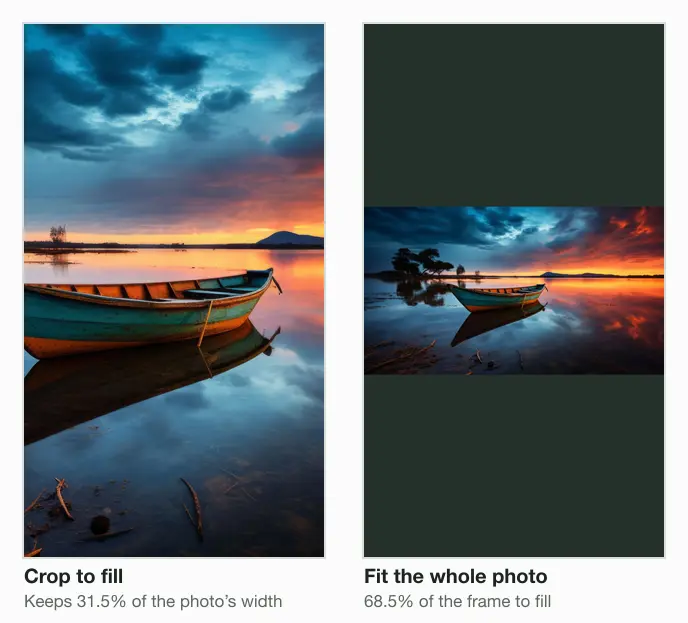
The crop kept 31.5% of the photo’s width and saved as a 125.9 KB JPEG at Auto. The fit kept every pixel, 605 pixels tall, with 68.5% of the frame left for a colour or stickers. In the app you can paint that space by hand: pick a colour in the draw tool, then tap and hold the screen.
How to make a picture fit an Instagram story
Open the 9:16 frame
Drop the photo into the editor set to resize an image to 1080x1920.
Choose Fit or Crop
Fit keeps the whole photo on a band of colour. Crop fills the frame, and you drag it over the subject.
Save and post
The export is exactly 1080 × 1920, so the app has nothing left to cut.
Instagram story aspect ratio and the reel size
The Instagram story aspect ratio is 9:16, and a full-screen reel uses the same frame. Instagram’s Reels help page accepts any shape from 1.91:1 to 9:16 at 720 pixels or more, so 1080 × 1920 fills the screen for both.
The Instagram story ratio is not the feed’s
A feed photo can be at most 3:4, so a 9:16 image posted to the feed is cropped to fit. The reverse holds too: a 3:4 feed photo shown as a story leaves bands at the top and bottom, or loses its sides. Make one file for each place.
Instagram profile picture size: what to upload
Instagram states no profile picture size. Its help page explains how to change the picture, from your phone’s library, the camera or Facebook, and gives no pixels and no shape. The 320 × 320 that most guides print is Meta’s figure for a Facebook Page profile picture, borrowed. Others print 110, 160, 180 or 400 pixels, none with a source.
What holds is the shape: the app shows the picture as a small circle. So upload a square with the face in the middle. 320 pixels a side is a sensible floor, the narrowest width Instagram keeps for a feed photo, and 1080 leaves headroom. Our square of a studio portrait came to 10.6 KB at 320 and 110.8 KB at 1080, both as JPEGs at Auto.
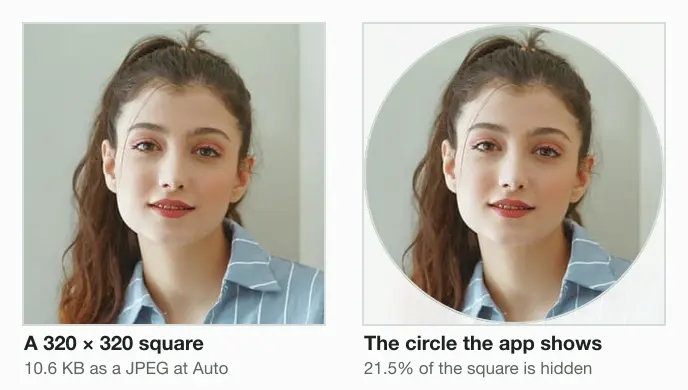
Instagram DP size: how to make the picture fit the circle
Crop the image to a square first, with the face in the middle and room above the head, so the circle cuts only background. Then, in the app, open Edit profile, tap Edit picture or avatar, choose the square and tap Done.
Instagram post size: four shapes at 1080 wide
Feed posts are the one place Instagram states its pixels. Its help page keeps a photo from 320 to 1080 pixels wide, at any ratio from 1.91:1 to 3:4. Wider is sized down to 1080, narrower is enlarged to 320, and any other ratio is cropped to fit. Here is our camera photo cut to four shapes and saved at Auto:
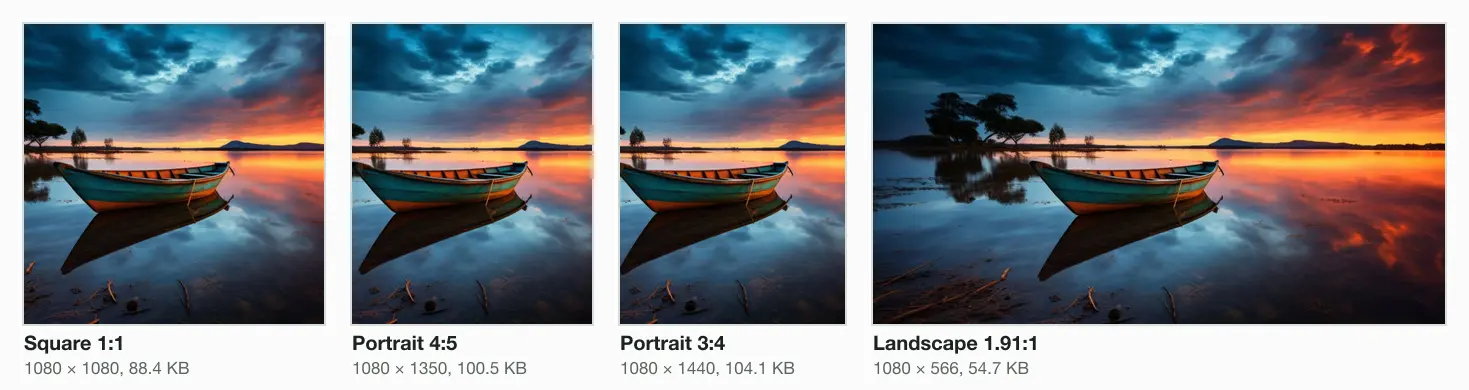
3:4 joined the range in May 2025, when Instagram’s head, Adam Mosseri, said a 3:4 upload now appears exactly as shot. In January 2025 he announced a new tall grid on profiles, made of rectangles instead of squares. Instagram gives no ratio for the grid tile; guides measure it as 3:4. The Instagram post size page fits any photo to these sizes without a crop.
Carousels: up to 20 photos, one shape
A carousel holds up to 20 photos and videos, and the orientation you pick applies to all of them. Meta’s API says every image is cropped to the shape of the first. Give each slide the same size before you upload and none loses its edges.
Does Instagram lower your photo quality?
Instagram states what it resizes, not how it compresses. A feed photo wider than 1080 is sized down, and one outside the ratio range is cropped. Upload at 1080 wide, inside the range, and that resize never happens. For reels the app has a switch, Upload at highest quality, under Media quality on iPhone; Instagram documents it for reels only.
Story, 1080 × 1920, against the API125.9 KB of 8 MB
2% of the capStory, 1080 × 1920, against the ads limit125.9 KB of 30 MB
under 1% of the capFeed post, 1080 × 1440104.1 KB of 8 MB
1% of the cap
Our story came to 125.9 KB, under 2% of the API’s 8 MB. A file that size passes every cap Meta publishes, so there is nothing to gain from sending a larger one. The social media image sizes cheat sheet sets the same caps side by side for every network.
Read the full guide: Social media image sizes cheat sheet: ratios, safe zones and limits.
Questions
- Are Instagram stories 3:4 or 9:16?
- Stories are 9:16. Meta recommends 9:16 for story images, at 1080 × 1920 pixels, to fill the phone screen with no crop and no bands. 3:4 is the tallest shape for a feed photo, 1080 × 1440, which Instagram added in May 2025. A 3:4 photo shown as a story leaves bands or loses its sides.
- Should you use 4:3 or 16:9 for Instagram?
- For a story, neither: both are landscape, so a 9:16 frame crops them or leaves wide bands. For the feed, both fit inside Instagram’s 1.91:1 to 3:4 range, so they post uncropped at 1080 × 810 and 1080 × 608. A phone photo is usually 3:4 portrait, which now shows exactly as shot.
- What is the Instagram reel size?
- 1080 × 1920 pixels for a full-screen reel, the same 9:16 frame as a story. Instagram’s Reels help page accepts any shape from 1.91:1 to 9:16, at 720 pixels or more, and recommends a cover of 420 × 654. Export at 9:16 and the reel fills the screen.
- What is the recommended size for an Instagram profile photo in 2026?
- Instagram recommends none. Many guides print 320 × 320, borrowed from Meta’s figure for a Facebook Page profile picture. Upload a square of at least 320 pixels, the narrowest width Instagram keeps for a feed photo, or 1080 × 1080 for headroom. Keep the face in the middle: the app shows a circle, which hides 21.5% of the square.
- How do I make my Instagram profile picture fit?
- Crop the photo to a square before you upload, with the face in the centre and room around it, because the app shows a circle and cuts the corners. Then open Edit profile, tap Edit picture or avatar, choose the square and tap Done. A square needs no further crop in the app.
- How can I convert a photo to the Instagram profile size?
- Crop it to a 1:1 square in an image cropper, then set the size: 320 × 320 is enough for the small circle, and 1080 × 1080 leaves headroom. Our 320 square of a portrait saved at 10.6 KB as a JPEG at Auto, and the 1080 square at 110.8 KB.
- How long can an Instagram story be?
- A video story clip runs up to 60 seconds. Post a longer video and Instagram splits it into back-to-back clips; Meta’s API takes story videos from 3 to 60 seconds. Every story stays up for 24 hours unless you add it to a highlight, and there is no daily limit on how many.
- Is the insta story size the same on iPhone and Android?
- Yes. Meta gives one figure, 1080 × 1920 at 9:16, and names no separate size for iPhone or Android; Instagram’s help pages give none for either. Make one file and post it from both. Keep text inside Meta’s safe zones, about 269 pixels from the top and 672 from the bottom.