How to turn a video into a GIF on any device
Trim the clip, then export it as a GIF from Clipchamp, Photoshop, the Shortcuts app, your phone or a free website. Here is each route, and how to keep the file small. Part of the image converter.
By Sahadat Husain14 min readFormats

To turn a video into a GIF, trim the clip to a few seconds and export it as a GIF. On Windows, Microsoft Clipchamp exports a GIF for videos of 15 seconds or less. On a Mac or iPhone, the Shortcuts app has a Make GIF action. Photoshop imports the video frames and saves them as a GIF. On any device, a free site such as ezgif or Adobe Express does it in your browser. Keep the GIF short and narrow: our GIF came out 61 times bigger than the same clip as an MP4. Our image converter handles still images such as JPG, PNG and WebP. This guide uses the tools that make moving GIFs.
Which way should you make a GIF from a video?
Pick the route that is already on your device. Every route below is free except Photoshop.
| You have | Use | Length cap | Source of the steps |
|---|---|---|---|
| Windows 10 or 11 | Clipchamp | 15 seconds | Microsoft’s help page |
| A Mac | Shortcuts, Make GIF | None stated | Apple’s Shortcuts guide |
| Photoshop | Video Frames to Layers | None stated | Adobe’s guide |
| Any browser | ezgif | 60 s (its form, October 2026) | ezgif’s page |
| Any browser | Adobe Express | 1 minute | Adobe’s page |
| An iPhone | Shortcuts, Make GIF | None stated | Apple’s Shortcuts guide |
| A Samsung Galaxy | Gallery’s video player | Varies by model | A guide we did not run |
How do you turn a video into a GIF on Windows?
Microsoft Clipchamp turns a video into a GIF on Windows, for videos of 15 seconds or less. Microsoft’s page Exporting and saving a video in Clipchamp lists “GIF for videos 15 seconds or less” beside the video sizes. The Windows Photos app has no GIF export that Microsoft documents.
Open Clipchamp and drag your video onto the timeline
Open Clipchamp and drag your video onto the timeline.
Trim the clip to 15 seconds or less
Trim the clip to 15 seconds or less. Clipchamp offers GIF only for clips that short.
Click Export, then choose GIF
Click the Export button at the top right of the editor, then choose GIF.
Wait for the progress bar
The GIF saves to your computer, usually in Downloads.
Microsoft’s page says premium features show a diamond symbol on the free plan. Remove them, or the export asks you to upgrade.
How do I make a GIF from a video on a Mac?
The Shortcuts app on a Mac makes a GIF from a video with its Make GIF action. Apple’s Intro to Shortcuts on Mac says Make GIF “uses those photos to build an animated GIF”. Apple gives no step list for the action. The steps below use the action names the app shows.
Open Shortcuts and create a new shortcut
Open Shortcuts and create a new shortcut.
Add Select Photos and set it to videos
Add Select Photos and set it to videos.
Add Make GIF, then Quick Look
Add Make GIF, then Quick Look to see the result.
Run the shortcut, pick your video and save the GIF
Run the shortcut, pick your video and save the GIF.
Can QuickTime do it? No. Apple’s QuickTime export page lists only QuickTime movies (.mov) and audio. Trim a long clip in QuickTime first, then run the shortcut.
How do you make a GIF from a video in Photoshop?
Photoshop imports a video’s frames as layers, then exports them with Save for Web (Legacy). These steps follow Adobe’s guide, Make an animated GIF.
Import the video frames as layers
Choose File > Import > Video Frames to Layers, pick your video and click Open.
Open the Timeline and create a frame animation
Open Window > Timeline and choose Create Frame Animation.
Make frames from layers and loop Forever
From the Timeline menu, choose Make Frames From Layers. Set the repeat menu to Forever.
Save for Web as a GIF
Choose File > Export > Save for Web (Legacy). Pick GIF 128 Dithered, set Colors to 256 and click Save.
Lower the Image Size in the Save for Web window if the file comes out too big.
How can I convert an MP4 video to a GIF for free?
A free website turns an MP4 into a GIF on a computer or a phone. Three sites rank for this, each with its own limits:
- ezgif. Its Video to GIF page now works locally in your browser by default, with no size cap. Turn local processing off and the upload limit is 200 MB. With no start or end time set, ezgif uses the first 5 seconds.
- Adobe Express. Its video to GIF page takes a video up to 1 minute long. You pick a Large, Medium or Small size and a square, landscape or portrait shape.
- GIPHY. Its GIF Maker takes a file or a video link. GIPHY publishes no limits page for it that we found.
Open ezgif’s Video to GIF page and pick your MP4
Click Choose File and pick the video. Leave Local processing ticked so the file stays in your browser.
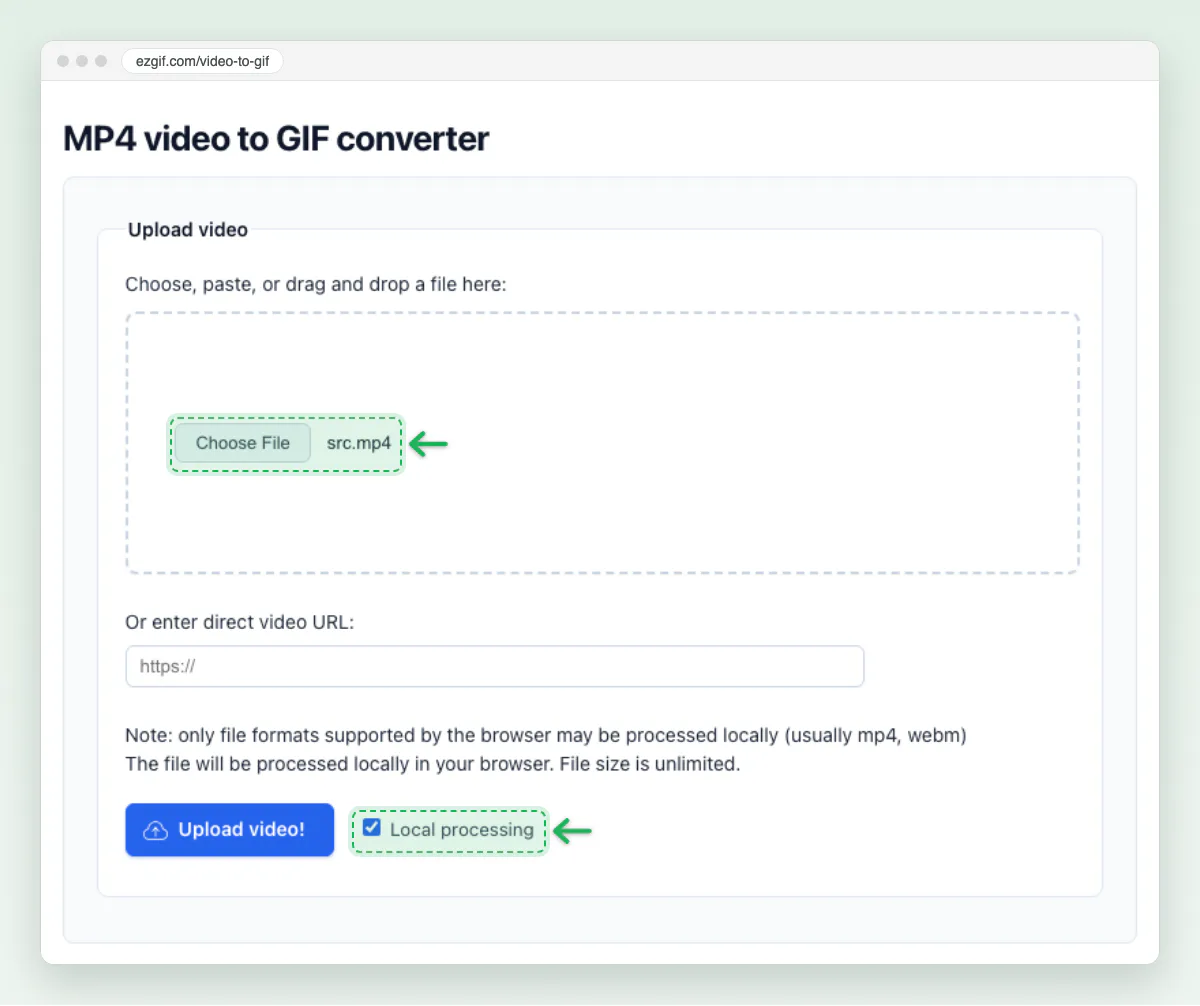
The upload form with Local processing ticked Set the start and end time, the size and the frame rate
We set 0 to 5 seconds, 480xAUTO and 10 fps.
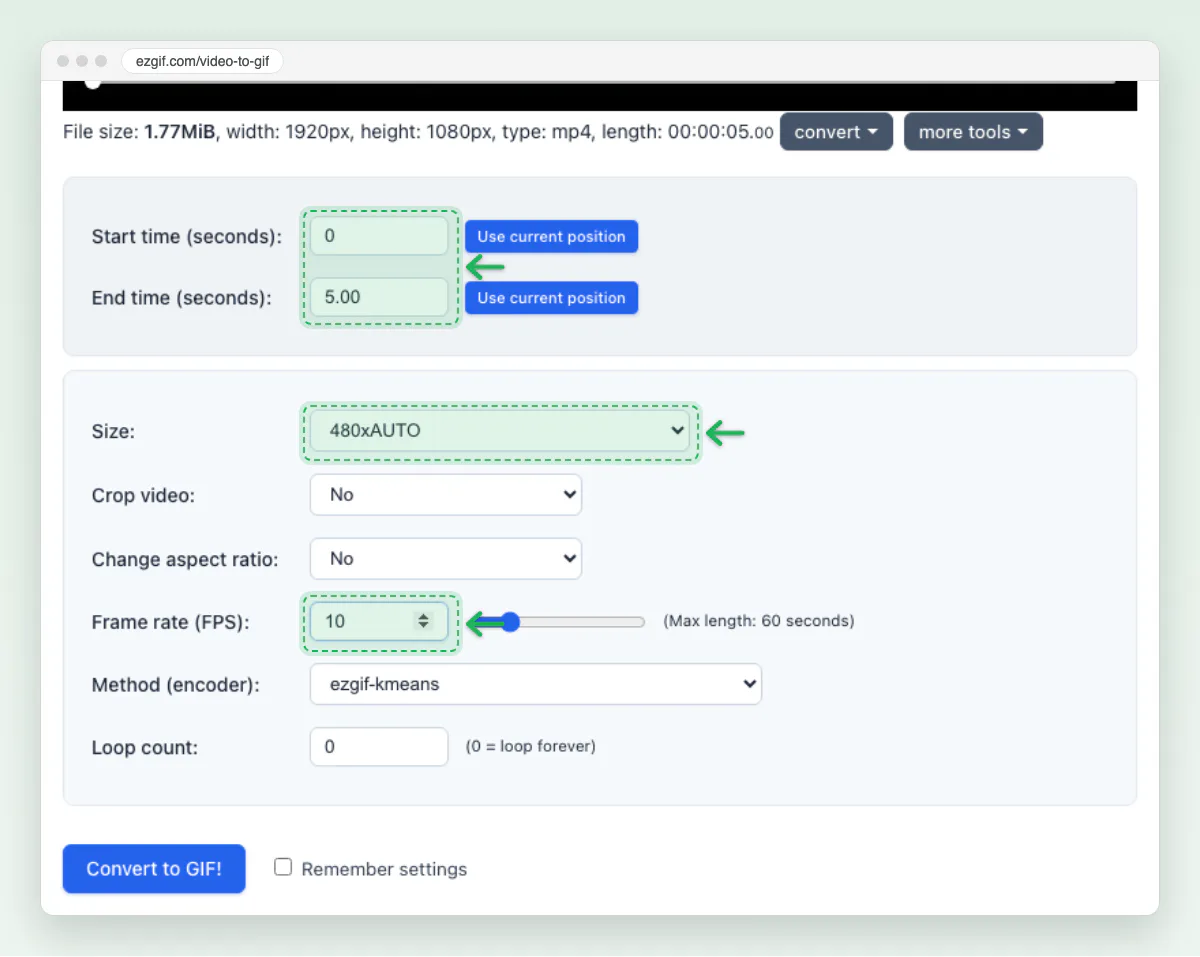
Width and frame rate decide most of the file size Click Convert to GIF, then save the result
The GIF appears under Output GIF animation with its file size. Click Save to download it.
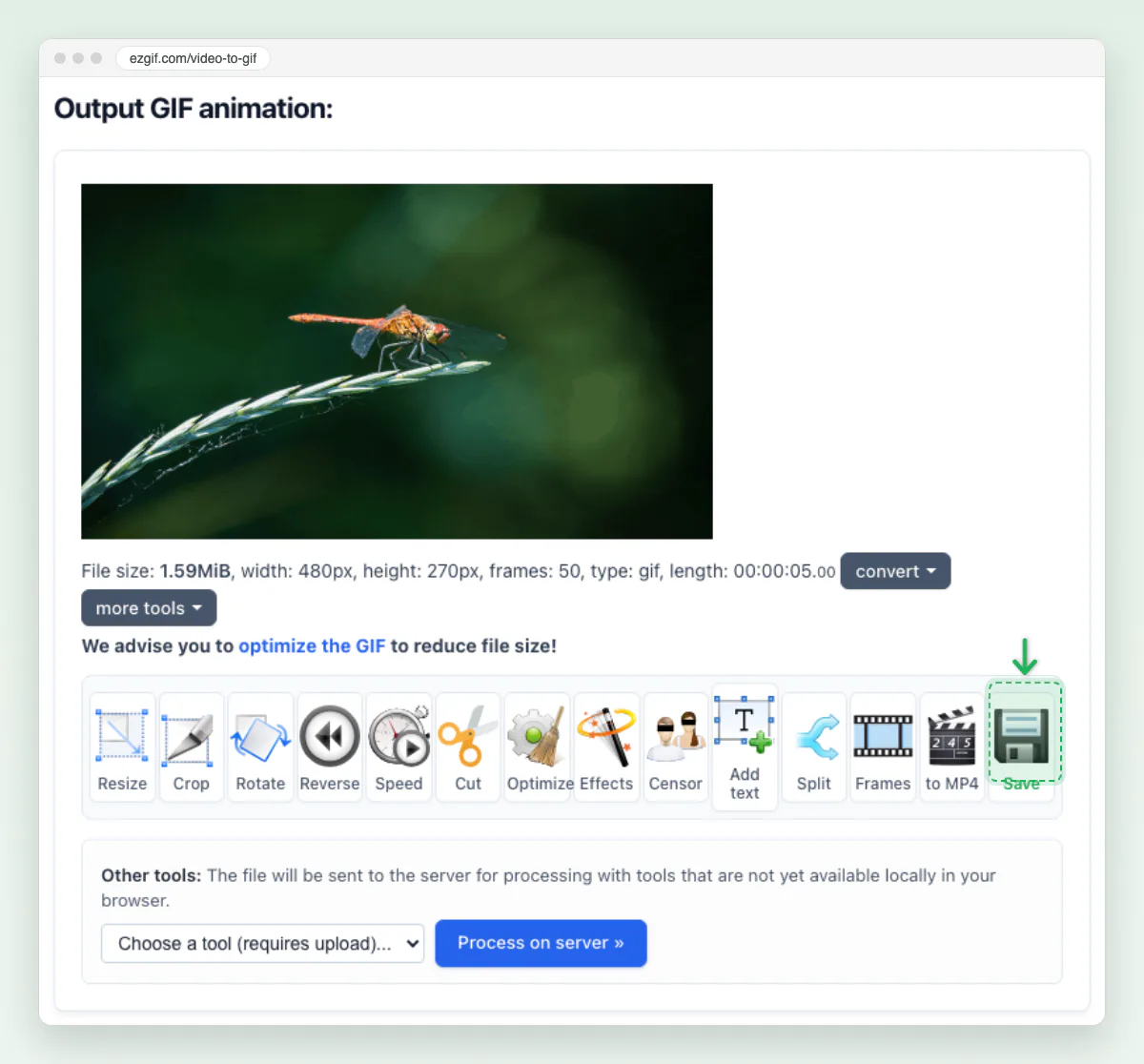
The finished GIF and its size
Making a GIF from a YouTube video? Only use footage you made or have permission to share.
How do you turn a video into a GIF on Samsung and other Android phones?
On a Samsung Galaxy, the Gallery’s video player makes a GIF from a video. Samsung’s own page, create a GIF image from photos on your Galaxy phone, covers photos, bursts and the Camera app only. The video steps below come from a guide we did not run (Guiding Tech).
Open the video in Gallery and tap Open in Video player
Open the video in Gallery and tap Open in Video player from the menu.
Tap GIF, trim, then tap Save
Tap GIF, drag the bars to trim, then tap Save.
From photos, Samsung’s page gives its own route: long press to select several, tap the More icon, then Create, then GIF. On other Android phones, Google documents no GIF tool in Google Photos. Use the GIPHY app or ezgif in Chrome.
How do you make a GIF from a video on iPhone?
On iPhone, the Shortcuts app’s Make GIF action turns a video into a GIF, as on a Mac. Keynote and Live Photos can make one too.
What does each method keep and lose?
Every route drops the sound, because the GIF format holds only pictures and timing. The routes differ on length and control:
| Route | Sound | Loops | Colour control | Size control |
|---|---|---|---|---|
| Clipchamp | Dropped | Yes | None | Trim only |
| Shortcuts, Make GIF | Dropped | Yes | None | Trim only |
| Photoshop | Dropped | Forever | Colors menu, up to 256 | Image Size |
| ezgif | Dropped | Loop count, 0 for endless | Optimise after | Width, frame rate |
| Adobe Express | Dropped | Yes | None | Large, Medium, Small |
Clipchamp, Shortcuts and Adobe Express give you no width or frame rate to set. If size matters, use ezgif or Photoshop.
Why is a GIF so much bigger than the MP4?
A GIF stores every frame as a full picture. An MP4 stores mostly the changes between frames. The GIF89a specification allows at most 256 colours per table. It packs each frame with LZW, a lossless method from the 1980s. MP4 uses H.264, which predicts each frame from the ones around it. Google’s web.dev guide shows a 3.7 MB GIF that became 551 KB as MP4.
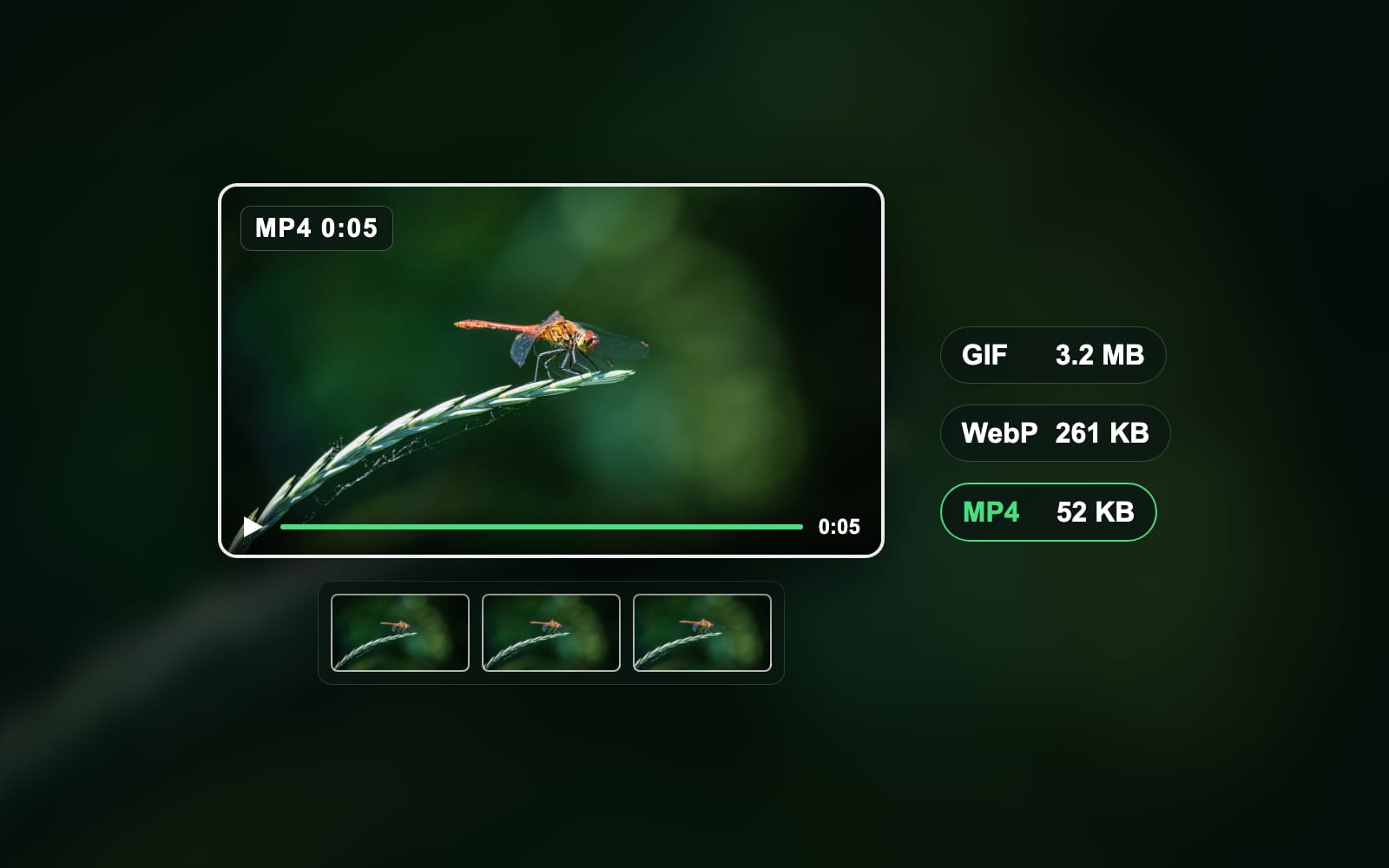
Our own test clip shows the same gap:
Bytes of the same clip
- GIF, 320 px, 10 fps1,396 KB
- GIF, 480 px, 10 fps3,180 KB
- GIF, 480 px, 15 fps4,424 KB
- GIF, 720 px, 10 fps7,520 KB
- Animated WebP, 480 px261 KB
- MP4 (H.264), 480 px52 KB
| Version of the 5-second clip | Width | Frame rate | Size |
|---|---|---|---|
| GIF | 320 px | 10 fps | 1,396 KB |
| GIF | 480 px | 10 fps | 3,180 KB |
| GIF | 480 px | 15 fps | 4,424 KB |
| GIF | 720 px | 10 fps | 7,520 KB |
| Animated WebP | 480 px | 10 fps | 261 KB |
| MP4 (H.264) | 480 px | 10 fps | 52 KB |
Several top guides say the opposite. Samsung’s GIF page calls GIFs “highly compressed” compared with video. Universal Music for Creators says a GIF saves you sending “a large video file”. Our 720 px GIF came out at 7.5 MB. That is 4 times the 1.9 MB 1080p MP4 we started from. The GIF only wins where a video cannot play.
How do you make a GIF smaller in file size?
Cut the width first, because a GIF’s size grows with every pixel in every frame. In our test, 320 px came to 1.4 MB against 7.5 MB at 720 px. Then work through the rest:
- Frame rate. 10 fps looks smooth for most clips. Going from 15 to 10 fps saved 28% in our test.
- Length. Every second adds a full set of frames. Aim for 2 to 6 seconds.
- Colours. Fewer colours in Photoshop’s Save for Web pack smaller. Clips with flat colour shrink most.
Will your GIF fit where you want to post it?
Check the app’s upload limit before you convert. A GIF of a 1080p clip passes many of them fast. Each limit below comes from the maker’s own help page, read on 24 October 2026:
| Where | Limit | Our 480 px, 10 fps GIF (3.2 MB) | Our 720 px GIF (7.5 MB) |
|---|---|---|---|
| X, mobile app | 5 MB per GIF (X Help) | Fits | Too big |
| X, web | 15 MB per GIF (same page) | Fits | Fits |
| Discord, free | 20 MB per file (Discord) | Fits | Fits |
| Gmail | 25 MB per message (Gmail Help) | Fits | Fits |
| Slack | 1 GB per file (Slack) | Fits | Fits |
The pages: X Help, Discord, Gmail Help and Slack.
Why won’t my GIF work?
Most failures come from a length cap or a size cap, not a broken file. Match the symptom to the fix:
- Clipchamp will not give you a GIF. Microsoft offers GIF only for videos of 15 seconds or less. Trim the clip, then export again.
- ezgif made only 5 seconds. No start or end time was set. Enter both before you convert.
- ezgif refuses a long clip. Its form showed a 60-second cap when we tested. Trim the clip to 60 seconds or less.
- X rejects the GIF on your phone. The mobile app caps a GIF at 5 MB. Post from the web, or cut the width.
- Discord shows a download link instead of the GIF. The file passed 20 MB. Shrink it, then send it again.
Should you use a GIF, an MP4 or an animated WebP?
Use a GIF where the place you post accepts only images, and a video file everywhere else. Each choice gives something and costs something:
- GIF plays in every email client, chat app and forum, with no play button. It costs file size and colour, and it has no sound.
- MP4 is far smaller and keeps full colour and sound. It needs a video player, and some email clients and forums will not autoplay it.
- Animated WebP sits between the two: 261 KB in our test, with more colours than a GIF. Browsers show it, but some apps and email clients still do not.
For a website you control, an MP4 set to autoplay muted is usually the better file. For a reply in a chat thread, a GIF still travels best. To keep a GIF you find online, read how to save a GIF. For the format’s history, read what does GIF stand for.
How we tested
- The file: a 5-second 1,920 × 1,080 clip at 30 fps, a slow zoom across our own dragonfly photo. Saved as an H.264 MP4 of 1.9 MB.
- The tool: ffmpeg 6.0: palettegen and paletteuse for each GIF, libwebp at quality 75, libx264 at CRF 23.
- The date: 24 October 2026.
- Sizes in KB and MB, 1,000-byte units, read from the file system.
- The steps: each from the maker’s page, read on 24 October 2026: Microsoft, Apple, Adobe, ezgif, X, Discord, Google and Slack. The Samsung video steps come from Guiding Tech. How we measure covers the rest.
Your next step: make the GIF at 480 pixels and 10 fps, then check it against the app’s limit. For still images, read how to reduce image file size.
Read the full guide: Best image format: JPG, PNG, WebP, AVIF, HEIC and GIF explained.
Questions
- How can I convert an MP4 video to a GIF for free?
- Open a free site such as ezgif or Adobe Express, pick the MP4, set the start time and length, and convert. ezgif now works inside your browser with no size cap. Adobe Express takes clips up to 1 minute. On Windows, Clipchamp exports a GIF free for videos of 15 seconds or less.
- Can Windows 11 make a GIF from a video?
- Yes, Windows 11 makes a GIF through Microsoft Clipchamp. Click Export at the top right of the editor and choose GIF, which Microsoft offers for videos of 15 seconds or less. The Photos app has no GIF export that Microsoft documents. For a longer clip, use ezgif, whose form showed a 60-second cap when we tested it.
- Can QuickTime save a video as a GIF?
- No, QuickTime Player cannot save a video as a GIF. Apple’s QuickTime guide lists only QuickTime movies and audio-only files as export options. Use QuickTime to trim the clip, then run the Make GIF action in the Shortcuts app. A free website such as ezgif is another route on a Mac.
- How do you make a GIF from a video on iPhone?
- Open the Shortcuts app, tap Gallery, and add a GIF shortcut such as Video to GIF. Run the shortcut, pick the video and trim it when asked. The phone saves the GIF to Photos. The GIPHY app is a second route on iPhone when you want text or stickers on the GIF.
- How do I make a GIF on my phone?
- On iPhone, use the Shortcuts app’s Make GIF action. On a Samsung Galaxy, open the video in Gallery, choose Open in Video player and tap GIF. Any other Android phone can use the GIPHY app or a free website such as ezgif in Chrome. All three routes are free.
- How long can a GIF be?
- The GIF format sets no length limit, but each tool sets its own. Clipchamp exports a GIF only for videos of 15 seconds or less. ezgif’s form showed a 60-second cap in October 2026. Adobe Express takes 1 minute of video. For sharing, keep a GIF between 2 and 6 seconds.
- Why is my GIF file so large?
- A GIF stores every frame as a full picture and packs it with LZW, an old lossless method. A video stores mostly the changes between frames. In our test, a 5-second clip made a 3.2 MB GIF and a 52 KB MP4. Cut the width, drop the frame rate to 10 fps and shorten the clip.
- What frame rate should a GIF be?
- A frame rate of 10 fps suits most GIFs made from video. It looks smooth for people, pets and screen recordings, and it keeps the file small. In our test, 15 fps made the GIF 39% bigger than 10 fps. Use 15 fps only for fast motion such as sports.
- What size should a GIF be?
- A width of 480 pixels suits most chat apps and social posts. Use 320 pixels for a small reaction GIF and 720 pixels only when detail matters. In our test, the same 5-second clip made 1.4 MB at 320 pixels and 7.5 MB at 720 pixels. Set the width before you convert.
- Is a GIF better than an MP4?
- A GIF is better where only images are allowed, such as many email clients and forums. An MP4 is better almost everywhere else. In our test, the MP4 was 61 times smaller than the GIF of the same clip. An MP4 keeps full colour and sound; a GIF holds 256 colours per frame.
- Does a GIF have sound?
- No, a GIF cannot hold sound. The GIF format stores only pictures and timing, so every converter drops the audio from your video. If the sound matters, share the clip as an MP4 instead. GIPHY offers Clips with sound, but those are short video files, not GIF files.
- How big can a GIF be on Discord or X?
- Discord takes files up to 20 MB on a free account, raised from 10 MB in August 2026. X allows a GIF of 5 MB in its mobile app and 15 MB on the web. A 480-pixel GIF at 10 fps fits both in our test, at 3.2 MB for 5 seconds.