How to save a GIF on any device and keep it moving
To save a GIF on a computer, right-click it and choose Save Image As, and keep the name ending in .gif. On a phone, touch and hold it and tap Save Image, Save to Photos or Download image. Sites like Giphy show a WebP instead, so open i.giphy.com/CODE.gif first. We measured what each site really serves. Part of the image converter.
By Sahadat Husain14 min readFormats

How do I save GIFs on a PC or Mac?
Right-click the GIF and choose Save Image As, then keep the name ending in .gif. Google’s Chrome help gives that step for every image, and it is the same in Chrome on Windows, macOS and ChromeOS. We ran it on Tenor in Chrome on a Mac on 17 October 2026.
Open the GIF on its own page
Click the GIF so it opens on its own page, not in a grid of small previews. On Tenor, that page showed a real .gif file.

Screenshot: the GIF’s own page on Tenor, not the search grid. Right-click and choose Save Image As
Pick a folder and check the file name. It should end in .gif. If it ends in .webp, the site sent a WebP: use the Giphy steps below.
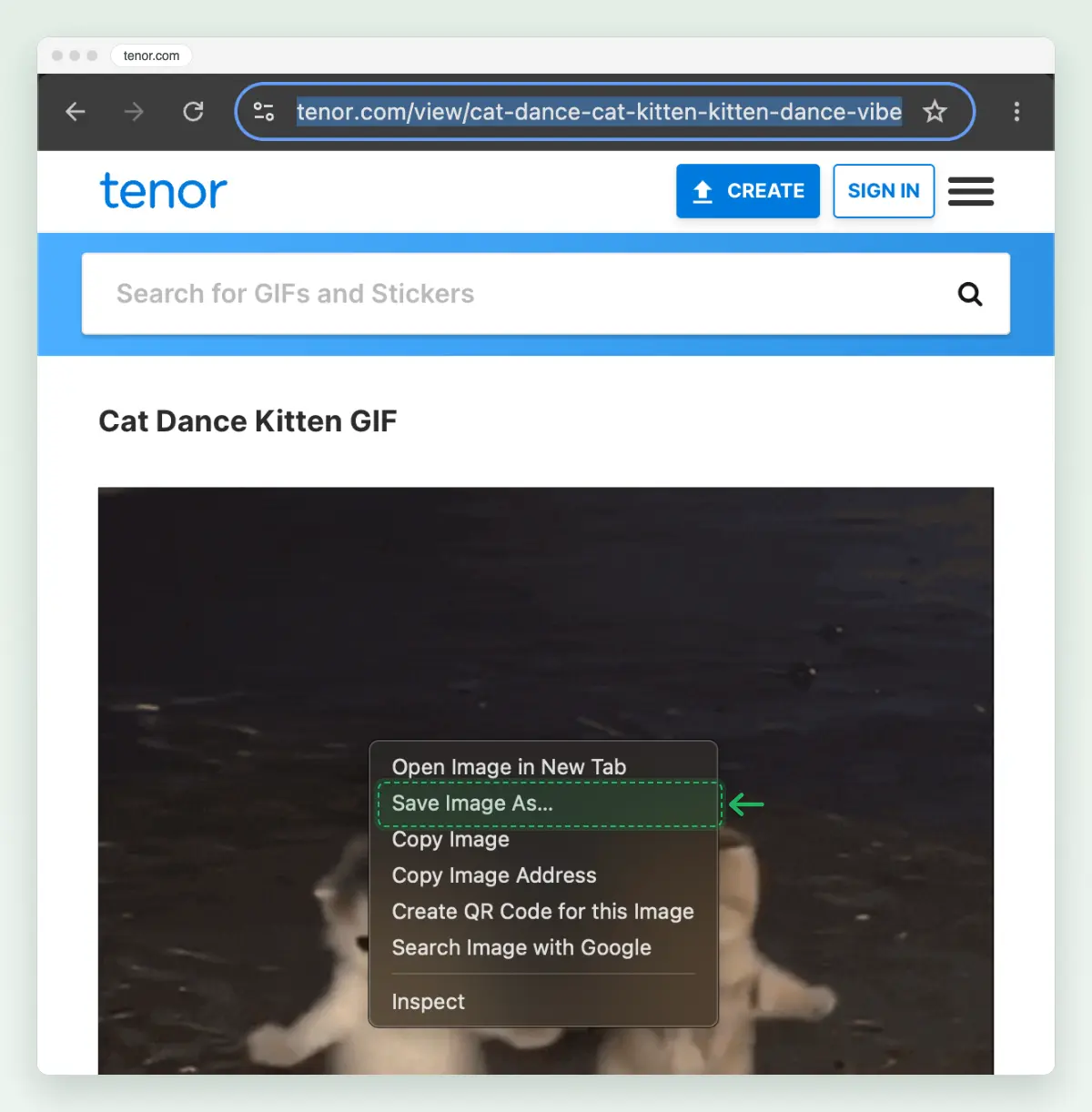
Screenshot: Save Image As is the second line of Chrome’s menu.
Our Tenor test file saved as a GIF of 498 × 476 pixels, 1.24 MB. To watch it move, open the file in a browser: drag it onto a Chrome, Edge or Safari window.
How do I save a GIF from Giphy as a GIF, not a WebP?
Open the GIF’s own address at i.giphy.com, ending in .gif, then save it. On Giphy’s GIF page, Save Image As was greyed out when we right-clicked, and the image the page shows is a WebP. Giphy’s Download button sent us to the login page. The four steps below need no account, no extension and no upload.
Right-click the GIF on Giphy
Save Image As is greyed out. A layer of the page sits over the GIF, so Chrome cannot save it from here.
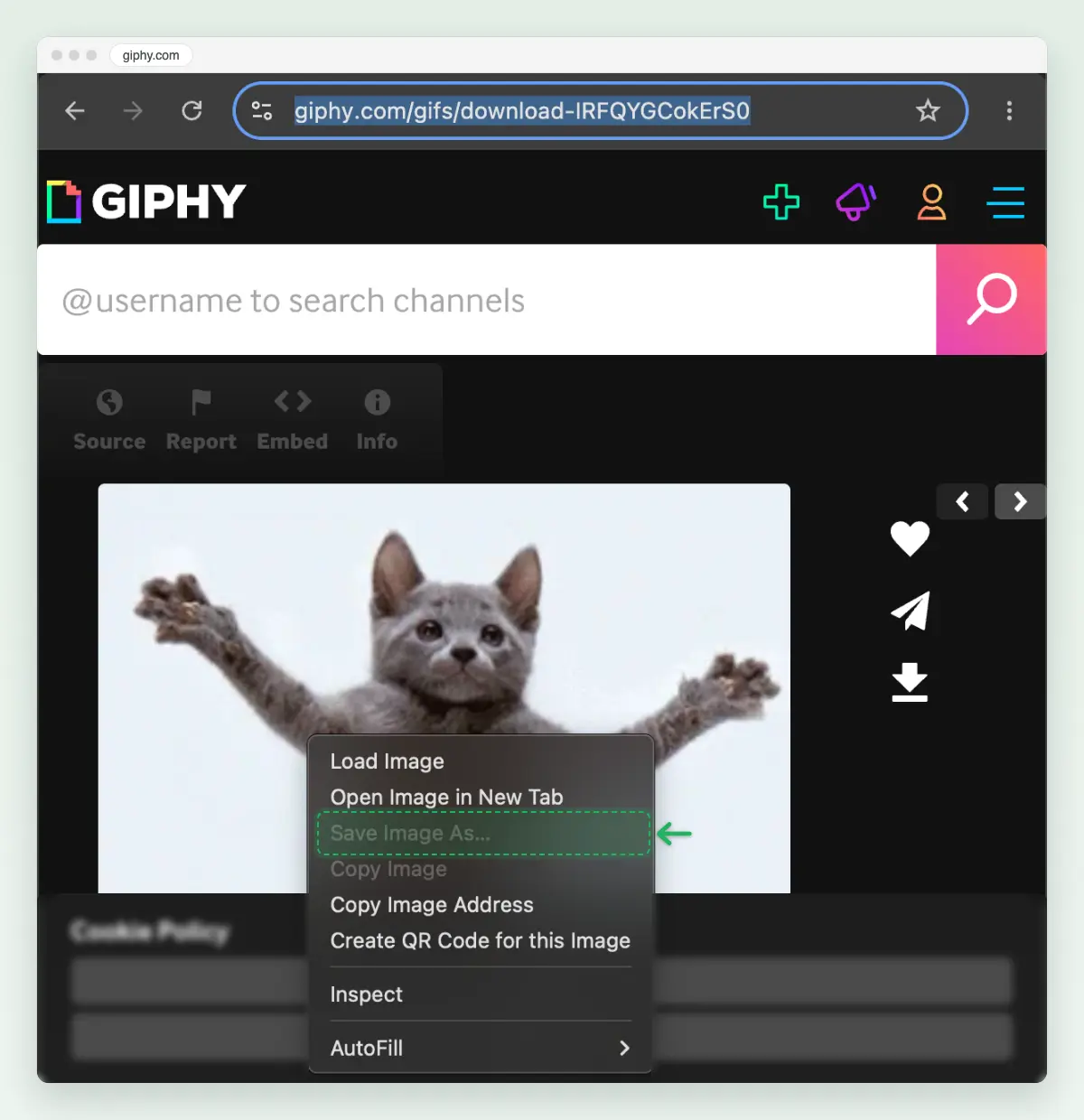
Screenshot: on Giphy’s own page, Save Image As cannot be clicked. Copy the code at the end of the address
The code is everything after the last hyphen in the address. For giphy.com/gifs/download-IRFQYGCokErS0, the code is IRFQYGCokErS0.
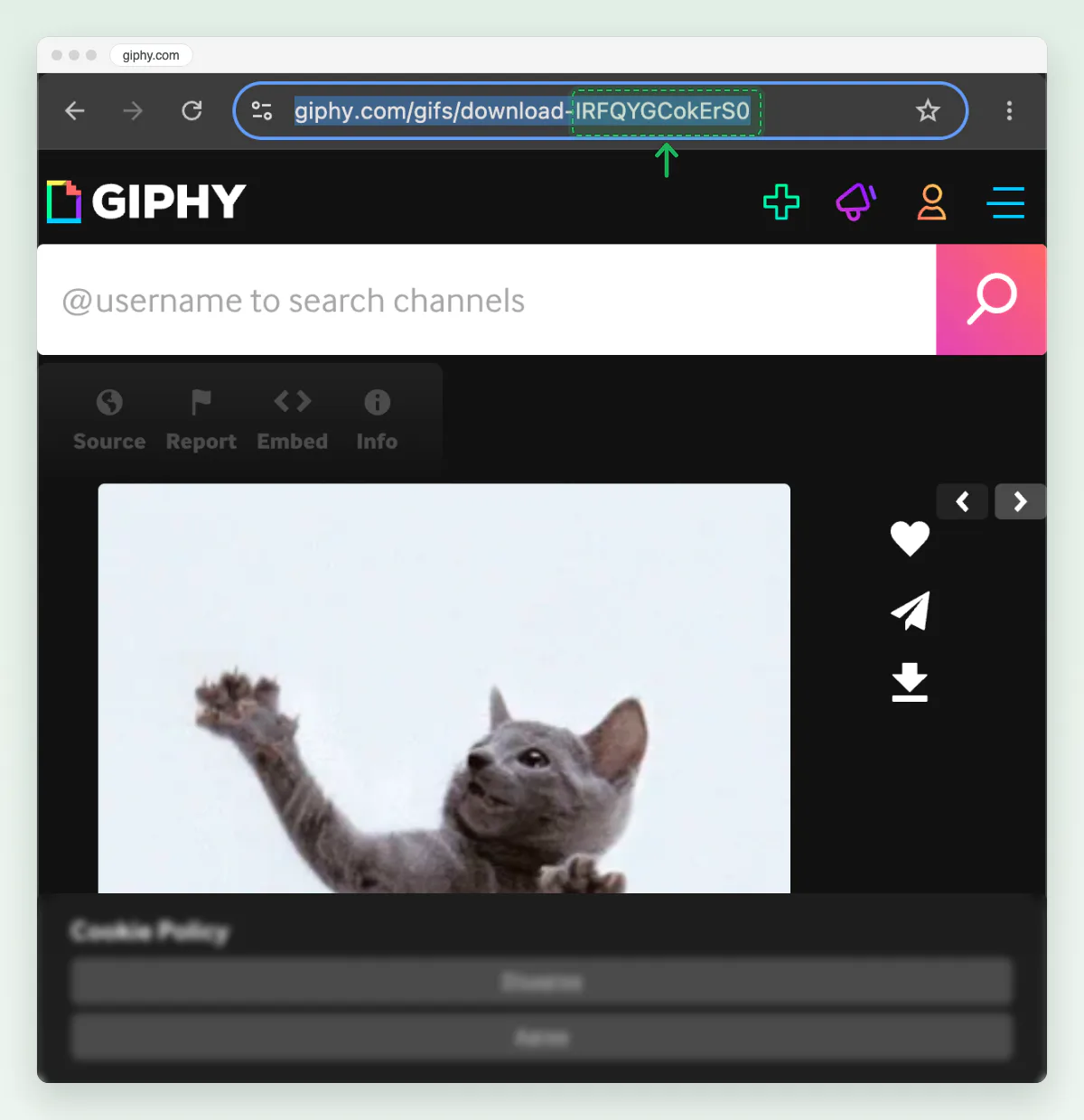
Screenshot: the GIF’s code is the end of the address. Go to i.giphy.com/CODE.gif
Type i.giphy.com/ then the code and .gif in the address bar, and press Enter. The GIF opens on its own, moving. Ours was i.giphy.com/IRFQYGCokErS0.gif.
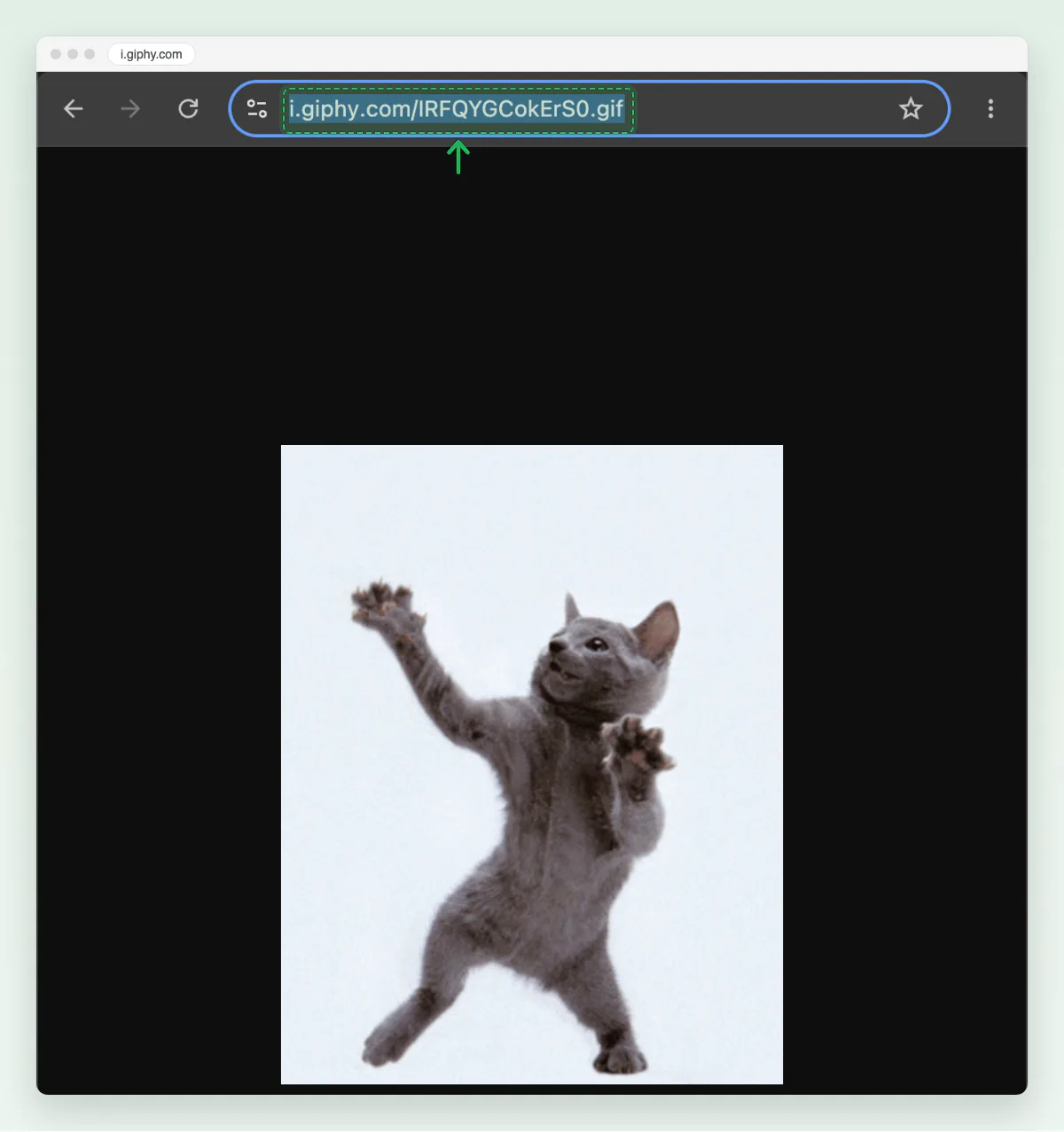
Screenshot: the .gif address opens the GIF itself. Right-click, Save Image As
Save Image As works now, and the file name ends in .gif. Check the name before you click Save.
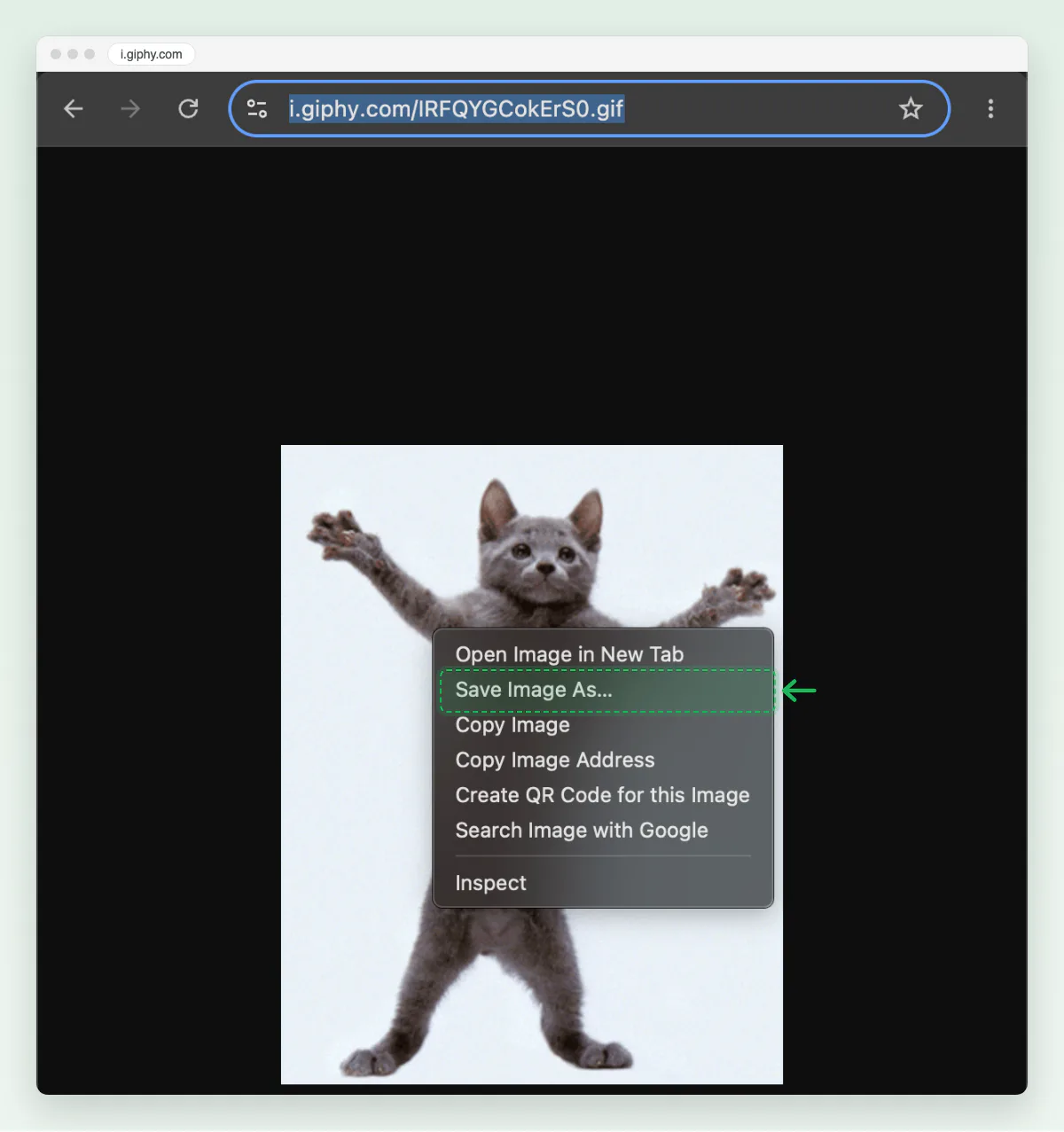
Screenshot: Save Image As saves the GIF, not the WebP.
The file was 101.5 KB as a GIF, against the 36.6 KB WebP the Giphy page showed, both 314 × 400 pixels. Editing the address the page opens does not do the same: media.giphy.com/…/giphy.gif opened an HTML page that still showed the WebP when we tried it.
How do I save a GIF from Google Images?
Click Visit and save the GIF from the site it came from. The preview Google Images shows can be a smaller copy. For “dancing cat gif”, the first preview was a Tenor file of 220 × 211 pixels. Tenor’s own page for the same GIF showed it at 498 × 476.
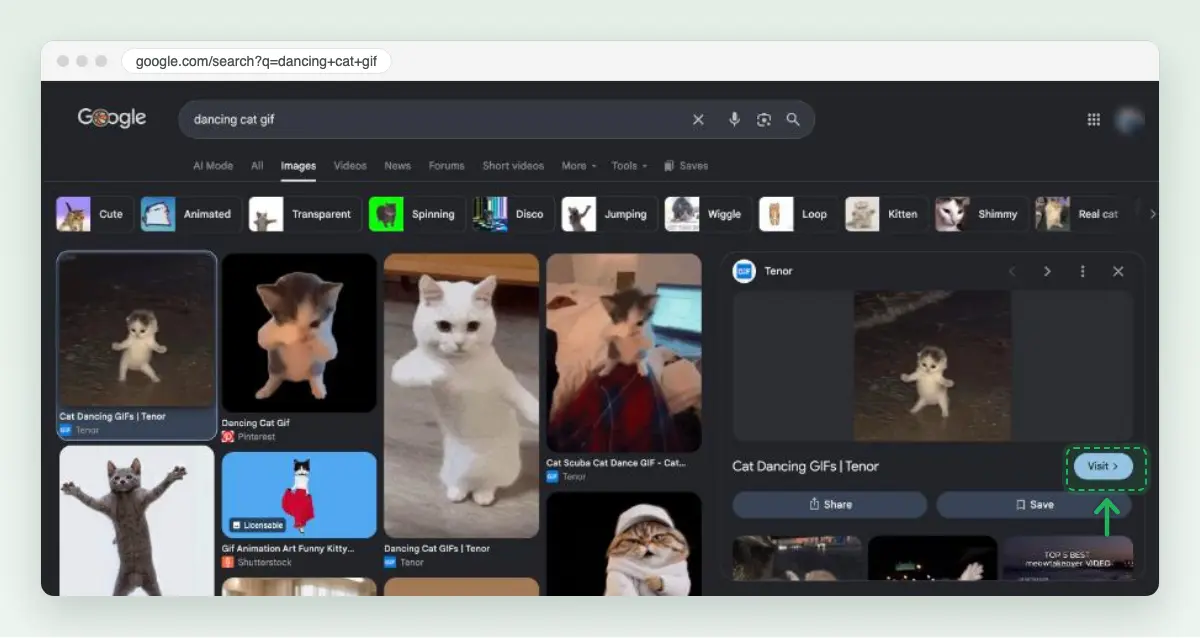
On the page Visit opens, right-click the GIF and choose Save Image As, or touch and hold it on a phone, as in the steps above.
Our post how to download an image from Google covers still photos, full size, and the usage rights filter.
How do I save GIFs on my iPhone?
Touch and hold the GIF, then tap the save option. In Chrome on iPhone it is Save Image, as Google’s help page says. A GIF someone sent you in Messages saves the same way: Apple’s page on GIFs says to touch and hold it, then tap Save, and it goes to Photos.
Open the GIF on its own page
Tap the GIF in search results so it opens on its own page. Ours was a GIF on Tenor, in Safari.

Screenshot: the GIF on its own page on Tenor. Touch and hold it, then tap Save to Photos
Hold your finger on the GIF until the menu opens, then tap Save to Photos. In Chrome on iPhone the option is Save Image. From Tenor, our iPhone saved a real animated GIF: 24 frames at 373 × 498.
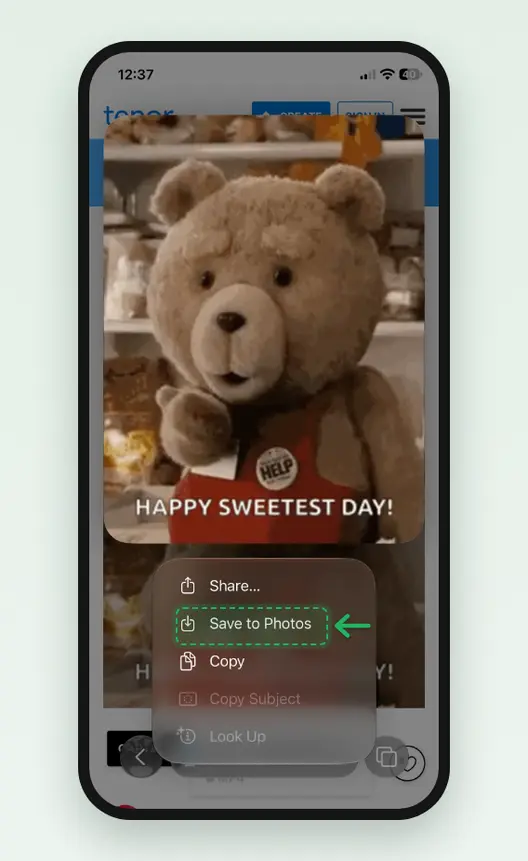
Screenshot: Save to Photos in the hold menu. Check it saved as a GIF
Tap Share on the GIF: the top of the share sheet names the file type. Ours, sent on in WhatsApp, read GIF Image, and on a Mac the same file opened as an animated GIF.
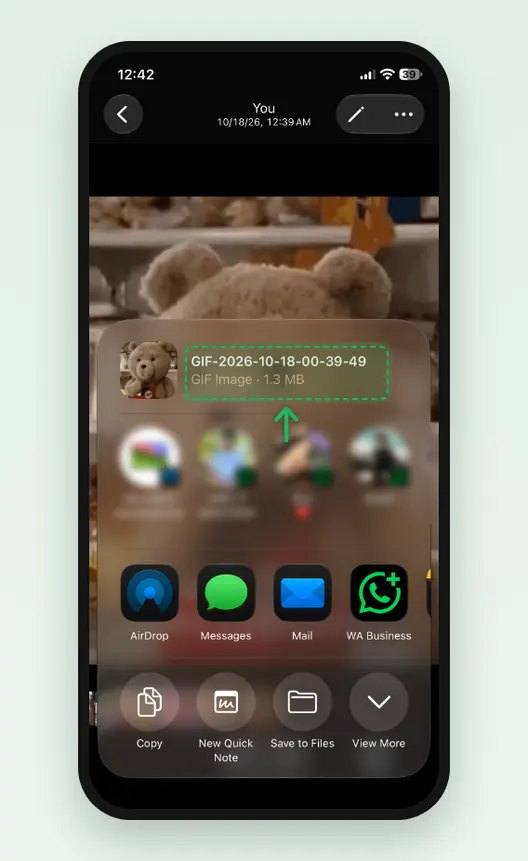
Screenshot: the share sheet says GIF Image. On Giphy, the same menu saved a WebP
We held a GIF on Giphy’s page and tapped Save to Photos. The iPhone saved the WebP the page shows, not a GIF. Open i.giphy.com/CODE.gif first, as on a computer.
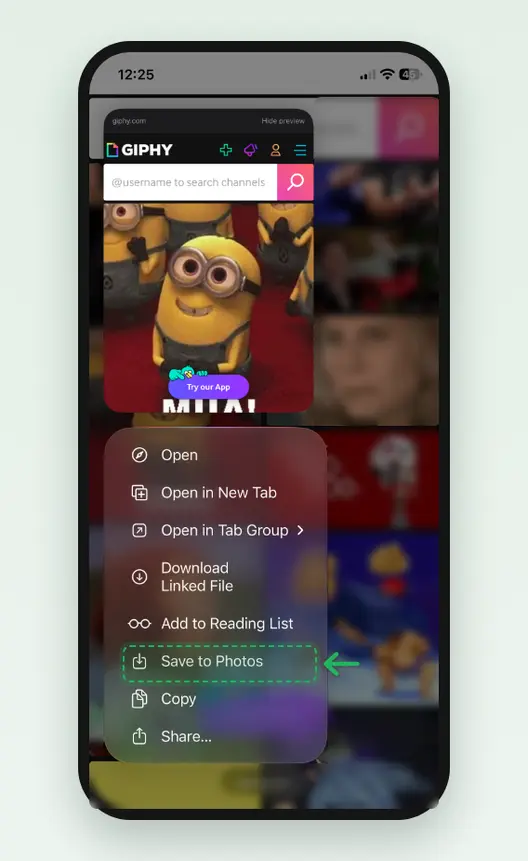
Screenshot: on Giphy’s own page, Save to Photos saved a WebP. In WhatsApp, open the GIF and tap Save
A GIF someone sent you in WhatsApp saves from the chat. Open it, and tap Save beside Share and Forward. In Messages, Apple says to touch and hold the GIF, then tap Save.
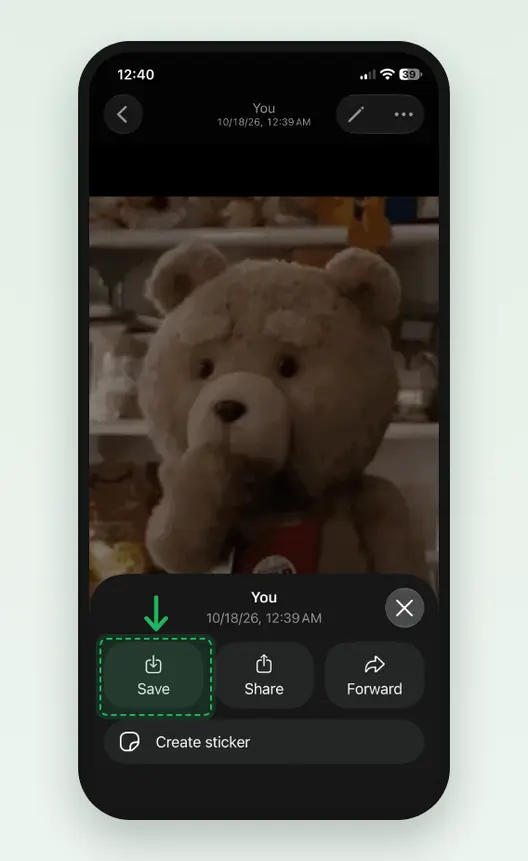
Screenshot: Save, beside Share and Forward. Find it in Photos
The GIF lands in Library with your newest photos. To see only moving files, tap Collections, then Media Types, then Animated. The grid may show a still frame; the GIF moves when you open it.
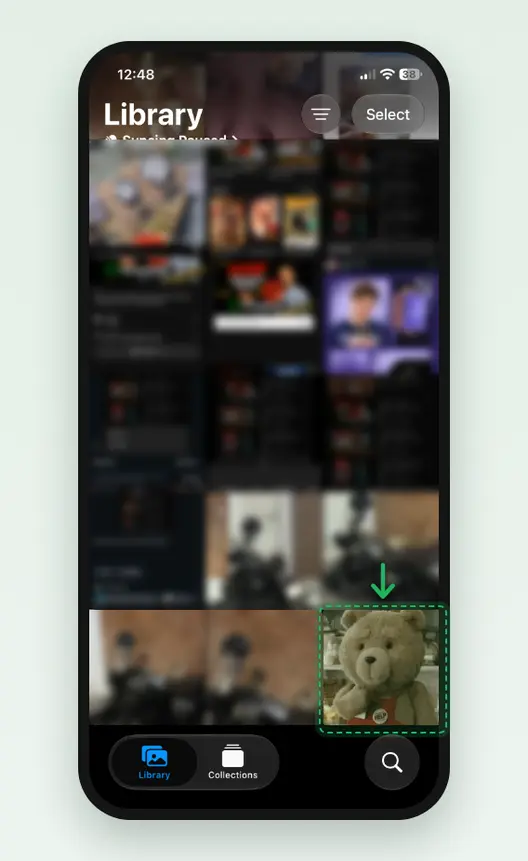
Screenshot: the saved GIF, newest in Library.
Apple’s Photos guide gives the Collections and Media Types path. A Live Photo is not a GIF: Apple’s Loop effect turns it into a looping video, and X can post a Live Photo as a GIF.
How do I save GIFs on Android?
In Chrome, touch and hold the GIF, then tap Download image. That is the step on Google’s Chrome help for Android, and the file goes to your Downloads. Samsung Internet and other browsers have a similar hold menu; we did not run them.
Touch and hold the GIF, tap Download image
Open the GIF’s own page, hold your finger on it, and tap Download image in the menu.
Open it from Files, in Downloads
Google’s help page says to open the Files app to find every file you downloaded. Tap the GIF to watch it move.
Gboard’s GIF button sends GIFs from its search into a chat; it is not a way to save one. A GIF someone sends you in a chat app saves with that app’s own menu. We did not test WhatsApp or Google Messages.
How do I save GIFs from X, Reddit and Instagram comments?
X: X has no save option for a GIF, and X’s help pages describe none. X’s developer documentation lists a GIF as the media type animated_gif, with playback variants, and its example variant is a video/mp4 file. So what plays on X is a short video, not a .gif. Screen recording, below, keeps the moment; a GIF converter can turn the clip back into a GIF. We were not signed in to X, so we did not run a save there.
Reddit: in a browser, right-click a GIF in a post and choose Save Image As, as on any site. Reddit blocked our tools on the day we wrote this, so we did not test it, and some “GIF” posts there are videos.
Instagram comments: a GIF in a comment has no save option, and Instagram’s help center has no page on saving one (we searched it on 17 October 2026). Record the screen instead. Apple’s steps for an iPhone:
Open Control Center and tap Screen Recording
Swipe down from the top-right corner and tap Screen Recording. Wait for the three-second countdown, then leave Control Center.
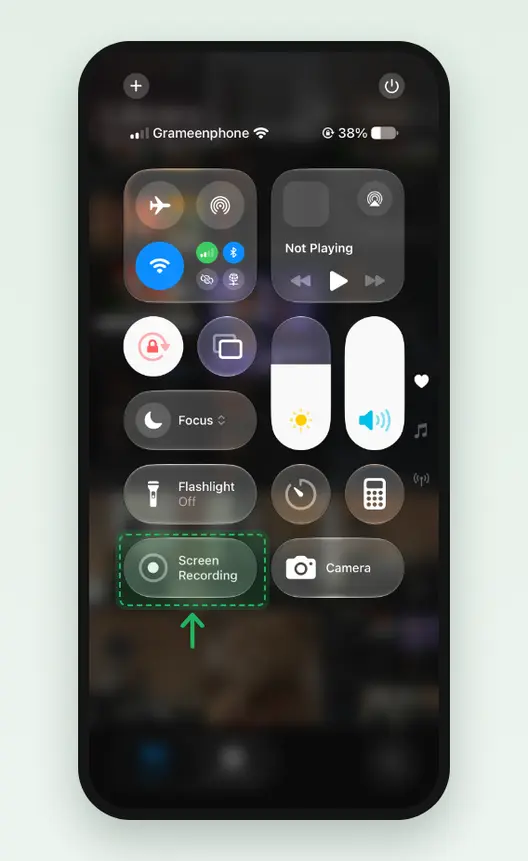
Screenshot: Screen Recording in Control Center. Play the GIF, then stop the recording
Let the GIF play once or twice. Open Control Center again and tap the red Screen Recording button, which reads Recording, or tap the red indicator at the top of the screen. The recording goes to Photos.
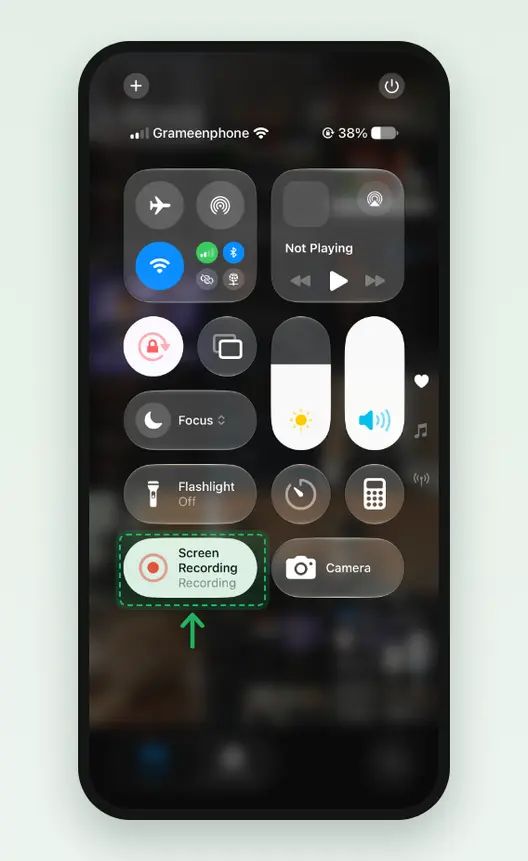
Screenshot: tap the red button to stop. The video goes to Photos.
The recording is a video, not a GIF, so trim it in Photos to the part you want. Android phones have a screen recorder in Quick Settings on most models; we did not run one.
Why does a GIF save as WebP or MP4?
Because the site sends a WebP or a video, and a WebP or a video is a much smaller file. In its developer guide, Giphy tells apps to “Use MP4 wherever supported, or WEBP as a fallback. Do not use the GIF format.” Tenor’s API lists a GIF and an MP4 of every clip, plus small copies up to 220 pixels wide. The browser saves the file it was sent, whatever the post calls it.
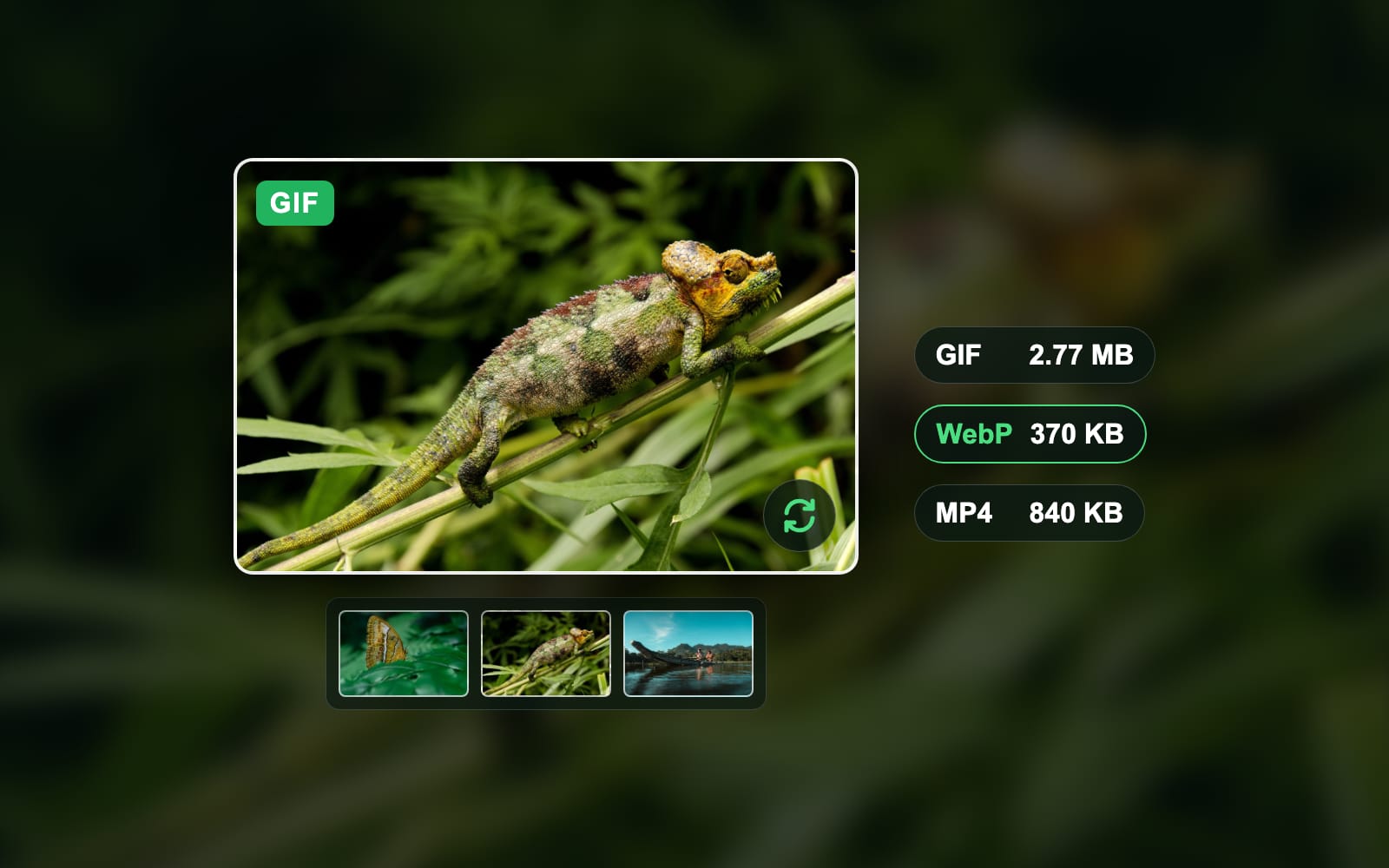
We measured it on one animation made from 6 of our own photos: 480 × 320 pixels, 7.2 seconds, looping. Every file below plays the whole 7.2 seconds.
Bytes of the same animation
- GIF2.77 MB
- Animated WebP370.4 KB
- MP4 (H.264)840.4 KB
- GIF made back from the WebP2.64 MB
The WebP was 13% of the GIF’s size. Turning that WebP back into a GIF gave 2.64 MB, nearly the size of the original GIF again. So a GIF converter gets you the format, not a small file.
What Giphy serves for the same GIF
Giphy’s own files tell the same story. For the first 8 GIFs on its “download” page, we compared the three files Giphy serves for each one.
| GIF code | .gif | .webp | .mp4 | WebP share of GIF |
|---|---|---|---|---|
| IRFQYGCokErS0 | 101.5 KB | 36.6 KB | 33.2 KB | 36% |
| GKaxfZLlUT9YJeHL0m | 40.5 KB | 30.8 KB | 28.4 KB | 76% |
| fzn50NoTO0Pn9rKSyz | 4.58 MB | 1.53 MB | 676.2 KB | 33% |
| Kwd3jZhC7CVR6wSjw6 | 4.73 MB | 995.0 KB | 821.1 KB | 21% |
| 1a8ogVUOKA8UBxIUlB | 7.03 MB | 1.93 MB | 1.53 MB | 27% |
| 10FwycrnAkpshW | 848.9 KB | 277.3 KB | 261.0 KB | 33% |
| LHZyixOnHwDDy | 190.2 KB | 191.0 KB | 71.0 KB | 100% |
| 6LygV2CaXxxaDDCopf | 7.81 MB | 2.81 MB | 1.50 MB | 36% |
| All 8 | 25.33 MB | 7.80 MB | 4.93 MB | 31% |
At the median, Giphy’s WebP was 35% of its GIF and its MP4 was 26%. In 1 of the 8, the WebP was slightly larger than the GIF, so the swap is not always a win.
Our post what is a WebP file explains why images save as WebP in general, and what does GIF stand for explains why a GIF is so large.
Why is my saved GIF not moving?
- The file is not a GIF. Check the ending. A .webp or .mp4 file is the site’s copy, and renaming it to .gif does not change what is inside.
- The app shows the first frame. A photo grid or a file preview often shows a still. Open the file in a browser, or open it full screen on the phone.
- You saved the preview. A grid tile, a Google Images preview or a screenshot can be a still or a small copy. Open the GIF on its own page, then save it.
- The GIF plays once. Some GIFs are made to play one time and stop. X shows a GIF that does not loop as a still image, its help page says.
Blinkimg’s image converter does not take animated files yet. Our engine refused both the animated WebP and the GIF from our test instead of flattening them to one frame, so nothing you save is silently turned into a still.
How we tested
- The animation: 6 of the owner’s own photos, each cut to 480 × 320, held for 8 frames and crossfaded into the next: 72 frames of 100 ms, 7.2 seconds, looping.
- The files: the GIF and the animated WebP (quality 75) written by libvips 8.18.6 through sharp 0.35.4, the MP4 by macOS AVFoundation (H.264 at its default bitrate), each read back for its frames and play time. Measured 2026-10-17. The MP4’s bytes move by a few percent between runs.
- What sites serve: in Chrome on 17 October 2026, the status, type and bytes of each Giphy rendition for the first 8 GIFs of giphy.com/explore/download, and of the Tenor files for the first “dancing cat gif” result in Google Images. Nothing was uploaded.
- The steps: the Giphy, Tenor and i.giphy.com screenshots are a Chromium window on a Mac with Chrome’s own menu open; the Google Images one is our founder’s Chrome, his avatar blurred. The phone steps follow Google’s and Apple’s help pages, read that day. How we measure covers the rest.
Read the full guide: Best image format: JPG, PNG, WebP, AVIF, HEIC and GIF explained.
Questions
- How can I save GIFs for free?
- Every built-in way is free. On a computer, right-click the GIF and choose Save Image As. On iPhone, touch and hold it and tap Save to Photos. On Android, touch and hold it and tap Download image. On Giphy, open i.giphy.com/CODE.gif first, because the page itself shows a WebP.
- How can I save GIFs?
- On a computer, right-click the GIF and choose Save Image As, then check the name ends in .gif. On a phone, touch and hold the GIF and tap Save Image, Save to Photos or Download image. Open the GIF on its own page first, because grid previews are often small copies or stills.
- How do you save a GIF and keep it moving?
- Save the .gif file itself, not a screenshot or a preview, and open it in an app that plays animation. A browser always does: drag the file onto a Chrome, Edge or Safari window. On an iPhone, open it from Photos full screen. A file ending in .webp or .mp4 is a different format.
- Why can’t I save a GIF?
- The site may block the menu or send a different file. On Giphy’s page, Save Image As was greyed out and the image was a WebP. Open i.giphy.com followed by the GIF’s code and .gif instead. X plays GIFs as video, and some apps, like Instagram comments, offer no save option at all.
- How do I save GIFs on my iPhone?
- Touch and hold the GIF in Safari or Chrome and tap Save to Photos or Save Image. In Messages, touch and hold a GIF someone sent and tap Save. The GIF goes to Photos. Find it under Collections, Media Types, Animated; it moves when you open it.
- How do I save GIFs on Android?
- In Chrome, open the GIF on its own page, touch and hold it, and tap Download image. The file goes to your Downloads folder. Open the Files app and tap Downloads to find it. Other browsers, such as Samsung Internet, have a similar menu when you hold your finger on an image.
- How do I save a GIF from Google on my phone?
- Tap the GIF in Google Images, then tap Visit to open the site it came from. Touch and hold the GIF there and tap the save or download option. The preview in Google Images can be a small copy: our test preview was 220 pixels wide, the site’s own copy 498.
- How do I save GIFs from X?
- X has no save button for GIFs. X’s developer documentation shows a GIF’s playback file as an MP4 video, so what plays is a short clip. Record your screen to keep it, or use a downloader that fetches the post’s video, then a GIF converter if you need a .gif. A downloader sees the post link you paste.
- Why do GIFs keep saving as WebP?
- Because the site sent a WebP, which is much smaller. Giphy tells apps not to use the GIF format, and its WebP was 35% of the GIF at the median of 8 files we checked. Your browser saves the file it received. Open the .gif address of the same image to get the GIF.
- Can I download a GIF instead of a WebP file?
- Yes, when the site keeps a GIF copy. On Giphy, take the code at the end of the GIF page address and open i.giphy.com/CODE.gif, then save it. On Tenor, the GIF page already shows a .gif. Renaming a .webp file to .gif does not convert it.
- Where do GIFs get saved?
- On a computer, in your Downloads folder unless you picked another one in the Save dialog. On an iPhone, in the Photos app, under Media Types, Animated. On Android with Chrome, in Downloads, which you open from the Files app. A GIF saved from Messages also goes to Photos.
- How do I save GIFs from Instagram comments?
- Instagram offers no save option for a GIF in a comment. Record the screen instead: on an iPhone, open Control Center, tap Record, play the GIF, then tap the red indicator and Stop. The recording goes to Photos as a video, which you can trim to the part you want.