CMYK to RGB: how to convert a print file for screens
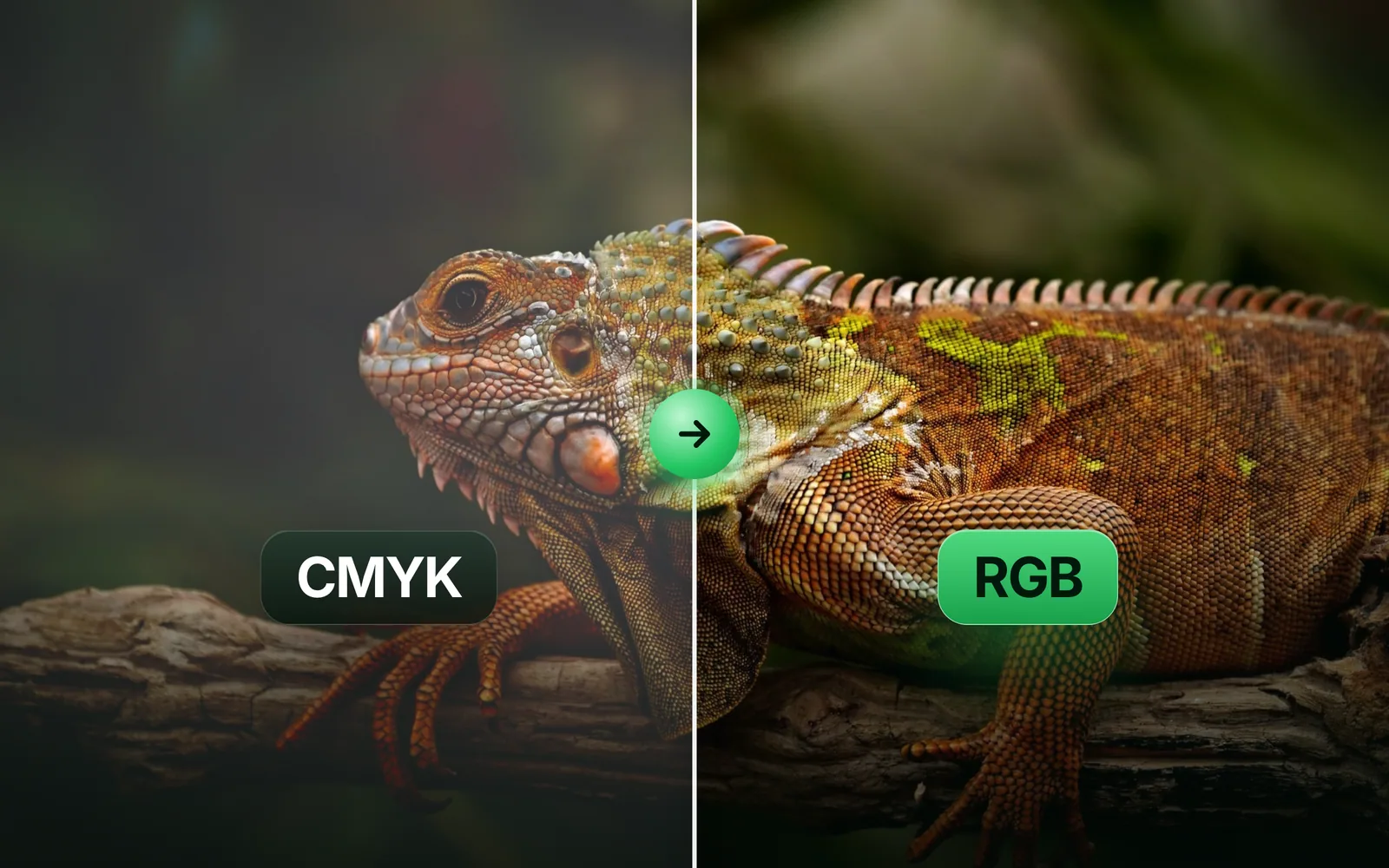
To convert CMYK to RGB, run the file's numbers through its ICC profile, not a formula. We took one photo to print CMYK and back 7 ways, and measured how far each one drifts on 2,457,600 pixels. Part of the image converter.
By Sahadat Husain14 min readFormats

How do you convert CMYK to RGB?
To convert CMYK to RGB, read the file’s CMYK numbers through its ICC profile, then write the colour out in sRGB. A CMYK number is an amount of ink, not a colour. The same four numbers print differently on each press and paper. The profile says which colour those inks make. The ICC’s FAQ explains the middle step. In the profile connection space, colour is specified “in terms of its appearance rather than in a device-dependent space such as CMYK”.
CMYK numbers
C100 M0 Y0 K0
Ink amounts, no colour yet
Source profile
U.S. Web Coated (SWOP) v2
Embedded in the file
Connection space
CIELAB or CIEXYZ
The colour itself
sRGB profile
The web’s colour space
RGB numbers
0, 174, 239
What a screen shows
The ICC profile format sets the rules for this chain, and three tools run it for you. Photoshop has Edit > Convert to Profile and Image > Mode > RGB Color. An image converter that reads the embedded profile does it on upload. We tested how close each path gets, and two browsers too.
How we tested each way
Our test: one 1920 × 1280 photo of an iguana, taken to CMYK with the U.S. Web Coated (SWOP) v2 profile. We saved it as a CMYK JPEG at quality 90, once with the profile inside and once without. Then we turned it back into RGB 7 ways. Each result was compared, pixel by pixel, with an ICC conversion by LittleCMS 2.19. That reference uses relative colorimetric with black point compensation, as Adobe’s help recommends.
The score is ΔE, the CIEDE2000 colour difference, over all 2,457,600 pixels. A ΔE of 0 is the same colour. The bigger the number, the further apart two colours sit.
The CMYK to RGB formula, and how far it misses
The CMYK to RGB formula that calculator pages print turns each ink into a perfect filter. It works on fractions from 0 to 1:
R = 255 × (1 − C) × (1 − K)
G = 255 × (1 − M) × (1 − K)
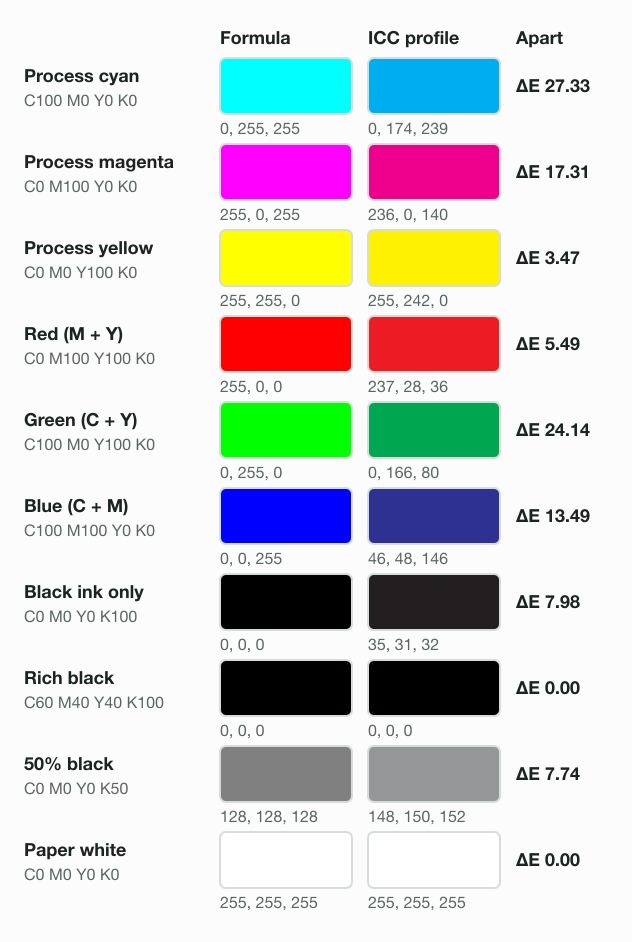
B = 255 × (1 − Y) × (1 − K)Real ink is not a perfect filter. Process cyan reflects less light than the formula assumes. The formula makes C100 M0 Y0 K0 pure 0, 255, 255. The SWOP profile makes it 0, 174, 239, a ΔE 27.33 gap, the widest of our 10 builds. Green ink mixes miss by ΔE 24.14.
| Build | CMYK | Formula | ICC profile | Blinkimg | Formula off by |
|---|---|---|---|---|---|
| Process cyan | C100 M0 Y0 K0 | 0, 255, 255 | 0, 174, 239 | 0, 174, 239 | ΔE 27.33 |
| Process magenta | C0 M100 Y0 K0 | 255, 0, 255 | 236, 0, 140 | 236, 0, 140 | ΔE 17.31 |
| Process yellow | C0 M0 Y100 K0 | 255, 255, 0 | 255, 242, 0 | 255, 242, 0 | ΔE 3.47 |
| Red (M + Y) | C0 M100 Y100 K0 | 255, 0, 0 | 237, 28, 36 | 237, 28, 36 | ΔE 5.49 |
| Green (C + Y) | C100 M0 Y100 K0 | 0, 255, 0 | 0, 166, 80 | 0, 166, 80 | ΔE 24.14 |
| Blue (C + M) | C100 M100 Y0 K0 | 0, 0, 255 | 46, 48, 146 | 46, 48, 146 | ΔE 13.49 |
| Black ink only | C0 M0 Y0 K100 | 0, 0, 0 | 35, 31, 32 | 35, 31, 32 | ΔE 7.98 |
| Rich black | C60 M40 Y40 K100 | 0, 0, 0 | 0, 0, 0 | 0, 0, 0 | ΔE 0.00 |
| 50% black | C0 M0 Y0 K50 | 128, 128, 128 | 148, 150, 152 | 148, 150, 152 | ΔE 7.74 |
| Paper white | C0 M0 Y0 K0 | 255, 255, 255 | 255, 255, 255 | 255, 255, 255 | ΔE 0.00 |
On the whole photo, the formula lands ΔE 5.43 from the reference on average. That is 11 times the engine’s ΔE 0.49. Use the formula for a rough guess at one flat colour. Use a profile for a brand colour or a photo.
What Blinkimg does with a CMYK JPEG
Blinkimg’s engine converts a CMYK JPEG to sRGB, whatever format you save. All 16 of our outputs, in 4 formats from both CMYK files, came back as sRGB with 3 channels. With the profile in the file, the engine landed ΔE 0.49 from the reference on average. At the 95th percentile it was ΔE 1.43. The engine used the profile’s perceptual table: against a perceptual LittleCMS conversion, the average gap was ΔE 0.00.
The output carries no profile by default, and a browser reads a file with no profile as sRGB. With Keep metadata on, the engine attaches a 480-byte sRGB profile. The CMYK file carried a 557,168-byte SWOP profile, 24% of its 2.32 MB.
- CMYK JPEG, profile inside2.32 MB
- CMYK JPEG, no profile1.77 MB
- Blinkimg PNG1,005.9 KB
- Blinkimg JPG267.0 KB
- Blinkimg WebP214.5 KB
- Blinkimg AVIF118.9 KB
The JPG at Auto scores ΔE 1.59 on average. The extra over ΔE 0.49 is the JPG’s own compression, not the colour. For a web page, the JPG to WebP converter gives the 214.5 KB file. To keep editing without further loss, the JPG to PNG converter writes a lossless RGB copy.
Why does a CMYK JPEG look washed out in a browser?
A CMYK JPEG can look washed out because the browser converts it badly, even with the profile inside. Headless Chromium 149 drew our file ΔE 9.70 from the reference on average. It lifted rich black to 53, 54, 58, a grey haze over every shadow. WebKit 26.5 drew the same file ΔE 0.52 away, near the engine’s ΔE 0.49.
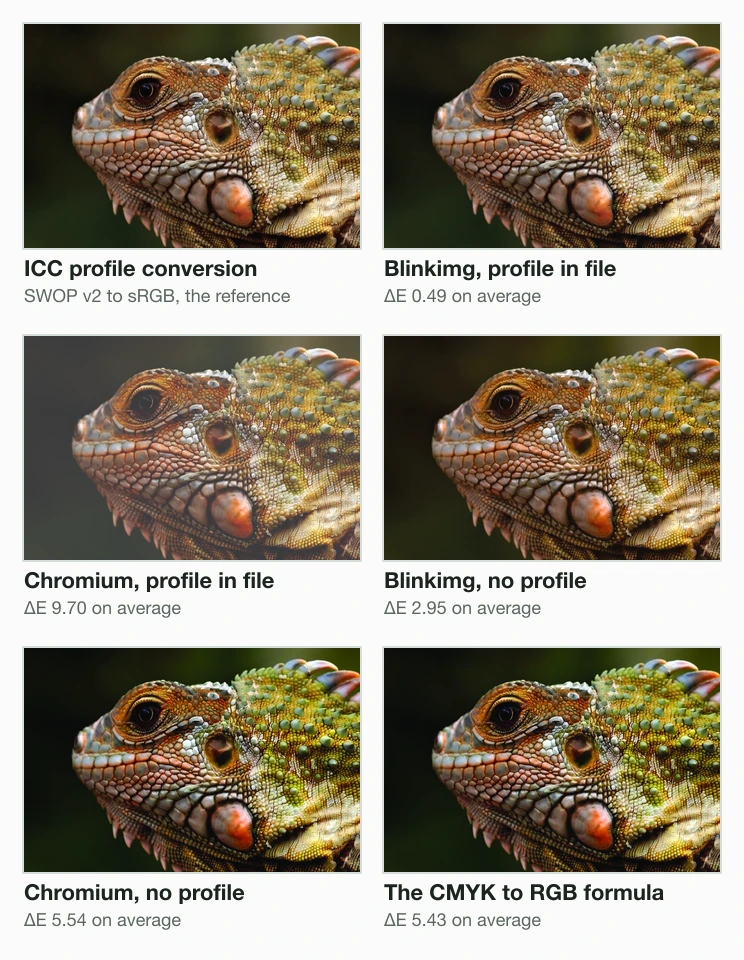
- Blinkimg, profile in file0.49
- WebKit, profile in file0.52
- Blinkimg, no profile2.95
- WebKit, no profile4.10
- The formula5.43
- Chromium, no profile5.54
- Chromium, profile in file9.70
These are Playwright’s headless builds on a Mac, not the browsers on your phone. They still show the risk: a CMYK JPEG on a web page looks different from one browser to the next. After conversion that risk is gone. Chromium drew the engine’s sRGB JPG ΔE 0.22 from the file’s own pixels, and WebKit ΔE 0.24.
What if the CMYK file has no profile?
A CMYK file with no profile gets a guess, and every program guesses differently. The ICC’s FAQ is blunt: “There is no way to tell any of the parameters you specify if you have a file with no profile.” Our copy without the profile went three ways:
- Blinkimg’s engine assumed libvips’s built-in “Chemical proof” profile and landed ΔE 2.95 from the truth.
- WebKit assumed macOS’s Generic CMYK Profile (within ΔE 0.84 of it) and landed ΔE 4.10 away.
- Chromium drew the formula, within ΔE 0.39 of it, and landed ΔE 5.54 away.
The fix is to name the profile before you convert. Ask the sender which profile made the file. In Photoshop, Edit > Assign Profile sets it. Adobe notes that assigning “doesn’t change the document’s color values”; it only tells Photoshop how to read them. Then convert to sRGB as usual.
Does the CMYK file carry an ICC profile?
- Yes
Convert it as it is
Blinkimg and WebKit landed within ΔE 0.52 of the reference
- No
Do you know which profile made it?
- Yes
Assign that profile, then convert
Edit > Assign Profile in Photoshop
- No
Convert, then check the colours by eye
Our three guesses landed ΔE 2.95 to ΔE 5.54 away
- Yes
How to convert CMYK to RGB in Photoshop
In Photoshop, Edit > Convert to Profile converts CMYK to RGB with the profile you choose. Adobe’s help describes both menus. Four steps:
Open the file and check its mode
Photoshop shows the mode in the document tab, such as CMYK/8. If the file has no profile, Photoshop can ask which one to use when it opens.
Choose Edit > Convert to Profile
Set Destination Space to sRGB IEC61966-2.1, the colour space browsers assume. Adobe recommends the Adobe (ACE) engine and Black Point Compensation checked.
Pick the intent
Relative Colorimetric or Perceptual. On our photo, the two intents ended ΔE 0.49 apart on average.
Save a copy for the web
Save the RGB copy as a JPG under a new name and keep the CMYK original for print. Or skip the save dialog: drop the CMYK JPEG on the JPG compressor, which converts and compresses in one step.
Image > Mode > RGB Color does the same in one click. It converts to the RGB working space named in Edit > Color Settings, so check that it says sRGB first. Adobe’s Color Settings page adds that the working spaces also “determine the appearance of colors in untagged documents”.
How to tell if a JPG is CMYK or RGB
To tell if a JPG is CMYK, look at the colour space your editor reports. Photoshop prints it in the document tab. On a Mac, the sips command in Terminal names the space and the profile. Our three files:
$ sips -g space -g profile cmyk-tagged.jpg
  space: CMYK
  profile: U.S. Web Coated (SWOP) v2
$ sips -g space -g profile cmyk-untagged.jpg
  space: CMYK
  profile: Generic CMYK Profile
$ sips -g space -g profile engine-tagged.jpg
  space: RGB
profile: sRGB IEC61966-2.1Read the second answer with care. The file without a profile shows “Generic CMYK Profile”: that is the profile macOS assumes, not one stored in the file. The engine’s JPG carries no profile either, and sips names sRGB IEC61966-2.1, the one it assumes for RGB.
CMYK vs RGB: what is the difference?
RGB mixes red, green and blue light; CMYK mixes cyan, magenta, yellow and black ink. Screens make colour with RGB, and printing presses with CMYK. A JPEG can hold either. Our CMYK JPEG has 4 channels; the engine’s sRGB JPG has 3.
Why is CMYK more dull than RGB?
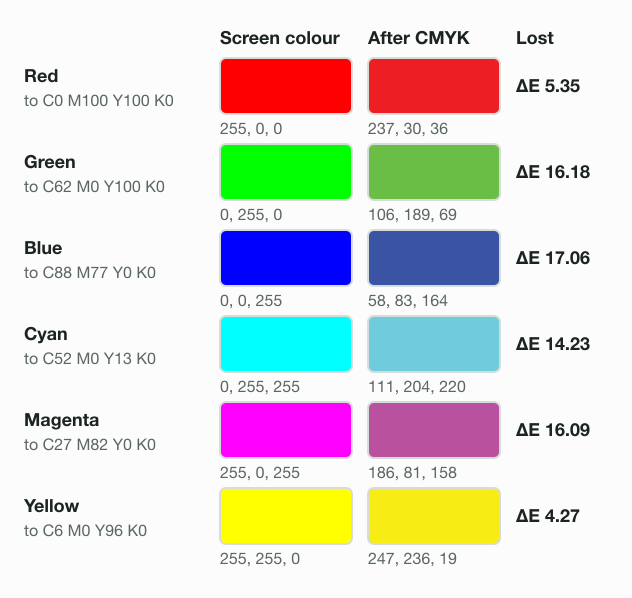
CMYK looks dull because ink cannot make a screen’s brightest colours. We sent 6 pure screen colours to CMYK with the SWOP profile and back. Pure blue went to C88 M77 Y0 K0 and came back as 58, 83, 164, ΔE 17.06 away. Green lost ΔE 16.18. Red lost ΔE 5.35, and yellow only ΔE 4.27.
Can you convert CMYK to RGB without losing colour?
Converting CMYK to RGB loses almost nothing: the engine landed ΔE 0.49 from the reference. The loss happened earlier, on the way into CMYK. Our photo, taken to CMYK and back, sat ΔE 1.95 from the original on average, one JPEG save included. At the 95th percentile it was ΔE 4.47. No converter brings those colours back. If you still have the RGB original, use it.
RGB to CMYK: do you need it for print?
Convert RGB to CMYK only when your printer asks for CMYK and names its profile. The ICC’s FAQ notes that “Many printers only have a RGB interface.” It adds that converting to CMYK only helps when the printer uses CMYK data directly. Convert once, with the press’s profile, and keep the RGB master for screens.
Got a CMYK JPG for a web page or a social post? Drop it on the JPG compressor below. It comes back as an sRGB JPG, 89% smaller in our test.
Read the full guide: Best image format: JPG, PNG, WebP, AVIF, HEIC and GIF explained.
Questions
- How do I convert CMYK to RGB?
- Convert CMYK to RGB through the file's ICC profile. In Photoshop, choose Edit > Convert to Profile and pick sRGB. An image converter that reads the embedded profile does the same on upload. Blinkimg's engine landed ΔE 0.49 from an ICC reference on our photo. The one-line formula landed ΔE 5.43.
- What is the CMYK to RGB formula?
- The common formula is R = 255 × (1 − C) × (1 − K). G comes from magenta and B from yellow, each value from 0 to 1. It treats inks as perfect filters. It turned process cyan into 0, 255, 255, where the SWOP v2 profile gives 0, 174, 239. Treat its answer as a rough guess.
- What is the difference between RGB and CMYK?
- RGB mixes red, green and blue light, the way a screen makes colour. CMYK mixes cyan, magenta, yellow and black ink, the way a press prints. RGB files have 3 channels and CMYK files 4. The same CMYK numbers print differently on each press, so a CMYK file needs its profile.
- Why is CMYK more dull than RGB?
- CMYK is duller because four inks on paper cannot reach a screen's brightest colours. We sent pure blue 0, 0, 255 to SWOP v2 CMYK and back. It returned as 58, 83, 164, ΔE 17.06 away. Pure green lost ΔE 16.18. Yellow, which ink prints well, lost only ΔE 4.27.
- What colors does CMYK struggle with?
- CMYK struggles with bright blues, vivid greens, cyans and magentas, the saturated colours a screen makes easily. In our test through the SWOP v2 profile, pure blue and pure green each lost more than ΔE 16. Red lost ΔE 5.35 and yellow ΔE 4.27, because the inks print those well.
- Can I convert CMYK to RGB without losing color?
- Converting CMYK to RGB loses almost nothing when the profile is used: Blinkimg's engine landed ΔE 0.49 from the reference. The colour was lost earlier, when the file went from RGB to CMYK. Our photo's round trip measured ΔE 1.95 on average. Start from the RGB original if you have it.
- Does JPEG support CMYK colors?
- JPEG supports CMYK colours. A CMYK JPEG stores 4 channels where an RGB one stores 3. Our test file held 4 channels, an Adobe marker and a 557,168-byte SWOP profile. Browsers do not all show such a file correctly, so convert it to sRGB before it goes on a web page.
- How can I tell if a JPEG is RGB or CMYK?
- Check the colour space your software reports. Photoshop shows CMYK or RGB in the document tab. On a Mac, run sips -g space photo.jpg in Terminal; it prints CMYK or RGB. A profile name from sips can be an assumption: it names Generic CMYK Profile for a CMYK file that carries none.
- Why does my CMYK JPEG look washed out?
- A CMYK JPEG looks washed out when the program converts it to screen colours badly. Headless Chromium 149 drew our file with its profile ΔE 9.70 from the reference and turned rich black into 53, 54, 58. WebKit drew it ΔE 0.52 away. Converting to sRGB first removes the difference.
- How do I convert CMYK to RGB in Photoshop?
- Open the file, then choose Edit > Convert to Profile. Set Destination Space to sRGB IEC61966-2.1, keep Black Point Compensation checked and click OK. Save the copy under a new name. Image > Mode > RGB Color also works, but it uses the RGB working space set in Color Settings.
- How can I convert images to RGB colors?
- Open the image in an editor that reads ICC profiles and convert it to sRGB. Or upload it to a converter that does. Blinkimg's engine turns a CMYK JPEG into sRGB in every format it writes. Our 2.32 MB CMYK photo came back as a 267.0 KB JPG at Auto.
- Do I need to convert RGB images to CMYK for printing?
- Only when your printer asks for CMYK and names the profile its press uses. The ICC notes that many printers only have an RGB interface and convert to CMYK themselves. Then sending RGB is better. When CMYK is required, convert once with the press profile and keep the RGB master for screens.
- What happens if I print RGB?
- The printer converts the RGB colours to its inks, using its own profile. Colours outside what the inks can print come out duller. In our SWOP v2 test, pure blue landed ΔE 17.06 from the screen colour. Converting to CMYK yourself with the same profile loses the same colours.