Best image format: JPG, PNG, WebP, AVIF, HEIC and GIF explained
The best image format depends on what the picture is and where it goes. For a photo on your own website, use AVIF with WebP or JPG as the fallback. For a photo you send, use JPG. For a screenshot, a logo or anything see-through, use PNG. For animation, use WebP. We saved one photo, one card of text and one flat graphic in every format to show why. Part of the image converter.
By Sahadat HusainUpdated 21 min readFormats

The best image format, in one table
Two questions settle most choices. Is the picture a photo, or was it drawn? And will a browser you control show it, or will someone else’s app open it? The table puts the six formats side by side; every section after it shows the bytes behind a row.
| Format | Compression | Transparency | Animation | Browsers | Use it for |
|---|---|---|---|---|---|
| JPG | Lossy | No | No | All | Photos you send or upload |
| PNG | Lossless | Yes | As APNG | All | Screenshots, logos, editing copies |
| WebP | Lossy or lossless | Yes | Yes | 96.74% | Web images and animation |
| AVIF | Lossy or lossless | Yes | Yes | 95.35% | Web photos at the fewest bytes |
| HEIC | Lossy, as phones save it | Allowed | Allowed | Safari, 14.63% | Photos kept on an iPhone |
| GIF | Lossless, 256 colours | One colour, hard edge | Yes | All | Loops where WebP is refused |
Lossy, at Auto
- AVIF69.3 KB
- WebP85.5 KB
- JPG140.3 KB
Palette or lossless
- PNG at Auto606.7 KB
- GIF843.1 KB
- PNG, lossless2.5 MB
The AVIF is 51% smaller than the JPG and still closer to the original. We scored every file with PSNR, a decibel measure of how far its pixels moved from the source, where higher is closer. The AVIF scored 39.1 dB, the JPG 38.5 dB. HEIC has no bar because we cannot write one; the HEIC section says why.
Lossy vs lossless image compression: what each one keeps
Every format shrinks a picture in one of two ways. Lossless compression stores the same pixels in fewer bytes: decode the file and every value comes back exactly. Lossy compression drops detail the eye is unlikely to miss, then stores the rest. Here is one 8 × 8 block of our photo, on the edge of a boat’s hull, as three files store it.
Lossless PNG
64 of 64 pixels exact
JPG at Auto
0 of 64 exact, shifts up to 38
GIF
0 of 64 exact, shifts up to 14
The JPG kept none of the 64 pixels exactly and moved one channel by up to 38 levels. The GIF moved less on this block, by up to 14, but more over the whole photo: a PSNR of 36.0 dB against the JPG’s 38.5 dB. That is the trade. The JPG spent 140.3 KB on the whole photo; the lossless PNG spent 2.5 MB. Lossy compression is right for anything people only look at. Lossless is right for anything you will edit, measure or save again.
What non-lossy compression keeps
Non-lossy compression is another name for lossless compression, and it keeps every pixel. PNG always works this way. WebP and AVIF each have a lossless mode beside the lossy one. GIF stores its pixels losslessly too, but only after cutting the picture to 256 colours, which is a loss of its own.
Which is the best image file for quality?
A lossless one: a PNG at full quality, or a lossless WebP. Nothing is lost however often you open and save it, which makes it the right master for editing. For a picture that is only viewed, a lossy file at a sensible quality looks the same at a fraction of the bytes.
JPG: the photo format every device opens
JPG, also spelled JPEG, is the lossy format for photographs that the Joint Photographic Experts Group standardised in 1992 as ITU-T T.81. It splits a picture into small blocks and rounds away fine detail in each. Every browser shows it. It holds no transparency and no animation, and MDN’s image format guide caps it at 65,535 pixels a side.
Rounding suits a photo and fails on sharp edges. Our 1200 × 630 card of text came out at 36.3 KB as a JPG, twice the 18.3 KB of a PNG at Auto. The JPG also sat further from the source: 39.6 dB against 49.1 dB. Zoomed in, the white letters on the blue button show why.
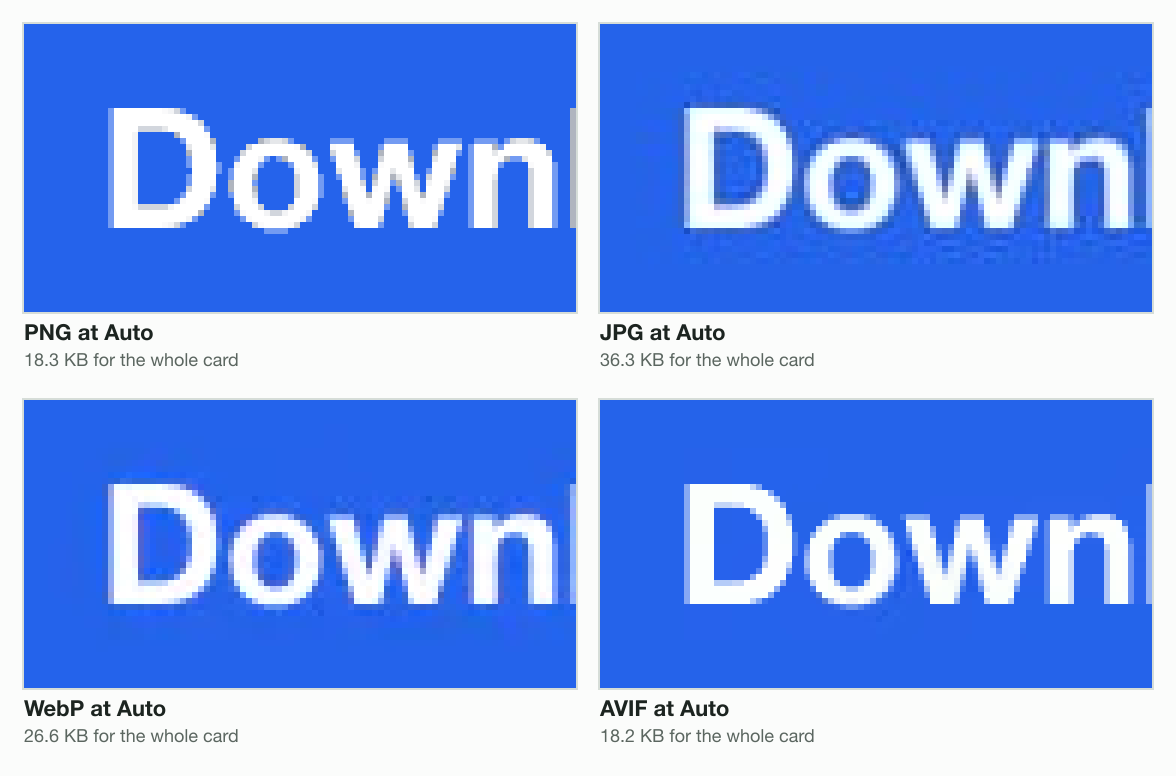
Use JPG for photos you email, upload to a form, print or post. Avoid it for screenshots, logos, line art and anything with a transparent background; why each mistake costs you is in PNG vs JPG. A PNG, WebP, AVIF or HEIC becomes a JPG in the JPG converter.
PNG: lossless pixels, full transparency, heavy photos
PNG stores pixels losslessly and holds transparency with soft edges. Its third edition became a W3C Recommendation on 24 June 2025, and it now covers animation (APNG) and HDR colour. A side can run to 2,147,483,647 pixels.
PNG at Auto in our engine is not the same file as PNG at quality 100. Auto first reduces the picture to at most 256 colours, then stores those losslessly. On our flat graphic that changed nothing: the 1.6 KB Auto PNG decodes to the exact source pixels. On the photo it cut 2.5 MB to 606.7 KB, and moved the pixels further than the JPG did, 36.5 dB against 38.5 dB.
The photo, 1920 × 1076
- PNG, lossless2.5 MB
- PNG at Auto606.7 KB
- JPG at Auto140.3 KB
The text card, 1200 × 630
- PNG, lossless58.7 KB
- PNG at Auto18.3 KB
- JPG at Auto36.3 KB
Use PNG for screenshots, logos, charts, transparent cut-outs and the master copy you edit. Avoid it for photos you share. The PNG converter makes one from a JPG, WebP, AVIF or HEIC.
WebP: smaller than JPG and PNG on most images
WebP is Google’s format, documented as RFC 9649 in November 2024. It has a lossy mode and a lossless one, holds transparency and plays animation, up to 16,383 pixels a side. Google says lossy WebP is 25 to 34% smaller than a comparable JPEG, a figure measured in 2011 against libjpeg 6b, and lossless WebP 26% smaller than PNG.
On our photo, WebP at Auto came to 85.5 KB, 39% under the JPG. Part of that gap is quality: the WebP’s pixels sat a little further from the source, 37.7 dB against 38.5 dB. Browser support is close to universal: caniuse counts 96.74% of users, with Safari the last to join, at version 14 in 2020. The WebP converter writes WebP from JPG, PNG, AVIF or HEIC, and turns a WebP into JPG, PNG or AVIF.
WebP vs PNG: is PNG or WebP better?
Lossless against lossless, WebP was smaller on all three of our images, by more than Google’s 26% average on two of them. Our engine writes lossy WebP only, so we wrote these lossless WebPs with libvips, the image library inside it.
The photo
- PNG2.5 MB
- WebP2.0 MB
The text card
- PNG58.7 KB
- WebP27.0 KB
The flat graphic
- PNG1.7 KB
- WebP0.2 KB
At Auto the answer flips on text. The engine’s lossy WebP of the card was 26.6 KB, larger than the 18.3 KB PNG and further from the source. So for a screenshot on your own site, use lossless WebP. For a file someone else opens or edits, PNG is the safe pick, because every app reads it.
AVIF: the smallest photos, and the sharpest at one size
AVIF, the AV1 Image File Format, stores pictures compressed with the AV1 video codec. The Alliance for Open Media published its specification on 19 February 2019. It holds lossy or lossless pictures, transparency, animation and 10- or 12-bit HDR colour. Chrome reads it from version 85, Firefox from 93, Safari fully from 16.4 and Edge from 121: 95.35% of users, per caniuse.
The fairest test of a lossy format is the same file size. We gave the photo one cap, a 70 KB Max file size, in each format and kept all 1920 × 1076 pixels. AVIF used the bytes best: 39.1 dB, against 36.9 dB for WebP and 35.9 dB for JPG.
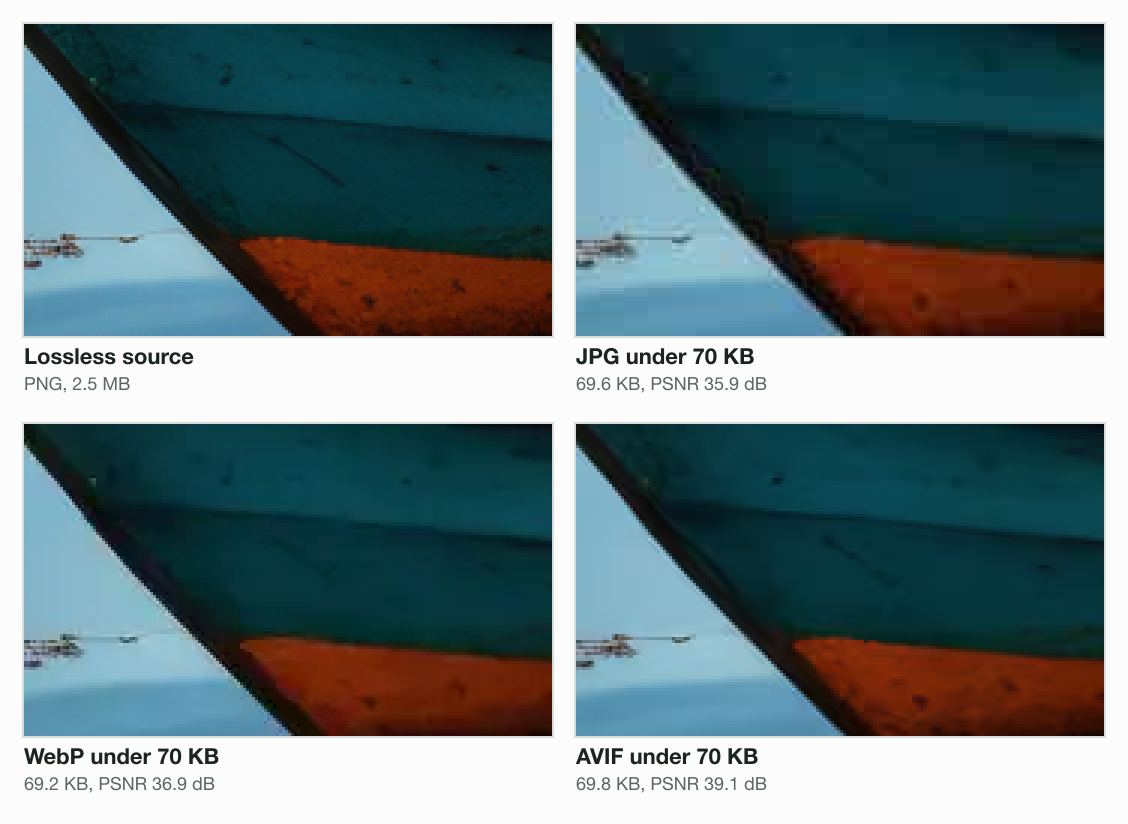
AVIF’s weak spot is its lossless mode. Written by libvips, the lossless AVIF of the text card came to 101.1 KB, against 58.7 KB for the lossless PNG. Keep AVIF for lossy pictures on pages you run. The AVIF converter writes it from a JPG, PNG, WebP or HEIC. AVIF vs WebP compares the two on three images and gives the HTML that serves both.
HEIC: the iPhone photo format most browsers cannot show
HEIC is a HEIF file, the ISO/IEC 23008-12 container, holding pictures compressed with HEVC, the H.265 video codec. Every iPhone from the iPhone 7 saves photos this way. Apple’s support note says the format uses less storage than JPEG “while preserving the same visual quality”. The catch is the web. Only Safari shows a HEIC, from version 17 in 2023: 14.63% of users, against 95.35% for AVIF.
- WebP96.74%
- AVIF95.35%
- HEIC14.63%
HEIC is the one format we could not measure beside the others. Our engine reads it and cannot write it: the libvips build inside has no HEVC encoder, a codec that the documentation of sharp, our image library, calls patent-encumbered. What we can show is a conversion: our 1920 × 1280 test HEIC, 343.0 KB, became a 267.4 KB JPG at Auto.
Keep HEIC as the original on the phone and send copies as JPG. The HEIC converter makes JPG, PNG, WebP or AVIF copies, and what is an HEIC file opens one up box by box.
GIF: 256 colours and the web’s oldest animation
GIF is CompuServe’s format, and its 89a specification is dated 31 July 1990. Each frame holds up to 256 colours from a palette, stored losslessly with LZW. One palette colour can be marked transparent, and each frame carries a delay in hundredths of a second. Our engine neither reads nor writes GIF, so every GIF here was written by libvips at its defaults: 256 colours, with dithering.
Squeezed into 256 colours, our photo came to 843.1 KB, 6 times the JPG, and further from the source: 36.0 dB against 38.5 dB. The dithering shows in a sunset sky as a sprinkle of dots.
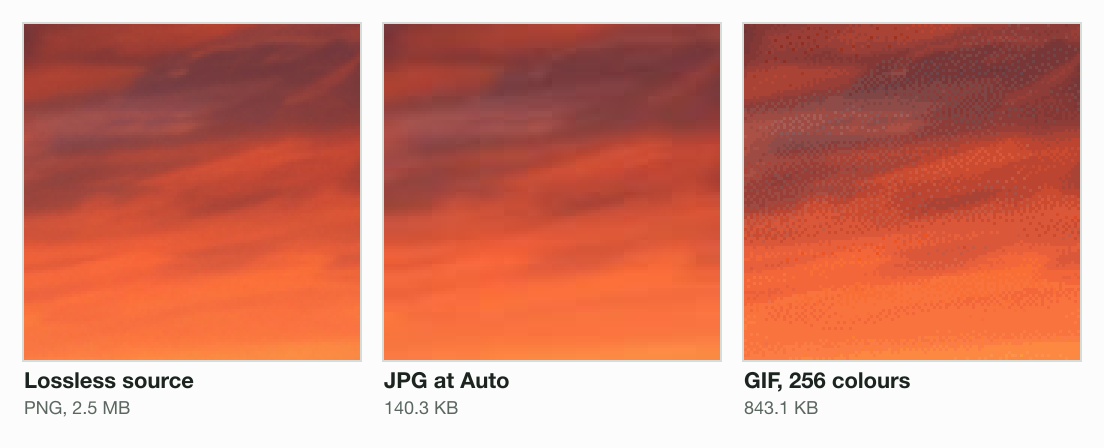
Animation is why GIF survives, and it is where GIF costs the most. We cut 12 frames of 480 × 270 from the photo, 100 ms each, and saved the loop three ways with libvips.
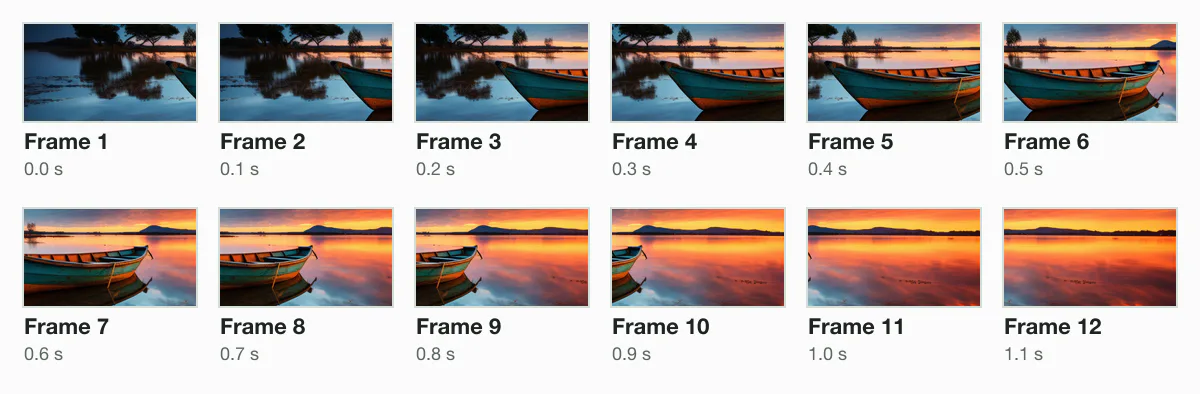
- WebP, lossy116.0 KB
- GIF738.3 KB
- WebP, lossless1.8 MB
The lossy WebP was 84% smaller than the GIF. MDN’s advice matches: prefer PNG for still images, and WebP, AVIF or APNG for animation. Even where GIF loses nothing, PNG wins. Our flat graphic is 4.5 KB as a GIF and 1.6 KB as a PNG, both pixel for pixel.
Which image formats support transparency?
PNG, WebP, AVIF and GIF hold transparency; JPG does not. HEIF allows it, but phone photos never use it. What separates them is the edge. We drew a soft-edged logo, a teal disc and a white ring with anti-aliased edges, 247 levels of transparency in all, and saved it in each format.
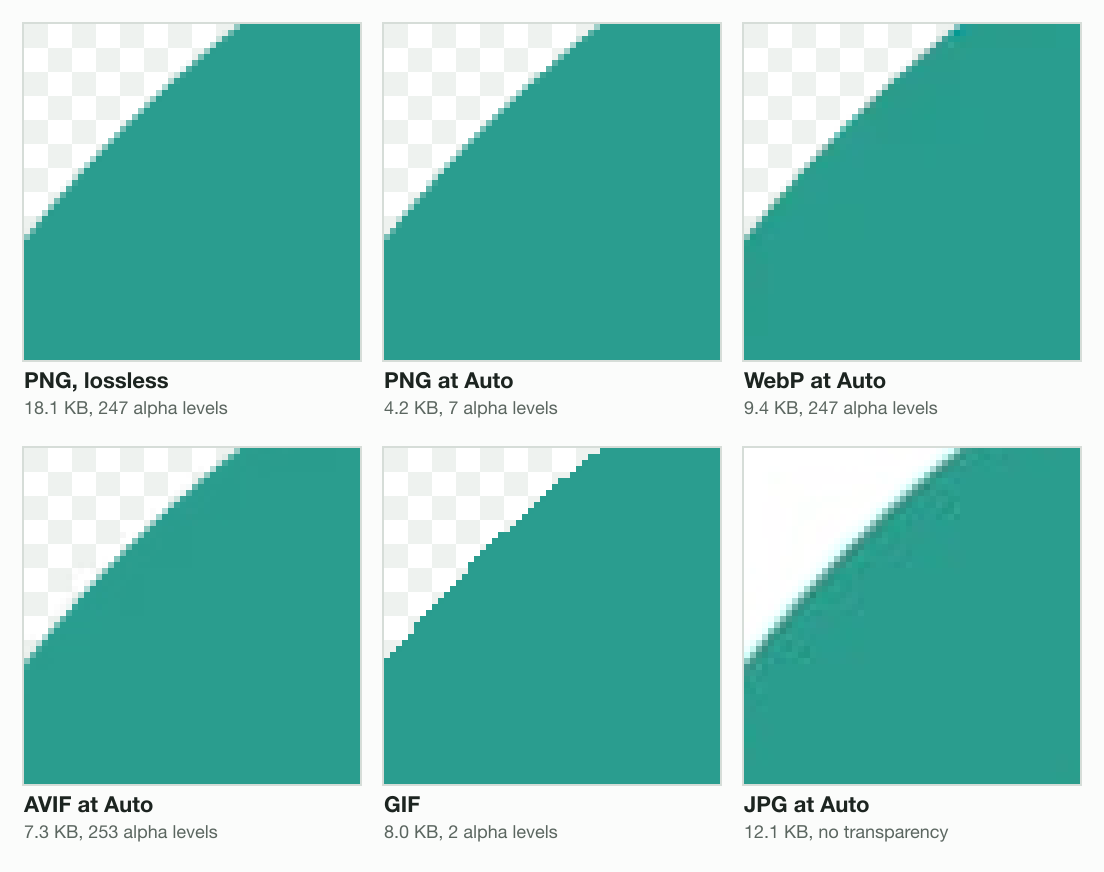
- Lossless PNG, 18.1 KB: all 247 levels, the edge exactly as drawn.
- PNG at Auto, 4.2 KB: the smallest file, with the edge reduced to 7 levels. At normal size it still looks smooth.
- WebP, 9.4 KB, and AVIF, 7.0 KB: the full soft edge, at 48% and 61% under the lossless PNG.
- GIF, 8.0 KB: 2 levels, clear or solid, so every edge pixel snaps one way and the rim turns jagged.
- JPG, 12.1 KB: no transparency. Our engine fills the see-through part with white.
Photo file formats compared, on three images
Here is every file from this post in one place. Each image went into every format from the same pixels. The three are our photo resized to 1920 × 1076, a 1200 × 630 card of text, and a 640 × 480 graphic of flat colour blocks. How we measure covers the engine, the settings and the files behind every table on the site.
| Format | Photo | Text card | Flat graphic |
|---|---|---|---|
| JPG at Auto | 140.3 KB | 36.3 KB | 2.9 KB |
| PNG at Auto | 606.7 KB | 18.3 KB | 1.6 KB |
| PNG, lossless | 2.5 MB | 58.7 KB | 1.7 KB |
| WebP at Auto | 85.5 KB | 26.6 KB | 1.3 KB |
| WebP, lossless * | 2.0 MB | 27.0 KB | 0.2 KB |
| AVIF at Auto | 69.3 KB | 17.9 KB | 0.8 KB |
| AVIF, lossless * | 2.1 MB | 101.1 KB | 0.9 KB |
| GIF * | 843.1 KB | 35.6 KB | 4.5 KB |
The photo
- AVIF39.1 dB
- JPG38.5 dB
- WebP37.7 dB
- PNG at Auto36.5 dB
- GIF36.0 dB
The text card
- GIF67.6 dB
- PNG at Auto49.1 dB
- AVIF45.5 dB
- WebP44.4 dB
- JPG39.6 dB
- Photo: AVIF is the smallest and the closest to the source. WebP and JPG follow; PNG and GIF are many times larger.
- Text card: PNG at Auto and AVIF tie on size, and the PNG is closer. The GIF is closest of all, because the card has few colours, but it is 1.9 times the size.
- Flat graphic: lossless WebP wins at 0.2 KB, with every pixel exact.
The best image format for each job
Answer the questions from the top and stop at the first format you reach. Then read the job it serves.
Does the picture move?
- Yes
WebP
GIF only where a WebP is refused
- No
Does it need a see-through background?
- Yes
PNG to send; AVIF or WebP on your site
Never JPG
- No
Is it a photo?
- Yes
Will it appear on a website you run?
- Yes
AVIF, with WebP or JPG as the fallback
- No
JPG
The safest format to send
- Yes
- No
Will it appear on a website you run?
- Yes
AVIF or lossless WebP
Or the SVG it was drawn in
- No
PNG
Screenshots, logos, charts, text
- Yes
- Yes
- Yes
On a website you run
- Photos: AVIF first, with WebP or JPG as the fallback for the few browsers without it.
- Logos and screenshots: AVIF or lossless WebP. If the logo was drawn as vectors, use the SVG itself: MDN recommends SVG for images that must be drawn accurately at different sizes.
- Anything transparent: WebP or AVIF, which keep a soft edge at a fraction of a lossless PNG. Never JPG, and GIF only for hard-edged art.
- Animation: WebP, 84% smaller than GIF on our loop. GIF only where an upload form or an app refuses WebP.
Files you send, print or keep
- Print: a JPG at a high quality or a lossless PNG, at the full pixel size. Send the format the print shop names.
- Email and upload forms: JPG for photos, and PNG for screenshots, logos and anything transparent. The newer formats are patchy in mail: caniemail’s tests found desktop Outlook for Windows showing neither WebP nor AVIF.
- Phone photos: keep the HEIC on an iPhone and share JPG copies. Apple says that when the other device cannot read HEIF, the iPhone may share a more compatible format such as JPEG.
- Archiving: keep the original file, untouched. Save edits as a lossless PNG master, and export lossy copies from it.
How to convert an image to another format
Convert from the original, once, into the format the job needs. A converter decodes the pixels and encodes them again; renaming photo.heic to photo.jpg changes the name and nothing inside. Here is what our engine does with each file.
Read the bytes
The format comes from the file
never from its name
Decode
Every pixel, turned upright
from its camera tag
Encode at Auto
A quality per format
for a photo or a graphic
Never larger
A same-format save that grows
returns the original
Start from the first file you have
Each lossy save drops a little more detail, so convert the camera original or the master, not a copy of a copy.
Pick the format for the place it goes
Use the tree above: the job decides, not the format the file arrived in.
Compare the result before you use it
Check the size and look at the picture at full size. A lossless format will not restore detail a lossy one already dropped.
The next step is one file: drop it into the converter, pick the format the job needs, and read the size printed beside the result.
The guides
- CMYK to RGB: how to convert a print file for screens
- What does GIF stand for? Meaning, origin and file size
- What is a PNG file, and when it beats JPG
- Is JPG and JPEG the same? Yes, and here is why both exist
- What is a WebP file? Why your images save as WebP
- What is an HEIC file, and how to open one anywhere
- What is an AVIF file? Open it, convert it, or keep it
- AVIF vs WebP vs JPG: which is better for a website, measured
- PNG vs JPG: which is better for photos, screenshots and logos
Questions
- What is the best image format for a website?
- AVIF for photos, with a WebP or JPG fallback for the few browsers without it. In our tests a 1920 × 1076 photo was 69.3 KB as AVIF against 140.3 KB as JPG, and closer to the source. For logos and screenshots, use AVIF or lossless WebP, or the SVG if the art was drawn as vectors.
- What is the best quality image format?
- A lossless format: PNG, or WebP in its lossless mode. Both keep every pixel exactly, however many times you save. For photos people only look at, a lossy AVIF, WebP or JPG at a sensible quality looks the same at a fraction of the size. Lossless earns its bytes when you edit or archive.
- What is non-lossy compression?
- Another name for lossless compression: it makes the file smaller without changing any pixel, so decoding gives back the exact original. PNG always works this way, and WebP and AVIF have lossless modes. The price is size: our photo was 2.5 MB as a lossless PNG and 140.3 KB as a lossy JPG at Auto.
- Which image format makes the smallest file?
- For photos, AVIF in our tests: a 1920 × 1076 photo was 69.3 KB, against 85.5 KB as WebP and 140.3 KB as JPG. For flat colour, lossless WebP: our graphic was 0.2 KB. For a card of text, PNG at Auto and AVIF tied near 18.3 KB. The smallest format depends on the picture.
- What is the best image format for a logo?
- The SVG it was drawn in, if you have one, because it stays sharp at every size. As a picture: PNG to send to people, and AVIF or WebP on your own site. Our soft-edged test logo was 18.1 KB as a lossless PNG, 9.4 KB as WebP and 7.0 KB as AVIF, all with transparency kept.
- What is the best image format for printing?
- A high-quality JPG for photos, or a lossless PNG for graphics and text. Send the full pixel size, not a copy resized for a screen. Print shops state the formats and the resolution they accept, so send exactly what they name. Keep the original file in case they ask for another format.
- Which is better, JPG or PNG or TIFF?
- JPG makes the smallest photo and opens everywhere. PNG keeps every pixel, so it suits screenshots, logos and copies you will edit. TIFF is a lossless format for print and archives, and MDN lists Safari as the only browser that shows it. For the web, pick JPG or PNG; for a print shop, send what it asks for.
- Is PNG or SVG high quality?
- Both keep their quality, in different ways. PNG stores every pixel, so it matches the source at its own size but blurs when you enlarge it. SVG stores shapes as drawing instructions, so it stays sharp at any size. Use SVG for logos and icons drawn as vectors, and PNG for screenshots and anything made of pixels.
- Is a PNG or JPEG better quality?
- A lossless PNG is higher quality: it keeps every pixel, and a JPG trades detail for size. Our 1920 × 1076 photo was 140.3 KB as a JPG and 2.5 MB as a lossless PNG. On text the PNG wins twice: our card was 18.3 KB as a PNG and 36.3 KB as a JPG, and closer to the source.
- Is HEIC or PNG higher quality?
- A PNG saved losslessly is higher quality, because it keeps every pixel. HEIC is lossy as phones save it, though Apple says it keeps the same visual quality as JPEG in less storage. Converting a HEIC to PNG cannot bring back detail the HEIC dropped. It only makes a bigger file that opens in more places.
- What image format should I use for email?
- JPG for photos and PNG for screenshots, text and logos. Newer formats depend on the reader’s app: caniemail’s tests found desktop Outlook for Windows showing neither WebP nor AVIF, and Gmail converting both to JPG. Resize a photo to the size a screen shows before you attach it, and the message stays small.
- Should I keep iPhone photos as HEIC?
- Yes, on the phone. Apple says HEIF uses less storage while preserving the same visual quality. When the other device cannot read HEIF, Apple says the iPhone may share a more compatible format such as JPEG. Convert copies to JPG for web uploads and for computers without HEIF support, and keep the HEIC.
- Is GIF a lossless format?
- Partly. GIF stores its pixels losslessly with LZW, but each frame holds at most 256 colours, so a photo loses colour before it is stored. Our photo as a GIF was 843.1 KB at 36.0 dB PSNR, against a 140.3 KB JPG at 38.5 dB: larger, and further from the original.
- Does converting an image to another format lose quality?
- Converting into a lossy format does: JPG, lossy WebP and AVIF each drop some detail. Converting into a lossless format keeps the pixels it receives, but it cannot bring back detail an earlier lossy save removed. Convert from the original once, and keep that original rather than converting copies of copies.
- Can I change an image format by renaming the file?
- No. Renaming changes the name, not the bytes inside, and software that reads the file still finds the old format. Some apps then refuse it, and others show an error. To change the format, open the image and save or export it in the new one, or run it through an image converter.
- What about JPEG XL?
- JPEG XL is a newer format that caniuse describes as designed to replace JPEG, PNG, GIF and WebP. In its data of 30 September 2026, only Safari shows it, with partial support, for 14.63% of users. That data lists full support for Chrome 155 and Firefox 158, neither released by that date. Use AVIF or WebP meanwhile.