What is a PNG file, and when it beats JPG
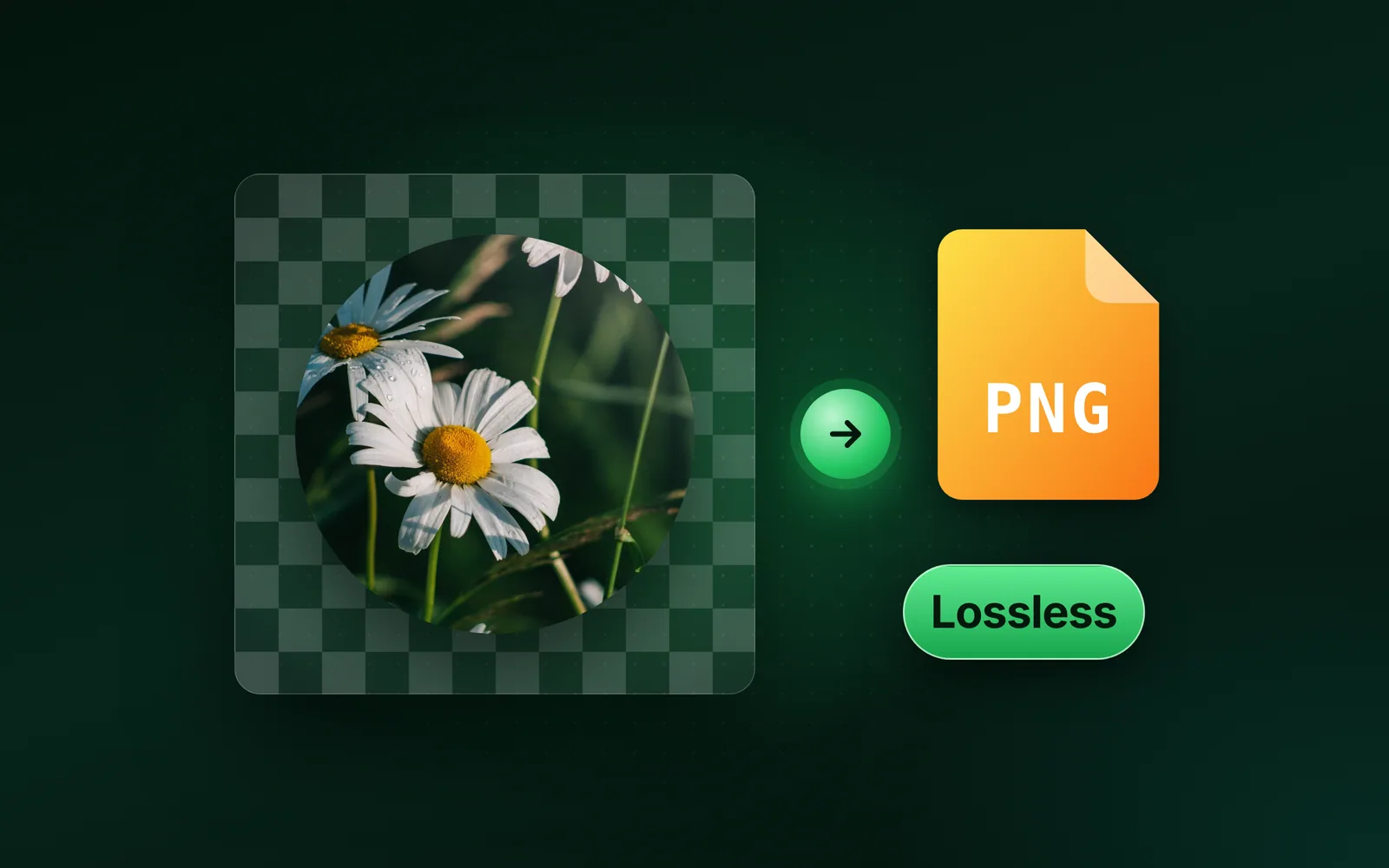
A PNG file is an image saved without loss, so every pixel comes back exactly as it was stored. A PNG can also be see-through. So PNG beats JPG on logos and flat graphics, and JPG stays smaller for photos. Part of the PNG converter.
By Sahadat HusainUpdated 14 min readFormats

What is a PNG file?
A PNG file is a raster image, a grid of pixels, compressed so that no pixel changes. Its name ends in .png, and web servers label it image/png. The W3C PNG Specification defines the format.
Each PNG stores its pixels as one of five colour types. A truecolour pixel holds red, green and blue. A palette PNG, or indexed-colour, lists up to 256 colours; each pixel holds a number into that list. Two types add an alpha channel, the transparency of each pixel.
Every PNG measured in this post is one of three in our reference set:
- Our reference photo, one of our photographs (an iguana on a branch) saved as PNG, 1920 × 1280 pixels, 4,096.3 KB.
- Our flat graphic, 640 × 480 pixels in 8 solid colours, 7.4 KB.
- Our 512 × 512 test circle, one flat teal disc with hard edges on a see-through ground, 7.9 KB.
| Colour type | Code | Bit depths | Each pixel holds | Our files |
|---|---|---|---|---|
| Greyscale | 0 | 1, 2, 4, 8, 16 | A grey level | None |
| Truecolour | 2 | 8, 16 | Red, green and blue | The reference photo and the flat graphic, at 8 bits |
| Indexed-colour | 3 | 1, 2, 4, 8 | A number in a palette of up to 256 colours | All three, once saved at Auto |
| Greyscale with alpha | 4 | 8, 16 | A grey level and its transparency | None |
| Truecolour with alpha | 6 | 8, 16 | Red, green, blue and transparency | The test circle, at 8 bits |
What does PNG stand for?
PNG stands for Portable Network Graphics, and the specification says to pronounce it “ping”. The format was made to replace GIF, after a patent fight.
On 28 December 1994, CompuServe announced royalties on software that supports GIF. Unisys held the patent on LZW, the compression inside GIF. A week later, on 4 January 1995, Thomas Boutell posted the first draft of a free replacement. He called it PBF, for Portable Bitmap Format. Oliver Fromme proposed the name PNG within days, the PNG group’s history records.
The W3C made PNG 1.0 a Recommendation on 1 October 1996. RFC 2083 published the same text in March 1997. The third edition became a W3C Recommendation on 24 June 2025. It brought animated PNG (APNG) into the standard, and a chunk for HDR colour.
What a PNG file holds, byte by byte
A PNG file holds an 8-byte signature, then a run of chunks, each a labelled block of data. Each chunk has four parts: a 4-byte length, a 4-byte type, the data and a 4-byte check. The check, a CRC, lets a reader spot a damaged chunk.
- 89·
- 50P
- 4EN
- 47G
- 0DCR
- 0ALF
- 1ASUB
- 0ALF
Signature, 8 bytes
- 00NUL
- 00NUL
- 00NUL
- 0DCR
Length: 13
- 49I
- 48H
- 44D
- 52R
Type: IHDR
Each signature byte has a job, RFC 2083 explains. The first byte, 89, is not a text character, so a text file is not mistaken for a PNG. Bytes 50 4E 47 spell PNG. Then 0D 0A, a carriage return and a line feed, catch a transfer that rewrites line endings. The 1A, a control-Z, stops MS-DOS from showing the file, and a last 0A catches the reverse rewrite.
Four critical chunks, and the rest
Four chunk types are critical, the specification says, because a reader needs them to draw the picture. IHDR comes first and holds the width, the height, the bit depth and the colour type. PLTE holds the palette, IDAT the compressed pixels, and IEND marks the end. The specification caps each side at 2³¹ − 1, or 2,147,483,647 pixels.
Every other chunk is ancillary, and a reader can safely ignore one it does not know. A lowercase first letter marks it, as in tRNS or pHYs.
Our 512 × 512 test circle at Auto, 1,306 bytes
- Signature8 bytes
- IHDR25 bytes
- PLTE18 bytes
- tRNS13 bytes
- pHYs21 bytes
- IDAT1,209 bytes
- IEND12 bytes
In that file the pixels take 1,209 bytes of the 1,306, all in IDAT. PLTE lists its 2 colours, and tRNS makes 1 of them see-through. pHYs gives the intended pixel size; our engine wrote one into every file here. In our reference photo, 500 IDAT chunks hold 4,096,278 of its 4,096,344 bytes.
Inside IDAT, each row of pixels is filtered, then compressed. A row gets one of five filters. Four store each byte as its difference from a prediction made from nearby bytes, which can compress better. The fifth, None, leaves the row as it is. Deflate, in the zlib format, then packs the rows. Both steps are reversible, so nothing is lost.
Is PNG lossless?
PNG is lossless: decoding a PNG gives back exactly the pixels its encoder stored. The format has no lossy mode. A PNG can still lose detail first, when a tool cuts its colours to fit a palette.
Blinkimg’s engine does that at Auto: it keeps at most 256 colours, then stores them losslessly. At quality 100 it keeps truecolour and every pixel. We saved our three files both ways:
| File | Source | Colours at Auto | PNG at Auto | Pixels at Auto | Quality 100 |
|---|---|---|---|---|---|
| Reference photo, 1920 × 1280 | 4,096.3 KB | 256 | 994.3 KB | Moved, PSNR 37.4 dB | 2,866.3 KB |
| Flat graphic, 640 × 480 | 7.4 KB | 8 | 1.6 KB | Unchanged | 1.7 KB |
| Test circle, 512 × 512 | 7.9 KB | 2 | 1.3 KB | Unchanged | 2.7 KB |
Our flat graphic has 8 colours and our test circle 2. A palette held them all, so Auto changed nothing. Our reference photo holds 221,628 different colours. At Auto its pixels moved, to a PSNR of 37.4 dB. PSNR measures how close a file stays to its source; higher is closer.
Quality 100 kept all three exact and still made each smaller. Our reference photo went from 4,096.3 KB to 2,866.3 KB, 30% smaller with nothing changed. Two PNGs of the same pixels can differ in size, because an encoder can try harder. Ours compresses at zlib’s top level, 9. The PNG compressor offers both: Auto for the smallest file, quality 100 when nothing may change.
How to know if an image is a PNG
An image is a PNG if its first 8 bytes are the PNG signature, whatever its name ends in. The extension is only a label, and anyone can change it. On a Mac or Linux, the file command reads those bytes for you:
$ file photo.png graphic.png transparent.png
photo.png:       PNG image data, 1920 x 1280, 8-bit/color RGB, non-interlaced
graphic.png:     PNG image data, 640 x 480, 8-bit/color RGB, non-interlaced
transparent.png: PNG image data, 512 x 512, 8-bit/color RGBA, non-interlaced
The output names the colour type too. RGB is truecolour, RGBA adds an alpha channel, and “colormap” means a palette. Then we copied a WebP of our reference photo and renamed it photo.png. Its first bytes still spelled RIFF, the WebP wrapper:
$ file photo.png
photo.png: RIFF (little-endian) data, Web/P image, VP8 encoding, 1920x1280, Scaling: [none]x[none], YUV color, decoders should clampOn Windows, open PowerShell and run Format-Hex on the file. A PNG’s first row starts 89 50 4E 47. Microsoft’s Format-Hex reference says the command can help you find the type of a file with no extension. Blinkimg’s engine reads the same bytes: it names a format from them alone and never from the extension.
How to open a PNG file
To open a PNG file, double-click it, or drag it into a web browser. MDN’s image format guide lists PNG as working in all versions of Chrome, Edge, Firefox, Opera and Safari.
- Windows: the Photos app opens it. Microsoft’s Photos help page lists PNG among the formats the app supports.
- Mac: Preview opens it. File > Export saves a copy as HEIC, JPEG, JPEG-2000, OpenEXR, PDF or TIFF, says Apple’s Preview guide.
A PNG that will not open is often not a PNG, or not a whole one. Check its first bytes as in the section before. A download that stopped early has no IEND chunk at its end, so download it again.
When PNG beats JPG, and when it does not
PNG beats JPG on pictures with few colours and hard edges, like our test circle and flat graphic. JPG wins on photos. We saved all three files both ways with Blinkimg’s engine at Auto:
Test circle, 512 × 512
- PNG at Auto1.3 KB
- JPG at Auto7.0 KB
Flat graphic, 640 × 480
- PNG at Auto1.6 KB
- JPG at Auto2.9 KB
Reference photo, 1920 × 1280
- PNG at Auto994.3 KB
- JPG at Auto273.9 KB
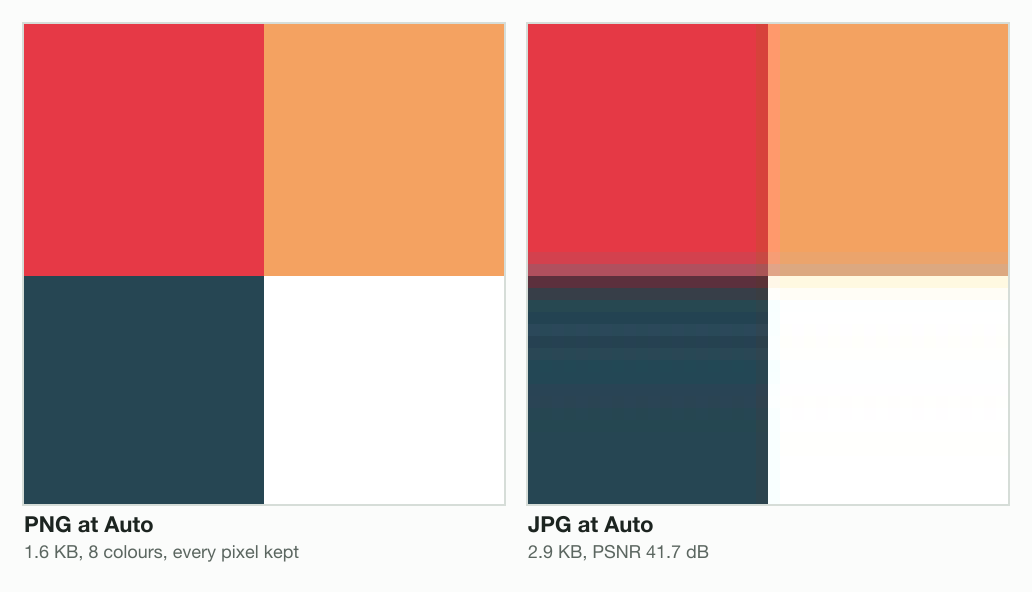
On our flat graphic, the JPG is not only larger. JPG rounds detail in 8 × 8 blocks, and the rounding shows where two colours meet. The JPG scored a PSNR of 41.7 dB, while the PNG matched the source exactly.
A JPG cannot be see-through, either: our engine fills the clear part of the test circle with white. On our reference photo the result flips. The JPG was 273.9 KB against 994.3 KB for the palette PNG, and stayed about as close to the source: a PSNR of 37.1 dB against 37.4 dB.
MDN prefers PNG over JPEG when an image must be reproduced precisely, or when it needs transparency. Our post on PNG vs JPG measures the photo case in full. To turn a photo saved as PNG into a smaller file, use the PNG to JPG converter.
PNG and bitmaps
A PNG is a bitmap in the broad sense: an image stored as a grid of pixels. Another name for that is a raster image. RFC 2083 calls PNG a standard for “lossless bitmapped image files”. BMP, the Windows bitmap file, is a separate format, and MDN says its common form is uncompressed.
We wrote two of our files as 24-bit BMPs, in that common form: 3 bytes a pixel, no compression. Beside them, the PNGs of the same pixels at quality 100:
Reference photo, 1920 × 1280
- BMP, 24-bit7,372.9 KB
- PNG, lossless2,866.3 KB
Flat graphic, 640 × 480
- BMP, 24-bit921.7 KB
- PNG, lossless1.7 KB
Both pairs hold identical pixels, so the gap is compression alone. A photo compresses poorly: the PNG of our reference photo is only 61% smaller than its BMP. Flat colour almost vanishes: our flat graphic shrinks from 921.7 KB to 1.7 KB.
A PNG is not a vector file, which stores shapes instead of pixels. Enlarged, a PNG shows its pixels as squares, as in the crop of our flat graphic above.
Read the full guide: Best image format: JPG, PNG, WebP, AVIF, HEIC and GIF explained.
Questions
- What does PNG mean?
- PNG means Portable Network Graphics, an image format that stores pixels without loss. The W3C specification says it is pronounced "ping". A PNG file ends in .png and can hold transparency. The name dates from January 1995, when the PNG group drafted a free replacement for GIF.
- What is a PNG document?
- A PNG document is an image file, not a page of text. It holds one picture as a grid of pixels, compressed without loss. A PDF is different: it can hold many pages of text and images. To put a PNG on a page you can print or send, convert it to a PDF.
- What is a PNG image used for?
- A PNG image is used for logos, icons, screenshots, charts and other graphics with hard edges. PNG keeps hard edges crisp and can be see-through. MDN's image guide prefers PNG over JPEG for precise reproduction or transparency. Blinkimg's engine saved our 512 × 512 test circle at Auto as a 1.3 KB PNG. The JPG was 7.0 KB.
- Is PNG 100% lossless?
- The PNG format is 100% lossless: decoding gives back exactly the stored pixels. A tool may still cut the colours before it saves. Blinkimg's engine keeps at most 256 at Auto. Our 640 × 480 flat graphic kept all 8 colours and every pixel. Our 1920 × 1280 reference photo changed, to a PSNR of 37.4 dB.
- What are the disadvantages of a PNG?
- A PNG is large for a photo. Blinkimg's engine at Auto saved our 1920 × 1280 reference photo as a 994.3 KB PNG. Its JPG was 273.9 KB. PNG has no lossy mode, so a smaller PNG needs fewer colours, which shows on photos. A browser without APNG support shows only the first frame of an animated PNG.
- What program opens a PNG file?
- Every current web browser opens a PNG: Chrome, Edge, Firefox, Opera and Safari. On Windows, the Photos app lists PNG among its supported formats. On a Mac, Preview opens it and can export a copy as JPEG, HEIC, PDF or TIFF. To view one quickly, drag the file into a browser window.
- Why can’t I open a PNG file?
- The file may not be a PNG at all. A WebP or JPG renamed .png is still a WebP or JPG inside. An app expecting PNG may refuse it. Give it its real extension, or convert it. A download that stopped early lacks its end chunk, so download it again.
- How can you tell if a picture is a PNG?
- You can tell a PNG by its first bytes, not its name. Every PNG starts with 89 50 4E 47 0D 0A 1A 0A. On a Mac or Linux, the file command reads them and prints "PNG image data". On Windows, PowerShell's Format-Hex shows the bytes. A WebP we renamed .png still read as "Web/P image".
- Is a screenshot a PNG?
- A Mac screenshot is a PNG when the Screenshot app captures in SDR (Most Compatible), Apple's guide says. In HDR it saves a HEIF instead. PNG suits screenshots, because text and interface edges stay sharp without loss. MDN calls PNG better than JPEG for screenshots, diagrams and line art.
- Is an iPhone photo a PNG?
- An iPhone photo is not a PNG. The camera saves HEIF with High Efficiency or JPEG with Most Compatible, Apple's guide says. Both settings sit under Settings, Camera, Formats. You can convert a photo to PNG at quality 100 to keep it exactly. Expect a far larger file, because PNG stores the photo without loss.
- Can a PNG file be animated?
- A PNG can be animated in the APNG form. The third edition of the PNG specification brought APNG into the standard in June 2025. The caniuse site counts 96.61% of users with support, data of 30 September 2026. Chrome 59, Firefox 3, Safari 8 and Edge 79 play it. Other readers show the first frame.
- Why does my PNG have a checkerboard background?
- The checkerboard is probably painted into the pixels. A see-through PNG takes on whatever sits behind it. So it looks different on a white page and on a dark one. If the same grey squares show on both, they are part of the picture. The file command helps: RGB means no alpha channel.
- Is a PNG a vector file?
- A PNG is not a vector file. It is a raster image, a grid of pixels, so it turns blocky when enlarged past its size. A vector file such as SVG stores shapes and stays sharp at any size. You can turn an SVG into a PNG, but not back without tracing it.