What does GIF stand for? Meaning, origin and file size
GIF stands for Graphics Interchange Format, the image format CompuServe released in 1987. A GIF holds up to 256 colours and can loop short animations. We saved one 2.4-second loop 5 ways. The GIF weighed 1,539.3 KB, and the AV1 video 33.0 KB. Part of the image converter.
By Sahadat Husain13 min readFormats

Graphics Interchange Format, word by word
GIF is an acronym of 3 words: Graphics Interchange Format. The name belongs to CompuServe, the online service in Columbus, Ohio. Its GIF89a specification, dated 31 July 1990, spells the name out on its cover. The same page calls GIF a service mark of CompuServe Incorporated.
| Letter | Word | What the word means in the format |
|---|---|---|
| G | Graphics | Raster pictures: a grid of coloured pixels |
| I | Interchange | Sent between computers, on any hardware |
| F | Format | A file of blocks any decoder can read |
The spec states the aim in one line. The format moves raster graphics "in a way that is independent of the hardware".
What is a GIF?
A GIF is an image file in the Graphics Interchange Format. Each frame is a grid of pixels painted from a palette of at most 256 colours. One file holds a single picture or many frames that play in a loop.
The Library of Congress calls GIF a bitmapped image format “widely used on the Web”. It names LZW compression and palette-based colour. LZW is lossless: the file gives back the exact palette indices it stored. Every web browser opens a GIF, and its media type is image/gif.
Every GIF names itself in its first 6 bytes. These are the first 13 bytes of the loop further down this page, as a hex viewer shows them:
- 47G
- 49I
- 46F
Signature: GIF
- 388
- 399
- 61a
Version: 89a
- 68h
- 01·
Width: 360
- F0·
- 00NUL
Height: 240
- 87·
256-colour table
- 00NUL
- 00NUL
Background, aspect
The width and height follow, low byte first: 360 and 240 pixels. The packed byte 0x87 says a global colour table comes next. Its 3-bit size field holds 7. The spec’s rule, 2 to the power of 8 (the field’s 7, plus 1), gives 256 colours. Older files start GIF87a. Version 89a added the extension blocks for a frame’s delay, a transparent colour, comments and application data.
How do you pronounce GIF?
GIF’s inventor pronounced it with a soft G, like the peanut butter brand Jif. Steve Wilhite created the format at CompuServe in 1987. He accepted a Webby Award on 21 May 2013. His five-word speech was a GIF on the big screens, CNN reported: “It’s pronounced JIF, not GIF.”
Plenty of people still say it with a hard G, as in "gift". The Oxford English Dictionary accepts both, the same CNN report says. So both are understood, and the soft G is the creator’s own.
| Say it | Sounds like | Who says so |
|---|---|---|
| Soft G, "jif" | Jif, the peanut butter | Steve Wilhite, the creator (CNN, 2013) |
| Hard G, "gif" | The start of "gift" | Many speakers; the OED accepts both (CNN) |
Wilhite died on 14 March 2022, aged 74, of complications from COVID-19, NPR reported.
Where did the GIF come from?
CompuServe released the first version, 87a, in May 1987, the spec’s own list of versions says. Version 89a followed in July 1989. NPR adds the reason it caught on: compressed pictures moved faster over the slow modems of the 1980s.
May 1987
GIF87a, from CompuServe
July 1989
GIF89a: delays, transparency
1994
Unisys charges LZW licence fees
2003 and 2004
The LZW patents expire
May 2013
Wilhite: "JIF, not GIF"
The compression had an owner. GIF “became notorious in 1994”, the Library of Congress writes, when Unisys began charging fees to license LZW. Unisys’s US patent expired in June 2003. Its European and Japanese patents expired in June 2004. PNG was designed to succeed GIF without the patent, the same page notes. The post What is a PNG file picks up that story.
Why does a GIF have only 256 colours?
A GIF has only 256 colours because each pixel is stored as a number pointing into a colour table. The table’s size field has 3 bits, and its largest value gives 256 entries. A photo has far more colours than that. So the encoder picks 256 and maps every pixel to the nearest one.
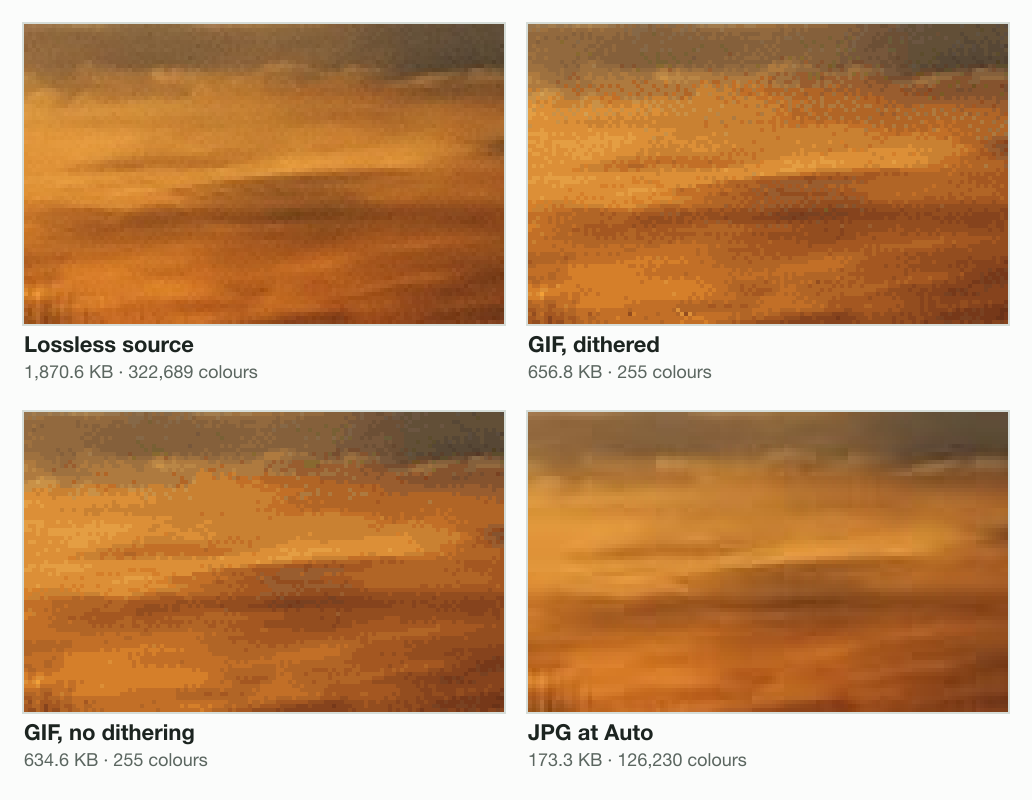
We saved our sunset photograph at 1200 × 800 pixels. Stored losslessly, it holds 322,689 distinct colours. The GIF that libvips 8.18.6 wrote from it keeps 255. That is every colour in the palette below:
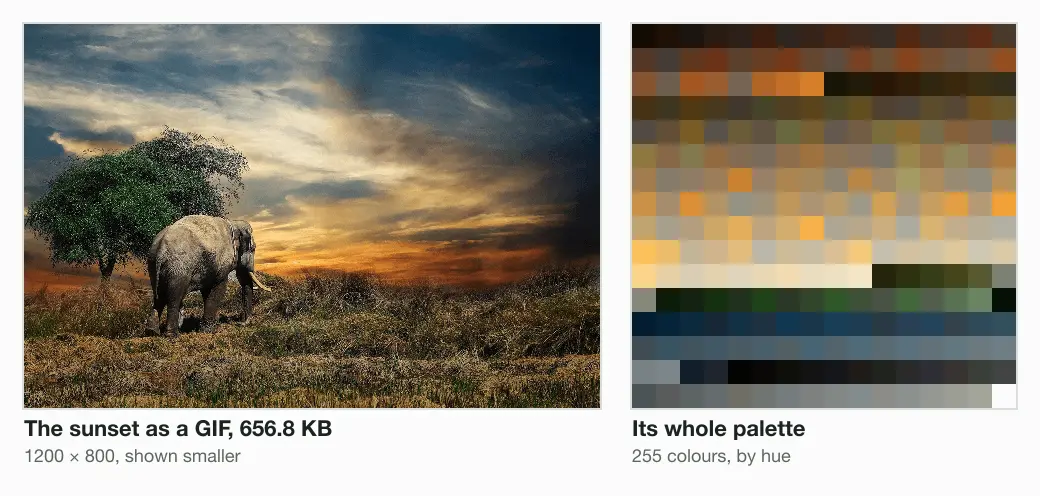
With so few colours, a smooth sky has to break into steps. An encoder hides the steps with dithering: it scatters pixels of 2 nearby colours so the eye blends them. Without dithering, the steps show as flat bands:
Is a GIF better than a JPG at the same quality?
For our sunset photo, a JPG beats the GIF's quality in fewer bytes. PSNR is the usual score for how far pixels moved. It rated the GIF above the JPG at Auto: 36.7 dB against 29.7 dB. But the GIF spent 3.8 times the bytes, 656.8 KB against 173.3 KB. So we matched the quality instead. At quality 95, the engine’s JPG scores 38.6 dB at 518.5 KB, 79% of the GIF’s bytes.
| File | Written by | Size | Colours | PSNR |
|---|---|---|---|---|
| PNG, lossless | Blinkimg’s engine | 1,870.6 KB | 322,689 | identical |
| GIF, dithered | libvips 8.18.6 | 656.8 KB | 255 | 36.7 dB |
| GIF, no dithering | libvips 8.18.6 | 634.6 KB | 255 | 36.9 dB |
| WebP at Auto | Blinkimg’s engine | 178.0 KB | 96,366 | 33.2 dB |
| JPG at Auto | Blinkimg’s engine | 173.3 KB | 126,230 | 29.7 dB |
| JPG at quality 95 | Blinkimg’s engine | 518.5 KB | 139,969 | 38.6 dB |
PSNR has a blind spot of its own. It barely counts bands of nearby colours. That is why the banded GIF edges out the dithered one on the score. The bands are still plain to see.
How big is an animated GIF?
For a photo crossfade like ours, an animated GIF is many times larger than WebP or video. We built one 2.4-second loop from 2 of our photos. The loop fades from a sunset to a rabbit and back. It has 24 frames at 360 × 240, 100 ms each. As a GIF it weighs 1,539.3 KB. Here it is, the measured file itself:
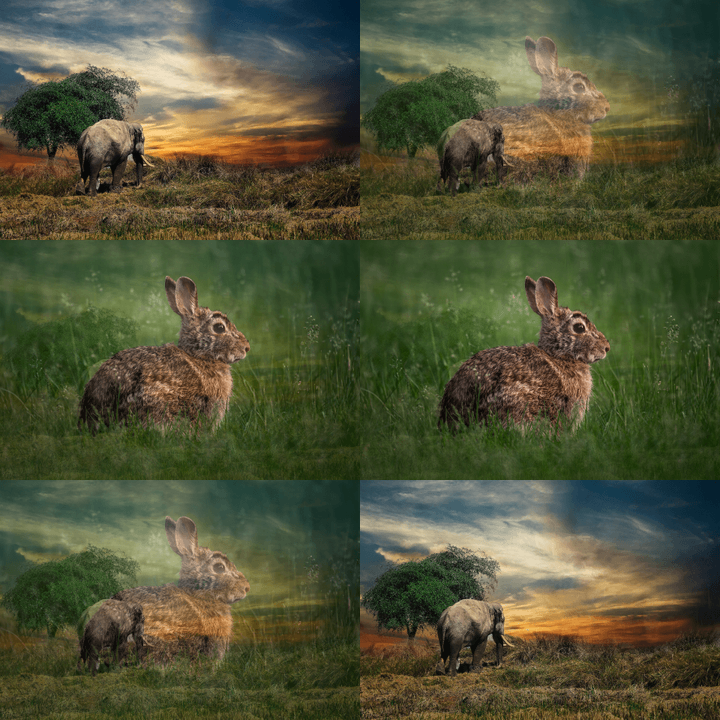
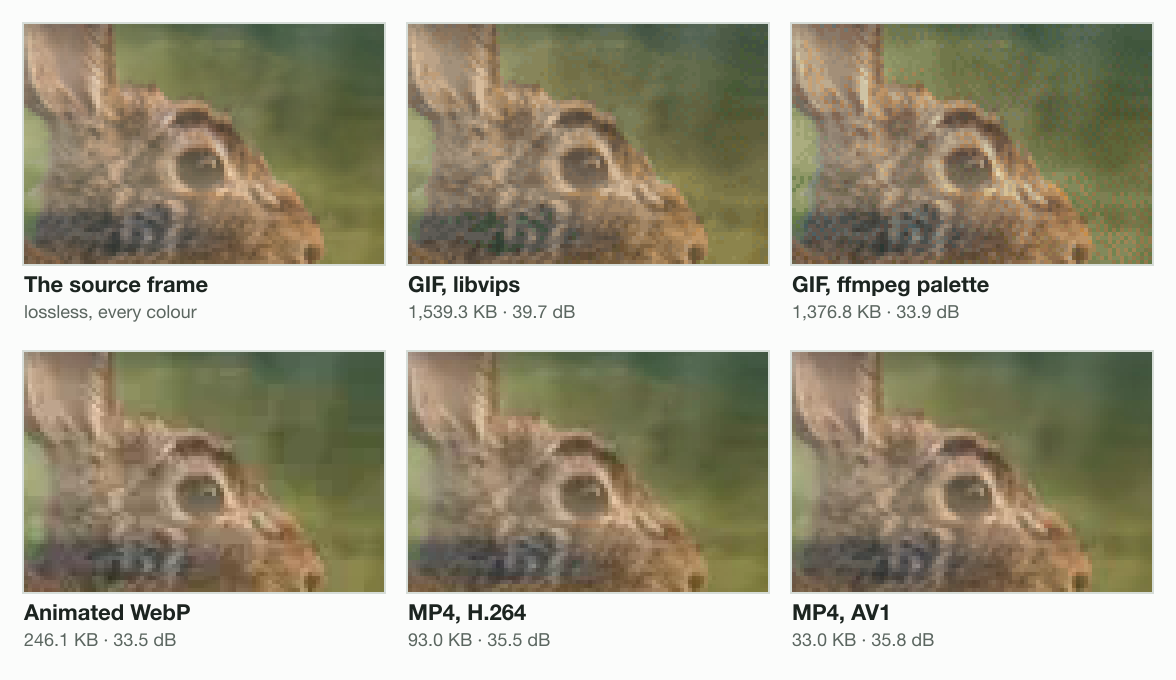
We saved the same 24 frames 4 more ways. The second GIF used ffmpeg’s two-pass palette, which picks one palette for the whole loop. The WebP used quality 75. The 2 MP4s used each video encoder’s default quality.
2.4-second loop, 24 frames
- GIF (libvips)1,539.3 KB
- GIF (ffmpeg palette)1,376.8 KB
- Animated WebP246.1 KB
- MP4, H.26493.0 KB
- MP4, AV133.0 KB
| File | Encoder and setting | Size | Mean PSNR |
|---|---|---|---|
| GIF | libvips 8.18.6 (cgif 0.5.3), defaults | 1,539.3 KB | 39.7 dB |
| GIF | ffmpeg 7.1.1, palettegen and paletteuse | 1,376.8 KB | 33.9 dB |
| Animated WebP | libvips 8.18.6, quality 75 | 246.1 KB | 33.5 dB |
| MP4, H.264 | ffmpeg 7.1.1, libx264 at CRF 23 | 93.0 KB | 35.5 dB |
| MP4, AV1 | ffmpeg 7.1.1, SVT-AV1 at CRF 35 | 33.0 KB | 35.8 dB |
The 2 GIFs came out between 5 and 47 times the size of the other files. The H.264 MP4 is 17 times smaller than the libvips GIF. The AV1 MP4 is 47 times smaller. Both scored a higher PSNR than ffmpeg’s GIF. The libvips GIF scored highest, 39.7 dB. A likely reason: 23 of its 24 frames carry a colour table of their own. Its bytes paid for that.
Why is an animated GIF so large?
A GIF can skip only pixels that stay exactly the same. It does that with smaller frame rectangles, a transparent colour and its disposal rules. It has no motion prediction. A video encoder predicts each frame from the frames around it. A crossfade changes every pixel a little, so the GIF repaints nearly every pixel each time. The animated WebP was 84% smaller than the GIF.
What does GIF mean in texting?
In texting, a GIF is a short looping clip sent instead of words, usually a reaction. A GIF of someone laughing says "that was funny". Nothing about the format changes; only the use does.
On an iPhone, Messages finds GIFs in #images. Tap the add button, then #images, then Find images, and type a word, Apple’s guide says. Tap a GIF, then Send. Apple lists #images in 13 countries, including the United States, the United Kingdom and India.
On Android, Google’s Gboard keyboard searches and sends GIFs from the keyboard itself. Google launched Gboard for Android on 16 December 2016 with that feature, its launch post says.
How to open, make or replace a GIF
A GIF opens in any web browser: drag the file into a window and it plays. To make one, export from any editor that saves GIF. Keep it short and small, since every frame adds a whole picture of bytes.
Replacing a GIF depends on what it holds. A still photo is smaller as a JPG or WebP. A logo or screenshot keeps every pixel as a PNG. An animation is a fraction of the size as an animated WebP or a short video. The post What is a WebP file covers the format, and the image formats guide compares all 6.
Blinkimg’s engine does not read GIF files yet. For JPG, PNG, HEIC and AVIF images, the WebP converter makes the smaller file. For the newest format, read what an AVIF file is.
Read the full guide: Best image format: JPG, PNG, WebP, AVIF, HEIC and GIF explained.
Questions
- What does a GIF stand for?
- A GIF stands for Graphics Interchange Format, the image file format CompuServe released in May 1987. The name is on the cover of the GIF89a specification. A GIF file holds pixels from a palette of up to 256 colours. One file can hold many frames that play as a looping animation.
- What does GIF mean?
- GIF means Graphics Interchange Format, a file type for pictures and short animations. In everyday talk, a GIF is also a looping clip sent as a reaction. People send them in chats and comments. Both meanings point at the same thing. It is a small image file that plays a few seconds of motion on repeat.
- What is the acronym for GIF?
- GIF is the acronym for Graphics Interchange Format. The G is Graphics, not Graphical. The F is Format, singular. The name belongs to CompuServe, the online service in Columbus, Ohio, which released the format in 1987. Its specification calls GIF a service mark of CompuServe Incorporated. The format is free to use today.
- Is it pronounced GIF or Jif?
- Both pronunciations are in use. The creator, Steve Wilhite, said it is pronounced Jif at the Webby Awards in May 2013, CNN reported. That is a soft G. Many people say it with a hard G, as in gift, and the Oxford English Dictionary accepts both. Either way, people know which file you mean.
- How did the creator say to pronounce GIF?
- Steve Wilhite said GIF is pronounced Jif, like the peanut butter brand. He accepted a Webby Award in May 2013 with a five-word speech, shown as a GIF. It read: “It’s pronounced JIF, not GIF.” He had argued for the soft G for years before that, CNN reported at the time.
- What is GIF on your phone?
- On a phone, GIF usually means the button that finds short looping clips to send in a chat. On an iPhone, Messages finds them in #images, after the add button. On Android, Google’s Gboard keyboard can search and send GIFs from the keyboard itself, Google says. The clips arrive as small animated files that loop without sound.
- What is the main difference between a meme and a GIF?
- A GIF is a file format. A meme is an idea that spreads, often a picture with a caption. A meme can be a still JPG or PNG, a video or a GIF. A GIF can hold any picture or loop, funny or not. Many reaction memes are GIFs because the format loops without sound.
- Is a GIF a video?
- A GIF is an image file, not a video, even when it moves. It has no sound and stores each frame as a picture of up to 256 colours. That makes it far larger than a video of the same clip. Our 2.4-second loop weighed 1,539.3 KB as a GIF and 93.0 KB as an H.264 MP4.
- Why are GIF files so big?
- A GIF can skip only pixels that stay exactly the same, and it has no motion prediction. Video predicts each frame from its neighbours. A photo also needs dithering to fit 256 colours, and that grain compresses poorly. Our 24-frame loop of 360 × 240 pixels was 1,539.3 KB as a GIF. As an animated WebP it was 246.1 KB.
- Is GIF lossless?
- GIF compression is lossless, but only after the picture is cut to 256 colours or fewer. A logo with few colours survives unchanged. A photo does not: our 1200 × 800 sunset had 322,689 colours, and its GIF kept 255. PNG keeps every colour of a photo and is also lossless.
- Who invented the GIF?
- Steve Wilhite invented the GIF while working at CompuServe, which released it in 1987. He received a Webby lifetime achievement award for it in 2013. Wilhite died on 14 March 2022, aged 74, from complications of COVID-19, NPR reported. The format he led is still read by every web browser.
- What is another meaning for GIF?
- Outside image files, GIF has slang meanings. Acronym Finder lists Google It First and Guy In Front among them. In image software, GIF always means the Graphics Interchange Format. That is the looping picture file CompuServe released in 1987, with up to 256 colours a frame.