Is JPG and JPEG the same? Yes, and here is why both exist
Is JPG and JPEG the same? Yes. They are two names for one image format, and the file inside is identical: we saved one photo as .jpg and .jpeg and both have the same SHA-256 fingerprint. JPEG is the committee and its standard; .jpg is the three-letter form old PCs needed. Here is where each name comes from, why cameras write .JPG in capitals, and which one to use. Part of the JPG converter.
By Sahadat HusainUpdated 10 min readFormats

Is JPG and JPEG the same? Yes, one format with two names
JPG and JPEG are the same image format. The registry of internet media types files both under one type, image/jpeg, and its entry lists the file extensions as “jpg, jpeg”. Software tells a JPEG by its first three bytes, FF D8 FF, not by its name. So we tested it: one JPEG saved under five names.
| File name | SHA-256, first 16 characters | macOS file says | sharp says |
|---|---|---|---|
| photo.jpg | 12159f2d13fb60fe | image/jpeg | jpeg |
| photo.jpeg | 12159f2d13fb60fe | image/jpeg | jpeg |
| PHOTO.JPG | 12159f2d13fb60fe | image/jpeg | jpeg |
| photo.jpe | 12159f2d13fb60fe | image/jpeg | jpeg |
| photo.jfif | 12159f2d13fb60fe | image/jpeg | jpeg |
Every name gave the fingerprint 12159f2d13fb60fe, so not one byte differs. The name is outside the image data, which is why a rename can neither help nor hurt a picture.
Are JPG and JPEG the same quality?
Yes, because they are the same bytes. Google shows a forum reply for this question that claims a JPG keeps more quality and takes more space; the hashes above say otherwise. Quality is set when a picture is encoded, by the quality number, never by the extension.
What does JPEG stand for?
JPEG stands for Joint Photographic Experts Group, the committee that wrote the standard. The standard itself, ITU-T Recommendation T.81, defines the name as “the informal name of the committee which created this Specification.” The group formed in 1986. Its standard was approved on 18 September 1992, and the identical text was published by ISO/IEC as 10918-1.
The “joint” is two worlds working together: the ISO/IEC standards bodies and the telecom side, then called CCITT and now ITU-T. The committee’s own page says it does not mean ISO and IEC together. Today the group is ISO/IEC JTC 1/SC 29/WG 1, and it still meets about four times a year.
What is a JPEG?
A JPEG is a photo stored with the JPEG method of lossy compression. The picture is cut into blocks of 8 × 8 pixels, each block is turned into a set of frequencies, and the finest of them are rounded away. The quality number decides how much is rounded. The Library of Congress puts typical settings at 10:1 to 20:1 smaller than the raw pixels. We put our 9.8 MB camera photo, resized to 1600 pixels wide, through our engine at seven qualities:
Our camera photo, 1600 wide, as a JPEG
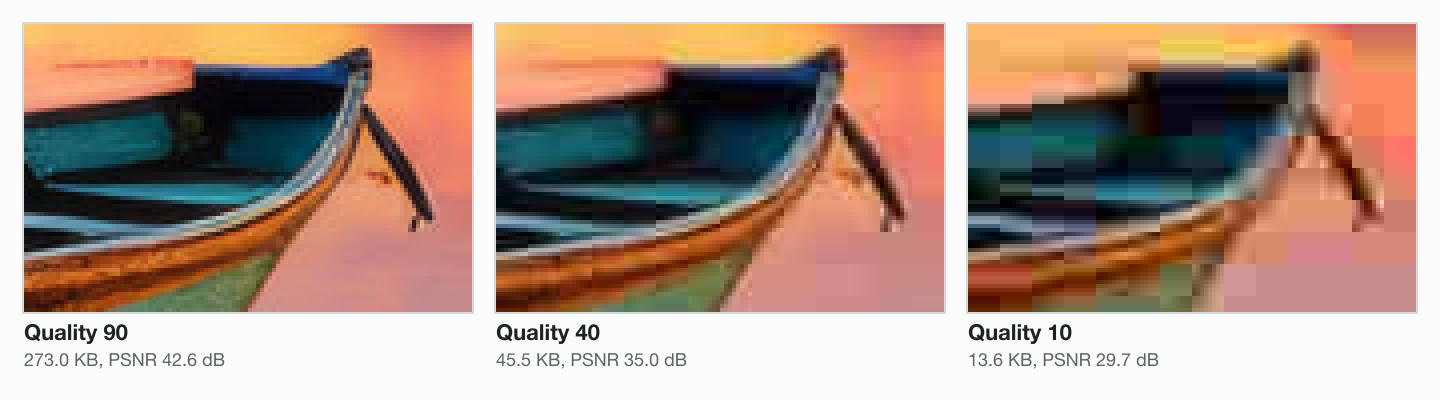
- Quality 95412.8 KB, 44.8 dB
- Quality 85135.9 KB, 39.2 dB
- Quality 7594.1 KB, 37.8 dB
- Quality 6065.7 KB, 36.4 dB
- Quality 4045.5 KB, 35 dB
- Quality 2024.8 KB, 32.6 dB
- Quality 1013.6 KB, 29.7 dB
From quality 95 to 75 the file shrank from 412.8 KB to 94.1 KB, and the picture looks the same at normal size. Below about 40 the blocks start to show. Enlarged four times, here is the same bow of a boat at three qualities:
A JPEG has limits worth knowing. It has no transparency, its common baseline form stores 8 bits per colour channel (T.81 also defines a 12-bit extended mode), and its largest picture is 65,535 × 65,535 pixels. For a logo or a screenshot, the PNG vs JPG comparison shows when PNG wins.
Why are there two extensions, .jpg and .jpeg?
Because the standard never named one. T.81 describes the compressed data, and the file format most JPEGs use, JFIF 1.02 by Eric Hamilton of C-Cube Microsystems, dated 1 September 1992, describes the header. Neither mentions a file extension. The extension was left to the computers.
In 1992 a PC running MS-DOS or Windows 3.1 used the FAT file system, which allowed 8 characters for the name and 3 for the extension. A four-letter .jpeg did not fit, so .jpg did. Windows 95, which shipped on 24 August 1995, brought names of up to 255 characters, and .jpeg worked from then on. Both stuck.
| Date | What happened |
|---|---|
| 1986 | The Joint Photographic Experts Group forms |
| June 1992 | The first MIME standard, RFC 1341, defines image/jpeg |
| 1 September 1992 | JFIF 1.02, the file format, names no extension |
| 18 September 1992 | T.81, the JPEG standard, is approved; it names no extension |
| 24 August 1995 | Windows 95 ships with long file names |
| October 1995 | Exif 1.0, the camera standard, later says “.JPG” |
| 1998 | DCF 1.0 fixes 8-character names and the extension “JPG” |
| 2024 | IANA’s entry for image/jpeg lists “jpg, jpeg” |
Why do cameras and phones save .JPG in capitals?
Because the camera standards say so. The Exif standard, first published in October 1995, sets file names of 8 characters or fewer and the extension “.JPG” in its version 2.3 text. DCF, the camera file system rule from 1998, puts it plainly: “The extension is ‘JPG’.” It also makes the first four characters upper case, then a number from 0001 to 9999.
That is where names like DSC00001.JPG and the DCIM folder come from: DCF says DCIM stands for Digital Camera Images. A name that starts with an underscore, such as _DSC0001.JPG, marks a photo in the optional colour space DCF allows. Both rules were built on the FAT 8.3 names above, which is why camera files end in .JPG.
Which extension does your browser save?
It depends on the browser, even for the same file. We served our JPEG from a local address with no extension, labelled image/jpeg, and downloaded it in the three browser engines on a Mac:
| Engine | Version | Saved the file as |
|---|---|---|
| Chromium (Chrome, Edge) | 149.0.7827.55 | photo.jpeg |
| Firefox | 151.0 | photo.jpg |
| WebKit (Safari) | 26.5 | photo.jpeg |
Firefox’s own table lists jpg first; Chromium and WebKit follow the Mac, which prefers jpeg. On Windows, Chromium follows the system’s mapping, which on recent versions can name the file .jfif. That is the same format again; the JFIF to JPG page explains the Windows setting behind it.
| Extension | Where it comes from |
|---|---|
| .jpg | The 8.3 form; cameras (Exif, DCF) and most software |
| .jpeg | The full name; long file names since Windows 95 |
| .jpe | Another three-letter form; Windows and macOS read it |
| .jfif | The JFIF format’s name; a Windows mapping some browsers follow |
| .pjpeg, .pjp | Internet Explorer’s old image/pjpeg type |
What is inside a .jpg file: JFIF, Exif or neither
Two JPEGs can differ inside while sharing a name. After the FF D8 start marker, a JFIF file carries a JFIF header, a camera file carries an Exif header with the shot’s details, and some files carry neither. We read three files segment by segment: our camera photo, a 400 × 267 JPEG we wrote with a camera-style Exif header, and a JPEG our engine wrote.
| File | First four bytes | Header | Frame | Size |
|---|---|---|---|---|
| Our 9.8 MB camera photo | FF D8 FF E0 | APP0 JFIF + APP2 ICC_PROFILE | Baseline | 9.8 MB |
| A 400 × 267 JPEG we wrote with an Exif header | FF D8 FF E1 | APP1 Exif + APP2 ICC_PROFILE | Baseline | 33.6 KB |
| Blinkimg’s own JPEG | FF D8 FF DB | None | Progressive | 104.9 KB |
Our engine writes no JFIF or Exif header at all, and every browser opens its files, because browsers check the first bytes. What a name cannot do is turn one format into another. We saved a PNG as photo.jpg: it still starts with 50 4E 47, the letters PNG, and both macOS and sharp still call it a PNG.
Should you rename .jpeg to .jpg, or use one over the other?
Rename when a form or an app insists on one spelling: the file inside does not change. A converter re-encodes the picture, which changes the bytes and can lose detail, so use one only when you want a smaller file or a real change of format. The JPEG to JPG page has the rename steps for Windows 11 and Mac and converts a batch when a rename is not enough.
For your own files, pick .jpg in lower case and keep to it. The Library of Congress notes that .jpg is the extension used most often, and cameras write it. On a website, a file named photo.JPG and a link to photo.jpg can be two different addresses, so one consistent spelling saves broken images.
Read the full guide: Best image format: JPG, PNG, WebP, AVIF, HEIC and GIF explained.
Questions
- Is JPEG and JPG the same file format?
- Yes. Both are the JPEG format, registered once as the media type image/jpeg, whose entry lists the extensions jpg and jpeg. We saved one photo under .jpg, .jpeg, .JPG, .jpe and .jfif, and all five had the same SHA-256 fingerprint, so not a single byte differed between them.
- Is JPG the same as JPEG in quality?
- Yes. The extension is only part of the file’s name, outside the image data, so it cannot change a pixel. Quality is set when the picture is encoded, by the quality number the app uses. A JPG and a JPEG made at the same setting from the same photo are identical files.
- Is JPEG the same as JPG for upload forms?
- For the file, yes: both are image/jpeg, so a form that checks the bytes accepts either. A form that lists only .jpg may check the name, though, so rename photo.jpeg to photo.jpg before you upload. Nothing inside the file changes, and the form then reads the same JPEG it would have read anyway.
- Are JPG and JPEG the same size?
- Yes, byte for byte. Renaming a file from .jpeg to .jpg, or back, keeps every byte, so the size in KB stays exactly the same. A file only gets smaller or larger when it is saved again, for example at a lower quality number or at fewer pixels, which any JPEG compressor does.
- Should I convert JPG to JPEG?
- No. There is nothing to convert, because they are one format. If an app or a form insists on the other spelling, rename the file’s extension. A converter decodes and saves the picture again, which changes the bytes and can lose a little detail, so use one only to make a smaller file or a different format.
- Is it better to save as JPG or JPEG?
- Neither is better: the picture is the same. Choose .jpg in lower case for files you share or put online, because it is the most common spelling and the one cameras write. Then keep to it, since a web address can treat photo.JPG and photo.jpg as two different files.
- Is an iPhone photo a JPEG?
- Not by default. Since iOS 11, iPhones that support it save new photos as HEIF, which Apple says compresses better than JPEG. In Settings, Camera, Formats, choosing Most Compatible makes new photos JPEG, and sharing can convert a photo to JPEG for a device that cannot open HEIF.
- Where do I find my JPG files?
- On a camera card or a phone’s storage, look in the DCIM folder: the camera file standard names it Digital Camera Images and puts photos in numbered subfolders such as 100ABCDE, three digits and five letters. On a computer, search for .jpg, and for .jpeg too, since browsers on a Mac often save the longer spelling.
- What are the disadvantages of using JPEG?
- It is lossy, so each save at a lower quality throws detail away for good. It has no transparency, its baseline form stores only 8 bits per colour channel, and its largest picture is 65,535 × 65,535 pixels. For logos and screenshots PNG keeps edges sharper, and WebP or AVIF are smaller for photos.