How much is a wallet size photo? Every print size
Two sizes share the name wallet, sold in sets of 2 to 16. Every print size here is measured on one photo. Part of the image resizer.
By Sahadat Husain16 min readSizes

A wallet size photo costs 25 to 56 cents each at 6 US photo labs. We read 6 labs’ own pages and Google’s snippet of Mpix’s on 5 October 2026. Labs sell wallets in sets of 2 to 16, not one at a time.
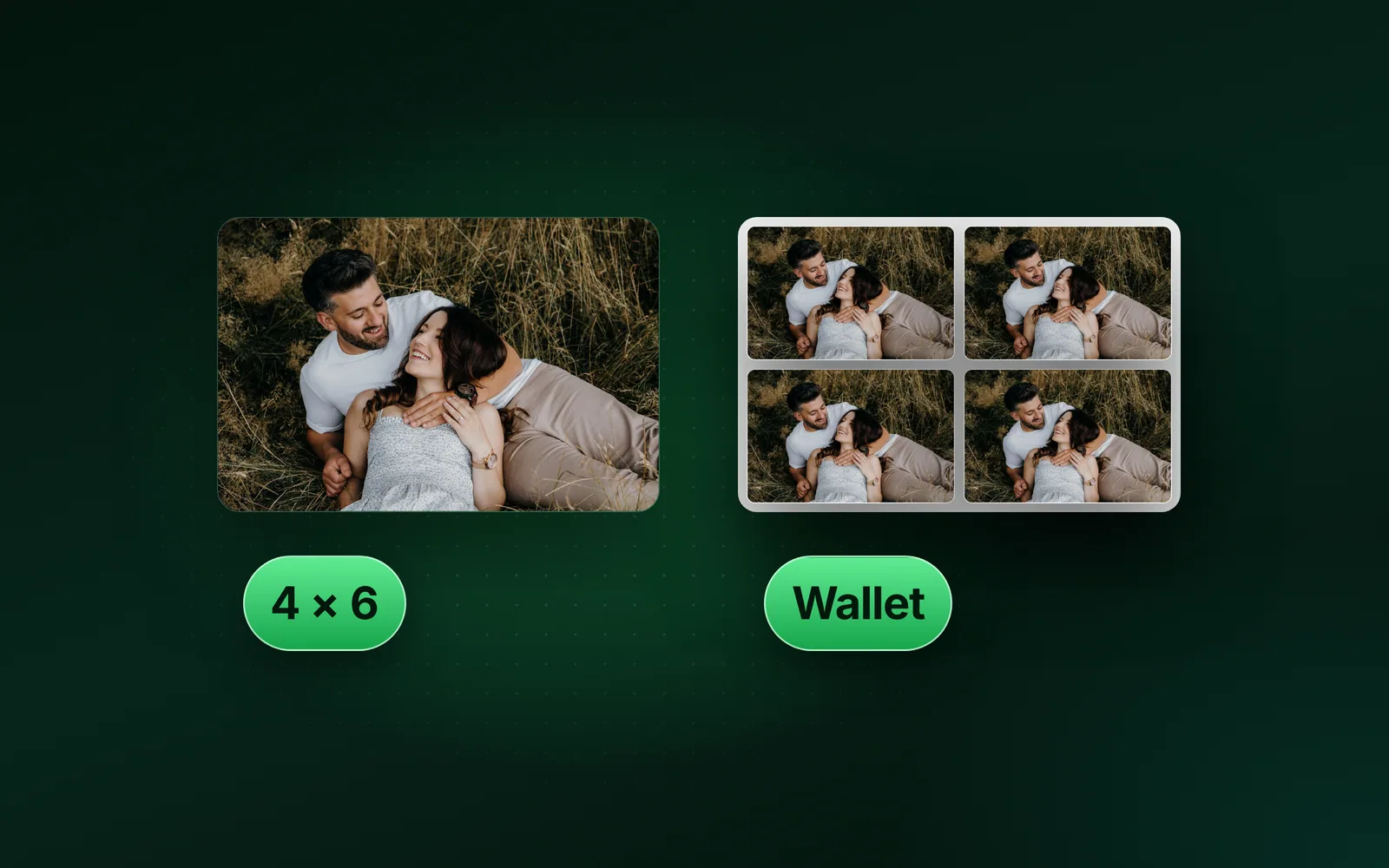
Walgreens charges $0.99 for 4 wallets at 2 × 3 inches. Shutterfly charges $2.24 for 4 at 2.5 × 3.5 inches. Those are the 2 wallet sizes. The standard print is 4 × 6 inches, which is 1200 × 1800 pixels at 300 DPI.
One wallet photo, in cents
- Walgreens25 cents
- Snapfish25 cents
- Walmart39 cents
- Printique32 cents
- Nations Photo Lab44 cents
- Shutterfly56 cents
How much is a wallet size photo at each lab?
A set of wallet photos costs $0.78 to $2.24 at the US labs we read. Walmart’s set is the cheapest, but it holds 2 photos. Walgreens and Snapfish give 4 for $0.99, the lowest price a photo.
| Lab | Wallet size (in) | Photos | Price | Each | Comes on |
|---|---|---|---|---|---|
| Walgreens | 2 × 3 | 4 | $0.99 | 25 cents | one sheet |
| Snapfish | 2 × 3 | 4 | $0.99 | 25 cents | one sheet |
| Walmart | 2.5 × 3.5, or 2 × 3 | 2 | $0.78 | 39 cents | a 4 × 6 sheet |
| Printique | 2.5 × 3.5 | 4 | $1.28 | 32 cents | an uncut 5 × 7 |
| Nations Photo Lab | 2.5 × 3.5 | 4 | $1.75 | 44 cents | a sheet of 4 |
| Mpix | 2.5 × 3.5 | 4 | from $1.99 | not stated | not stated |
| Shutterfly | 2.5 × 3.5 | 4 | $2.24 | 56 cents | not stated |
CVS lists a wallet print at $0.99, with “multiple wallet-size photos printed on a 4x6 sheet”. That line is Google’s snippet of the CVS product page. CVS refuses visitors outside the US, so we could not read the size or count. The Mpix wallet page refused our connection too. Its snippet says “Starting At $1.99” and “Standard Wallets (set of 4)”, but not that $1.99 buys the set.
What size is a wallet size photo?
A wallet size photo is 2 × 3 inches at Walgreens and Snapfish. Shutterfly, Printique, Nations Photo Lab and Mpix sell 2.5 × 3.5 inches instead. Snapfish says its set has “4 images in 2x3 inch size” on a single sheet.
A mini wallet is smaller still: 1.75 × 2.5 inches at Mpix, Nations Photo Lab and Printique. A 2 × 3 wallet is 5.1 × 7.6 cm. A 2.5 × 3.5 wallet is 6.4 × 8.9 cm.
Walmart’s own pages give 2 answers. On its print product page, the wallet appears after you choose 2.5″x3.5″ under Photo size. The same product’s description says “Each wallet print measures 2″×3″” and “Set of 2”. Ask the store which one it prints.
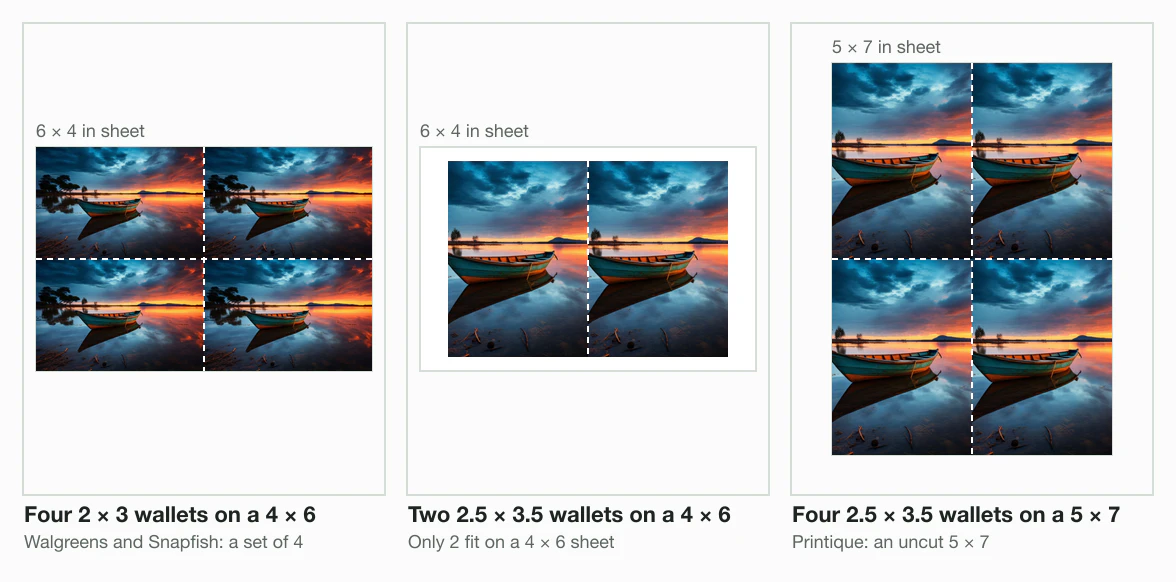
Four 2 × 3 wallets tile a 4 × 6 sheet with no waste. A 2.5 × 3.5 wallet is wider, so only 2 fit on a 4 × 6. Printique prints 4 of them on an uncut 5 × 7.
Every standard photo print size
The standard photo print size is 4 × 6 inches, the size Snapfish’s menu marks as its best seller. Shutterfly lists 4 × 6, 5 × 7 and 8 × 10 as its “Everyday Photo Prints”. The rest run from a mini wallet to a 20 × 30 poster.
| Print (in) | cm | Pixels at 300 DPI | At 150 DPI | Shape |
|---|---|---|---|---|
| Mini wallet, 1.75 × 2.5 | 4.4 × 6.4 | 525 × 750 | 263 × 375 | 7:10 |
| Wallet, 2 × 3 | 5.1 × 7.6 | 600 × 900 | 300 × 450 | 2:3 |
| Wallet, 2.5 × 3.5 | 6.4 × 8.9 | 750 × 1050 | 375 × 525 | 5:7 |
| 3.5 × 5 | 8.9 × 12.7 | 1050 × 1500 | 525 × 750 | 7:10 |
| 4 × 4 | 10.2 × 10.2 | 1200 × 1200 | 600 × 600 | 1:1 |
| 4 × 5.3 | 10.2 × 13.5 | 1200 × 1590 | 600 × 795 | about 3:4 |
| 4 × 6 | 10.2 × 15.2 | 1200 × 1800 | 600 × 900 | 2:3 |
| 5 × 7 | 12.7 × 17.8 | 1500 × 2100 | 750 × 1050 | 5:7 |
| 8 × 10 | 20.3 × 25.4 | 2400 × 3000 | 1200 × 1500 | 4:5 |
| 11 × 14 | 27.9 × 35.6 | 3300 × 4200 | 1650 × 2100 | 11:14 |
| 16 × 20 | 40.6 × 50.8 | 4800 × 6000 | 2400 × 3000 | 4:5 |
| 20 × 30 | 50.8 × 76.2 | 6000 × 9000 | 3000 × 4500 | 2:3 |
Pixels are the inches times the DPI, rounded. Centimetres are the inches times 2.54. Only some sizes share a shape, so a crop made for one rarely fits another.
- Mini wallet1.75 × 2.5 in
- Wallet2 × 3 in
- Wallet2.5 × 3.5 in
- 3.5 × 5 in1050 × 1500
- 4 × 6 in1200 × 1800
- 5 × 7 in1500 × 2100
- 8 × 10 in2400 × 3000
What each print size cuts from your photo
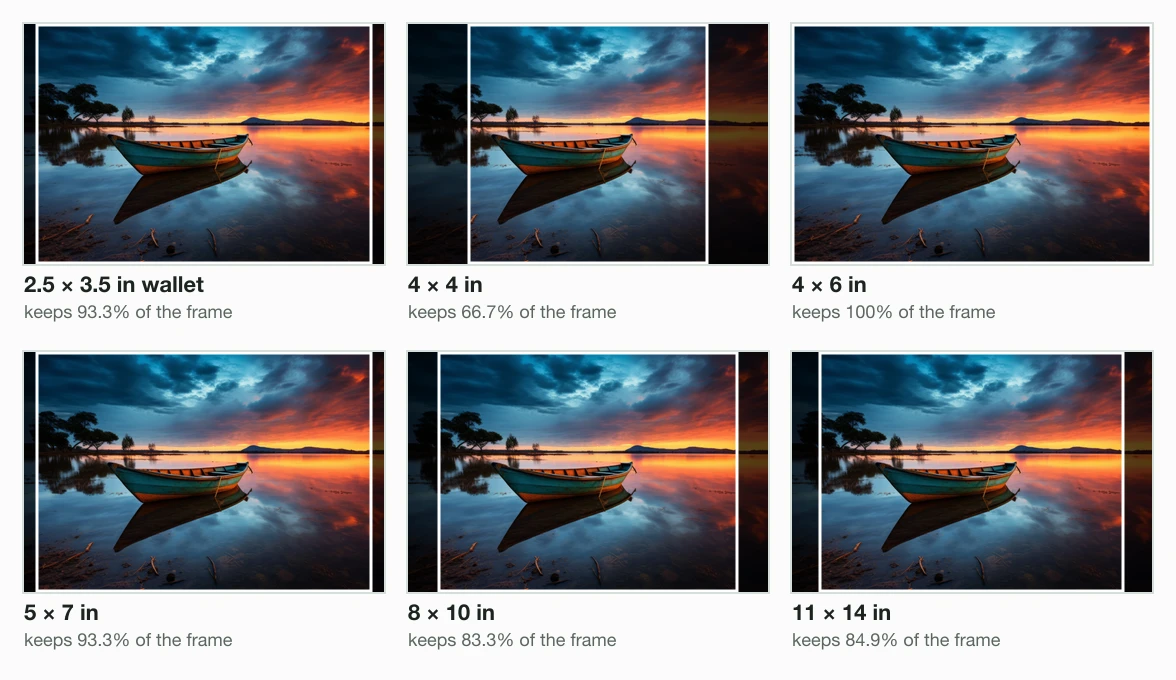
A print cuts your photo when the shapes differ. We measured the cut on our 9.8 MB camera photo. Its 4964 × 2782 frame is close to 16:9, so we first cut 2 frames from its centre.
One is a 3:2 frame of 4173 × 2782 pixels, the shape of a camera. The other is a 4:3 frame of 3709 × 2782, a shape an iPhone offers. Then sharp 0.35.4 cut each print, centred, with the long sides together.
From a 3:2 camera photo
A 4 × 6 print and a 2 × 3 wallet kept the whole 3:2 frame. Both share its shape. The 4 × 4 square kept the least, 66.7%. An 8 × 10 kept 83.3%, so it trims the sides.
From a 4:3 phone photo
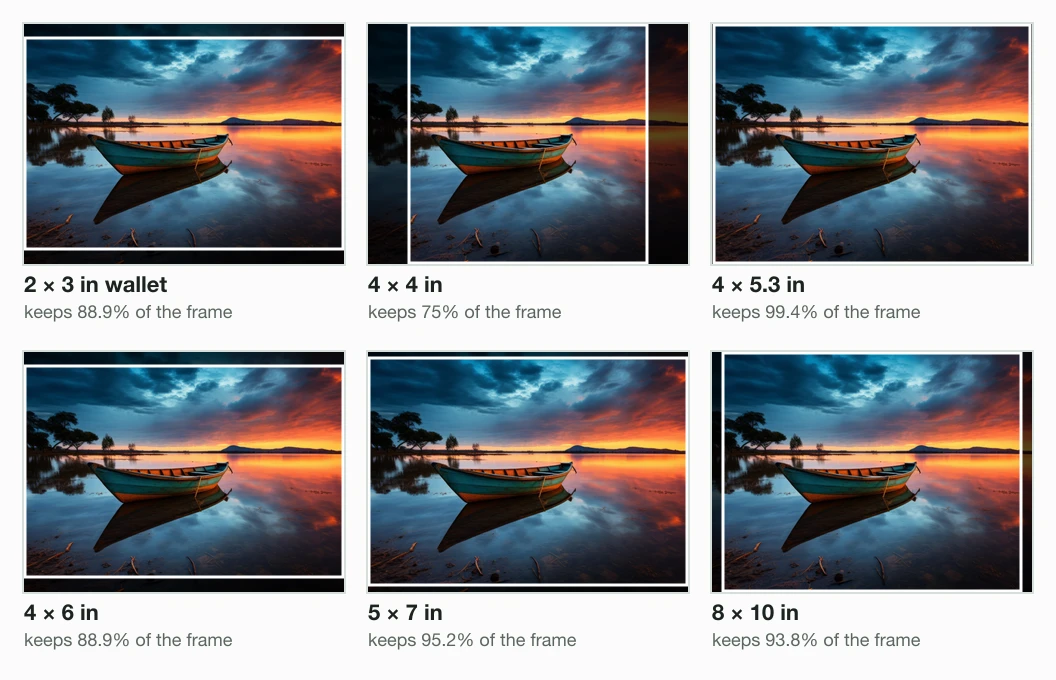
A 4:3 phone photo loses 11.1% of its area on a 4 × 6 print. The iPhone User Guide says: “You can choose between 1:1, 4:3, and 16:9 aspect ratios.” None is the 3:2 shape of a 4 × 6.
The 4 × 5.3 print fits a phone photo best. It kept 99.4% of the 4:3 frame. Walgreens, Walmart and Snapfish sell it, and Snapfish labels it “MINIMAL CROP!” in its size list.
| Print (in) | Keeps of a 3:2 photo | Keeps of a 4:3 photo |
|---|---|---|
| Mini wallet, 1.75 × 2.5 | 95.2% | 93.3% |
| Wallet, 2 × 3 | 100% | 88.9% |
| Wallet, 2.5 × 3.5 | 93.3% | 95.2% |
| 3.5 × 5 | 95.2% | 93.3% |
| 4 × 4 | 66.7% | 75% |
| 4 × 5.3 | 88.3% | 99.4% |
| 4 × 6 | 100% | 88.9% |
| 5 × 7 | 93.3% | 95.2% |
| 8 × 10 | 83.3% | 93.8% |
| 11 × 14 | 84.9% | 95.5% |
| 16 × 20 | 83.3% | 93.8% |
| 20 × 30 | 100% | 88.9% |
To choose the cut yourself, crop before you upload. The aspect ratio changer crops to any shape, such as the 4:5 of an 8 × 10.
What photo size to print: pixels at 300 DPI
A photo prints at its best with 300 pixels for every inch of the print. Nations Photo Lab’s pixel chart lists 300 PPI as best quality. It lists 125 PPI as the “Minimum Requirement”.
On that chart, a 4 × 6 needs 500 × 750 pixels at least. It needs 1200 × 1800 for the best. Nations’ wallet page asks 750 × 1050 for its 2.5 × 3.5 wallets. How to change the DPI of an image explains the DPI tag itself.
Our 3:2 frame filled every size up to 8 × 10 at 300 DPI. Larger prints ran out of pixels. At 11 × 14 the frame gave 252 DPI. At 16 × 20 it gave 173 DPI, and at 20 × 30 just 139.
| Print (in) | Most DPI | At 300 DPI |
|---|---|---|
| Mini wallet, 1.75 × 2.5 | 1589 | fills it |
| Wallet, 2 × 3 | 1391 | fills it |
| Wallet, 2.5 × 3.5 | 1112 | fills it |
| 3.5 × 5 | 794 | fills it |
| 4 × 4 | 695 | fills it |
| 4 × 5.3 | 695 | fills it |
| 4 × 6 | 695 | fills it |
| 5 × 7 | 556 | fills it |
| 8 × 10 | 347 | fills it |
| 11 × 14 | 252 | short by 48 DPI |
| 16 × 20 | 173 | short by 127 DPI |
| 20 × 30 | 139 | short by 161 DPI |
A pixel count is not a print size. A 600 × 900 pixel image is a 2 × 3 wallet at 300 DPI. The same image is a 4 × 6 at 150 DPI. The engine made one file for both, 49.4 KB.
How big is the file for each print size?
Print files at 300 DPI stayed under 600 KB on this photo. Blinkimg’s engine saved the 4 × 6 at 1800 × 1200 pixels as a 146.9 KB JPG at Auto. The 8 × 10 came to 371.2 KB.
Our DPI guide measured 146.6 KB for a 4 × 6 at 300 DPI from the same photo. There sharp resized it to 1800 × 1200 with a cover crop, and the engine only saved it. Here the engine did the resize.
One print file at 300 DPI (KB)
- 1.75 × 2.538.2 KB
- 2 × 349.4 KB
- 2.5 × 3.566.2 KB
- 3.5 × 5114.2 KB
- 4 × 4101.6 KB
- 4 × 5.3132.5 KB
- 4 × 6146.9 KB
- 5 × 7199.8 KB
- 8 × 10371.2 KB
- 11 × 14, capped468.8 KB
- 16 × 20, capped461.0 KB
- 20 × 30, capped537.1 KB
| Print (in) | File at 300 DPI | File at 150 DPI |
|---|---|---|
| Mini wallet, 1.75 × 2.5 | 750 × 525, 38.2 KB | 375 × 263, 13.3 KB |
| Wallet, 2 × 3 | 900 × 600, 49.4 KB | 450 × 300, 17.3 KB |
| Wallet, 2.5 × 3.5 | 1050 × 750, 66.2 KB | 525 × 375, 22.6 KB |
| 3.5 × 5 | 1500 × 1050, 114.2 KB | 750 × 525, 38.2 KB |
| 4 × 4 | 1200 × 1200, 101.6 KB | 600 × 600, 34.8 KB |
| 4 × 5.3 | 1590 × 1200, 132.5 KB | 795 × 600, 44.4 KB |
| 4 × 6 | 1800 × 1200, 146.9 KB | 900 × 600, 49.4 KB |
| 5 × 7 | 2100 × 1500, 199.8 KB | 1050 × 750, 66.2 KB |
| 8 × 10 | 3000 × 2400, 371.2 KB | 1500 × 1200, 125.9 KB |
| 11 × 14 | 3541 × 2782, 468.8 KB (252 DPI) | 2100 × 1650, 211.6 KB |
| 16 × 20 | 3478 × 2782, 461.0 KB (173 DPI) | 3000 × 2400, 371.2 KB |
| 20 × 30 | 4173 × 2782, 537.1 KB (139 DPI) | 4173 × 2782, 537.1 KB (139 DPI) |
| Control: the 3:2 frame, no resize | 4173 × 2782, 537.1 KB | |
| Control: the original JPEG | 4964 × 2782, 9.8 MB |
The engine never enlarges. It was asked for 9000 pixels wide, a 20 × 30 at 300 DPI. It kept the frame’s 4173 × 2782 pixels. That file matched the unresized control byte for byte, 537.1 KB.
The original JPEG was 9.8 MB, many times any of these files. How to resize an image without losing quality covers the resize itself.
What each print size costs
A 4 × 6 print costs 18 cents at Walmart and 39 cents at Shutterfly, at list price. A 5 × 7 costs $1.28 and $1.69. Both labs list these on their own prints pages.
| Print (in) | Walmart | Shutterfly |
|---|---|---|
| 4 × 4 | $0.26 | $0.42 |
| 4 × 6 | $0.18 | $0.39 |
| 5 × 7 | $1.28 | $1.69 |
| 8 × 10 | $2.94 | $4.44 |
| 11 × 14 | not listed | $12.29 |
| 16 × 20 | not listed | $22.99 |
| 20 × 30 | not listed | $29.99 |
| Wallet set | $0.78 for 2 | $2.24 for 4 |
Walmart’s prints page says its prices are the same for pickup and delivery. Shutterfly’s prints page adds an app offer of 10-cent 4 × 6 prints with $5.99 shipping.
How to make a wallet size photo, step by step
You make a wallet size photo by cropping it to the lab’s wallet shape before you upload. The lab then prints your crop, not its own.
Check the lab’s wallet size
Walgreens and Snapfish print 2 × 3 inches. Shutterfly, Printique, Nations Photo Lab and Mpix print 2.5 × 3.5.
Open the resize image in inches page and drop the photo
The resize image in inches editor opens on Crop.
Type the wallet size in Custom size, then Apply
Unlink the sides and type 2 and 3, or 2.5 and 3.5. At 300 DPI that is 600 × 900 or 750 × 1050 pixels.
Frame the face, then Save
Drag the frame over the part to keep. Upload the saved file to the lab and order wallets.
sips -g pixelWidth -g pixelHeight file-wallet-2x3-300.jpg
file-wallet-2x3-300.jpg
  pixelWidth: 900
pixelHeight: 600A 2 × 2 passport photo is a different job with its own rules. The passport size photo maker and the 2 × 2 inch passport photo page set those. For a size in centimetres, use resize image in cm.
Which print size should you order?
The right print size depends on where the photo goes and what shape it is. A wallet goes in a pocket; a 4 × 6 goes in an album.
Is the print for a wallet or to hand out?
- Yes
Does your lab sell 2 × 3 wallets?
- Yes
Crop to 2 × 3, 600 × 900 px
Walgreens and Snapfish: $0.99 for 4.
- No
Crop to 2.5 × 3.5, 750 × 1050 px
Shutterfly, Printique, Nations Photo Lab, Mpix.
- Yes
- No
Was the photo taken on a phone, in 4:3?
- Yes
Order 4 × 5.3 if the lab sells it
It kept 99.4% of the 4:3 frame; a 4 × 6 kept 88.9%.
- No
Order 4 × 6, the standard print
It kept 100% of the 3:2 frame, 1200 × 1800 px.
- Yes
For the standard print, the 4x6 photo size tool crops or fits your photo to 1200 × 1800 pixels. The image resizer sets any other size.
Read the full guide: US passport photo requirements: size, smile, clothes.
Questions
- How much does it cost to print a wallet-size photo?
- A wallet-size photo costs 25 to 56 cents each at list price. On 5 October 2026, Walgreens charged $0.99 for 4 wallets at 2 × 3 inches. Walmart charged $0.78 for a set of 2. Shutterfly charged $2.24 for 4 at 2.5 × 3.5 inches. Promo codes often cut these prices.
- How much does Walgreens charge for wallet prints?
- Walgreens Photo listed its 2x3 Wallet Set at $0.99 on 5 October 2026. Its product page says one print sheet holds 4 images at 2 × 3 inches. The paper is glossy. That is about 25 cents a wallet. Walgreens also ran a 50% photo discount code that week.
- Is a 2x3 picture a wallet size?
- A 2 × 3 picture is a wallet size at Walgreens and Snapfish, which sell 4 to a sheet. Shutterfly, Printique, Nations Photo Lab and Mpix call 2.5 × 3.5 inches a wallet instead. Mini wallets at Mpix and Printique are 1.75 × 2.5 inches. Check your lab’s size before you crop the photo.
- Can you print 2x3 photos at Walmart?
- Walmart's own pages differ. Its wallet description says each print measures 2 × 3 inches, in a set of 2. The set comes on a 4 × 6 sheet. The same product's size data says 2.5 × 3.5 inches. Walmart Photo listed the set at $0.78 on 5 October 2026. Ask the store which size it prints.
- How can I convert a picture to wallet size?
- Crop the picture to your lab's wallet shape, then save it at 300 DPI. A 2 × 3 inch wallet is 600 × 900 pixels; a 2.5 × 3.5 is 750 × 1050. Nations Photo Lab asks 750 × 1050 for best quality. An editor with a Custom size in inches does both steps.
- How many wallet size photos fit on a 4x6?
- Four 2 × 3 inch wallets fit on a 4 × 6 sheet, 2 across and 2 down. Nothing is left over. Walgreens and Snapfish sell them that way. Only 2 wallets at 2.5 × 3.5 inches fit on a 4 × 6. Printique’s own page says it prints 4 of those on an uncut 5 × 7 sheet.
- Where can I get wallet size photos printed?
- Walgreens and Walmart print wallets for store pickup, and Walgreens’ wallet page offers Same Day Pickup. Shutterfly’s prints page offers same-day prints at CVS or Walgreens. Snapfish, Mpix, Printique and Nations Photo Lab print online and ship. Walgreens and Snapfish sell 4 wallets at 2 × 3 inches.
- What size is a normal photo print?
- A normal photo print is 4 × 6 inches, or 1200 × 1800 pixels at 300 DPI. Snapfish marks 4x6 as its best seller, and Shutterfly lists 4x6, 5x7 and 8x10 as its everyday photo prints. In centimetres a 4 × 6 is 10.2 × 15.2.
- Are normal photos 4x6 or 5x7?
- Normal photos are 4 × 6; a 5 × 7 is the larger print for a frame. At Walmart, a 4 × 6 cost $0.18 and a 5 × 7 cost $1.28. Those were list prices on 5 October 2026. A 5 × 7 also trims a 3:2 camera photo, while a 4 × 6 keeps it whole.
- Should my photos be 4:3 or 16:9?
- For prints, 4:3 is closer to the common sizes than 16:9. Apple's iPhone User Guide lists 1:1, 4:3 and 16:9 for the camera. On our 4:3 frame, a 4 × 6 print kept 88.9% and a 4 × 5.3 print kept 99.4%. Shoot 4:3 and order 4 × 5.3 where the lab sells it.
- Is 3x5 a standard photo size?
- Nations Photo Lab’s pixel chart lists 3.5 × 5 inches, not 3 × 5. It asks 1050 × 1500 pixels for best quality, 438 × 625 at least. Walmart, Walgreens, Snapfish and Shutterfly list neither size among their standard prints. So 3 × 5 is not a standard print at the US labs we read.
- What size should a photo be for printing?
- A photo for printing should hold 300 pixels for every inch of the print. Nations Photo Lab's pixel chart calls 300 PPI best quality and 125 PPI the minimum. A 4 × 6 needs 1200 × 1800 pixels for the best. An 8 × 10 needs 2400 × 3000.
- How can I print a photo to the exact size I want?
- Crop the photo to the print's shape yourself, then save it at the print's pixel size. The lab then prints your crop instead of cutting its own. A 4 × 6 at 300 DPI is 1200 × 1800 pixels. Walgreens, Walmart and Shutterfly list their sizes on their prints pages; pick one of those.