Image too small to upload? Fix pixels or KB
The error means too few pixels or too few KB. We list each site’s minimum and measure what each fix really adds. Part of the image resizer.
By Sahadat Husain13 min readGuides

An image is too small to upload when it has fewer pixels or fewer KB than the site’s minimum. YouTube asks a thumbnail for at least 640 pixels wide. Amazon refuses product photos under 500 pixels on the long side.
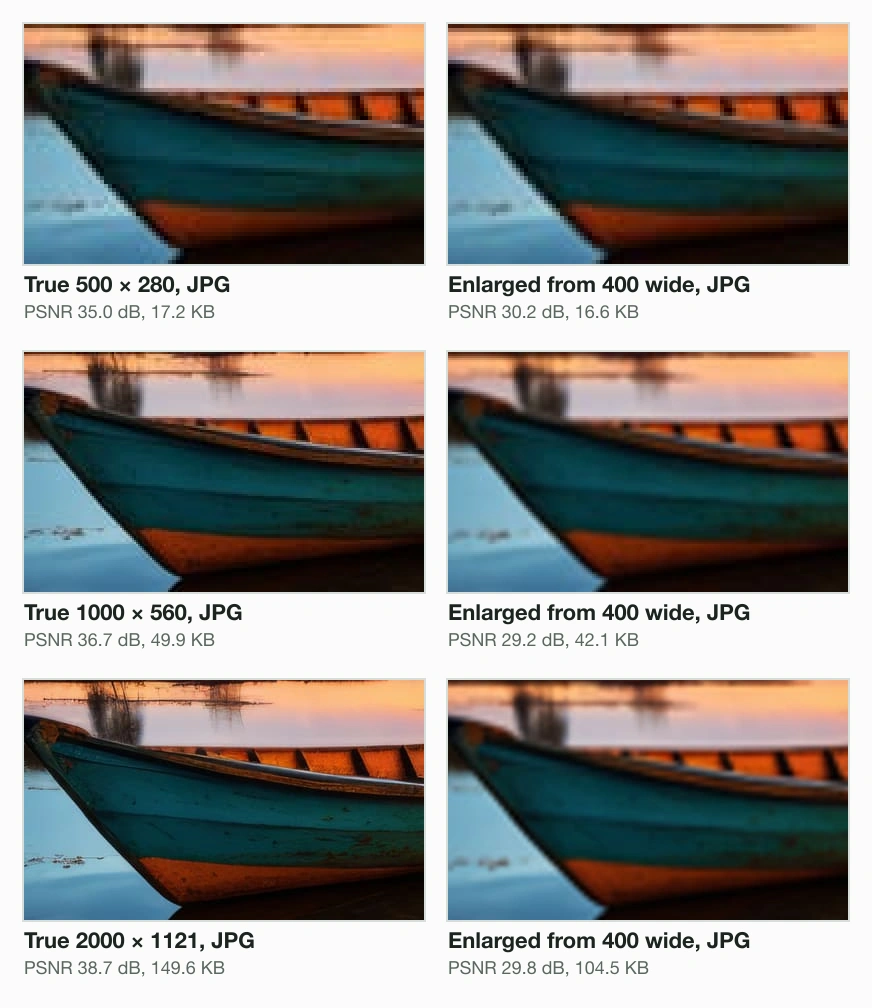
The fix is a larger original, not an enlarged copy. We enlarged a 400 × 224 copy of our 9.8 MB camera photo with sharp. At 1000 wide, Amazon’s zoom size, its JPG scored 29.2 dB against the real image. A JPG of the real image scored 36.7 dB.
Too small in pixels, or too small in KB?
An upload error means one of 2 numbers: the pixel size or the file size. Pixels are the width and height. KB is how many bytes the file holds.
Of the 6 platforms we read, only a government form states a KB minimum. The Indian e-Visa photo guide asks for “Minimum 10 KB – Maximum 300 KB”. It also asks at least 350 × 350 pixels.
Does the error name pixels, dimensions or resolution?
- Yes
Do you have the original photo?
- Yes
Upload the original, or resize it down to the size asked
Etsy: decreasing the size “won’t lower the resolution”.
- No
Enlarge to the minimum, no further
Our copy’s JPG at 1000 wide scored 29.2 dB.
- Yes
- No
Does it name KB or a minimum file size?
- Yes
Raise the quality with Min file size
A 50 KB test floor: 15.3 KB became 51.6 KB.
- No
Check the format and the cap instead
A file too large or a HEIC fails differently.
- Yes
A form may set both a floor and a cap. The photo not uploading in online form guide covers both checks. This post covers the “too small” half.
Minimum image sizes, platform by platform
The minimum image size differs on every platform, and most help pages state it plainly. We read 6 platforms’ own pages on 5 October 2026.
| Where | Least pixels | Least KB | Recommended | Most |
|---|---|---|---|---|
| YouTube video thumbnail | 640 wide | none stated | 3840 × 2160, 16:9 | 2 MB from a phone, 50 MB from a computer |
| Amazon product image | 500 on the long side | none stated | 1,000+ for zoom | 10,000 on the long side |
| Etsy listing photo, the first | 635 wide and high | none stated | 2,000 wide and high | none stated |
| Etsy big shop banner | 1200 × 300 | none stated | 1600 × 400 | none stated |
| LinkedIn profile photo | 400 × 400 | none stated | none stated | 7680 × 4320, 8 MB |
| LinkedIn banner | none stated | none stated | 1584 × 396 | 8 MB |
| Google Photos backup | larger than 256 × 256 | none stated | none stated | 200 MB or 200 MP |
| Indian e-Visa photo | 350 × 350, square | 10 KB | none stated | 1000 × 1000, 300 KB |
Etsy’s image page asks the first photo for 635 pixels “to avoid showing up lower in searches”. Google Photos states that items “must be larger than 256 x 256” to back up.
LinkedIn states a minimum for the profile photo only. Its cover image page gives the banner as “1584 (w) x 396 (h) pixels (recommended)”, with no floor. The LinkedIn banner size page exports that size.
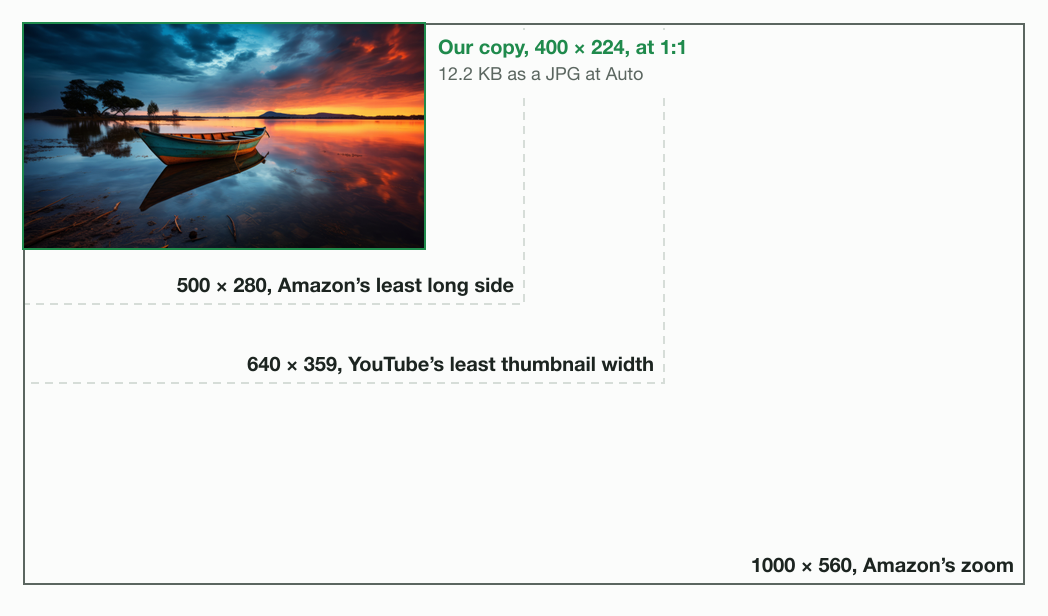
Amazon’s own note reads: “Do not artificially enlarge small images.” The same row adds that 1,000+ pixels on the longest side “enable the zoom function”. The 1000 × 1000 resizer exports that square.
- Google Photosmore than 256 × 256
- Indian e-Visa350 × 350
- LinkedIn photo400 × 400
- Amazon500 long side
- Etsy first photo635 × 635
- YouTube thumbnail640 wide
- Amazon zoom1,000 long side
- Our copy400 × 224
An error message often names the number. ShowSubmit, an art-show entry site, warns: “The image should be at least 1500px on the longest edge.” It adds that it “cannot enlarge images that are too small.”
How to check an image’s size before you upload
You check an image’s pixel size in its file properties. Do this before you resize anything.
On Windows, the e-Visa guide’s steps are Properties, then the “Details” tab, for the height and width. Without image-editing software, Amazon’s guide says to “right-click the image file and view its properties to check dimensions.”
On a Mac, the sips command in Terminal prints the pixels of any image file.
sips -g pixelWidth -g pixelHeight small.jpg
small.jpg
  pixelWidth: 400
pixelHeight: 224Can you make a small image bigger to upload it?
You can make a small image bigger, and the upload then passes, but the detail does not come back. Etsy’s help warns: “if you increase the size of an image, you may lose resolution and pixelation may occur.”
We measured how much. sharp 0.35.4 sized our 9.8 MB camera photo down to 400 × 224. Then sharp enlarged that copy with Lanczos 3 to 4 widths. Blinkimg’s engine never enlarges, so sharp did it.
Blinkimg’s engine saved each enlarged copy as a JPG at Auto, the file you would upload. We scored that JPG by PSNR against the true image.
The true image is the original sized straight down to the same pixels. Higher PSNR means closer to it. The control is the true image’s own JPG at Auto.
PSNR leans one way here. The enlarged pixels before any JPG save scored a little higher, 29.3 dB at 1000 wide. Scoring them would flatter enlarging, so we score the JPGs.
Enlarged from 400 wide, as a JPG at Auto (dB)
- 500 wide30.2 dB
- 640 wide29.1 dB
- 1000 wide29.2 dB
- 2000 wide29.8 dB
Control: the true image as a JPG at Auto (dB)
- 500 wide35.0 dB
- 640 wide35.5 dB
- 1000 wide36.7 dB
- 2000 wide38.7 dB
What the scores show
Every enlarged JPG scored below the true image’s JPG. The gap grew from 4.8 dB at 500 wide to 8.9 dB at 2000 wide. No enlarged JPG scored above 30.2 dB.
PSNR alone does not rank the enlargements. The 2000 wide JPG scored 29.8 dB, a little above the 1000 wide one. The crops show the blur still grows.
| Enlarged to | For | Enlarged, JPG at Auto | True image, JPG at Auto | Enlarged, before any JPG save |
|---|---|---|---|---|
| 500 × 280 | Amazon's least long side | 16.6 KB, 30.2 dB | 17.2 KB, 35.0 dB | 31.0 dB |
| 640 × 359 | YouTube's least thumbnail width | 23.4 KB, 29.1 dB | 25.3 KB, 35.5 dB | 29.3 dB |
| 1000 × 560 | Amazon's zoom | 42.1 KB, 29.2 dB | 49.9 KB, 36.7 dB | 29.3 dB |
| 2000 × 1121 | 5 times the small copy | 104.5 KB, 29.8 dB | 149.6 KB, 38.7 dB | 29.9 dB |
Why an enlarged file is smaller
The enlarged files are smaller, too. At 2000 wide the engine saved the enlarged copy at 104.5 KB. The true image at the same pixels took 149.6 KB. The missing bytes are detail the small copy never had.
Which enlarging method blurs least is a different question. How to resize an image in Paint measured the kernels. How to resize an image without losing quality covers sizing down.
How to increase the pixel size of an image
You increase the pixel size of an image best with a larger original, which carries real detail. Enlarge only when none exists.
Look for the original file
Use the photo from your camera roll or camera card. Skip copies from chats, screenshots and web pages.
Open the image resizer and drop the image
The image resizer opens the editor on your photo, in your browser.
Type the minimum in Custom size, then Apply
For a YouTube thumbnail, type at least 640 wide. For Amazon, 500 on the long side, or 1,000 for zoom.
Save, then check the pixels
The editor scales the picture up when the Custom size is bigger than the photo. Check the saved file before you upload.
The editor enlarges in your browser, and we did not measure the browser’s method. For a thumbnail, the YouTube thumbnail resizer opens on 1280 × 720.
Image file size too small: raise the KB with quality
A file under a KB floor needs more bytes of picture. The honest way to add them is a higher quality setting, which keeps more detail.
We tested the floor on a 350 × 350 square cut from our photo, the e-Visa’s least pixels. Blinkimg’s engine saved the square at 15.3 KB as a JPG at Auto. That is quality 78.
With Min file size at 10 KB, the engine changed nothing: the file was already 15.3 KB. We also set Min file size to 50 KB. That is a test setting, not a rule any platform here states. The engine raised the quality to 94, and the file came to 51.6 KB.
The higher quality kept more of the square. PSNR against the lossless square rose from 34.6 dB to 42.3 dB. Quality 93 gave 46.7 KB, under the floor.
Padding is the other way to add KB: empty bytes after the picture. We padded the Auto file to 50,000 bytes with zeros. It decoded to exactly the same pixels.
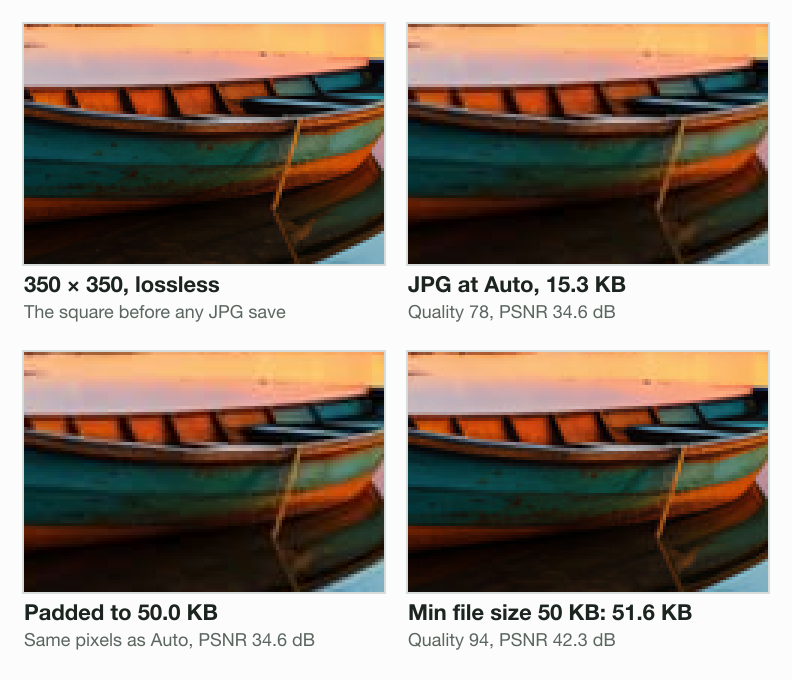
| Square | Setting | File | Quality | PSNR |
|---|---|---|---|---|
| 350 × 350 | Auto (control) | 15.3 KB | 78 | 34.6 dB |
| 350 × 350 | Min file size 10 KB | 15.3 KB | 78 | 34.6 dB |
| 350 × 350 | Min file size 50 KB | 51.6 KB | 94 | 42.3 dB |
| 350 × 350 | Auto, padded by our script | 50.0 KB | same as Auto | 34.6 dB |
| 120 × 120 | Auto (control) | 3.2 KB | 78 | 30.5 dB |
| 120 × 120 | Min file size 10 KB | 10.1 KB | 95 | 40.5 dB |
| 120 × 120 | Min file size 50 KB | refused | 100 gives 21.1 KB |
Quality has a ceiling, and the pixels set it. Our 120 × 120 square reached only 21.1 KB at quality 100. The engine refused the 50 KB floor and said why.
This image comes to 21,112 bytes as JPEG at the highest quality, under the 50,000-byte minimum. Export it at a larger size or start from a larger photo.A file too small in KB can be too small in pixels, as our 120 × 120 square was. Resize to the size the form states, then set the floor. To shrink a file under a cap instead, use reduce image size in KB.
Which fix to use
The right fix depends on the number in the error and on the file you have. Read the error first, then pick one line.
- The error names pixels and you have the original: upload the original, sized down to the limit if needed.
- The error names pixels and you have only a small copy: enlarge to the minimum, no further.
- The error names KB: set Min file size to the floor, and check the result.
- The engine refuses the floor: add pixels first, up to the size the form allows.
Read the full guide: How to reduce image file size on any device.
Questions
- Why does it say my image is too small to upload?
- The image has fewer pixels or fewer KB than the site's minimum. YouTube Help asks a thumbnail for at least 640 pixels wide. Amazon's Product image guide refuses photos under 500 pixels on the longest side. Check the file's width, height and size, then compare them with the number the error names.
- How do I resize an image so I can upload it?
- Find the size the site asks for on its help page, then type it into an image resizer. Size down from a larger original whenever you can. Etsy Help says decreasing an image will not lower its resolution, but increasing it may cause pixelation. Save once, then check the pixels before uploading.
- How can I increase my image size?
- Start from a larger original if one exists, such as the photo in your camera roll. If not, enlarge to the site's minimum and stop. In our test, sharp enlarged a 400 × 224 copy to 1000 wide. Its JPG scored 29.2 dB against the real image. Amazon's guide asks sellers not to artificially enlarge small images.
- How to increase pixel size of image?
- Open the image in a resizer, type a larger width and height, and save. The new pixels are estimates, so the picture looks softer. We enlarged a 400 × 224 copy to 2000 wide with sharp. Its JPG held 104.5 KB, against 149.6 KB for the real image. Etsy Help warns that enlarging may cause pixelation.
- How can I increase the KB size of an image?
- Save it at a higher quality, which keeps more detail and more bytes. Blinkimg's engine raised a 350 × 350 square to 51.6 KB, quality 94, for a 50 KB test floor. India's e-Visa guide asks at least 10 KB. Padding with empty bytes adds no picture.
- How to increase the size of an image more than 100 KB?
- Add pixels first, because quality alone has a ceiling. Our 350 × 350 square reached only 130.3 KB at quality 100 in Blinkimg's engine. Our 9.8 MB camera photo at 2000 × 1121 came to 149.6 KB at Auto in Blinkimg's engine. The Indian e-Visa guide caps its photo at 300 KB.
- What can I do if my image is too large to upload?
- Compress it under the cap, or resize it down to the pixels the site asks for. LinkedIn Help caps profile photos at 8 MB. YouTube Help allows 2 MB for a thumbnail from a phone and 50 MB from a computer. A compressor with a size target lands under the number in one step.
- How do I upload a full size photo?
- Upload the original file from your camera roll or camera card. Skip copies saved from a chat or a web page. Google Photos Help says it backs up photos up to 200 MB or 200 MP. Check the pixels in the file’s details before you upload.
- What is the minimum size for a YouTube thumbnail?
- YouTube Help asks for a minimum width of 640 pixels for video thumbnails. It recommends 3840 × 2160 at 16:9. The file must stay under 2 MB from a phone or 50 MB from a computer. A 1280 × 720 thumbnail clears the minimum with room to spare.
- What size does an Amazon product image need for zoom?
- Amazon Seller Central's Product image guide says images with 1,000+ pixels on the longest side enable the zoom function. Images below 500 pixels on the longest side cannot be uploaded. The most it accepts is 10,000 pixels. A 1000 × 1000 square meets the zoom size.
- Does enlarging a photo make it blurry?
- Enlarging spreads the same detail over more pixels, so edges soften. Etsy Help warns that increasing the size of an image may lose resolution and cause pixelation. In our test, sharp enlarged a 400 × 224 copy. Its JPGs scored 4.8 to 8.9 dB below the real image's JPGs.
- How do I resize an image to fit a certain size?
- In Blinkimg’s image resizer, type the width and height into Custom size. Then choose Crop to fill the shape, or Fit to keep the whole picture. YouTube Help suggests 16:9 for video thumbnails, so a 4:3 photo needs a crop or a fit. Save once and check the pixels in the file details.