What is a WebP file? Why your images save as WebP
What is a WebP file? An image format Google released in 2010 that stores photos and graphics in fewer bytes than JPG and PNG. Websites send WebP because it is light, so a picture you save can arrive as .webp even when its address ends in .jpg. Here is what the file holds, why it lands on your disk, and how to open or change it. Part of the WebP converter.
By Sahadat HusainUpdated 13 min readFormats

What is a WebP file?
A WebP file is an image in Google’s WebP format, made to carry pictures over the web in fewer bytes. Google announced it on 30 September 2010 as a developer preview, built on VP8, the video codec it had open-sourced that May. Its launch test re-encoded about a million web images, mostly JPEGs, and they came out 39% smaller on average.
The file ends in .webp and servers label it image/webp. Inside, a WebP is a small RIFF container, the same wrapper a .wav sound uses, holding one of two kinds of picture. A lossy WebP is VP8 still-image coding; a lossless WebP uses a separate format Google built for the job, VP8L. The format became an RFC in November 2024, RFC 9649, an informational document rather than an internet standard.
| Feature | In a WebP | In a JPG |
|---|---|---|
| Lossy compression | Yes, 8-bit 4:2:0 colour | Yes |
| Lossless compression | Yes, a separate mode | No |
| Transparency | Yes, in lossy and lossless files | No |
| Animation | Yes, frames with a delay each | No |
| Metadata | Exif, XMP and a colour profile | Exif, XMP and a colour profile |
| Largest picture | 16383 × 16383 pixels | 65535 × 65535 pixels |
Why do images save as WebP?
The website chose WebP for your browser, and Save image as kept what arrived. The name in the address does not decide the format. We proved it with one public image whose address ends in .jpg, Cloudinary’s demo photo with automatic format, fetched by the three browser engines and by two written requests on 2 October 2026:
One .jpg address, five different files
| Who asked | Formats it listed first | What came back | Size |
|---|---|---|---|
| Chromium (Chrome, Edge) | AVIF, then WebP | AVIF | 41,448 bytes |
| Firefox | AVIF, then WebP | AVIF | 41,654 bytes |
| WebKit (Safari) | WebP, AVIF, JPEG XL, HEIC | JPEG XL | 40,594 bytes |
| A browser that lists WebP, not AVIF | WebP | WebP | 50,482 bytes |
| An app that lists only PNG and JPEG | PNG, JPEG | JPEG | 101,100 bytes |
sample.jpg, as each client received it
- AVIF to Chromium41.4 KB
- AVIF to Firefox41.7 KB
- JPEG XL to WebKit40.6 KB
- WebP to a WebP-only browser50.5 KB
- JPEG to an old app101.1 KB
How the site picks the format
Each browser sends a list of the image formats it can show, the Accept header, with every request. Chromium’s, read from the request it made:
image/avif,image/webp,image/apng,image/svg+xml,image/*,*/*;q=0.8Google’s WebP FAQ tells servers to do exactly this: send WebP when the browser says it accepts image/webp. Cloudflare’s Polish keeps the same image addresses and serves the WebP version only when the Accept header from the browser includes WebP
, and Shopify stores have served WebP automatically since July 2019. The order of the list does not decide: the service picks from the formats listed, by its own preference. At this address Chromium and Firefox got AVIF, WebKit got JPEG XL although it lists WebP first, and a browser that lists WebP alone got WebP.
Your browser asks
Accept: image/avif,
image/webp, …
The site picks
One format per browser,
at the same address
Save image as
Keeps the bytes
that arrived
Your file
.webp or .avif,
even from a .jpg link
How to stop images saving as WebP, or save as JPG instead
Chrome and Edge have no setting for it. Their image Accept header is fixed in the browser, and a Chromium request to let you download a JPG or PNG from a WebP has been open since May 2024. What works depends on the site, so here is what each option really does.
Convert the file you saved
Always works. Decode the WebP and write a JPG or PNG with a converter, Photoshop 23.2 or later, GIMP, or Preview on a Mac (File > Export). A WebP that was lossy becomes a JPG through a second lossy step, so choose a high quality, or PNG.
In Firefox, stop asking for WebP
Open about:config and set image.http.accept to
image/png,image/*;q=0.8,*/*;q=0.5. Sites that choose by the Accept header then have no WebP to send you. The old image.webp.enabled switch no longer exists. The change also drops AVIF, and a site that stores only WebP still sends WebP.Change the format in the address
On some image services the format sits in the link. On Cloudinary, f_auto becomes f_jpg; on Cloudflare’s image transforms, format=auto becomes format=jpeg. Shopify treats a format in the link as a hint, so it may still send WebP.
How to open a WebP file on Windows, Mac, iPhone and Android
Any current browser opens one: drag the .webp into Chrome, Edge, Firefox or Safari. Browser support is close to universal, at 96.74% of browsers in use by caniuse’s count of 30 September 2026. The apps outside the browser are where a WebP gets refused.
| Where | Opens a WebP | Since |
|---|---|---|
| Chrome | Yes | Chrome 17, February 2012 |
| Firefox | Yes | Firefox 65, January 2019 |
| Safari on Mac, iPhone, iPad | Yes | Safari 14: macOS Big Sur and iOS 14, 2020 |
| Windows Photos and File Explorer | With Microsoft’s free WebP Image Extension | Windows 10 version 1809 or later |
| Word, PowerPoint, Excel on Windows | Insert > Pictures, with the same extension | Office version 2105, 2021 |
| Android | Yes; lossless and transparent from 4.2.1 | Android 4.0; animated from Android 9 |
| Photoshop | Opens and saves, no plug-in | Photoshop 23.2, February 2022 |
| GIMP | Opens and exports, animation too | GIMP 2.10, April 2018 |
| Lightroom Classic | Imports and edits | Version 15.2, February 2026 |
| Canva | Uploads a still WebP, not an animated one | Its upload rules |
On Windows, the WebP Image Extension in the Microsoft Store is what lets Photos, File Explorer thumbnails and Office read the format. On a Mac, macOS reads WebP but does not write it. On our Mac (macOS 26.5), Preview lists WebP among the files it opens and exports one to JPEG, PNG or PDF with File > Export.
How to convert a WebP to JPG, PNG or PDF
Convert it when an app refuses it, or when someone needs a JPG. A conversion decodes the WebP and writes a new file. Here is what our engine made of our reference photo saved as a 611.2 KB WebP. That WebP was saved at a high quality, which is why the JPG at Auto comes out smaller than it:
photo.webp, 611.2 KB
- JPG at Auto271.0 KB
- JPG at 85338.0 KB
- PNG at Auto978.4 KB
- PNG, lossless2,835.2 KB
For a JPG any app opens
Drop the files into the WebP to JPG converter. Auto picks a quality per photo; a JPG has no transparency, so see-through parts turn white.
For a logo or a screenshot
Use WebP to PNG, which keeps transparency. Choose quality 100 when every pixel must match.
For a document
WebP to PDF puts each image on its own A4 page, turned to fit it, in the order you drop them, up to 10 WebP files a run.
Is WebP better than JPG?
Usually smaller, by an amount that varies. Google’s own figure is that a lossy WebP is 25% to 34% smaller than a JPEG at the same quality, measured in 2011 against libjpeg 6b, and the explainers that rank for this question repeat it without a test of their own. We saved our camera photo at two sizes and our reference photo as JPG and as WebP, both at Auto, and the WebP was smaller on all three.
Reference photo, 1920 × 1280
- JPG273.9 KB
- WebP218.9 KB
Camera photo at 1920 wide
- JPG140.3 KB
- WebP85.5 KB
Camera photo, full 4964 × 2782
- JPG605.5 KB
- WebP329.0 KB
On the full 9.8 MB camera photo the WebP was 46% smaller than the JPG, and at 1920 pixels wide it was 39% smaller. On our 1920 × 1280 reference photo, one of our photographs, it was only 20% smaller. That spread shows that the 25% to 34% is an average, not a promise. Test your own pictures before you switch a whole site to WebP.
The same photo under one size limit
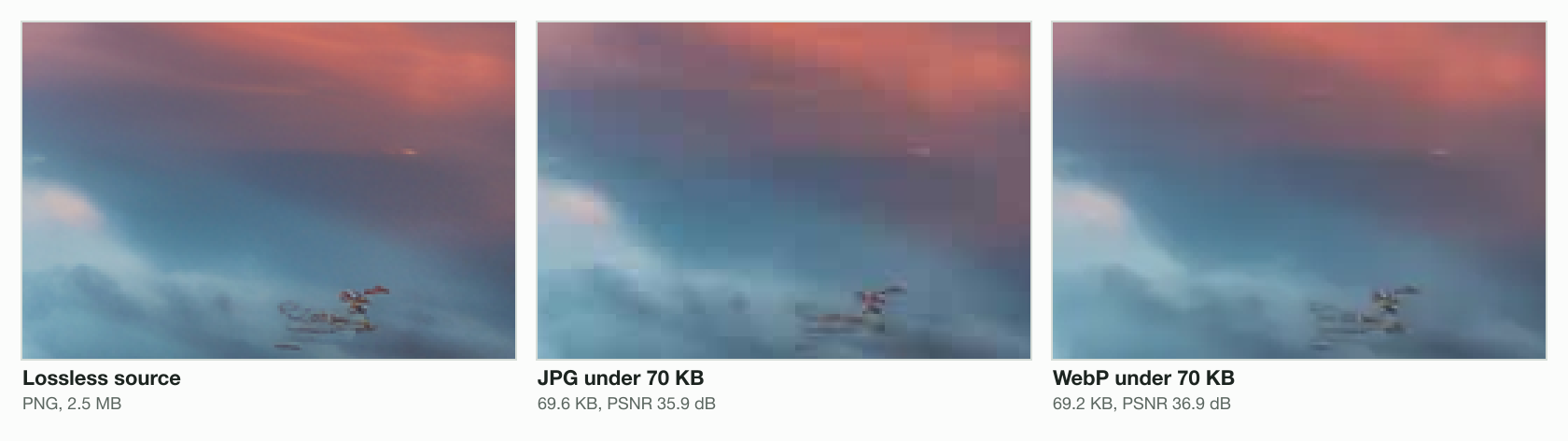
Size alone hides quality, so we also capped one photo at 70 KB in both formats and compared the result with the original. The WebP landed at 69.2 KB with a PSNR of 36.9 dB, the JPG at 69.6 KB with 35.9 dB. Higher PSNR means closer to the original, so at the same size the WebP kept more of the picture. The JPG shows its 8 × 8 blocks in the sky; the WebP smooths them.
WebP vs PNG: transparency and lossless files
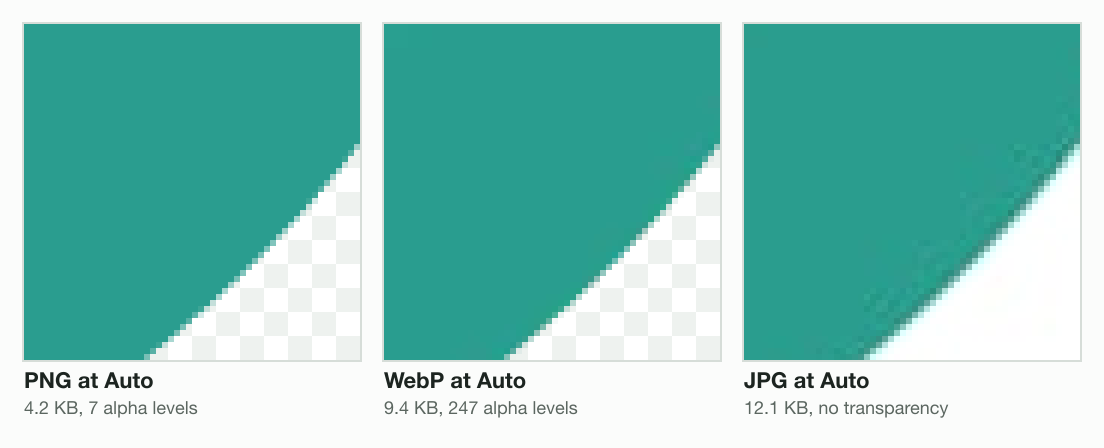
WebP does both jobs people keep PNG for. It holds transparency, and it can store a picture losslessly, with every pixel kept. The difference is in the details. A soft-edged logo keeps its fade in a WebP: our engine’s WebP of a 512 × 512 logo kept 247 levels of transparency in 9.4 KB. The PNG at Auto saved 4.2 KB by keeping only 7 levels, so its edge steps. A JPG cannot be see-through at all.
Lossless WebP is usually smaller than a lossless PNG, by how much depends on the picture. On our three test subjects the saving ran from 18% on a photo to 54% on a card of text and 88% on a flat graphic. Google quotes 26% smaller than PNG; the study it links reports 23% against ZopfliPNG and 42% against libpng.
Photo, 1920 × 1076
- PNG, lossless2,463.2 KB
- WebP, lossless2,017.3 KB
Text card, 1200 × 630
- PNG, lossless58.7 KB
- WebP, lossless27.0 KB
Flat graphic, 640 × 480
- PNG, lossless1.7 KB
- WebP, lossless0.2 KB
Can a WebP file be animated?
Yes. A WebP can hold many frames with a delay each, like a GIF, and it is far smaller. We built the same 12-frame clip of 480 × 270 pixels both ways: 116.0 KB as an animated WebP against 738.3 KB as a GIF, 84% smaller. The GIF also has to squeeze every frame into 256 colours, which shows as speckled dithering in a sunset.

Is a WebP file safe to open?
Yes, on an updated device. In September 2023 a flaw in libwebp, the library most apps use to read WebP, let a crafted image write past its memory, and Google said an exploit existed in the wild. Chrome fixed it on 11 September (version 116.0.5845.187), Firefox on 12 September (117.0.1) and libwebp itself on 13 September (1.3.2). The flaw was in the reader, not the format, and every image decoder carries the same kind of risk. Keep the browser, the system and your image apps updated.
When to keep a WebP, and when to convert it
Is the picture going on a website?
- Yes
Keep WebP
Nearly every browser shows it, and it is small
- No
Does the app, form or person you send it to accept WebP?
- Yes
Keep WebP
A conversion adds a second lossy step for nothing
- No
Does it have transparency or sharp text?
- Yes
Convert to PNG
Keeps see-through parts and crisp edges
- No
Convert to JPG
Every app and upload form takes it
- Yes
- Yes
Going the other way, a JPG or PNG for your own site is worth turning into WebP, or into AVIF, which is smaller again on most photos. Our post on what an AVIF file is covers that format, and compress WebP shrinks the WebP files you already have.
Read the full guide: Best image format: JPG, PNG, WebP, AVIF, HEIC and GIF explained.
Questions
- How do I convert a WebP file to a JPEG?
- Open it in a WebP to JPG converter, drop the file and download the JPG. On a Mac, Preview does it with File then Export; on Windows, Photoshop 23.2 or later and GIMP save a copy as JPG. Our engine turned a 611.2 KB WebP into a 271.0 KB JPG at Auto quality.
- Is WebP good or bad?
- Good for the web: it is usually smaller than JPG and PNG, keeps transparency and animation, and nearly every browser shows it. Bad only where an app refuses it, such as an old editor or an upload form. A 2023 flaw in its reading library was patched within a week.
- What will open a WebP file?
- Every current browser: Chrome, Edge, Firefox and Safari 14 or later. On Windows, Photos and File Explorer with Microsoft’s free WebP Image Extension; on a Mac, Preview; on Android, the system since version 4.0. Photoshop 23.2, GIMP 2.10 and Lightroom Classic 15.2 open it too.
- How do I change a WebP file to a PDF?
- Use a WebP to PDF converter: drop the files in the order you want the pages, and each image becomes one A4 page turned to fit it. Blinkimg converts up to 10 WebP files a run. On a Mac, Preview can also export a single WebP as a PDF with File then Export.
- How do I stop images from saving as WebP?
- Chrome and Edge have no setting, because the website picks the format from the list your browser sends. In Firefox, set image.http.accept in about:config to a list without WebP. On some image services you can change the format in the address. Otherwise, convert the saved file.
- Why can’t I open a WebP file?
- The app is older than its WebP support. Windows Photos needs Microsoft’s free WebP Image Extension, Safari needs version 14 on macOS Big Sur or later, and Photoshop before 23.2 needs a plug-in. Open the file in any current browser, or convert it to JPG or PNG for the app.
- Is WebP lossless?
- It can be either. A WebP is lossy or lossless, and the two use different coding inside the same kind of file. Our lossless WebP of a card of text was 27.0 KB against 58.7 KB for a lossless PNG of the same pixels, both keeping every pixel exactly.
- Does WebP support transparency?
- Yes, in both lossy and lossless files, which JPG cannot do. Our engine’s WebP of a soft-edged logo kept 247 levels of transparency in 9.4 KB, so the edge fades smoothly, while the PNG at Auto kept 7 levels and the JPG none.