What is a favicon? Size, formats and how to make one
A favicon is the small square icon that marks a website in browser tabs, bookmarks and search results. Make it from one simple square mark. Use 32 × 32 pixels for the tab, 180 for Apple and 192 and 512 for a web app. We measured each size in bytes and logged the files headless Chromium 149 requested on five test pages. Part of the image API.
By Sahadat Husain15 min readEngineering

What is a favicon?
A favicon is a small square image that stands for a website in a browser. The name is short for “favorite icon”, in MDN’s glossary. Browsers show it in tabs, bookmarks and history. Phones use a larger copy for a Home Screen shortcut. Google can show it beside your site in search results.
Favicons began with Internet Explorer 5 in March 1999, as Wikipedia’s favicon article records. The file was favicon.ico, in the Windows ICO format, at the site’s root. Microsoft’s Internet Explorer 9 guide calls it a “site icon (also called shortcut icon, or favicon)”.
Today the HTML Standard defines it as a link with rel=“icon”. The standard says a browser “should” use the icon “when representing the page in the user interface”.
What size should a favicon be?
A favicon should be a square: 32 × 32 pixels for a browser tab, larger for phones and Google. The 32 is our reading, not an owner’s rule. MDN gives 16 × 16 as the usual size. A 2x screen draws 16 CSS pixels with 32 real ones. The HTML Standard counts the sizes attribute in “raw pixels (as opposed to CSS pixels)”.
- 16 × 16Tab, 1x
- 32 × 32Tab, 2x
- 48 × 48favicon.ico
- 180 × 180Apple touch icon
- 192 × 192Manifest
| Size | Where it shows | Who asks for it | Our PNG at Auto |
|---|---|---|---|
| 16 × 16 | A browser tab on a 1x screen | MDN: the usual favicon size | 385 bytes |
| 32 × 32 | The same tab on a 2x screen | Our reading: MDN’s 16 on a 2x screen | 643 bytes |
| 48 × 48 | Inside favicon.ico, with 16 and 32 | Microsoft: 16, 32 and 48 for Internet Explorer 9 | 879 bytes |
| 180 × 180 | iPhone Home Screen (apple-touch-icon) | Apple: the 180 × 180 example in its Safari guide | 2,839 bytes |
| 192 × 192 | A web app icon; also above Google’s 48 | web.dev: at least 192 and 512 for Chromium | 3,047 bytes |
| 512 × 512 | A web app’s install and splash screen | web.dev | 7,142 bytes |
Favicon dimensions and file size, measured
Favicon files are small: the Blinkimg mark is 643 bytes at 32 × 32. We sized the mark, a 750 × 750 PNG, to each size with Blinkimg’s engine. Each file was saved as PNG at Auto, which keeps at most 256 colours.
| Size | PNG at Auto | Colours at Auto | PNG at quality 100 | PSNR on white |
|---|---|---|---|---|
| 8 × 8 | 295 bytes | 31 | 346 bytes | 42.5 dB |
| 16 × 16 | 385 bytes | 34 | 824 bytes | 42.2 dB |
| 32 × 32 | 643 bytes | 36 | 1,975 bytes | 45.8 dB |
| 48 × 48 | 879 bytes | 36 | 3,135 bytes | 46.4 dB |
| 180 × 180 | 2,839 bytes | 26 | 13,370 bytes | 48.8 dB |
| 192 × 192 | 3,047 bytes | 24 | 14,007 bytes | 48.5 dB |
| 512 × 512 | 7,142 bytes | 19 | 43,349 bytes | 48.6 dB |
The mark has flat colours, so Auto needed only 36 colours at 32 × 32. Quality 100 keeps every colour the resize made. From 16 × 16 up, it cost 2.1 to 6.1 times the bytes. Laid on white, each Auto file scored a PSNR of 42.2 dB or more against its quality 100 twin. PSNR measures how close one file stays to another; higher is closer.
Why a favicon must be a simple mark
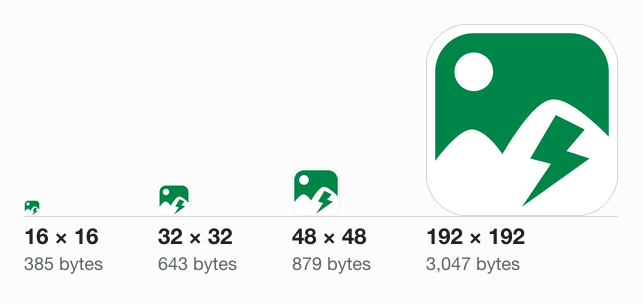
A favicon reads best as a simple mark, because a 16 × 16 icon has only 256 pixels. We drew the engine’s four smallest files 192 pixels wide, every pixel a square:
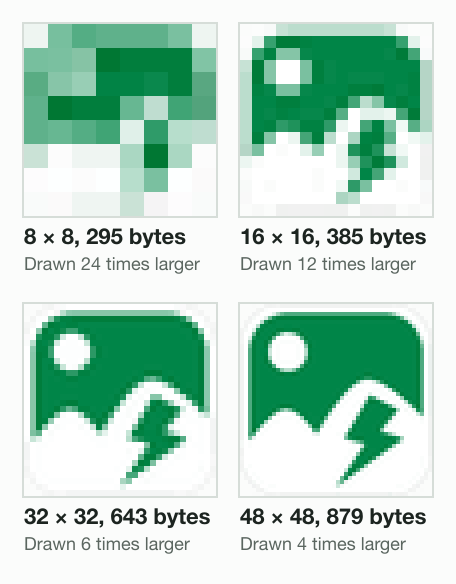
At 8 × 8, Google’s minimum, the mark is a green smudge. At 16 × 16 the sun and the bolt survive as a few pixels each. At 32 × 32 every shape reads.
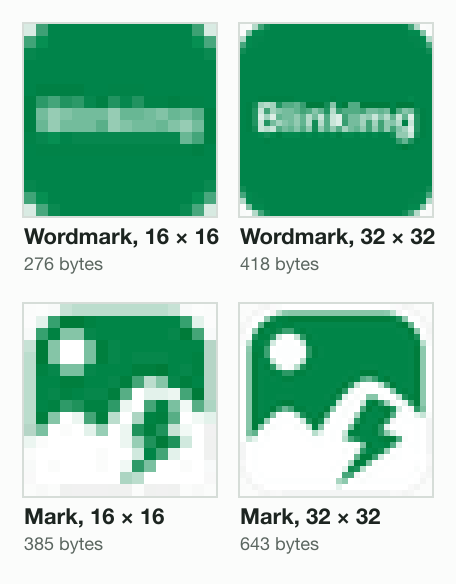
Words fare worse. We drew a test wordmark, the word Blinkimg in white on the same green. We sized it the same way:
ICO, PNG or SVG: which favicon format to use
A PNG is the format the owners agree on: MDN, Apple’s guide and Google’s format list all name PNG. Each format has one job:
- PNG: one file per size, with a see-through background. What is a PNG file opens one byte by byte.
- ICO: “A single .ICO file can contain multiple images of different resolutions”, Microsoft’s Internet Explorer 9 guide says. Internet Explorer 9 took only ICO.
- SVG: one vector file that stays sharp at every size. The caniuse site counts 91.61% of users with support; Safari joined at version 26.0. Serve it as image/svg+xml, caniuse notes.
- JPG, GIF, BMP: Google lists them too, but a JPG has no transparency. Turn a JPG logo into a PNG with the JPG to PNG converter first.
Google’s list of favicon formats has no SVG. So an SVG favicon needs a PNG or ICO linked beside it for search results.
What is favicon.ico?
The favicon.ico file is a website’s icon in Microsoft’s ICO format, kept at the site’s root. A browser may fetch it without any link. The HTML Standard allows a request for /favicon.ico when a page has no icon link.
An ICO is a container. It opens with a 6-byte header, then a 16-byte entry for each image, Microsoft’s icon article shows. We built one with Pillow 12.3.0 from the engine’s 16, 32 and 48 pixel PNGs. Its first 22 bytes:
- 00NUL
- 00NUL
- 01·
- 00NUL
- 03·
- 00NUL
Header: icon, 3 images
- 10·
- 10·
16 × 16
- 00NUL
- 00NUL
- 00NUL
- 00NUL
Colours, planes: unused
- 20SP
- 00NUL
32 bits a pixel
- 6Fo
- 01·
- 00NUL
- 00NUL
367 bytes long
- 366
- 00NUL
- 00NUL
- 00NUL
Starts at byte 54
Each image inside can be a PNG or an old-style bitmap (BMP). We saved the same three images both ways with Pillow:
favicon.ico with 16, 32 and 48 pixel images
- Pillow, PNG entries1,902 bytes
- Pillow, BMP entries14,510 bytes
- Blinkimg’s own1,961 bytes
The pixels were the same, so the gap is compression: the BMP version came out 7.6 times larger. Blinkimg’s own favicon.ico comes from our site’s build script, which wraps the engine’s PNGs as they are. Pillow re-saves each PNG entry, which made its copy 59 bytes smaller. The file command reads all three:
pillow-png.ico: MS Windows icon resource - 3 icons, 16x16 with PNG image data, 16 x 16, 8-bit colormap, non-interlaced, 32 bits/pixel, 32x32 with PNG image data, 32 x 32, 8-bit colormap, non-interlaced, 32 bits/pixel
pillow-bmp.ico: MS Windows icon resource - 3 icons, 16x16, 32 bits/pixel, 32x32, 32 bits/pixel
favicon.ico: MS Windows icon resource - 3 icons, 16x16 with PNG image data, 16 x 16, 8-bit colormap, non-interlaced, 32 bits/pixel, 32x32 with PNG image data, 32 x 32, 8-bit colormap, non-interlaced, 32 bits/pixelWhich icon file does a browser load?
We served five test pages from this Mac and logged every file requested. Playwright drove headless Chromium 149, at 1x and 2x, and its WebKit 26.5 build. Chromium asked for /favicon.ico only when a page had no icon link. On the others it took one linked icon, or the next one after a 404.
Read the icon links
Every rel="icon" in the head
Pick one
With these tags: SVG over ICO, either order
32 PNG over 192 PNG
Missing? Try the next
A 404 on the 32 led to the 192
No link at all
Ask for /favicon.ico
| Icon links in the page | Chromium 149, 1x | Chromium, 2x | WebKit 26.5 |
|---|---|---|---|
| None | /favicon.ico | /favicon.ico | nothing |
| 32 PNG, 192 PNG, apple-touch-icon | /icon-32.png | /icon-32.png | nothing |
| ICO (sizes=32x32), then SVG | /icon.svg | /icon.svg | nothing |
| SVG, then ICO (sizes=32x32) | /icon.svg | /icon.svg | nothing |
| 32 PNG (missing), 192 PNG | /missing-32.png, /icon-192.png | /missing-32.png, /icon-192.png | nothing |
The two PNG links drew one request, for the 32 pixel file, even at 2x. The SVG beat the ICO in either order. When the 32 pixel file was missing, the browser tried the 192 next. That matches the standard’s rule for an icon found inappropriate: a browser “must try the next-most-appropriate icon”.
Chromium never fetched the apple-touch-icon; Apple’s guide ties that link to iPhone and iPad Home Screens. Playwright’s WebKit build asked for no icon at all. A headless test build is not the browser on your desk, so read these logs as one build’s behaviour.
How to add a favicon in HTML
To add a favicon in HTML, put link elements with rel=“icon” in the head of every page. This set covers the cases in this post:
<link rel="icon" href="/favicon.ico" sizes="32x32">
<link rel="icon" href="/icon.svg" type="image/svg+xml">
<link rel="apple-touch-icon" href="/apple-touch-icon.png">
<link rel="manifest" href="/manifest.webmanifest">The ICO line matches our ICO-then-SVG test page. Keep favicon.ico at the site’s root too, for any client that asks for it without a link. The older rel=“shortcut icon” still works: the standard allows “shortcut” for historical reasons.
The manifest lists the large icons. For Chromium, in web.dev’s words, “you must provide at least a 192x192 pixel icon and a 512x512 pixel icon.”
{
  "icons": [
    { "src": "/icon-192.png", "sizes": "192x192", "type": "image/png" },
    { "src": "/icon-512.png", "sizes": "512x512", "type": "image/png" }
  ]
}Safari also looks for apple-touch-icon.png at the root when no link names one, says Apple’s Safari Web Content Guide. Its own example links a 180 × 180 file.
How Google shows your favicon in search results
Google can show the favicon your home page links, one per hostname, when its rules are met. The rules sit on Google Search Central, last updated 28 August 2026:
- “Your favicon must be a square (1:1 aspect ratio) that’s at least 8x8px.”
- Its advice: “we recommend using a favicon that’s larger than 48x48px so that it looks good on various surfaces.”
- The formats it supports: “BMP, GIF, ICO, PNG, JPEG, PPM, and TIFF”.
- “Googlebot-Image must be able to crawl the favicon file and Googlebot must be able to crawl the home page”.
- “The favicon URL must be stable (don’t change the URL frequently).”
A 192 × 192 PNG meets the size advice; ours from the engine is 3,047 bytes. Google adds that a favicon “isn’t guaranteed to appear” even when every rule is met. A new icon waits for a recrawl, which can take “several days to several weeks”.
How to make a favicon
To make a favicon, start from one square mark and save it at each size as a PNG. Five steps cover it:
Start from a square master
Export your mark as a square PNG of 512 × 512 pixels or more. Give it a see-through background. Enlarging a small icon adds no detail: how to resize an image without losing quality measures why.
Simplify it for 16 pixels
Drop the words and thin lines. Check a 16 × 16 copy enlarged, as in our test.
Make each size
Open the 512x512 resizer, fit the mark and save it as a PNG. For 32, 180 and 192, use Custom size in the image resizer. It takes 16 to 8,192 pixels a side.
Wrap an ICO, if you want one
Blinkimg has no favicon generator; the resizer makes the PNGs. Blinkimg’s engine writes JPG, PNG, WebP and AVIF, not ICO. An ICO tool wraps your PNGs into one file. We used Pillow, a free Python library: one save call with three sizes.
Link the files and check
Add the link tags, upload the files and open the site in a new tab. A changed icon may need a cleared cache or a new file name, Microsoft’s Internet Explorer 9 guide warns.
Your PNGs are already small at Auto. To squeeze a large PNG further, the PNG compressor keeps it a PNG. Favicons are one part of a fast page; image optimization for the web covers the rest.
Read the full guide: Image optimization for the web: formats, sizes and lazy loading.
Questions
- Is a favicon the same as a logo?
- A favicon is not the same as a logo, though it is often cut from one. A logo can be wide and hold words. A favicon is a small square, and MDN's glossary gives 16 × 16 pixels as its usual size. Use the logo's symbol or first letter, because words blur at that size.
- How do I create a favicon?
- Start with a square PNG of your mark, at least 512 × 512 pixels, on a see-through background. Resize copies to 32, 180, 192 and 512 pixels. Link them with rel="icon" in the head of every page. Apple's Safari guide adds an apple-touch-icon link for iPhone Home Screens.
- Where should the favicon be placed?
- Put the icon files anywhere on your site and link them from the head of every page. Keep a favicon.ico at the site's root as well. The HTML Standard lets a browser request /favicon.ico when a page has no icon link. Google reads the icon link on your home page.
- Can I use PNG as a favicon?
- You can use a PNG as a favicon. MDN's glossary names PNG among the usual favicon formats, and Google Search lists PNG as supported. Link it with rel="icon" and type="image/png". Blinkimg's engine saved our 32 × 32 PNG favicon in 643 bytes at Auto.
- Is the favicon 16x16 or 32x32?
- MDN says a favicon is usually 16 × 16 pixels. A 2x screen draws those 16 CSS pixels with 32 real ones. The HTML Standard counts icon sizes in real pixels. So supply 32 × 32. In our test, headless Chromium 149 picked a 32 pixel PNG over a 192 one, at 1x and 2x.
- What is the best size for a favicon PNG?
- Make the tab PNG 32 × 32 and add larger PNGs for other places. Apple's Safari guide shows a 180 × 180 apple-touch-icon. Google's web.dev guide asks for 192 × 192 and 512 × 512 manifest icons. Google Search recommends a favicon larger than 48 × 48 for its search results.
- What size should a favicon be in 2026?
- A 2026 favicon set can stay small: a 32 × 32 tab icon, a 180 × 180 touch icon. Add 192 and 512 pixel icons for a web app manifest. Google's favicon guideline, updated in August 2026, asks for a square of at least 8 × 8 pixels. It recommends larger than 48 × 48.
- Can a favicon be 512x512?
- A favicon can be 512 × 512, and web.dev asks for one in a web app manifest. A tab shows it far smaller, so the extra bytes buy nothing there. Blinkimg's engine saved our 512 × 512 icon in 7,142 bytes; the 32 × 32 took 643 bytes. Link a small file for tabs.
- Should I use PNG or SVG for favicon?
- Use an SVG and a PNG together. An SVG stays sharp at every size, and caniuse counts 91.61% of users whose browsers support SVG favicons. Google Search's list of favicon formats has no SVG, though. So link the SVG for browsers and keep a PNG or ICO linked for Google.
- Does the favicon need to be ico?
- A favicon does not need to be an ICO. The HTML Standard names no required format, and Google lists PNG, GIF and JPEG beside ICO. An ICO still helps one case: with no icon link, a browser may request /favicon.ico. Headless Chromium 149 did exactly that in our test.
- How can I generate a free favicon?
- You can make a free favicon from your own square logo. Resize it to 32, 180, 192 and 512 pixels, saved as PNG. The web.dev guide asks for the 192 and 512. For an ICO, the free Python library Pillow wraps the PNGs into one file. Blinkimg has no favicon generator or ICO output.
- What is a favicon image, and what are favicons used for?
- A favicon image is a small square picture that stands for a website. MDN's glossary lists page tabs and the bookmarks menu. The glossary notes most modern browsers replaced the address-bar favicon with an HTTPS sign. Phones use a larger copy as a Home Screen icon. Google can show one beside a site in its search results.
- What is favicon.ico?
- The favicon.ico file is a website's icon in Microsoft's ICO format, kept at the site's root. One ICO can hold several sizes, Microsoft's Internet Explorer 9 guide says. Blinkimg's own wraps the engine's 16, 32 and 48 pixel PNGs in 1,961 bytes. With no icon link, headless Chromium 149 requested /favicon.ico in our test.