Image still too big after compressing? Set a size cap
Compressing at Auto aims at a quality, not at your limit, so a big photo can stay too big. We measured each cause on one photo. Part of the image compressor.
By Sahadat Husain13 min readGuides

An image is still too big after compressing when the compressor aimed at a quality, not at your limit. At Auto, Blinkimg’s engine left our 9.8 MB camera photo at 605.5 KB. That is 12 times a 50 KB limit.
The fix is a size cap. With Max file size 50 KB alone, the engine hit 39.7 KB. It shrank the photo to 1371 × 768.
Choosing the width yourself added a little. At 1200 wide the cap kept quality 67 and scored 36.0 dB. The cap’s own width scored 35.3 dB. A PNG photo, kept metadata and an already compressed file are the other causes we measured.
Is it a photo saved as PNG?
- Yes
Convert to JPG, then set Max file size
PNG at Auto: 256.7 KB; JPG at Auto: 66.9 KB, still over
- No
Is Keep EXIF metadata on?
- Yes
Turn it off, then set Max file size
Under 50 KB: quality 62 on, 67 off
- No
Do you know the width it is shown at?
- Yes
Set Max resolution and Max file size
1200 wide: quality 67, 36.0 dB
- No
Set Max file size alone
39.7 KB at 1371 × 768, 35.3 dB
- Yes
- Yes
Why is my compressed image still too big? The causes at a glance
A compressed image stays too big for 5 reasons here, and we measured 4 on one photo. Each measured row changes one setting against its control.
| Cause | Left alone | Fixed | What to do |
|---|---|---|---|
| No size cap | 4964 × 2782 at Auto: 605.5 KB | Max file size 50 KB: 39.7 KB | Set Max file size to the limit |
| Width left to the cap (quality, not size) | Cap alone: 1371 wide, 35.3 dB | Cap at 1200 wide: 36.0 dB | Also set Max resolution |
| A photo saved as PNG | PNG at Auto, 1200 wide: 256.7 KB | JPG at Auto: 66.9 KB | Save photos as JPG, then cap |
| Metadata kept under a cap | Keep EXIF on: quality 62 | Keep EXIF off: quality 67 | Leave Keep EXIF metadata off |
| Already compressed | Auto again: 67.0 KB to 66.4 KB | 50 KB cap: 49.5 KB | Set the cap; start from the original |
| KB counted as 1,024 bytes | not measured | not measured | Read the limit in bytes |
Auto never aims at a size
Auto picks a quality, not a file size, and it keeps every pixel. For a photo, Blinkimg’s Auto is JPG quality 78.
Our camera photo is 4964 × 2782, about 13.8 million pixels. At Auto it weighed 605.5 KB. Sized to 3000 wide it weighed 281.1 KB. Only the 800 wide copy, 35.2 KB, fit under 50 KB at Auto.
4964 × 2782 at Auto605.5 KB of 50 KB
1211% of the cap: over3000 × 1681 at Auto281.1 KB of 50 KB
562% of the cap: over2000 × 1121 at Auto149.9 KB of 50 KB
300% of the cap: over1200 × 673 at Auto67.0 KB of 50 KB
134% of the cap: over800 × 448 at Auto35.2 KB of 50 KB
70% of the cap
Fewer pixels cut the bytes fast, because pixels grow with the width squared. At 2000 wide, 40% of the full width, the photo weighed 149.9 KB. That is about a quarter of full size.
A smaller width alone did not fit the limit. At 1200 wide, Auto still gave 67.0 KB. Only a size cap aims at the number.
What a 50 KB cap does to a big photo
A 50 KB cap fits a big photo, but the photo pays for it in quality. Blinkimg’s Max file size searches JPG quality from 5 to 95 for the highest that fits. When even quality 5 is too big, the engine shrinks the pixels at quality 45.
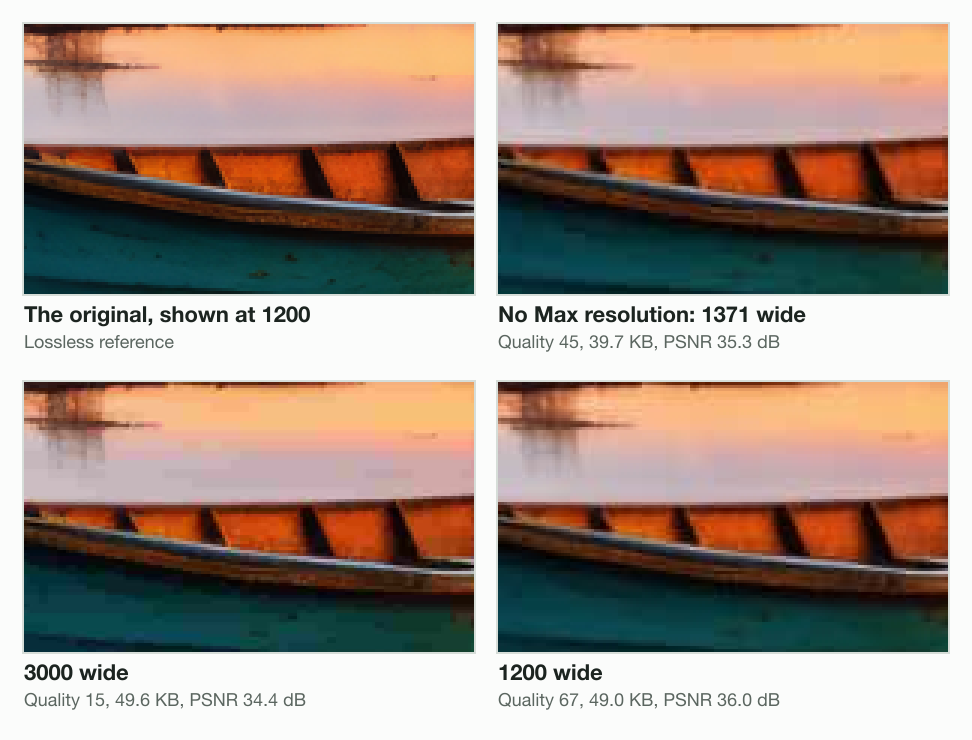
With no Max resolution, the cap shrank our photo to 1371 × 768 at quality 45. At Max resolution 3000, the engine kept the pixels and fell to quality 15. At 1200 wide it kept quality 67.
| Max resolution | Pixels saved | Quality | File | PSNR at 1200 |
|---|---|---|---|---|
| none | 1371 × 768 (shrunk by the cap) | 45 | 39.7 KB | 35.3 dB |
| 3000 | 3000 × 1681 | 15 | 49.6 KB | 34.4 dB |
| 2000 | 2000 × 1121 | 29 | 48.9 KB | 35.9 dB |
| 1200 | 1200 × 673 | 67 | 49.0 KB | 36.0 dB |
| 800 | 800 × 448 | 87 | 49.6 KB | 31.7 dB |
Which 50 KB file scores closest at 1200 wide
The 1200 wide file scored closest, 36.0 dB, level with 2000 wide at 35.9 dB. The cap's own shrink scored 35.3 dB, 0.7 dB lower. The 3000 wide file at quality 15 scored 34.4 dB, below the cap alone.
We scored each file the way a screen shows it. Each was sized to 1200 wide by sharp, then compared with the original sized straight to 1200. Higher PSNR means closer; it counts pixel differences, not sharpness.
PSNR under a 50 KB cap, shown at 1200 wide, dB (higher is closer)
- 1200 wide, quality 6736.0 dB
- 2000 wide, quality 2935.9 dB
- No Max resolution, quality 4535.3 dB
- 3000 wide, quality 1534.4 dB
- 800 wide, quality 8731.7 dB
A low quality at full pixels shows blocks
At its own pixels, the 3000 wide file under the cap shows blocks. Quality 15 leaves square blocks, which sizing the photo down partly hides.
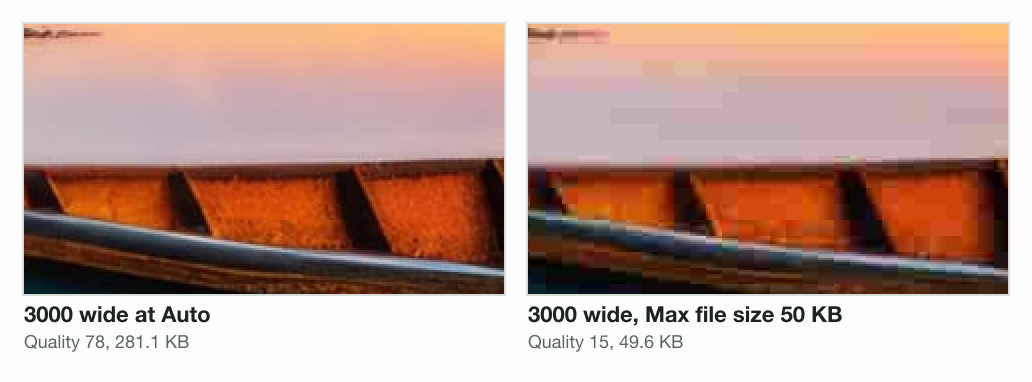
A cap is a ceiling the engine fills
Under a cap the engine fills the budget with quality. At Max resolution 800 it chose quality 87 and 49.6 KB, where Auto gave 35.2 KB.
A PNG photo stays too big
A PNG photo stays big because PNG stores every pixel without loss, grain included. sharp saved our photo at 1200 × 673 as a lossless PNG, 1,759.1 KB. Then Blinkimg’s engine compressed it 6 ways.
| Saved as | File | PSNR |
|---|---|---|
| PNG at Quality 100 (lossless) | 991.7 KB | identical |
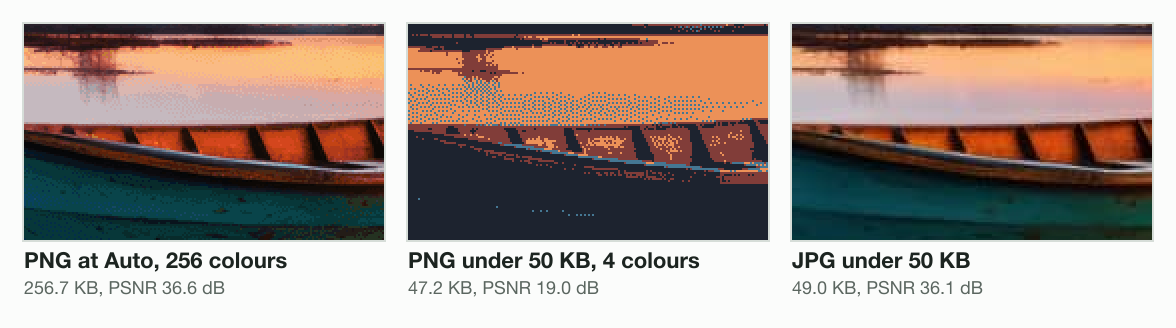
| PNG at Auto (256 colours) | 256.7 KB | 36.6 dB |
| PNG at Quality 40 (16 colours) | 108.7 KB | 25.2 dB |
| PNG, Max file size 50 KB (4 colours) | 47.2 KB | 19.0 dB |
| JPG at Auto | 66.9 KB | 37.2 dB |
| JPG, Max file size 50 KB | 49.0 KB | 36.1 dB |
PNG has no quality dial, so the engine cuts colours instead. Its PNG at Auto keeps 256 colours, 256.7 KB. The 16-colour step was still 108.7 KB. Under a 50 KB cap it fell to 4 colours and 19.0 dB. The JPG under the same cap scored 36.1 dB.
Blinkimg’s home page compresses a PNG as a PNG unless you pick another format. The KB pages, like compress image to 50 KB, start with JPG chosen. For a photo, convert with PNG to JPG. Keep PNG for screenshots and logos, as PNG vs JPG explains.
Does metadata make an image file bigger?
Metadata adds bytes to a photo, and the Exif standard caps the camera block at 64 KB. CIPA’s Exif 2.3 standard says:
The size of APP1 including all these elements shall not exceed the 64 KBytes specified in the JPEG standard.
The same standard records Flashpix extension data over 64 KB in a string of APP2 segments.
We wrote an Exif block into a 1200 × 673 JPG that sharp saved at quality 95. The block held made-up camera tags, a GPS position and a 160 × 90 thumbnail. It weighed 4,208 bytes: 258.5 KB became 262.7 KB, with identical pixels.
Blinkimg removes the block by default, because Keep EXIF metadata starts off. At Auto the file came out at 67.3 KB. With Keep EXIF metadata on it was 72.2 KB.
Under a cap, kept metadata costs picture. At Max file size 50 KB the engine reached quality 67 without the block, and 62 with it. The remove EXIF data page strips the block on its own.
Compressed image bigger than original, or not smaller at all
A compressed image can get bigger than the original when it is re-saved as PNG. Blinkimg’s engine saved its own 1200 wide Auto JPG, 67.0 KB, as a PNG at Auto: 238.3 KB.
A file that was already compressed has little left to remove at the same quality. Run through the engine again at Auto, the JPG came out at 66.4 KB, 607 bytes smaller. With Max file size 100 KB, the engine handed back the same bytes.
Nothing changed with that cap, because the file was already under it. Blinkimg hands back the original instead of a larger re-save when four things hold. The format stays the same and no Max resolution is set. Keep EXIF metadata is off, and the file carries no metadata. A file with metadata is re-saved, so its metadata comes off. With Keep EXIF metadata on, the file is re-saved and keeps it.
A lower cap still works on a compressed file. At 50 KB the same file came out at 49.5 KB.
The photos blurry after upload post measures each extra save. The reduce image file size guide covers phones, Macs and Windows.
When the site counts KB differently
A site can count 1 KB as 1,000 or 1,024 bytes. A tool that counts 1,024 can save a “50 KB” file of 51,200 bytes. A site that counts 1,000 refuses it. Blinkimg counts 1 KB as 1,000 bytes, and reduce image size in KB shows the trap.
How to get a photo under the limit, in order
You get a photo under a KB limit by typing the limit as a cap. Each step below matches a row we measured.
Start from the original photo
A copy saved from a chat or a website may have been compressed already.
Open a KB page with the cap set
The compress image to 50 KB page opens with Max file size at 50 KB and JPG chosen.
Leave Keep EXIF metadata off
The camera block then costs nothing under the cap.
Type a width in Max resolution, if you know it
Use the width the form or page shows. On our photo, 1200 wide added 0.7 dB over the cap alone.
Drop the photo and check the size
Our photo came out at 49.0 KB, 1200 × 673, quality 67.
On a Mac, sips and stat read the saved file’s pixels and bytes, the 2 numbers a form checks.
sips -g pixelWidth -g pixelHeight photo-1200-50kb.jpg
photo-1200-50kb.jpg
  pixelWidth: 1200
  pixelHeight: 673
stat -f "%z bytes" photo-1200-50kb.jpg
48990 bytesFor an exact shape, such as a square, crop first with the image resizer. Its editor sends the crop as a lossless PNG when one fits your plan’s limit. If a form still refuses it, the photo not uploading in an online form guide covers the other checks.
Read the full guide: How to reduce image file size on any device.
Questions
- Why is my compressed file still too big?
- The compressor aimed at a quality, not at your limit. At Auto, Blinkimg's engine left our 4964 × 2782 camera photo at 605.5 KB. With Max file size 50 KB, it came out at 39.7 KB, shrunk to 1371 × 768. Type your limit as a maximum.
- Why is my file not getting smaller when I compress it?
- A file that was already compressed has little left to remove at the same quality. Blinkimg's engine took a 1200 wide JPG from 67.0 KB to 66.4 KB on a second pass. With a 100 KB cap above the file, it handed back the same bytes.
- How to reduce file size after compression?
- Set a size cap; running the same setting again barely helps. Blinkimg's engine took a 1200 wide JPG from 67.0 KB to 66.4 KB at Auto. Under a 50 KB cap it came out at 49.5 KB. Start from the original file when you have it.
- How to fix an image that is too large?
- Save photos as JPG and type the limit as Max file size. Setting the shown width helps a little more. In Blinkimg's engine, our camera photo met a 50 KB cap at 1371 × 768 alone. At 1200 × 673 it kept quality 67.
- Why is my image file still so big?
- Two causes we measured are more pixels than the page shows and a photo saved as PNG. At 1200 × 673, Blinkimg's engine saved our photo as a 256.7 KB PNG at Auto. As a JPG at Auto it was 66.9 KB. A size cap then brings it under the limit.
- How do I compress a photo that is too large?
- Use a size cap, not a quality slider. Blinkimg's Max file size searches quality 5 to 95 for the highest that fits. Under 50 KB, our camera photo fell to quality 15 at 3000 wide. At 1200 wide it kept quality 67.
- How to compress a file that is too large to upload?
- Read the limit, type it as Max file size, and set a sensible width. Blinkimg counts 1 KB as 1,000 bytes. Under a 50 KB cap, Blinkimg's engine saved our photo at 1200 × 673 as 49.0 KB. A KB page also starts with JPG chosen.
- How to fix an overly compressed photo?
- You cannot restore detail a low quality removed; compress the original again with fewer pixels. Under 50 KB, Blinkimg's engine took our photo at 3000 wide to quality 15: 34.4 dB shown at 1200. At 1200 wide it kept quality 67 and 36.0 dB.
- Are compressed images lower quality?
- Lossy compression lowers quality a little at Auto and a lot under a tight cap. At 3000 wide, Blinkimg's engine scored our photo 43.8 dB at Auto. Under a 50 KB cap it scored 34.4 dB, both shown at 1200 wide. Higher is closer to the original.
- Does metadata make a photo file bigger?
- Metadata adds bytes, and CIPA's Exif 2.3 standard limits the Exif block to 64 KB. Our written block with a 160 × 90 thumbnail weighed 4,208 bytes. Kept under a 50 KB cap at 1200 wide, it cut Blinkimg's JPG quality from 67 to 62.
- Why did my compressed image get bigger than the original?
- A re-save as PNG can be bigger than a compressed JPG. Blinkimg's engine saved our 1200 wide 67.0 KB JPG as a 238.3 KB PNG at Auto. It keeps the original when a re-save is not smaller. That needs the same format, no Max resolution, no metadata and Keep EXIF off.
- How can I compress an image to any size?
- Type the size as a maximum, and the engine finds the highest quality that fits. Blinkimg's Max file size searches JPG quality 5 to 95, then shrinks pixels at quality 45 if none fits. Our 4964 × 2782 photo under 50 KB came out 1371 × 768.