Black and white image converter: make a grayscale image
Drop a photo and the editor opens on Color with Mono already pressed, so the preview is grey before you touch a control. Set the tone on the sliders and save: JPEG, PNG, WebP or AVIF, optimised. One of the image tools.
Output format
– / –
Drop images or browse
JPEG · PNG · WEBP · AVIF · HEIC · up to 50 at once · max 30 MB each
HEIC
PNG
JPEG
AVIF
WEBP
Advanced settings1 on
SmallerAutoBetter
Auto tunes each image.
A hard cap for the number your form demands.
KB
A floor for forms that refuse small files.
Max resolution
×
Empty side keeps the ratio. Never enlarges.
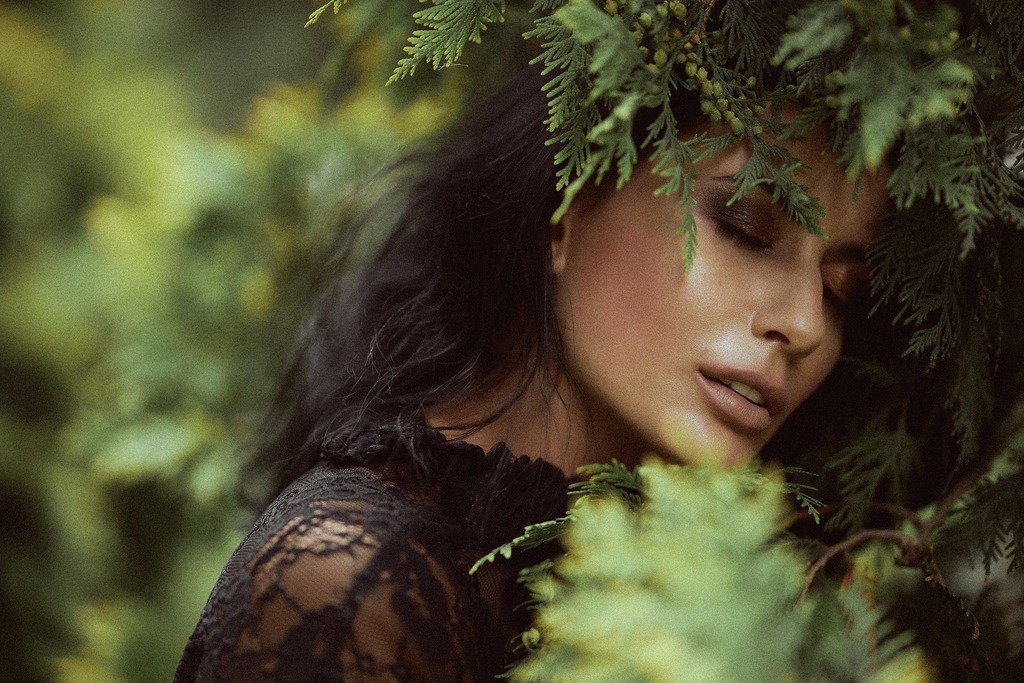
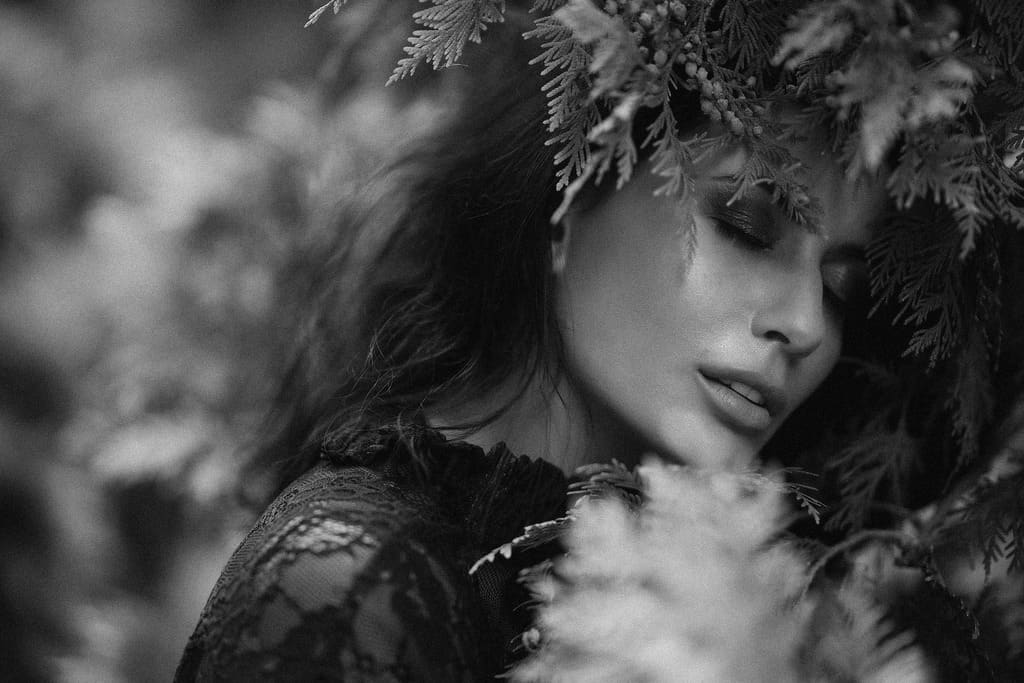
A real grayscale conversion, before and after
Original · 217.2 KB
Grayscale · 64.7 KB
−70%
One of our photographs, actually turned grayscale in the editor and saved by our engine; the sizes are the real files'. Drop your own image and do the same.
How it works
Drop, grayscale, save
Three steps, no account. The file leaves smaller than it arrived.
01
Drop
Drop a photo and the editor opens on Color with Mono already pressed.
02
Grayscale
Keep Mono, or pick Silvertone or Noir, and set the tone on the sliders.
03
Save
The grey file comes out optimised, in the format you chose.
How do I make an image black and white?
Drop the image and the editor opens on the Color tab with Mono pressed: saturation goes to zero and contrast up a step, so the preview is already grey. Silvertone is the same grey with a warm tint and a little lift; Noir is the same grey with strong contrast and a darker base. The sliders on the same tab set brightness, contrast, exposure, highlights, shadows and warmth. Tap Save and the file comes back optimised, as JPEG, PNG, WebP or AVIF. The Original tile takes the colour back.
What does grayscale actually do to the colours?
Mono weights the channels the way your eye does: each pixel’s grey is 0.2126 of its red, 0.7152 of its green and 0.0722 of its blue, computed on the sRGB values. Those are the Rec. 709 luma coefficients the W3C’s Filter Effects spec gives for the CSS grayscale filter. A photo turned grey here matches what a browser’s own filter would show. Green counts most and blue least, because that is how bright they look. A plain average of the three makes a red rose too bright and a green leaf too dark. Other tools weight differently. Pillow’s documentation converts with the older ITU-R 601 numbers (0.299, 0.587 and 0.114). GIMP’s manual offers five modes and calls luminance the only one with a physical meaning. The greys differ slightly between tools; ours are the 709 ones.
Grayscale, black and white or desaturate: which do I want?
Grayscale keeps a full range of greys: sharp’s documentation describes 8-bit greyscale as 256 shades of grey. True black and white keeps two values, black or white, the 1-bit look of a fax or a line scan. Desaturate is grayscale by another name, and what a photographer calls a black and white photo is grayscale with contrast, which is Mono. A 1-bit threshold is not on the tab. Partial desaturation is: with Mono pressed, drag the Saturation slider up and a share of the colour returns. A tinted monochrome, sepia included, is a grey with Warmth added after it, which is how Silvertone is built.
Does converting to black and white make the file smaller?
A little, on a JPEG. Our photograph shows a woman with her eyes closed, her face framed by fern leaves. It exported at 217.2 KB in colour as a JPEG at 92. In grayscale it exported at 201.9 KB, 7% less. Quality 92 was the editor’s JPEG step before 5 October 2026. That grey copy came from sharp’s grayscale(), not the editor’s Mono, which weights the channels differently and adds a step of contrast, so a Mono save will not match these bytes exactly. Wikipedia’s JPEG article explains where the saving comes from. A JPEG stores one brightness component and two colour components. The colour ones are already kept at reduced resolution, most commonly 4:2:0, because the eye is less sensitive to fine colour than to fine brightness. Grey makes those two components flat, and flat compresses to almost nothing. But they were the smaller part of the file to begin with. That is why the drop is real and modest, not the large one that storage arithmetic promises.
What the JPEG measured
File
Channels
Size
Our photograph, exported
Colour
217.2 KB
Grayscale, exported
Grey
201.9 KB
Grayscale, saved by our engine
Grey
64.7 KB
Source: one of our photographs, a woman with her eyes closed, her face framed by fern leaves, at 1024 × 683. The exports are JPEGs at 92, as the editor saved them before 5 October 2026. The grey copy came from sharp's grayscale(), not the editor's Mono, and was written with three identical channels, as sharp's documentation notes a greyscale JPEG is unless told otherwise. The last row is the file our engine made from the grey copy.
Every byte count is the size of an actual file, not an estimate. A row marked exported is the picture as a JPEG at 92, the editor’s save before 5 October 2026. The engine’s row is the file the engine produced from that JPEG. The photograph is one of our own. Drop your own file into the tool above to rerun any of them. How we measure names the sources and the settings.
PNG, WebP and a size cap
A PNG or WebP output is encoded on its own terms, and its bytes are its own; the result row prints them. For a form with a limit, set Max file size in Advanced settings and the grey file lands under the number.
Will my photo look flat?
A plain desaturation often does, because colour was doing work that grey cannot: a red jacket against green grass differs in hue and hardly in brightness, so in grey the two merge. Mono adds a step of contrast to compensate, and Noir adds a lot with a darker base. The Highlights slider brings a washed sky back, Shadows lifts a face out of the dark, and Sharpen restores the edge definition that colour contrast used to provide. Judge the result at the size it will be seen: a grey that looks flat at full zoom often reads fine as a thumbnail.
Should I convert to grayscale before printing or uploading a scan?
Yes when the print is black and white: the printer then gets the greys you chose instead of choosing its own, and you see the tone on screen before paper is spent. The Crop tab’s ID & print presets export 4×6 at 1800 × 1200, 5×7 at 2100 × 1500 and A4 at 2480 × 3508, all sized for 300 pixels per inch. The grey file lands at the size the lab wants. For a scanned form or a coloured photocopy, grey removes the colour cast of the scanner and the stain of the paper. The same save can hold the file under a portal’s limit with Max file size.
How is a grayscale copy an accessibility check?
Because it shows whether the meaning survives without colour. WCAG 1.4.1, Use of Color, says that if information is conveyed through colour differences in an image, the colour may not be seen by users with colour deficiencies. It adds that people using limited-colour or monochrome displays will be unable to access information that is presented only in colour. A grey copy tests exactly that. Drop a chart, a map or a UI screenshot, and Mono is already pressed. If the two lines, the two states or the error field can no longer be told apart, colour was carrying the meaning on its own. It needs a label, a shape or a pattern beside it.
Does it work on PNG logos with transparency, and on HEIC?
A PNG with real transparency stays a PNG on save, so the alpha survives and only the visible pixels turn grey. Choose JPEG as the output and the transparency has to go, because JPEG cannot store it. A HEIC photo from an iPhone needs one conversion first, because the editor does not open HEIC yet. Safari 17 and later can show a HEIC; Chrome, Edge and Firefox cannot; the editor refuses one in every browser. The HEIC to JPG converter handles it, and its link appears when you drop a HEIC on the tool. JPG, PNG, WebP and AVIF open in the editor directly.
When grayscale is the wrong tool
Pure black and white with no greys?
Not here: Mono keeps the full range of greys. A scanner's line-art mode or a threshold filter does that job.
One object in colour, the rest grey?
The Color tab works on the whole frame. A layer-based editor does the mask.
A smaller file, colour kept?
Compress it instead. Grey saves a little; the compressor saves more, and keeps the colour.
Short answers specific to this tool. Try it above and the editor settles the rest.
Q:How do I convert an image to grayscale?
Drop the image into the grayscale tool. The editor opens on the Color tab with Mono already pressed, so the preview is grey before you touch anything. Adjust the contrast or brightness sliders if you like, pick Silvertone or Noir for a tint or more punch, and tap Save. The grey file comes back optimised, as JPEG, PNG, WebP or AVIF.
Q:What is the difference between grayscale and black and white?
Grayscale keeps a full range of greys: sharp's documentation describes 8-bit greyscale as 256 shades of grey. True black and white keeps two values, black or white, the 1-bit look of a fax or a line scan. What photographers call a black and white photo is grayscale with contrast. Mono here is grayscale; a 1-bit threshold is not on the tab.
Q:Does converting to black and white reduce file size?
A little, on a JPEG. Before 5 October 2026, our photograph weighed 217.2 KB in colour as the editor's JPEG at 92. A grey copy from sharp's grayscale(), not Mono, weighed 201.9 KB, 7% less. JPEG already stores colour at reduced resolution, as Wikipedia's JPEG article explains. Grey flattens only that smaller part, so the drop is modest.
Q:What is the best way to convert a color image to black and white?
A luminance weighting, which is what Mono uses: 0.2126 of red, 0.7152 of green and 0.0722 of blue. That is the Rec. 709 luma the W3C's Filter Effects spec gives for the CSS grayscale filter. Green counts most because the eye does. A plain average of the three channels makes reds too bright and greens too dark, and GIMP's manual calls luminance the only mode with a physical meaning.
Q:Which grayscale conversion method should I use?
Mono for a faithful grey: saturation to zero plus a touch of contrast. Silvertone for a warm, slightly lifted print look: the same grey with a little brightness and warmth added after the desaturation. Noir for drama: the same grey with strong contrast and a darker base. All three sit on the Color tab, and the sliders under them fine-tune whichever you pick.
Q:Can I convert a PNG or JPG to grayscale without losing quality?
The conversion itself loses nothing you would want back: each pixel gets one grey, computed from its own three channels at full resolution. Saving encodes once, optimised. A PNG with transparency stays a PNG and keeps its alpha. A JPG is re-encoded once, at Auto unless you set Quality. The compare view shows the result before you download.
Q:Can I make an image only partly grayscale?
Partly in strength, yes: with Mono pressed, drag the Saturation slider up and a share of the colour returns, from a faint tint to almost the original. Partly in area, no: the Color tab works on the whole frame, so keeping one object in colour while the rest goes grey is a masking job for a layer-based editor.
Q:Can I adjust brightness and contrast of my grayscale image?
Yes. The Color tab keeps Brightness, Contrast, Exposure, Highlights, Shadows and Warmth sliders live with Mono pressed, plus Sharpen and Vignette. Push Contrast when the grey looks flat, pull Highlights to bring a sky back, lift Shadows for a face. Warmth after Mono tints the grey; that is how Silvertone gets its tone.
Q:How do I make a photo black and white on iPhone?
In a browser: open the grayscale tool in Safari, tap the drop zone and pick the photo from your library. The editor opens on Color with Mono pressed; tap Save and the grey copy downloads. A HEIC photo needs one conversion to JPG first, because the editor does not open HEIC yet; the converter link appears when you drop one.
Q:Can I convert logos with transparent backgrounds?
Yes. A PNG with real transparency stays a PNG on save, so the alpha channel survives and the transparent pixels stay transparent; only the visible pixels turn grey. Choose JPEG as the output and the transparency has to go, because JPEG cannot store it. Keep PNG, or WebP, for a logo that has to sit on any background.
Q:Can I make multiple photos black and white at once?
One at a time in the editor. But every photo dropped on the grayscale tool opens with Mono already pressed, so a set is drop, Save, next, with no tile to find each time. Every save lands in the same download list, and the compressor beside the editor takes up to 50 files in one run once the grey copies exist.
Q:Is greyscale the same as grayscale?
Yes. Greyscale is the British spelling and grayscale the American one, for the same thing: an image made of greys between black and white. Search either and the same tools answer. Mono, desaturate and monochrome describe the same result in other words, though monochrome also covers a single tint such as sepia.
Q:Do you keep the photo I convert to grayscale?
No. We keep nothing: files are processed and wiped automatically, never archived and never used for anything else. The editor redraws the grey picture, so the saved copy carries none of the photo's EXIF metadata, GPS location and capture time included; the Keep EXIF metadata switch cannot bring them back to an edited copy. There is no account, no watermark and no charge for the grayscale conversion.