Resize an image for Instagram and keep the whole photo: the editor opens on 1080 × 1350 with Fit on, the picture inside Instagram's portrait post size on a white fill, nothing cut. One tap switches to Crop, to the square or story tile, or type 1080 × 1440 for a 3:4 phone photo. Part of the social media image resizer.
Instagram post size in 2026, with the story frame and the profile picture
Post, portrait 4:5
1080 × 1350 pxcomputed from Instagram Help
Post, portrait 3:4
1080 × 1440 pxInstagram Help
Post, square 1:1
1080 × 1080 pxcomputed from Instagram Help
Post, landscape 1.91:1
1080 × 566 pxInstagram Help
Story or Reel, 9:16
1080 × 1920 pxthe editor; Instagram states none
Profile picture
A square, 320 × 320 px or moreFacebook's figure; Instagram states none
Output format
– / –
Drop images or browse
JPEG · PNG · WEBP · AVIF · HEIC · up to 50 at once · max 30 MB each
HEIC
PNG
JPEG
AVIF
WEBP
Advanced settings1 on
SmallerAutoBetter
Auto tunes each image.
A hard cap for the number your form demands.
KB
A floor for forms that refuse small files.
Max resolution
×
Empty side keeps the ratio. Never enlarges.
Presets
Every named size, one editor
The same editor, the size already pressed. Pick the document or the platform.
Paste this line into your page’s HTML. The picture links back here, the credit our CC BY 4.0 licence asks for.
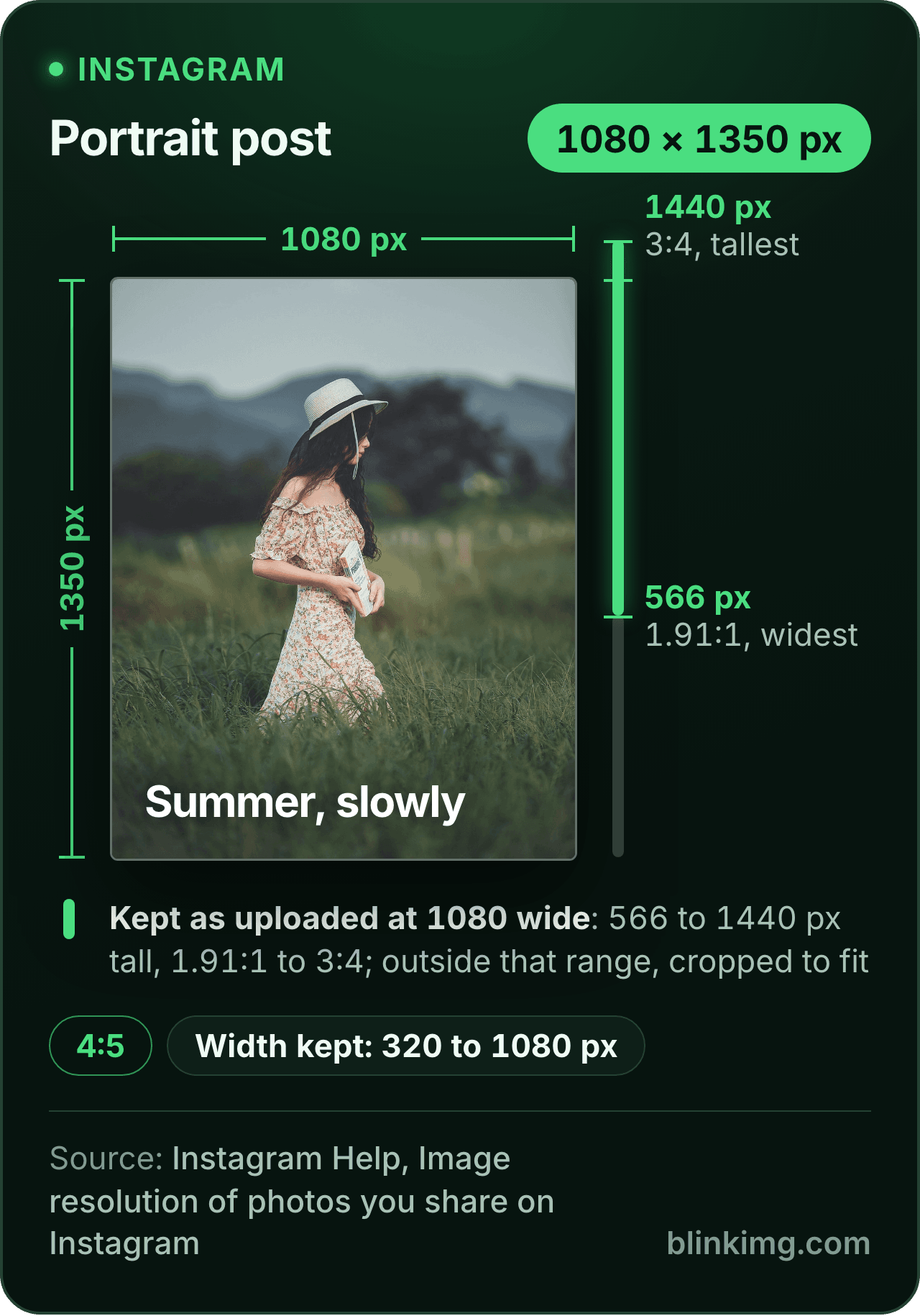
<a href="https://blinkimg.com/resize-image-for-instagram"><img src="https://blinkimg.com/images/size-guides/resize-image-for-instagram.png" alt="An Instagram portrait post drawn at 1080 × 1350 pixels, 4:5, beside a ruler of the heights Instagram keeps at 1080 wide: 566 to 1440 pixels, from 1.91:1 to 3:4. A photo outside that range is cropped to fit, and widths from 320 to 1080 pixels are kept." width="640" height="915" style="max-width:100%;height:auto"></a>
The size, exactly
1080 × 1350 px, in every unit a form states it in
Millimetres and inches at 300 DPI, the print resolution the portals assume.
What Save exports
1080 px
1350 px
1080 × 1350 px
Pixels
1080 × 1350 px
Millimetres
91.4 × 114.3 mm
Inches
3.6 × 4.5 in
Ratio
4:5
Fit
whole picture, white bands
Metadata
EXIF and GPS stripped
The rules, with their sources
Width kept as uploaded
320 to 1,080 px; wider is sized down to 1,080, narrower is enlarged to 320
Instagram Help, Image resolution of photos you share on Instagram
Ratio kept as uploaded
1.91:1 to 3:4, a height of 566 to 1,440 px at 1,080 wide
Instagram Help, Image resolution of photos you share on Instagram
Outside the range
Cropped to fit a supported ratio
Instagram Help, Image resolution of photos you share on Instagram
3:4 posts
Shown as shot, since May 2025
Adam Mosseri on Threads, 28 May 2025
3:4 in carousels
Supported, according to Instagram's broadcast channel
The Verge, 29 May 2025
Profile picture
Instagram states no size; the guides' 320 × 320 is Facebook's Page figure
Each rule as it read on its source when we checked it in September 2026. The source’s own page wins over this card.
Source: photo.jpg, 576.8 KB at 1920×1280, through the preset this page opens on (the whole picture inside the size on the fill), then the engine at its defaults. The row is the real output.
Every byte count is the size of the actual file our engine produced from the named source, the same bytes you would download, not an estimate. The reference photo is one of our own photographs, an iguana on a branch, and the camera photo is a real one too. Drop your own file into the tool above to rerun any of them. How we measure names the sources and the settings.
The sizes
What is the Instagram photo size in 2026?
1,080 pixels wide, at any ratio from 1.91:1 to 3:4.
That is the whole rule, and it comes from Instagram’s help page on the resolution of photos you share. A photo between 320 and 1,080 pixels wide keeps its resolution as long as its ratio sits in that range, which the page states as a height of 566 to 1,440 pixels at 1,080 wide. Four sizes fall out of it. Each is one tile or one typed size in the editor.
1
Portrait 4:5, 1080 × 1350
The size the page opens on, with Fit on. For years the tallest post allowed, and still the one most templates and guides assume. The IG portrait tile in the Social group.
2
Portrait 3:4, 1080 × 1440
The tallest post since May 2025, when Instagram’s head announced on Threads that 3:4 uploads appear exactly as shot. Unlink the sides, type 1080 and 1440 in the Custom size box and tap Apply; the Fit switch stays on.
3
Square 1:1, 1080 × 1080
The IG/FB post tile. Inside the range, so a square upload is kept as it is. Fit puts a rectangle whole inside the square; Crop cuts the largest square out of it.
4
Landscape 1.91:1, 1080 × 566
The widest the range allows. Unlink the sides and type 1080 and 566 in the Custom size box. A 16:9 photo is already inside the range at 1080 × 608 and needs no change at all.
Answered
Why does Instagram crop my photos?
Because the photo’s shape is outside the range.
Instagram’s help page says a photo whose ratio is not supported is cropped to fit a supported one, and the supported ones run from 1.91:1 to 3:4.
Which long photos for Instagram get cut?
The ones taller than 3:4 or wider than 1.91:1: a 2:3 portrait from a camera, a 9:16 shot framed like a story, a panorama. Fit a tall one into 1080 × 1440, the tallest post the range allows, and a 9:16 screenshot gets bands of about 135 pixels at each side instead of a cut.
The Instagram pixel size that keeps a photo sharp
Exactly 1,080 pixels wide. The same page explains the softness people notice: a photo wider than 1,080 pixels is sized down to 1,080, and one narrower than 320 is enlarged to 320. A phone or camera photo is far wider than that (our camera reference is 4964 pixels across), so the app resamples every one of them. Upload at 1,080 wide, at a ratio inside the range, and the help page says the photo keeps its resolution. One route differs: Meta’s publishing API, which schedulers post through, takes widths up to 1,440. A 1,080-wide file is inside both limits.
Answered
Fit or Crop: how do I resize an image for Instagram without cropping?
Leave Fit on, which is how the page opens.
The Size presets panel shows a Crop / Fit switch under the tiles whenever an exact size is pressed. Fit scales the whole picture to sit inside 1080 × 1350 and paints the rest a flat colour, white to start, with black, grey, green and a colour well beside it. Crop draws a 4:5 frame over the photo instead and you drag it to the part you want. The bands Fit paints depend on the shape you start from. A 16:9 landscape gets about 371 pixels above and below. A 3:4 phone photo gets slivers of about 34 pixels at each side, or none at all if you type 1080 × 1440. A 2:3 camera portrait gets 90 pixels at each side at 4:5 and 60 at 3:4. A 9:16 screenshot gets 160 at each side. Those numbers are the editor’s own arithmetic, and the stage shows the bands before you save.
Answered
Is 4:5 or 3:4 better for an Instagram post?
3:4 for a phone photo, 4:5 for anything built to the older rule.
On 28 May 2025 Instagram’s head, Adam Mosseri, posted on Threads that Instagram supports 3:4 photos, the format almost every phone camera defaults to, and that a 3:4 upload appears exactly as you shot it. Instagram’s broadcast channel added that carousels take 3:4 too, The Verge reported the next day. So a phone photo at 1080 × 1440 needs no bands and no cut. 4:5 is still inside the range and still what most templates, schedulers and older guides assume, so a carousel designed at 4:5 should stay at 4:5.
Carousels: one Instagram ratio and size for every slide
The one rule for a carousel is one size for every slide: give each photo the same size before you upload, with Fit on for the ones that would otherwise be cut, so no slide loses its edges to match another.
Answered
Does the editor make stories and profile pictures too?
Yes: the story tile exports a 9:16 frame, and the 1:1 tile makes the square for the circle.
Instagram’s photo help page covers feed posts and states neither size. Our Instagram story size guide sets out what Meta does state, page by page, with the safe zones and the circle.
Stories: 1080 × 1920 from the story tile
The IG/FB story tile exports 1080 × 1920, the shape of a phone screen; keep faces and text away from the top and bottom edges, where the app lays its own controls over the picture.
Profile picture: a square the app shows as a circle
Press the 1:1 tile, keep the face in the middle with room around it, and upload the square: the app draws the circle itself. Instagram states no size; 320 × 320 is Facebook’s Page figure, and 1080 leaves headroom.
Answered
How big is the file, and will Instagram shrink it again?
Our 1920 × 1280 reference photo came back at 141.3 KB at 1080 × 1350 with Fit on and the white bands in, saved once through the engine at its defaults.
That is the row in the measured table above. A phone photo lands in the same region, because the export is 1,080 wide whatever the source was, and 1,080 wide is exactly what the help page says the app keeps. Set Max file size in Advanced settings before you save if you want a byte cap as well, and the export lands at or under it. A JPG photo comes back a JPG, with the profile converted to sRGB and stripped. Pick PNG in the format picker by the drop zone if the destination needs one.
Be sure first
When is the Instagram photo resizer the wrong tool?
The photo is already 4:5, 3:4, square or 16:9 at 1,080 wide?
It is inside the range. Post it as it is; there is nothing to fit or crop.
You want the cut, not the bands?
Switch to Crop and drag the frame. Fit keeps everything; Crop keeps the part you choose.
A Reel or a video?
This editor takes still images only. The 9:16 frame is the same, the tool is not.
Bands that continue the picture?
We paint a flat colour. A blurred or extended edge is invented pixels, and we do not invent any.
The size is already pressed above. One drop settles most of these.
Q:What are the Instagram post size dimensions in 2026?
1,080 pixels wide, at a ratio between 1.91:1 and 3:4. Instagram's help page says a photo between 320 and 1,080 pixels wide keeps its resolution inside that range, which at 1,080 wide means a height from 566 to 1,440. So the four sizes are 1080 × 1080 square, 1080 × 1350 portrait, 1080 × 1440 for 3:4 and 1080 × 566 for landscape.
Q:How do I post a full photo on Instagram without cropping?
Fit it into one of the allowed sizes instead of cropping it. Drop the photo into the Instagram resizer: the editor opens on 1080 × 1350 with Fit on, so the whole picture sits inside the frame and the rest is a fill colour. Save, then upload the export. Instagram sees a 4:5 image and has nothing to cut.
Q:Why does Instagram crop my photos?
Because the photo's shape falls outside the range the app accepts. Instagram's help page says a photo with a ratio outside 1.91:1 to 3:4 is cropped to fit a supported ratio. A 2:3 camera portrait, a 9:16 phone screenshot and a panorama all fall outside it. Fit the photo into 4:5 or 3:4 first and nothing is cropped.
Q:What aspect ratio does Instagram allow for a post?
From 1.91:1 landscape to 3:4 portrait, according to Instagram's help page, with square 1:1 and portrait 4:5 in between. The page states the range as a height between 566 and 1,440 pixels at 1,080 wide. 3:4 joined the range in May 2025; most size guides still stop at 4:5.
Q:Which Instagram portrait size is better, 4:5 or 3:4?
3:4 when the photo came from a phone, because that is the ratio most phone cameras shoot, and Instagram's May 2025 announcement said a 3:4 upload now appears exactly as shot. 4:5 when a template or a carousel already uses it. Both sit inside the allowed range; 3:4 is a little taller and needs no bands on a phone photo.
Q:Can I make an Instagram story with this editor?
Yes, for a still image. Tap the IG/FB story tile: it exports 1080 × 1920, the 9:16 frame Meta recommends for stories. Instagram's own help pages state no story size; our story size guide sets out what Meta does state, including the safe zones at the top and bottom of the frame.
Q:Are the Instagram feed and Reel sizes the same?
No. A feed post follows Instagram's photo help page: 1,080 pixels wide, at a ratio from 1.91:1 to 3:4. Its Reels help page allows 1.91:1 to 9:16, at least 720 pixels, so a full-screen Reel is 9:16, the shape of a story. This editor takes still images only; for a still in that shape, tap the IG/FB story tile, which exports 1080 × 1920.
Q:What size photos work for an Instagram carousel?
One size for every slide, chosen from the same range as a single post: 1080 × 1080, 1080 × 1350 or 1080 × 1440. Give each photo the same size before you upload, with Fit for the ones that would otherwise be cut. A set of mixed shapes is the usual reason a carousel loses the edges of some slides.
Q:Why does Instagram lower the quality of my photos?
Because it resamples anything that does not already match its rules. Instagram's help page says a photo wider than 1,080 pixels is sized down to 1,080, one narrower than 320 is enlarged, and one outside the ratio range is cropped. Upload at 1,080 wide, inside the range, and the help page says the photo keeps its resolution. Meta's publishing API, which schedulers use, takes up to 1,440 wide.
Q:Can I post a landscape photo on Instagram without cropping?
Yes. A 16:9 landscape is inside Instagram's range, so the app keeps it as it is at 1080 × 608. To show it as a portrait post, keep the 1080 × 1350 preset with Fit on: the photo sits in the middle with a fill band of about 371 pixels above and below. Switch to Crop to cut a 4:5 piece instead.
Q:Can I make an Instagram profile picture here?
Yes. Press the 1:1 tile, keep the face in the middle with room around it, and save the square; the app draws the circle itself. Instagram states no profile picture size. A square of 320 pixels or more works, and typing 1080 into the Custom size box leaves headroom.
Q:How do I resize an image to the Instagram square size, 1080 × 1080?
Tap the IG/FB post tile in the Size presets panel: it sets a 1080 × 1080 export. With Fit on, the whole photo sits inside the square on a fill. With Crop on, the frame is the largest square in the photo and you drag it over the subject. Either way the saved file is exactly 1080 × 1080.
Q:Can I change the colour of the bands?
Yes. With Fit on, the Size presets panel shows a row of fill swatches: white, black, grey and green, plus a colour well that opens the system picker for any other colour, a hex value included. The bands are a flat colour painted under the picture, not a blur and not invented pixels.
Q:Can I resize several photos for Instagram at once?
One at a time in the editor, because the fit or the crop should be looked at before it is saved. Each photo opens with 1080 × 1350 pressed and Fit on, so a set is drop, check, Save, next, and every save lands in the same download list. The compressor beside the editor takes up to 50 finished files in one run.
Q:Which photo resizer for Instagram should I use?
Any resizer that exports exactly 1,080 pixels wide, at a ratio Instagram keeps, will do; the numbers matter more than the tool. Instagram's help page says it keeps a photo from 1.91:1 to 3:4 at that width and resamples the rest. This one opens on 1080 × 1350 with Fit on, so the whole photo sits on a fill, and saves the export once.
Q:Do you keep my Instagram photos?
No. We keep nothing: files are processed and wiped automatically, never archived and never used for anything else. Saving strips EXIF metadata, GPS location included, so the export you post carries no record of where it was taken. There is no account, no watermark and no charge for the resize.