What size is a YouTube thumbnail, and the banner (2026)
A YouTube thumbnail should be 3840 × 2160 pixels at 16:9 and at least 640 pixels wide, YouTube’s help page says. The channel banner is 2560 × 1440, with text and logos kept inside a small safe area. We read YouTube’s pages on 4 October 2026, then measured the files. Part of the social media image resizer.
By Sahadat Husain10 min readSizes

What is the YouTube thumbnail size in 2026?
The YouTube thumbnail size is 3840 × 2160 pixels for a video, the resolution YouTube’s help page on custom thumbnails recommends. The same image becomes the preview in the embedded player, so YouTube wants it “as large as possible”. Shorts and podcast playlists take other shapes:
| Thumbnail | Size YouTube recommends | Shape | Minimum |
|---|---|---|---|
| Video | 3840 × 2160 | 16:9 | 640 pixels wide |
| Short | 2160 × 3840 | 9:16 | 640 pixels tall |
| Podcast playlist | Not stated | 1:1 | Not stated |
The number 1280 appears nowhere on that page. Three of the five top guides we read still print 1280 × 720 as the size. It still meets YouTube’s rules: it is 16:9 and twice the minimum width. So make the thumbnail 3840 × 2160 when your picture has the pixels, and 1280 × 720 when it does not.
- What YouTube recommends3840 × 2160
- The guides’ size1280 × 720
- The minimum640 × 360
What is a YouTube thumbnail?
A YouTube thumbnail is the still picture that stands for a video before anyone presses play. YouTube offers auto-generated suggestions, and you can upload your own, a custom thumbnail, if your account is verified. That rule covers video and Shorts thumbnails alike. A Short’s custom thumbnail can be added only in YouTube Studio on a computer.
Every custom thumbnail must follow YouTube’s Community Guidelines. YouTube may reject one that shows nudity, hate speech, violence or harmful content. It may also add a strike to the account.
How to make thumbnails for YouTube at the right size
To make a YouTube thumbnail at the right size, crop a picture to 16:9 and size it. Then save it as a JPG and upload it in YouTube Studio. The picture can be a photo, a frame from the video or a design.
Start from a picture at least 1280 × 720
A larger source keeps more detail. Our 9.8 MB camera photo is 4964 × 2782, wide enough for 3840 × 2160.
Crop it to 16:9
Frame the subject first, then leave a band for a few large words.
Save it as a JPG under 2 MB
A photo saves far smaller as a JPG than as a PNG. If the file is still over the phone limit, compress the image to 2 MB before you upload it.
Upload it in YouTube Studio
Choose Content in the left menu and open the video. Below Thumbnail, click Upload file, then click Save.
YouTube serves your thumbnail at up to five sizes
YouTube serves a video’s thumbnail at up to five sizes, from 120 × 90 to 1280 × 720. They are listed in the YouTube Data API reference, which apps and sites use to show YouTube videos. The two largest exist for some videos only, the reference says.
| API name | Pixels | Shape | Our JPG | Headline type |
|---|---|---|---|---|
| default | 120 × 90 | 4:3 | 2.7 KB | 11.3 px |
| medium | 320 × 180 | 16:9 | 9.6 KB | 30 px |
| high | 480 × 360 | 4:3 | 18.6 KB | 45 px |
| standard | 640 × 480 | 4:3 | 27.8 KB | 60 px |
| maxres | 1280 × 720 | 16:9 | 71.4 KB | 120 px |
We tested what each size leaves of a headline. We set three words, “Lake at Sunset”, on a 1280 × 720 thumbnail of our camera photo. The type is 120-pixel Inter, white on a dark band. The engine saved it at each size as a JPG at Auto. Three sizes are 4:3, so there the 16:9 picture sits between black bands. The bands are ours: the API names no fill.
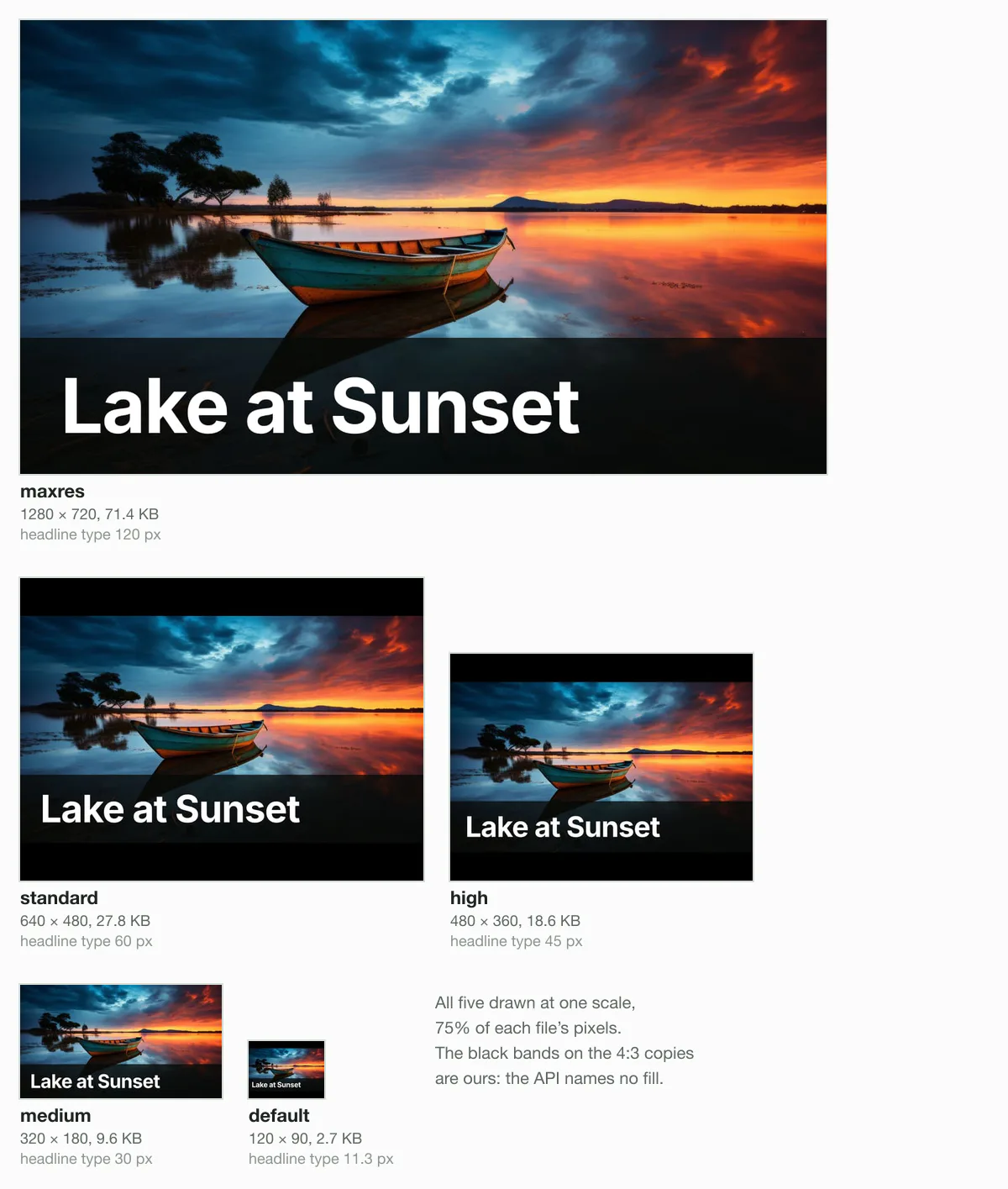
On the sheet, the headline reads clearly down to 320 × 180. Its tallest letters stand 22 pixels high in that file. It stops reading at 120 × 90. There the whole headline is 76 pixels wide, and its tallest letters are 9 pixels high. Type set at 40 pixels on the full thumbnail would end up under 4 pixels.
The channel banner: 2560 × 1440 with a small safe area
The YouTube channel banner should be 2560 × 1440 pixels, “especially for TV”, YouTube says on its channel branding help page. The minimum is 2048 × 1152 at 16:9, and the file may be up to 6 MB. The YouTube banner size page crops a picture to 2560 × 1440.
Only the safe area is sure to show on every device. YouTube says the banner “will get cropped on certain views and devices”. At the minimum size, its safe area for text and logos is 1235 × 338 pixels. That is under a fifth of the banner.
- At 2048 × 1152YouTube: 1235 × 338 for text and logos
- At 2560 × 1440Scaled by us: about 1544 × 423
- Safe area for text and logos
- May be cropped on some views and devices
Searches often pair 1024 × 576 with the YouTube banner. That size is half the minimum in each direction, so YouTube’s page rules it out. Blinkimg’s engine at Auto saved our 2560 × 1440 banner of our camera photo as a 226.5 KB JPG. That is under 4% of the limit.
Will your thumbnail fit under 2 MB?
A JPG thumbnail fits under 2 MB with room to spare, at every size we measured. YouTube’s limit depends on where you upload from. From a phone it is 2 MB, or 10 MB for a podcast thumbnail. From a computer it is 50 MB.
YouTube recommends an image format “such as JPG or PNG”. One guide we read, Levitate Media, adds GIF, which the page does not name.
1280 × 720, JPG74.5 KB of 2 MB
4% of the cap1280 × 720, PNG289.0 KB of 2 MB
14% of the cap3840 × 2160, JPG423.5 KB of 2 MB
21% of the cap3840 × 2160, PNG2,217.5 KB of 2 MB
111% of the cap: over
Save a photo thumbnail as a JPG. At 1280 × 720, Blinkimg’s engine at Auto made a 74.5 KB JPG of our camera photo. The PNG of the same pixels came to 289.0 KB, about 4 times larger. At 3840 × 2160, the PNG reached 2,217.5 KB and broke the phone limit.
Read the full guide: Social media image sizes cheat sheet: ratios, safe zones and limits.
Questions
- What size thumbnail for YouTube should I use?
- Use 3840 × 2160 pixels if your picture has that many, because that is the size YouTube's help page recommends. Otherwise use 1280 × 720, which is 16:9 and above the 640-pixel minimum width. Keep the 16:9 shape either way. For a phone upload, save a photo as a JPG under 2 MB.
- How big is a YouTube thumbnail?
- A YouTube thumbnail is 3840 × 2160 pixels at the size YouTube recommends, and at least 640 pixels wide. The file can be up to 2 MB from a phone or 50 MB from a computer. Blinkimg's engine at Auto saved our 9.8 MB camera photo as a 74.5 KB JPG at 1280 × 720.
- What are the right YouTube thumbnail dimensions?
- The right dimensions are 16:9, ideally 3840 × 2160 pixels, the size YouTube recommends. Smaller 16:9 sizes pass down to 640 × 360, at the 640-pixel minimum width. Both 1920 × 1080 and 1280 × 720 qualify. Pick the largest size your picture can fill without being enlarged, so the thumbnail stays sharp.
- What are the dimensions of a YouTube thumbnail for videos, Shorts and podcasts?
- YouTube's help page recommends 3840 × 2160 pixels at 16:9 for a video thumbnail, at least 640 pixels wide. A Shorts thumbnail is the same turned upright: 2160 × 3840 at 9:16, at least 640 pixels tall. A podcast playlist takes a 1:1 square, and the page gives no pixel size for it.
- Is 1280 × 720 still a good YouTube thumbnail size?
- A 1280 × 720 thumbnail still meets every rule YouTube sets for thumbnails. It is 16:9 and twice the 640-pixel minimum width. YouTube's custom thumbnail help now recommends 3840 × 2160 and no longer names 1280 × 720. The YouTube Data API still lists 1280 × 720 as the largest copy of a thumbnail it serves.
- Can a YouTube thumbnail be 1920 × 1080?
- A 1920 × 1080 thumbnail meets YouTube's rules, because it is 16:9 and far above the 640-pixel minimum width. It sits between 1280 × 720 and the 3840 × 2160 that YouTube recommends. Blinkimg's engine at Auto saved our 9.8 MB camera photo at 1920 × 1080 as a 142.2 KB JPG.
- Is JPG or PNG better for a YouTube thumbnail?
- JPG is better for a photo thumbnail. At 1280 × 720, Blinkimg's engine at Auto made a 74.5 KB JPG of our 9.8 MB camera photo. The PNG came to 289.0 KB. At 3840 × 2160 the PNG reached 2,217.5 KB, over YouTube's 2 MB phone limit. YouTube accepts both formats for a thumbnail.
- Why can’t I add a custom thumbnail on YouTube?
- YouTube lets you upload your own thumbnail if your account is verified, so verify it first. A Short's custom thumbnail can be added only in YouTube Studio on a computer. Then check the file. YouTube recommends an image format such as JPG or PNG, at least 640 pixels wide. From a phone, keep it under 2 MB.
- What happens if my thumbnail is not 16:9?
- YouTube recommends 16:9 for a video thumbnail and does not say what it does with other shapes. So crop to 16:9 before you upload. YouTube states one case. On the home, explore and subscription pages, YouTube replaces a vertical video's 16:9 custom thumbnail with a 4:5 one. YouTube generates that one itself.
- How big should the text be on a YouTube thumbnail?
- Make the text large, because YouTube's API serves thumbnails as small as 120 × 90 pixels. We set three words in 120-pixel type on a 1280 × 720 thumbnail. At 320 × 180 the type was 30 pixels and easy to read. At 120 × 90 it shrank to 11.3 pixels.
- What size is a YouTube podcast thumbnail?
- A podcast playlist thumbnail is a 1:1 square, YouTube says, rather than the 16:9 of a video thumbnail. YouTube gives no pixel size for it. Its file limit is 10 MB from a phone and 50 MB from a computer. A video thumbnail uploaded from a phone gets only 2 MB.
- How do I change my YouTube banner?
- Open YouTube Studio on a computer and choose Customization in the left menu, then Profile. Click Change and select an image. To adjust it, select a preview and change the crop, then click Done and Publish. YouTube recommends 2560 × 1440 pixels and allows up to 6 MB, so size the file first.