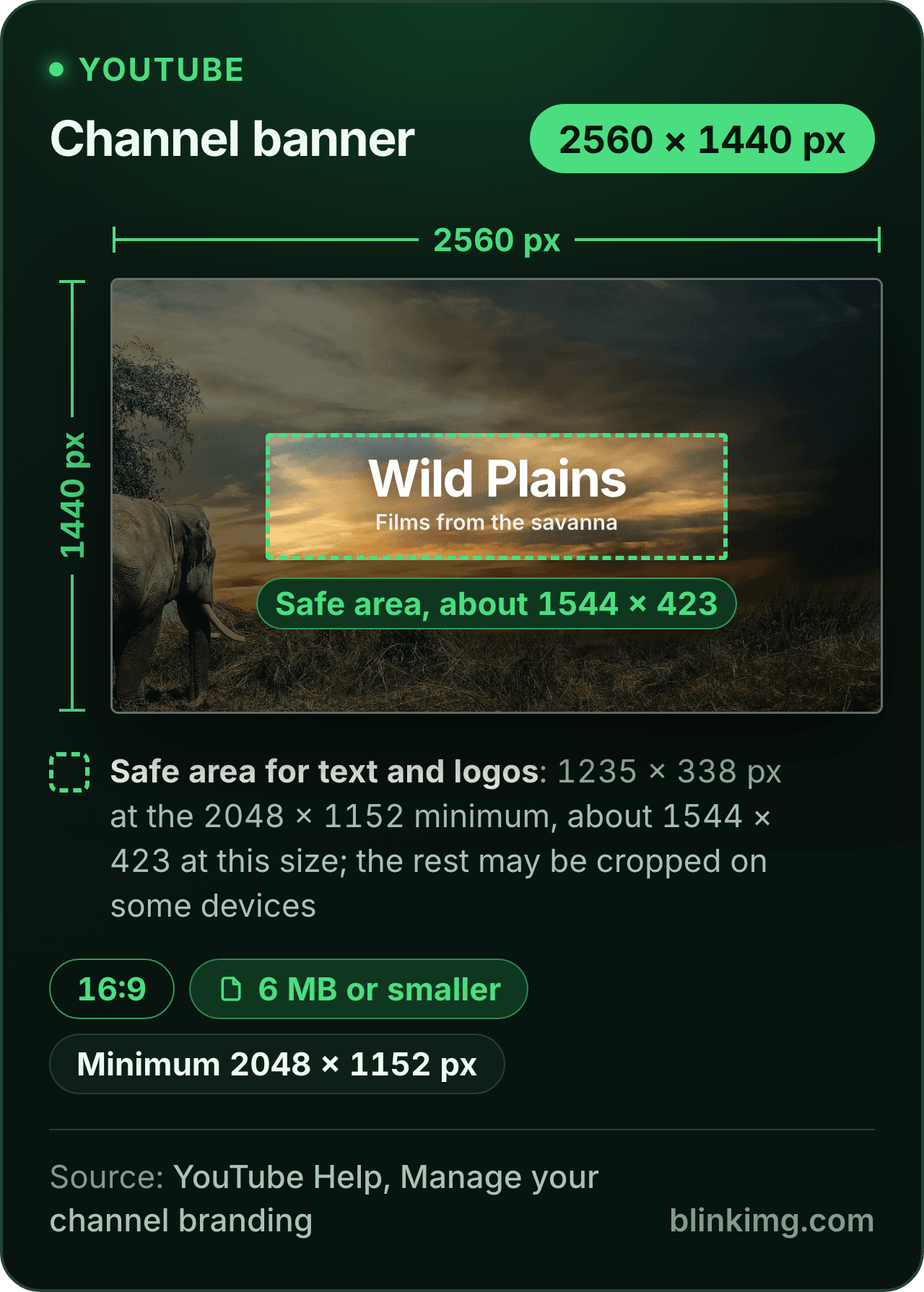
The editor opens on 2560 × 1440, the YouTube banner size its help page recommends for channel art, cropped to 16:9. Keep text and logos inside the safe area, and the file lands under YouTube's 6 MB. Part of the social media image resizer.
YouTube banner size in 2026
Recommended
2560 × 1440 px, especially for TVYouTube Help
Minimum upload
2048 × 1152 px at 16:9YouTube Help
Safe area for text and logos
1235 × 338 px at the minimum, about 1544 × 423 at 2560 wideYouTube Help, scaled here
File size
6 MB or smallerYouTube Help
Output format
– / –
Drop images or browse
JPEG · PNG · WEBP · AVIF · HEIC · up to 50 at once · max 30 MB each
HEIC
PNG
JPEG
AVIF
WEBP
Advanced settings1 on
SmallerAutoBetter
Auto tunes each image.
A hard cap for the number your form demands.
KB
A floor for forms that refuse small files.
Max resolution
×
Empty side keeps the ratio. Never enlarges.
Presets
Every named size, one editor
The same editor, the size already pressed. Pick the document or the platform.
Paste this line into your page’s HTML. The picture links back here, the credit our CC BY 4.0 licence asks for.
<a href="https://blinkimg.com/resize-image-for-youtube-banner"><img src="https://blinkimg.com/images/size-guides/resize-image-for-youtube-banner.png" alt="A YouTube channel banner drawn at 2560 × 1440 pixels, 16:9, with the safe area for text and logos outlined in its middle: 1235 × 338 at YouTube's 2048 × 1152 minimum, about 1544 × 423 at this size, with the channel name inside it. Chips give the 6 MB file limit and the 2048 × 1152 minimum." width="640" height="895" style="max-width:100%;height:auto"></a>
The size, exactly
2560 × 1440 px, in every unit a form states it in
Millimetres and inches at 300 DPI, the print resolution the portals assume.
What Save exports
2560 px
1440 px
2560 × 1440 px
Pixels
2560 × 1440 px
Millimetres
216.7 × 121.9 mm
Inches
8.53 × 4.8 in
Ratio
16:9
Fit
cropped to the shape
Metadata
EXIF and GPS stripped
The rules, with their sources
Recommended
2560 × 1440 px, especially for TV
YouTube Help, Manage your channel branding
Minimum upload
2048 × 1152 px at 16:9
YouTube Help, Manage your channel branding
Safe area for text and logos
1235 × 338 px at the minimum size; about 1544 × 423 at 2560 wide
YouTube Help, Manage your channel branding; scaled here
File size
6 MB or smaller
YouTube Help, Manage your channel branding
Profile picture
JPG, GIF, BMP or PNG, no animated GIF; renders at 98 × 98 px
YouTube Help, Manage your channel branding
Each rule as it read on its source when we checked it in September 2026. The source’s own page wins over this card.
Source: photo.jpg, 576.8 KB at 1920×1280, through the preset this page opens on (the centre cropped to the ratio and scaled to the size), then the engine at its defaults. The row is the real output.
Every byte count is the size of the actual file our engine produced from the named source, the same bytes you would download, not an estimate. The reference photo is one of our own photographs, an iguana on a branch, and the camera photo is a real one too. Drop your own file into the tool above to rerun any of them. How we measure names the sources and the settings.
The sizes
What is the YouTube banner size?
2560 × 1440 pixels.
YouTube’s help page on managing your channel branding gives four numbers for the banner image, and the tips page beside it says the same: at least 2560 × 1440 for the best display on all devices. Channel art and banner are one image; the help page calls it the banner. The ranking tools print these numbers without the page; here they are with it.
1
Recommended: 2560 × 1440
“Recommended dimension (especially for TV)” on the branding page. The size this page opens on and the YouTube banner tile in the Banners group.
2
Minimum: 2048 × 1152
“Minimum dimension for upload”, at 16:9. Art narrower than this is enlarged by the preset, so it is the floor for your source as well as for the upload.
3
Safe area: 1235 × 338
Stated at the minimum size. At 2560 wide the same box is about 1544 × 423: the middle 60 percent of the width and 29 percent of the height.
4
File: 6 MB or smaller
The one byte rule. A 2560 × 1440 export from here is far under it; Max file size makes it a guarantee.
Answered
What is the YouTube banner safe area, and where does 1546 × 423 come from?
Google states the safe area once, at the minimum size: 1235 × 338 pixels inside a 2048 × 1152 banner.
That is the box for text and logos. The number most guides print, 1546 × 423, is not on Google’s page; it is the same box scaled to 2560 wide and rounded. The arithmetic is 1235 × 2560 / 2048 and 338 × 2560 / 2048, which give about 1544 × 423. Either figure is right for its size; what matters is the proportion, the middle 60 percent of the width and 29 percent of the height, centred. When you place the frame in the editor, put the channel name, the logo and the schedule inside that middle strip. Treat the rest of the 2560 × 1440 as background: a texture, a colour, a scene that survives being cut.
Answered
Why does my YouTube banner get cropped on mobile?
Because one image serves every screen size YouTube has.
Google’s page recommends 2560 × 1440 for TV and defines a safe area for text and logos; the guides describe the rest, a wide strip across the top of a desktop page and a shorter strip on a phone. The safe area is the part every device shows, and a phone shows little beyond it. So a banner designed edge to edge loses its edges on a phone and its top and bottom on a computer, and only the middle strip is safe everywhere.
One YT banner size for every screen
There is no separate mobile banner to make: one 2560 × 1440 file serves the TV, the computer and the phone. The fix is in the design, not the upload: keep the words in the middle and let the edges be decoration you can lose.
Answered
YouTube banner dimensions: 2560 × 1440, and where 1024 × 576 comes from
The YouTube banner dimensions are 2560 × 1440 for the file you upload, the canvas YouTube slices for every screen.
1024 × 576 is the other number people are given, from older guides. It is below the 2048 × 1152 minimum that YouTube’s branding page sets for an upload. Upload at 2560 × 1440 and every device gets a sharp banner. Text and logos belong in the safe area in the middle: 1235 × 338 at the minimum size, about 1544 × 423 at 2560 wide. The editor above opens on the full canvas with that safe area marked.
Answered
Crop or Fit for a banner: how do I resize without stretching?
Crop, which is how the page opens: the YouTube banner tile draws a 16:9 frame over the picture and you drag it to the strip you want.
Nothing is stretched; the pixels inside the frame keep their shape. The Crop / Fit switch under the tiles offers the other route. Fit puts the whole picture inside 2560 × 1440 on a fill colour: a 3:2 photo gets bands of 200 pixels at each side, a 4:3 photo 320. On a banner those bands land in the visible strip on every device, so Fit suits flat art on a background that matches the fill, a logo on white or on black, and rarely suits a photo. One warning the ranking tools skip: an exact-size preset exports 2560 × 1440 whatever the source, so art narrower than 2048 is enlarged and looks soft. Our 1920 × 1280 reference photo is enlarged 1.3 times in the measured row above, and a phone screenshot is enlarged the same way. Make the art at size.
Answered
How do I keep the banner under 6 MB?
Save it here and it is.
YouTube’s help page caps the banner file at 6 MB or smaller, and our 1920 × 1280 reference photo came back at 385.8 KB at 2560 × 1440, saved once through the engine at its defaults. For a guarantee rather than a likelihood, open Advanced settings and set Max file size to 6 MB, or tap the 1 MB chip, before you save: the export lands at or under the number, never over. A JPG photo comes back a JPG. Pick PNG in the format picker above the drop zone for flat art with text, or WebP for a photo: on our camera photo, WebP came out smaller than JPEG at each format’s default. The profile picture has its own rule on the same page: JPG, GIF, BMP or PNG, no animated GIFs.
Answered
Does this work for the channel logo too?
Yes, as a square.
YouTube’s channel branding page says the profile picture renders at 98 × 98 pixels and takes a JPG, GIF, BMP or PNG file with no animated GIFs. Press the 1:1 tile, then type 1024 into the Custom size box for a 1024 × 1024 square, and keep the subject in the middle with room around it, because the picture is drawn as a circle and the corners go. Save and upload the full square; YouTube masks it. The same page sets the video watermark at a square of at least 150 × 150 pixels under 1 MB, which the Custom size box and Max file size cover in one save.
Be sure first
When is the YouTube banner resizer the wrong tool?
The art is narrower than 2048 pixels?
The preset enlarges it and it looks soft on TV. Remake the art at 2560 × 1440 and drop that.
A video thumbnail?
A different size and a different page: 1280 × 720 or 3840 × 2160 at 16:9.
Text or a logo to add?
The Objects tab adds text, a badge or your logo; for a full layout, design it first inside the safe area and bring the finished art here to size and compress.
The size is already pressed above. One drop settles most of these.
Q:What size is the YouTube banner?
2560 × 1440 pixels, the size YouTube's channel branding help page recommends, especially for TV. The same page sets the minimum upload at 2048 × 1152 at 16:9, the safe area for text and logos at 1235 × 338 at that minimum, and the file at 6 MB or smaller. The banner and the channel art are the same image.
Q:How do I resize an image for a YouTube banner?
Drop the image into the banner resizer. The editor opens on 2560 × 1440 with a 16:9 frame drawn over the picture; drag the frame to the strip you want and tap Save. The export is exactly 2560 × 1440, optimised once. Keep text and logos in the middle, inside the safe area, before you upload it in YouTube Studio.
Q:How do I resize an image to a YouTube banner without stretching it?
Crop it to 16:9 instead of stretching it, which is what the preset does: the frame keeps the 16:9 shape, the pixels inside keep theirs, and the pixels outside are cut. A stretch squeezes the same pixels into a new shape and every face and circle shows it. The editor has no stretch, so nothing you save can lean.
Q:Will my image get stretched?
No. An exact-size preset crops to the shape first and then scales the crop, so the proportions hold. What can happen is enlargement: the export is always 2560 × 1440, so a source narrower than that is scaled up and looks soft. A phone screenshot is the usual case. Start from art at least 2048 pixels wide.
Q:Why does my YouTube banner get cropped on mobile?
Because one image serves every screen. YouTube's help page recommends 2560 × 1440 for TV and defines a safe area for text and logos, 1235 × 338 at the minimum size; a phone shows roughly that middle strip while a TV shows the whole image. Text outside the safe area shows on some screens and vanishes on others.
Q:What is the YouTube banner safe area?
1235 × 338 pixels at the 2048 × 1152 minimum, from YouTube's channel branding help page. Scaled to the recommended 2560 × 1440 the same box is about 1544 × 423, which the guides round to 1546 × 423. It is the middle 60 percent of the width and 29 percent of the height. Everything that must be read belongs inside it.
Q:Is there a file size limit for YouTube banner uploads?
Yes: 6 MB or smaller, according to YouTube's channel branding help page. A banner saved here is well under it; our reference photo came back at 385.8 KB at 2560 × 1440. If you want the number guaranteed, set Max file size in Advanced settings to 6 MB, or tap the 1 MB chip, before you save.
Q:What is the YouTube channel art size?
The same as the banner: 2560 × 1440 recommended, 2048 × 1152 minimum at 16:9, 6 MB or smaller, with a 1235 × 338 safe area at the minimum. Channel art is the older name; YouTube's help page calls the image the banner. One file, one upload in YouTube Studio, shown across TV, desktop and mobile.
Q:Does this work for the channel logo too?
Yes, as a square. YouTube's channel branding page says the profile picture is a JPG, GIF, BMP or PNG file, no animated GIFs, that renders at 98 × 98 pixels. Press the 1:1 tile, then type 1024 into the Custom size box and the square follows; keep the subject centred, and save. Upload the full square; YouTube draws the circle.
Q:Is 2048 × 1152 a banner size YouTube still accepts?
Yes. YouTube's channel branding page states 2048 × 1152 at 16:9 as the minimum dimension for upload and 2560 × 1440 as the recommended one. A 2048 × 1152 banner uploads and displays; it just has fewer pixels for a TV screen. Type 2048 × 1152 in the Custom size box if that is the size your art was made at.
Q:Can I resize a 1024 × 576 YouTube banner to 2560 × 1440?
Yes, and it comes out soft. The banner preset exports 2560 × 1440 whatever you drop, so a 1024 × 576 banner is enlarged 2.5 times to reach it. Both are 16:9, so nothing is cut or stretched; the same pixels are spread over a bigger frame. Remake the art at 2560 × 1440, or at least 2048 × 1152, when you can.
Q:What are the dimensions of a YouTube banner in inches?
None that matter. A banner is shown on screens, and a screen draws pixels, not inches. A 300 DPI conversion exists for anyone whose template asks, but no inch figure changes what YouTube receives. Work in pixels: 2560 wide, 1440 tall, the safe area in the middle.
Q:Do you keep my banner?
No. We keep nothing: files are processed and wiped automatically, never archived and never used for anything else. Saving strips EXIF metadata, GPS location included. The banner you download is yours, in your file's own format or the one you picked. It comes with no account, no watermark and no charge.