Why are my photos blurry when I upload them?
Two things blur an upload: too few pixels and extra lossy saves. We simulated Instagram’s stated resize with our engine and measured both. Part of the image resizer.
By Sahadat HusainUpdated 12 min readGuides

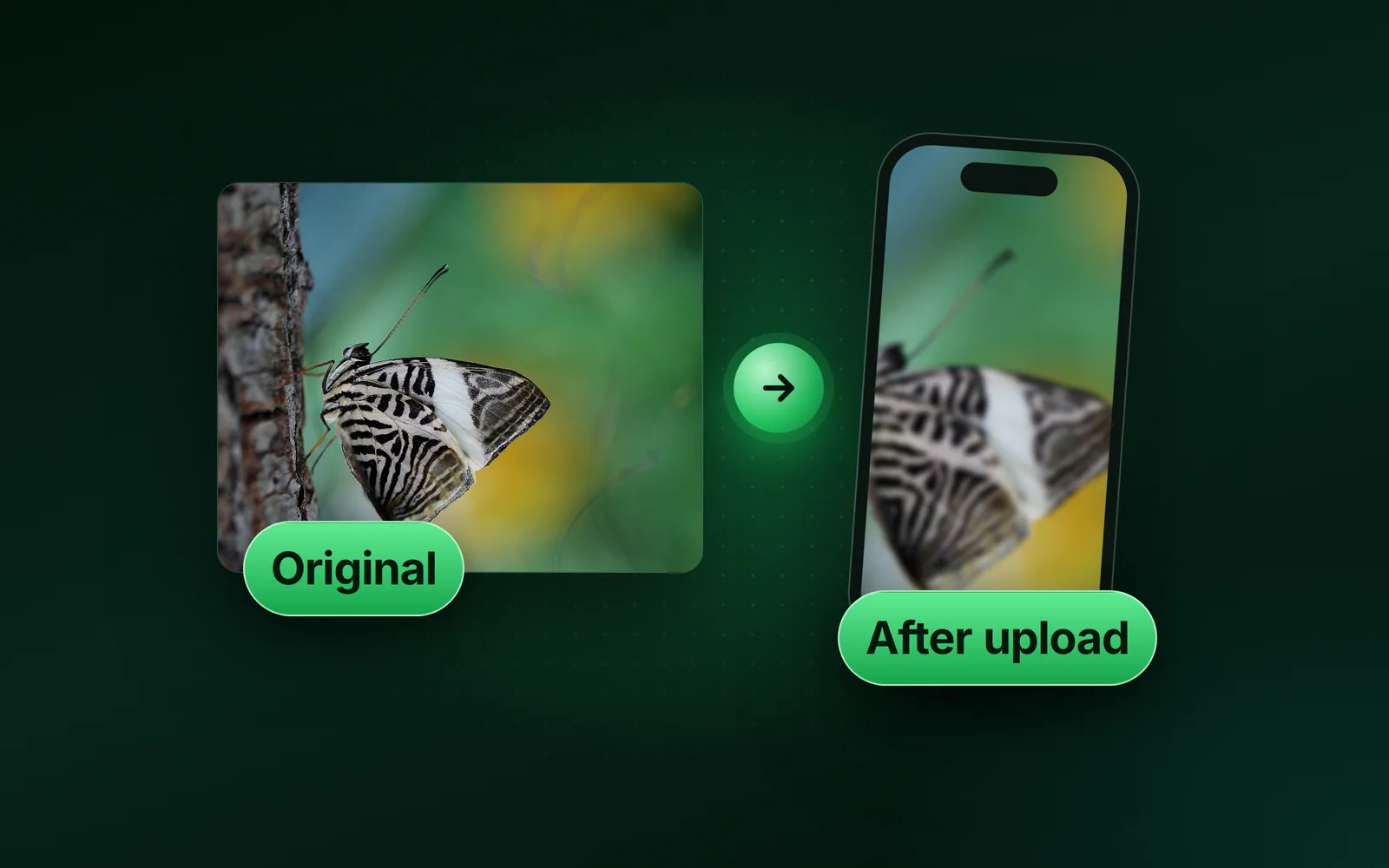
Photos look blurry after you upload them when they have too few pixels or get saved too often. Instagram states that it sizes wider photos down to 1080 pixels wide.
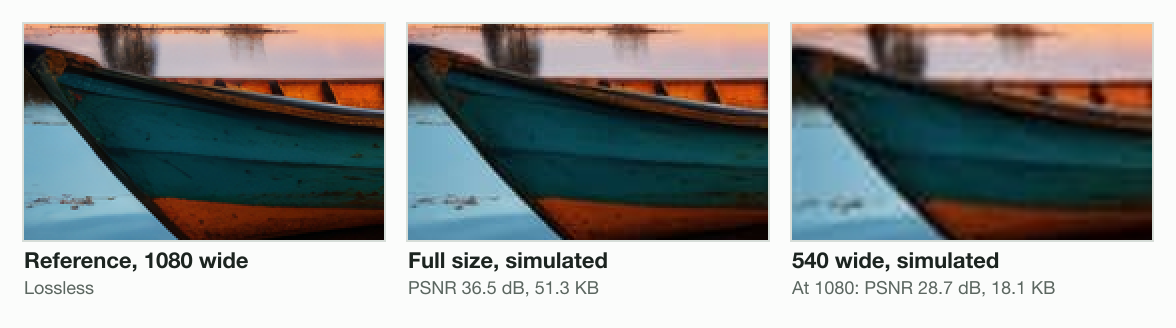
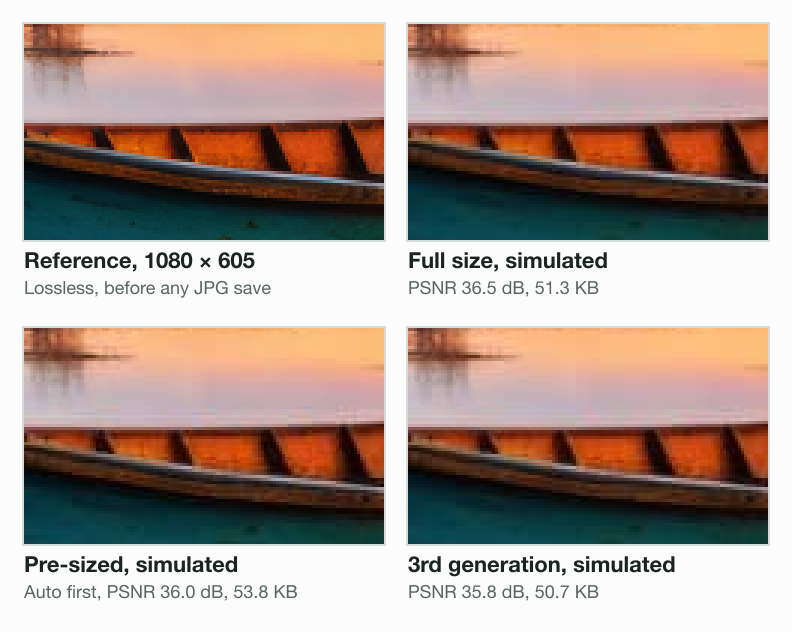
We simulated the upload step with Blinkimg’s engine, not any network’s encoder. Our 9.8 MB camera photo, uploaded full size, came out at 1080 × 605 and scored 36.5 dB. A 540 wide copy scored 28.7 dB once enlarged to 1080 for display.
Both scores are PSNR against a lossless 1080 copy of the photo. Higher means closer to it. PSNR counts pixel differences, not how sharp a photo looks. It favours the Lanczos kernel our reference and enlargement share.
You upload
Our 9.8 MB camera photo
4964 × 2782
Sized down to 1080 wide
Instagram’s stated rule
1080 × 605 here
Re-saved as a JPG
Simulated at quality 75
51.3 KB, by the engine
Shown on a screen
PSNR 36.5 dB
against a lossless 1080 copy
Why photos get blurry after upload: the causes at a glance
Photos get blurry after upload for 4 common reasons, and we simulated 3 of them. A blur that was in the photo before upload is the fourth.
| Cause | What happens | Our simulation | What to do |
|---|---|---|---|
| Too few pixels | The app keeps it small; a screen enlarges it | 540 wide: 28.7 dB | Upload at least 1080 wide |
| Colour halved twice (two 4:2:0 JPG saves) | Your JPG halves the colour; the step halves it again | Pre-sized at Auto: 36.0 dB | Upload the original, or a lossless PNG |
| Reposting a downloaded copy | Each upload is processed again | 3rd generation: 35.8 dB | Post from the original file |
| Full-size original (the control) | Resized and re-saved once | 36.5 dB | Nothing more to fix |
| Camera shake or missed focus | The blur is in the file already | not measured | Retake the photo |
What Instagram, Facebook and X say they do to your photo
Instagram states its resize rule in full, while Facebook and X state much less. We read each network’s own page on 5 October 2026.
Instagram’s help page says it uploads photos “up to a width of 1080 pixels”. A photo 320 to 1080 wide keeps its resolution if its shape is between 1.91:1 and 3:4.
If you share a photo at a lower resolution, we enlarge it to a width of 320 pixels. If you share a photo at a higher resolution, we size it down to a width of 1080 pixels.
- Instagram’s least320 wide
- Our small upload540 × 303
- Instagram’s most1080 × 605
X’s posting page says photos “can be up to 5MB”. It adds: “Your photo will be automatically scaled for display.” We read the Wayback Machine’s copy of 29 August 2026, because the live page blocked our browser.
Meta’s help pages that we read give no size for a Facebook feed photo. Its Page dimensions page covers the cover and the profile picture.
Instagram photos blurry? Too few pixels is the biggest cause in our simulation
Too few pixels blurred our photo far more than any simulated re-save did. The missing pixels cost the most.
We sized our photo to 540 × 303. The engine saved it as a JPG at Auto, 19.2 KB. Instagram’s rule keeps that width, so our simulated step re-saved it at 540 wide, 18.1 KB.
A screen that shows the post 1080 pixels wide must enlarge it 2 times. Enlarged by sharp, the copy scored 28.7 dB. The full-size upload scored 36.5 dB.
The control shows where the loss comes from. The lossless 540 copy, enlarged the same way with no JPG save, scored 29.3 dB.
Screenshots, chat downloads and tight crops can start small. The image too small to upload guide measures what enlarging adds. On a Mac, the sips command prints a file’s pixels.
sips -g pixelWidth -g pixelHeight small.jpg large.jpg
small.jpg
  pixelWidth: 540
  pixelHeight: 303
large.jpg
  pixelWidth: 1080
pixelHeight: 605Does resizing to 1080 before you upload help?
Resizing to 1080 before upload did not help in the simulation when the JPG halved its colour. Engine 8, which ran these tests, saved JPG colour at half the width and height, called 4:2:0. sharp does so by default. Our simulated step does the same, so a 4:2:0 upload has its colour halved twice. Since engine 9 (5 October 2026), Blinkimg’s JPG keeps full colour from Quality 90.
The engine saved the 1080 copy at Auto, 56.7 KB, 36.9 dB on its own. Our simulated step kept the width and re-saved it. The result scored 36.0 dB, under the full-size upload’s 36.5 dB.
The loss comes from halved colour, not quality
Quality alone did not fix it. Engine 8’s JPG at 95 gave 36.1 dB, and sharp’s at 100 with halved colour gave 36.1 dB.
Full colour did. sharp’s JPG at 95 with full colour (4:4:4) gave 36.6 dB, level with full size. A lossless PNG gave 36.6 dB, from sharp or from the engine at Quality 100. So the resize cost nothing here; halving the colour twice cost 0.4 to 0.5 dB.
Not every PNG is lossless. The engine’s PNG at Auto is a 256-colour palette, 207.7 KB. After the step it scored 35.6 dB, lower than the engine’s JPG at Auto.
| You upload | Your file | After the step | PSNR after the step |
|---|---|---|---|
| The original, full size | 4964 × 2782, 9.8 MB | 51.3 KB | 36.5 dB |
| 1080, JPG at Auto (engine 8, 4:2:0) | 56.7 KB | 53.8 KB | 36.0 dB |
| 1080, JPG at 95 (engine 8, 4:2:0) | 138.7 KB | 50.5 KB | 36.1 dB |
| 1080, JPG at 100 with halved colour (4:2:0), saved by sharp | 343.2 KB | 50.5 KB | 36.1 dB |
| 1080, JPG at 95 with full colour (4:4:4), saved by sharp | 216.9 KB | 51.3 KB | 36.6 dB |
| 1080, PNG at Auto (engine, 256-colour palette) | 207.7 KB | 52.7 KB | 35.6 dB |
| 1080, PNG at Quality 100 (engine, lossless) | 806.2 KB | 51.3 KB | 36.6 dB |
| 1080, lossless PNG (the reference, saved by sharp) | 1,429.9 KB | 51.3 KB | 36.6 dB |
When pre-sizing does help
Pre-sizing still has one use: you choose the crop instead of the app. Instagram crops a shape outside 1.91:1 to 3:4. The Instagram post size resizer opens on 1080 × 1350, a 4:5 shape Instagram keeps.
If you pre-size, save a lossless PNG, or a JPG at high quality with full colour. At Quality 100, Blinkimg’s resizer keeps a PNG lossless. A JPG photo now leaves its editor as a lossless PNG when the PNG fits the upload limit. Set Quality to 90 or more in Advanced settings, and the resizer’s JPG keeps full colour.
For a JPG photo, upload the full-size original. It scored 36.5 dB, level with a lossless pre-size.
Generation loss: what each re-upload costs
Each simulated re-upload re-saved a file that was already re-saved, so the loss added up. Each step was small.
We uploaded the full-size result again, then again: 3 re-saves in all. PSNR fell from 36.5 dB to 36.1 dB to 35.8 dB. The file went from 51.3 KB to 50.9 KB to 50.7 KB.
PSNR after the simulated upload, dB (higher is closer)
- Pre-sized, lossless PNG36.6 dB
- Full size36.5 dB
- Pre-sized, 95 full colour36.6 dB
- Pre-sized, 9536.1 dB
- 2nd generation36.1 dB
- Pre-sized, Auto36.0 dB
- Pre-sized, palette PNG35.6 dB
- 3rd generation35.8 dB
- 540 wide28.7 dB
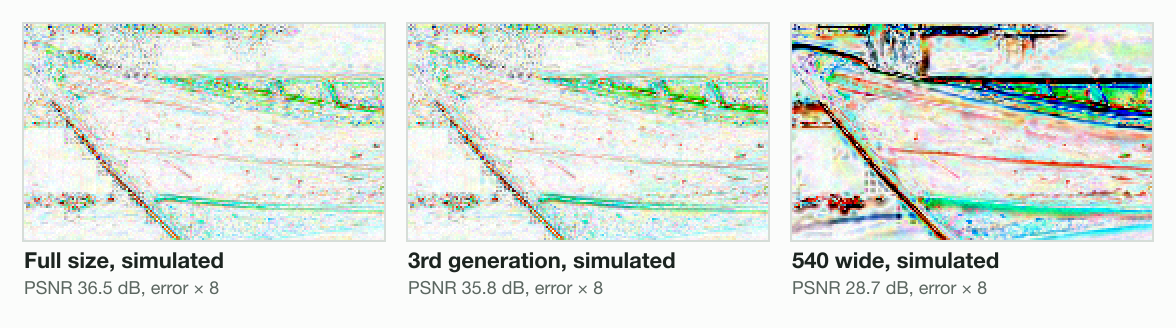
Our 3 re-saves used one quality and one width. A network that changes either could lose more, and we did not test that. Our guide on how to resize an image without losing quality measures the resize side.
Facebook photos blurry: what Meta’s pages say
Meta’s help pages state fewer rules for Facebook photos than Instagram’s do. Its Page dimensions page gives a cover size and a file type.
Loads fastest as an sRGB JPG file that’s 851 pixels wide, 315 pixels tall and less than 100 kilobytes.
The same page suggests PNG for a cover or profile picture with “your logo or text”. The Facebook cover photo size page exports 851 × 315 under 100 KB.
How to upload a photo without losing quality
You upload a photo with the least quality loss by sending enough pixels, saved once. Too few pixels and extra saves blur a photo on any network.
Start from the original
Use the photo from your camera roll, not a copy saved from a chat or a post.
Give it at least 1080 pixels of width
Instagram’s page asks for at least 1080 wide, at a shape between 1.91:1 and 3:4.
Crop only if the shape needs it
If the shape fits, upload the full-size original. To crop, the image resizer crops to any size. Set Quality to 90 or more, and the resizer’s JPG keeps full colour.
Check the pixels, then post
Read the width in the file’s details, or with sips on a Mac.
Post from the original every time
Avoid reposting a downloaded copy, which adds another re-save.
For a story or a profile picture, the Instagram story size guide gives both sizes. Every other network is in the social media image sizes cheat sheet.
Read the full guide: How to reduce image file size on any device.
Questions
- Why do my pictures look blurry when I upload them?
- The picture may have too few pixels, or it was saved once too often. Instagram Help says it keeps photos 320 to 1080 wide at their own size. In our simulation with Blinkimg's engine, a 540 × 303 upload scored 28.7 dB at 1080 wide. Full size scored 36.5 dB.
- How to upload a photo without losing quality?
- Upload the original photo, at least 1080 pixels wide, saved only once. Instagram Help asks for a width of at least 1080 pixels and a shape between 1.91:1 and 3:4. Crop to that shape yourself, then post from the original file, never from a downloaded copy.
- How to fix blurry Instagram photos after posting?
- You cannot sharpen a posted photo; delete it and post again from the original. Instagram Help says photos wider than 1080 pixels are sized down to 1080. Upload at least that width, at a shape between 1.91:1 and 3:4, so Instagram keeps the whole frame.
- Why is Instagram making my photos so blurry?
- Instagram Help says it sizes photos down to 1080 pixels wide and keeps narrower ones. In our simulation with Blinkimg's engine, a 540 wide upload scored 28.7 dB at 1080 wide. A full-size 4964 × 2782 upload scored 36.5 dB. Upload the original.
- How do I stop Instagram from ruining my photo quality?
- Send a photo Instagram does not need to enlarge or crop. Instagram Help keeps 320 to 1080 pixels wide at shapes from 1.91:1 to 3:4. In our simulation with Blinkimg's engine at 1080 × 605, the full-size original scored 36.5 dB. A pre-sized JPG with halved colour scored 36.0 dB.
- How do I upload high quality photos to Instagram?
- Upload a photo at least 1080 pixels wide, with a shape between 1.91:1 and 3:4, as Instagram Help advises. For reels, Instagram Help names a Media quality setting called Upload at highest quality. The Reels page says higher quality may take longer to upload.
- How to fix picture quality on Facebook?
- Upload the original photo rather than a copy saved from a chat or a post. Meta Help states no feed-photo size on the pages we read. For a Page cover, Meta says it loads fastest as an sRGB JPG, 851 × 315, under 100 KB. Logos and text may look better as PNG.
- How do I stop Facebook from changing my photo quality?
- Meta Help names no upload-quality setting on the pages we read, so send a file that needs little change. Meta Help suggests PNG for a cover or profile picture with a logo or text. For photos, upload the original once, and avoid reposting downloaded copies.
- How do I unblur pictures on Facebook?
- A blurred upload cannot get its lost detail back from the posted copy. Delete it and upload again from the original file on your phone or camera. Meta Help states no size for a feed photo on the pages we read, so send the full-size original.
- Does X compress photos?
- X Help says photos can be up to 5 MB and are automatically scaled for display. It accepts GIF, JPEG and PNG files. X's page states no quality. Send a JPEG or PNG under 5 MB, made from the original. A single photo between 2:1 and 3:4 displays in full.
- Should I resize a photo to 1080 before posting it?
- Only to choose the crop yourself; otherwise upload the full-size original. In our simulation with Blinkimg's engine at 1080 × 605, the original scored 36.5 dB. A pre-sized JPG at Auto scored 36.0 dB, and a lossless PNG 36.6 dB. Instagram Help sizes wider photos down to 1080 anyway.
- Does reposting a photo make it blurrier?
- Reposting makes a photo a little blurrier each time, because every upload processes the last copy. Over 2 more simulated re-uploads in Blinkimg's engine, a 1080 × 605 photo fell from 36.5 to 35.8 dB. Instagram Help describes its resize, not its re-save. Post from the original file instead.