Does Discord compress images? Limits and file sizes
Discord compresses some images: Data Saving Mode sends smaller ones, and uploads pass a “pre-compression check”. Discord checks the file size before any compression. The free limit is 20 MB per file since August 2026. Part of the image compressor.
By Sahadat Husain13 min readGuides

Discord’s help pages describe no re-encode of every image you send. Our photo’s 21.5 MB PNG export was over the free limit. Saved as a JPG by Blinkimg’s engine, it came to 2,598.6 KB with all 4964 × 2782 pixels.
What Discord says it does to your images
Discord’s pages describe four steps an image can meet on its way into a chat. Discord calls its size check a “pre-compression check”, and Data Saving Mode lowers quality on purpose.
- The size check comes first. Discord’s File Attachments FAQ says it checks the file size “before compression rather than after”. Desktop always worked that way, and mobile does since August 2026.
- Mobile used to compress first. The same FAQ says Discord on mobile used to “try to compress your file first”. It now runs the “pre-compression check that desktop has always used”. It warns: “On Android, where source files tend to be larger, you may hit the size limit more often”. Discord does not say how or when it compresses.
- Data Saving Mode sends smaller images. On a cellular network, “images will upload in 360p”, says the Video Upload Quality FAQ.
- A service resizes the copy Discord shows. In 2017, Discord’s engineering blog said a service fetches images on users’ behalf. It then resizes them “to reduce bandwidth usage”.
You pick a file
Its size on your device counts.
Discord checks the size
Before any compression.
20 MB on a free account.
Data Saving Mode, if on
Images go at 360p
over cellular data.
The chat shows it
An image over 20 MB
arrives as a download.
Discord’s file size limits in October 2026
Discord’s free upload limit is 20 MB per file, raised from 10 MB in August 2026. Discord’s Nitro page gives 50 MB for Nitro Basic and up to 1 GB for Nitro. A server at Boost Level 2 or 3 lifts it for every member, per the Server Boosting FAQ.
| Upload | Limit | Discord page |
|---|---|---|
| A file, free account | 20 MB (20 MiB) | File Attachments FAQ, developer docs |
| A file, Nitro Basic | 50 MB | What are Nitro & Nitro Basic? |
| A file, Nitro | up to 1 GB | What are Nitro & Nitro Basic? |
| A file, Boost Level 2 server | 50 MB, in that server | Server Boosting FAQ |
| A file, Boost Level 3 server | 100 MB, in that server | Server Boosting FAQ |
| Server avatar | 8 MB, JPG, PNG or GIF | Per-Server Profiles |
| Nitro profile banner | under 10 MB, PNG, JPG or GIF | Per-Server Profiles |
Is the limit 10 MB or 20 MB?
The limit is 20 MB, though one older Discord page still says 10 MB. Its How do I upload images and GIFs? article, edited in June 2026, asks for pictures under 10 MB. The attachments FAQ, edited on 30 September 2026, gives 20 MB.
Discord’s developer change log dates both moves. The default fell from 25 MiB to 10 MiB, already live for users by December 2024. On 3 September 2026 it rose to 20 MiB. A MiB is 1,048,576 bytes, so 20 MiB is 20,971,520 bytes. Both help pages add that Discord is testing other limits on some accounts.
Which photo files go over 20 MB?
Our photo’s lossless PNG came to 21.5 MB, over 20 MB on its own. We exported our 9.8 MB camera photo, 4964 × 2782 pixels, four more ways with sharp 0.35.4. We also took a 5K screenshot of a photo grid. Then we listed the files on this Mac.
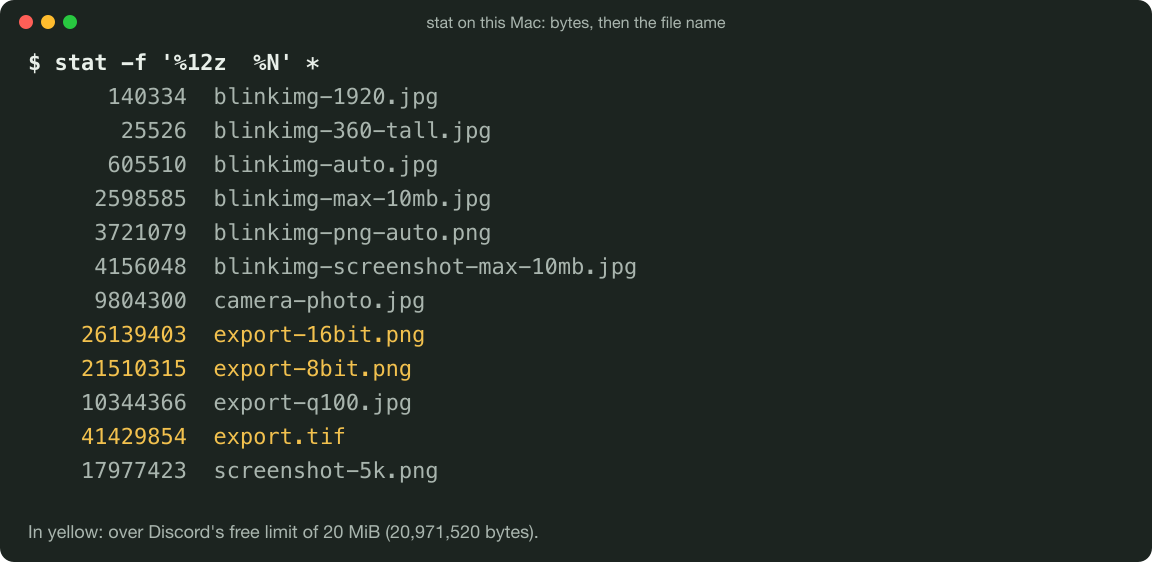
The camera JPG9.4 MiB of 20 MiB
47% of the capJPG at quality 100, sharp9.9 MiB of 20 MiB
49% of the capThe 5K screenshot, PNG17.1 MiB of 20 MiB
86% of the capPNG, 8-bit, sharp20.5 MiB of 20 MiB
103% of the cap: overPNG, 16-bit, sharp24.9 MiB of 20 MiB
125% of the cap: overTIFF, uncompressed, sharp39.5 MiB of 20 MiB
198% of the cap: over
The camera JPG fits with room to spare, and so does the 18.0 MB screenshot. The 8-bit PNG is 538.8 KB over 20 MiB, or 1,510.3 KB over 20 MB. The 16-bit PNG misses by more. Blinkimg’s engine does not read TIFF, and that file is over its 30 MB free input anyway.
Our quality 100 JPG export came to 10.3 MB, over 10 MB but under 10 MiB. Discord’s pages count two ways: its help pages say MB, and its Uploading Files reference says MiB. By the old 10 MiB, that file would have fit.
Discord image compression you can switch off
Discord image compression has one documented switch for images: Data Saving Mode in the mobile app. Discord documents no switch for the compression its “pre-compression check” implies.
Turn off Data Saving Mode
Tap your profile picture
In the Discord mobile app, it sits in the bottom-right corner.
Tap the cogwheel, then the Chat tab
The cogwheel is top right. Discord’s attachments FAQ, edited in September 2026, gives this path.
Turn the setting off
The FAQ lists it as a mobile-only setting, beside Video Uploads.
Discord’s pages differ on the path. Its 2024 video FAQ names App Settings > Data Consumption instead. It puts Video Uploads under Text & Media. If one path is missing, try the other.
Images over 20 MB arrive as a download
A Chat setting called “When uploaded directly to Discord” shows uploaded images in the chat. The FAQ adds that an image larger than 20 MB “will be shared as a download instead”. With the setting on, a photo under 20 MB shows in the conversation.
Videos have their own quality settings
The Video Uploads setting covers videos only, the 2024 FAQ notes. Best Quality uploads at 720p, or 1080p with Nitro. Standard, the default, uploads at 480p, or 720p with Nitro.
How to send a photo under the limit at high quality
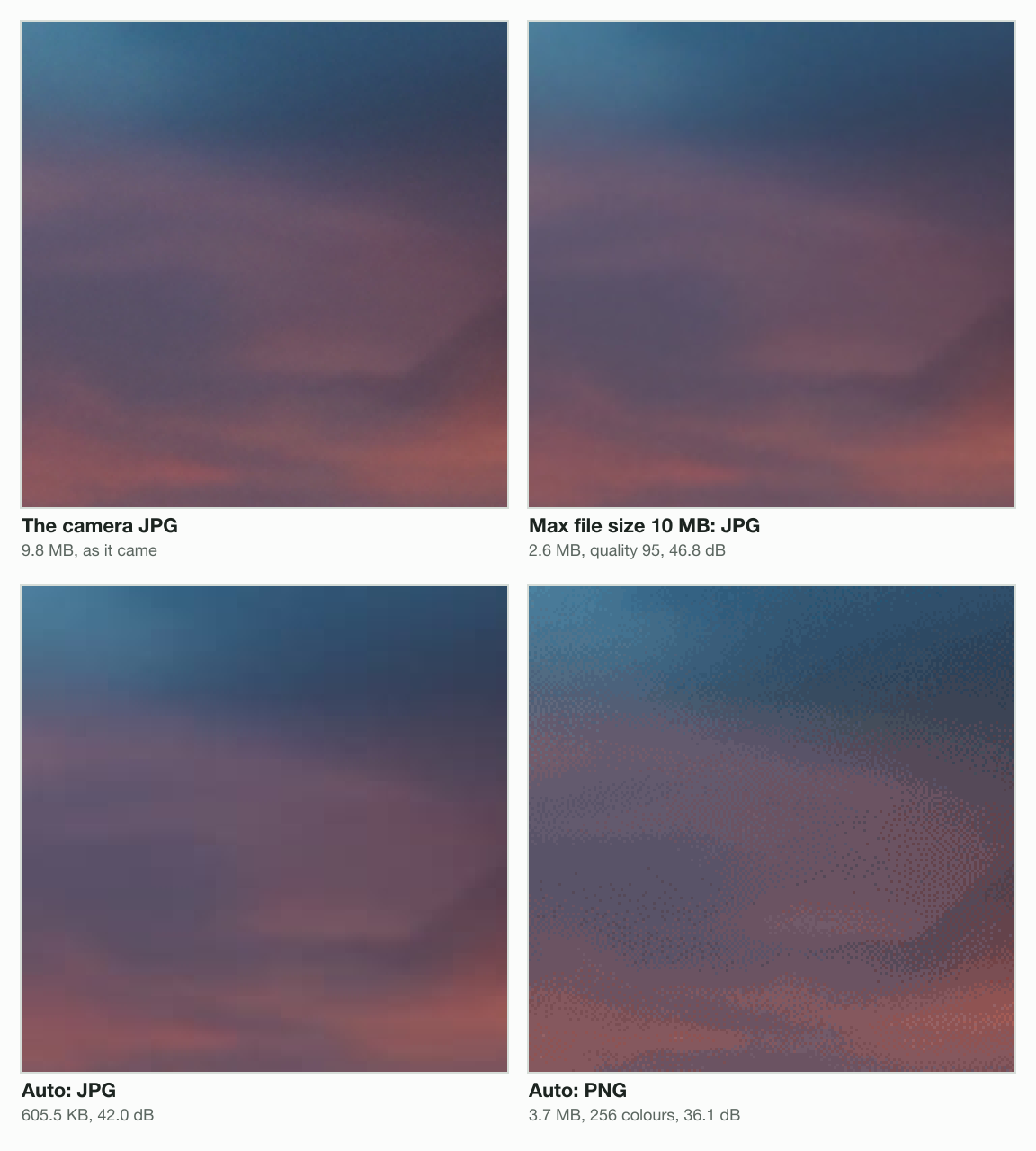
Change the format first: our photo’s pixels were far smaller as a JPG than as a PNG. Blinkimg’s engine turned the 21.5 MB PNG export into a 2,598.6 KB JPG at quality 95. All 4964 × 2782 pixels stayed, at a PSNR of 46.8 dB.
The format did that work, not the cap. Max file size 10 MB and 8 MB gave the same 2,598,585 bytes. Quality 95 is the top of the engine’s search, and that JPG was already under both caps. The camera JPG and both PNGs came back as that one file.
One photo, five files (KB)
- The 8-bit PNG, sharp21,510.3 KB
- The camera JPG9,804.3 KB
- Blinkimg, PNG at Auto3,721.1 KB
- Blinkimg, JPG under 10 MB2,598.6 KB
- Blinkimg, JPG at Auto605.5 KB
At Auto, the engine picks a lower quality for the same photo: 605.5 KB and 42.0 dB. That is 94% smaller than the camera file.
A 5K screenshot under the same caps
A screenshot is a common large PNG. Ours shows a grid of photos at 5120 × 2880 pixels, the size of a 5K display. It came to 18.0 MB as a PNG: under the free 20 MB, over 10 MB and 8 MB.
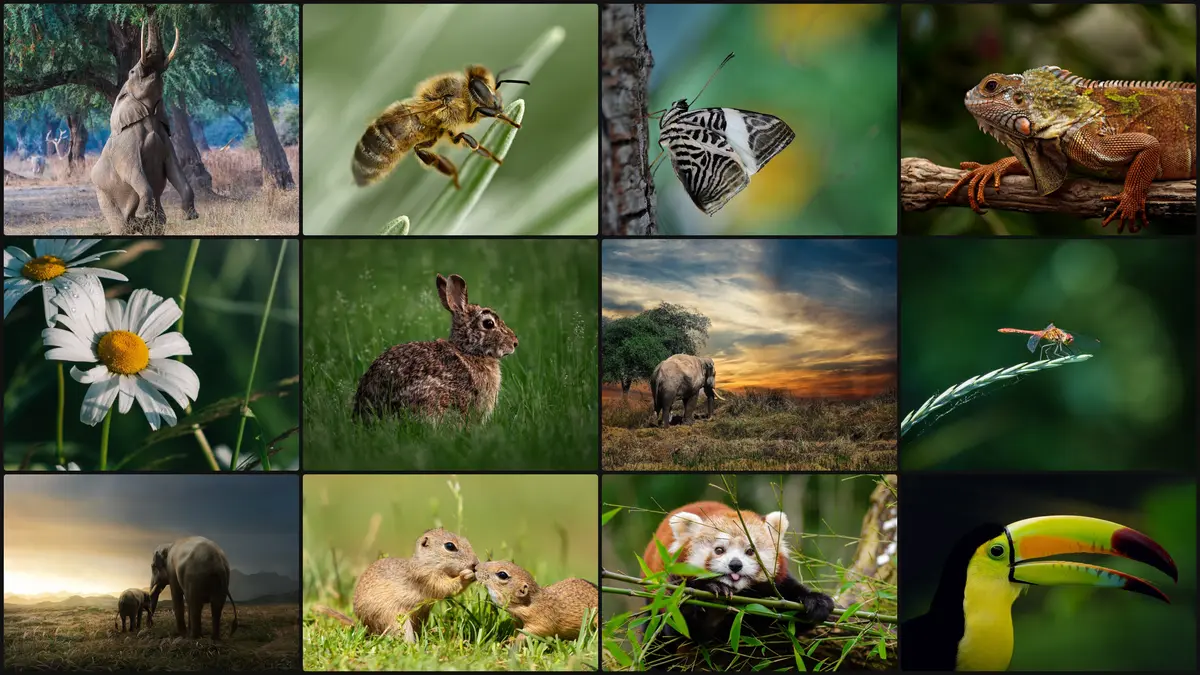
| File | Size | Quality or colours | PSNR |
|---|---|---|---|
| The PNG as taken | 17,977.4 KB | every colour | (the source) |
| JPG at Auto | 1,376.2 KB | quality 78 | 36.7 dB |
| JPG, Max file size 10 MB | 4,156.0 KB | quality 95 | 44.0 dB |
| JPG, Max file size 8 MB | 4,156.0 KB | quality 95 | 44.0 dB |
| JPG, Max file size 3 MB | 2,911.7 KB | quality 90 | 40.7 dB |
| PNG at Auto | 5,500.3 KB | 256 colours | 34.1 dB |
| PNG, Max file size 10 MB | 5,500.3 KB | 256 colours | 34.1 dB |
| PNG, Max file size 8 MB | 5,500.3 KB | 256 colours | 34.1 dB |
| PNG, Max file size 5 MB | 2,671.7 KB | 16 colours | 24.8 dB |
Blinkimg’s engine saves a PNG at 256 colours even at Auto. Neither the 10 MB nor the 8 MB cap changed any file we measured. As a JPG, the screenshot came to 4,156.0 KB at quality 95 under both.
A cap changes a file only below what Auto or quality 95 gives. Under 3 MB, a limit tighter than Discord’s, the JPG dropped to quality 90 and 2,911.7 KB. Under 5 MB, the PNG fell to 16 colours and 2,671.7 KB, at 24.8 dB. The compress image to 3 MB and compress image to 5 MB pages set those caps.
Why not keep it as a PNG?
Blinkimg’s engine saves a photo PNG at 256 colours, not every colour. Our camera photo as a PNG at Auto came to 3,721.1 KB, at 36.1 dB. The JPG at quality 95 scored 46.8 dB with 30% fewer bytes.
A screenshot of text is a different case, which PNG vs JPG covers.
What to do when Discord refuses a file
Does Discord refuse the file, or show it as a download?
- Yes
Is it a photo, not a screenshot of text?
- Yes
Save it as a JPG (a cap guarantees the size)
Our photo was 88% smaller as a JPG than as a PNG.
- No
Keep the PNG; crop or resize it
Blinkimg’s engine saves a photo PNG at 256 colours.
- Yes
- No
Does it look soft only on phone data?
- Yes
Turn off Data Saving Mode
It lowers image quality on phone data.
- No
Send it as it is
It fits, and it shows in the chat.
- Yes
The compress image to 10 MB tool sets that cap for you. For a server avatar, the compress image to 8 MB page matches Discord’s 8 MB. Any other number works in reduce image size in MB.
A photo at 360 pixels tall, our cut
Our photo cut to 360 pixels tall kept its shapes and lost its fine grain. Discord does not say how 360p applies to a still photo. In video, 360p means 360 pixels tall. We cut our photo to that height with Blinkimg’s engine: 643 × 360 pixels, a 25.5 KB JPG. A copy 1920 pixels wide weighed 140.3 KB.
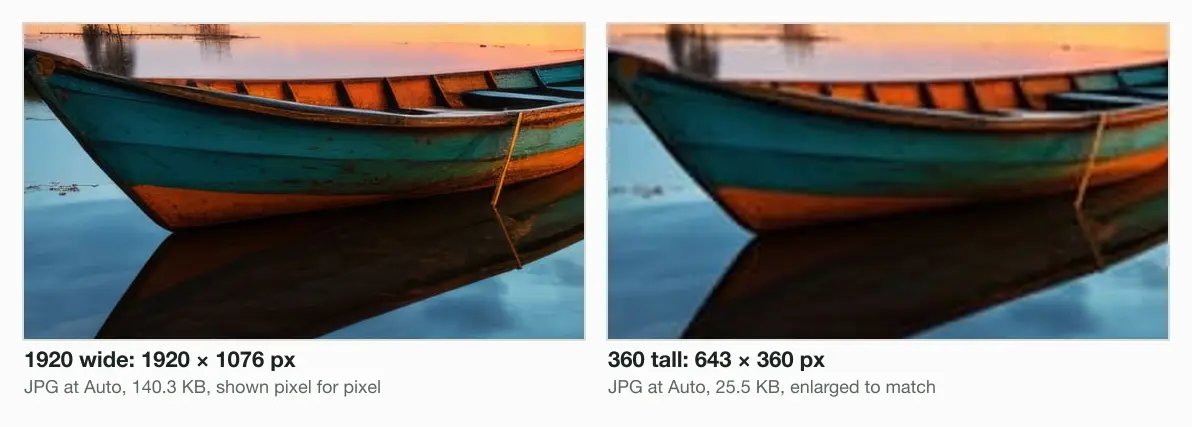
The 360-pixel copy holds 11% of the 1920 copy's pixels. If your photos look soft only away from Wi-Fi, check that setting first.
Profile pictures, banners and server avatars
Discord’s profile images have their own limits, lower than a message’s. A server avatar can be a JPG, PNG or GIF up to 8 MB, per its Per-Server Profiles article. A Nitro profile banner must stay under 10 MB, at 600 × 240 pixels or more.
At 9.8 MB, our camera photo is too big for a server avatar as it comes. For the sizes in pixels, read Discord PFP and banner sizes. For any other upload, start with the image compressor.
Read the full guide: How to reduce image file size on any device.
Questions
- How to stop Discord compressing images?
- Turn off Data Saving Mode in the Discord mobile app: profile picture, the cogwheel, then the Chat tab. Discord’s Video Upload Quality FAQ says that with it on, images upload in 360p on cellular data. Discord documents no switch for the compression its “pre-compression check” implies.
- Why is Discord 10MB now?
- Discord’s free limit is no longer 10 MB. Its File Attachments FAQ puts it at 20 MB since August 2026. The 10 MB limit was live for users by December 2024, per Discord’s developer change log. Discord’s Nitro page explained that cut by storage costs. It added that most users send files under 10 MB.
- How can I compress the size of an image for Discord?
- Save it as a JPG; the format change does most of the work. Blinkimg's engine turned a 21.5 MB PNG of our camera photo into a 2,598.6 KB JPG at quality 95. A Max file size of 10 MB then guarantees the size. At Auto, the photo came to 605.5 KB.
- Does Discord reduce image quality?
- Discord’s pages point to three cases. Its File Attachments FAQ says mobile used to “try to compress your file first”. Discord now calls its size check a “pre-compression check”. Data Saving Mode sends images at 360p over cellular data, per its Video Upload Quality FAQ. Its 2017 engineering blog says a service resizes the copy Discord shows, to cut bandwidth.
- How do I turn off image compression?
- In Discord, turn off Data Saving Mode: profile picture, the cogwheel, then the Chat tab in the mobile app. Discord’s 2024 Video Upload Quality FAQ puts it under App Settings > Data Consumption instead. With it on, images go at 360p on cellular data. Discord documents no other image switch.
- How to bypass 10MB limit on Discord?
- Discord's File Attachments FAQ now sets the free limit at 20 MB per file. For more, Nitro Basic allows 50 MB and Nitro up to 1 GB. A server at Boost Level 2 allows 50 MB there, and Level 3 allows 100 MB. Or compress first: at Auto, our 9.8 MB photo became a 605.5 KB JPG.
- Is 8MB a big file?
- For our 13.8-megapixel camera photo, 8 MB was plenty of room. Blinkimg's engine saved it as a 2,598.6 KB JPG at quality 95, 32% of 8 MB. Discord sets 8 MB as the limit for a server avatar, per its Per-Server Profiles article. A lossless PNG of the same photo weighed 21.5 MB.
- What is the best image size for Discord?
- Discord publishes no best size for an image in a chat. Its Server Banners article recommends 960 × 540 for a server banner. Its Per-Server Profiles article recommends at least 600 × 240 for a Nitro banner. Our photo at 1920 × 1076 came to 140.3 KB as a JPG at Auto.
- How do I upload high quality images to Discord?
- Keep each image under the 20 MB free limit, and turn off Data Saving Mode on your phone. Discord's File Attachments FAQ says the size is checked before any compression. Our photo kept its detail as a JPG at quality 95: 2,598.6 KB, against 21.5 MB as a PNG.
- How do I stop Discord from compressing videos?
- Set Video Uploads to Best Quality in the Discord mobile app. The 2026 File Attachments FAQ lists it on the Chat tab. The 2024 Video Upload Quality FAQ says Text & Media. Best Quality uploads at up to 720p, or 1080p with Nitro. Standard, the default, uses 480p.
- Does Discord compress images with Nitro?
- Nitro Basic raises the upload limit to 50 MB, and Nitro to 1 GB, per Discord’s Nitro page. The Video Upload Quality FAQ gives Data Saving Mode no Nitro exception for images. Images still go at 360p on cellular data with Data Saving Mode on. Nitro does lift video uploads to 1080p.
- Is Discord’s limit per file or per message?
- Discord's limit is per file. Its developer documentation says the upload size limit "applies to each file in a request". A 2025 change log entry says apps now match how a user's attachments are checked. The free limit per file is 20 MiB, or 20,971,520 bytes.