How to change a file type: convert, don’t rename
To change a file type, open the file and save it in the new format, or use a converter. Renaming the extension changes only the name. Part of the image converter.
By Sahadat Husain12 min readGuides

You change a file type by converting the file in an app, not by renaming it. We renamed a PNG to .jpg on a Mac, and every byte stayed the same. Blinkimg’s engine converted the same 2.5 MB PNG into a 140.3 KB JPG.
Open the file and use Save as or Export, or drop it into an image converter. Pick the new format, then save a new copy.
Does renaming a file change its type?
Renaming a file changes only its name, and the file type stays the same. Microsoft’s Common file name extensions in Windows puts it plainly. A new extension “won’t convert the file to another format”.
We tested it. Our camera photo at 1920 × 1076 pixels, saved as a PNG, weighs 2,463,231 bytes. We copied it as photo-renamed.jpg, the same bytes under a new name. Then we read the start of each file.
- 89·
- 50P
- 4EN
- 47G
- 0DCR
- 0ALF
- 1ASUB
- 0ALF
photo-renamed.jpg: the PNG signature
- FF·
- D8·
- FF·
- DB·
- 00NUL
- 43C
- 00NUL
- 07·
photo.jpg, a real JPG: FF D8 FF
Every file format opens with its own signature. A PNG starts with the byte 89 and the letters PNG, a JPG with FF D8 FF. Our renamed copy still opened with 89 50 4E 47. Its SHA-256 hash matched the PNG’s, so not one byte had changed.

What reads the name, and what reads the bytes
Some apps read a file's name, and others read its bytes. We asked the readers on this Mac what photo-renamed.jpg is. The file command, sips and Blinkimg's engine read the bytes and said PNG.
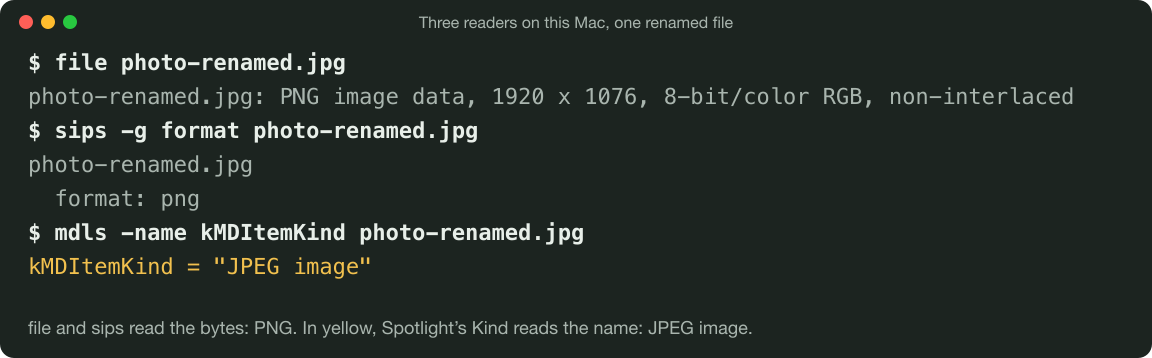
Spotlight, the Mac’s search index, reads the name. Its Kind field, read with mdls, said “JPEG image”. Chromium 149, given the file in a web form, reported the type image/jpeg. It still drew the picture at 1920 × 1076.
| What we read | photo.png | Renamed to .jpg | Converted to JPG |
|---|---|---|---|
| Size | 2,463.2 KB | 2,463.2 KB | 140.3 KB |
| First bytes | 89 50 4E 47 | 89 50 4E 47 | FF D8 FF DB |
| file and sips say | PNG | PNG | JPEG |
| The engine reads | PNG | PNG | JPEG |
| Spotlight’s Kind says | PNG image | JPEG image | JPEG image |
| Chromium’s File.type | image/png | image/jpeg | image/jpeg |
| Is it a JPG? | no | no | yes |
That split is why a rename can seem to work. The renamed file opened in Chromium, so it looked fine. A web form that trusts the browser's type sees a JPEG. A server that sniffs the bytes, as Blinkimg's engine does, sees a PNG.
A renamed HEIC fails in the browser
A renamed HEIC shows the risk. We had sips make a HEIC of the same photo, 191.6 KB, and copied it as photo-heic-renamed.jpg. Chromium 149 called it image/jpeg and could not draw it.
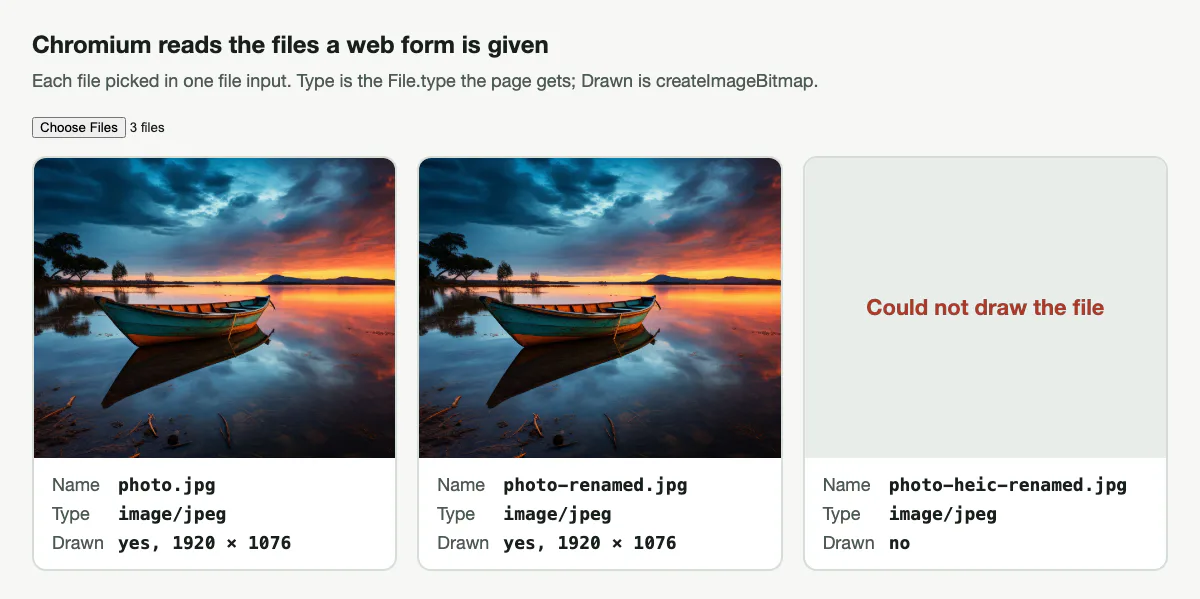
The real HEIC failed in Chromium too, so the name was not the cause. Chromium 149 could not draw a HEIC on this Mac. Blinkimg’s engine read the renamed copy as HEIC and made a real 137.4 KB JPG from it.
How do I change a PNG image to a JPEG?
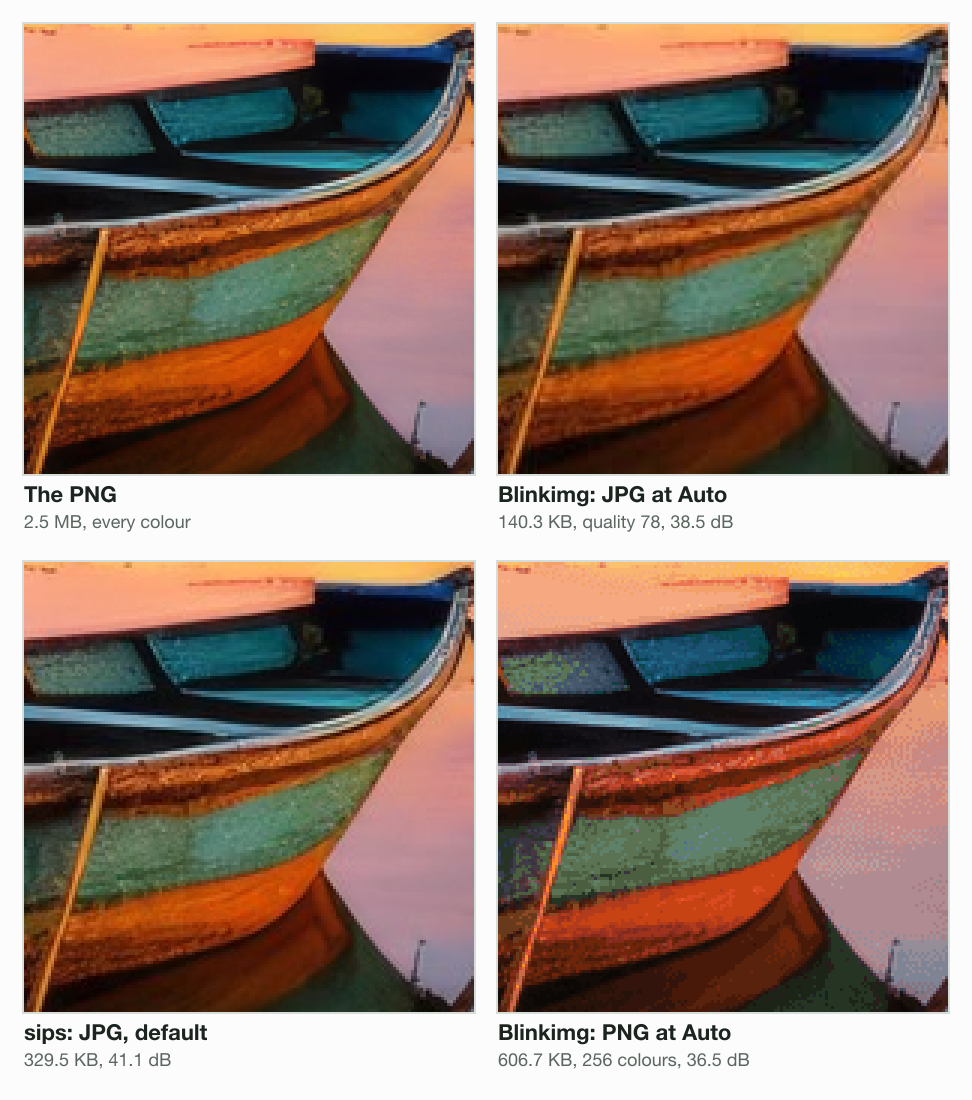
You change a PNG image to a JPEG by saving a new copy in JPEG format. For our PNG, Blinkimg’s engine chose quality 78 at Auto. The JPG had 94% fewer bytes, with all 1920 × 1076 pixels kept.
One photo, seven files (KB)
- The PNG2,463.2 KB
- The PNG renamed .jpg2,463.2 KB
- Blinkimg, JPG quality 1001,668.5 KB
- Blinkimg, PNG at Auto606.7 KB
- Blinkimg, JPG quality 90366.9 KB
- sips, JPG default329.5 KB
- Blinkimg, JPG at Auto140.3 KB
| File | Made by | Size | PSNR |
|---|---|---|---|
| The PNG | the source | 2,463.2 KB | (the source) |
| JPG, quality 100 | Blinkimg | 1,668.5 KB | 51.0 dB |
| PNG at Auto, 256 colours | Blinkimg | 606.7 KB | 36.5 dB |
| JPG, quality 90 | Blinkimg | 366.9 KB | 42.7 dB |
| JPG, default setting | macOS sips (sips-316) | 329.5 KB | 41.1 dB |
| JPG at Auto (quality 78) | Blinkimg | 140.3 KB | 38.5 dB |
sips, the image tool built into macOS, made a 329.5 KB JPG at its default setting. Blinkimg's engine first reached its score at quality 90, with 366.9 KB. From quality 90 up, the engine keeps full colour, and that costs bytes. At Auto, the engine trades 2.6 dB for a much smaller file.
In a browser, with an image converter
Open the image to JPG converter
The image to JPG converter takes PNG, WebP, AVIF and HEIC. The engine behind it reads the bytes, not the name.
Drop your files
Drop up to 10 files at once. Leave the quality at Auto, or set your own.
Download the JPGs
Each file comes back with a .jpg name and JPEG bytes. Files are deleted within 24 hours.
For one pair, the PNG to JPG converter and the WebP to JPG converter set the format for you.
On a Mac, with Preview
Open the image in Preview
Then choose File > Export.
Pick JPEG in the Format menu
The menu lists HEIC, JPEG, JPEG-2000, OpenEXR, PDF, PNG and TIFF. A JPEG export lets you set the quality.
Name the converted file and click Save
Type a new name or choose a new location, then save.
Apple’s Preview User Guide adds a batch route. Open several images in one window, select them in the sidebar, then export. In Terminal, sips does the same job:
sips -s format jpeg photo.png --out photo.jpgOn Windows, with Paint
We found no Microsoft help page for Paint’s Save as. These steps come from How-To Geek’s PNG to JPG guide, dated January 2022.
Right-click the PNG, then Open with > Paint
How-To Geek’s guide starts from the file in File Explorer.
Click File, then Save as > JPEG picture
JPEG picture is the format to pick for a JPG.
Pick a folder and a name, then Save
How-To Geek warns that transparent areas turn white.
What a PNG loses when it becomes a JPG
A PNG loses two things as a JPG: exact pixels and transparency. JPEG is lossy, so even the engine’s quality 100 scored 51.0 dB, not a perfect match. JPEG also has no alpha channel, so see-through areas get filled.
Our test logo shows the second loss. The PNG is a 512 × 512 disc and ring with see-through corners, 18.1 KB. The engine saved it as a 12.1 KB JPG at Auto.
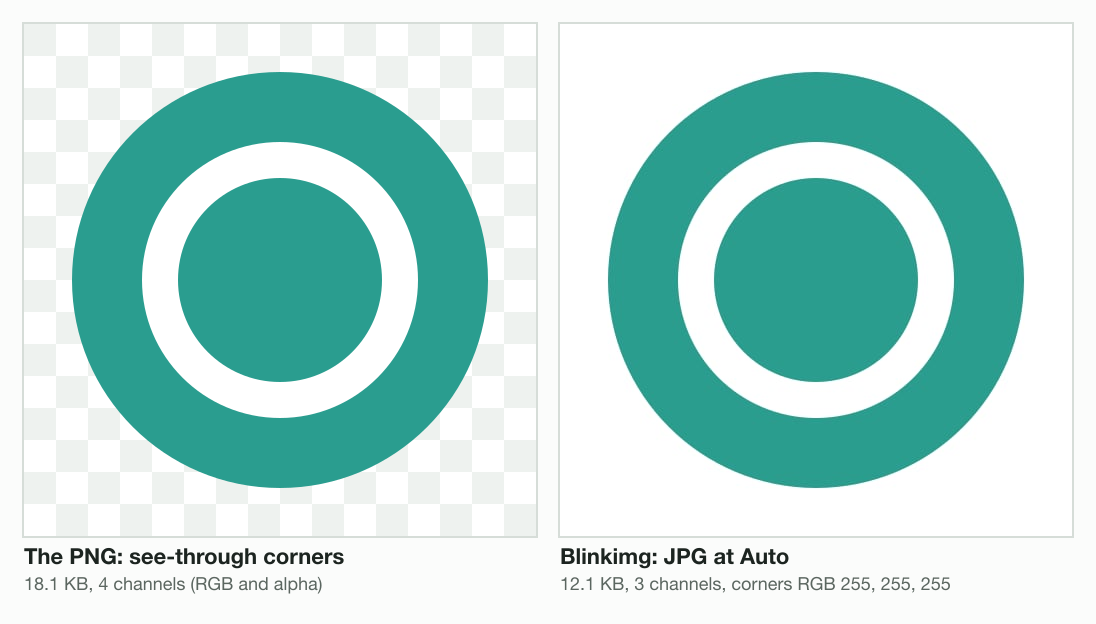
The see-through corners turned white, RGB 255, 255, 255. Keep a logo or an icon as a PNG, or convert it to a format with alpha. PNG vs JPG covers which jobs suit each format.
How to see file extensions on Windows and Mac
Hidden extensions let a file carry a name you cannot see. Turn them on before you rename anything.
Windows 11 and Windows 10
On Windows 11, open File Explorer and select View > Show > File name extensions. On Windows 10, tick File name extensions in the View tab’s Show/hide group. Both paths are from Microsoft’s extensions page.
macOS
On a Mac, choose Finder > Settings, click Advanced and select Show all filename extensions. For one file, press Command-I and untick Hide extension. Apple’s Mac User Guide gives both steps and says macOS usually hides extensions.
The same guide warns against changing an extension when you rename a file. You “may no longer be able to open the file with the app that was used to create it”. The pane also offers Show warning before changing an extension.
How to change a photo’s file type on iPhone
An iPhone changes the file type of new photos with one setting. Apple gives the path: Settings, Camera, Formats, then Most Compatible. “All new photos and videos will now use JPEG or H.264 format.”
That page speaks of new photos only. A photo already saved as a HEIC stays a HEIC when renamed. The file command, sips and the engine all read our renamed copy as HEIC. Convert it with the HEIC to JPG converter instead. What is HEIC explains the format.
When renaming the extension is enough
Renaming is enough when the name is wrong and the bytes are right. A .jpeg file renamed .jpg is still a JPEG, because JPG and JPEG are one format. Is JPG and JPEG the same has the history.
The other case is a file that already carries the wrong name. Our photo-renamed.jpg is a PNG. Renaming it back to .png fixes the label, because the bytes never changed.
Do the file’s bytes already match the format you need?
- Yes
Rename it
A .jpeg to .jpg rename, or a PNG named .jpg back to .png.
- No
Does the image have see-through areas?
- Yes
Convert to PNG, WebP or AVIF
As a JPG, our logo's corners came out white.
- No
Convert it to JPG
Our 2.5 MB PNG became a 140.3 KB JPG.
- Yes
Not sure which format you need? Image formats explained compares them on one photo. Going the other way, the JPG to PNG converter makes a PNG. For a signature check, What is a PNG file walks through all 8 bytes.
Read the full guide: How to reduce image file size on any device.
Questions
- Is it possible to change a file type?
- A file type changes through a conversion, not a rename. Microsoft's help page on file name extensions says a new extension "won't convert the file to another format". Open the file and use Save as or Export, or an image converter. Blinkimg's engine turned our 2.5 MB PNG into a 140.3 KB JPG.
- Can I just rename a PNG to JPG?
- You can, but the file stays a PNG. We renamed a 1920 × 1076 PNG to .jpg on a Mac. It kept the PNG signature 89 50 4E 47 and the same SHA-256 hash. The file command and sips still called it PNG, while Spotlight's Kind called it a JPEG image.
- How do I change a file type to JPEG?
- Open the image and save a copy as JPEG. On a Mac, open it in Preview and choose File > Export, then JPEG in the Format menu. On Windows, How-To Geek gives Paint's File > Save as > JPEG picture. In a browser, an image to JPG converter does it for PNG, WebP, AVIF and HEIC files.
- How do I change the type of file in Windows 11?
- Show extensions first: Microsoft says to open File Explorer and select View > Show > File name extensions. Renaming then changes only the name. To change the format itself, open the file in Paint and use Save as. An online image converter works too.
- How do I rename a file to change its type?
- Renaming changes the label, not the type. Show extensions, rename the file and edit the part after the dot. Microsoft says this does not convert the file. Apple warns the file may no longer open in the app that created it. Rename only when the bytes already match the new extension.
- How to undo file type change?
- Rename the file back to its old extension. A rename never touches the bytes, so the original name restores it. Our PNG renamed .jpg kept the same SHA-256 hash as the PNG. A real conversion writes a new file, so the original stays wherever you saved it.
- How to know file format?
- Read the bytes, not the name. On a Mac, the Terminal commands file and sips -g format report the real format. Both called our renamed copy PNG. Spotlight’s Kind reads the extension instead. A PNG starts with the bytes 89 50 4E 47, a JPG with FF D8 FF.
- How can I convert a JPEG to JPG?
- Rename the extension from .jpeg to .jpg. JPG and JPEG are one format, so the bytes already match and nothing needs converting. This is the one case where a rename is the right fix. Show file extensions first, so you edit the real extension and not part of the name.
- How to change a picture format from PNG to JPG?
- Save a new copy in JPEG format. Use Preview's File > Export on a Mac, or Paint's Save as on Windows, per How-To Geek. In a browser, use a PNG to JPG converter. Blinkimg's engine turned our 2.5 MB PNG into a 140.3 KB JPG at Auto. Transparent areas turn white in the JPG.
- How do I export PNG to JPG?
- On a Mac, open the PNG in Preview and choose File > Export. Apple's Preview guide lists JPEG in the Format menu and says you can adjust its quality. Type a new name, then click Save. To convert several images, open them in one window and select them in the sidebar first.
- How do I convert a PNG image to JPG on my phone?
- Use a converter in your phone's browser, such as Blinkimg's PNG to JPG converter. Its engine reads the bytes, not the name. On our test photo, the engine made a 140.3 KB JPG from a 2.5 MB PNG at Auto. Files are deleted within 24 hours.
- How do I change a file type on iPhone?
- For new photos, Apple's HEIF support page gives Settings, Camera, Formats, Most Compatible. "All new photos and videos will now use JPEG or H.264 format." Apple's page speaks of new photos only. Convert older HEIC photos with a HEIC to JPG converter. Blinkimg's engine made a 137.4 KB JPG from our HEIC.