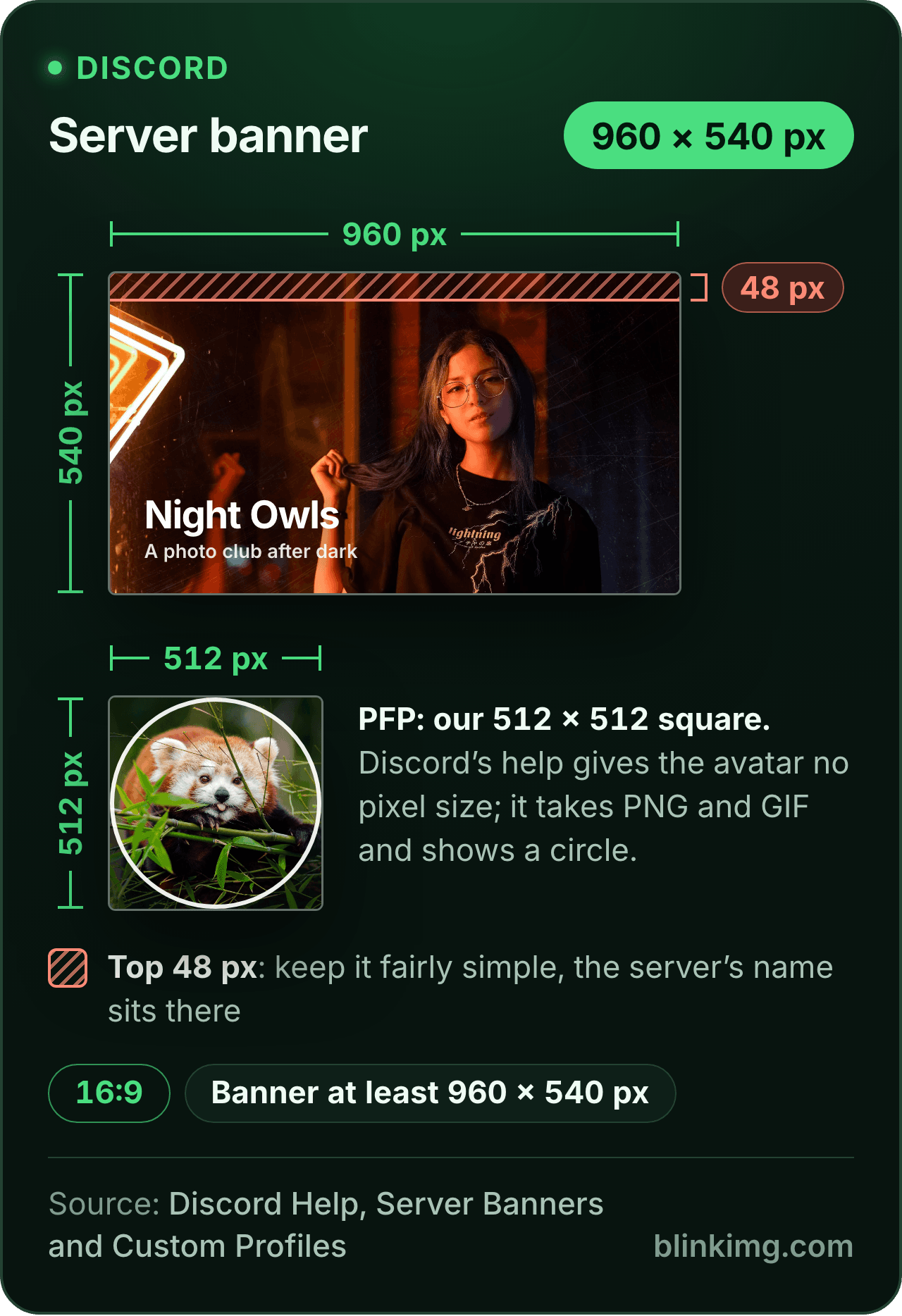
The editor opens on our Discord PFP size, a 512 × 512 square with Fit on, so a wide screenshot or a tall drawing fits whole on a white fill. Discord's help sets no avatar pixel size; 512 is a power of two, a size Discord's developer reference lets apps request, between 16 and 4096. Part of the social media image resizer.
Paste this line into your page’s HTML. The picture links back here, the credit our CC BY 4.0 licence asks for.
<a href="https://blinkimg.com/resize-image-for-discord-pfp"><img src="https://blinkimg.com/images/size-guides/resize-image-for-discord-pfp.png" alt="A Discord server banner drawn at 960 × 540 pixels, 16:9, with its top 48 pixels hatched, the strip Discord asks you to keep fairly simple for the server's name; below it, a 512 × 512 profile picture, our preset, in the circle Discord shows. Discord's help gives the avatar no pixel size." width="640" height="934" style="max-width:100%;height:auto"></a>
The size, exactly
512 × 512 px, in every unit a form states it in
Millimetres and inches at 300 DPI, the print resolution the portals assume.
What Save exports
512 px
512 px
512 × 512 px
Pixels
512 × 512 px
Millimetres
43.3 × 43.3 mm
Inches
1.71 × 1.71 in
Ratio
1:1
Fit
whole picture, white bands
Metadata
EXIF and GPS stripped
The rules, with their sources
Requestable image sizes
Any power of two between 16 and 4096 px, set by the size an app asks for; 512 and 1024 are on the ladder, 500 is not
Discord developer reference, Image Formatting
Formats served
PNG, JPEG, WebP and GIF; animated avatars as animated WebP or GIF
Discord developer reference, Image Formatting
Avatar
PNG and GIF; animated GIFs for Nitro subscribers; no pixel size stated
Discord Help, Custom Profiles
Server avatar
JPG, PNG or GIF, 8 MB maximum
Discord Help, Per-Server Profiles
Server icon
At least 128 × 128 px; crop in multiples of 128
Discord Help, How do I create a server?
Banners
Profile banner at least 680 × 240, PNG, JPG or animated GIF under 10 MB (Nitro); server banner at least 960 × 540 at 16:9
Discord Help, Custom Profiles and Server Banners
Each rule as it read on its source when we checked it in September 2026. The source’s own page wins over this card.
Source: photo.jpg, 576.8 KB at 1920×1280, through the preset this page opens on (the whole picture inside the size on the fill), then the engine at its defaults. The row is the real output.
Every byte count is the size of the actual file our engine produced from the named source, the same bytes you would download, not an estimate. The reference photo is one of our own photographs, an iguana on a branch, and the camera photo is a real one too. Drop your own file into the tool above to rerun any of them. How we measure names the sources and the settings.
Answered
What is the Discord PFP size?
A square. Discord sets no pixel size for an avatar, so 512 × 512 is our preset.
Discord’s Custom Profiles article names the avatar’s file types, PNG and GIF, with animated GIFs for Nitro subscribers, and no pixel size. So the numbers the ranking tools print for the avatar, 128 × 128 as the minimum and 512 × 512 as the recommended size, are the guides’. 128 × 128 is Discord’s minimum for a server icon, and 8 MB its limit for a server avatar. Discord’s developer reference adds one rule, under image formatting: an app can request an image at any power of two between 16 and 4096 pixels. 512 is on that ladder and so is 1024; 500 is not. Discord returned no more pixels than it stored: asked for an 800 × 800 server icon at 4096 on 1 October 2026, its CDN sent 800 × 800. So 512 or 1024 is a sensible upload, and 1024 has pixels to spare.
Answered
Fit or Crop: how do I fit a wide image into a Discord PFP?
Leave Fit on, which is how the page opens.
The Size presets panel shows a Crop / Fit switch under the tiles whenever an exact size is pressed; Fit scales the whole picture to sit inside the 512 × 512 square and paints the rest a flat colour, white to start, with black, grey, green and a colour well for anything else. A 16:9 screenshot or a wide piece of art gets bands of 112 pixels above and below. A 3:4 drawing gets 64 pixels at each side. A picture that is already square gets none. Crop draws a square frame over the picture instead and you drag it over the face, which is the better choice for a photo, because a whole photo fitted into a circle drawn small becomes a tiny figure with bands round it. Either way the export is exactly 512 × 512, and the stage shows the result before you save.
Answered
Is a Discord PFP round or square, and where does the status dot sit?
You upload a square; Discord shows a circle cut from its middle, with the status dot drawn over the bottom-right, according to the guides.
The circle touches the centre of each edge and hides the four corners, about 21 percent of the square. So a face, a logo or a character belongs in the middle with room around it, and nothing that matters belongs in a corner or at the bottom-right edge. With Fit on, the bands of a wide picture sit at the top and bottom, where the circle reaches the edge, so a strip of the fill shows above and below the picture. Pick a fill that suits the art and the strip reads as a frame. Upload the full square and let Discord mask it; a circle you cut yourself is masked again on top and the two edges never agree.
Answered
What is the Discord banner size?
A profile banner is at least 680 × 240 pixels, and a server banner at least 960 × 540 at 16:9. Discord’s Custom Profiles article sets the profile banner’s minimum, for Nitro members, as a PNG, JPG or animated GIF under 10 MB; its Server Banners article sets the server banner’s and resizes a 1920 × 1080 upload itself.
A per-server profile banner is the third size: its recommended minimum is 600 × 240, according to Discord’s Per-Server Profiles article. Both main banners crop to their ratio, and the profile banner is partly covered by the avatar in the bottom left, so keep anything important out of that corner. Discord asks for the top 48 pixels of a server banner to stay simple, so the server name reads. Type the numbers into the size field above and the editor holds the shape while you position the picture.
Answered
Why is my Discord PFP blurry?
Because the square was enlarged, cropped from a small region, or too detailed for the size it is drawn at.
A profile picture spends most of its life as a small circle in a member list, and a picture that reads at 512 pixels can turn to noise there. The enlargement case is the usual one: a screenshot of a picture is a few hundred pixels across, and an exact-size preset exports 512 × 512 whatever you drop, so it is stretched to fill the square. A face cut out of a big photo is enlarged the same way. Start from the original file, fit or crop it at 512 or 1024, and simplify busy art before you upload. Our 1920 × 1280 reference photo came back at 30.5 KB at 512 × 512 with Fit on, saved once through the engine at its defaults: a small file, which is why an 8 MB limit is never the constraint.
Answered
Can I use a GIF or a transparent PNG?
A transparent PNG, yes, with Crop; a GIF, not from here.
This editor exports still images, so an animated avatar is outside it. Discord’s Custom Profiles article says Nitro subscribers can upload animated GIFs as their profile avatar, and its developer reference serves them as animated WebP or GIF. For transparency the mode and the fill both matter. The page arrives with a white fill set for Fit, and a fill flattens alpha in either mode, so switch to Crop and press No background fill on the Regions tab. A PNG with real alpha then stays a PNG and keeps its transparent background inside the square, so a sticker-style character floats on whatever Discord draws behind it. Under Fit the fill is painted under the whole square, so transparent areas take the fill colour. A JPEG has no transparency to keep and comes back as a JPEG.
Answered
What is the Discord server icon size?
At least 128 × 128, and the profile picture’s square works.
Discord’s help article on creating a server sets the minimum icon at 128 × 128 and suggests cropping a large image in multiples of 128, so 512 × 512 or 1024 × 1024 is the upload for a server icon too. The icon is drawn small, in the server list down the side of the app, so a simple mark in the middle beats a detailed picture: a letter, a symbol, a face with nothing else. Fit a logo onto a fill that matches its background, or crop the part of a picture that reads at a glance, and, with the sides unlinked, type 1024 into both Custom size fields when the art has the pixels. Save, upload, and the app masks it.
Be sure first
When is the Discord square the wrong tool?
A server banner or a profile banner?
Not a square. Discord's help gives at least 680 × 240 for a profile banner and 960 × 540 at 16:9 for a server banner; unlink the sides and type the size into the Custom size box.
An animated avatar?
This editor exports still images only.
A decoration or a frame around the circle?
Those are Discord's own, drawn in the app. Upload a plain square.
The size is already pressed above. One drop settles most of these.
Q:How do I resize an image for a Discord PFP?
Drop the image into the Discord PFP resizer. The editor opens on a 512 × 512 square with Fit on, so the whole picture sits inside it on a fill colour; switch to Crop to cut a square around a face instead. Tap Save and upload the export. The square is exact, and Discord draws the circle over it in the app.
Q:What is the Discord profile picture (PFP) size?
Discord's help gives the avatar's file types and no pixel size, so 512 × 512 is our preset, not Discord's rule. Its developer reference lets an app request any power of two between 16 and 4096 pixels, and 512 is on that ladder. The guides print 128 × 128 as the avatar minimum; Discord's help states that figure for a server icon.
Q:What are the Discord PFP dimensions and resolution?
A square, 1:1. 512 × 512 or 1024 × 1024 are sensible uploads: Discord's developer reference lets an app request an image at any power of two between 16 and 4096 pixels, and both are on that ladder; 500 × 500 is not. Discord's help gives no avatar pixel size. Resolution in DPI means nothing here; the picture is drawn on screens in pixels.
Q:What is the Discord PFP size limit?
8 MB for a server avatar: Discord's Per-Server Profiles article allows a JPG, PNG or GIF of up to 8 MB. Its Custom Profiles article gives no byte limit for the main avatar, and the guides print the same 8 MB. It hardly matters at this size: our reference photo came back at 30.5 KB at 512 × 512. If a picture is refused as too big, set Max file size to 1 MB and save again.
Q:Is there a Discord image compressor for the 10 MB limit?
Yes, and the limit has moved. Discord's File Attachments FAQ puts the free upload at 20 MB since August 2026, up from 10 MB, checked before Discord's own compression. For a message, the compress image to 10 MB page arms the old cap, which passes either. A profile picture needs far less: our reference photo came back at 30.5 KB at 512 × 512.
Q:Can I use an animated GIF as my Discord PFP?
Not from here: this editor exports still images. Discord's Custom Profiles article says Nitro subscribers can upload animated GIFs as their profile avatar, and its developer reference serves animated avatars as animated WebP or GIF. For a still picture, a square PNG or JPEG at 512 or 1024 pixels is the upload.
Q:Why is my Discord PFP blurry?
Because the square was enlarged, cropped from a small region, or is too detailed for a circle drawn small. A screenshot of a picture is a few hundred pixels across and gets stretched to fill the square; a face cut out of a big photo is enlarged the same way. Start from the original, fit or crop it at 512 or larger, and simplify busy art before you upload.
Q:Is a Discord PFP round or square?
You upload a square and Discord draws a circle from its middle. The circle touches the centre of each edge and hides the corners, about 21 percent of the square, and the guides put the status dot over the bottom-right. Keep the face or the logo in the middle with room around it, and upload the full square; a picture you round yourself gets masked twice.
Q:What is the Discord server icon size?
At least 128 × 128, according to Discord's help article on creating a server, which suggests cropping a large image in multiples of 128. 512 × 512 and 1024 × 1024 are both multiples, so the profile picture's square works. The icon is drawn small in the server list, so a simple mark in the middle reads better than a detailed picture. Fit a logo on a matching fill, or crop.
Q:Is 128 × 128 enough for a Discord PFP?
It is the floor Discord's help sets for a server icon, and the guides print it as the avatar minimum too. It looks soft wherever the picture is shown larger than that, and a profile opened in full shows it far larger. In our test Discord's CDN sent no more pixels than it stored, so a 512 or 1024 square leaves room to spare. Upload the bigger square when you have the pixels.
Q:Should I upload 512 or 1024?
1024 when the source has the pixels, 512 when it does not. Discord returned no more pixels than it stored: we asked its CDN for an 800 × 800 server icon at 4096 and got 800 × 800. So a 1024 upload can answer a request for 1024, and a 512 one stops at 512. Unlink the sides and type 1024 into both Custom size fields.
Q:Does the PFP keep a transparent background?
With Crop, yes, once the fill is off. The page arrives with a white fill set for Fit, so switch to Crop, then press No background fill on the Regions tab; a PNG with real transparency then stays a PNG and keeps its alpha inside the square. With Fit, no: the fill is painted under the whole square, so transparent areas take the fill colour. Discord's developer reference lists PNG among the formats it serves.
Q:Do you keep my picture?
No. We keep nothing: files are processed and wiped automatically, never archived and never used for anything else. Saving strips EXIF metadata, GPS location included, so a photo you use as an avatar carries no record of where it was taken. There is no account, no watermark and no charge for the resize.