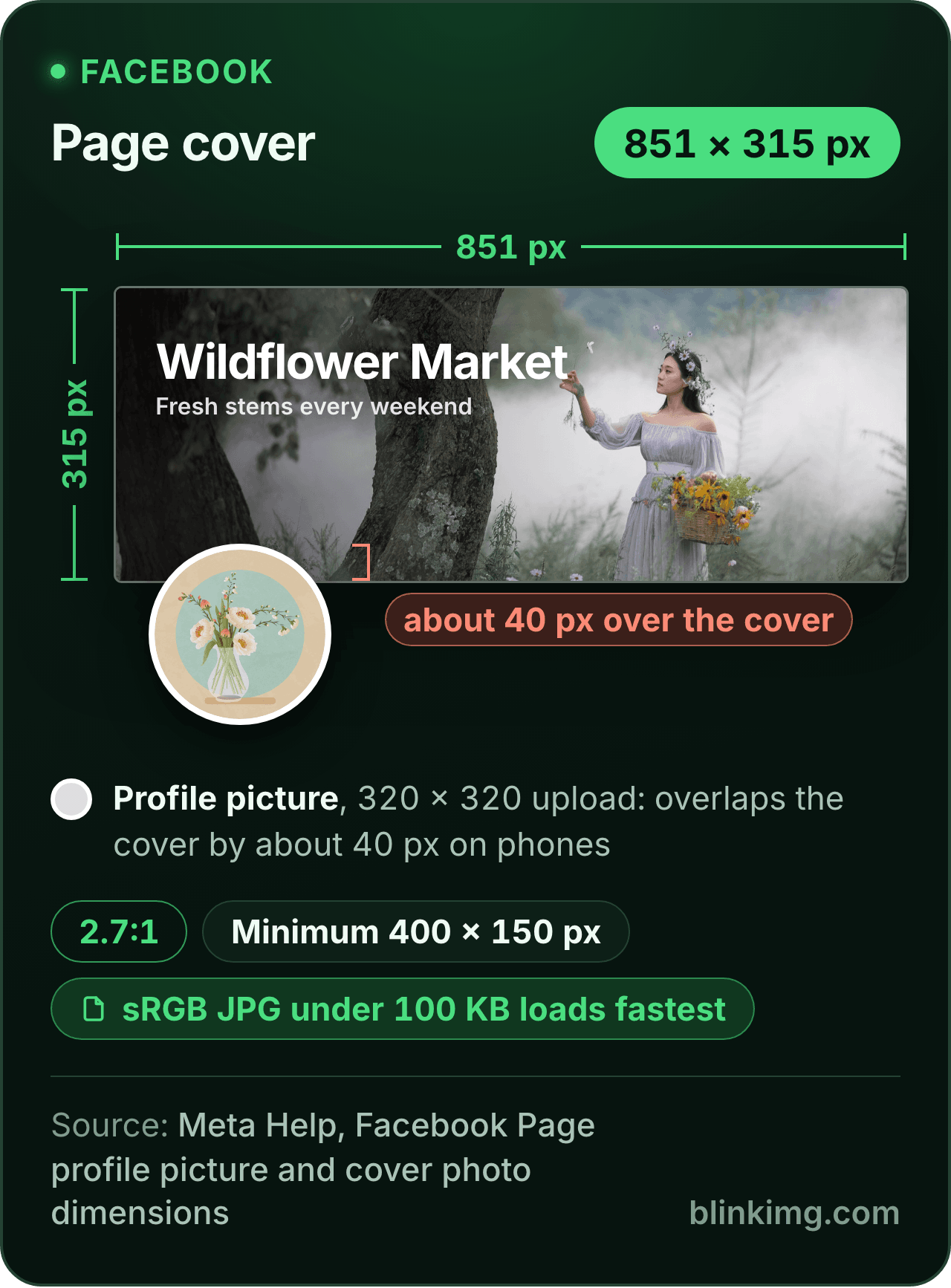
The editor opens on 851 × 315, the Facebook cover photo size Meta's help page says loads fastest on a Page, cropped to the shape. Tap the 100 KB chip before you save and the JPG meets the same page's "less than 100 kilobytes". Part of the social media image resizer.
Paste this line into your page’s HTML. The picture links back here, the credit our CC BY 4.0 licence asks for.
<a href="https://blinkimg.com/resize-image-for-facebook-cover"><img src="https://blinkimg.com/images/size-guides/resize-image-for-facebook-cover.png" alt="A Facebook Page cover drawn at 851 × 315 pixels, 2.7:1: a misty meadow with a market's name, and the profile picture overlapping the cover's lower edge by about 40 pixels, as Meta says it does on phones. Chips give the sRGB JPG under 100 KB that Meta says loads fastest and the 400 × 150 minimum." width="640" height="867" style="max-width:100%;height:auto"></a>
The size, exactly
851 × 315 px, in every unit a form states it in
Millimetres and inches at 300 DPI, the print resolution the portals assume.
What Save exports
851 px
315 px
851 × 315 px
Pixels
851 × 315 px
Millimetres
72.1 × 26.7 mm
Inches
2.84 × 1.05 in
Ratio
2.70:1
Fit
cropped to the shape
Metadata
EXIF and GPS stripped
The rules, with their sources
Page cover, loads fastest
sRGB JPG, 851 × 315 px, less than 100 KB
Meta Help, Facebook Page profile picture and cover photo dimensions
Page cover, minimum
400 × 150 px
Meta Help, Facebook Page profile picture and cover photo dimensions
Shown at
16:9, left-aligned, full bleed on computers; 2.4:1 on mobile
Meta Help, Facebook Page profile picture and cover photo dimensions
Profile picture overlap
About 40 px over the cover on mobile
Meta Help, Facebook Page profile picture and cover photo dimensions
Personal profile cover
At least 720 px wide; no other figure
Meta Help, Add or change your cover photo on Facebook
Page profile picture
320 × 320 px; shown at 176, 196 and 36 px, cropped to a circle
Meta Help, Facebook Page profile picture and cover photo dimensions
Each rule as it read on its source when we checked it in September 2026. The source’s own page wins over this card.
Source: photo.jpg, 576.8 KB at 1920×1280, through the preset this page opens on (the centre cropped to the ratio and scaled to the size), then the engine at its defaults. The row is the real output.
Every byte count is the size of the actual file our engine produced from the named source, the same bytes you would download, not an estimate. The reference photo is one of our own photographs, an iguana on a branch, and the camera photo is a real one too. Drop your own file into the tool above to rerun any of them. How we measure names the sources and the settings.
Answered
What is the Facebook cover photo size?
851 × 315 pixels for a Page, as an sRGB JPG under 100 KB, with 400 × 150 as the smallest upload.
Those are Meta’s words, from its help page on Facebook Page profile picture and cover photo dimensions: the cover “loads fastest as an sRGB JPG file that’s 851 pixels wide, 315 pixels tall and less than 100 kilobytes” on computers and phones alike. A personal profile has a different page and a shorter rule: Meta’s page on adding or changing your cover photo says the image has to be at least 720 pixels wide, and nothing else. The numbers on most tool pages, 820 × 312 for computers and 640 × 360 for phones, or 820 × 360, appear on no live Meta page we could reach. They are the older figures, repeated from one guide to the next. An 820-wide image still uploads; it is just not Meta’s size, and it is not what this page opens on.
Answered
Why does my cover photo look different on mobile?
Because Meta shows the same image at two shapes and lays the profile picture over it.
Its Page dimensions page says the cover “left aligns with a full bleed and a 16:9 aspect ratio” on computers and displays at “a 2.4:1 aspect ratio” on mobile. It adds that “the profile picture overlaps with the cover photo by approximately 40 pixels on mobile devices”. An 851 × 315 image is 2.7:1, wider than either shape, so each screen shows a different slice of its width, and the computer’s slice is the narrower one. Two habits survive both. Keep faces, the shop name and any words in the middle third of the width. And keep the edge where your profile picture sits clear of anything you need to read; open the Page on a phone after uploading and see where it lands, then move the frame here and save again if it covers something.
Answered
Crop or Fit: how do I resize a photo for a Facebook cover without cropping?
Crop for a photograph, Fit for flat art.
The page opens on Crop: a 851 × 315 frame over the picture that you drag to the strip you want. The cover is a wide strip, 2.7:1, so a full-width crop keeps 56 percent of a 3:2 photo’s height and 49 percent of a 4:3 one; the band you choose is the whole design. The Crop / Fit switch under the tiles offers the other route. Fit scales the whole photo to sit inside the strip and paints the rest a colour: a 3:2 photo gets bands of 189 pixels at each side, a 4:3 photo 215. On a cover those bands are visible on every screen, so Fit earns its place when the image is a logo or lettering on a plain background and the fill matches it, white on white or black on black. For a photo, a good crop beats a padded one.
Answered
How do I get the cover under 100 KB?
Tap the 100 KB chip in Advanced settings before you save, and the export lands at or under it, never over.
Meta’s page does not refuse a heavier file; it says the 100 KB one loads fastest, and a cover is the first thing every visitor to the Page downloads. At 851 × 315 the cap is easy. Our 1920 × 1280 reference photo came back at 54.6 KB at 851 × 315 through the engine at its defaults with no cap at all. A busy photo that runs over gets the cap’s search for the highest quality that fits. Pick JPEG in the format picker, because Meta’s fastest file is a JPG and a PNG of a photo weighs several times more. The colour side is handled for you: the engine converts an embedded profile to sRGB and strips it, so the export is the sRGB JPG the page asks for.
Answered
What is the Facebook profile picture size?
320 × 320 pixels for best quality, from the same Meta page as the cover.
The page also says where the picture is shown: 176 × 176 on your Page on computers, 196 × 196 on smartphones and 36 × 36 on most feature phones, cropped to a circle.
The FB profile picture size to upload
A square of 320 pixels or more. Press the 1:1 tile, then type 320 into the Custom size box with the link on, drag the square over the face or the logo with room around it, and save. Upload the full square: Facebook draws the circle, and a picture you round yourself gets masked twice. A larger square is fine and stays sharp when the picture is shown big on the profile itself; smaller than 196 pixels is enlarged on a phone and looks soft.
Answered
Can I resize an event or group cover with this?
Yes, at the size the upload box shows you.
Meta publishes no separate figure for event or group covers on the pages we reached, and we print none rather than borrow one from a guide. Open the event or the group, start the cover upload, and read the size it asks for; then unlink the sides, type that width and height into the Custom size box, tap Apply, drag the frame and save. If the box shows a wide strip like the Page cover, the 851 × 315 preset already pressed is a sensible upload, and the same rules apply: the middle survives every screen, the edges may not.
Be sure first
When is the cover preset the wrong tool?
A personal profile cover?
Meta states only a 720-pixel minimum width for it. Any wide crop at 720 or more works; the Page size is one safe choice, not the rule.
A link preview image?
That is the OG image tile, 1200 × 630, a different shape for a different slot.
An ad?
Ad placements have their own specs on Meta Business Help. Read the placement, then type its size here.
The size is already pressed above. One drop settles most of these.
Q:What is the recommended size for a Facebook cover photo?
851 × 315 pixels for a Page. Meta's help page on Page profile picture and cover photo dimensions says the cover loads fastest as an sRGB JPG 851 pixels wide, 315 tall and under 100 KB, and must be at least 400 × 150. For a personal profile, Meta's cover photo page says only that the image must be at least 720 pixels wide.
Q:How do I resize my cover photo to fit the Facebook dimensions online?
Drop the photo into the cover resizer. The editor opens with FB cover pressed, a 851 × 315 frame drawn over the picture; drag it to the strip you want and tap Save. Tap the 100 KB chip in Advanced settings first and the JPG also meets Meta's "less than 100 kilobytes". Upload the export as the Page cover.
Q:What size is a cover photo for Facebook, in pixels?
851 × 315 for a Page cover, with 400 × 150 as the minimum, from Meta's Page dimensions help page. The 820 × 312, 820 × 360 and 640 × 360 figures on most tool pages appear on no live Meta page we could reach; they are older numbers passed from guide to guide. Meta's personal-profile page states no exact size, only a 720-pixel minimum width.
Q:Why does my cover photo look different on mobile?
Because Meta shows it at two shapes. Its Page dimensions page says the cover is left-aligned with a full bleed at 16:9 on computers and shown at 2.4:1 on mobile, and that the profile picture overlaps the cover by about 40 pixels on phones. So the ends and the edge near the profile picture change from screen to screen; keep what matters in the middle.
Q:What are the Facebook profile picture size dimensions?
320 × 320 pixels for best quality, says Meta's Page dimensions help page, which also lists where it is shown: 176 × 176 on computers, 196 × 196 on smartphones and 36 × 36 on most feature phones, cropped to a circle. Press the 1:1 tile, then type 320 in the Custom size box, keep the face centred, and upload the square.
Q:What is the minimum Facebook profile picture size?
Meta's Page dimensions page states no minimum for the profile picture, only the 320 × 320 size it calls best quality and the sizes it is displayed at: 176, 196 and 36 pixels square. A picture smaller than 196 pixels is enlarged on a phone and looks soft, so treat 320 as the floor and upload a larger square when you have one.
Q:Can I resize a Facebook event cover photo with this tool?
Yes, at whatever size the event's upload box states. Meta publishes no separate event or group cover figure on the pages we reached, so we print none. Keep the FB cover preset if the box shows a wide strip like the Page cover, or unlink the sides, type the size it asks for into the Custom size box, drag the frame, and save.
Q:How do I resize a photo for a Facebook cover without cropping?
Switch the Crop / Fit control under the tiles to Fit. The whole photo then sits inside 851 × 315 on a fill colour instead of being cut: a 3:2 photo gets bands of 189 pixels at each side, a 4:3 photo 215. On a cover those bands show on every screen, so Fit suits a logo or flat art on a matching fill better than a photograph.
Q:Is the Facebook cover size 820 × 312?
Not on any Meta page we could reach. 820 × 312 for computers and 640 × 360 for phones are the figures most guides and tools still print. Meta's live Page dimensions page says 851 × 315 under 100 KB with a 400 × 150 minimum, and its personal cover page says at least 720 pixels wide. An 820 × 312 image still uploads; it is just not Meta's number.
Q:Why does Meta say under 100 KB?
Because that is the file it says loads fastest: an sRGB JPG at 851 × 315 under 100 kilobytes, in the words of its Page dimensions page. A cover is the first thing every visitor downloads. Tap the 100 KB chip in Advanced settings and the export lands at or under it; our reference photo came back at 54.6 KB at this size without a cap.
Q:What is the Facebook cover photo size in inches?
It has none that matters: a cover is shown on screens, in pixels. A 300 DPI conversion exists for anyone whose template asks, but no inch figure changes what Facebook receives. Work in pixels, 851 wide and 315 tall, keep the middle clear of edges, and let the file weigh under 100 KB.
Q:Do you keep my cover photo?
No. We keep nothing: files are processed and wiped automatically, never archived and never used for anything else. Saving strips EXIF metadata, GPS location included, and converts the colour profile to sRGB before it goes. The cover you download is yours, with no account, no watermark and no charge for the resize.