What is a pixel? A real photo, measured pixel by pixel
A pixel is the smallest dot of colour in a digital image. It is one square of a grid, stored as three numbers for red, green and blue. We read one pixel of a real photo, saved its 13,809,848 pixels six ways and counted what a pixel costs in bytes and on a screen. Part of the image resizer.
By Sahadat Husain12 min readGuides

What is a pixel?
A pixel is the smallest dot of colour in a digital image. A photo is a grid of them, and each pixel holds one colour. Our camera test photo is 4964 × 2782 pixels: 13,809,848 squares. The word joins “pix”, short for pictures, and “el”, for element, says Wikipedia’s pixel article.
Merriam-Webster defines a pixel as “any of the small discrete elements that together constitute an image”. It dates the word’s first known use to 1965. That year Frederic C. Billingsley of JPL published it for scanned pictures from space probes, Wikipedia records.
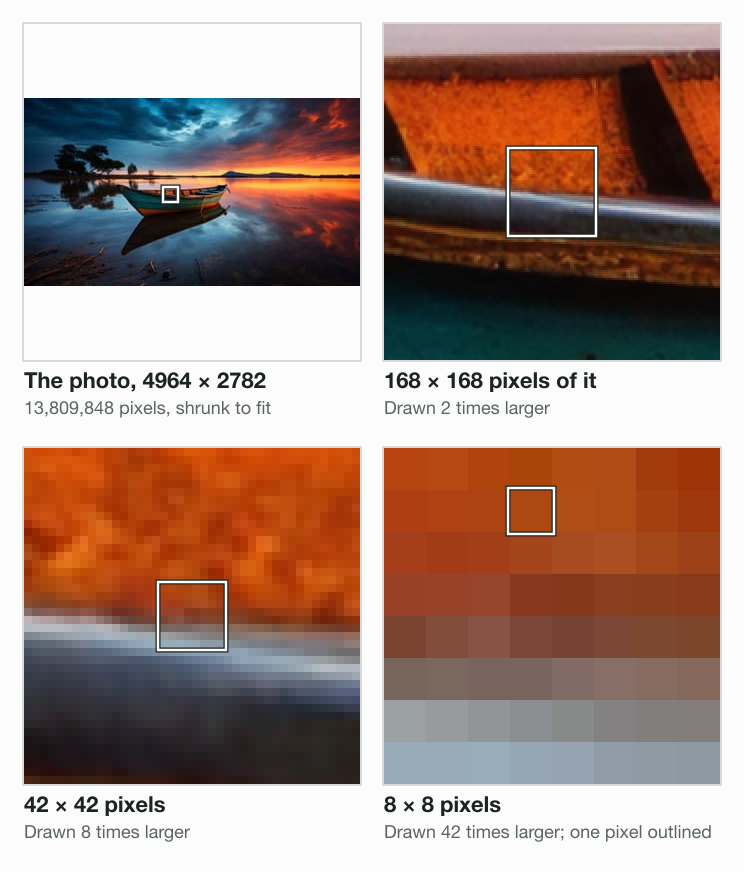
Each square in the last panel is one pixel. A pixel has one colour and no detail inside it. Detail comes only from more pixels.
The word has two other common meanings. A camera sensor’s light-detecting cells are pixels too, in Merriam-Webster’s second sense. And in advertising, a pixel is code: Meta calls its Meta Pixel “a snippet of JavaScript code” that tracks ad visitors on a website. This post is about the dot in an image.
How do pixels work?
A pixel works as three numbers: how much red, green and blue light to mix. Each number takes one byte, from 0 to 255. The outlined pixel, at column 2,167 and row 1,423 of our photo, holds these three:
- AC·
Red: 172
- 49I
Green: 73
- 12·
Blue: 18
Three bytes give 256 × 256 × 256 = 16,777,216 possible colours. Our photo stores 8 bits for each colour, so 24 bits a pixel. Red 172, green 73 and blue 18 mix to a burnt orange: the plank of the boat.
A pixel stores no size and no position. The file stores the width and height once, then every colour row by row. Software finds a pixel by counting: row 1,423 starts after 1,423 full rows of 4,964 pixels.
How a screen shows a pixel
A screen pixel is a light, not a number. In LCD, LED and plasma displays, each pixel holds red, green and blue parts called subpixels. Wikipedia’s article puts it plainly: “LCDs typically divide each pixel vertically into three subpixels.” The screen sets each subpixel’s brightness from the file’s three bytes. From a normal distance, the three blend into one colour.
How many bytes is a pixel?
A pixel takes 3 bytes in memory and far less in a file. Our photo’s 13,809,848 pixels fill 41.4 MB as raw colour values. Blinkimg’s engine saved the same pixels as a 287.9 KB AVIF at Auto:
Bytes for the whole photo
- Raw RGB41.4 MB
- PNG, quality 10015.1 MB
- Original JPEG9.8 MB
- JPEG at Auto605.5 KB
- WebP at Auto329.0 KB
- AVIF at Auto287.9 KB
| Form | Bytes | Bits a pixel |
|---|---|---|
| Raw RGB, 3 bytes a pixel | 41,429,544 | 24 |
| PNG at quality 100 (lossless) | 15,050,026 | 8.72 |
| The original JPEG | 9,804,300 | 5.68 |
| JPEG at Auto | 605,510 | 0.35 |
| WebP at Auto | 328,972 | 0.19 |
| AVIF at Auto | 287,931 | 0.17 |
Files store patterns, not one pixel after another. A PNG packs the exact values: 8.72 bits a pixel against the raw 24. A JPEG, WebP or AVIF goes further by nudging values the eye barely sees. Here is the 8 × 8 block from the zoom, as the photo holds it and as two files gave it back:
The photo
63 colours in 64 pixels
PNG, quality 100
0 of 64 changed
JPEG at Auto
64 of 64 changed, by 14 at most
The JPEG moved every value in the block by 14 steps of 255 at most. That trade is how 605.5 KB holds 13,809,848 pixels. To get a photo under an upload limit, compress image to 100 KB picks the bytes for you. Image formats explained compares the formats in full.
How big is a one-pixel image?
One pixel as a file weighs far more than its 3 bytes. We saved the outlined pixel’s colour as a 1 × 1 image with Blinkimg’s engine. The WebP took 66 bytes, the PNG 90, the AVIF 288 and the JPEG 323. Nearly all of each file is the format’s headers, the labels a file carries before its first pixel.
Does more pixels mean better quality?
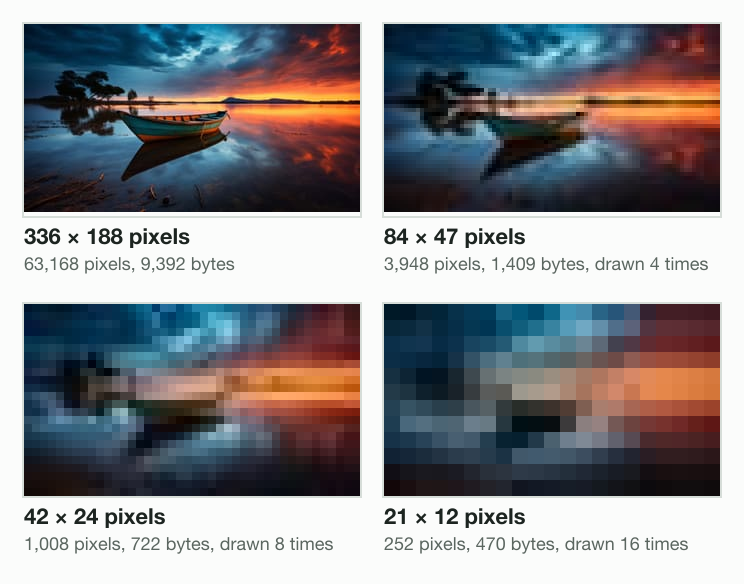
More pixels hold more detail, so a photo with more pixels can show finer things. We resized our photo with Blinkimg’s engine and drew four of the results at one width:
| Size in pixels | Pixels | Megapixels | JPEG at Auto |
|---|---|---|---|
| 4964 × 2782 | 13,809,848 | 13.8 | 605.5 KB |
| 1920 × 1076 | 2,065,920 | 2.1 | 140.3 KB |
| 336 × 188 | 63,168 | under 0.1 | 9,392 bytes |
| 84 × 47 | 3,948 | under 0.1 | 1,409 bytes |
| 42 × 24 | 1,008 | under 0.1 | 722 bytes |
| 21 × 12 | 252 | under 0.1 | 470 bytes |
At 21 × 12, the photo is 252 squares. The pixelate image tool does the same on purpose, to hide a face or a plate. Pixels a display cannot show buy nothing, though. Our 336-pixel version looks sharp at 336 pixels wide; the original pays off only on a big screen or in print.
Enlarging a small photo adds pixels but no detail. How to resize an image without losing quality measures why.
What is a megapixel?
A megapixel is 1,000,000 pixels. Our photo’s 13,809,848 pixels make 13.8 megapixels. Apple’s iPhone 17 specs list a 48MP main camera with “super-high-resolution photos (24MP and 48MP)”. A 1920 × 1080 image holds 2,073,600 pixels: about 2.1 megapixels.
How big is a pixel?
A pixel in a file has no size of its own. It takes the size of the screen or the paper that shows it. Three common cases:
| Where | Pixels per inch | One pixel | Source |
|---|---|---|---|
| A CSS pixel on a web page | 96 | 0.26 mm | W3C: 1px = 1/96th of 1in |
| An iPhone 17 screen | 460 | 0.055 mm | Apple: 2622 × 1206 at 460 ppi |
| A photo print at 300 DPI | 300 | 0.085 mm | 25.4 mm ÷ 300 |
The CSS specification fixes the web’s pixel: “1px = 1/96th of 1in”, about 0.26 mm when read at arm’s length. A print counts pixels per inch instead. Our photo printed at 300 DPI would be 16.5 inches wide. How to change the DPI of an image covers print sizes, and resize image in inches sets one.
CSS pixels and screen pixels
A web page’s pixel is not always one screen pixel. MDN defines devicePixelRatio as “the ratio of the resolution in physical pixels to the resolution in CSS pixels”. We drew a 100 × 100 CSS pixel square in headless Chromium 149 at three device scales:
| Device scale | devicePixelRatio | The square in screen pixels | Screen pixels |
|---|---|---|---|
| 1x | 1 | 100 × 100 | 10,000 |
| 2x | 2 | 200 × 200 | 40,000 |
| 3x | 3 | 300 × 300 | 90,000 |
At scale 2, the square took 200 × 200 screen pixels: 4 for every CSS pixel. A headless browser stands in for a phone here; a real phone reports its own ratio. So an image that stays sharp on a 2x screen needs twice the width it shows at.
What size is this image? How to check its pixels
An image’s size in pixels is its width × height, and every computer can show it. Adobe’s DPI guide gives the Windows and Mac paths:
- Windows. Right-click the file in File Explorer and choose Properties. Open the Details tab; Dimensions sits under Image.
- Mac, Preview. Open the image and choose Tools > Show Inspector. The General Info tab lists the image size.
- Mac, Terminal. Type sips -g pixelWidth -g pixelHeight and the file name.
- Mac or Linux, any image. The file command prints a JPEG’s width and height in its one line.
- In a browser. Drop the image into the image resizer. The editor’s header shows its width × height beside the file name.
$ sips -g pixelWidth -g pixelHeight image-compressor-sample-camera-photo.jpeg
  pixelWidth: 4964
  pixelHeight: 2782
$ file -b image-compressor-sample-camera-photo.jpeg
JPEG image data, JFIF standard 1.01, aspect ratio, density 1x1, segment length 16, baseline, precision 8, 4964x2782, components 3Check the pixels before an upload. A form that asks for 1920 × 1080 wants those two numbers, whatever the file weighs. The resizer under this post sets that exact size, with a crop or a fit and no stretch.
Read the full guide: How to reduce image file size on any device.
Questions
- What is a 1920x1080 pixel?
- 1920x1080 is an image or screen size in pixels: 1,920 pixels across and 1,080 down. That makes 2,073,600 pixels, about 2.1 megapixels. Stored raw at 3 bytes a pixel, it fills 6,220,800 bytes. Our photo at 1920 × 1076 took 140,334 bytes as a JPEG from Blinkimg's engine at Auto.
- What does one pixel look like?
- One pixel looks like a tiny flat square of a single colour. Zoom into a photo far enough and the picture breaks into these squares. In our test photo, one pixel on a boat's rim holds red 172, green 73 and blue 18: a burnt orange square with no detail inside it.
- Is a pixel an image?
- A pixel is not an image on its own; it is one dot of an image. A photo is a grid of millions of pixels, each holding one colour. A 1 × 1 image file does exist, though. Blinkimg's engine saved one pixel as a 66-byte WebP: mostly headers around 3 bytes of colour.
- How to explain pixels to a child?
- Tell a child that a picture on a screen is made of tiny coloured tiles, like a mosaic. Each tile is a pixel, and it shows only one colour. Zoom into a photo together until the tiles appear. Fewer tiles make a blockier picture, like our photo shrunk to 21 × 12 pixels.
- How much is 1 pixel?
- One pixel has no fixed size; it takes the size of what shows it. On a web page, a CSS pixel is 1/96 of an inch, about 0.26 mm, by the W3C's CSS specification. An iPhone 17 screen packs 460 pixels an inch, so one is about 0.055 mm. In memory, a pixel takes 3 bytes.
- How are pixels created?
- A camera creates pixels when its sensor measures light at millions of points. Each point becomes a pixel with red, green and blue values. Software creates pixels too, by drawing or by resizing. Blinkimg's engine turned our 13,809,848-pixel photo into 252 pixels at 21 × 12, each blended from the area it covers.
- What does pixel mean in a phone?
- On a phone, pixel means two things. The screen's pixels are its tiny lights: Apple's iPhone 17 has 2622 × 1206 of them at 460 pixels an inch. The camera's pixels are its light sensors, counted in megapixels. Apple lists the iPhone 17 main camera at 48MP, which is 48 million of them.
- Does higher pixel mean better quality?
- More pixels mean more detail, but only up to what the screen or the print can show. Our photo at 336 × 188 pixels looked sharp at that size; the 13.8-megapixel original adds detail only on a big screen or in print. More pixels also cost bytes: 9,392 at 336 wide, 140,334 at 1920.
- What does pixel mean?
- Pixel means picture element: the smallest dot of colour in a digital image or on a screen. The word joins pix, short for pictures, and el, for element. Merriam-Webster dates its first known use to 1965. The word also names a camera sensor's light cells and, in advertising, a tracking pixel.
- What are pixels made of?
- In a file, pixels are made of numbers: three bytes each, for red, green and blue, from 0 to 255. On a screen, pixels are made of light. In LCD and LED displays, each pixel holds red, green and blue subpixels that glow at the strengths the file sets. Together they show one colour.
- How do pixels work?
- Pixels work as a grid of colour values. An image file stores a width, a height and three numbers for each pixel, row by row. The screen lights each pixel's red, green and blue parts to match those numbers. From a normal distance, millions of these dots blend into one smooth picture.
- What is a megapixel?
- A megapixel is one million pixels. Multiply an image's width by its height, then divide by 1,000,000. Our camera test photo is 4964 × 2782 pixels, which is 13,809,848 pixels or 13.8 megapixels. Apple lists the iPhone 17 main camera at 48MP, with photos at 24MP or 48MP.
- What is a tracking pixel?
- A tracking pixel is code on a web page that reports a visit; it is not a dot of a photo. Meta describes its Meta Pixel as a snippet of JavaScript code that tracks Facebook ad-driven visitors on a website. A one-pixel image is small too: Blinkimg's engine saved one as a 66-byte WebP.
- What’s the image size of this image, and how do I find it?
- Look for the width and height in pixels. On Windows, open the file’s Properties and the Details tab. On a Mac, open it in Preview and choose Tools > Show Inspector, or run sips -g pixelWidth in Terminal. In a browser, the image resizer’s editor shows width × height beside the file name.