Resize an image to the TikTok profile picture size
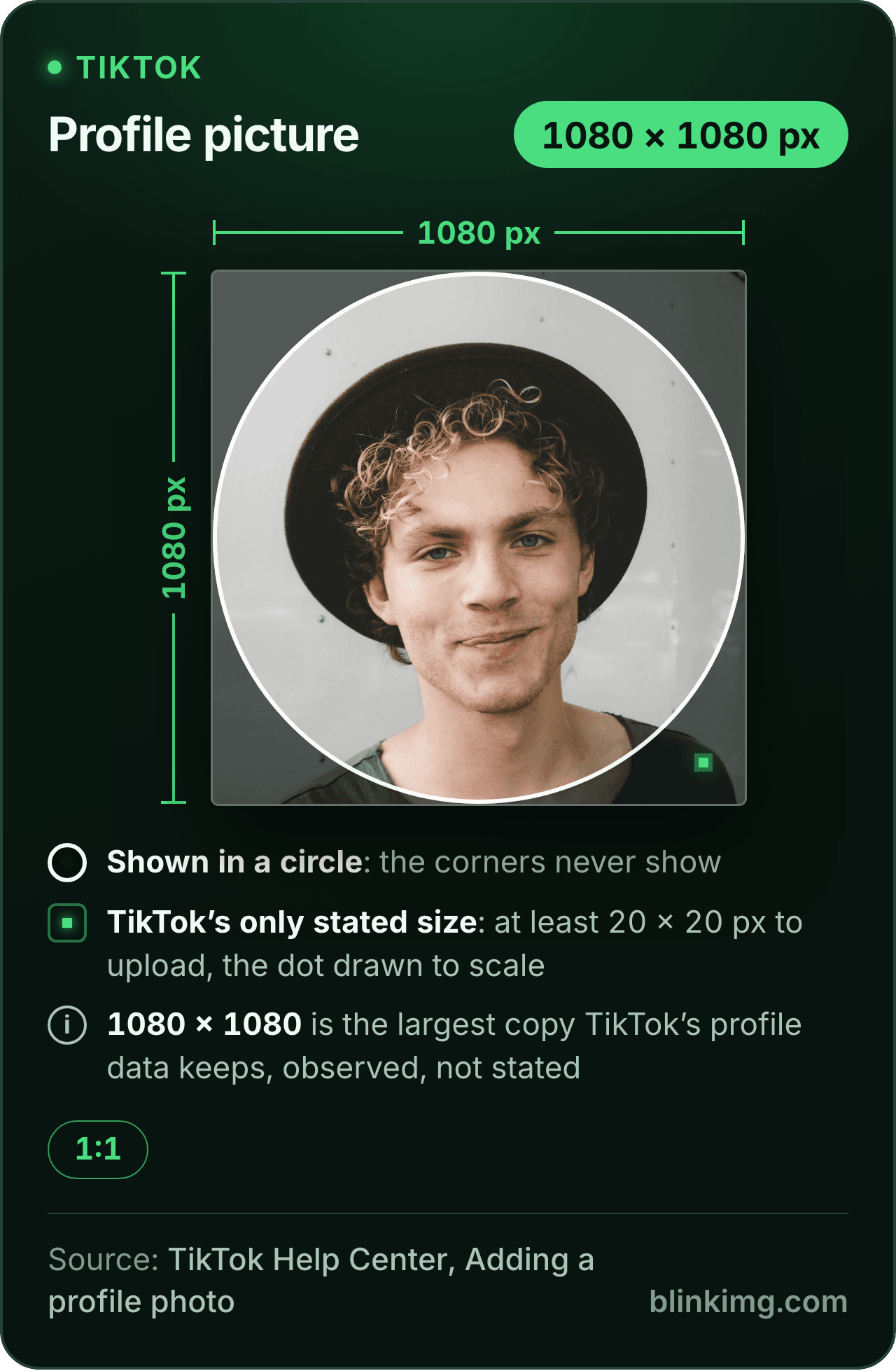
TikTok's help page states one TikTok profile picture size, a minimum of 20 × 20 pixels, and no recommended one. The editor opens on a 1080 × 1080 square with Fit on, the largest copy TikTok's profile data keeps, so the picture stays sharp in the circle. Part of the social media image resizer.
TikTok profile picture size, and where each number comes from
Paste this line into your page’s HTML. The picture links back here, the credit our CC BY 4.0 licence asks for.
<a href="https://blinkimg.com/resize-image-for-tiktok"><img src="https://blinkimg.com/images/size-guides/resize-image-for-tiktok.png" alt="A TikTok profile picture drawn at 1080 × 1080 pixels with the circle the app shows it in, the corners dimmed, and TikTok's only stated size, a 20 × 20 pixel minimum, drawn to the same scale as a dot in the corner." width="640" height="979" style="max-width:100%;height:auto"></a>
The size, exactly
1080 × 1080 px, in every unit a form states it in
Millimetres and inches at 300 DPI, the print resolution the portals assume.
What Save exports
1080 px
1080 px
1080 × 1080 px
Pixels
1080 × 1080 px
Millimetres
91.4 × 91.4 mm
Inches
3.6 × 3.6 in
Ratio
1:1
Fit
whole picture, white bands
Metadata
EXIF and GPS stripped
The rules, with their sources
Profile photo
at least 20 × 20 px to upload; the app crops, then Save
TikTok Help Center, Adding a profile photo
Copies TikTok keeps
1080 × 1080, 720 × 720 and 100 × 100; the developer docs name the 100 × 100 and a "higher resolution" copy
third-party samples of TikTok profile data; TikTok for Developers
Ad profile photo
98 × 98 px, 1:1, JPG or PNG, under 50 KB; key element in the middle 66 px
TikTok Ads Manager Help, In-Feed Ads
Video
ads: 9:16 from 540 × 960, 16:9 from 960 × 540, 1:1 from 640 × 640; posting API: 360 to 4096 px a side
TikTok Ads Manager Help; TikTok for Developers
Photo posts
up to 35 photos; posting API images up to 1080p, JPEG or WebP
TikTok Help Center; TikTok for Developers
Carousel ads
1200 × 628, 640 × 640 or 720 × 1280; 100 KB or less suggested
TikTok Ads Manager Help
Each rule as it read on its source when we checked it in September 2026. The source’s own page wins over this card.
Source: photo.jpg, 576.8 KB at 1920×1280, through the preset this page opens on (the whole picture inside the size on the fill), then the engine at its defaults. The row is the real output.
Every byte count is the size of the actual file our engine produced from the named source, the same bytes you would download, not an estimate. The reference photo is one of our own photographs, an iguana on a branch, and the camera photo is a real one too. Drop your own file into the tool above to rerun any of them. How we measure names the sources and the settings.
Answered
What size is a TikTok profile picture?
TikTok states one size, a minimum of 20 × 20 pixels, and no recommended one; the copies its profile data keeps are 1080 × 1080, 720 × 720 and 100 × 100.
The minimum is on TikTok’s help page for adding a profile photo. The copies are seen in third-party samples of TikTok’s own profile data; its developer docs name a 100 × 100 copy and a “higher resolution” one without a number. So the size that matters is the largest, 1080 × 1080: upload that and every smaller copy is made from pixels you gave, which is why this page opens on it. The guides’ 200 × 200 and 720 × 720 are their own figures, and the table below says who prints which.
Compared
Why do the guides disagree on the TikTok profile picture size?
TikTok never says.
Because TikTok publishes no recommended size, each guide picks one. Only the first three rows are TikTok’s; the rest are the guides’ own words from the pages named in the caption.
Source
Size
Kind
TikTok Help Center
at least 20 × 20
TikTok's rule
TikTok Ads Manager
98 × 98, under 50 KB
TikTok's ad spec
TikTok's profile data
1080 × 1080, 720 × 720, 100 × 100
observed
Hootsuite
200 × 200 recommended
guide
Buffer
at least 200 × 200
guide
Sprout Social
200 × 200 minimum
guide
CapCut
200 × 200, credited to TikTok with no link
guide
SocialSizes
720 × 720, called its own recommendation
guide
TikTok Help Center, Adding a profile photo; TikTok Ads Manager Help, In-Feed Ads (June 2026); third-party samples of TikTok's profile data. Hootsuite (2 September 2026), Buffer (12 May 2026), Sprout Social, CapCut (16 May 2025) and SocialSizes (18 August 2026), as read in September 2026.
A square larger than every figure in the table is the safe answer, and 1080 × 1080 is the largest copy TikTok keeps. The same reasoning gives the WhatsApp DP size and the Discord profile picture size their pages.
Answered
Why does TikTok say minimum 250x250 pixels?
People report the message, and TikTok’s own search pages exist for it, but the help page still says 20 × 20.
We could not read the message itself, so we cannot say which check shows it or when. What is certain is that it is a floor, like the help page’s: a picture that meets it is allowed, not good. The 1080 × 1080 square this page makes clears both numbers by a wide margin, so whichever minimum the app applies, the upload passes and the picture stays sharp.
Answered
Why is my TikTok profile picture blurry?
Because it started small: a 200 × 200 upload holds 1/29 of the pixels of the 1080 × 1080 copy TikTok keeps.
A screen that shows the large copy has to stretch a small one, and the stretch is the blur. Two other starts are small without looking it: a screenshot of a photo, and a face cropped out of a group shot. Go back to the original photo, drop it here, and save the square once at 1080 × 1080. Saving it again from the saved copy only adds loss.
Answered
How do I make my TikTok profile picture fit without cropping?
Fit it here: TikTok’s own step crops and saves, and has no way to fit.
This page opens with Fit on. A 3:4 selfie sits at 810 × 1080 inside the square with a 135 pixel band each side, in white or a colour you pick, and a 4:3 landscape photo sits the other way with bands above and below. The square then passes TikTok’s crop step with nothing to cut. For a close face, switch to Crop and drag the square over it instead: a bigger face reads better in a small circle.
Answered
Is a TikTok profile picture a circle, and where does it cut?
Yes: the circle hides 21.5% of the square, the four corners.
Keep the face or the logo inside the middle 727 pixels of a 1080 × 1080 upload and the circle never touches it. That is TikTok’s own proportion: its ad spec keeps the key element inside the middle 66 pixels of a 98 pixel profile photo, and 66 of 98 scaled to 1080 is 727. The whole square still uploads, so the corners can hold anything; they are simply not shown on the profile.
Answered
What is the TikTok video size?
9:16 from 540 × 960 for ads, and 1080 × 1920 as the full-HD frame the guides recommend.
TikTok Ads Manager also takes 16:9 from 960 × 540 and square from 640 × 640, and its posting API takes video from 360 to 4096 pixels a side. A photo post can hold up to 35 photos, with no pixel size on the help page. For a still in the tall frame, the 1080 × 1920 page opens on it, and the 9:16 aspect ratio page works out where text is safe from the app’s buttons.
Answered
What size is the profile image for TikTok ads?
98 × 98 pixels, square, JPG or PNG, under 50 KB, on TikTok Ads Manager’s in-feed ads page.
Keep the key element inside the middle 66 pixels, the page adds, so the circle does not cut it. Spark Ads, which promote an account’s own post, use the account’s profile photo instead. To make one, type 98 and 98 into Custom size, press Apply, open Advanced and set Max file size to 50 KB, then Save: the square comes back at that size and under the cap in one go.
Be sure first
When the TikTok preset is the wrong tool
A video or a tall photo?
That is a 9:16 frame, not a square: the 1080 × 1920 page opens on it.
A banner for another platform?
The YouTube, X and LinkedIn banner pages open on their own sizes.
A face that must fill the circle?
Switch Fit off: Crop drags the square over the face, and nothing is added around it.
The size is already pressed above. One drop settles most of these.
Q:What size is a TikTok profile picture?
TikTok states no recommended size, only a minimum: photos must be at least 20 × 20 pixels to upload, on its help page. The copies its profile data keeps are 1080 × 1080, 720 × 720 and 100 × 100, seen in third-party samples. Upload a 1080 × 1080 square and every copy is made from pixels you gave; that is what this page opens on.
Q:What is the minimum Tik Tok profile picture size?
20 × 20 pixels: TikTok's help page on adding a profile photo says photos must be at least that size to upload. It is a floor, not advice. A picture that small is a blur on any screen, so treat the minimum as the rule and 1080 × 1080 as the size to aim for.
Q:Why does TikTok say minimum 250x250 pixels?
People report a message asking for 250 × 250 when they change the photo, and TikTok has search pages for the phrase, but its help page still says 20 × 20. We could not read the message itself. The 1080 × 1080 square made here clears both numbers, so whichever check the app runs, the upload passes.
Q:Why is my TikTok profile picture blurry?
Usually because it started small. A 200 × 200 upload has 1/29 of the pixels of the 1080 × 1080 copy TikTok keeps, so a large screen stretches it. A screenshot, or a face cropped out of a group photo, starts small too. Save the picture once, from the original photo, at 1080 × 1080, and upload that file.
Q:How do I make my TikTok profile picture fit without cropping?
Fit it here first. TikTok's own step crops, then saves; it cannot fit. This page opens with Fit on, so a 3:4 selfie becomes 810 × 1080 inside the square with a 135 pixel band each side, in white or a colour you pick. The square then passes TikTok's crop step with nothing to cut.
Q:Is a TikTok profile picture a circle?
Yes, the app shows it in a circle, which hides 21.5% of the square: the corners. Keep a face or a logo inside the middle 727 pixels of a 1080 × 1080 upload, the same proportion TikTok's ad spec asks to keep safe, and nothing that matters is cut. The whole square still uploads.
Q:Can you have a video as your TikTok profile picture?
Not from the help page any more. TikTok’s article on adding a profile photo had a Change video step in every archived copy from 2020 to early July 2024; from late July 2024 it lists Change photo only. Treat the profile as photo-only, and check the app, where the options appear under Edit profile.
Q:What is the TikTok video size?
TikTok Ads Manager asks for 9:16 video of at least 540 × 960, or 16:9 from 960 × 540, or square from 640 × 640. Its posting API takes 360 to 4096 pixels a side. The guides recommend 1080 × 1920, the full-HD 9:16 frame, which the 1080 × 1920 page opens on for a still image.
Q:What size is a TikTok photo or carousel post?
TikTok states no pixel size for a photo post; its help page allows up to 35 photos, and its posting API takes JPEG or WebP up to 1080p. For carousel ads, TikTok Ads Manager lists 1200 × 628, 640 × 640 or 720 × 1280, at 100 KB or less as a suggestion. The 9:16 page answers the tall frame.
Q:What size is the profile image for TikTok ads?
98 × 98 pixels, square, JPG or PNG, under 50 KB, with the key element inside the middle 66 pixels, on TikTok Ads Manager's in-feed ads page. Spark Ads use the account's own photo instead. Type 98 and 98 into Custom size and set Max file size to 50 KB, and one save makes it.
Q:Is there a file size limit for a TikTok profile picture?
TikTok states none for a personal profile photo; the 5 MB and 10 MB some guides print are theirs. The ad profile photo must be under 50 KB. The 1080 × 1080 square this page makes weighed 114.3 KB from our reference photo as a JPEG, small for any upload.
Q:How do I change my TikTok profile picture?
In the app: tap Profile, then Edit profile, then Change photo, pick Take photo or Upload photo, crop it and tap Save, the steps on TikTok's help page. Make the square here first, with Fit on or the face centred, and the crop step has nothing to cut.
Q:Do you keep my photo?
No. We keep nothing: files are processed and wiped automatically, never archived and never used for anything else. Saving strips EXIF metadata, including the GPS position a phone writes into a photo, before it reaches TikTok. There is no account and no watermark, and 300 images a day are free.