The editor opens on 1500 × 500, the 3:1 Twitter header size X's Help Center recommends and every guide gives, cropped to the strip you choose. Slide the frame to the band you want, and Save exports that exact strip. Part of the social media image resizer.
Twitter header size (the X header) in 2026
Header
1500 × 500 px, 3:1X Help Center
Profile photo
400 × 400 px, up to 2 MBX Help Center
Header crop
60 px top and bottom on some screensX Help Center
File types
JPEG, GIF or PNGX Help Center
Header file size
5 MBthe guides' figure
Output format
– / –
Drop images or browse
JPEG · PNG · WEBP · AVIF · HEIC · up to 50 at once · max 30 MB each
HEIC
PNG
JPEG
AVIF
WEBP
Advanced settings1 on
SmallerAutoBetter
Auto tunes each image.
A hard cap for the number your form demands.
KB
A floor for forms that refuse small files.
Max resolution
×
Empty side keeps the ratio. Never enlarges.
Presets
Every named size, one editor
The same editor, the size already pressed. Pick the document or the platform.
Paste this line into your page’s HTML. The picture links back here, the credit our CC BY 4.0 licence asks for.
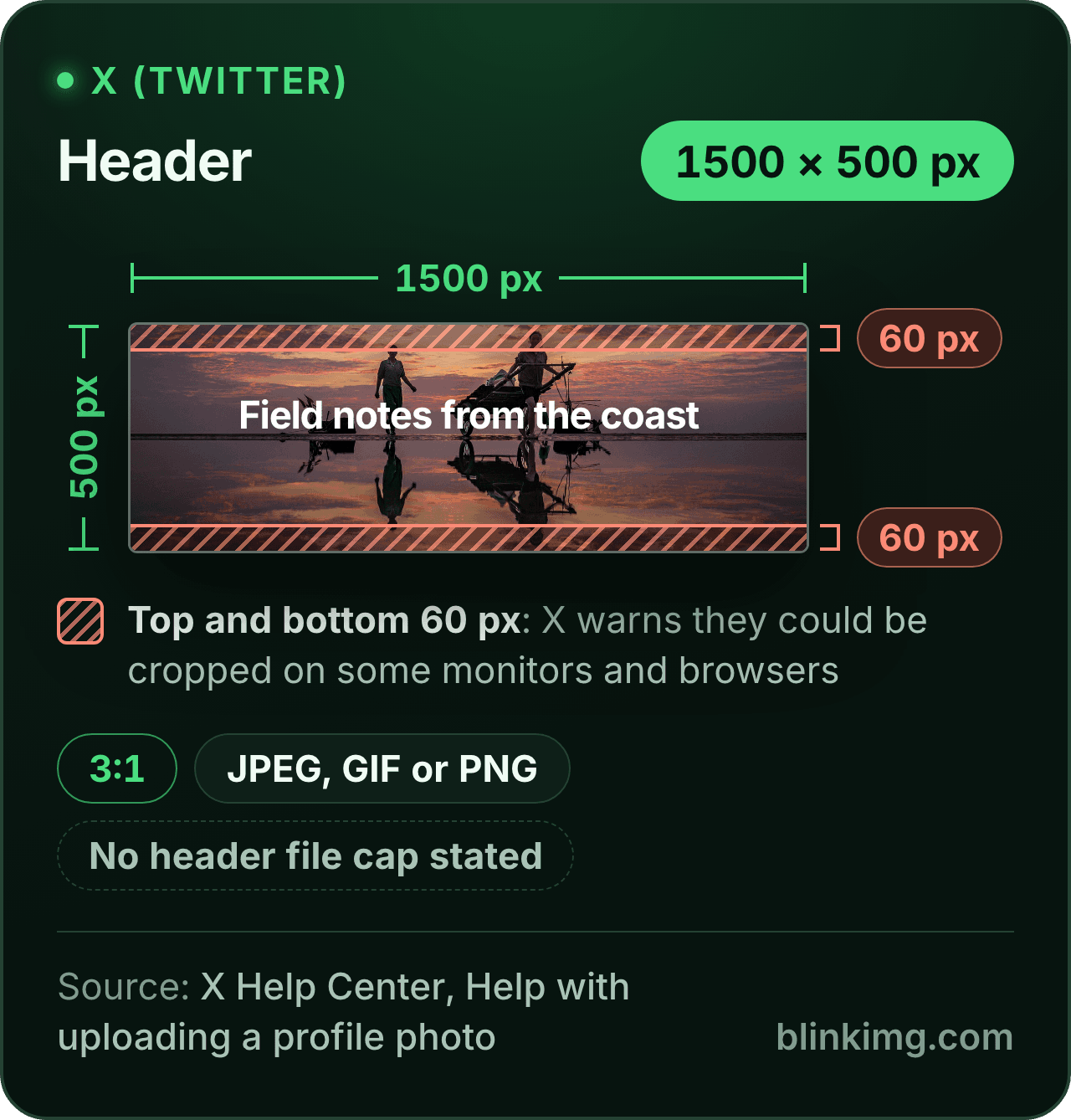
<a href="https://blinkimg.com/resize-image-for-x-header"><img src="https://blinkimg.com/images/size-guides/resize-image-for-x-header.png" alt="An X header drawn at 1500 × 500 pixels, 3:1: a beach at sunset with a headline in the middle, and hatched bands 60 pixels deep at the top and the bottom, the strips X warns could be cropped on some monitors and browsers. X names JPEG, GIF and PNG and states no file cap for the header." width="640" height="669" style="max-width:100%;height:auto"></a>
The size, exactly
1500 × 500 px, in every unit a form states it in
Millimetres and inches at 300 DPI, the print resolution the portals assume.
What Save exports
1500 px
500 px
1500 × 500 px
Pixels
1500 × 500 px
Millimetres
127 × 42.3 mm
Inches
5 × 1.67 in
Ratio
3:1
Fit
cropped to the shape
Metadata
EXIF and GPS stripped
The rules, with their sources
Header
1500 × 500 px (3:1), recommended
X Help Center, Help with uploading a profile photo
Profile photo
400 × 400 px recommended, 2 MB at most
X Help Center, Help with uploading a profile photo
Header crop
60 px at the top and the bottom could be cropped on some monitors and browsers
X Help Center, Help with uploading a profile photo
File types
JPEG, GIF or PNG
X Help Center, Help with uploading a profile photo
Post photos
Up to 5 MB; GIFs 5 MB on mobile, 15 MB on the web; one photo from 2:1 to 3:4 shows in full
X Help Center, How to post photos or GIFs on X
Header file size
5 MB in the guides; X's page on sizes names no header cap
the guides' figure
Each rule as it read on its source when we checked it in September 2026. The source’s own page wins over this card.
Source: photo.jpg, 576.8 KB at 1920×1280, through the preset this page opens on (the centre cropped to the ratio and scaled to the size), then the engine at its defaults. The row is the real output.
Every byte count is the size of the actual file our engine produced from the named source, the same bytes you would download, not an estimate. The reference photo is one of our own photographs, an iguana on a branch, and the camera photo is a real one too. Drop your own file into the tool above to rerun any of them. How we measure names the sources and the settings.
Answered
What is the X (Twitter) header size, and is it still 1500 × 500?
1500 × 500 pixels, a 3:1 strip: X’s Help Center recommends it for header images, every guide prints it under both names, and the editor’s X header tile exports it.
The same help page, Help with uploading a profile photo, recommends 400 × 400 for the profile photo, caps profile photos at 2 MB and names JPEG, GIF and PNG as the formats X supports. It also warns that at 1500 × 500, “60 pixels on the top and bottom could be cropped” on some monitors and browsers, so the middle 380 pixels of height are the part every screen keeps. It states no file cap for the header; the guides print 5 MB, which is their figure, not X’s. The page refuses plain fetchers, so we read it in a browser on 2 October 2026, and X can change it; if a number must be exact, it is worth a look. The rest of this page is about making the strip look right.
Answered
3:1 is a strip: what survives the crop?
A slice.
At 1500 wide the strip is 500 tall, and a full-width crop keeps 50 percent of a 3:2 photo’s height, 44 percent of a 4:3 phone photo’s and 25 percent of a portrait’s. A head does not fit in a strip that shape unless the strip is cut from a small part of a large photo, which enlarges it. So the page opens on Crop with the frame ready to slide, and the choice of strip is the whole design. A horizon, a skyline, a desk, a texture, a row of products, a crowd, or a photo taken with the header in mind, with the subject small and the sides empty. Pull a corner of the frame to take a narrower slice when the picture needs it; the export is still 1500 × 500. The Crop / Fit switch under the tiles offers the other route: Fit puts the whole photo inside the strip on a fill, which for a 3:2 photo means bands of 375 pixels at each side and a small picture in the middle. On a header that looks like a mistake unless the picture is a logo on a matching fill. A good crop beats a pad here.
Answered
What part of the header does the profile picture cover?
The lower left, according to the guides; X’s help page gives the sizes, not the position.
The safe layout does not depend on the exact pixels: keep the name, the logo and any words in the upper half of the strip and right of centre, below the top 60 pixels X says some screens crop, and treat the lower-left corner as covered. A phone shows a narrower strip than a computer does, so the middle is the only part every screen shares. Upload, look at the profile on a phone and on the site, and if the picture hides something, come back, slide the frame or move the subject, and save again. The export is exact every time, so the second upload replaces the first at the same size.
Answered
Why is my X header blurry, and how do I stop it?
Because the file X received was small or soft before X touched it.
An exact-size preset exports 1500 × 500 whatever you drop, so a source narrower than 1500 pixels is enlarged to fill the strip, and enlargement reads as blur. Our 1920 × 1280 reference photo is the safe case: its 3:1 strip is 1920 × 640, wider than the header, so the measured row above scales it down to 1500 × 500. A phone screenshot narrower than 1500 is enlarged instead. A small piece cropped from a large photo is the same thing by another route, and a file passed through several apps carries every compression it met. The fix is one clean export from the original: at least 1500 wide, cropped to the strip, saved once. A JPG photo comes back a JPG, and PNG from the format picker keeps a flat design’s edges crisp. Our reference photo came back at 132.2 KB at 1500 × 500. Whatever X does to the upload afterwards, and its help page does not say, a clean file gives it the least to spoil.
Answered
What is the X profile picture size?
400 × 400 pixels, the size X’s Help Center recommends, up to 2 MB, as JPEG, GIF or PNG.
It is a square shown as a circle, so the job is the same as any avatar: press the 1:1 tile, then type 400 into the Custom size box with the link on, drag the square over the face with room around it, and save. A larger square is fine and stays sharp when the picture is opened large; a square smaller than the slot is enlarged and looks soft. Upload the full square and let X draw the circle.
The size of an image for a Twitter post
X gives no pixel size for a post. Its help page on posting photos or GIFs says a single photo with a ratio between 2:1 and 3:4 displays in full, that a photo can be up to 5 MB, and that a GIF can be 5 MB on mobile and 15 MB on the web. A 16:9 frame at 1600 × 900, the size the guides print, sits inside that range; the Full HD tile exports the same shape at 1920 × 1080.
Be sure first
When is the header preset the wrong tool?
A post image, not a header?
A different shape. X shows a single photo in full from 2:1 to 3:4, up to 5 MB; the Full HD tile exports a 16:9 inside that range.
An animated header or avatar?
This editor exports still images only.
The whole photo must show?
Fit does it, on a fill colour, and a 3:1 letterbox looks like a mistake on a header. Choose the strip instead.
The size is already pressed above. One drop settles most of these.
Q:What size header does Twitter (X) use?
1500 × 500 pixels, a 3:1 strip. X's Help Center recommends header images at 1500x500, the size every guide prints and the one the editor's X header tile exports. Crop a wide strip from your photo to that size, keep the words in the upper half, and upload the exact file.
Q:Is the Twitter header still 1500 × 500?
Yes. X's Help Center still recommends 1500x500 pixels for header images, the same figure as under the old name, and the guides print it too. The rename changed the logo, not the size. The strip is 3:1, so a normal photo keeps only a slice of its height; choose that slice before you save.
Q:Why is my X header blurry?
Because the file X received was already soft, or small. A source narrower than 1500 pixels is enlarged to fill the strip; a small piece cropped from a large photo is enlarged too; a file compressed by several apps on its way to you shows every pass. Export at exactly 1500 × 500 from the original, saved once, and X gets the cleanest file it can.
Q:What part of the header does the profile picture cover?
The lower left, according to the guides; X's help page gives the sizes, not the position, so it does not confirm this. Keep the name, a logo and any words in the upper half of the strip and right of centre, and treat the lower-left corner as covered. Upload, look at the profile on a phone and on the site, then move the frame here and save again if anything is hidden.
Q:Does X crop the header image?
It can. X's Help Center page on uploading a profile photo says that at 1500 × 500, "60 pixels on the top and bottom could be cropped" on some monitors and browsers. So keep text, faces and logos inside the middle 380 pixels of height, and let the top and bottom 60 hold sky, texture or colour.
Q:What makes a good header for Twitter: the size or the layout?
Both, and the size is the easy part: 1500 × 500 at 3:1, the size X's Help Center recommends. The layout is the work: cut a wide strip from a photo, keep words in the upper half and right of centre, clear of the profile picture the guides put at the lower left, and save once from an original at least 1500 wide.
Q:What is the X (Twitter) profile picture size?
400 × 400 pixels: X's Help Center recommends profile images at 400x400, up to 2MB, as JPEG, GIF or PNG. Press the 1:1 tile, then type 400 into the Custom size box with the link on, keep the face in the middle with room around it, save, and upload the full square. X draws the circle; a picture you round yourself gets masked twice.
Q:What is the Twitter (X) tweet image size?
X gives no pixel size for a post. Its help page on posting photos or GIFs says a single photo between 2:1 and 3:4 displays in full, and a photo can be up to 5 MB. 1600 × 900, the guides' 16:9 frame, sits inside that range; the Full HD tile exports the same shape at 1920 × 1080.
Q:How large can a Twitter photo or GIF be?
Up to 5 MB for a photo, according to X's help page on posting photos or GIFs. A GIF can be 5 MB from the mobile app and 15 MB on the web, and X takes GIF, JPEG and PNG. Type 5 into Max file size in Advanced settings, pick MB, and the export lands at or under the limit.
Q:How do I resize an image for an X header without cropping?
Set the Crop / Fit control under the tiles to Fit. The whole photo then sits inside 1500 × 500 on a fill colour instead of being cut: a 3:2 photo gets bands of 375 pixels at each side, so the picture is a small rectangle in the middle of a wide strip. It works for a logo on a matching fill; for a photograph a chosen 3:1 crop looks far better.
Q:What file size does X allow for a header?
5 MB, by the guides: X's Help Center page on sizes gives no cap for the header, only 2MB for a profile photo, and names JPEG, GIF and PNG. A header from this editor is far below either figure: our reference photo came back at 132.2 KB at 1500 × 500. Set Max file size if you want a guarantee.
Q:What is the X header ratio?
3:1, three times as wide as it is tall: 1500 × 500 reduces to exactly that. Only LinkedIn's 4:1 banner is a thinner strip; a Facebook cover is 2.7:1. So a normal photo keeps only a slice. A 3:2 photo keeps 50 percent of its height in a full-width crop; a portrait keeps 25 percent.
Q:Is the Twitter banner the same as the X header?
Yes. Banner, header and cover photo are three names for the one wide image at the top of a profile, and the guides use all three. The size they give is 1500 × 500 at 3:1 under both the old and the new name. The editor's tile is called X header; it exports the same strip whichever name your search used.
Q:Should I upload the header as PNG or JPG?
PNG for flat art with lettering, JPG for a photograph. X's Help Center says X supports JPEG, GIF and PNG, so both work. A JPG photo stays a JPG. Pick PNG in the format picker by the drop zone, and a flat design keeps its edges crisp. Keep WebP and AVIF for your own site.
Q:Do you keep my X header?
No. We keep nothing: files are processed and wiped automatically, never archived and never used for anything else. Saving strips EXIF metadata, GPS location included, so the header you upload carries no record of where it was taken. There is no account, no watermark and no charge for the resize.