Crop or fit a photo to the 4:5 aspect ratio

The 4:5 aspect ratio is 4 wide for every 5 tall, a portrait shape: 1080 × 1350 in pixels, the shape of an 8 × 10 print. The editor opens on it; crop or fit, and Save exports 1080 × 1350. Part of the image resizer.

4:5 aspect ratio in pixels
The editor opens on
1080 × 1350 px
Meta feed image ads
1440 × 1800 px
LinkedIn vertical image ads
720 × 900 px
8 × 10 in print at 300 PPI
2400 × 3000 px
Instagram posts
1.91:1 to 3:4, so 4:5 fits
Output format
– / –

Drop images or browse

JPEG · PNG · WEBP · AVIF · HEIC · up to 50 at once · max 30 MB each

HEIC
PNG
JPEG
AVIF
WEBP
Advanced settings
SmallerAutoBetter

Auto tunes each image.

A hard cap for the number your form demands.

A floor for forms that refuse small files.

Max resolution

Empty side keeps the ratio. Never enlarges.

Presets

Every named size, one editor

The same editor, the size already pressed. Pick the document or the platform.

Size guide

4:5 aspect ratio size guide

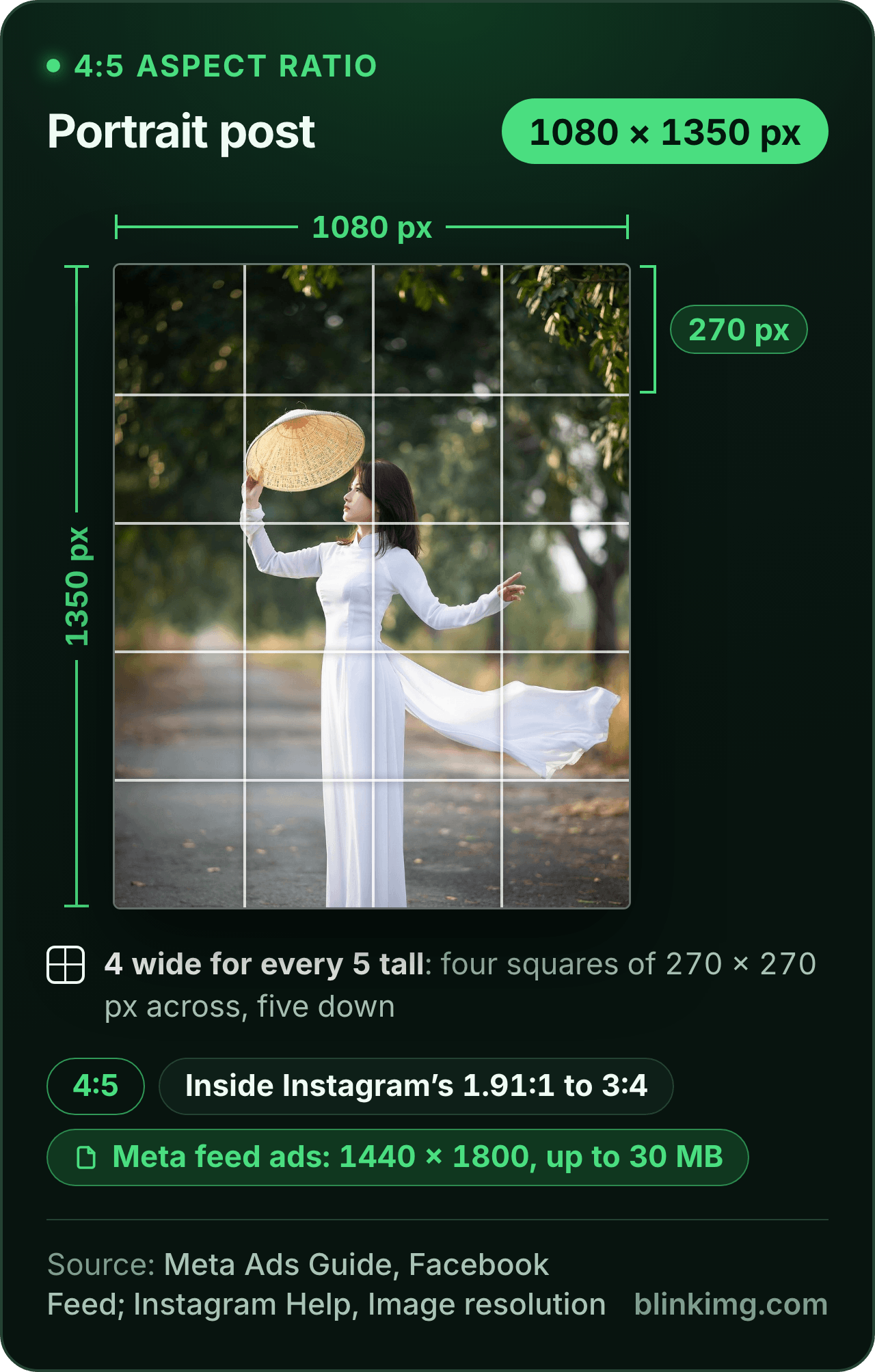
A 4:5 portrait drawn at 1080 × 1350 pixels with a grid of 270-pixel squares, four across and five down. Chips give Meta's 1440 × 1800 feed image ad, up to 30 MB, and Instagram's kept range of 1.91:1 to 3:4, which 4:5 sits inside.
Download the cheat sheet (PNG, 367.2 KB)
Embed this cheat sheet on your site

Paste this line into your page’s HTML. The picture links back here, the credit our CC BY 4.0 licence asks for.

<a href="https://blinkimg.com/4-5-aspect-ratio"><img src="https://blinkimg.com/images/size-guides/4-5-aspect-ratio.png" alt="A 4:5 portrait drawn at 1080 × 1350 pixels with a grid of 270-pixel squares, four across and five down. Chips give Meta's 1440 × 1800 feed image ad, up to 30 MB, and Instagram's kept range of 1.91:1 to 3:4, which 4:5 sits inside." width="640" height="1004" style="max-width:100%;height:auto"></a>

The size, exactly

1080 × 1350 px, in every unit a form states it in

Millimetres and inches at 300 DPI, the print resolution the portals assume.

What Save exports

Pixels
1080 × 1350 px
Millimetres
91.4 × 114.3 mm
Inches
3.6 × 4.5 in
Ratio
4:5
Fit
cropped to the shape
Metadata
EXIF and GPS stripped

The rules, with their sources

Instagram posts
1.91:1 to 3:4 kept uncropped; 4:5 inside
Instagram Help Center, Image resolution
Facebook and Instagram feed ads
4:5 at 1440 × 1800
Meta Ads Guide, Image ad specs
LinkedIn vertical image ads
4:5 recommended, 720 × 900
LinkedIn Marketing Solutions Help
8 × 10 and 16 × 20 prints
4:5; 2400 × 3000 for 8 × 10 at 300 PPI
Printique; Nations Photo Lab
Pinterest video
4:5 among the vertical shapes
Pinterest Business Help, ad specs

Each rule as it read on its source when we checked it in September 2026. The source’s own page wins over this card.

More image tools

Keep working on this image

Browse all image tools

Measured

The reference image at this size, measured

SourcePresetFitResultDimensions
photo.jpg (576.8 KB)1080 × 1350crop182.2 KB1080×1350

Source: photo.jpg, 576.8 KB at 1920×1280, through the preset this page opens on (the centre cropped to the ratio and scaled to the size), then the engine at its defaults. The row is the real output.

Every byte count is the size of the actual file our engine produced from the named source, the same bytes you would download, not an estimate. The reference photo is one of our own photographs, an iguana on a branch, and the camera photo is a real one too. Drop your own file into the tool above to rerun any of them. How we measure names the sources and the settings.

Answered

What is the 4:5 ratio in pixels?

Any width, with the height at the width × 5 ÷ 4: 1080 × 1350 is the size this page opens on.

The 4:5 ratio drawn to one scale at 1080 × 1350 and 4800 × 6000: one shape at two sizes. The height is always the width × 5 ÷ 4.

A ratio fixes the shape, not the size. Pick the width the destination asks for and the height follows: 720 wide is 900 tall, 4800 wide is 6000 tall. Starting from a height, the width is the height × 4 ÷ 5: 1920 tall is 1536 wide. The table lists the widths people ask for and where each one is asked for; type any of them into Custom size with the sides linked, and the export keeps 4:5 exactly.

SizeMegapixelsWhere it fits
720 × 9000.65LinkedIn vertical image ads, 720 × 900
1080 × 13501.46where the editor opens; a portrait post 1,080 wide
1440 × 18002.59Meta feed image ads, 1440 × 1800
2400 × 30007.2an 8 × 10 in print at 300 PPI
4800 × 600028.8a 16 × 20 in print at 300 PPI

Computed: the height is the width × 5 ÷ 4, rounded to a whole pixel; megapixels are width × height ÷ 1,000,000. Where each size is asked for, from the sources on this page.

Answered

Where is the 4:5 aspect ratio used?

A portrait shape for three jobs: an Instagram or Facebook post, a Meta or LinkedIn ad, and an 8 × 10 print.

Where 4:5 is asked for: Instagram posts, Facebook and Instagram feed ads, LinkedIn vertical image ads, 8 × 10 and 16 × 20 prints, Pinterest video. Each rule and its source are on the page.

Instagram keeps a photo at its own resolution when its shape falls between 1.91:1 and 3:4, so a 4:5 portrait posts uncropped. Meta’s feed image ads are 4:5 at 1440 × 1800, and there 4:5 is still the tallest shape an ad may be. LinkedIn recommends 4:5 for vertical image ads at 720 × 900, shown on mobile only. On paper, 8 × 10, 16 × 20, 20 × 25 and 24 × 30 inch prints are all 4:5; 11 × 14 is not. Pinterest lists 4:5 for video, while its images stay at 2:3.

Answered

Yes: 8 × 10 inches is 4:5, and so are 16 × 20, 20 × 25 and 24 × 30.

Print sizes at 300 PPI to one scale: 8 × 10 in is 2400 × 3000 pixels and 16 × 20 in is 4800 × 6000, both 4:5; 11 × 14 in, 3300 × 4200, is not 4:5.

Printique’s aspect ratio chart groups them together and lists 11 × 14 on its own, because 11:14 is not 4:5. A sharp 8 × 10 needs 2400 × 3000 pixels at 300 PPI, and a 16 × 20 needs 4800 × 6000, by Nations Photo Lab’s pixel chart. Crop the photo to 4:5 here, then type 2400 into Custom size with the sides linked: the height becomes 3000.

Answered

Is 4:5 still the tallest Instagram post?

No: Instagram’s help page now keeps posts up to 3:4, which is 1080 × 1440.

Instagram's post shapes at 1080 wide, to one scale: 1080 × 566 at 1.91:1, the widest; 1080 × 1350 at 4:5; 1080 × 1440 at 3:4, now the tallest post Instagram keeps without cropping.

Its image resolution page keeps a photo 320 to 1,080 pixels wide at its own resolution when its shape is between 1.91:1 and 3:4; outside that, the app crops it. 4:5 sits inside the range, a little shorter than 3:4. Meta’s feed ads still stop at 4:5, with 400 × 500 as the tallest shape an ad may take. The Instagram page opens on the post sizes with their sources.

Answered

How do I make a photo 4:5 without stretching it?

Crop it to the shape, or fit the whole picture inside it on a fill; the editor never stretches.

A 3:2 photo and two ways to make it 4:5 at 1080 × 1350: Crop keeps 53.3% of its width; Fit keeps the whole picture with bands of fill, 315 px above and below.

How much Crop takes depends on the shape the photo starts in. The table works it out for the shapes cameras and phones make, at 1080 × 1350: the share of the photo a 4:5 crop keeps, and the bands of fill Fit adds to keep all of it. Drag the frame to the subject before you save; Fit leaves nothing out.

Your photoCrop keepsFit at 1080 × 1350 adds
2:3 camera portrait83.3% of its height90 px at each side
3:4 phone portrait93.8% of its height34 px at each side
1:1 square80% of its width135 px above and below
4:3 phone landscape60% of its width270 px above and below
3:2 camera landscape53.3% of its width315 px above and below
16:9 landscape45% of its width371 px above and below

Computed for a photo of each shape cropped or fitted to 4:5 at 1080 × 1350.

Be sure first

When 4:5 is the wrong shape

  • A story or reel frame?

    That shape is 9:16; the 9:16 page opens on 1080 × 1920.

  • The tallest Instagram post?

    Instagram now keeps 3:4, 1080 × 1440; type it into Custom size with the sides unlinked.

  • An 11 × 14 print?

    11 × 14 is not 4:5; at 300 PPI it is 3300 × 4200, which you can type into Custom size.

  • A 40 × 50 mm ID photo?

    It is 4:5 too, but an ID size comes with a head band; its page opens on 472 × 591 at 300 DPI.

Related: Instagram post size · 40x50 mm photo · 9:16 ratio · Change aspect ratio of image · Resize image in inches

FAQ

Questions, answered

The size is already pressed above. One drop settles most of these.

What is 4:5 in pixels?

Any size whose height is the width × 1.25. 1080 × 1350 is the one this page opens on, and 1440 × 1800 is what Meta asks for feed image ads. At 300 PPI an 8 × 10 inch print is 2400 × 3000. The ratio fixes the shape; you pick the width the destination names, and the height follows.

What ratio is 1080x1350?

4:5. Divide both sides by 270 and you get 4 and 5, a portrait shape 1.25 times as tall as it is wide. It is the size guides give for an Instagram portrait post, inside the 1.91:1 to 3:4 range Instagram keeps, and the size this page opens the editor on.

Is 4:5 the same as 5:4?

The same numbers, turned. 4:5 is portrait, 4 wide and 5 tall, like 1080 × 1350; 5:4 is its landscape twin, 1350 × 1080. For 5:4, type 1350 and 1080 into Custom size with the sides unlinked, and the frame turns on its side. Crop or Fit works the same way in both.

Is 3:4 the same as 4:5?

No: 3:4 is taller. At 1,080 pixels wide, 3:4 is 1080 × 1440 and 4:5 is 1080 × 1350. A 3:4 phone photo cropped to 4:5 keeps 93.8% of its height, so it loses a thin band. The crop table on this page works out the same for other shapes.

Is 4:5 portrait or landscape?

Portrait: 4 wide for every 5 tall, so the picture stands upright. It is the shape of an 8 × 10 print held upright and of a portrait Instagram post. Its landscape twin is 5:4, the same frame on its side, which is 1350 × 1080 at the same size.

How do I crop a photo to 4:5?

Drop it into the tool above: the editor opens on Crop with 1080 × 1350, the 4:5 frame, in force. Drag the frame to the face or the subject, then Save. To keep the whole photo instead, press Fit, and the space around it fills with white or a colour you pick. Nothing is stretched either way.

Can you convert a horizontal photo to 4:5 without distortion?

Yes, by cropping or fitting, never by stretching. A 3:2 camera landscape cropped to 4:5 keeps 53.3% of its width, so frame the subject in the middle. Fit keeps the whole photo instead and adds 315 px above and below at 1080 × 1350, filled with white or a colour you pick.

How many pixels do I need to print a 4:5 photo at 8x10?

2400 × 3000 at 300 PPI, the resolution Nations Photo Lab calls ideal; its chart gives 1000 × 1250 as the minimum at 125 PPI. Crop to 4:5 here, then type 2400 into Custom size with the sides linked, and the export is 2400 × 3000 if your photo has the pixels to start with.

Still have a question?

Ask us. A person reads it.

Contact us

Page updated

The 4:5 frame, cropped or fitted

The 4:5 frame is set above at 1080 × 1350. Drop the photo, crop it or fit it, and Save exports it compressed.

Make it 4:5