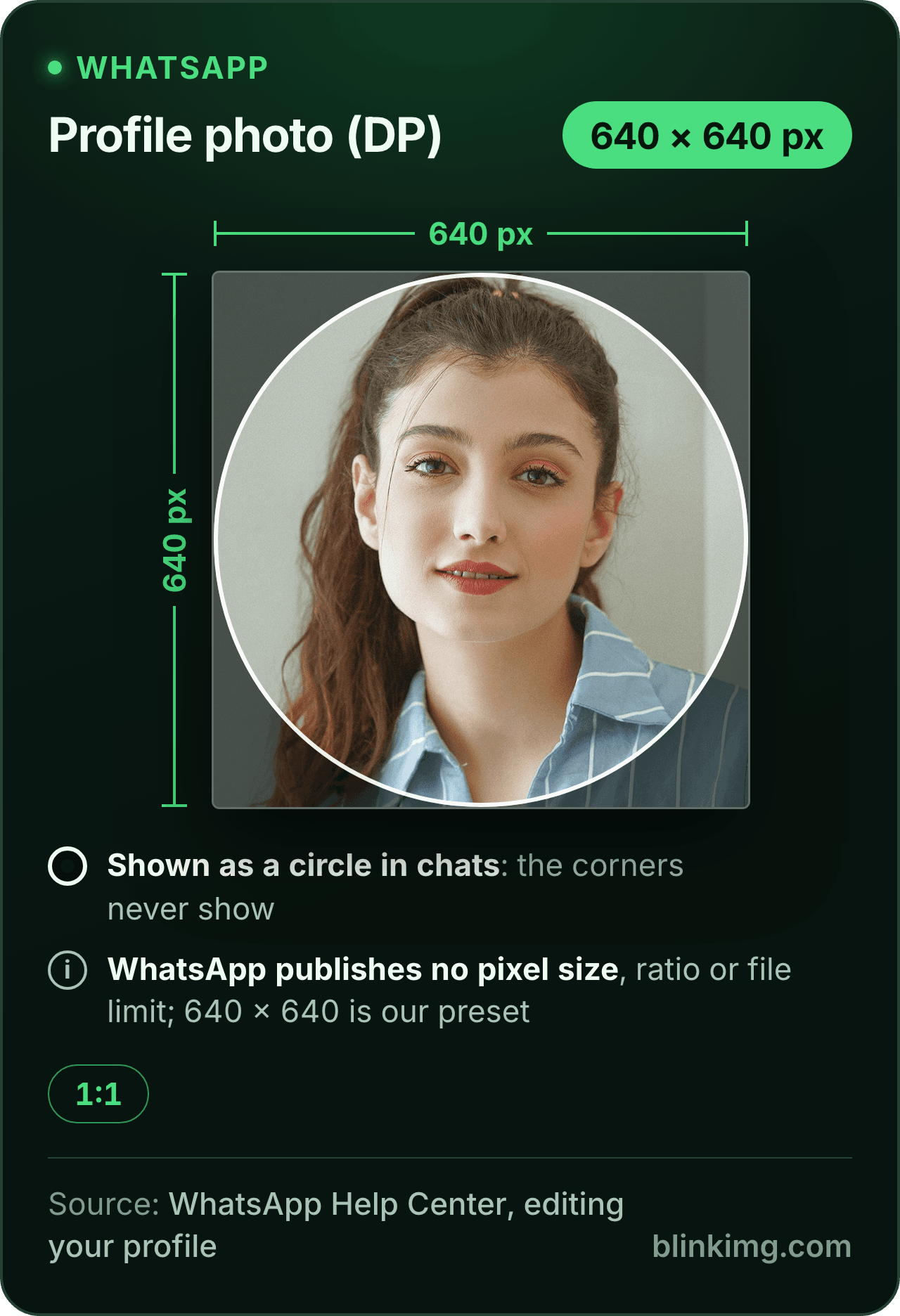
The editor opens on a safe WhatsApp DP size, a 640 × 640 square with Fit on, so the whole photo shows on a white fill and nothing is cut. WhatsApp publishes no pixel size for a profile photo; a clean square at 640 or more is the safe upload. Part of the social media image resizer.
WhatsApp DP size, and where each number comes from
Profile photo this page makes
640 × 640 px, squarethe guides' figure, WhatsApp Business
Personal profile photo
no size, ratio or file limit publishedWhatsApp Help Center
Paste this line into your page’s HTML. The picture links back here, the credit our CC BY 4.0 licence asks for.
<a href="https://blinkimg.com/resize-image-for-whatsapp-dp"><img src="https://blinkimg.com/images/size-guides/resize-image-for-whatsapp-dp.png" alt="A WhatsApp profile photo drawn as a 640 × 640 pixel square, our preset, with the circle chats show it in and the corners dimmed. WhatsApp publishes no pixel size, ratio or file limit for a profile photo." width="640" height="936" style="max-width:100%;height:auto"></a>
The size, exactly
640 × 640 px, in every unit a form states it in
Millimetres and inches at 300 DPI, the print resolution the portals assume.
What Save exports
640 px
640 px
640 × 640 px
Pixels
640 × 640 px
Millimetres
54.2 × 54.2 mm
Inches
2.13 × 2.13 in
Ratio
1:1
Fit
whole picture, white bands
Metadata
EXIF and GPS stripped
The rules, with their sources
Personal profile photo
No pixel size, ratio or file limit published; the help article gives the steps only
WhatsApp Help Center, editing your profile
Business profile photo
640 × 640 is the guides' figure for the Business Platform; Meta's reference page could not be read
What the guides print
500, 640, 800 and 1,080 px squares, none citing a WhatsApp page
The shape
A square upload, shown as a circle in chats; the corners never show
Each rule as it read on its source when we checked it in September 2026. The source’s own page wins over this card.
Source: photo.jpg, 576.8 KB at 1920×1280, through the preset this page opens on (the whole picture inside the size on the fill), then the engine at its defaults. The row is the real output.
Every byte count is the size of the actual file our engine produced from the named source, the same bytes you would download, not an estimate. The reference photo is one of our own photographs, an iguana on a branch, and the camera photo is a real one too. Drop your own file into the tool above to rerun any of them. How we measure names the sources and the settings.
Answered
What is the WhatsApp DP size in pixels?
There is no official number.
WhatsApp’s help article on editing your profile tells you how to change the photo and states no pixel size, no ratio and no file limit. The pages that rank for this question fill the gap with a guess each: 500 × 500 on some, 640 × 640 on others, 800 × 800 and 1080 × 1080 elsewhere, and not one of them cites a WhatsApp page. The 640 × 640 figure is the one the guides quote from the WhatsApp Business Platform documentation, which is why this page opens on it; we could not read that reference page ourselves, so it stays a guides’ number here. The practical rule is simpler than any of them: a square of 640 pixels or more, sharp, with the subject in the middle, satisfies every figure in the argument.
Answered
How do I set a full-size WhatsApp DP without cropping?
Give the app a square that already holds the whole photo.
That is what Fit does. The Size presets panel shows a Crop / Fit switch under the tiles; Fit is on when the page opens, and the whole picture is scaled to sit inside 640 × 640 with the rest painted a flat colour. A 3:4 phone portrait gets bands of 80 pixels at each side. A 4:3 landscape gets 80 pixels above and below. A 16:9 group photo gets 140. The swatches under the switch set the colour, white, black, grey or green, and the colour well opens the system picker for anything else. Save, then choose the file in WhatsApp: it is square already, so the picker’s square has nothing to cut. The same switch set to Crop draws a square frame over the photo instead, for the times a face matters more than the edges.
Answered
Is a WhatsApp DP square or round, and where does the circle fall?
You upload a square; chats show a circle cut from its middle.
The circle touches the centre of each edge and hides the four corners, about 21 percent of the square. With Fit on, a portrait photo’s bands sit at the sides, where the circle reaches the edge, so a thin strip of the fill shows at the left and right of the circle; with a landscape photo the strips show at the top and bottom. Pick a fill that suits the photo and the strips read as a frame rather than a mistake. Whatever the mode, keep the face or the logo inside the circle: in the middle of the square, with room around it, and never in a corner.
Answered
Why is my WhatsApp DP blurry?
Because the square was enlarged, cropped from a small region, or compressed more than once, and a profile picture is drawn small enough that any of those shows.
A screenshot of a photo is the usual culprit: a few hundred pixels across, stretched to fill the square. So is a face cut out of a large group photo, which is enlarging by another name. Start from the original file, fit or crop it at 640 or larger, and save once. Our 1920 × 1280 reference photo came back at 45.4 KB at 640 × 640 with Fit on, saved through the engine at its defaults. That is sharp at every size a chat draws it, and small enough that whatever the app does to it afterwards has little to spoil.
Answered
Is a WhatsApp Business picture or a group icon any different?
No. Both are the same square job: a picture chosen through a square picker and shown as a circle.
For a Business profile the guides quote 640 × 640 from the Business Platform documentation, the size this page opens on, so a logo fitted into it with a matching fill colour is ready as it is. For a group icon the same square works, and the subject rule matters more: a group photo fitted whole into a square gets deep bands and tiny faces, so Crop with the square dragged over two or three people usually reads better than Fit. Save the square, upload it, and the picker accepts it without a cut.
Answered
Can I make it 500 × 500 instead, or any other square?
Yes.
The Custom size box under the tiles takes any width and height from 16 to 8192 pixels. With the chain button linked the height follows the square, so typing 500 into the width fills 500 in the height; Apply sets the export to exactly 500 × 500. Fit and the fill stay as they were, so the whole picture sits inside the new square, or switch to Crop for the cut. 500 × 500 is the number some guides print, 1080 × 1080 is another, and neither is a WhatsApp rule, so pick the larger when the source has the pixels: a square only gets softer when it is enlarged, and a 640 or 1080 square from a phone photo is a reduction, not an enlargement.
Be sure first
When is the WhatsApp DP resizer the wrong tool?
You want the circle drawn in?
Upload the square. The app draws the circle itself, and a pre-cut circle gets cropped twice.
A status or a story?
That is a 9:16 frame, not a square. Tap the IG/FB story tile, 1080 × 1920.
The size is already pressed above. One drop settles most of these.
Q:What is the WhatsApp DP size in pixels?
WhatsApp does not publish one. Its help article on editing your profile gives the steps to change the photo and no pixel size, ratio or file limit. The size guides print 500, 640, 800 or 1,080 pixels square and none cites WhatsApp. A square of 640 pixels or more, with the face in the middle, clears every figure they argue over.
Q:How do I set a full-size WhatsApp DP without cropping?
Make the square yourself before the app can. Drop the photo into the WhatsApp DP resizer: the editor opens on 640 × 640 with Fit on, so the whole picture sits inside the square on a fill colour. Save, then choose the export in WhatsApp. It is already square, so the picker has nothing left to cut.
Q:Why does WhatsApp crop my profile picture?
Because the profile picture is a square slot, shown as a circle in chats, and a photo that is not square has to lose its ends or gain bands to fit. The app takes the first route. A portrait loses its top or bottom; a group photo loses the people at the edges. Fit the photo into a square first and the app has nothing to remove.
Q:Is a WhatsApp DP square or round?
Both: you upload a square and the app shows it as a circle. The circle touches the middle of each edge and hides the four corners, which is about 21 percent of the square. Anything that matters belongs inside the circle, so keep the face or the logo in the middle with room around it, and upload the full square.
Q:What is the WhatsApp Business profile picture size?
640 × 640 is the figure the guides quote from the WhatsApp Business Platform documentation, which is why the editor opens on that size. We could not read the reference page itself when we checked, so we do not print it as a rule. The upload is the same square job: fit or crop, face or logo centred, save, upload.
Q:Why is my WhatsApp DP blurry?
Three causes cover almost every case. The source was tiny, an old photo or a screenshot of one, and the square enlarged it. The square was a small crop of a large photo, which is enlarging too. Or the file was compressed several times on its way to you. Start from the original, fit or crop it at 640 or larger, and save it once.
Q:Can I use a rectangular photo as my WhatsApp DP?
Yes, with Fit on. A 3:4 portrait sits inside the square with bands of 80 pixels at each side; a 4:3 landscape gets 80 pixels above and below; a 16:9 group photo gets 140. Pick the band colour from the swatches or the colour well. If bands bother you, switch to Crop and drag the square over the part that matters.
Q:What file size and format does WhatsApp accept for a profile photo?
The help article names no format and no limit for a personal profile photo. Our export is a JPEG or a PNG at a modest size: the reference photo came back at 45.4 KB at 640 × 640. Nothing on the article suggests a file that small would be refused. If you want a byte cap anyway, set Max file size before you save.
Q:How do I resize an image to 500 × 500?
Type 500 into the width field of the Custom size box; the linked height follows, then tap Apply. Fit stays on, so the whole picture sits inside the 500 × 500 square on the fill, or switch to Crop for the cut. Any square from 16 to 8192 pixels works the same way, and the export is exactly the number you typed.
Q:What is the WhatsApp DP ratio?
Square, 1:1, whatever the pixel count. 500 × 500, 640 × 640 and 1080 × 1080 are all the same ratio, and the app shows each as a circle. The ratio is what the picker enforces; the pixels only decide how sharp the circle looks. Any square at 640 or more looks sharp at the size a chat list draws it.
Q:Can I change the band colour?
Yes. With Fit on, the Size presets panel shows fill swatches for white, black, grey and green and a colour well that opens the system picker for any other colour. The bands are a flat colour painted under the picture. Pick one that matches the photo, or choose Crop and have no bands at all.
Q:Do you keep my WhatsApp DP?
No. We keep nothing: files are processed and wiped automatically, never archived and never used for anything else. Saving strips EXIF metadata, GPS location included, so the square you upload carries no record of where or when it was taken. There is no account, no watermark and no charge for the resize.